

Overview
The Complexity Router embeds each incoming request and assigns it the tier of its nearest reference phrase: Simple, Medium, or Complex. The result is exposed as a flat string variable (complexity_tier) in Bifrost’s CEL routing engine, so you can write routing rules like:
complexity_tier, so requests that never touch a complexity rule pay no embedding cost. Once semantic classification is configured, a request it cannot confidently match, such as a near miss or timeout, leaves complexity_tier unpublished. You can optionally configure an LLM fallback classifier to step in after semantic classification has run and returned no tier. See LLM fallback classifier. Without semantic classification configured at all, Bifrost keeps the request on its existing routing path instead of guessing. When session-aware routing is enabled and the request carries a recognized session identity, a turn that still produces no tier of its own reuses the tier already retained for that session, so complexity_tier goes unpublished only when neither classification nor session state supplies one.
Complexity classification is semantic (embedding-based). The older lexical keyword scorer is retired. See Lexical keyword classifier (retired).
How it works
- Extract. Bifrost takes the latest user message (or the last
message_history_countuser messages, joined oldest-first) as the text to classify. System prompts and assistant replies are never embedded. - Embed. The text is embedded with your configured embedding provider and model, inline on the request path, bounded by
timeout(default 1.5s). - Match. The embedding is compared against the stored reference-phrase embeddings in the vector store. The request takes the tier of the nearest phrase.
- Route. The tier is published as
complexity_tierfor CEL routing rules. The matched phrase and similarity are recorded in the routing decision logs, so every decision is auditable.
min_similarity, no tier is published. At 0 (the default), Bifrost accepts the nearest eligible match; a positive value makes the classifier abstain on weak matches. If the embedding call fails or times out, no tier is published either; in both cases the request falls through to your normal routing path rather than being blocked.
Reference phrases
Reference phrases are example requests you label with a tier. The classifier’s entire knowledge of “simple” vs “complex” comes from them. Bifrost ships 150 default phrases (50 per tier) balanced across use cases (coding, math, writing, knowledge, conversation, extraction, translation, agentic) and writing styles, so the classifier learns requested work rather than subject matter or verbosity. When writing your own phrases:- Each phrase’s tier must be derivable from its own text. “Summarize these notes” is fine; “yes, go with option 2” has no defensible tier on its own.
- Keep phrases short and prototypical. A long, hyper-specific phrase mostly matches near-identical requests.
- Balance surface form across tiers. If most Complex phrases are questions, every question routes to Complex. Mix questions, imperatives, terse and detailed phrasing in every tier.
config.json are merged additively with phrases already stored in the database before the 750-phrase limit is checked. If the merged result exceeds the limit, Bifrost logs a warning, keeps the existing database configuration active, and does not apply that config.json phrase edit. Reduce one of the lists before restarting. Restore defaults remains the recovery path for a stored semantic configuration this version cannot load: it replaces the unreadable configuration with the 150 built-in phrases. Re-enter the embedding provider, model, and storage settings afterward. For a valid readable configuration, restore defaults preserves those semantic settings and only resets the boundaries and phrase lists.
Choosing how much conversation to embed
message_history_count (default 1) controls how many recent user messages are joined into the embedded text. Raising it lets a short follow-up like “and make it faster” inherit the intent of earlier turns, at the cost of diluting the latest message and embedding more tokens per request. Requests with fewer available turns embed what they have.
Session-aware routing
Enable Session-aware routing to balance cost and quality with an upward-only complexity ladder inside an agent conversation. The first classifiable user turn that produces a tier establishes the session tier. Each later sequential human turn is classified normally and can raise that tier from Simple to Medium or Complex, while an easier follow-up keeps the stored higher tier. This avoids unnecessary tier-driven model changes that can reduce provider prompt-cache reuse. Once a session reaches Complex, Bifrost reuses Complex without another classifier call. Session state expires after 24 hours of inactivity. Each participating conversational turn refreshes that inactivity window. After expiry, the next classifiable human request starts a new session epoch and is classified normally. Bifrost stores only the effective tier under a scoped hash of the session identity; it does not store prompts, similarity scores, reference phrases, model choices, or turn history as session state. Bifrost uses the explicitx-bf-session-id when supplied. For recognized agent harnesses it can also use their native, User-Agent-gated identity: x-codex-turn-metadata.session_id for Codex and x-claude-code-session-id for Claude Code. Codex background work (prewarm, compaction, and memory) bypasses session state. Supported conversational continuations with no new human text may reuse an existing tier, but never initialize or escalate one. Requests with no valid identity retain ordinary per-request classification.
Session-aware routing keeps the complexity tier stable; it does not pin a weighted routing target, provider key, or provider prompt-cache entry. Provider cache TTLs remain provider-owned and independent of the 24-hour routing-state lifetime. Keeping a session on one provider and key is the job of Session Affinity, which uses the same session identity and runs alongside the router.
LLM fallback classifier
By default, a request that matches no reference phrase confidently simply carries nocomplexity_tier. If you’d rather have a second opinion than let those requests fall through, set semantic classification’s fallback to llm and configure a chat model to name the tier instead.
The LLM fallback runs only after semantic classification produces no tier: never as the primary classifier, and never in parallel with it. It never sees a request that semantic classification already resolved.
The fallback model is asked to answer with one of the three tier names, guided by a prompt you can edit (prompt, or Fallback Classification Prompt on the Complexity Router page). Bifrost always appends a fixed, non-editable section stating the tier names and the required JSON response shape, so your edits refine what the tiers mean to the model but can never break the response contract. Leaving prompt empty uses Bifrost’s shipped default guidance.
message_history_count behaves the same way it does for semantic classification: it controls how many of the most recent user messages (oldest first) are sent to the fallback model, independent of the semantic classifier’s own message_history_count.
An LLM-classified turn carries no similarity score. A chat completion has no equivalent of embedding-distance, and a synthetic one would invite comparisons against thresholds tuned for your vector backend.
complexity_score is therefore absent on rows where complexity_mechanism is llm. See Observability.Configuration
Semantic classification requires an embedding provider and model. The provider must have an enabled key in Model Providers. The UI warns you if the saved provider has no usable key.- Web UI
- API
- config.json
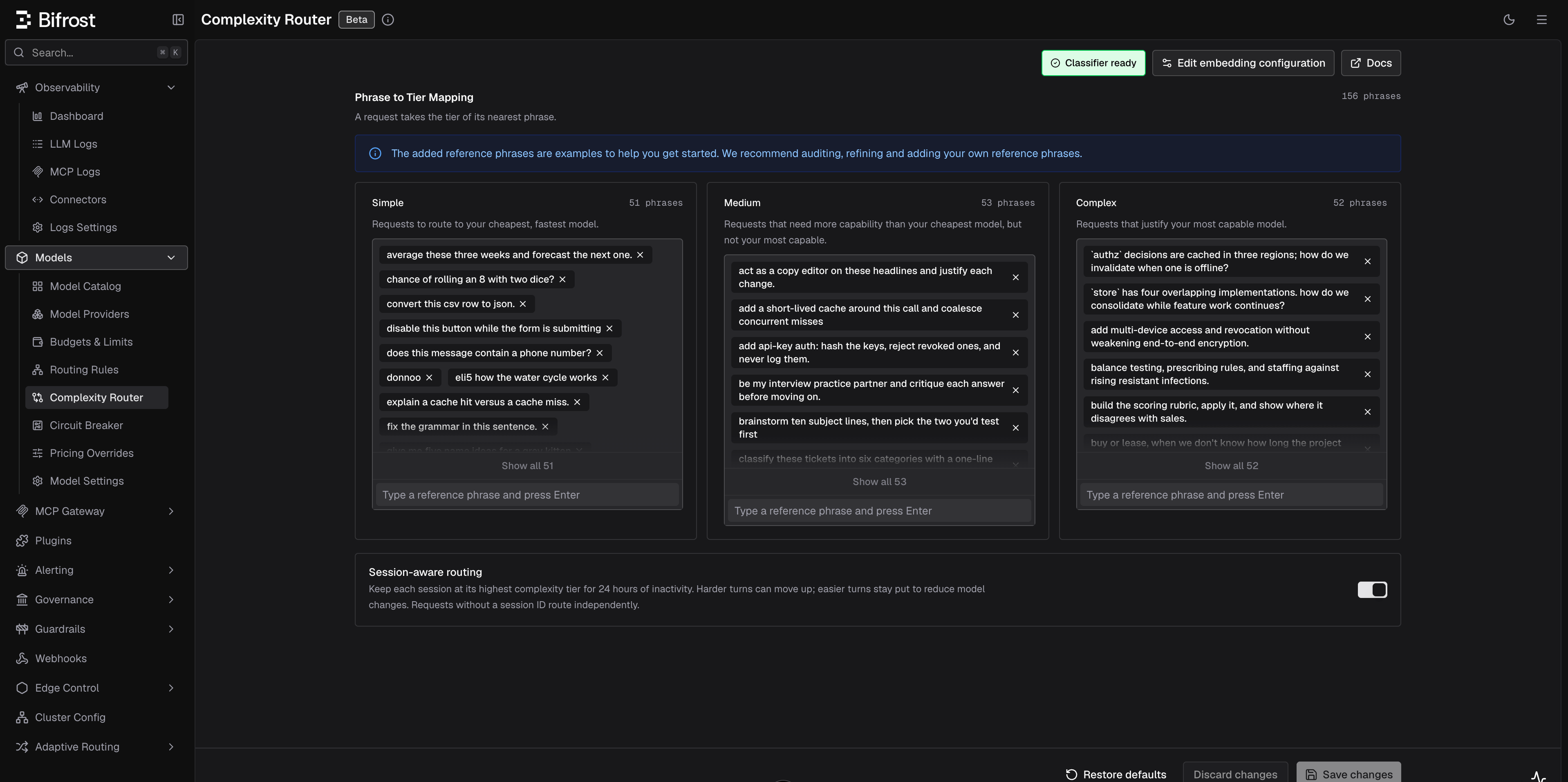
- Phrase to Tier Mapping: add a phrase by typing it and pressing Enter in a tier’s input; remove one with the × on its chip. Counts are shown per tier.
- Session-aware routing: retain the highest tier reached by each identified session for 24 hours of inactivity. The toggle is off by default and requires the semantic classifier.
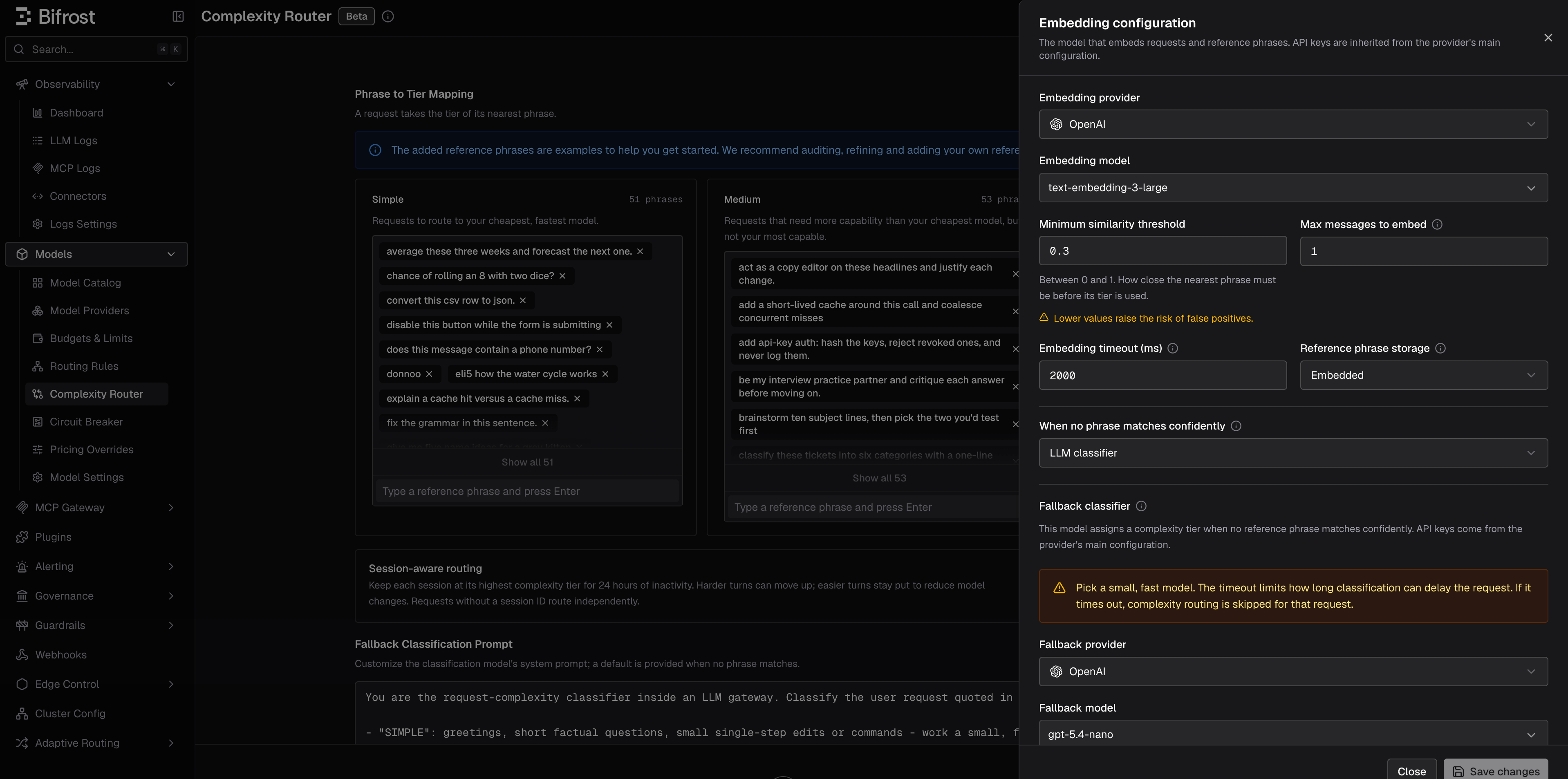
- Edit embedding configuration: opens the embedding sheet (provider, model, similarity floor, history window, timeout, budgets, and phrase storage: Embedded keeps phrase vectors in Bifrost’s own memory; Vector Store keeps them in the configured vector store so they survive restarts, falling back to Embedded when none is available). Setting When no phrase matches confidently to LLM classifier reveals a Fallback classifier section further down the same sheet: provider, model, timeout, history window, and budgets for the fallback model. Setting it back to None hides that section again; its settings are preserved either way.
- When the fallback is on, a Fallback Classification Prompt section appears on the main page below the phrase lists, with a Reset to default button. The model itself is configured in the embedding sheet; only the prompt text lives here, since it needs room to iterate.
- The Classifier status badge in the header shows whether the classifier is ready to serve (see Classifier status and warmup).
Classifier status and warmup
Reference phrases are embedded in the background (warmup) whenever the configuration changes. Bifrost detects the embedding dimension automatically. Within a running process, unchanged phrase vectors are reused; changing provider or model re-embeds every phrase. The badge in the UI header andGET /api/routing/complexity-analyzer-status report:
The status response never contains phrases, embeddings, or provider secrets.
It also reports where the classifier is keeping its vectors, which is worth checking whenever storage behaves unexpectedly:
Stored generations
Every configuration change mints a new fingerprinted generation and warms it before switching over. What happens to the previous one depends on where the vectors live:- Embedded storage (and any node-local chromem store) reclaims the previous generation as soon as no request is still using it. Deleting a phrase removes its vector.
- A shared vector store cannot drop it immediately: another Bifrost node may still be serving that generation, and no node can observe another’s state. Bifrost reclaims it in the background instead — each node records which generation it is using, and a periodic sweep removes only the generations no node has claimed. A generation a stale node is still serving stays until that node moves on or stops.
active. Deletion is refused for the serving generation, for a generation any other node has claimed, and for any namespace outside the classifier’s own BifrostComplexityRouter_ scheme — so this can neither disturb a peer nor drop an unrelated collection sharing the same backend. An unclaimed orphan deletes immediately.
The same response always also carries the LLM fallback classifier’s own status, whether or not it is configured:
Routing with complexity_tier
Once the classifier has a serving generation, use complexity_tier as a variable in any CEL routing rule expression. Bifrost evaluates it as a plain string.
complexity_tier is not a special standalone rule type. In the Routing Rules builder, it behaves like any other field, so you can combine it with headers, request type, team/customer scope, budgets, and other predicates in the same rule or nested rule group.
Complexity Router only exposes
complexity_tier; it does not create rules automatically. Add rules for the tiers you want to route. For deterministic three-tier routing, create rules for Simple, Medium, and Complex.Available operators
Combining with other rule conditions
You can mix complexity with any other routing condition the CEL builder supports:Setting up a complexity-based routing rule
The best first rollout is usually a single Complex rule. It is easy to validate, has the smallest blast radius, and leaves Simple and Medium traffic on your existing routing path.- Go to Routing Rules in the sidebar.
- Create a new rule and open the CEL builder.
- Add a condition: field = Complexity Tier, operator = =, value = Complex.
- Set the target provider and model to your strongest model.
- Save and enable the rule.
Use case examples
Start with a Complex carve-out
Route only frontier-worthy requests to your strongest model and let everything else keep using your existing routing:Full three-tier ladder
Route every tier explicitly when you want deterministic model selection across the full spectrum:Roll out to one team first
Test complexity routing with a single team before enabling it globally:Observability
When a routing rule referencescomplexity_tier, the classification outcome is recorded as structured fields on the request log:
The routing decision logs also record the matched reference phrase alongside the tier and similarity, so you can tell a genuine match from an accidental one. Long phrases are truncated to 120 characters in the log line.
For example, a successful semantic match is recorded as:
complexity_tier; requests that never touched a complexity rule carry no complexity fields.
In the log explorer
The log detail view shows Complexity Tier (as a colored badge), Complexity Mechanism, and Complexity Score in the request overview. The logs filter sidebar can filter by Complexity Tier and Complexity Mechanism, so you can audit how traffic is being distributed and spot mis-classifications to tune your phrase lists or similarity floor. The same filters are available on the logs API as comma-separated query parameters:The raw
complexity_score is displayed but not filterable; tier and mechanism are the supported filter dimensions. The mechanism filter offers semantic, llm, session, and skipped. Legacy REASONING tiers remain available in the logs filter.In telemetry
The tier and mechanism are also emitted as the span attributesbifrost.complexity_tier and bifrost.complexity_mechanism, and as low-cardinality labels on Prometheus metrics. The raw score is emitted as the span attribute bifrost.complexity_score and stored in request logs, but deliberately excluded from metrics because it has unbounded cardinality.
Semantic routing’s own embedding overhead is tracked separately with two Prometheus counters, labeled by the embedding provider, model, and phase (request classification vs warmup exemplar embedding):
bifrost_routing_embedding_requests_totalbifrost_routing_embedding_cost_total(USD; recorded whether or notcount_toward_budgetsis set)
phase label; the fallback has no warmup):
bifrost_routing_llm_requests_totalbifrost_routing_llm_cost_total(USD; recorded whether or notcount_toward_budgetsis set)
Troubleshooting
No tier is ever published (everything is skipped)
The most common cause is that semantic classification is not configured. Without a configured semantic classifier, no fallback runs either; the LLM fallback only ever engages after semantic classification has actually been invoked, never as a substitute for missing semantic configuration. Check the classifier status badge or GET /api/routing/complexity-analyzer-status:
disabled: set an embedding provider and model, and make sure the provider has an enabled key.warming: warmup is embedding the reference phrases. Ifserving_previousis true, the last good generation remains available while it runs.failed: check server logs for the provider or vector-store failure. Ifserving_previousis true, the last good generation is still serving while you fix the configuration.
complexity_tier; classification runs lazily and never runs otherwise.
Setting fallback to llm is rejected
Semantic classification’s fallback field requires a companion llm block with at least provider and model set; the update endpoint rejects fallback: "llm" without one. Configure the LLM fallback classifier (Web UI: the Fallback classifier section inside the embedding sheet; API/config.json: the llm block) before or in the same request that sets fallback to llm.
LLM fallback times out or never runs
Checkllm.state on GET /api/routing/complexity-analyzer-status: disabled means no llm block is saved. If it’s ready but classifications still show complexity_mechanism: skipped, check llm.timeout: the fallback model may be too slow for the configured budget. Provider errors and timeouts are recorded in the routing decision logs alongside the cause.
Rule not matching when complexity_tier is set
If the routing rule usescomplexity_tier and the request is not matching, make sure the latest user message contains analyzable user text. A system prompt by itself is not enough. The classifier needs a text-bearing user prompt.
If classification is unavailable for a request (unsupported input, mixed-modal content, embedding failure, timeout, or a match below min_similarity), the complexity-dependent rule does not match and evaluation falls through to the next rule. This is intentional: complexity rules silently degrade rather than blocking requests.
Which request types are supported
Complexity routing currently runs only for text-bearing request families. This applies identically to the LLM fallback classifier. It shares the same input extraction as semantic classification, so a request semantic classification cannot analyze reaches the fallback in the same unclassifiable state. Supported inputs include:- Chat Completions and other messages-style requests with text-only user content
- Text Completions requests using
prompt - Responses API requests using text-only
input - Anthropic Messages, Bedrock Converse, and Gemini
contents/systemInstructionshapes when they carry text-only user input
- Image generation, embeddings, rerank, OCR, audio/speech/transcription, video, or count-tokens requests
- Chat or Responses requests where user content mixes text with image, file, or audio blocks
- Requests that contain only system or developer text and no user text
Requests landing in the wrong tier
Read the matched reference phrase in the routing decision logs. It shows exactly which phrase the request landed on and at what similarity. Then either add phrases that look like your real traffic to the correct tier, or remove/relabel the phrase that keeps winning. If everything routes to one tier, check that the tier lists are balanced in length and writing style (see Reference phrases).Near misses you expected to match
Ifmin_similarity is set above 0, genuine matches can fall under the floor and publish no tier. The routing log records the nearest phrase and its score for these rejections. Lower the floor, or add more phrases that cover the rejected shapes.
Lexical keyword classifier (retired)
What this means for existing deployments:- Boot is safe. Legacy configurations still parse and validate, so upgrades never fail on startup because of an old complexity config. Until you configure an embedding provider and model, no tier is published (
complexity_mechanism: skipped) and complexity rules simply fall through. - Your keyword lists became phrase lists. User-added entries are retained and mapped from four tiers to three: Simple stays Simple, Code and Technical become Medium, and Reasoning becomes Complex. They are now reference phrases to embed, not keywords to match. Short keywords like
"debug"or"api"are weak exemplars and will produce poor classifications. - Historical logs are unchanged. Earlier versions also had a fourth tier, REASONING, merged into COMPLEX; old
REASONINGrows stay reachable through the logs filter, but update any routing rules that still match on"REASONING".
Next Steps
Routing Rules
Full reference for CEL expressions, scope hierarchy, and rule chaining
Virtual Keys
Scope complexity routing rules to specific teams, customers, or virtual keys
Budget & Limits
Combine complexity routing with budget limits for cost-optimal routing
Provider Routing
Understand how complexity routing fits into the full request routing pipeline