

Overview
Bifrost provides two complementary layers of resilience:- Retries - When a provider returns a transient server error (network issue, 5xx) or a per-key failure (a
429rate limit, a rejected credential, an exhausted quota, a model this key cannot reach, a retired model), Bifrost automatically retries the same request against the same provider. Transient-server retries reuse the same key with exponential backoff; per-key failures rotate to a different API key from your pool. Backoff is skipped only when rotating away from a permanent per-key failure where waiting offers nothing; for429rotations a backoff is still applied to let account-level quota windows slide. - Fallbacks - When the primary provider fails, after whatever retries it was given, Bifrost moves on to the next provider in your fallback chain. Each fallback provider gets its own full retry budget.
Retries
How retries work
When a request fails with a retryable error, Bifrost:- Classifies the failure (see how failures are classified) as a per-key failure (the key or the account behind it is the problem), a transient server failure (the upstream is the problem:
5xx/ network / DNS), or a request failure (no key would have served it). - On per-key failures, rotates to a different API key from the pool (if multiple keys are configured). Two sub-cases:
- Permanent per-key failure (rejected credential, exhausted quota, model this key cannot reach, retired model, region block): mark the key dead for the remainder of the request and rotate immediately with no backoff, since waiting changes nothing for that key. The failed attempt is not charged against
max_retries: the budget bounds retries against a key that might recover, not the walk to the next key, so a pool is walked even at the defaultmax_retries: 0. - Rate limit (
429): mark the key as used-this-cycle and rotate, but still apply backoff, since providers often enforce account-level quotas shared across keys, so the new key may not have fresh capacity until the window slides.
- Permanent per-key failure (rejected credential, exhausted quota, model this key cannot reach, retired model, region block): mark the key dead for the remainder of the request and rotate immediately with no backoff, since waiting changes nothing for that key. The failed attempt is not charged against
- On transient server failures (
5xx, DNS, connection refused): reuse the same key and wait using exponential backoff with jitter before the next attempt. - Continues until the request succeeds,
max_retriesis exhausted, or every key is permanently dead. When any key was refused for the model (no access, no such deployment, retired) or for the request’s location, that error is returned whichever key died last: a404for a model no key serves stays a404, and a region block comes back as the provider sent it. Otherwise every key was rejected for an account-level reason (credential, quota), and within the configured budget Bifrost returns502 upstream_credentials_exhaustedrather than the raw4xx, to make it clear the caller’s Bifrost API key is fine and the configured provider credentials are not; when the pool ran out on an attempt granted beyond the budget, the last upstream error is returned as is. A key the caller sent with the request (x-bf-direct-key) is the exception: the refusal is about the caller’s own key, so the provider’s error is returned as sent, whatevermax_retriesis.
How failures are classified
Every failed attempt gets afailure_class, recorded on the attempt_trail (see Built-in Observability) with the raw status_code. Where a provider exposes its own error code, type or exception name, the class is read from that rather than from the status, and from the message where it exposes nothing else, because providers disagree on which status carries which fact: Gemini rejects a bad key with a 400, Bedrock reports a retired model as a 400 ValidationException or a 404 ResourceNotFoundException, Anthropic reports an empty credit balance as a 400 invalid_request_error, OpenAI reports one as a 429. A status alone decides only what it has always decided for the retry loop: 401, 402, 403, 429 and the transient 5xx set. A 401 or 403 marks the key dead whatever its body says, and a transient 5xx stays a same-key retry unless its body carries rate-limit wording, exactly as before. A provider with no keys to rotate (a keyless custom provider) keeps the same-key retries these statuses have always earned.
Azure streaming errors before output
Azure Chat Completions and Responses streams can emit startup metadata before reporting an error inside an HTTP200 response. Bifrost buffers recognized
startup events so these errors can reach the existing retry and fallback logic.
- Chat Completions: empty-choice annotations, empty deltas, and assistant-role chunks.
- Responses: empty
response.created,response.in_progress,response.queued, and ping events, plus empty assistant-message and output-text-part startup events.
content_filter finish reason remains a terminal response.
Buffering also ends when startup metadata reaches 64 chunks or 256 KiB of
serialized data. Existing request deadlines and stream idle timeouts still apply.
Raw streaming passthrough and Responses retrieval/resumption are excluded.
See Microsoft’s Azure streaming examples
and Responses event reference.
Provider retry hints
When a provider says how long to wait before retrying, Bifrost records it on the error asextra_fields.retry_after_ms, in milliseconds. It reads, in this order:
The value is clamped to between 1 second and 5 minutes, and the field is absent when the provider gave no explicit hint. Rate-limit reset headers (
x-ratelimit-reset-*, anthropic-ratelimit-*-reset) are not used: they say when each limit refills, not how long a given request must wait.
attempt_trail as retry_after_ms, so a key that was rotated away from still shows how long it asked for. The request’s final error only carries the answer from the key it ended on.
The hint is informational: Bifrost’s own retries still wait according to the backoff formula below.
In Bifrost Enterprise, Adaptive Routing uses the hint as how long to hold the refused key out of rotation for later requests, never less than 10 seconds.
Backoff formula
Backoff applies to same-key retries (transient server 5xx / network errors) and to429 rate-limit rotations (since account-level quotas can be shared across keys). It is skipped only when rotating away from a permanent per-key failure (credential, quota, model_access, model_gone) to a genuinely different key: a dead key gains nothing from waiting.
retry_backoff_initial = 500ms and retry_backoff_max = 5000ms:
What triggers a retry
Configuring retries
Retries are configured per-provider innetwork_config. The defaults are max_retries: 0 (no retries), retry_backoff_initial: 500 ms, and retry_backoff_max: 5000 ms.
- Web UI
- API
- Go SDK
- config.json
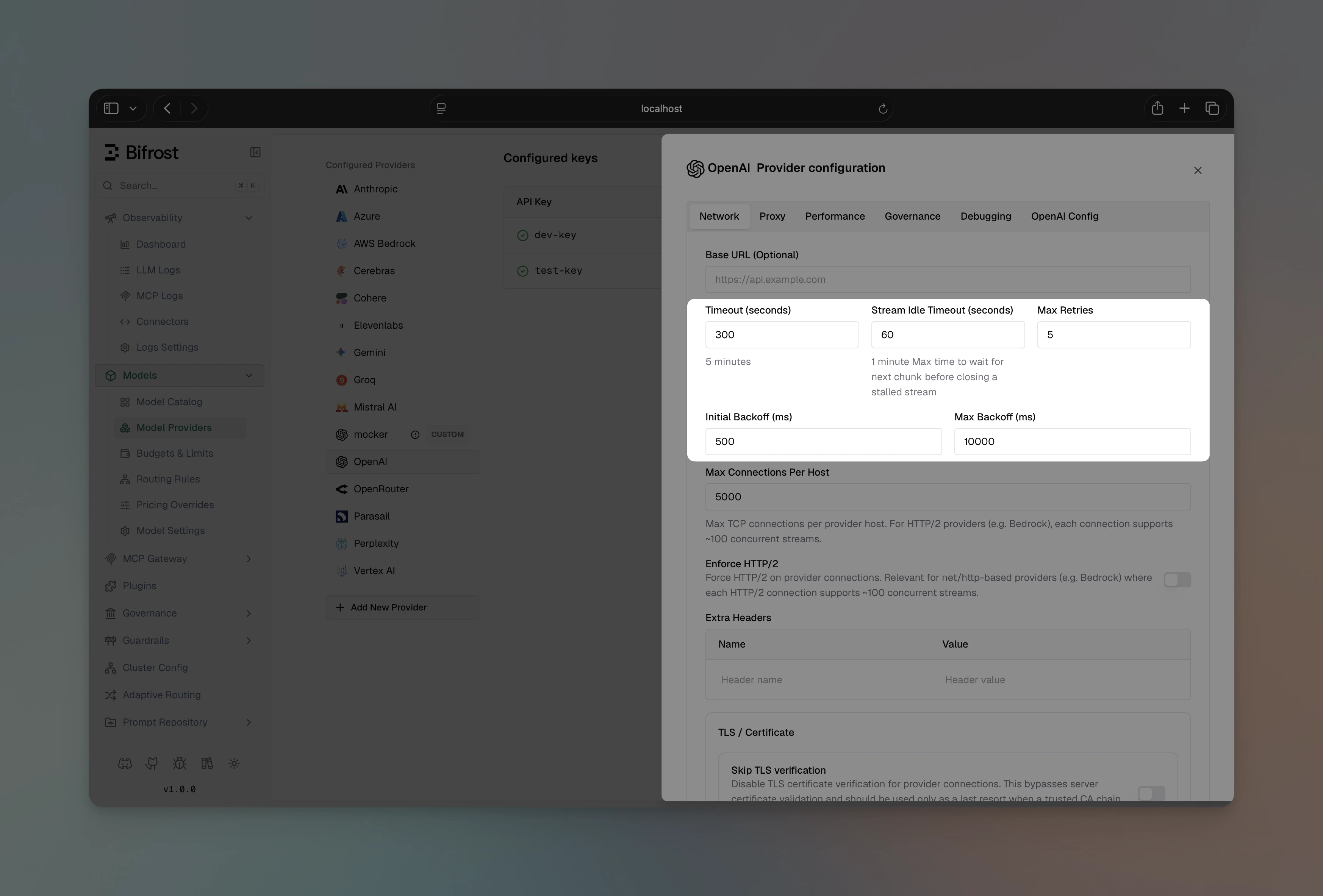
- Max Retries - number of additional attempts after the first failure (e.g.
3) - Retry Backoff Initial - starting backoff in milliseconds (e.g.
500) - Retry Backoff Max - maximum backoff cap in milliseconds (e.g.
5000)
Key rotation on per-key failures
Key rotation on retries requires v1.5.0-prerelease4 or later. Rotation on auth (401/403) and billing (402) errors (in addition to rate limits) requires the retry-logic-enhancements release. Rotation on model access, retired model and region block errors, and rotation past permanent failures at
max_retries: 0, require the failure-class release.- Rate limit (
429): this key is rate-limited; another may have spare quota. - Rejected credential (
401,403, or the provider’s own code for a bad key): bad / revoked key, or key lacks permission. - Exhausted quota (
402, OpenAIinsufficient_quota, Anthropic “credit balance is too low”): billing issue on this key’s account. - Model this key cannot reach (
model_not_found, AzureDeploymentNotFound, Bedrock and Google model errors): no access, no such deployment, no inference profile; another key may have it. - Retired model (
model_decommissioned, “deprecated”, “end of its life”): tried on the next key in case its mapping differs, then returned as the provider sent it. - Region block (
unsupported_country_region_territory, Gemini “User location is not supported”, Bedrock “unsupported countries”): the block may be bound to this key’s project or account (a Gemini free-tier project, a Bedrock account with an unsupported billing address), so the next key is tried; when it is the gateway’s own address, the walk ends with the provider’s error.
used set. Once all keys in the pool have been tried, Bifrost resets that set and starts a fresh weighted round — a previously rate-limited key may have free quota by then. With 3 keys and max_retries: 5, Bifrost can cycle through all three keys twice before giving up.
Permanent per-key failures (credential, quota, model access, retired model, region block) are different: the failing key is marked permanently dead for the remainder of the request and is never reset, and the attempt is granted back rather than charged against max_retries, so the walk to the next key happens even at max_retries: 0. If any key was refused for the model or for the request’s location, that error is returned. If every configured key ends up permanently dead for an account-level reason (credential, quota) within the configured budget, Bifrost returns 502 upstream_credentials_exhausted and skips any remaining retries; if the pool ran out on a granted attempt, or the refused key is the caller’s direct key, the last upstream error is returned as is.
The walk has a cost worth knowing: a model no key can reach, including a typo in the model name, or a region block on the gateway’s own address, now costs one upstream call per configured key before the error (or the fallback provider) is reached, instead of one.
Rate-limit rotation only applies when
max_retries > 0 and more than one key is configured for the provider. Rotation past a permanent per-key failure applies whenever more than one key is configured, whatever max_retries is. With a single key, all retries reuse that key, and a permanent per-key failure ends the request with the provider’s error (or 502 when the budget outlasts the key, except for a caller’s direct key, whose error is always returned as sent).Fallbacks
Fallbacks provide automatic failover to a different provider when the primary fails, after whatever retries it was given. Each fallback is tried in order until one succeeds.How fallbacks work
- Primary attempt: Tries your configured provider with its full retry budget
- Fallback decision: If the primary fails, Bifrost moves to the first fallback, whatever the error. It does not when the caller cancelled the request, when a plugin set
AllowFallbacks = falseon the error, or when the error is the request’s own fault (caller_fault, see how failures are classified) and the fallbacks were added by the model catalog for a bare model rather than named by the caller or a routing rule - Sequential fallbacks: Each fallback provider also gets its own full retry budget
- First success wins: Returns the response from the first provider that succeeds
- All fail: Returns the original error from the primary provider, with the primary’s provider response headers (its request ID and rate-limit headers), not the last fallback’s. A fallback whose provider is not configured, or that cannot serve the request type, is skipped. A fallback the caller cancels stops the chain and its error is returned. Exception: if a plugin on a fallback provider sets
AllowFallbacks = falseon the error (e.g. a security or compliance plugin that should halt the chain regardless of remaining fallbacks), Bifrost stops immediately and returns that fallback’s error rather than continuing to the next provider or returning the primary error.
Implementation
- Gateway
- Go SDK
Pass a The response’s
fallbacks array in the request body. Each entry specifies a provider/model string:extra_fields.routing_info tells you which provider actually served the request, and whether it was a fallback. On the drop-in SDK routes, whose responses have no extra_fields, read the same facts from the response headers:How retries and fallbacks work together
The two mechanisms form a nested resilience loop. Retries run inside each provider attempt; fallbacks run across providers once a provider attempt fails. Key point: each provider in the chain - primary and every fallback - gets its own fullmax_retries budget. A primary configured with max_retries: 3 and two fallbacks each also configured with max_retries: 3 means up to 12 total attempts before giving up.
The retry budget is set per-provider in
network_config. If your fallback providers have different retry configurations, each will use their own settings.Auditing retry and fallback decisions
Every retry transition and every fallback transition is recorded on the request’s routing engine log trail under the engine namecore. This is the same per-request trail that plugins like governance, loadbalancing, routing-rule, and model-catalog write to when they make routing decisions — so the chain reads end-to-end: which engine picked the primary, what the primary failed with, what core retried with, and which fallback ultimately served the response.
Entries core emits:
The failure context attached to each entry is intentionally categorical — only the error type (e.g.
rate_limit_error) and HTTP status code. The upstream provider message is never included, since providers can echo back API keys, tokens, or user input. The key identifier surfaced in retry rotation notes is the user-set key name, not the secret value.
When core emits at least one entry on a request, it also adds itself to the request log’s routing_engines_used field (deduped — core appears at most once per request even if both the retry and fallback orchestrators were involved).
Real-world scenarios
Scenario 1: Rate limiting with key rotation OpenAI key 1 hits its rate limit. Bifrost rotates to key 2 on the next retry - no fallback needed, the request succeeds within the same provider. Scenario 2: Provider outage OpenAI is experiencing downtime (returning503). Bifrost retries with the same key (transient server issue), exhausts max_retries, then fails over to Anthropic. Anthropic succeeds on the first attempt.
Scenario 3: Cascading failure
Both primary and first fallback are down. Bifrost works through each provider’s retry budget sequentially until the second fallback succeeds.
Scenario 4: Cost-sensitive fallback
Primary: a premium model for quality. Fallback: a cost-effective alternative. Governance rules can trigger a budget-exceeded error on the primary, which cascades into the fallback chain.
Scenario 5: Revoked credential
OpenAI key 1 was rotated out-of-band and now returns 401. Bifrost marks key 1 permanently dead for this request and immediately rotates to key 2 (no backoff, and no max_retries needed), which succeeds. Future requests will retry key 1 again: the dead-key set is per-request, not persistent. In Bifrost Enterprise, Adaptive Routing remembers the refusal instead: key 1 is held out of rotation on every node, and one request checks it again after a wait. If every configured key was revoked and the retry budget outlasted the pool, Bifrost would return 502 upstream_credentials_exhausted instead of bubbling up the raw 401 (which would falsely suggest the caller’s Bifrost API key is the problem).
Scenario 6: Deployment missing on one key
Two Azure keys point at different resources; only the second has a gpt-4o deployment. The first returns 404 DeploymentNotFound, which is classified model_access: key 1 is marked dead for this request and key 2 serves it, at max_retries: 0. If neither key had the deployment, the caller would get the 404 back, not a credentials error. A request pinned to key 1 by key id or name, or held on it by session affinity, has no other key to walk to and gets the 404 at once.
Plugin execution
Routing runs once per request, before the primary attempt: routing rules, virtual key load balancing and the model catalog decide the chain, and fallbacks do not re-run them. Each fallback attempt then runs the per-attempt plugins again:- Semantic cache checks run again (the fallback provider may have a cached response)
- Governance checks the fallback provider and model against the virtual key, and applies its budgets and rate limits
- Logging captures the fallback attempt separately
- MCP tools are added to the request again
x-bf-api-key-id, x-bf-api-key), a routing rule’s key pin, and the caller’s direct key, so it runs on the fallback provider’s own keys, or the key the fallback entry names. Raw request passthrough is turned off when the fallback provider cannot take the caller’s native body, for example a /genai request falling back to a provider other than Google.
Plugin fallback control: Plugins can prevent fallbacks from being triggered for specific error types. For example, a security plugin might disable fallbacks for compliance reasons. When a plugin sets AllowFallbacks = false on the error, the fallback chain is skipped entirely and the original error is returned immediately.
Next steps
- Keys Management - Configure multiple API keys per provider to enable key rotation on retries
- Governance - Use virtual keys and routing rules to control which providers are used
- Observability - Track retry counts and fallback usage in your logs