

Overview
Routing Rules provide dynamic, expression-based control over request routing. They execute before governance provider selection and can override it, allowing you to make sophisticated routing decisions based on request context, headers, parameters, capacity metrics, and organizational hierarchy.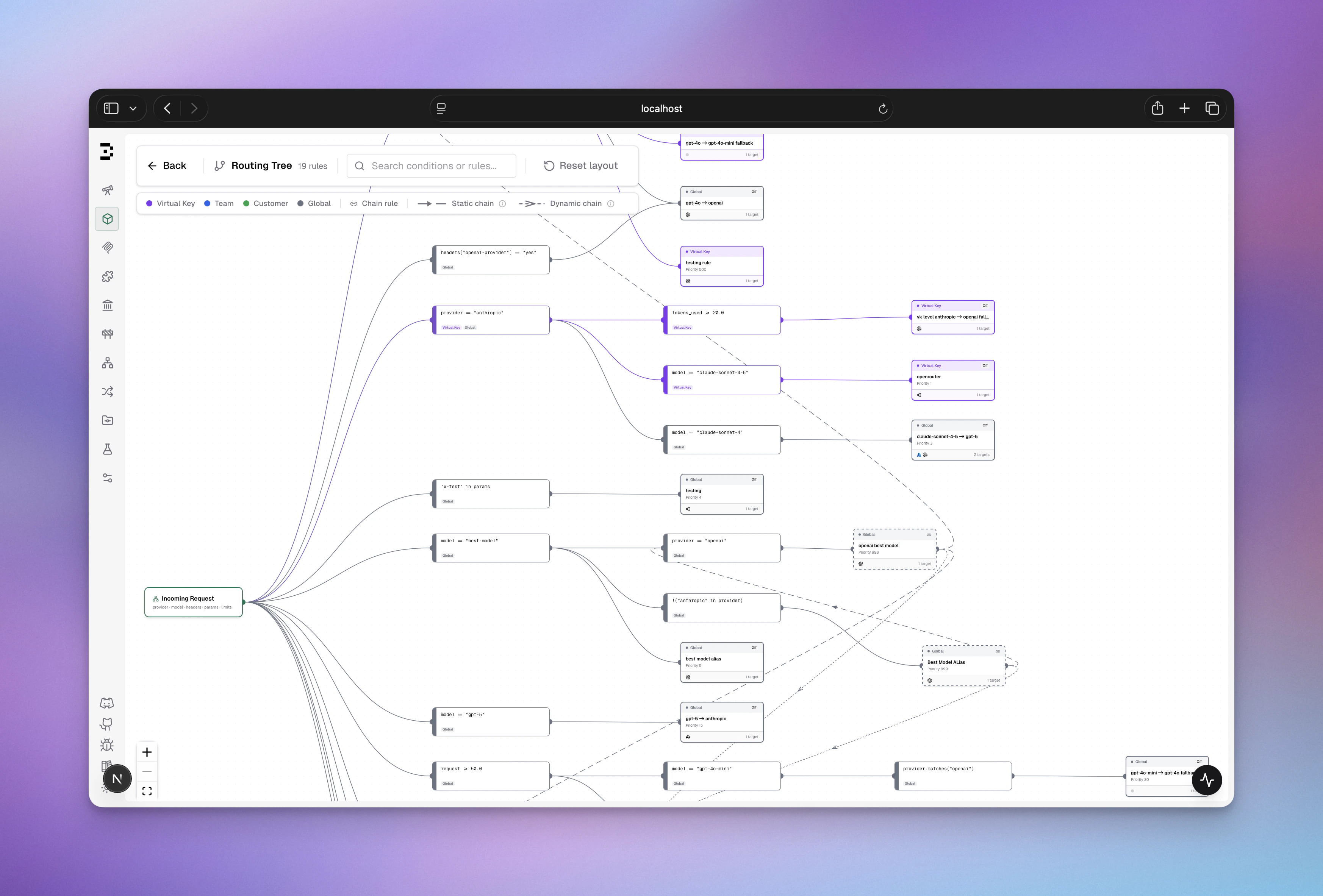
How It Works
Request Flow

Scope Hierarchy & Precedence
Routing rules are organized by scope with first-match-wins evaluation:- When a request arrives with a Virtual Key, Bifrost builds a scope chain
- Rules are evaluated in scope order (highest to lowest)
- The first matching rule wins - no further rules are evaluated in that iteration
- Within each scope, rules are sorted by priority (ascending: 0 evaluates before 10)
- If the matched rule has
chain_rule: true, the resolved provider/model becomes the new context and the full scope chain is re-evaluated from the top - If no rule matches (or the matched rule is terminal), the current decision is applied
- If no rule ever matches, the incoming provider/model is used unchanged
CEL Expression Guide
Available Variables
Routing rules evaluate CEL expressions with these available variables:Request Context
Headers & Parameters
Organization Context
Capacity Metrics (as percentages: 0-100)
Complexity Routing
If complexity classification is unavailable for a request (classifier not configured or not ready, unsupported input, or a match below the similarity floor),
complexity_tier is treated as unknown by the evaluator — the rule does not match and evaluation falls through. Rules using other variables are unaffected.How Capacity Metrics Are Resolved
Each variable reflects current usage as a percentage of the configured limit for the request’s provider and model combination. Values above 100 mean the limit is exhausted. Bifrost resolves which limits to read in this order (most specific first):- Model + provider config - a budget or rate limit set on a specific
provider/modelpair (e.g.,openai/gpt-4o) - Model-only config - a budget or rate limit set on a model name without a provider (matched across all providers)
- Global provider config - a budget or rate limit attached to the provider itself (e.g., all
openaitraffic) - Virtual Key provider config - a rate limit or budget attached to a provider entry inside the Virtual Key’s provider configs
budget_used will be 95.
If no limit is configured for the current provider/model, the variable is 0.0 - a rule like budget_used > 80 will never match.
In chained rules, capacity values are re-read at every chain step against the resolved provider/model, so downstream rules always see fresh data.
CEL Operators & Functions
Comparison Operators
Logical Operators
String Functions
Collections
Expression Examples
Simple Conditions
Complex Conditions (Multiple Criteria)
Pattern Matching
Validation & Error Handling
- Invalid CEL syntax → Rule logs warning, skipped, evaluation continues
- Missing header/parameter → Expression returns false (graceful no-match)
- Type mismatches → Logged as warning, rule skipped
- Empty expression → Rule always matches (use
true/falsefor explicit behavior)
Configuration
- Web UI
- API
- config.json
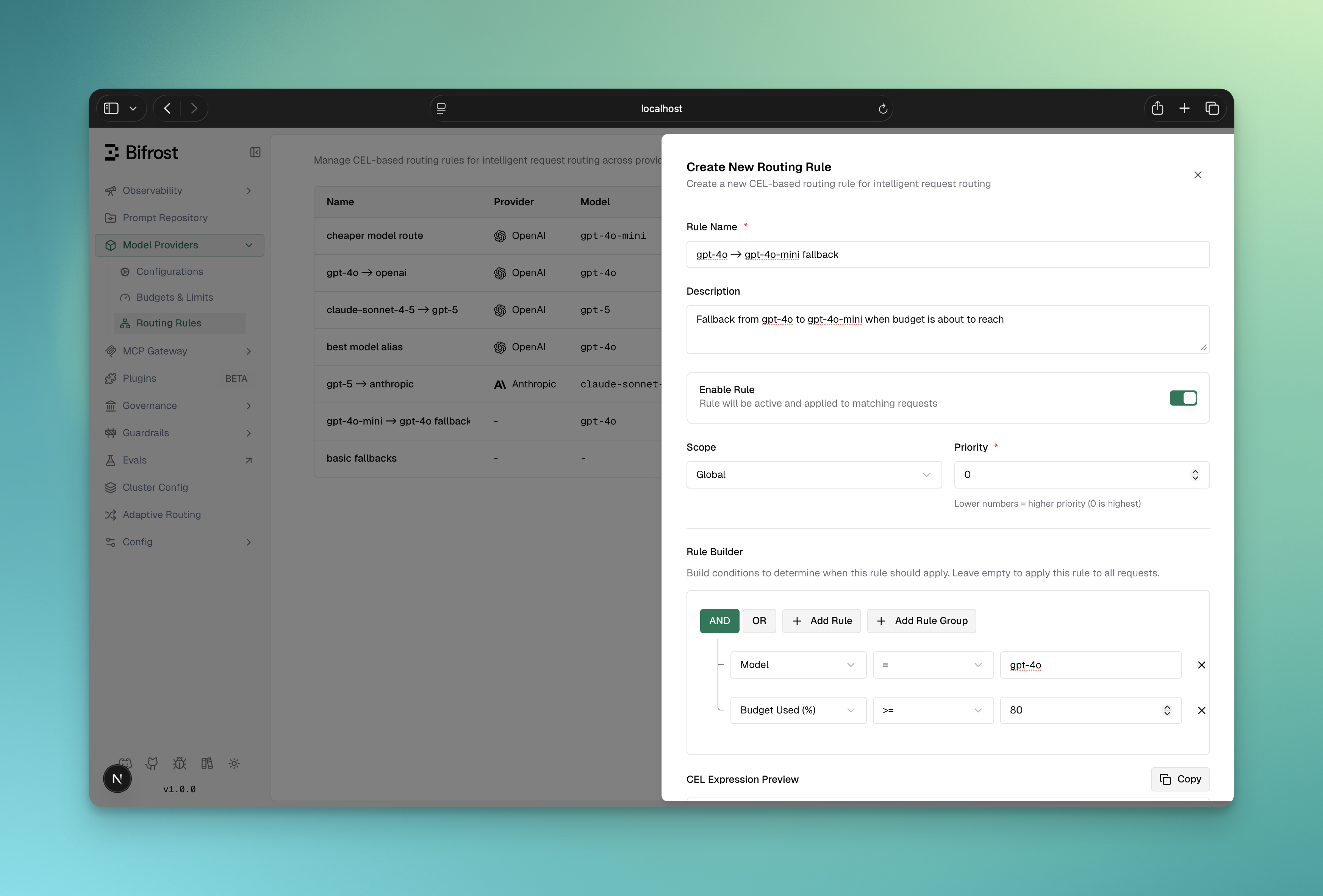
Access routing rules from the dashboard:Routing Rules Dashboard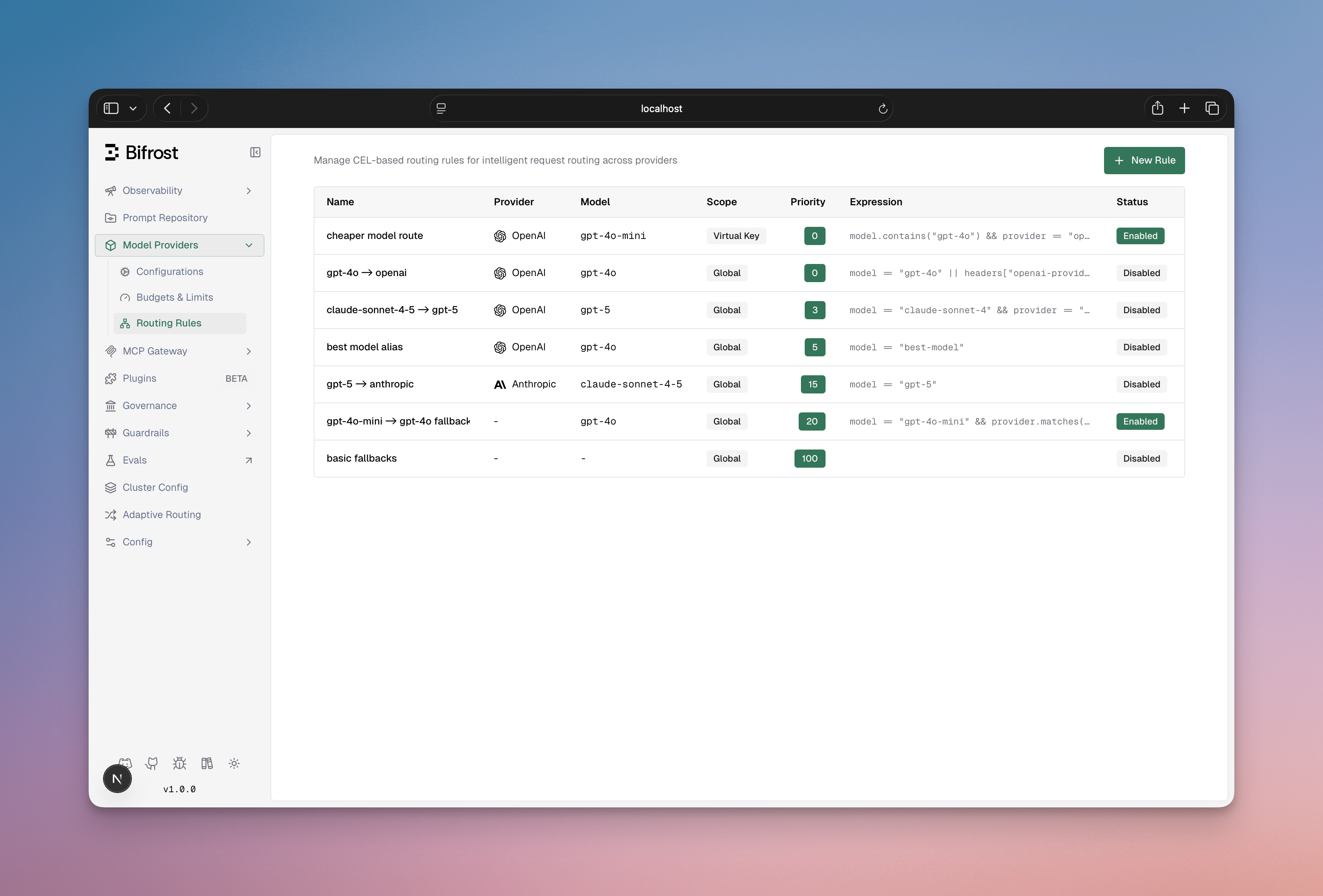
- List all rules with scope, priority, and enabled status
- Filter by scope or scope_id
- Create/Edit/Delete rules
- View rule expressions and targets
- Enable/disable rules without deletion
- Drag to reorder priority
- Name (required): Unique rule identifier
- Description (optional): Internal notes
- Enabled: Toggle rule on/off
- Chain Rule: When enabled, the routing engine re-evaluates all rules after this one matches, using the resolved provider/model as the new context. See Rule Chaining.
- CEL Expression: Visual or manual expression builder
- Targets (required): One or more weighted routing targets - each has Provider (optional), Model (optional), API Key (optional, requires Provider to be set), and Weight (%). Weights must sum to 1. When multiple targets are defined, one is selected probabilistically at request time.
- Fallbacks (optional): Array of fallback providers
- Scope: Where rule applies (global, customer, team, virtual_key)
- Scope ID: Required if scope is not global
- Priority: Lower = evaluated first (default: 0)
Visual CEL Builder
The dashboard includes a visual query builder for CEL expressions:- Condition Builder: Select field, operator, value
- Logical Operators: Combine conditions with AND/OR
- Manual Mode: Switch to edit CEL directly
- Validation: Real-time syntax validation
- Conversion: Auto-converts visual rules to CEL
Real-World Use Cases
When to use Routing Rules:- Dynamic routing based on request headers or parameters
- Capacity-based routing (route to fallback when budget/rate limit is high)
- Organization-based routing (different rules for different teams/customers)
- A/B testing or canary deployments
- Conditional provider override based on complex logic
Use Case 1: Tier-Based Routing
Route requests based on customer tier using headers:Use Case 2: Capacity-Based Failover
Route to cheaper provider when budget is exhausted:Use Case 3: Team-Specific Routing
Route team-specific requests to their preferred provider:Use Case 4: Complex Multi-Condition Routing
Combine multiple criteria for sophisticated routing:Use Case 5: Probabilistic A/B Testing
Split traffic across providers or models by weight for canary deployments or cost optimization:Use Case 6: Regional Routing
Route based on region headers:Rule Chaining
Rule chaining is available in Bifrost v1.5.0-prerelease2 and above.
chain_rule: true, the routing engine does not stop after it matches - instead, it updates the request context with the resolved provider/model and re-evaluates the full rule set from the top.
How Chaining Works
Termination Conditions
The chain stops when any of the following occurs:Decision Accumulation
Each chain step overwrites the previous decision - the last matched rule wins for all fields:
Every chain step is logged in the routing engine audit trail for full observability.
Configuration Example
model=gpt-4 is normalized to gpt-4-turbo by Rule 1 (chain continues), then routed to Azure by Rule 2 (chain stops).
Use Cases
- Model alias normalization: Rewrite short aliases to canonical model names before routing
- Tiered policy application: Apply a team-level override first, then a global key-pinning rule
- Feature flag injection: A chain rule sets the target to an experimental model; a downstream rule routes that model to the right provider
- Budget-aware escalation: A chain rule downgrades the model when budget is high; the next rule routes the downgraded model appropriately
Best Practices
- Keep chains short (2–3 steps) - long chains are harder to reason about
- Ensure the last rule in every intended chain path is terminal (
chain_rule: false) to prevent unintended continuation - Use convergence detection as a safety net, not a primary termination strategy - if you rely on it, your rules likely have a logic gap
- Name chain rules clearly to reflect their role: “Normalize X”, “Enrich context”, etc.
Integration with Governance & Load Balancing
Interaction with Governance Routing
Routing Rules run BEFORE governance provider selection and can override it: If a routing rule matches:- Governance configures: 70% Azure, 30% OpenAI
- Routing rule exists:
budget_used > 85 → groq - Request arrives with budget_used = 90%
- Result: Groq selected by routing rule, governance provider_configs ignored
Interaction with Load Balancing
Routing rules determine provider BEFORE adaptive load balancing runs:Fallback Chain
Routing rules can define fallbacks that flow into load balancing:- Level 2 load balancing evaluates Azure keys
- If all Azure keys fail, tries Groq
Execution & Performance
CEL Compilation
- First evaluation: CEL expression is compiled into a bytecode program
- Subsequent evaluations: Program is cached and reused
- Performance: Cached program evaluation is very fast (microseconds)
- Memory: Compiled programs cached in memory until Bifrost restart
Priority & Ordering
Rules within the same scope are evaluated in ascending priority order:Optimization Tips
- Order rules by likelihood: Put frequently matching rules first
- Use specific scopes: Avoid global scope when possible (narrower = faster)
- Avoid expensive string operations: Prefer
==over.matches()with regex - Keep expressions simple: Complex conditions increase evaluation time
- Use reasonable priorities: Gaps in priorities (0, 10, 20) make reordering easy
Best Practices
Rule Naming
Rule Naming
✅ Good names:
- “Premium Tier Fast Track”
- “Budget Exhaustion Fallback”
- “ML Team Anthropic Route”
- “Production High Priority Route”
- “Rule 1”
- “Fix”
- “Temp”
- “TODO”
CEL Expression Safety
CEL Expression Safety
✅ Safe patterns:❌ Risky patterns:
Scope Management
Scope Management
✅ Good scope design:
- Global rules for organization-wide policies
- Customer scope for compliance (EU, data residency)
- Team scope for team preferences
- Virtual Key scope for specific integrations
- Too many virtual key-level rules (maintenance nightmare)
- Conflicting rules across scopes
- Rules that duplicate governance routing
Testing & Validation
Testing & Validation
✅ Validate before deployment:
- Test CEL expression with expected headers
- Verify provider/model exist in your setup
- Check fallbacks are valid providers
- Confirm scope_id matches actual entity
- Test with
from_memory=trueto verify in-memory state
- Deploy rules without testing
- Use nonexistent providers
- Create circular fallback chains
Monitoring
Monitoring
✅ Track rule usage:
- Log which rules match (logged in Bifrost logs as
[RoutingEngine]) - Monitor routing decisions by scope
- Alert on unexpected provider selection patterns
- Review priority order occasionally
- Disabling unused rules (instead of deleting)
- Updating documentation when rules change
- Testing failover chains
Troubleshooting
Rule Not Matching
Symptom: Rule expression is correct but doesn’t match Diagnosis:- Check if rule is enabled (
enabled: true) - Verify scope matches (check VirtualKey’s team/customer hierarchy)
- Check rule priority vs other rules in scope (lower priority evaluates first)
- Verify variable values: Use
from_memory=trueto debug
Expression Compilation Error
Symptom: “Failed to compile rule: invalid CEL syntax” Common causes:- Unclosed quotes:
headers["x-tier(missing closing quote) - Invalid operators:
headers["x"] ??(not standard CEL) - String escaping:
headers["x-\type"](incorrect escape)
- Use the visual CEL builder to avoid syntax errors
- Test expressions incrementally
- Check CEL operator documentation above
- Wrap complex expressions in parentheses:
(A && B) || (C && D)
Wrong Provider Selected
Symptom: Request routed to unexpected provider Diagnosis:- Multiple rules matching? (first-match-wins means earlier rules take precedence)
- Governance routing already determined provider? (check scope hierarchy)
- Load balancing changed key? (rule sets provider, LB sets key)
- Lower priority of matching rules
- Verify scope precedence (VirtualKey > Team > Customer > Global)
- Check if another rule has lower priority and matches first
- Review logs:
[RoutingEngine] Rule matched! Decision: provider=...
Header/Parameter Not Found
Symptom: “no such key” error in CEL evaluation This is normal! Bifrost treats missing headers as non-matches:Debugging with Logs
Enable debug logging to see routing rule evaluation:API Reference
Request/Response Examples
Create Capacity-Based Rule
Create Probabilistic Split Rule
Create Rule with Pinned API Key
List Rules by Team Scope
Get In-Memory Rules (Debug)
Additional Resources
Provider Routing
Understand how routing rules fit into the complete routing pipeline
Virtual Keys
Configure Virtual Keys that scope routing rules
Governance
Learn about the governance layer (applied after routing rules determine provider selection when no rule matches)
CEL Language Spec
Complete CEL expression language documentation