

Overview
The MCP Sessions UI is available in Bifrost v1.5.0-prerelease2 and above (initial release), with per-user-headers support added in v1.5.4.
headers and oauth clients don’t surface here; their credentials live on the MCP client config itself, not as per-caller rows. Per-user clients also hold one client-level admin discovery credential (used only to refresh the server’s tool list) that deliberately never appears on this page; it is surfaced and repaired from the client sheet instead (see Per-User OAuth and Per-User Headers).
Each row represents one of:
- A completed credential — OAuth token or stored header values, keyed to a specific identity (VK, signed-in user, or session ID)
- A pending submission flow — a consent / submission link the user hasn’t yet completed
x-bf-vk sees rows for that VK; etc.
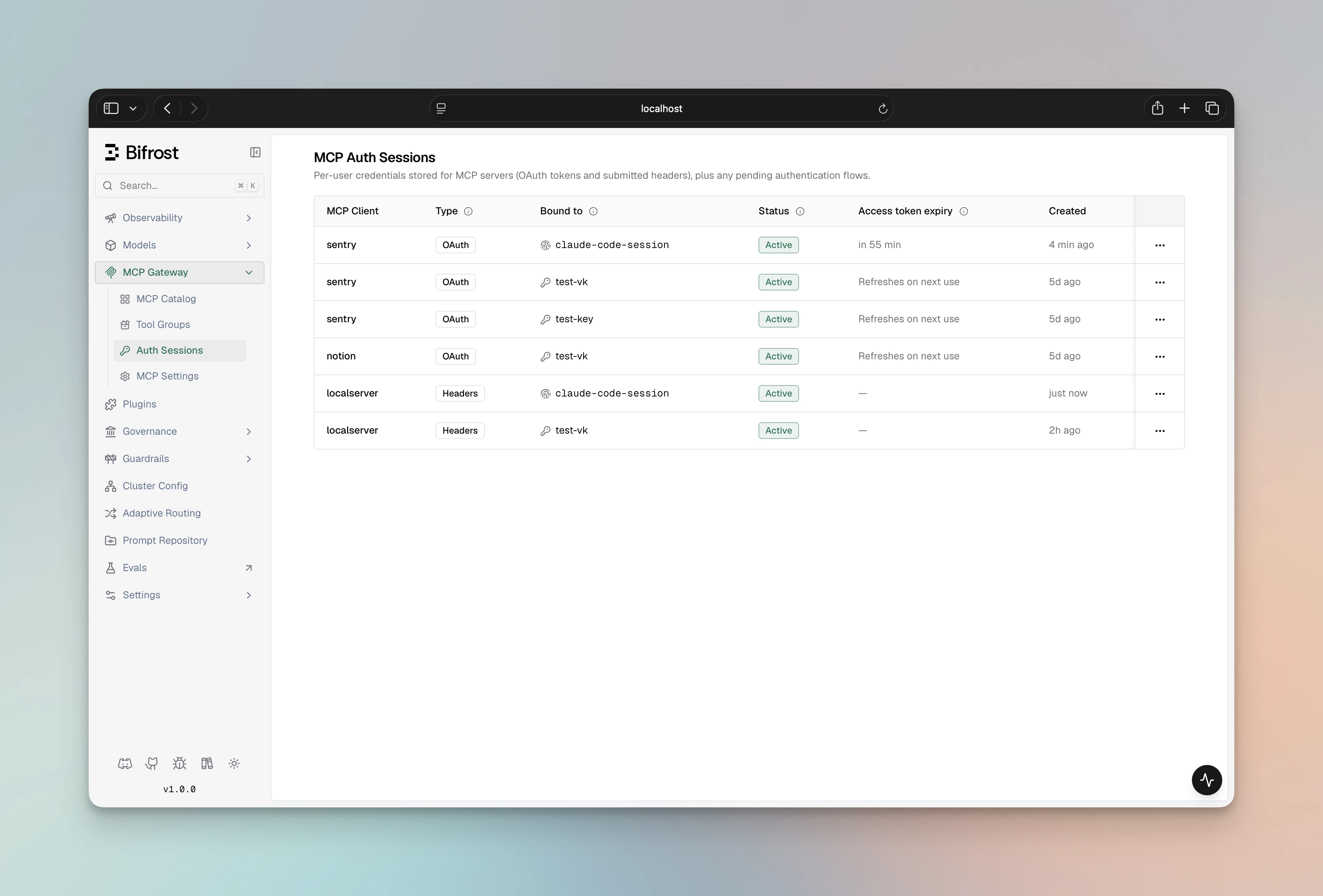
Columns
Statuses
Per-user OAuth (Type = OAuth)
Per-user Headers (Type = Headers)
Pending flow rows (Type = Pending)
Pending rows expire on their own after a short window (15 minutes); expired flow rows are deleted by Bifrost’s sweep worker — they don’t linger as failed rows.
Why orphaned and needs_* are different
Both look like “broken — make the user re-auth”, but the remediation is different:
needs_reauth/needs_updateare caller-side problems. A fresh credential fixes them: re-authenticate for OAuth, resubmit for headers.orphanedis an access-control problem. The credential itself is fine; what’s missing is the identity’s right to use this MCP through Bifrost. Running a fresh OAuth flow or resubmitting headers would either produce a duplicate credential or land back in the same orphan state on the next reconcile. The actual fix is admin-side: re-add the VK to the MCP’s allowlist, turnAllowOnAllVirtualKeysback on, or restore the user’s access profile.
Actions
The action menu adapts to the row’skind and status. Orphaned and needs_reauth rows are mutually exclusive with the action that wouldn’t help — Bifrost doesn’t surface no-op options.
Re-authenticate (OAuth)
Available onneeds_reauth OAuth token rows. Clicking it:
- Mints a fresh consent flow against the same MCP client and identity
- Redirects the browser to the upstream provider
- On callback, replaces the dead credential in place — same row ID, status flips to
active
Edit values (Headers)
Available onactive and needs_update header credential rows. Clicking it:
- Mints a fresh submission flow against the same MCP client and identity
- Redirects the browser to the values form pre-populated with the names of currently-stored keys (values are never shown)
- On submit, Bifrost runs a one-time upstream verify, replaces the credential in place, and flips status to
active
Complete authentication (Pending)
Available on pending flow rows. Just sends the user back to the auth URL (OAuth consent or headers submission depending on the flow’s kind) so they can finish what they started.Revoke
Available on credential rows and on stale pending flows. Hard-deletes the row. For pending OAuth flows, the corresponding flow row is removed first to close the race where an upstream callback could mint a brand-new token after revoke.Bifrost does not call the upstream provider’s
/revoke endpoint when you click Revoke. Per-user OAuth doesn’t store a per-server revocation endpoint, so revocation is local to Bifrost only. If you want the upstream provider to invalidate the token too, revoke it from the provider’s dashboard (GitHub Settings → Authorized OAuth Apps, etc.). Per-user-headers credentials never call an upstream revoke — the headers are just stored values.Automatic reconciliation when VK / MCP access changes
Bifrost keeps per-user credentials in sync with the VK ↔ MCP allowlist automatically. When the effective allowlist for a credential’s identity changes, every affected row flips status without anyone having to click anything:
The “effective allowlist” Bifrost uses is
explicit per-VK MCP configs ∪ MCPs with AllowOnAllVirtualKeys=true — same predicate as the runtime tool-allowance check.
Session-keyed credentials (rows where the identity is x-bf-mcp-session-id) are not subject to reconcile — they don’t have an AP-model identity to evaluate. They are only deleted when their MCP client is deleted.
What appears in the table
The table is scoped to the caller’s identity:- A signed-in admin sees rows visible under their VK / user ID — not every row in the system.
- A user authenticated only via a
vkheader sees rows for that VK. - A caller asserting only
x-bf-mcp-session-idsees rows for that session ID.
403). VK-mode and session-mode flows treat the URL itself as the capability — see Flow mode and access rules for the per-mode behavior.
When a credential and a pending flow exist for the same (identity, MCP) binding, only the credential row is shown. The flow row is suppressed to avoid duplicate-looking entries — it stays in the database until the user completes (and the row is consumed) or it expires.
Troubleshooting
A tool call fails with `mcp_auth_required` even though the user just authenticated
A tool call fails with `mcp_auth_required` even though the user just authenticated
Check the row status on the Sessions page:
- Active but tool still failing → look at the access-token expiry. If it’s past, Bifrost will refresh on the next call automatically (and, when the upstream cleanly rejects a call, force-refreshes and retries that call once inline). Transient refresh failures keep retrying silently; the row flips to
needs_reauthonly when the provider permanently rejects the refresh. - Orphaned → the caller’s identity has lost access to this MCP client. Restore the VK assignment / toggle
AllowOnAllVirtualKeysback on / fix the access profile; the row reactivates on next reconcile. - Needs re-auth → click Re-authenticate and complete the upstream flow.
- Needs update (header rows) → click Edit values and resubmit on the form.
`This authentication link is bound to a different user.`
`This authentication link is bound to a different user.`
You’re trying to complete a user-mode flow that was minted for another signed-in user. The SSO identity that triggered the original
mcp_auth_required is the only one Bifrost will accept on the auth page — forwarding the URL to a colleague doesn’t work. Ask that user to open the link in their own browser, or trigger a fresh request yourself so a new flow is minted under your identity.VK-mode and session-mode flows don’t surface this error — they treat the URL itself as the capability. See Flow mode and access rules.`This authentication flow has expired or been completed`
`This authentication flow has expired or been completed`
Pending flows have a 15-minute TTL. If the user took too long, the row is gone — trigger the action again to mint a fresh flow.
A re-auth attempt on an orphaned row does nothing useful
A re-auth attempt on an orphaned row does nothing useful
That’s by design. The Re-authenticate / Edit values action is hidden on orphaned rows. If you got there via a stale URL, the new credential would still be orphaned because the access constraint is admin-side. Restore access (re-assign the VK, toggle
AllowOnAllVirtualKeys back on, fix the access profile) and the row reactivates automatically.A credential I revoked came back on the next call
A credential I revoked came back on the next call
You probably revoked the credential row while a pending flow was still in flight. The flow completed against the same
(identity, MCP) binding and minted a fresh credential. Revoke now drops pending flows first to close this race; if you’re still seeing it, also delete any Pending rows for the same MCP / identity from the table.Related
- Per-User OAuth — how OAuth tokens get into this table
- Per-User Headers — how header credentials get into this table
- Server-level OAuth — admin-side, not surfaced here
- Tool Filtering — control which per-user tools a VK can call