

Overview
Some tools need one more answer before they run. Adeploy tool may ask the user which environment to deploy to, and a tool that needs an account may ask the user to connect it first.
MCP 2026-07-28 standardizes this as Multi Round-Trip Requests. The server answers the tool call with the questions it needs answered instead of a result. The client asks the user, then calls the tool again with the answers, and the server completes the call.
Bifrost passes these questions through its MCP gateway:
- Questions reach the user. The question goes to the MCP client connected to Bifrost, the user answers it there, and the answer goes back to the server on the retry.
- Servers only ask what the client can answer. Bifrost tells the server which kinds of questions the calling client supports.
- Any Bifrost node can take the retry. Bifrost keeps nothing between rounds, so in a cluster the retry can land on any node.
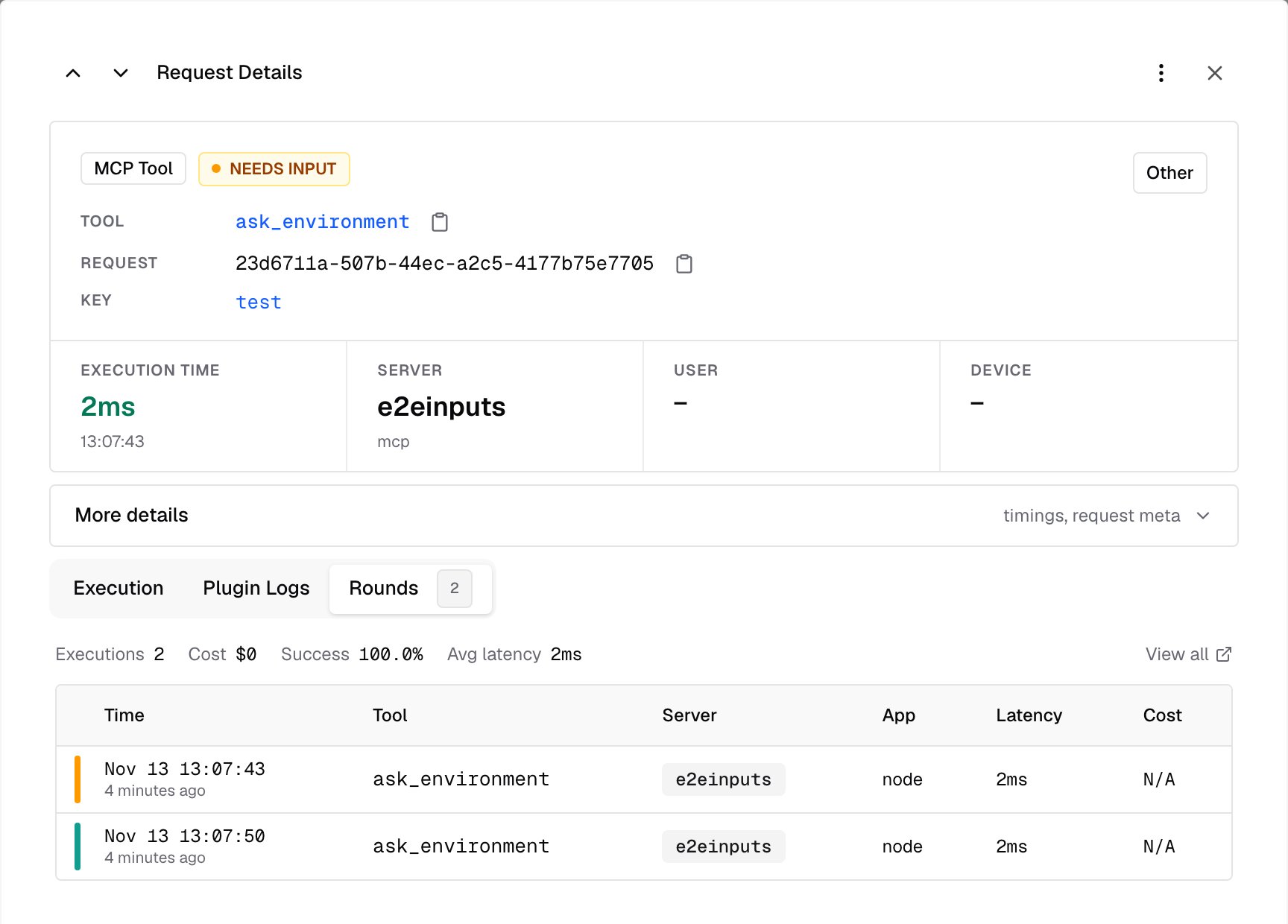
- Every round is logged. MCP Logs records each round, linked together, so you can follow the call from start to finish.
How a question travels through Bifrost
Each round is an ordinary tool call, so it goes through authentication, governance and logging like any other, and counts as a tool call toward governance limits. Each round has its own tool execution timeout, so the time the user takes to answer doesn’t count against it.What gets passed on
Bifrost passes a round on only when the client can answer every question in it. Sampling is deprecated in MCP
2026-07-28, and Bifrost doesn’t pass it on.
Requirements
Questions are passed on when both sides of the call are on MCP2026-07-28:
- The MCP client connects to Bifrost’s gateway on
2026-07-28, at/mcp, a server’s own/mcp/<slug>endpoint or a Virtual MCP (under aserver.base_path,/<prefix>/mcp), and declares the kinds of questions it can answer. - The MCP server is connected on
2026-07-28. A server connected on an earlier version asks its questions in a way Bifrost can’t pass on, so its tool fails with an error instead. SSE servers can’t use2026-07-28, so connect the server over HTTP or STDIO.
auto, the newest version. Deployments upgraded with existing MCP servers stay on 2025-06-18 until you change it.
- Web UI
- config.json
- Open MCP Servers and then MCP Settings.
- Set Max Protocol Version to Auto (latest).
- Save. Bifrost reconnects the affected servers without a restart.
Where questions can’t be passed on
Some callers have no user to ask. A tool that asks a question fails on these paths, with an error that names the server and what it asked for:- MCP clients on an earlier MCP version, or that don’t support the kind of question asked
- Chat completions and the Responses API, when Bifrost runs the tool in agent mode
- Tool execution through
/v1/mcp/tool/execute - Code mode
- Prompts and resource reads, through any path
Logs
Every round of a call is its own entry in MCP Logs:- A round that asked a question has the status Needs input, and shows what the server asked under Input requested.
- The retry shows the client’s answers under Answered, and the final result.
- A round that asked to retry later is marked Retry later.
Troubleshooting
The client gets an error instead of the question
- The client connects on an earlier MCP version. Check that it supports MCP
2026-07-28. - The client doesn’t support that kind of question. A client that declares only form questions can’t answer a link question, and the other way around.
- The call didn’t come through the MCP gateway. Chat completions, the Responses API, agent mode and code mode can’t ask a user.
The client supports questions, but the tool still fails
The server is connected on an earlier MCP version. Set its max protocol version toauto, and check that the server supports MCP 2026-07-28.
The server keeps asking to retry
A client connected through the gateway on MCP2026-07-28 retries as the server asks. On other paths, Bifrost retries the call itself and, after three attempts, returns an error saying the server kept asking to retry.
Next Steps
MCP Apps
Serve your servers’ interactive interfaces
Tool Execution
Run MCP tools through Bifrost
Connecting to Servers
Add MCP servers and set their protocol version
Gateway Authentication
Connect MCP clients to Bifrost