

Overview
OpenRouter is an OpenAI-compatible provider routing service that accesses models from multiple providers (OpenAI, Anthropic, Google, Meta, etc.) through a unified interface. Bifrost delegates to the OpenAI implementation with special handling for reasoning models. Key features:- Provider aggregation - Access 100+ models from multiple vendors
- Reasoning support - Extended thinking for supported models
- Parameter compatibility - Intelligent reasoning effort conversion
- Streaming support - Full SSE support with usage tracking
- Tool calling - Complete function definition and execution
Supported Operations
Unsupported Operations (❌): Image Generation, Files, Batch, and streaming Speech/Transcriptions are not supported by the upstream OpenRouter API. These return a
BifrostError with an error code of "unsupported_operation".Note: OpenRouter’s Responses API is currently in beta.Setup & Configuration
Configure OpenRouter as a provider.- Web UI
- config.json
- API
- Go SDK
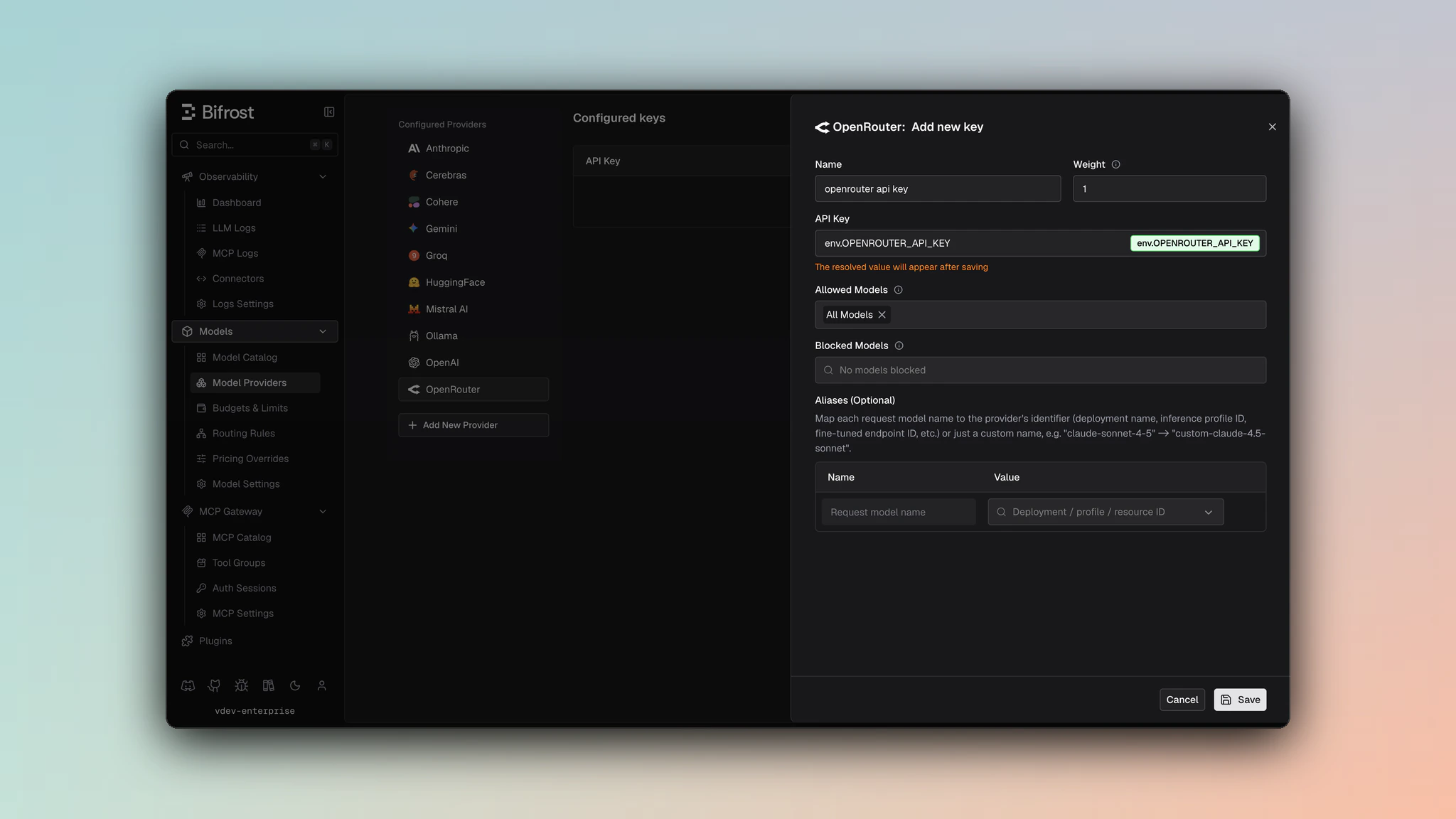
- Navigate to Models > Model Providers. Look for OpenRouter under Configured Providers. If it is missing, click on Add New Provider and select OpenRouter.
- Click Add Key or edit an existing key.
- Set a name for your key.
- Paste your API key directly or use an environment variable (for example,
env.OPENROUTER_API_KEY). - Set Allowed Models to All Models (default) or the specific model allowlist you want this key to serve.
- Save the provider configuration.
/v1/auth/key when provider key validation is enabled.
1. Chat Completions
Request Parameters
OpenRouter supports all standard OpenAI chat completion parameters. For full parameter reference and behavior, see OpenAI Chat Completions.Reasoning Parameter Handling
OpenRouter supports extended thinking on compatible models:Prompt Caching
Bifrost forwards Anthropic-style cache breakpoints to OpenRouter, but the two API surfaces take them in different shapes. Bifrost translates automatically, so you sendcache_control either way.
Chat Completions accepts per-block cache_control directly, and Bifrost
passes it through unchanged:
cache_control. Bifrost converts each
marked input_text block into the prompt_cache_breakpoint that OpenRouter
turns back into an Anthropic breakpoint:
Anthropic accepts at most four cache breakpoints per request and rejects a
fifth outright. On the Responses path Bifrost limits only the markers it
converts from
cache_control, and only to the capacity your own
prompt_cache_breakpoint values leave free. When it has to trim, it drops the
earliest converted markers, because caching is cumulative and a later
breakpoint anchors a longer prefix.Breakpoints you set yourself are never modified or dropped. If you supply four or
more of them, Bifrost converts nothing further; if you supply more than four, they
are forwarded as written and OpenRouter’s upstream will reject the request.A converted breakpoint carries no TTL. OpenRouter turns
prompt_cache_breakpoint
into a default Anthropic breakpoint, so {"type": "ephemeral", "ttl": "1h"}
caches for the default 5 minutes on the Responses path. Use Chat Completions,
which forwards cache_control verbatim, when you need the 1-hour TTL.Only "type": "ephemeral" is converted. It is the sole cache type Anthropic
defines, so a cache_control carrying any other value is dropped rather than
turned into a breakpoint.cache_control
on tool definitions (OpenRouter documents no tool-level Responses breakpoint) and on
function_call_output blocks (a text-only output array is collapsed to a single
string before it reaches the wire). Put your breakpoints on input_text blocks.
Verify caching worked by reading cached_tokens in the response usage. A 200
alone does not mean the cache was hit.
Bifrost can also add the marker for clients that send none, which is what makes this
work for agentic tools that emit no cache directives at all. See
Prompt caching.
See OpenRouter prompt caching
for the upstream contract.
Filtered Parameters
Removed for OpenRouter compatibility:verbosity- Anthropic-specificstore- Not supportedservice_tier- OpenAI-specific
prompt_cache_key is forwarded on the Responses path, and on Chat Completions
only when the model’s datasheet marks it supported. Either way it is not a
caching switch: OpenRouter uses it as a sticky-routing key, so it does not enable
Anthropic prompt caching on its own. Use a cache breakpoint for that.
OpenRouter supports all standard OpenAI message types, tools, responses, and streaming formats. For details on message handling, tool conversion, responses, and streaming, refer to OpenAI Chat Completions.
2. Responses API
OpenRouter’s Responses API is handled as a distinct endpoint at/v1/responses. This API is currently in beta on OpenRouter.
Same parameter support as Chat Completions, with requests forwarded directly to the Responses API endpoint without conversion to Chat Completions.
Special Message Handling (gpt-oss vs other models):
For details on how reasoning is handled differently between gpt-oss and other models, see OpenAI Responses API documentation for the comprehensive explanation of reasoning conversion (summaries vs. content blocks).
3. Text Completions
OpenRouter supports legacy text completion format:4. List Models
Lists 100+ models available through OpenRouter, including:- OpenAI (GPT-4, GPT-4 Turbo, etc.)
- Anthropic (Claude 3 family)
- Google (Gemini)
- Meta (Llama)
- Mistral
- And many more
5. Embeddings
OpenRouter supports embeddings through their OpenAI-compatible API. This allows you to generate vector embeddings for text using models from various providers.
Supported Models: OpenRouter supports various embedding models including:
- Cohere (embed-multilingual-v3.0, embed-english-v3.0, etc.)
- Amazon (amazon-embeddings-v2)
- And other providers
Speech (TTS) & Transcription (STT)
Speech and Transcription support for OpenRouter is available in Bifrost v2.0.0 and above.
/v1/audio/speech for text-to-speech and /v1/audio/transcriptions for speech-to-text.
Streaming Speech and Transcription are not supported by the upstream OpenRouter API and return a
BifrostError with "unsupported_operation".
Unsupported Features
Caveats
Cache Control Stripped
Cache Control Stripped
Severity: Medium
Behavior: Anthropic cache control directives are removed
Impact: Prompt caching features unavailable
Code: Stripped during JSON marshaling
Parameter Filtering
Parameter Filtering
Severity: Low
Behavior: OpenAI-specific parameters filtered
Impact: prompt_cache_key, verbosity, store removed
Code: filterOpenAISpecificParameters
User Field Size Limit
User Field Size Limit
Severity: Low
Behavior: User field > 64 characters silently dropped
Impact: Longer user identifiers are lost
Code: SanitizeUserField enforces 64-char max