

Overview
An MCP App is a tool that comes with its own interface. Next to the tool, the server offers aui:// resource that holds the app’s HTML, and an MCP client that supports MCP Apps shows it in the conversation, for example an interactive chart or form instead of a block of text.
Some of an app’s tools exist only for its interface, such as a button that refreshes the data the app shows. These app-only tools are meant to be called by the app, never by a model.
A server marks a tool’s interface with its ui:// resource in the tool’s metadata, and marks a tool app-only by making it visible to the app but not the model. Bifrost also recognises interfaces declared in the OpenAI Apps SDK’s form.
Bifrost carries MCP Apps through its MCP gateway:
- Apps reach clients that can show them. A server’s own endpoint serves its app tools and
ui://resources as the server sent them. - App-only tools never reach a model. They are listed only on a server’s own endpoint, to clients that declared MCP Apps support, and never offered to models in chat completions, the Responses API or code mode.
- Servers don’t collide. On the shared
/mcpendpoint and Virtual MCPs, each server’sui://resources are kept apart, so two servers that ship apps with the same URI don’t overwrite each other. - Your access rules apply. A virtual key, Virtual MCP or request filter that can’t reach a server can’t load its apps either.
How apps reach clients
What a caller gets depends on where it connects:
Connect an MCP client to a server’s own endpoint,
/mcp/<slug>, to use that server’s apps in full. The endpoint uses the server’s endpoint slug (see Direct MCP client endpoints), or /<prefix>/mcp/<slug> under a server.base_path. It accepts the same credentials as /mcp, and the credential must reach that server.
On the shared /mcp endpoint, a client can still show an app’s interface for a tool it calls. An app that calls its own app-only tools needs the server’s own endpoint.
Which clients show the interface
Every caller gets a tool’s interface along with the tool. A client that supports MCP Apps and connects on MCP version2026-07-28, which carries the client’s capabilities on every request, gets everything: the interface and the app-only tools. A client on an earlier MCP version can still show an app from a server on an earlier version. From a server on 2026-07-28, the app may not load for it, since Bifrost can pass its MCP Apps support to that server only on 2026-07-28 requests. Either way, app-only tools are served only to 2026-07-28 clients, so an app that calls them won’t work in full on an earlier version.
A client that doesn’t support MCP Apps shows the tool’s result as text instead, since MCP Apps require every tool to return a text result as well.
The server can run any MCP version Bifrost supports. Bifrost declares MCP Apps support to each server when it connects, on 2025-06-18, 2025-11-25 and 2026-07-28 alike, so the server knows it can send its apps. See Supported Protocol Versions.
Tool names apps use
An app calls tools by the names its own server gave them, for examplerefresh, while Bifrost lists them under the server’s name, as budget-refresh. Bifrost accepts both:
- On a server’s own endpoint, the server’s own name resolves to that server’s tool.
- On the shared
/mcpendpoint and Virtual MCPs, the server’s own name resolves when exactly one server the caller can reach has a tool by that name that models may call. When several do, the call is refused and lists the full names. App-only tools never resolve there.
Who can reach an app
An app is reachable through the same rules as the server’s tools: the servers a virtual key is assigned to, the servers a Virtual MCP draws from, and any request filters. A caller that can’t reach a server sees none of its tools, apps orui:// resources.
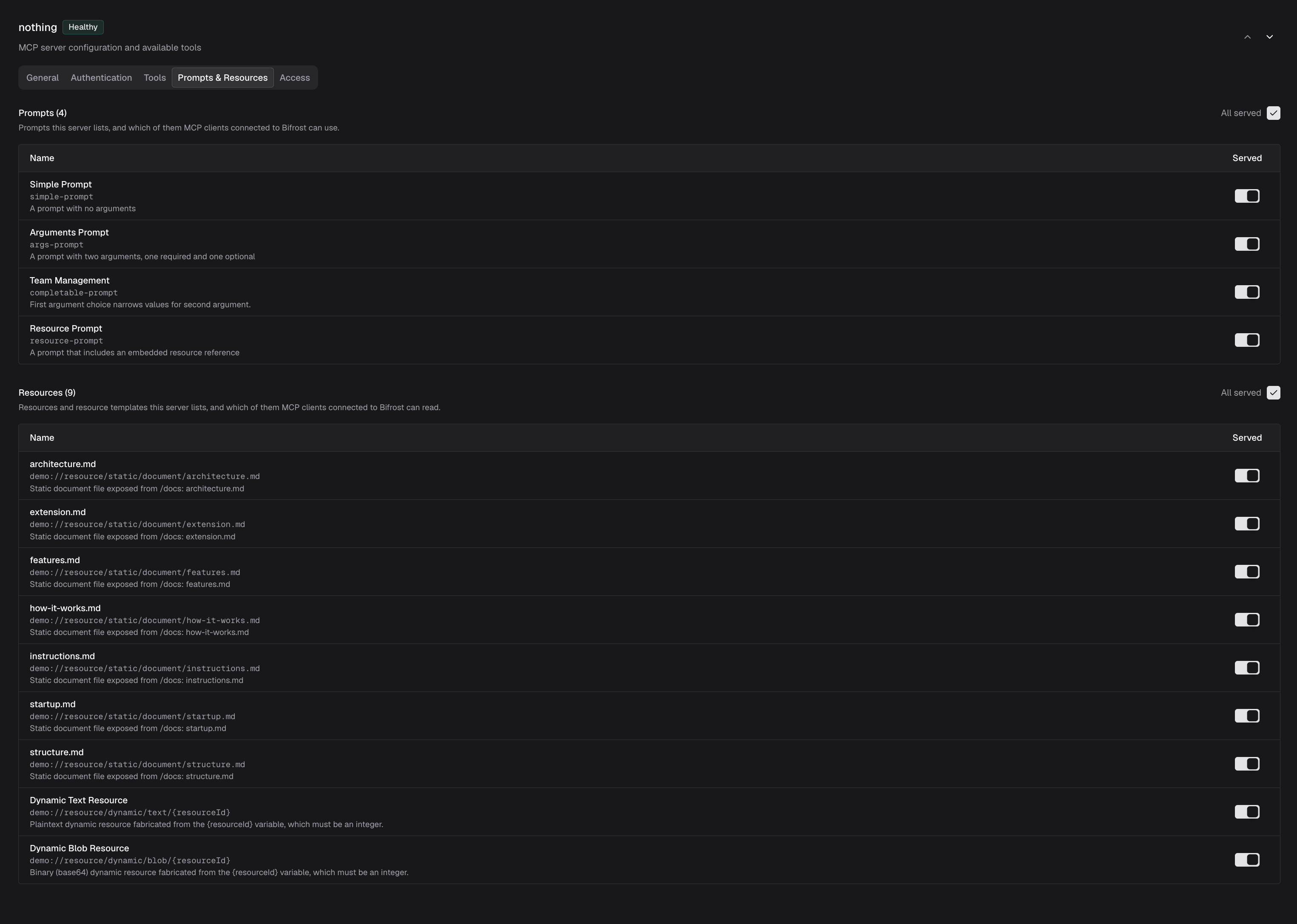
A server’s resource allow-list also applies to its ui:// resources. Each server exposes all of its resources by default. If you limit what a server exposes, include the ui:// resources of its apps, or clients can’t load them.
- Web UI
- config.json
- Open MCP Servers and select the server.
- Open the Prompts & Resources tab.
-
Make sure the app’s
ui://resources are among the exposed resources. -
Save the server.
Code mode
A server in code mode is reached through the code-mode tools on the gateway, including its own endpoint. Its tools aren’t listed one by one, so clients see none of its app tools there. Keep a server whose apps you want to serve out of code mode.Logs
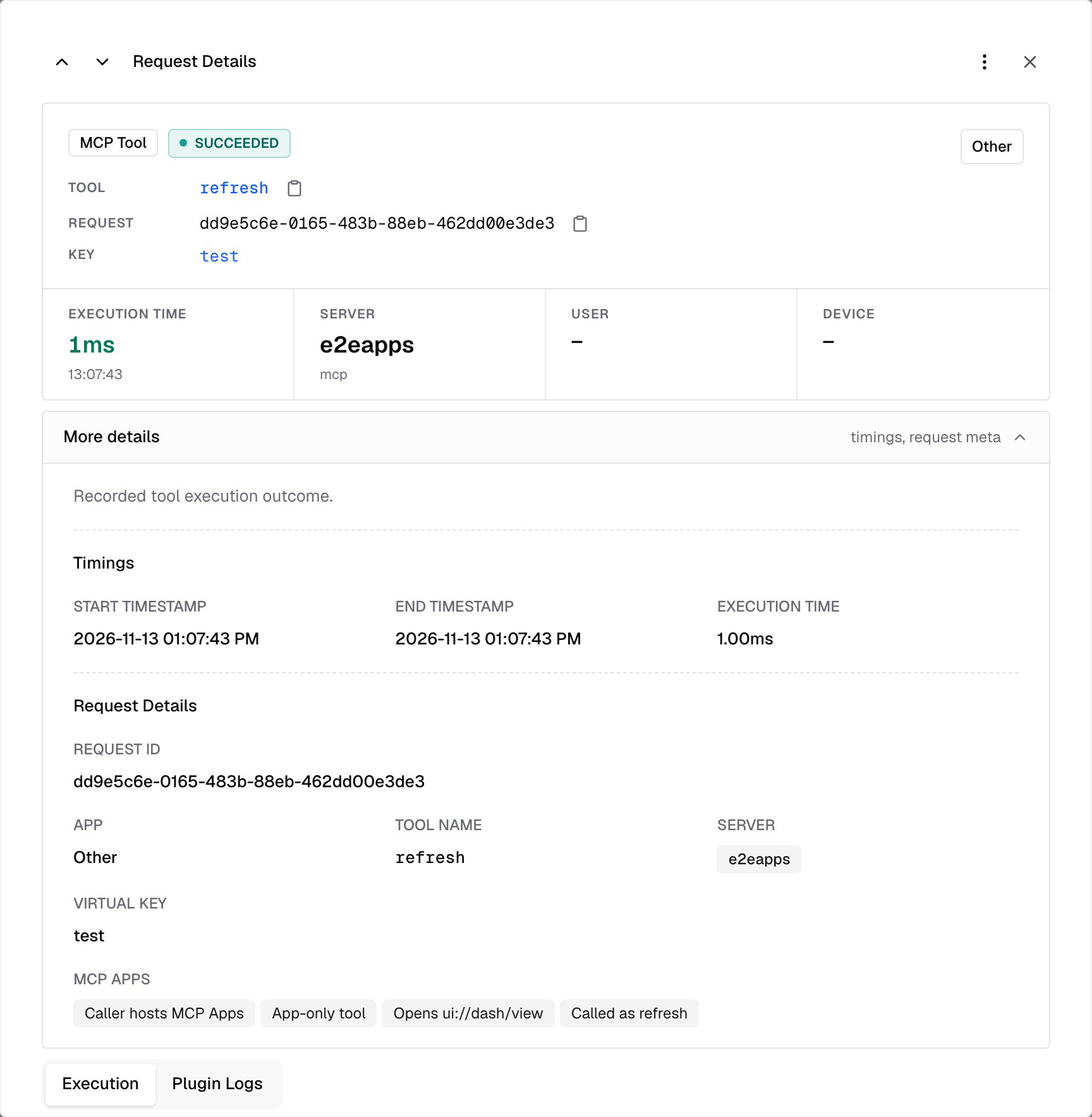
Every call from an app is recorded in MCP Logs like any other tool call, including calls to app-only tools that Bifrost refuses. A call by a server’s own tool name that Bifrost can’t resolve on the shared/mcp endpoint or a Virtual MCP is refused before it runs, and isn’t logged. Open the entry and expand More details to see what Bifrost knew about the call, under MCP Apps:
Troubleshooting
The app doesn’t show in the client
- The client connects to a Virtual MCP or the shared
/mcpendpoint. Connect it to the server’s own endpoint,/mcp/<slug>, to use the app in full. - The client doesn’t support MCP Apps. It shows the tool’s text result instead.
- The app calls app-only tools, and the client isn’t on MCP
2026-07-28. App-only tools are hidden from it, so the app can’t work in full. Check that the client supports the newest MCP version. - The server’s resource allow-list leaves out the app’s
ui://resource. Add it to the exposed resources. - The server is in code mode. Its app tools aren’t listed on the gateway.
An app-only tool isn’t found
App-only tools are listed and callable only on the server’s own endpoint, for clients that declared MCP Apps support. Models, the shared/mcp endpoint and Virtual MCPs never reach them.
A call by the tool’s short name is refused
On the shared/mcp endpoint or a Virtual MCP, there are two causes:
- More than one server you can reach has a tool by that name. Call it by its full name, such as
budget-refresh, or connect to the server’s own endpoint. - The only match is an app-only tool. App-only tools work only on the server’s own endpoint, whatever name you call them by. Connect the client to
/mcp/<slug>.
Next Steps
Resources and Prompts
Serve your servers’ prompts and resources
Virtual MCPs
Bundle servers behind one endpoint
Gateway Authentication
Connect MCP clients to Bifrost
Code Mode
Let models call tools through code