

Overview
By default, a per-user MCP server shows every caller the same tools: the ones Bifrost discovered with the admin’s credential when the server was verified. Each caller’s own credential is used only to run their tool calls. Some servers return different tools to different accounts, for example by workspace, plan or role. With Per-Caller Discovery on (per_user_discovery: true), Bifrost discovers each caller’s tools, prompts, resources and server instructions with that caller’s own credential, and serves each caller only what their account has. The server then keeps no admin credential and no discovery of its own.
Per-Caller Discovery applies to the per-user auth types: Per-User OAuth, Per-User Headers and Token Exchange. It does not apply to OpenAPI servers, whose tools come from their OpenAPI document.
A discovery is kept per user or per virtual key. A caller identified only by
x-bf-mcp-session-id (see Identity modes) has none, so a server with Per-Caller Discovery on offers them none of its tools.Turn it on
- Web UI
- API
- config.json
On a new server: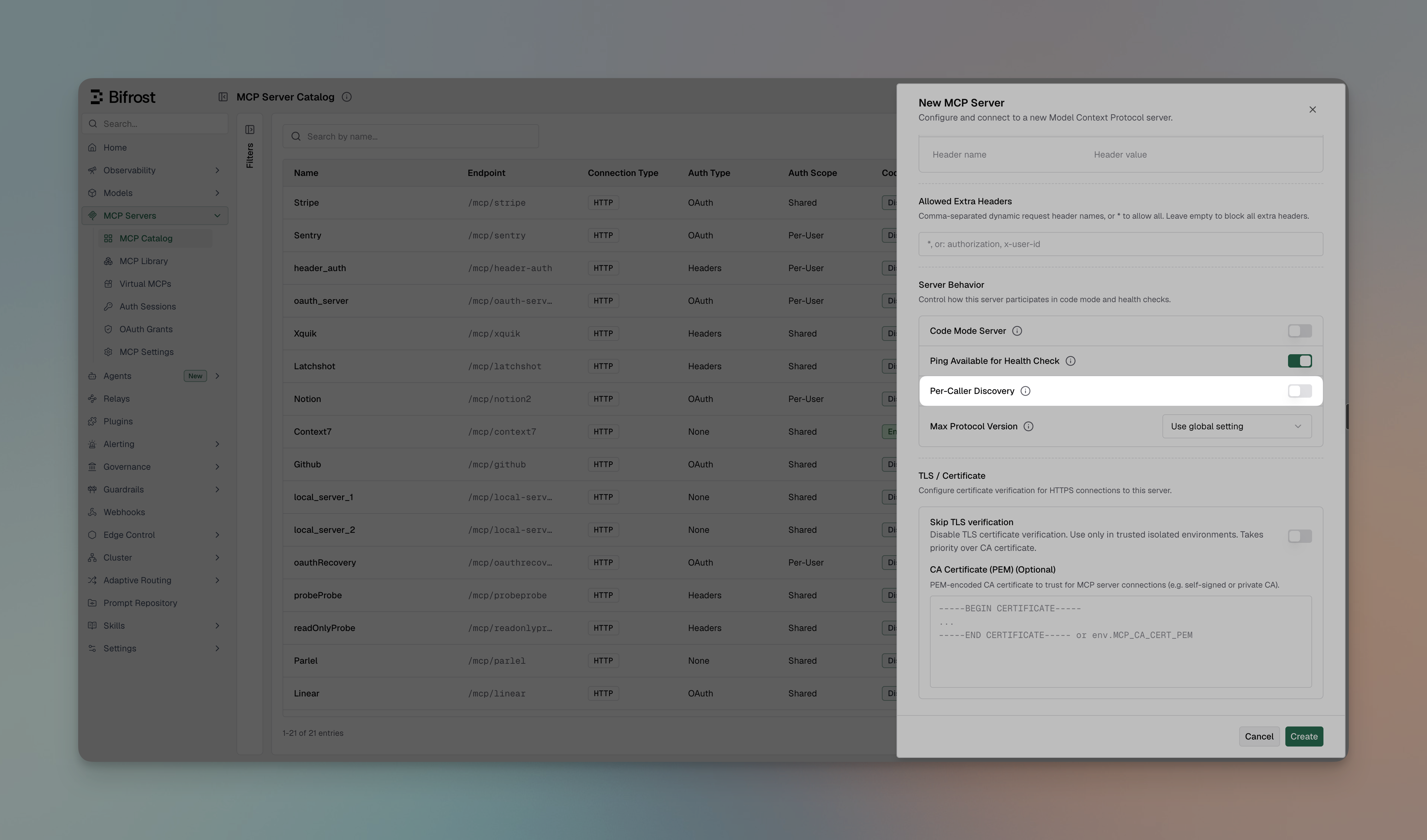
- Navigate to MCP Gateway in the sidebar and click New MCP Server
- Pick HTTP as the connection type and fill in the Connection URL
- Set Auth Type to Per-User OAuth 2.0, Per-User Headers or Token Exchange (On-Behalf-Of), and fill in its fields
- Turn on Per-Caller Discovery
- Click Create and complete the admin’s one-time step. With Per-Caller Discovery on, it only verifies the server (see Verification)
- Open the server’s actions menu (⋯) in MCP Gateway and click Edit
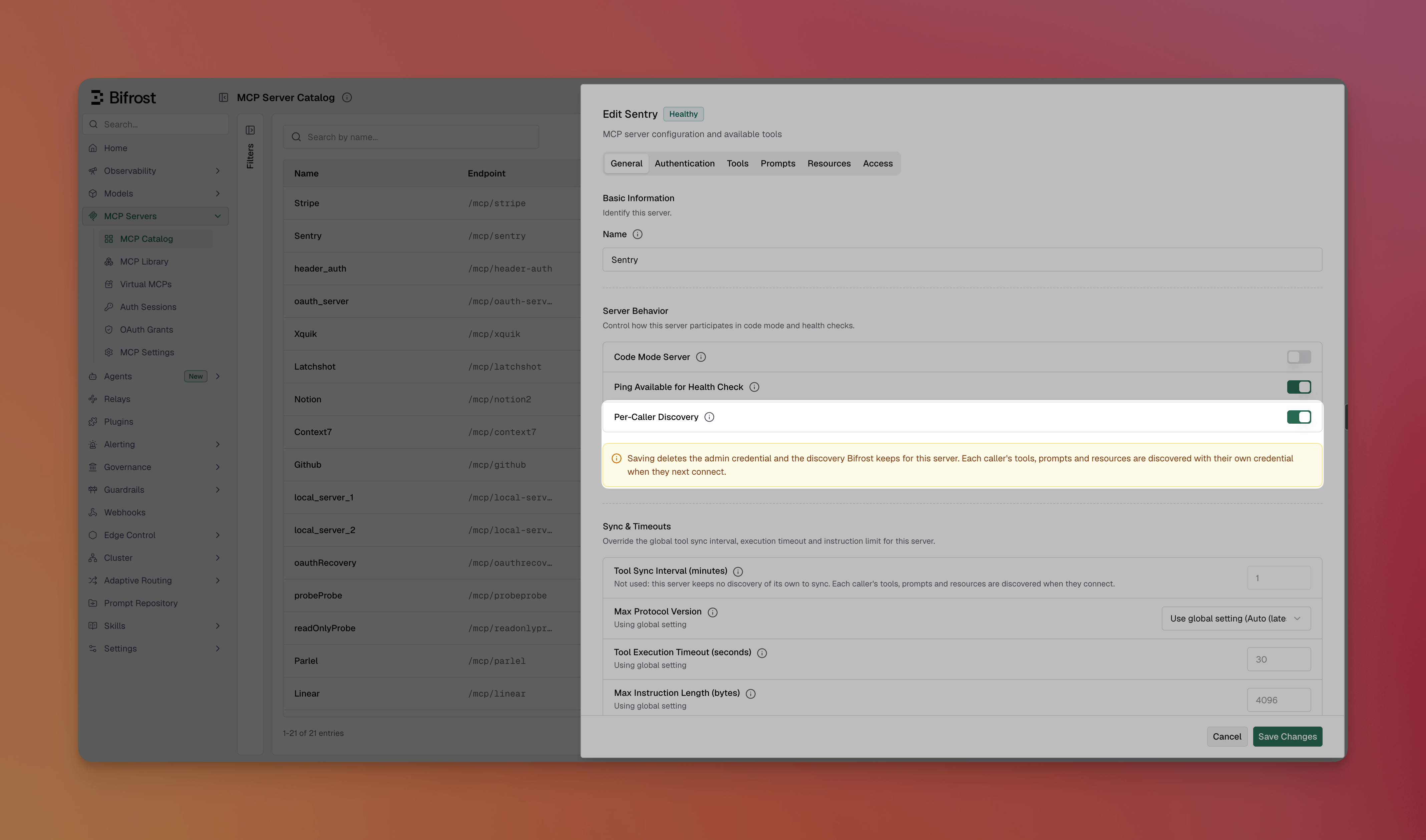
- On the General tab, turn Per-Caller Discovery on or off
- Read the warning under the toggle: it says what saving deletes (see Turning it on or off)
- Click Save
Verification
Each per-user auth type keeps its one-time admin step. With Per-Caller Discovery on, the step only checks that the server works with its configuration, and nothing from it is kept:- Per-User OAuth: the admin signs in once. Bifrost checks the sign-in, then deletes it.
- Per-User Headers: the admin’s sample header values verify the connection and are not stored.
- Token Exchange: Bifrost exchanges the admin’s identity token to verify the server, then keeps nothing.
pending_verification and serves no caller, not even its connect tool. A config.json-declared server starts there, and is verified from its view sheet as for any other per-user server.
Once the server is verified, it has no admin credential to repair. POST /api/mcp/client/{id}/reauthorize, and a repeat verify-headers or verify-exchange call, return 400. For a Per-User OAuth server, POST /api/mcp/client/{id}/reregister still works: it registers a new OAuth client with the provider, every caller signs in again, and the admin’s sign-in afterwards only verifies the new registration.
How a caller gets their tools
The connect tool
Until a caller has a discovery for a server, Bifrost offers them one tool in its place,<server>-connect (for example notion-connect). Bifrost answers the call itself; it never reaches the upstream server. Its result is always a normal tool result:
- The caller has a credential: Bifrost discovers the server’s tools with it and keeps them as the caller’s discovery. The result reads
Connected to notion: 12 tools are available from your next turn. - The caller has none yet: the result is the sign-in link, the same
mcp_auth_requiredmessage a tool call returns (see How per-user auth works). Its description tells the model to give the link to the user exactly as returned. - The caller is already connected:
Already connected to notion; its tools are in your tool list.
tools_to_execute is not empty), and is reachable by the request: in its client list, and named by its tool list when it carries one. A virtual key may call it when it allows at least one of that server’s tools, since no key can name a tool its caller has not discovered yet. In code mode, the connect tool is offered as a direct tool, not as a code binding.
If the upstream server has its own tool named
connect, its name on Bifrost is also <server>-connect. Once the caller’s discovery holds that tool, the name is the upstream tool’s.At sign-in
Per-User OAuth and Per-User Headers callers don’t need the connect tool after signing in. Bifrost discovers their tools as part of the sign-in (the OAuth callback, or submitting their header values), so their next request has them. Token Exchange callers have no sign-in step: their first discovery is made through the connect tool, with their exchanged identity token. If discovery fails at sign-in, for example because the upstream server is down, the sign-in still succeeds: the credential is stored. The page shows Discovery not finished yet, and the caller is offered the connect tool, which retries. Over the API, the per-user headers submit response carries adiscovery_error field in that case.
What each caller sees
A caller is served only their own discovery of the server, on both the LLM Gateway and the MCP Gateway (/mcp). On /mcp, the tools, prompts, resources and resource templates a caller lists are their own, with their own descriptions and schemas. A name the caller does not hold behaves as if it did not exist, so calling names reveals nothing about another caller’s account.
The server’s own settings still apply to every caller’s tools, by tool name: which tools are enabled (tools_to_execute), which run without approval (tools_to_auto_execute), and their pricing. Request-level filters can only narrow that further. In the server’s Tools settings, these are set on the names seen in callers’ discoveries so far (see Seeing what callers have); "*" covers names no caller has yet.
Keeping discoveries current
There is no periodic sync: a caller’s discovery stays as it was made until it is replaced or deleted. When the upstream server adds or removes tools, a caller’s discovery is made again when:- Their session is refreshed: Refresh tools on the MCP Sessions page, or
POST /api/mcp/sessions/{id}/refresh. It uses the credential the session stores, so the caller does not sign in again. - They sign in again: re-authenticating an OAuth session, or editing a header session’s values, discovers again as any sign-in does.
- Their discovery was deleted: they are offered the connect tool, and their next connect discovers again (see below).
POST /api/mcp/client/{id}/refresh-tools does not apply: the server keeps no tool list of its own, and the call returns 400.
When a discovery is deleted
A caller’s discovery is deleted in the same write as the stored credential it was made with, so an OAuth or header caller never keeps tools they can no longer call. It is deleted when:- the caller’s session is revoked on the MCP Sessions page;
- their OAuth token is rejected on refresh, or is found expired with no way to refresh it, and the session needs re-authentication;
- the server’s
oauth_configis rotated, which sends every OAuth session toneeds_reauth; - the server’s required header names change, which sends every header session to
needs_update; - the server’s token exchange settings change;
- a Token Exchange caller’s tool call can’t get a token, because the identity provider declines the exchange or the caller has no valid identity token or sign-in;
- an
orphanedcredential is cleaned up after the retention period; - the caller’s virtual key is deleted;
- the server is deleted, or Per-Caller Discovery is turned off.
Turning it on or off
Changing the setting changes what the server keeps, so saving deletes something either way. The UI shows a warning under the toggle before you save.- Turning it on deletes the server’s admin credential and the discovery made with it. Callers’ own credentials are kept, and each caller’s tools are discovered with them when they next connect or sign in. A verified server stays verified.
- Turning it off deletes every caller’s discovery. The server goes back to
pending_verificationuntil an admin completes its admin step again, which discovers with the admin’s credential and keeps it:- Per-User OAuth: the server keeps its OAuth registration, so callers keep their sign-ins. Verify it from its view sheet, or with
POST /api/mcp/client/{id}/initiate-verificationor/reauthorize, which sign the admin in on that registration. - Per-User Headers: verify it with sample values (
POST /api/mcp/client/{id}/verify-headers). - Token Exchange: verify it as yourself (
POST /api/mcp/client/{id}/verify-exchange).
- Per-User OAuth: the server keeps its OAuth registration, so callers keep their sign-ins. Verify it from its view sheet, or with
Seeing what callers have
On a server with Per-Caller Discovery on, the view sheet’s Tools tab lists Tools Seen in Callers’ Discoveries: every tool name found in at least one caller’s discovery, with how many callers have it. Descriptions are not shown, since they can differ from one caller to another. On a Per-User OAuth or Per-User Headers server, the Callers tab lists its sessions.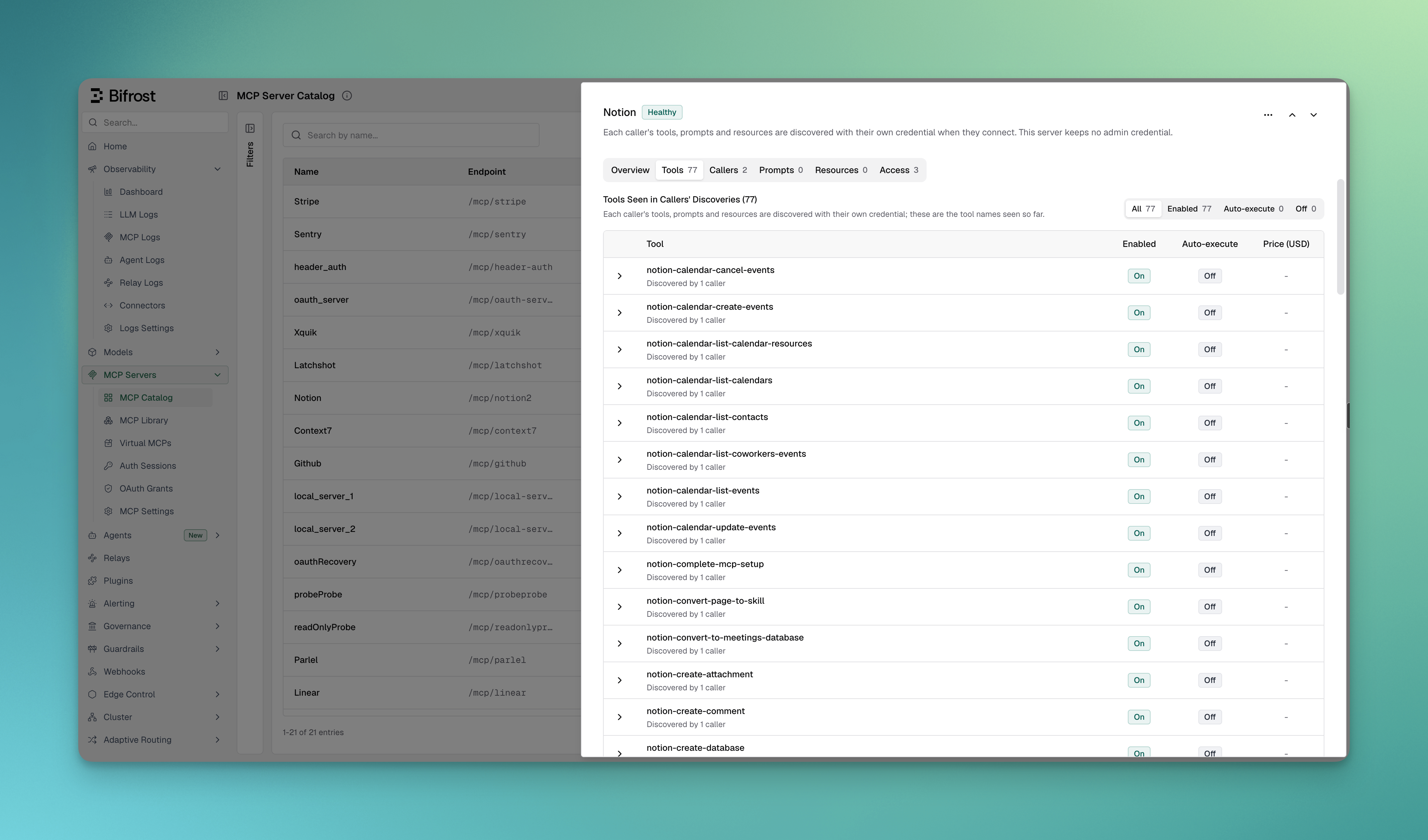
GET /api/mcp/clients returns the same: the server’s tools are the names seen in callers’ discoveries, and callers_by_tool maps each name to its caller count. callers_by_tool is left out until a caller has connected.
On the MCP Sessions page, the Discovery column shows what was discovered with each session’s credential and when, for example 3 tools · 1 prompt · 2 resources, discovered 4 min ago.
Troubleshooting
A caller only sees <server>-connect
Cause: the caller has no discovery for the server yet: they have not signed in, discovery failed at sign-in, or their discovery was deleted.
Fix: have the model call the connect tool, then follow the sign-in link it returns if there is one. On the next request, the caller has their tools.
A caller sees none of the server’s tools, not even the connect tool
Cause: one of these:- the request carries no user or virtual-key identity, only
x-bf-mcp-session-id, or none; - the server is still
pending_verification; - the server allows no tools (
tools_to_executeis empty); - the request’s client or tool list leaves the server out.
A tool the upstream server added doesn’t appear
Cause: the caller’s discovery was made before the tool existed. There is no periodic sync. Fix: for a Per-User OAuth or Per-User Headers caller, use Refresh tools on their session (see Keeping discoveries current). A Token Exchange caller has no session to refresh, so their discovery is made again only after it is deleted.reauthorize, verify-headers or verify-exchange returns 400
Cause: with Per-Caller Discovery on, a verified server keeps no admin credential to refresh or verify again.
Fix: nothing to repair. To pick up tools the upstream server added, see A tool the upstream server added doesn’t appear.
Next Steps
- Per-User OAuth: each user authenticates themselves
- Per-User Headers: each user submits their own header values
- Token Exchange: each caller’s identity token is exchanged automatically
- MCP Sessions: per-user credentials, their discoveries, and Refresh tools