

Overview
vLLM is a self-hosted inference provider with OpenAI- and Anthropic-compatible API surfaces. Bifrost uses the OpenAI-compatible endpoints by default and can route Chat Completions and Responses requests through vLLM’s Anthropic-compatible Messages endpoint per key or model alias. Key characteristics:- Native Responses API - Bifrost sends Responses requests directly to
/v1/responses; it does not translate them to Chat Completions - Optional Anthropic-compatible mode - Set
use_anthropic_endpointsto route Chat Completions and Responses through/v1/messages - OpenAI compatibility - Chat and text completions, embeddings, rerank, transcription, and streaming
- Self-hosted - Typically runs at
http://localhost:8000or your own server - Optional authentication - API key often omitted for local instances
Supported Operations
Unsupported Operations (❌) return
UnsupportedOperationError. Upstream capabilities vary by vLLM version and loaded model; in particular, the server must expose the selected OpenAI- or Anthropic-compatible endpoint.Setup & Configuration
Configure vLLM as a provider.- Web UI
- config.json
- API
- Go SDK
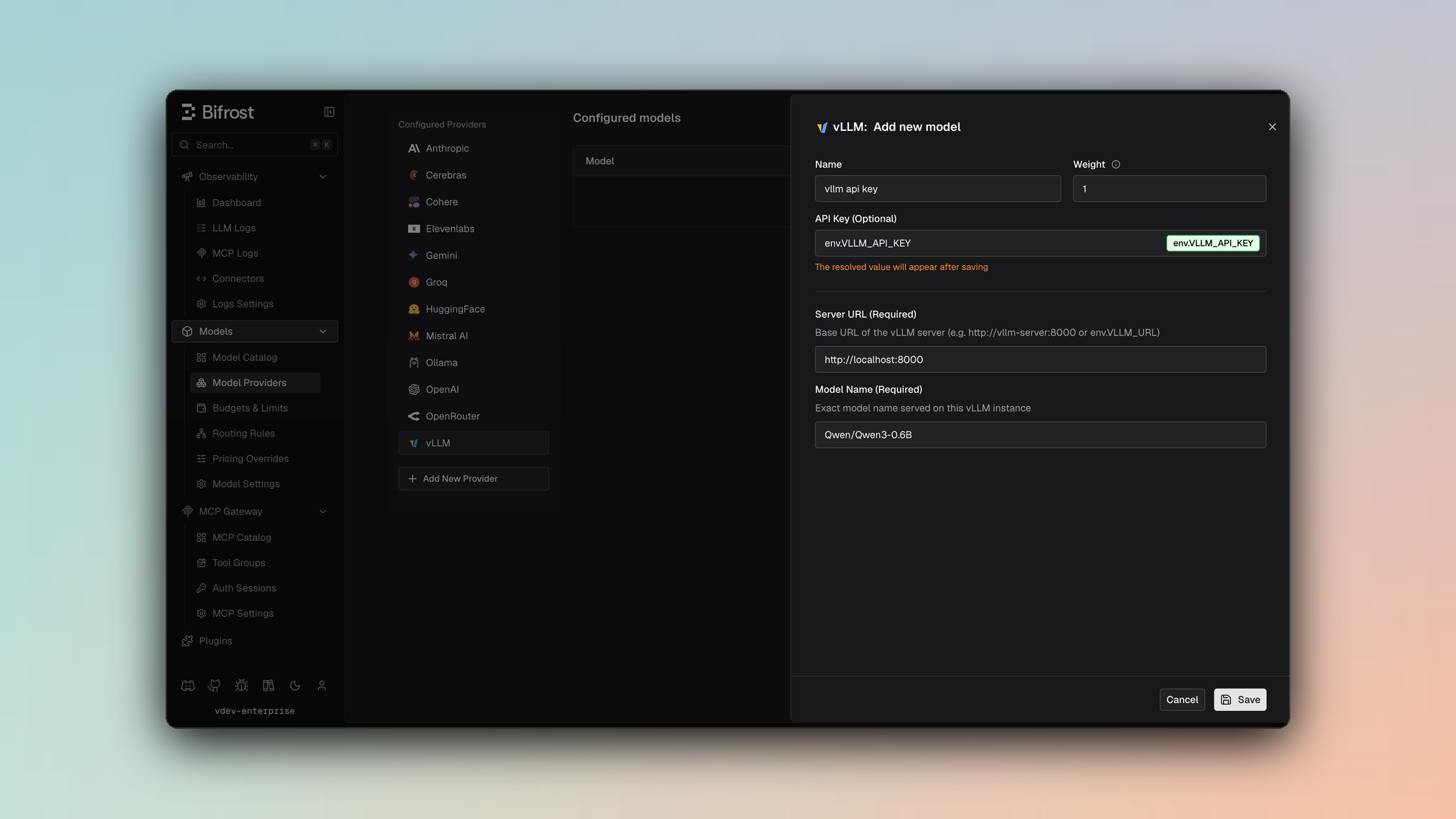
- Navigate to Models > Model Providers. Look for vLLM under Configured Providers. If it is missing, click on Add New Provider and select vLLM.
- Click Add New Model or edit an existing key.
- Set a name for your key.
- Leave API Key blank for local servers. If your endpoint requires auth, paste a bearer token directly or use an environment variable.
- Set vLLM URL to
http://localhost:8000and Model Name to the exact model loaded by the server. - Leave Use Anthropic Endpoints off to use vLLM’s OpenAI-compatible endpoints. Enable it only when the server exposes
/v1/messagesand you want Chat Completions and Responses routed through that endpoint. - Set Allowed Models to All Models (default) or the specific model allowlist you want this key to serve.
- Save the provider configuration.
Endpoint Mode
use_anthropic_endpoints affects only Chat Completions and the Responses API:
- Key-level - Sets the default for requests using that key.
- Alias-level - Overrides the key-level value for a specific model alias.
- Default -
false; requests use vLLM’s OpenAI-compatible endpoints.
/v1/messages/count_tokens, regardless of this setting.
Authentication remains
Authorization: Bearer <key> in both modes. Bifrost omits the header when the key value is empty.Server tool support
Anthropic’s server and client tools (web_search, web_fetch, code_execution, computer, bash, memory, text_editor, tool_search, mcp_toolset) run on Anthropic-operated infrastructure, so a self-hosted vLLM server does not implement them. Bifrost drops them from the request rather than forwarding a tool the server will reject. Your own function tools are never affected.
This matters most for clients that enable a built-in web search by default, which would otherwise fail every request.
Getting started
- Run a vLLM server (Docker or pip). Example with Docker:
- Verify the server:
- Use Bifrost with model prefix
vllm/<model_id>(e.g.vllm/meta-llama/Llama-3.2-1B-Instruct).
1. Chat Completions
By default, vLLM supports standard OpenAI chat completion parameters on/v1/chat/completions. For the full parameter reference, see OpenAI Chat Completions. Message types, tools, extra parameters, and streaming follow the shared OpenAI-compatible behavior.
With use_anthropic_endpoints: true, Bifrost builds an Anthropic Messages request and sends it to /v1/messages. For request conversion behavior, see Anthropic Chat Completions.
2. Responses API
Bifrost uses vLLM’s native Responses endpoint by default for both non-streaming and streaming requests:use_anthropic_endpoints: true, Bifrost instead converts the request to Anthropic Messages format, sends it to /v1/messages, and converts the result to a Bifrost Responses response.
3. Text Completions
4. Embeddings
vLLM supports/v1/embeddings. Use model IDs exposed by your vLLM server (e.g. BAAI/bge-m3).
5. List Models
Lists models from your vLLM instance via/v1/models. Available models depend on what is loaded on the server.
6. Rerank
vLLM supports reranking for pooling/cross-encoder reranker models. Bifrost sends requests to/v1/rerank and automatically falls back to /rerank when required by your vLLM deployment.
Your upstream vLLM server must be started with a rerank-capable model (pooling/cross-encoder task support).
7. Transcriptions
vLLM supports non-streaming and streaming transcription requests through/v1/audio/transcriptions. Bifrost sends multipart form data in the OpenAI-compatible format; streaming requests set stream: true and consume SSE transcription events.
8. Count Tokens
Count Tokens uses vLLM’s Anthropic-compatible/v1/messages/count_tokens endpoint. This route is independent of use_anthropic_endpoints, so the upstream vLLM server must expose it even when Chat Completions and Responses use the default OpenAI-compatible endpoints.
Caveats
Per-key BaseURL Required
Per-key BaseURL Required
Severity: High
Behavior: vLLM resolves request routing from
vllm_key_config.url.
Impact: Requests fail without vllm_key_config.url, even if a provider-level network_config.base_url is present.Error responses with HTTP 200
Error responses with HTTP 200
Severity: Low
Behavior: vLLM may return HTTP 200 with an error payload (e.g.
Impact: Bifrost normalizes these into standard error responses so clients see consistent error handling.
Behavior: vLLM may return HTTP 200 with an error payload (e.g.
{"error": {"code": 404, "message": "..."}}) instead of 4xx/5xx.Impact: Bifrost normalizes these into standard error responses so clients see consistent error handling.