

The Agent Card is an A2A discovery document. It describes what an agent can do, where to call it, and which authentication its requests require. Bifrost needs to fetch that document before it can read those requirements.
Fetch a protected card
In Agent Gateway, add or edit an agent. Expand the card options next to the Agent Card URL and configure authentication before fetching the card.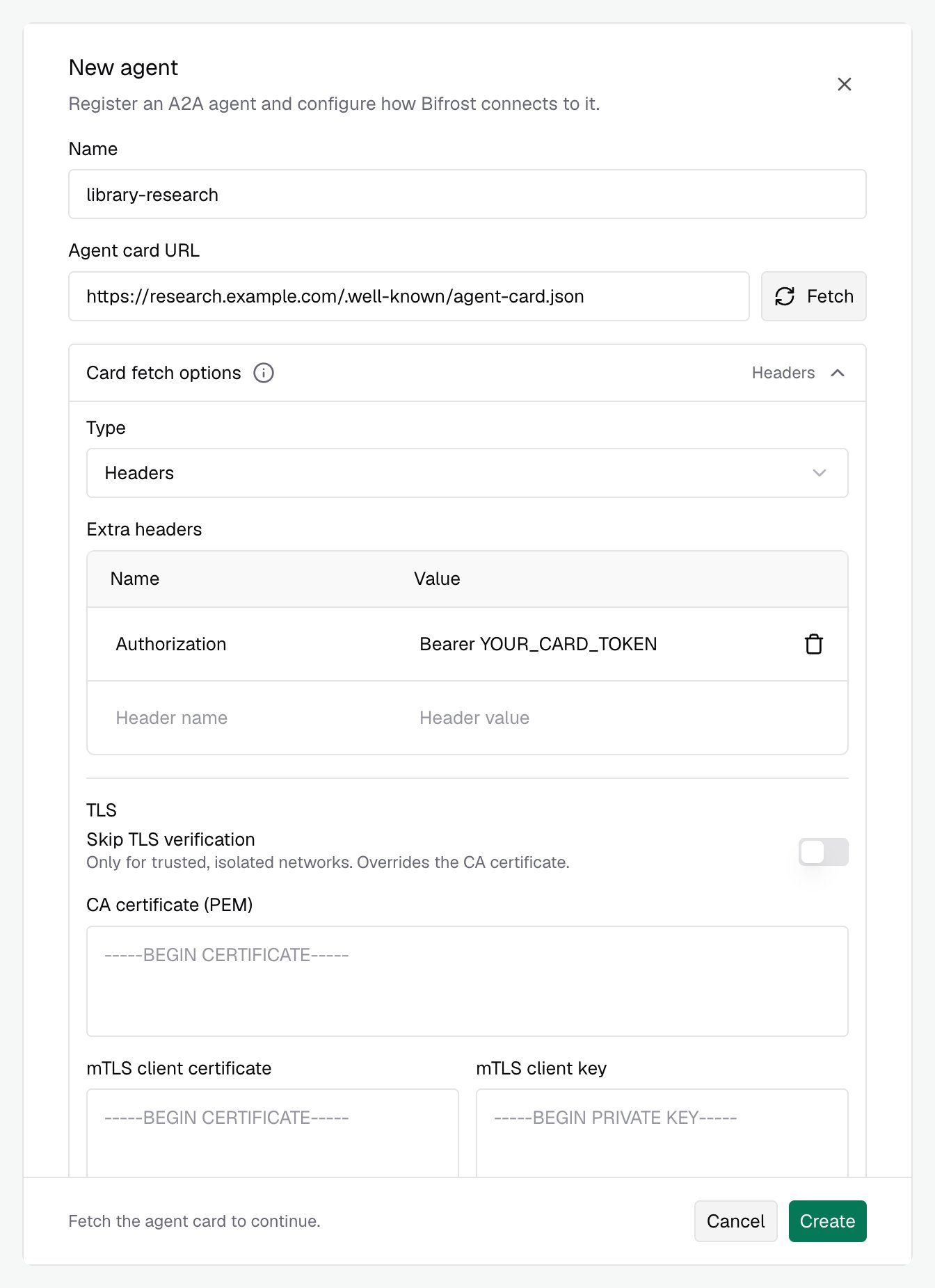
env. or vault. references for card credentials, request credentials, or TLS settings requires dashboard authentication when inspecting, creating, or editing an agent. Preserving stored secrets through masked placeholders on an update also requires dashboard authentication. Operator declarations in config.json can use secret references even when dashboard authentication is disabled.
Card authentication only authenticates the card fetch. Configure request authentication separately, even if both connections use the same credential.
Authenticate agent requests
After you fetch the card, Request authentication selects the authentication type and required fields advertised by the agent. Enter the credentials your agent expects in those fields. For example, a card advertising bearer authentication adds anAuthorization field where you enter Bearer YOUR_AGENT_TOKEN.
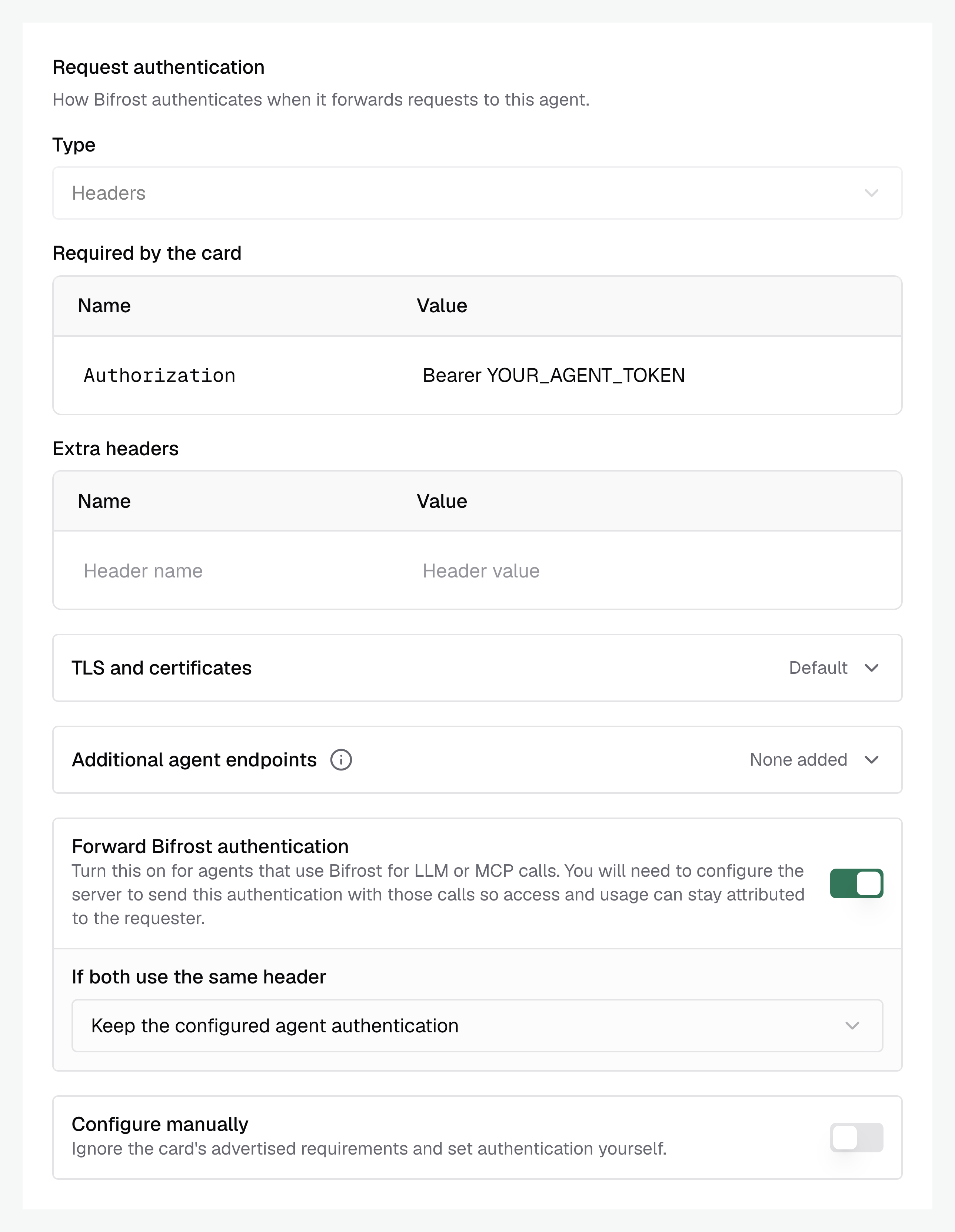
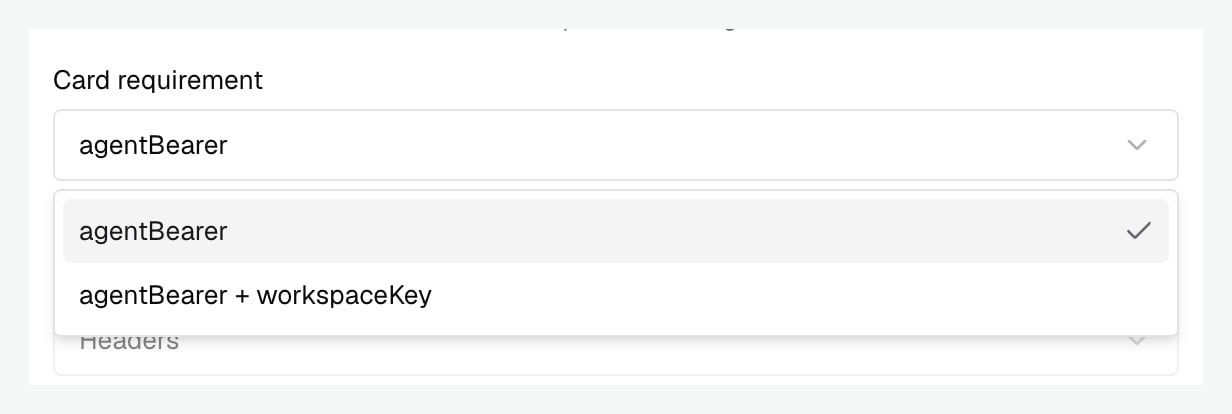
+ are requirements that must be satisfied together.
Additional agent endpoints
The card’s origin is automatically permitted for runtime requests. If the card advertises a runtime endpoint on another origin, add that origin under Additional agent endpoints in the agent’s create or edit form. Every runtime endpoint must pass this check, even when no request authentication is configured, because callers can supply their own upstream credential headers. An origin includes the scheme, hostname, and port. For example,https://research.internal:9000 permits that service. It does not permit http://research.internal:9000 or https://research.internal:9443. Do not include a path, query, fragment, username, or password.
The origin check protects configured runtime authentication, caller-provided upstream headers, the caller’s accepted Bifrost credential when forwarding is enabled, and runtime TLS client certificates. A private destination also needs permission in the global Private Network Allowlist. Adding a credential origin does not grant private-network access.
For a bare gRPC target such as research.internal:9000, use https://research.internal:9000 as the credential origin because the bare target uses TLS. Default ports match their implicit forms, so https://research.example.com:443 and https://research.example.com identify the same origin.
For a card at https://cards.example.com/.well-known/agent-card.json that advertises https://research.internal:9000, configure both:
- Web UI
- API
- config.json
- Helm
After fetching the card, expand Additional agent endpoints under Request authentication. A red approval badge identifies advertised addresses outside the card’s origin. Select Allow for each address you trust. Pending suggestions stay above added endpoints.Approved card addresses appear as read-only labels with a remove button. Select Add endpoint to enter another origin manually; these entries remain editable. Save the registration to apply the changes. Suggestions are not granted automatically.The section links to Agent Settings because private addresses also need permission in the global Private Network Allowlist. Supplying additional origins requires dashboard authentication.The example below uses a local card with separate HTTP and gRPC interfaces to show a pending suggestion, an approved address, and a manually entered endpoint. Replace these addresses with your agent’s origins.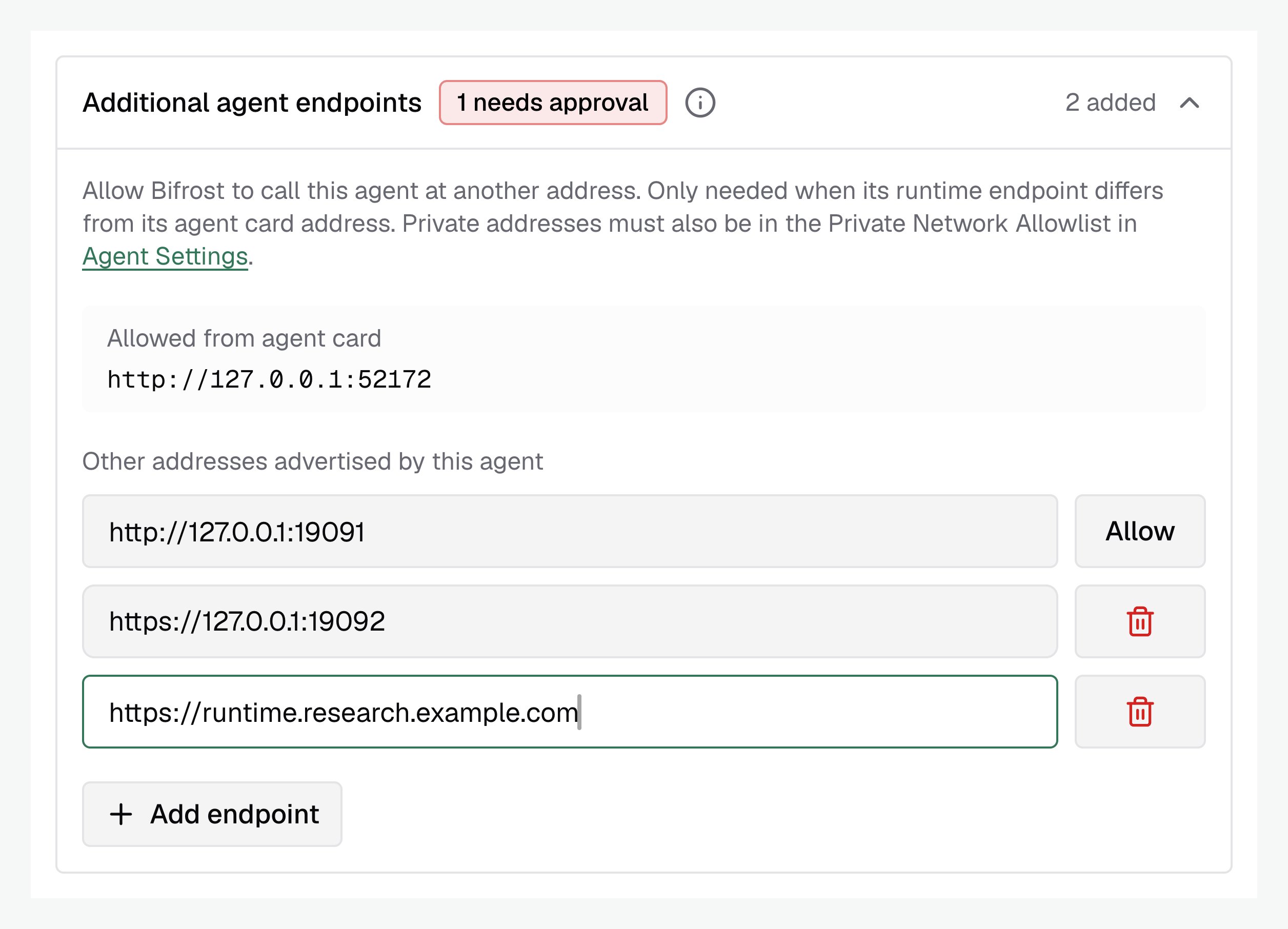
OAuth discovery and token requests follow the network allowlist. The credential-origin list controls runtime destinations. A discovered token endpoint must still share the discovery document’s origin. Configure
token_url explicitly when your authorization server uses a separate token origin.
Override the card
Turn on Configure manually when the card’s requirements are incorrect, cannot be represented by the automatic selection, or differ from the authentication you want Bifrost to send. You can then choose the type and headers yourself. For example, if the card requires anAuthorization header but your server accepts X-Agent-Key, enable Configure manually, select Headers, and configure X-Agent-Key with the value your server expects.
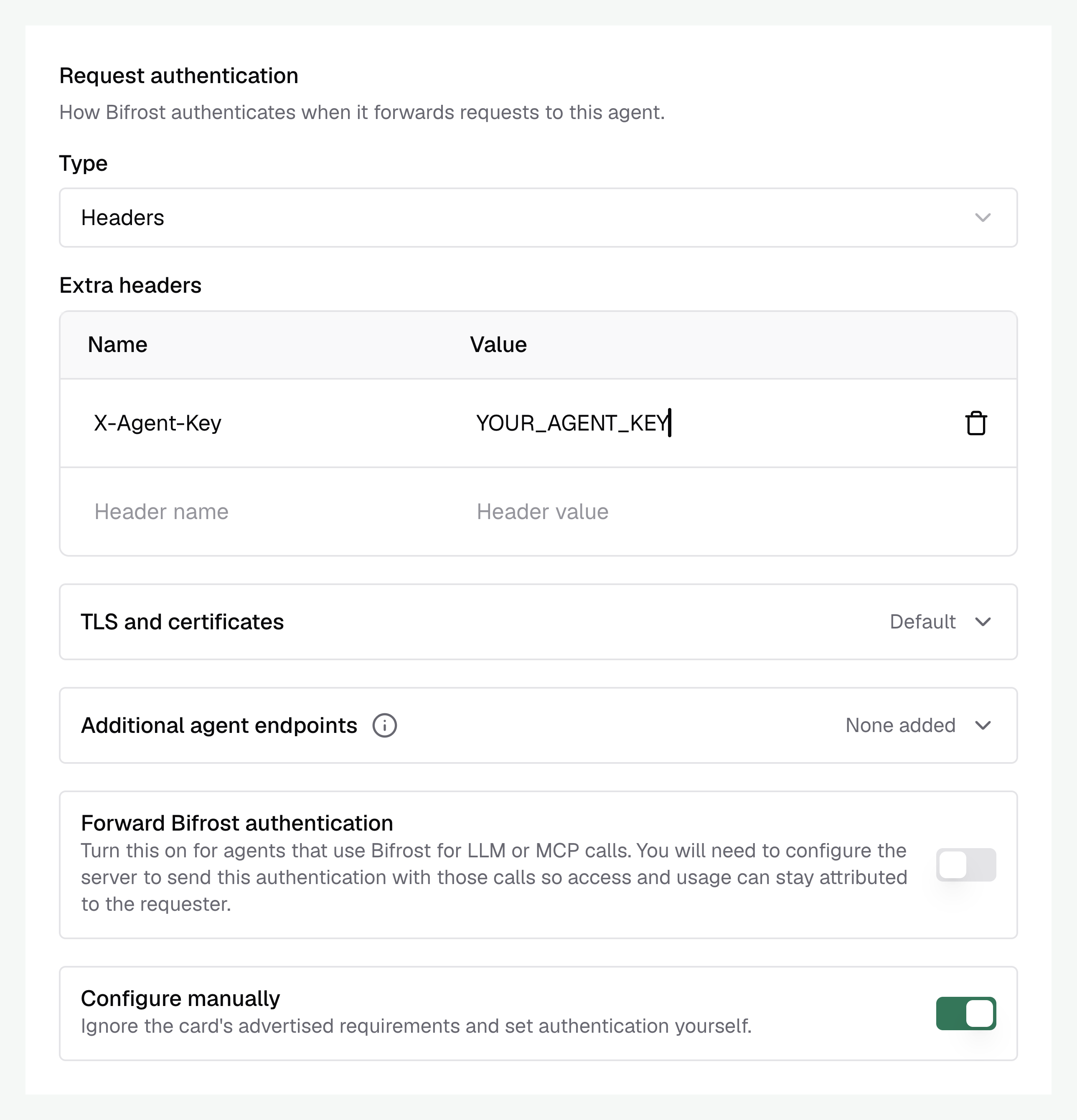
Forward the caller’s Bifrost authentication
Bifrost strips the caller’s Bifrost authentication credential before forwarding a request to an agent by default. This keeps the gateway credential from being sent to an external server unless you explicitly configure that registration to receive it. If your agent uses Bifrost’s LLM or MCP gateway, enable Forward Bifrost authentication so it can reuse the caller’s Bifrost credential on those calls. Configure the agent server to send that credential to Bifrost, preserving the original caller’s access rules and usage attribution. This toggle controls the accepted Bifrost credential. Other application headers follow the normal forwarding rules; they do not require this toggle. Bifrost forwards the credential it accepted for the incoming request, using that credential’s header. For a caller usingx-bf-vk, the agent receives x-bf-vk. This is opt-in and disabled by default.
With forwarding enabled, the caller’s credential follows this path:
The gateway toggle covers Bifrost → agent. Your server must handle agent → Bifrost. Keep the forwarded credential scoped to the request, including asynchronous task work, and send it only to your Bifrost endpoint.
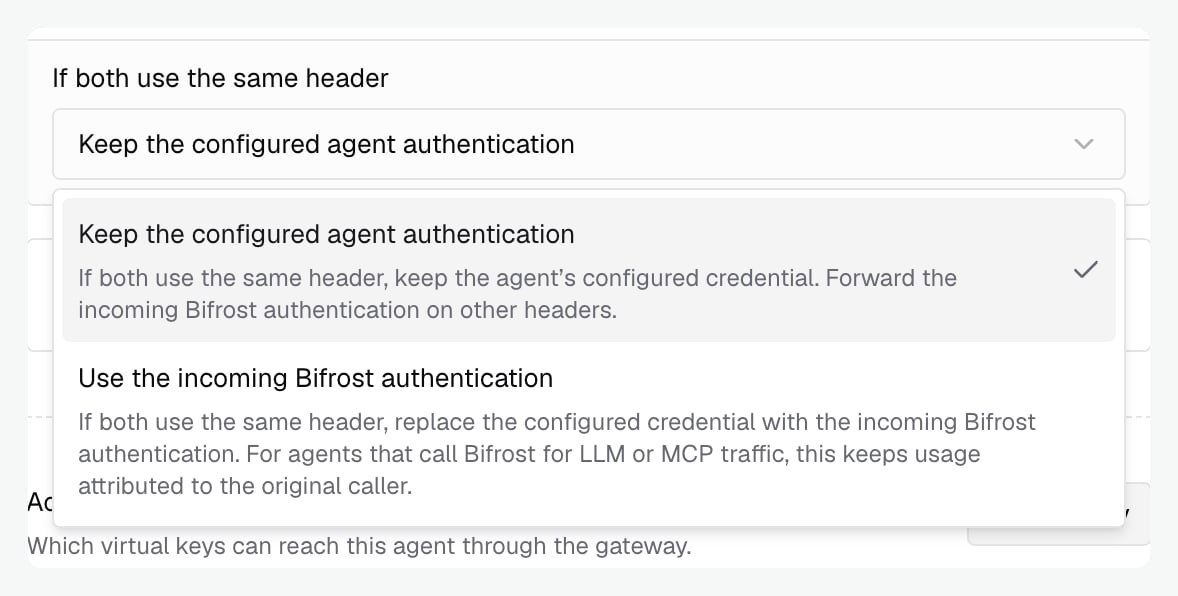
If both use the same header
Configured request authentication and forwarded Bifrost authentication can coexist when their headers differ. For example,X-Agent-Key authenticates the agent server while x-bf-vk identifies the caller for later Bifrost calls.
When both need the same header, select a policy:
TLS and certificates
Expand TLS and certificates for card authentication or request authentication. Each connection has its own settings.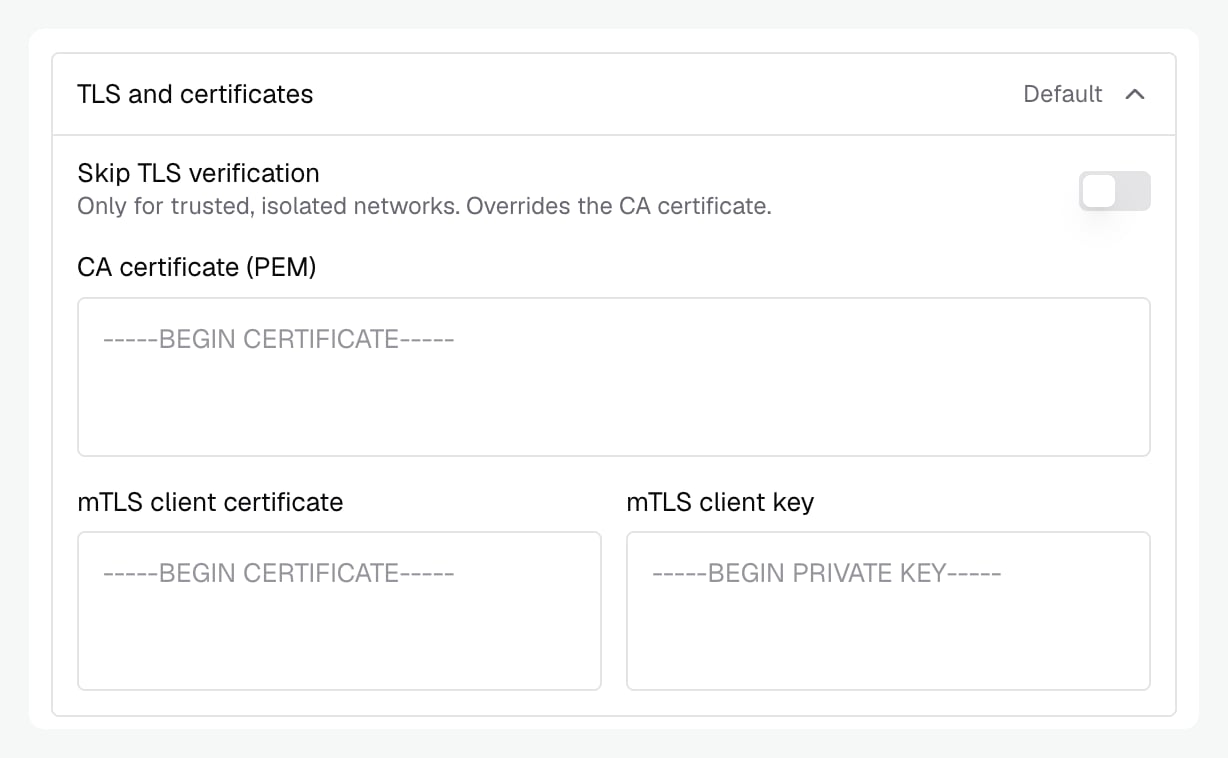
TLS settings here configure Bifrost’s upstream connections. They do not configure the certificate clients use to connect to Bifrost.
OAuth requirements and discovery
OAuth requirements and discovery
Agent authentication supports the shared OAuth client-credentials grant. Interactive sign-in and per-user OAuth consent are not part of agent registration.Bifrost sends the client ID and secret in the token request form, then uses the returned access token as a Bearer credential. Your authorization server must accept this client-authentication method. Configure scopes and resource when your authorization server requires them.Provide
token_url directly, or use discovery_url. With only provider_url, Bifrost reads /.well-known/oauth-authorization-server at that URL. A discovered token endpoint must have the same origin as its discovery document. If your authorization server publishes a token endpoint on another origin, set token_url explicitly.The connection’s TLS settings also apply to OAuth discovery and token requests. Card authentication and request authentication remain separate, even when they use the same OAuth client.Configure authentication through config.json or Helm
Configure authentication through config.json or Helm
This example uses different credentials for card discovery and runtime requests. Replace the URLs with your agent’s endpoints and provide the referenced environment variables.
- config.json
- Helm values
advanced records the manual configuration choice. security_schemes, when supplied, names the card requirements your configuration satisfies. forward_accepted_credential_overrides_auth: true selects the incoming credential on a header collision. Use runtime_auth: { "type": "none", "advanced": true } when the forwarded credential is the only runtime authentication.Agent registrations are reconciled at startup. Keep the complete registration, including access grants, in the declaration you manage. See configuration for source-of-truth behavior.When authentication fails
Next, configure Agent access to choose who can call the registered agent.