

Overview
MCP servers can offer more than tools. Prompts are reusable message templates that a user picks in their MCP client, and resources are documents or data the client can read, such as files or records. Bifrost discovers both from every connected MCP server and serves them through its MCP gateway, next to tools. An MCP client connected to Bifrost sees the prompts and resources of all the servers it can reach, without connecting to each one. Key benefits:- One connection - Clients get prompts and resources from every server through Bifrost.
- Same access rules as tools - A caller reaches a server’s prompts and resources when it can reach that server.
- Per-server control - Choose which prompts and resources each server exposes.
- Logged and governed - Reads appear in MCP logs and go through governance, like tool calls.
Prompts and resources are for MCP clients. They are not offered to models in chat completions, the Responses API, or Agent Mode, which use tools only.
How they appear to clients
Reads go back to the server that listed the item, and arguments for prompts and templates can be auto-completed when the server supports it.
If two servers list the same resource URI, only one of them serves it, and you cannot choose which. Keep URIs distinct across servers, or hide the duplicate with an allow-list.
Who can reach them
A caller can use a server’s prompts and resources when it can reach that server, by the same rules as tools:- A virtual key reaches the servers assigned to it.
- A Virtual MCP endpoint reaches the servers it draws its tools from.
- Request filters narrow which servers a request reaches.
Choosing what a server exposes
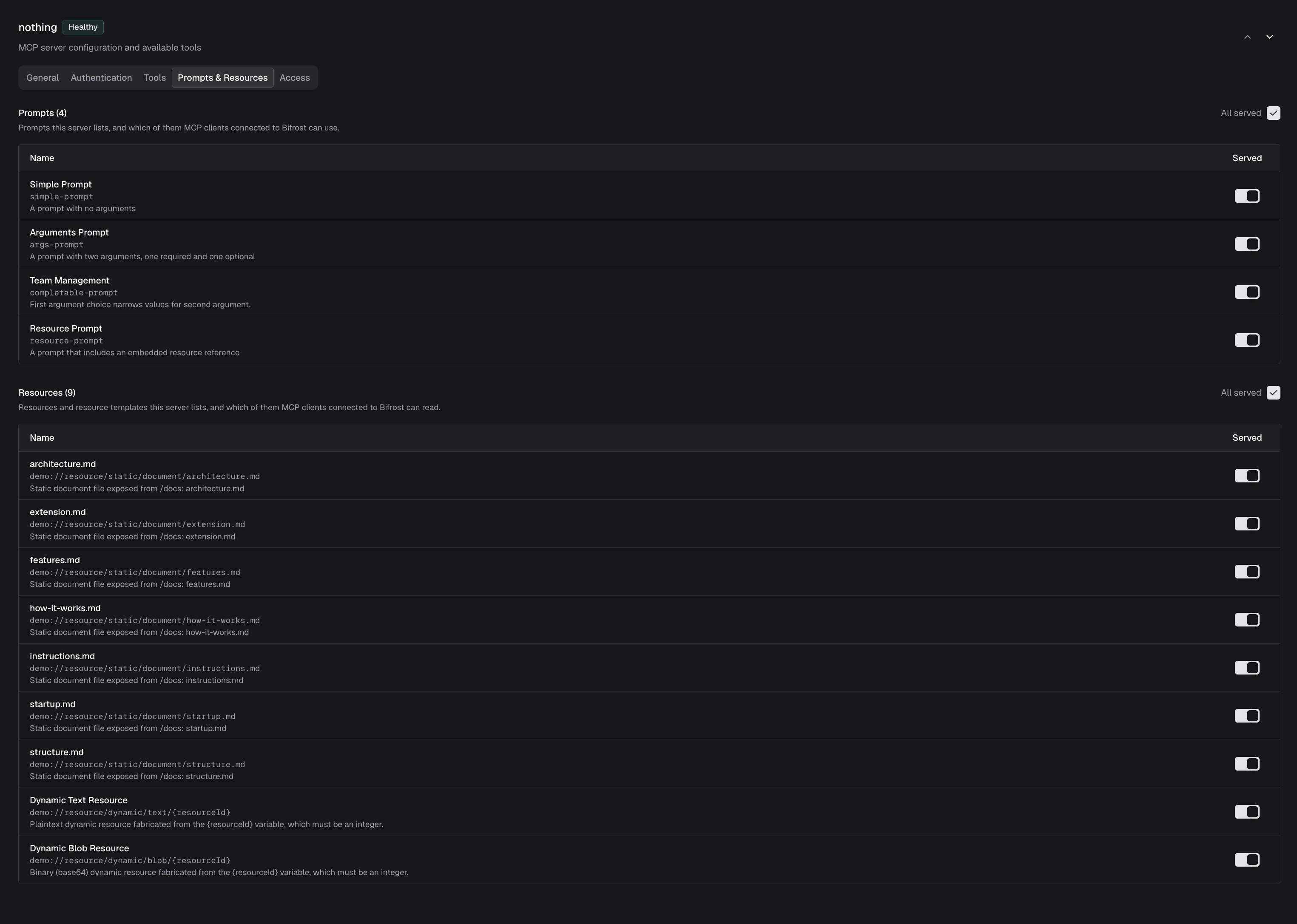
Each server exposes all of its prompts and resources by default. Use its allow-lists to expose fewer, or none.- Web UI
- config.json
- Open MCP Servers and select the server.
- Open the Prompts & Resources tab, which lists what the server offers.
- Choose which prompts and resources to expose.
-
Save the server.
Keeping lists up to date
Bifrost refreshes prompts and resources along with tools, on each server’s tool sync interval. A server with a persistent connection can also announce a change, and Bifrost picks it up straight away. See Dynamic Tool Discovery. To pick up a change immediately on any server, use Refresh tools on the server, which re-reads its prompts and resources too.Resource subscriptions are not supported through the gateway. A client that wants the latest content of a resource reads it again.
Logs and governance
Each prompt a client fetches and each resource it reads is recorded in MCP Logs, with the prompt name or resource URI in place of a tool name. Governance checks and accounts for reads as it does for tool calls, without the per-tool check. Enterprise guardrails apply to tool calls only, not to prompts or resource reads.Next Steps
Gateway Authentication
Connect MCP clients to Bifrost
Virtual MCPs
Bundle servers behind one endpoint
Tool Filtering
Control which tools and servers callers reach
Connections
How connection modes affect updates