

Overview
DeepSeek is a provider with a dedicated Bifrost provider implementation. By default, Chat Completions, the Responses API, and Text Completions all use DeepSeek’s OpenAI-compatible endpoints. Each key (or an individual alias) can opt into routing Chat Completions and the Responses API through DeepSeek’s Anthropic-compatible endpoint instead, using theuse_anthropic_endpoints toggle. Key characteristics:
- OpenAI-compatible by default - Chat Completions use
/chat/completions, authenticated with a bearer token - Optional Anthropic-compatible mode - Set
use_anthropic_endpointson a key (or override it per-alias) to route Chat Completions and the Responses API through/anthropic/v1/messages, authenticated withx-api-key, using the shared Anthropic request/response converters - Streaming support - Server-Sent Events for chat, responses, and text completions, in both endpoint modes
- Tool calling - Function tools are supported on both the OpenAI-compatible and Anthropic-compatible paths
- Reasoning support - Reasoning parameters are mapped through the OpenAI converters by default, or the Anthropic converters when Anthropic-compatible mode is enabled
- Beta text completions - Text/FIM completions always use DeepSeek’s OpenAI-compatible
/beta/completionsendpoint, regardless ofuse_anthropic_endpoints
Supported Operations
Unsupported Operations (❌): Embeddings, Image Generation, Speech, Transcriptions, Files, Batch, cached content, containers, token counting, compaction, OCR, rerank, video, and passthrough are not supported by the upstream DeepSeek API through this provider. These return
UnsupportedOperationError.Setup & Configuration
Configure DeepSeek as a provider.- Web UI
- config.json
- API
- Go SDK
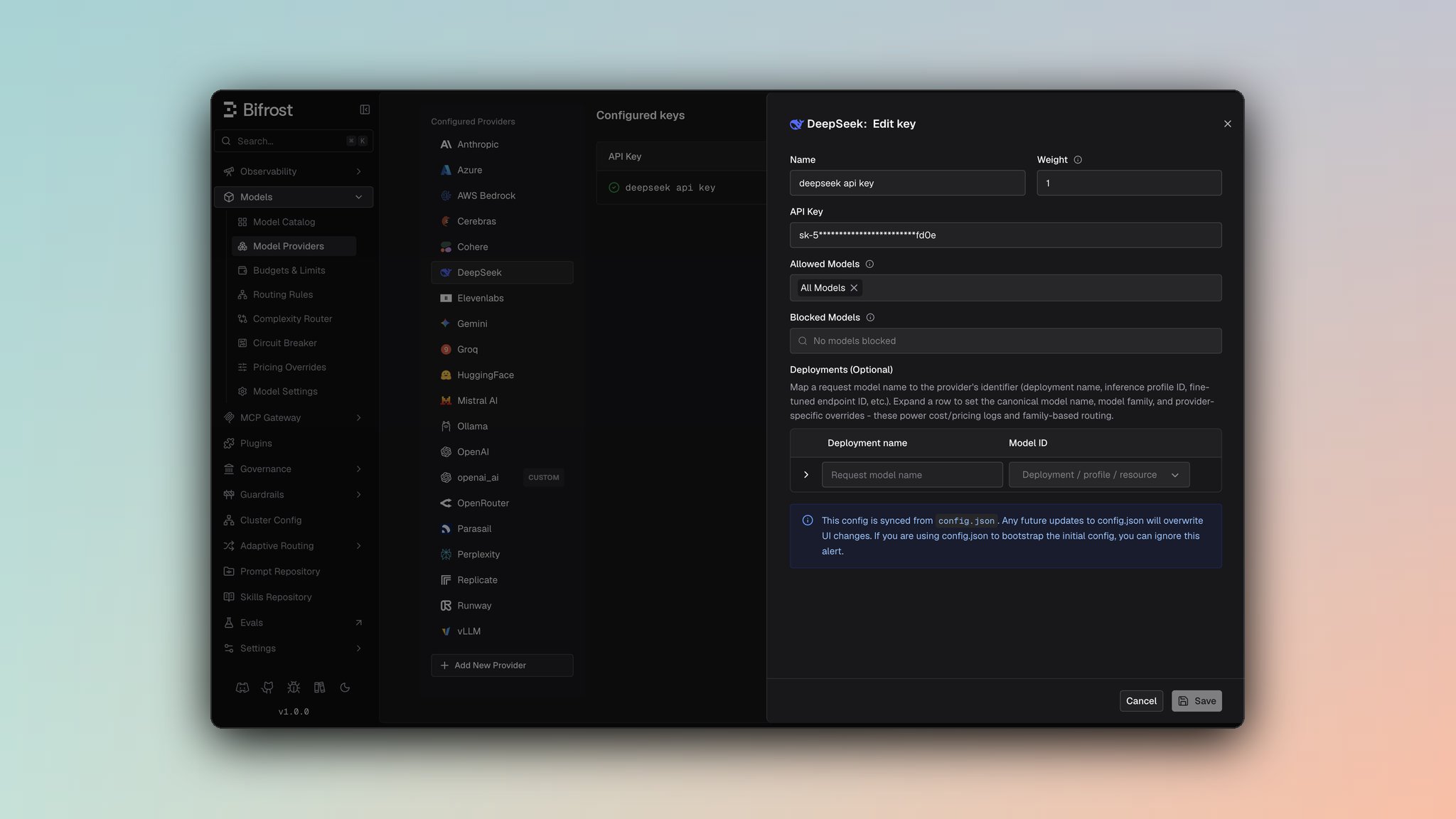
- Navigate to Models > Model Providers. Look for DeepSeek under Configured Providers. If it is missing, click on Add New Provider and select DeepSeek.
- Click Add Key or edit an existing key.
- Set a name for your key.
- Paste your API key directly or use an environment variable (for example,
env.DEEPSEEK_API_KEY). - Set Allowed Models to All Models (default) or the specific model allowlist you want this key to serve.
- Leave Use Anthropic Endpoints off to use DeepSeek’s OpenAI-compatible endpoints (the default), or turn it on to route Chat Completions and the Responses API through DeepSeek’s Anthropic-compatible endpoint instead. See Anthropic-Compatible Endpoints below.
- Save the provider configuration.
Anthropic-Compatible Endpoints (optional)
DeepSeek exposes an Anthropic-compatible Messages endpoint (/anthropic/v1/messages) alongside its default OpenAI-compatible Chat Completions API. Setting use_anthropic_endpoints routes Chat Completions and the Responses API through that endpoint instead — Text Completions are unaffected and always use /beta/completions.
The setting can be configured per key, and overridden per model alias:
- Key-level - Sets the default endpoint mode for every request made with that key.
- Alias-level - Overrides the key-level default for a single alias, so one key can serve some aliases through the OpenAI-compatible endpoints and others through the Anthropic-compatible endpoint.
- Web UI
- API
- config.json
On the key form, toggle Use Anthropic Endpoints (off by default). To override this for a specific alias, open that alias’s expanded row in the deployments table and toggle Use Anthropic endpoints under Deepseek overrides — this takes priority over the key-level setting for that alias only.
1. Chat Completions
Request Parameters
By default, DeepSeek Chat Completions use DeepSeek’s OpenAI-compatible/chat/completions endpoint, authenticated with Authorization: Bearer <key>. For the full parameter reference and message conversion behavior, see OpenAI Chat Completions.
When use_anthropic_endpoints is enabled, requests are sent instead to DeepSeek’s Anthropic-compatible endpoint (/anthropic/v1/messages), authenticated with x-api-key: <key>, and built using the shared Anthropic converters. For that parameter reference and message conversion behavior, see Anthropic Chat Completions.
Authentication
Bifrost sets the correct header automatically based on the resolved endpoint mode for the request.
Reasoning Parameter
- Default (OpenAI-compatible): Reasoning parameters follow the same conventions as the OpenAI provider (for example,
reasoning.effort). use_anthropic_endpoints: true: Reasoning/thinking parameters are mapped through the Anthropic converters (reasoning→thinking), the same as the Anthropic provider. Reasoning effort is sent asoutput_config.effort(Anthropic’s own field placement), not nested underthinking.reasoning_effortas DeepSeek’s native API documents it.
Forced Tool Choice
DeepSeek models run with thinking enabled by default, even when noreasoning parameter is set, and reject certain forced tool_choice combinations while thinking is on. Bifrost automatically disables thinking (thinking: {"type": "disabled"}) to avoid this, but which combination triggers the fix depends on the endpoint mode:
- Default (OpenAI-compatible): Thinking is disabled when
tool_choiceis the generic"required"string (forcing some tool call, without pinning a specific one). use_anthropic_endpoints: true: Thinking is disabled whentool_choicepins a specific named function, for both Chat Completions and the Responses API.tool_choice: "required"/"any"is left untouched in this mode, since DeepSeek’s Anthropic-compatible endpoint accepts that combination with thinking on.
Extra Parameters
DeepSeek enables passthrough extra parameters for Chat Completions and Text Completions when using the default OpenAI-compatible endpoints. Extra parameters are not passed through by default whenuse_anthropic_endpoints is enabled.
2. Responses API
-
Default (OpenAI-compatible): Responses requests fall back to Chat Completions, the same conversion pattern used by other OpenAI-compatible-only providers:
-
use_anthropic_endpoints: true: Responses requests are sent natively to DeepSeek’s Anthropic-compatible endpoint at/anthropic/v1/messages— there is no internal conversion to Chat Completions. Both non-streaming and streaming Responses requests build an Anthropic-format request body directly from theBifrostResponsesRequestand convert the response back to Bifrost’s Responses format.
3. Text Completions
DeepSeek supports beta text/FIM (Fill-In-Middle) completions through/beta/completions, regardless of use_anthropic_endpoints:
Setting
suffix alongside prompt puts the request in FIM mode: DeepSeek generates the text that belongs between prompt and suffix rather than a plain continuation of prompt.
Response returns choices[].text with completion text.
4. Text Completions Streaming
Streaming text completions use DeepSeek’s OpenAI-compatible SSE format on/beta/completions.
5. List Models
Lists available models from DeepSeek through/models.
Unsupported Features
Caveats
Peak / Off-Peak Pricing
Peak / Off-Peak Pricing
Severity: Medium
Behavior: DeepSeek bills the V4 models at two different rates depending on the time of day. Peak is Monday-Friday
01:00-04:00 and 06:00-10:00 UTC; every other hour, weekends included, is off-peak at half the peak rate, across cache-hit input, cache-miss input, and output alike
Impact: Bifrost prices this through the generic time-of-day fields (off_peak_cost_multiplier and peak_hours) on the model’s pricing row. If those fields are absent from the pricing datasheet in use, DeepSeek requests bill at the peak rate around the clock, overstating cost for most of the week — set them with a custom pricing override to correct it. Peak vs off-peak is decided by the request’s start time, so a stream crossing a boundary bills entirely at its start-time rate
Code: offPeakMultiplier and scaleUsageCost in framework/modelcatalog/datasheet/cost.goDefault Base URL
Default Base URL
Severity: Low
Behavior: DeepSeek defaults to
https://api.deepseek.com
Impact: Custom DeepSeek-compatible deployments must override network_config.base_url
Code: NewDeepSeekProvider sets the default base URL when no provider-level base URL is configuredBeta Text Completion Endpoint
Beta Text Completion Endpoint
Severity: Medium
Behavior: Text completions are routed to
/beta/completions
Impact: FIM/text completion behavior follows DeepSeek’s beta API contract and may differ from standard OpenAI /completions
Code: TextCompletion and TextCompletionStream use /beta/completionsUser Field Size Limit (Text Completions)
User Field Size Limit (Text Completions)
Severity: Low
Behavior: User field > 64 characters is silently dropped
Impact: Longer user identifiers are lost
Code:
SanitizeUserField enforces 64-char max in the shared OpenAI converter, still used for Text Completionsuse_anthropic_endpoints Resolution Order
use_anthropic_endpoints Resolution Order
Severity: Low
Behavior: An alias-level
use_anthropic_endpoints override always wins over the key-level setting for that alias; if neither is set, requests default to the OpenAI-compatible endpoints
Impact: A single key can serve some aliases through OpenAI-compatible endpoints and others through the Anthropic-compatible endpoint
Code: anthropic.ResolveUseAnthropicEndpoints in core/providers/anthropic/utils.go, used by ChatCompletion, ChatCompletionStream, Responses, and ResponsesStream in core/providers/deepseek/deepseek.goForced Tool Choice Disables Thinking (Mode-Dependent)
Forced Tool Choice Disables Thinking (Mode-Dependent)
Severity: Medium
Behavior: When thinking is on (the default), Bifrost forces
thinking: {"type": "disabled"} in the outbound request — for the generic tool_choice: "required" on the default OpenAI-compatible endpoint, or for a tool_choice pinning a specific named function on the Anthropic-compatible endpoint
Impact: Prevents DeepSeek’s "Thinking mode does not support this tool_choice" error for the combination each endpoint mode actually rejects; the other combination is left untouched on each path
Code: disableThinkingForForcedToolChoice in core/providers/deepseek/deepseek.go (OpenAI-compatible path); core/providers/anthropic/chat.go and core/providers/anthropic/responses.go, gated on Provider == DeepSeek (Anthropic-compatible path)Extra Parameters Not Passed Through in Anthropic-Compatible Mode
Extra Parameters Not Passed Through in Anthropic-Compatible Mode
Severity: Low
Behavior: Extra parameters are merged into the outbound request body by default on the OpenAI-compatible path (Chat and Text Completions), but not on the Anthropic-compatible path
Impact: Provider-specific
extra_params set on a request may be silently dropped when use_anthropic_endpoints is enabled
Code: BifrostContextKeyPassthroughExtraParams is set in the OpenAI-compatible branches of ChatCompletion/ChatCompletionStream (and in TextCompletion/TextCompletionStream), but not in the Anthropic-compatible branches, in core/providers/deepseek/deepseek.goMixed Endpoint Compatibility
Mixed Endpoint Compatibility
Severity: Medium
Behavior: Text Completions always use DeepSeek’s OpenAI-compatible beta endpoint (
/beta/completions, bearer token auth) regardless of use_anthropic_endpoints. Chat Completions and the Responses API use DeepSeek’s OpenAI-compatible endpoints by default, or its Anthropic-compatible endpoint (/anthropic/v1/messages, x-api-key auth) when use_anthropic_endpoints is enabled
Impact: When Anthropic-compatible mode is enabled, parameters and behavior documented for the OpenAI provider no longer apply to DeepSeek Chat Completions or Responses — refer to the Anthropic provider docs for those instead
Code: ChatCompletion, ChatCompletionStream, Responses, and ResponsesStream in core/providers/deepseek/deepseek.go branch on anthropic.ResolveUseAnthropicEndpoints; TextCompletion and TextCompletionStream always delegate to the openai package