

core/providers/huggingface) implements a complex integration that supports multiple inference providers (like hf-inference, fal-ai, cerebras, sambanova, etc.) through a unified interface.
Overview
The Hugging Face provider implements custom logic for:- Multiple inference backends: Routes requests to 19+ different inference providers
- Dynamic model aliasing: Transforms model IDs based on provider-specific mappings
- Heterogeneous request formats: Supports JSON, raw binary, and base64-encoded payloads
- Provider-specific constraints: Handles varying payload limits and format restrictions
Supported Inference Providers
The Hugging Face provider supports routing to 19 inference backends. Below is the current list of supported providers and their capabilities (as of August 2026):Provider capabilities may change over time. For the most up-to-date information, refer to the Hugging Face Inference Providers documentation. Also checkmarks (✅) indicate capabilities supported by the inference provider itself.
All Chat-supported models automatically support Responses(
v1/responses) as well via Bifrost’s internal conversion logic.Setup & Configuration
Configure Hugging Face as a provider.- Web UI
- config.json
- API
- Go SDK
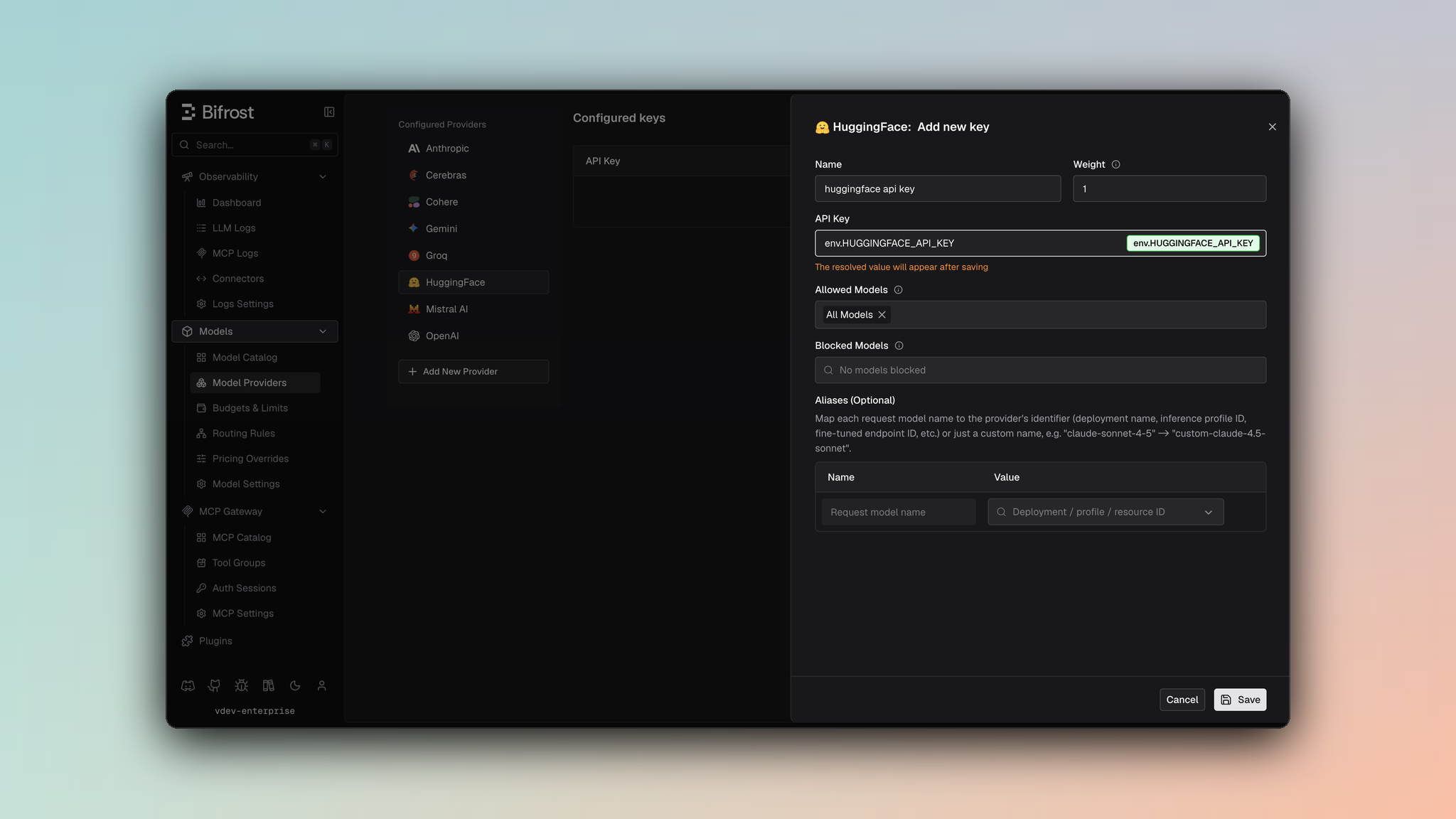
- Navigate to Models > Model Providers. Look for Hugging Face under Configured Providers. If it is missing, click on Add New Provider and select Hugging Face.
- Click Add Key or edit an existing key.
- Set a name for your key.
- Paste your API key directly or use an environment variable (for example,
env.HUGGINGFACE_API_KEY). - Set Allowed Models to All Models (default) or the specific model allowlist you want this key to serve.
- Save the provider configuration.
huggingface/<inference_provider>/<model_id> so Bifrost can route each call to the correct Hugging Face inference backend.
Model Aliases & Identification
Unlike standard providers where model IDs are direct strings (e.g.,gpt-4), Hugging Face models in Bifrost are identified by a composite key to route requests to the correct inference backend.
Format: huggingface/[inference_provider]/[model_id]
- inference_provider: The backend service (e.g.,
hf-inference,fal-ai,cerebras). - model_id: The actual model identifier on Hugging Face Hub (e.g.,
meta-llama/Meta-Llama-3-8B-Instruct).
huggingface/hf-inference/meta-llama/Meta-Llama-3-8B-Instruct
This parsing logic is handled in utils.go and models.go, allowing Bifrost to dynamically route requests based on the model string.
Request Handling Differences
The Hugging Face provider handles various tasks (Chat, Speech, Transcription) which often require different request structures depending on the underlying inference provider.Inference Provider Constraints
Different inference providers have specific limitations and requirements:Payload Limit
HuggingFace API enforces a 2 MB request body limit across all request types (Chat, Embedding, Speech, Transcription). This constraint applies to:- JSON request payloads
- Raw audio bytes in transcription requests
- Any other request body data
fal-ai Audio Format Restrictions
The fal-ai provider has strict audio format requirements:
- Supported Format: Only MP3 (
audio/mpeg) is accepted - Rejected Formats: WAV (
audio/wav) and other formats are explicitly rejected - Encoding: Audio must be provided as a base64-encoded Data URI in the
audio_urlfield
core/providers/huggingface/transcription.go):
Speech (Text-to-Speech)
For Text-to-Speech (TTS) requests, the implementation differs from a standard pipeline request:- No Pipeline Tag: The
HuggingFaceSpeechRequeststruct does not include apipeline_tagfield in the JSON body, even though the model might be tagged astext-to-speechon the Hub. - Structure:
- Implementation: See
core/providers/huggingface/speech.go.
Transcription (Automatic Speech Recognition)
The Transcription implementation (core/providers/huggingface/transcription.go) exhibits a “pattern-breaking” behavior where the request format changes significantly based on the inference provider.
1. hf-inference (Raw Bytes)
When using the standard hf-inference provider, the API expects the raw audio bytes directly in the request body, not a JSON object.
- Content-Type: Audio mime type (e.g.,
audio/mpeg). - Body: Raw binary data from
request.Input.File. - Payload Limit: Maximum 2 MB for the raw audio bytes.
- Logic:
- URL Pattern:
/hf-inference/models/{model_name}(no/pipeline/suffix for ASR).
2. fal-ai (JSON with Base64 Data URI)
When using fal-ai through HuggingFace provider, the API expects a JSON body containing the audio as a base64-encoded Data URI.
- Content-Type:
application/json. - Body: JSON object with
audio_urlfield. - Audio Format Restriction: Only MP3 (
audio/mpeg) is supported. WAV files are rejected. - Encoding: Audio is base64-encoded and prefixed with a Data URI scheme.
- Logic:
Dual Fields in types.go
To support these divergent requirements, the HuggingFaceTranscriptionRequest struct in types.go contains fields for both scenarios, which are used mutually exclusively:
Inputs: Used when JSON body is sent with raw bytes (most providers excepthf-inferenceandfal-ai).AudioURL: Used exclusively forfal-ai, must be a base64-encoded Data URI with MP3 format.- Note: For
hf-inference, the entire request body is raw audio bytes-no JSON structure is used at all.
Image Generation
The Hugging Face provider supports image generation through multiple inference providers, each with different request formats and capabilities.Supported Inference Providers
Request Conversion
The provider automatically routes to the appropriate inference provider based on the model string format:huggingface/{provider}/{model_id}.
1. hf-inference
The simplest format, only requires a prompt:
- Request Structure:
- Response: Raw image bytes (PNG/JPEG), automatically base64-encoded in Bifrost response
- Limitations: No size, quality, or other parameter support
2. fal-ai
The most feature-rich provider with extensive parameter support:
- Request Structure:
- Parameter Mappings:
n→num_imagessize(e.g.,"1024x1024") →image_size: {width: 1024, height: 1024}output_format: "jpg"→output_format: "jpeg"(normalized)response_format: "b64_json"→sync_mode: truemoderation: "low"→enable_safety_checker: false
- Response: JSON with
images[]array containingurland/orb64_jsonfields - Extra Parameters: Supports
guidance_scale,acceleration,enable_prompt_expansion,enable_safety_checkerviaextra_params
3. nebius
Uses Nebius-specific format with support for LoRAs:
- Request Structure: Uses
NebiusImageGenerationRequest(see Nebius provider docs) - Parameter Mappings:
size(e.g.,"1024x1024") →widthandheightintegersoutput_format→response_extension(normalized: “jpeg” → “jpg”)seed,negative_prompt→ Passed directlyextra_params.num_inference_steps→num_inference_stepsextra_params.guidance_scale→guidance_scaleextra_params.loras→loras[]array (supports both map and array formats)
- Response: Uses Nebius response format, converted to Bifrost format
4. together
OpenAI-compatible format:
- Request Structure:
- Parameter Mappings:
response_format: "b64_json"→response_format: "base64"num_inference_steps→steps
- Response: OpenAI-compatible format with
data[]array
Response Conversion
Each provider’s response is converted to Bifrost’s unifiedBifrostImageGenerationResponse format:
- hf-inference: Raw bytes → base64-encoded in
b64_json - fal-ai:
images[]array →ImageData[]withurland/orb64_json - nebius: Uses Nebius converter → Bifrost format
- together:
data[]array →ImageData[]withb64_jsonand/orurl
Image Generation Streaming
Onlyfal-ai supports streaming for HuggingFace image generation. Streaming uses Server-Sent Events (SSE) format.
Streaming Request Format
Streaming Response Format
- Event Type: Server-Sent Events with
data:prefix - Chunk Format: Each SSE event contains JSON with
images[]array - Stream Processing:
- Each image in
images[]becomes a separate stream chunk - Chunks have
type: "partial"until stream completion - Final chunk has
type: "completed"with the last image data - Images can be delivered as
url(public URL) orb64_json(base64-encoded)
- Each image in
- URL Pattern:
/fal-ai/{model_id}/stream(appended to base URL)
Streaming Behavior
- Chunk Indexing: Each chunk has an
Indexfield (0, 1, 2, …) andChunkIndexfor ordering - Completion: Final chunk includes all image data from the last SSE event
- Error Handling: Errors in SSE format are parsed and sent as
BifrostErrorchunks
Example Usage
- Gateway - fal-ai
- Gateway - Streaming (fal-ai only)
- Go SDK
- Go SDK - Streaming
Provider-Specific Notes
- fal-ai:
- When
response_format="b64_json",sync_modeis automatically set totrue - When
moderation="low",enable_safety_checkeris set tofalse output_format: "jpg"is normalized to"jpeg"
- When
- nebius:
response_extension: "jpeg"is normalized to"jpg"(Nebius inconsistency)- LoRAs can be provided as
{"url": scale}map or[{"url": "...", "scale": ...}]array
- hf-inference:
- Minimal format, only prompt supported
- Returns raw image bytes (automatically base64-encoded)
- together:
- OpenAI-compatible format
response_format: "b64_json"is converted to"base64"
Image Edit
Onlyfal-ai supports image editing for HuggingFace. Image edit requests are routed to fal-ai inference provider.
Request Parameters
Request Conversion
- Model Validation: Only
fal-aiinference provider supports image edit. Other providers returnUnsupportedOperationError. - Image Conversion: Each image in
bifrostReq.Input.Imagesis converted to a base64 data URL:- Format:
data:{mimeType};base64,{base64Data} - MIME type detection:
image/jpeg,image/webp,image/png(viahttp.DetectContentType)
- Format:
- Image Field Selection: The provider uses different image fields based on model capabilities:
- Multi-image models (e.g.,
fal-ai/flux-2/edit,fal-ai/flux-2-pro/edit): Usesimage_urlsarray field - Single-image models (e.g.,
fal-ai/flux-pro/kontext,fal-ai/flux/dev/image-to-image): Usesimage_urlstring field - Override:
ExtraParams["use_image_urls"]can override the automatic selection - Fallback: For unknown models, uses
image_urlif single image,image_urlsif multiple images
- Multi-image models (e.g.,
- Parameter Mapping:
prompt→Promptn→NumImagessize→ImageSize(converted from"WxH"string to{Width, Height}object)output_format→OutputFormat("jpg"normalized to"jpeg")seed(viaExtraParams["seed"]) →Seednum_inference_steps(viaExtraParams["num_inference_steps"]) →NumInferenceStepsguidance_scale(viaExtraParams["guidance_scale"]) →GuidanceScaleacceleration(viaExtraParams["acceleration"]) →Accelerationenable_safety_checker(viaExtraParams["enable_safety_checker"]) →EnableSafetyChecker
- Non-streaming: Uses the same response conversion as image generation (see Image Generation section)
- Streaming: fal-ai streaming responses use Server-Sent Events (SSE) format:
- Event Type: Server-Sent Events with
data:prefix - Chunk Format: Each SSE event contains JSON with
images[]array (ordata.images[]in API envelope format) - Stream Processing:
- Each image in
images[]becomes a separate stream chunk - Chunks have
type: "image_edit.partial_image"until stream completion - Final chunk has
type: "image_edit.completed"with the last image data - Images can be delivered as
url(public URL) orb64_json(base64-encoded)
- Each image in
- Response Structure: Handles both API envelope format (
Data.Images) and legacy flattened format (Images) - URL Pattern:
/fal-ai/{model_id}/stream(appended to base URL)
- Event Type: Server-Sent Events with
/fal-ai/{model_id} (non-streaming), /fal-ai/{model_id}/stream (streaming)
Image Variation
Image variation is not supported by HuggingFace.
Raw JSON Body Handling
While most providers strictly serialize a struct to JSON, the Hugging Face provider’sTranscription method demonstrates a hybrid approach depending on the inference provider:
Embedding Requests
For embedding requests, different providers expect different field names:- Standard providers (most): Use
inputfield hf-inference: Usesinputsfield (plural)
embedding.go populates both fields to ensure compatibility across providers.
Differences in Inference Provider Constraints
This multi-mode approach allows the provider to support diverse API contracts within a single implementation structure, accommodating:- Legacy endpoints that expect raw binary data
- Modern JSON APIs with different schema expectations
- Third-party providers (like
fal-ai) with custom requirements - Performance optimizations (raw bytes avoid JSON overhead for
hf-inference)
Model Discovery & Caching
The provider implements sophisticated model discovery using the Hugging Face Hub API:List Models Flow
- Parallel Queries: Fetches models from multiple inference providers concurrently
- Filter by Pipeline Tag: Uses
pipeline_tag(e.g.,text-to-speech,feature-extraction) to determine supported methods - Aggregate Results: Combines responses from all providers into a unified list
- Model ID Format: Returns models as
huggingface/{provider}/{model_id}
Provider Model Mapping Cache
The provider maintains a cache (modelProviderMappingCache) to map Hugging Face model IDs to provider-specific model identifiers:
Best Practices
When working with the Hugging Face provider:- Check Payload Size: Ensure request bodies are under 2 MB
- Audio Format: Use MP3 for
fal-ai, avoid WAV files - Model Aliases: Always specify provider in model string:
huggingface/{provider}/{model} - Error Handling: Implement retries for 404 errors (cache invalidation scenarios)
- Provider Selection: Use
autofor automatic provider selection based on model capabilities - Pipeline Tags: Verify model’s
pipeline_tagmatches your use case (chat, embedding, TTS, ASR)