

Overview
Replicate is architecturally different from other providers in Bifrost. It uses a prediction-based API where every request creates a “prediction” that runs asynchronously. Each model on Replicate defines its own input schema, making it highly flexible but requiring model-specific parameter knowledge.Key Architectural Differences
- Prediction-Based System: All operations create predictions via
/v1/predictionsor deployment endpoints - Model-Specific Inputs: Each model has its own parameter schema (use
extra_paramsfor model-specific fields) - Async/Sync Modes: Predictions can run synchronously (with
Prefer: waitheader) or asynchronously (with polling) - Flexible Output: Output can be strings, arrays, URLs, or data URIs depending on the model
Supported Operations
List Models returns account-specific deployments only, not all public models on Replicate.
Setup & Configuration
Configure Replicate as a provider.- Web UI
- config.json
- API
- Go SDK
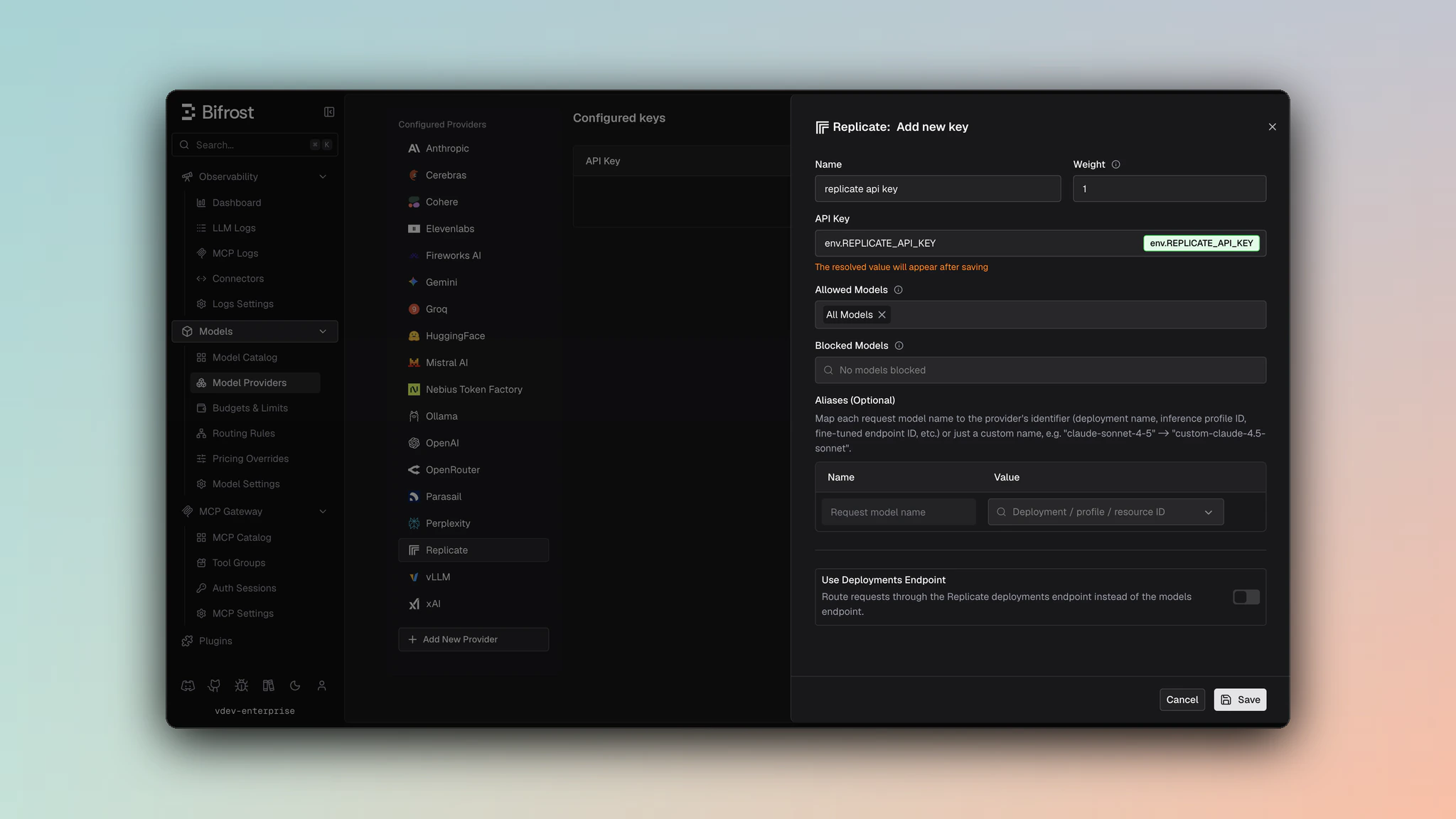
- Navigate to Models > Model Providers. Look for Replicate under Configured Providers. If it is missing, click on Add New Provider and select Replicate.
- Click Add Key or edit an existing key.
- Set a name for your key.
- Paste your API key directly or use an environment variable (for example,
env.REPLICATE_API_TOKEN). - Leave Use Deployments Endpoint disabled for public model/version requests, or enable it for deployment routes.
- Set Allowed Models to All Models (default) or the specific model allowlist you want this key to serve.
- Save the provider configuration.
replicate_key_config.use_deployments_endpoint to true when requests should target /v1/deployments/{owner}/{deployment}/predictions. Use key aliases to map a Bifrost model name to the Replicate deployment path.
Model Identification
Replicate models can be specified in three ways:1. Version ID
2. Model Name
Format:owner/model-name
3. Deployment
Configure deployed models in the Replicate key configuration. Deployments map custom model identifiers to actual deployment paths. Configuration Example:Prediction Modes
Sync Mode
Bifrost uses sync mode with thePrefer: wait header if it is present in the request headers. The request blocks until the prediction completes or times out (default 60 seconds).
How it works:
- Creates prediction with
Prefer: wait=60header - Replicate holds connection open for up to 60 seconds
- If prediction completes within timeout, returns result immediately
- If timeout expires, falls back to polling mode
Async Mode (Polling)
It is the default mode of Replicate predictions. Bifrost automatically polls the prediction URL every 2 seconds until completion. Status Flow:starting → processing → succeeded/failed/canceled
1. Chat Completions
Message Conversion
System Messages: Extracted from messages array and concatenated intosystem_prompt field.
User/Assistant Messages: Preserved as conversation context. Text content from content blocks is concatenated with newlines.
Image Content: Non-base64 image URLs from message content blocks are extracted and passed as image_input array.
System Prompt Filtering
Important: Not all Replicate models support thesystem_prompt field. For unsupported models, the system prompt is automatically prepended to the conversation prompt.
Models without system_prompt support:
meta/meta-llama-3-8bmeta/llama-2-70bopenai/gpt-oss-20bopenai/o1-minixai/grok-4- All
deepseek-ai/deepseek*models (e.g.,deepseek-r1,deepseek-v3)
Model-Specific Parameters
Useextra_params to pass model-specific parameters. These are flattened into the input object:
- Gateway
- Go SDK
Response Conversion
Field Mapping
- Output:
- String →
choices[0].message.content - Array of strings → joined and mapped to
choices[0].message.content - Object with
textfield →textvalue mapped tochoices[0].message.content
- String →
- Status:
succeeded→finish_reason: "stop",failed→finish_reason: "error" - Metrics:
input_token_count→prompt_tokens,output_token_count→completion_tokens
Example Response
Streaming
Replicate streaming uses Server-Sent Events (SSE) with the following event types:
Streaming Flow:
- Bifrost sets
stream: truein prediction input - Replicate returns
urls.streamin initial response - Bifrost connects to stream URL and processes SSE events
outputevents → content deltasdoneevent → final chunk withfinish_reason
- Empty or no reason = success (
finish_reason: "stop") "canceled"= prediction was canceled"error"= prediction failed
2. Responses API
The Responses API is converted internally to Chat Completions or native Replicate format depending on the model:- For OpenAI models with
gpt-5-structured: Uses native Responses format withinput_item_list,tools, andjson_schemasupport - For all other models: Converted to Chat Completions format using message conversion logic
Response Format
Responses follow standard Responses API format with status mapping:3. Text Completions (Legacy)
Conversion
- Prompt array: Joined with newlines into single
promptfield - top_k: Pass via
extra_params(model-specific)
Example
Response
Same conversion as chat completions: output string/array →choices[0].text, with usage metrics from prediction metrics.
4. Image Generation
Parameter Mapping
Input Image Field Mapping
Important: Different Replicate models expect input images in different fields. Bifrost automatically mapsinput_images to the correct field based on the model.
Field Mapping by Model:
For models that expect a single image field (
image_prompt, input_image, image), only the first image from the input_images array is used.Example
- Gateway
- Go SDK
Response Conversion
Replicate output can be:- Single URL: String →
data[0].url - Multiple URLs: Array →
data[i].urlfor each image - Data URIs: Base64-encoded images in data URI format
Streaming
Image generation streaming provides progressive image updates as data URIs: SSE Events:output: Data URI chunk (partial image)done: Final completion with reasonerror: Error details
- Each
outputevent contains a complete data URI (e.g.,data:image/webp;base64,...) - Progressive refinement shows generation progress
doneevent signals completion with final image- Each chunk includes
Index,ChunkIndex, andB64JSONfields
5. Image Edit
Image edit runs as a prediction like image generation. You send one or more input images plus a prompt; the model returns edited image(s). The same input image field mapping as Image Generation applies (see Field Mapping by Model below). Endpoint:/v1/images/edits (Bifrost) → Replicate /v1/predictions or deployment predictions.
Parameter Mapping
Field Mapping by Model
Input images are mapped to the same fields as in Image Generation:For single-image fields (
image_prompt, input_image, image), only the first image from input.images is used.Example
- Gateway
- Go SDK
Response
Same as Image Generation: single URL →data[0].url, array of URLs → data[i].url, or data URIs. Response shape is BifrostImageGenerationResponse with data[].url or data[].b64_json.
Streaming
Image edit streaming is supported. Events use the same prediction log stream as image generation:- Partial chunks:
type: "image_edit.partial_image"withb64_json(or data URI) until completion. - Completed:
type: "image_edit.completed"with final image and usage.
Prefer: wait for sync behavior or rely on polling (async) like other Replicate predictions.
6. Files API
Replicate’s Files API supports uploading, listing, and managing files for use in predictions.Upload
Request: Multipart form-data
Example:
List Files
Query Parameters:
Example:
next URL in response. Bifrost serializes this into the after cursor.
Retrieve / Delete
Operations:- GET
/v1/files/{file_id}- Retrieve file metadata - DELETE
/v1/files/{file_id}- Delete file
File Content Download
Required Parameters in ExtraParams:
Signature Format: HMAC-SHA256 of
"{owner} {file_id} {expiry}" using Files API signing secret
Example:
7. List Models
Endpoint:/v1/models
Deployments are private or organization models with dedicated infrastructure. The response includes:
- List your deployments via this endpoint
- Use deployment name as model identifier:
replicate/my-org/my-deployment - Predictions route to deployment-specific endpoint:
/v1/deployments/my-org/my-deployment/predictions
Extra Parameters
Model-Specific Parameters
The most important feature for Replicate integration is extra_params. Parameters not in Bifrost’s standard schema are flattened directly into the predictioninput object.
How It Works
Discovering Model Parameters
Each Replicate model has unique parameters. To find available parameters:- Model Page: Visit the model on replicate.com
- OpenAPI Schema: Available at
/v1/models/{owner}/{name}/versions/{version_id}(includesopenapi_schema) - Cog Definition: Check the model’s source code (if public)
Caveats
System Prompt Field Support
System Prompt Field Support
Severity: Medium
Behavior: Not all models support
system_prompt field. For unsupported models, system prompt is prepended to conversation prompt.
Impact: Prompt structure differs between models
Models Affected: meta/meta-llama-3-8b, meta/llama-2-70b, openai/gpt-oss-20b, openai/o1-mini, xai/grok-4, and all deepseek-ai/deepseek* modelsInput Image Field Mapping
Input Image Field Mapping
Severity: Medium
Behavior: Different models expect input images in different fields (
image_prompt, input_image, image, input_images)
Impact: Bifrost automatically maps to correct field based on model
Models Affected: Flux family models (see Input Image Field Mapping table)Image Content in Chat
Image Content in Chat
Severity: Low
Behavior: Only non-base64 image URLs from message content blocks are extracted to
image_input
Impact: Base64-encoded images in messages are ignoredModel-Specific Parameters
Model-Specific Parameters
Severity: Medium
Behavior: Each model has unique input schema; standard parameters may not work for all models
Impact: Requires checking model documentation for available parameters
Mitigation: Use
extra_params for model-specific fieldsVideo Generation
Generate (POST /v1/videos)
Request Parameters
Extra Params: Pass model-specific fields directly in the JSON body (unrecognized fields become
extra_params and are flattened into the prediction input). webhook and webhook_events_filter are extracted automatically.
Response: BifrostVideoGenerationResponse - id, status, model, videos[]
Job Statuses: queued (starting) → in_progress (processing) → completed / failed
Retrieve / Download
Video Delete, List, and Remix are not supported by Replicate.