

Overview
Authentication on MCP servers comes in two flavors:- Server-level auth — a single shared credential the admin configures once. Every caller hits the upstream MCP server under the same identity.
- Per-user auth — each end-user supplies their own credential. Bifrost stores the credential against the caller’s identity (Virtual Key, signed-in user, or asserted session ID) and reuses it on every later call.
Auth types at a glance
→ Pick your auth type for the decision flow, or jump straight to a type:
- None — no upstream auth
- Headers — static admin headers
- Per-User Headers — each user submits their own header values
- OAuth 2.0 — admin OAuth with token refresh
- Per-User OAuth — each user authenticates themselves
- Token Exchange — each caller’s identity token is exchanged automatically (enterprise)
Server-level vs per-user
Per-user auth requires every request to carry an identity. See Identity modes below.
Token Exchange (
token_exchange) is a third shape that doesn’t fit either column cleanly: like per-user auth, every caller reaches the upstream server under their own identity — but unlike per_user_oauth / per_user_headers, no credential is persisted per caller. Each tool call carries the caller’s identity-provider token, and Bifrost exchanges it on a cache miss (with a short in-memory cache), so there’s no consent step, no Sessions UI row, and no per-user revoke step — offboarding a user at the identity provider is reflected within the token’s cached lifetime (up to 5 minutes, or the identity provider’s own token expiry if shorter), not instantly. It requires identity authentication on every request; a virtual key alone is not sufficient.
Connection-state semantics describe a persistent upstream connection, so most of them only apply to server-level clients. Per-user clients don’t maintain a persistent upstream connection between calls: each tool call resolves and uses the caller’s credential on its own, with nothing held open between calls, so the dashboard links a per-user client to its MCP Sessions rows instead of showing a connection state for it. Two lifecycle states are the exception: pending_verification appears for every auth type, and needs_reauth appears for oauth, per_user_oauth, per_user_headers, and token_exchange.
For the full connection-state table, connection-mode (sticky vs. per-call) matrix, and per-auth-type lifecycle walkthroughs, see Connections, States & Lifecycles →.
Pick your auth type
A few common patterns:- “We have one company GitHub App and everyone uses it” →
oauth - “We use a custom internal MCP with a bearer token” →
headers - “Each user connects to their own Notion workspace” →
per_user_oauth - “Each user has their own API key for an LLM provider’s MCP wrapper” →
per_user_headers - “Our own internal MCP server trusts our workforce identity provider” →
token_exchange
Identity modes
Per-user auth keys every credential against an identity. The mode is derived from request context at lookup time, in priority order:
Priority:
user > vk > session. If multiple are present (e.g., a user-owned VK both resolves a VK ID and promotes a user ID), Bifrost picks the highest-priority and ignores the rest for credential lookup. This means a user-owned VK always lands in user mode — the credential and any auth flow are bound to the user, not the VK.
A per-user request without any identity is rejected — Bifrost returns an mcp_auth_required payload explaining that the caller must send a VK, sign in, or set x-bf-mcp-session-id.
Flow mode and access rules
When Bifrost mints an auth flow (the URL surfaced inmcp_auth_required), the identity mode picked at that moment is stamped onto the flow row and frozen for the flow’s lifetime. The stamped mode controls who can open the resulting URL, whether the URL can carry a temp token, and whether a dashboard login is required to complete it.
- User-mode flows are tied to one signed-in user. This includes the case where the original request used a user-owned VK — Bifrost auto-promotes the VK’s owner onto the context, so the flow ends up bound to that user rather than the VK. Forwarding the URL to a colleague doesn’t help — they’ll be redirected through SSO login and then hit a
403because the flow is bound to a different user. Use user-mode when each end-user must authenticate to the upstream MCP as themselves. - VK-mode and session-mode flows treat the URL itself as the capability. Whoever holds the URL can complete the flow and the credential is bound to that VK / session ID. This is intentional — those identities are usually scoped to one integration or test harness, and the flow URL is forwarded to whoever will actually click it. A VK only lands in vk-mode when it is not owned by a user; user-owned VKs always promote to user-mode.
The mcp_enable_temp_token_auth toggle
By default Bifrost does not mint temp tokens for any flow. VK/session flow URLs still work, but completing them requires the visiting browser to already have a dashboard session. Turn the toggle on to let anonymous browsers complete VK/session flows via a short-lived #t=<temp-token> URL fragment (15-minute TTL; fragments never reach server logs because they’re not sent in the request line).
User-mode flows ignore the toggle — they always require SSO login.
- Web UI
- API
- config.json
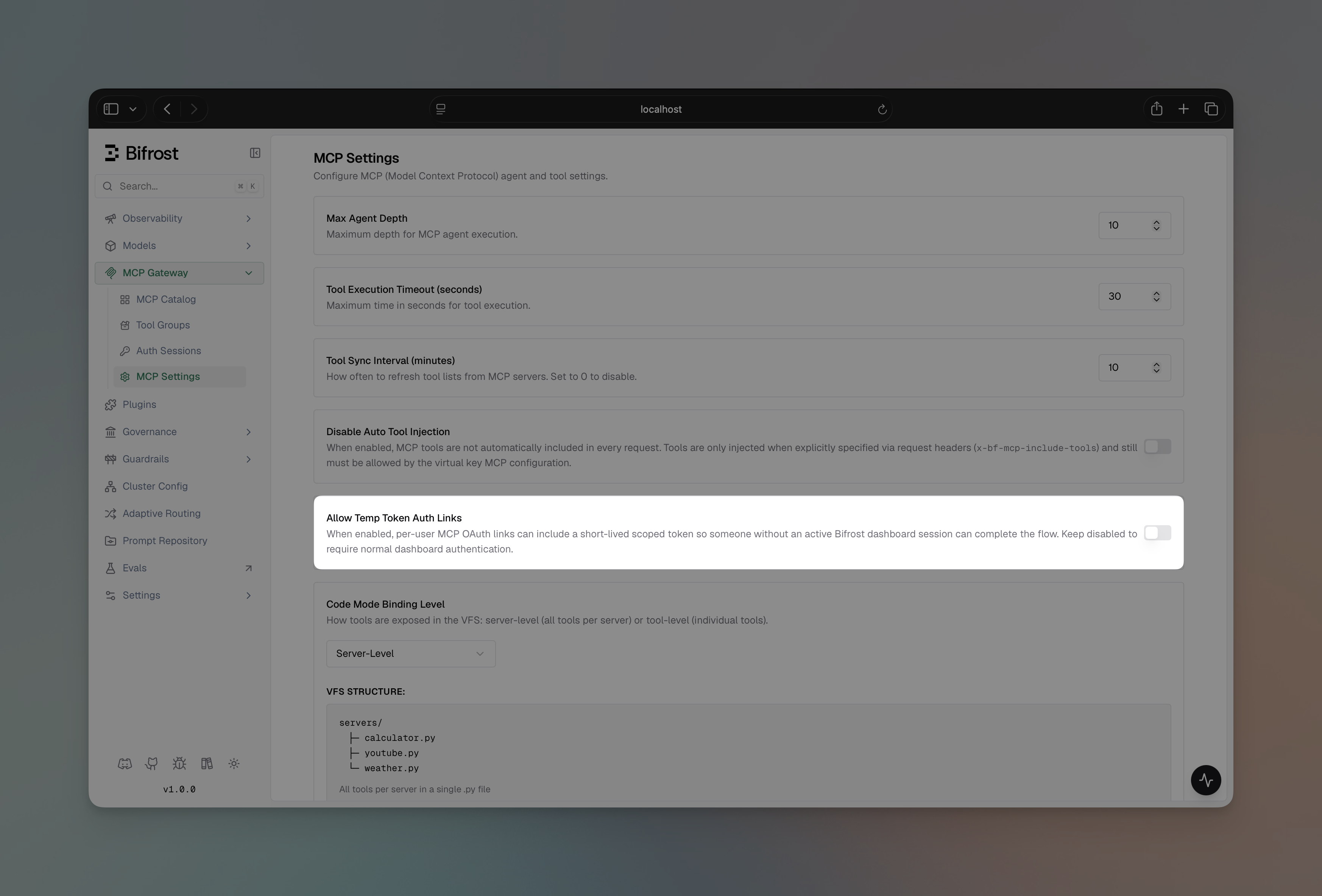
- Navigate to MCP Gateway → MCP Settings in the sidebar
- Toggle Allow Temp Token Auth Links on
- Click Save Changes
#t=… fragment and the visitor needs an active Bifrost dashboard session to complete the page.
How per-user auth works (lazy auth)
The same lazy-auth pattern applies to bothper_user_oauth and per_user_headers, on both the MCP Gateway (/mcp) and the LLM Gateway (/v1/chat/completions):
- The caller sends a request carrying an identity (header or SSO).
- The LLM (or MCP client) asks to invoke a tool on a per-user MCP server.
- Bifrost looks up an existing credential for
(identity, mcp_client):- Found and
active→ upstream call goes out transparently, result comes back. - Missing or non-
active→ Bifrost returns anmcp_auth_requiredpayload with an inline URL. The tool is not executed.
- Found and
- The user opens the URL:
- For
per_user_oauth, it points at the upstream provider’s authorize page (via a Bifrost consent screen). - For
per_user_headers, it points at a Bifrost form where the user enters their header values.
- For
- On completion, Bifrost stores the credential against the caller’s identity.
- The next request executes the tool normally — no re-auth, no special handling.

- LLM Gateway — in the response’s
extra_fields.mcp_auth_requiredblock, and embedded in the natural-language message so plain-text clients (curl, basic SDK wrappers) see it too. - MCP Gateway — as a tool result message, so OAuth-capable MCP clients like Claude Code and Cursor see the URL inline in chat.
mcp_auth_required payload carries a kind discriminator ("oauth" or "headers") so SDKs can branch. Plain-text clients can just open the URL.
Sessions and lifecycle
Every per-user credential — OAuth tokens and submitted headers — shows up on the MCP Sessions page. From there callers can:- See the credential’s status (
active,pending,orphaned,needs_reauth,needs_update) - Re-authenticate an OAuth row whose upstream token went stale
- Edit values on a header row when their key changes
- Revoke a credential outright
orphaned (invisible to runtime). When access is restored, the same rows reactivate. See MCP Sessions for the full lifecycle.
Next Steps
- None — no upstream auth
- Headers — static admin headers
- Per-User Headers
- OAuth 2.0 — admin OAuth
- Per-User OAuth
- Token Exchange — each caller’s identity token exchanged automatically (enterprise)
- MCP Sessions — per-user credential lifecycle