

Overview
Per-user headers is available in Bifrost v1.5.4 and above.
auth_type: "per_user_headers" lets each end-user supply their own HTTP headers for an upstream MCP server. The admin declares the header names that callers must fill in; each end-user submits their values the first time they hit the server. Bifrost stores one credential per (identity, mcp_client) and reuses it on every later call.
Use this when the upstream MCP server authenticates with per-user API keys, signed tokens, or any other static-shape credential — but does not offer OAuth (which would call for Per-User OAuth).
This auth type is only valid for HTTP and SSE connections.
How it works
The lazy-auth model is identical to Per-User OAuth — the only difference is what the user is asked for at the consent page:- Caller sends a request with an identity (header or SSO).
- The LLM (or MCP client) asks to invoke a tool on a
per_user_headersserver. - Bifrost looks up an existing credential for
(identity, mcp_client):- Found and
active→ Bifrost attaches the stored header values and calls upstream. - Missing,
orphaned, orneeds_update→ Bifrost returns anmcp_auth_requiredpayload with an inlinesubmit_url. The tool is not executed.
- Found and
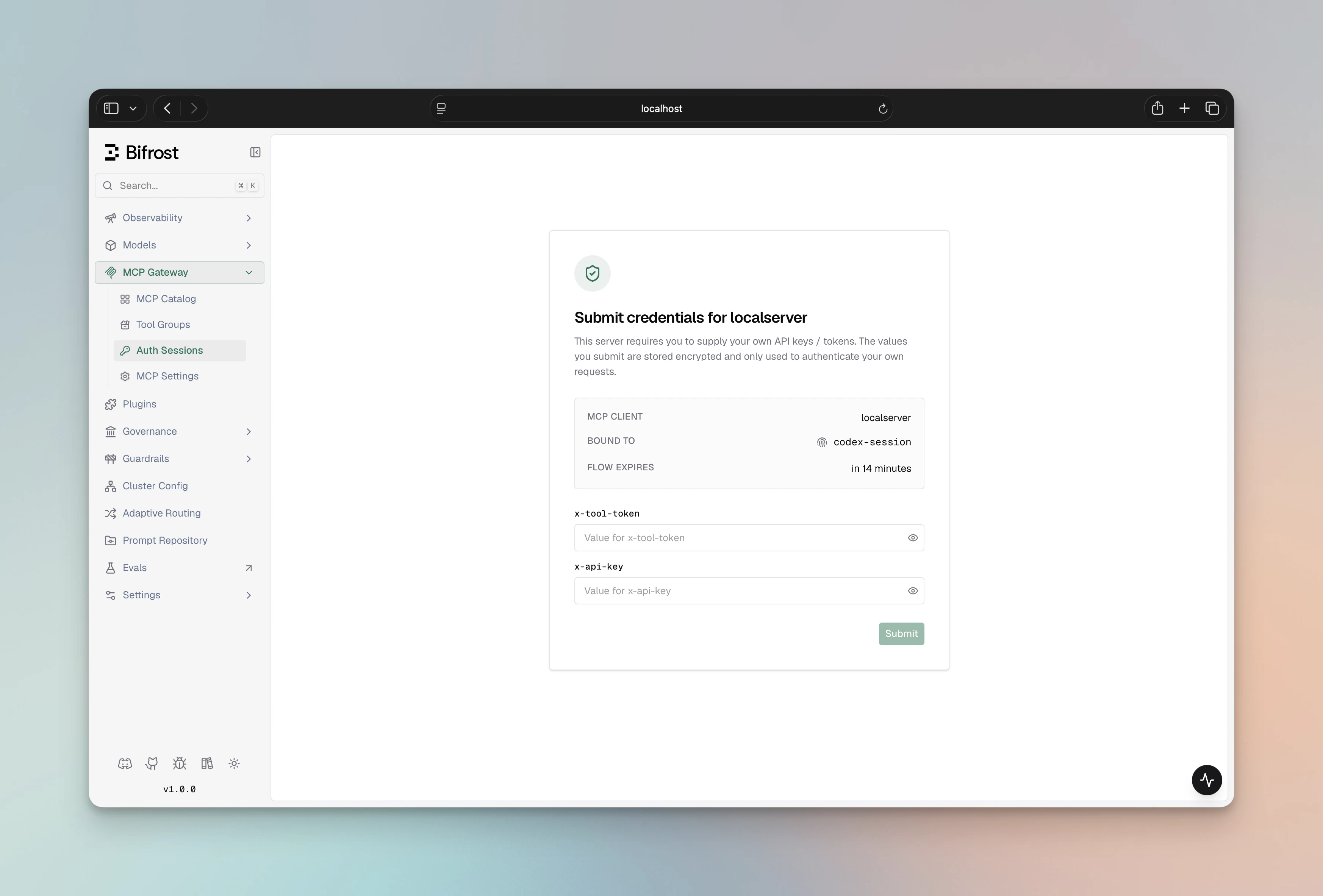
- The user opens the URL, sees a Bifrost form listing the required header names, fills in values, and submits.
- Bifrost runs a one-time upstream verify with the submitted values, then stores the credential.
- The next request executes the tool normally.
mcp_auth_required payload carries kind: "headers" so SDKs can branch on it. The natural-language message also embeds the URL so plain-text clients see it:
#t=<temp-token> fragment when mcp_enable_temp_token_auth is turned on, letting anonymous browser visitors complete the form without a dashboard session (the fragment never reaches server logs). User-mode URLs never carry a temp token — visitors must complete SSO login first, and only the bound SSO user can finish the flow. See Flow mode and access rules.
Setup
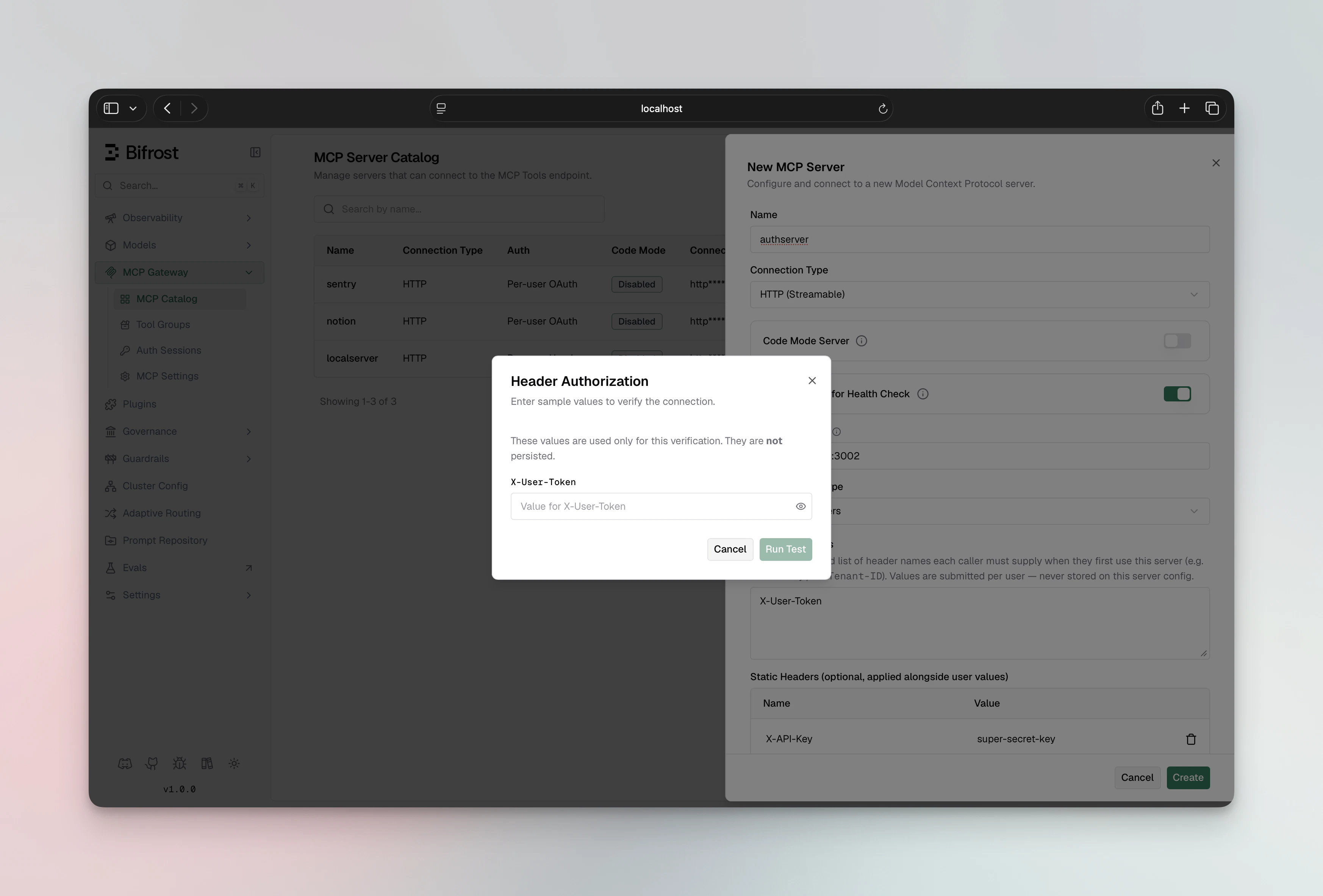
The admin configures the MCP client once, declaring the schema (header names) end-users will need to fill in. During setup, Bifrost asks the admin for sample values, runs a one-time upstream verify, and discovers the tool list — same as the per-user OAuth setup pattern, just with a values form instead of an OAuth popup. When verification runs through theverify-headers flow, the sample values are retained as the admin discovery credential used to keep the tool list fresh; values passed inline on the create call are still used once and discarded.
- Web UI
- API
- config.json
- Navigate to MCP Gateway in the sidebar
- Click New MCP Server
- Pick HTTP or SSE as the connection type, fill in the Connection URL
- Set Auth Type to Per-User Headers
- Fill in Required Headers — comma-separated list of header names each caller must supply (e.g.
X-API-Key, X-Tenant-ID). Values are submitted per-user — never stored on this MCP config. - (Optional) Fill in Static Headers — admin-set headers that accompany every per-user request (e.g. a fixed tenant ID). These are visible to plugins; the per-user values aren’t.
- Click Create — a dialog opens asking for sample header values to run a one-time verify
- Enter sample values, click Run Test
- On success, the MCP client is persisted with the discovered tool list
Static admin headers
per_user_headers clients can carry both:
- Per-user values — what each end-user submits (e.g.,
X-API-Key,X-Tenant-ID) - Static admin headers — what the admin sets once and is sent on every per-user request (e.g.,
X-Region,X-Tenant-Class)
- Static admin headers are not allowed to override per-user header names. If
X-API-Keyappears in bothper_user_header_keysandheaders, the static value is dropped on the wire — the per-user value wins. Authorizationis treated as a credential by Bifrost and is never exposed to connect-plugins or accidentally leaked.- Static admin headers are visible to connect-plugins (so a plugin can read e.g.
X-Regionand mutate it); per-user values aren’t.
Editing the schema
If the admin later changesper_user_header_keys (adds, removes, or renames a required header), all existing credentials for that MCP server flip to needs_update. End-users will see an mcp_auth_required payload on the next tool call and be sent back to the submission form to fill in the new schema. Their old values are preserved where the key still matches — the form pre-shows which keys are already on file (names only, never values). The retained admin discovery credential flips to needs_update too, which surfaces as a needs_reauth badge on the client until the admin re-runs verification with values for the new schema.
- Web UI
- API
- Open the MCP client in the MCP Gateway registry
- Click Edit
- Update Required Headers
- Click Save
needs_update. The next tool call from each user triggers a fresh submission.End-user submission flow
When an end-user hits the inline-401 URL, they land on/workspace/mcp-sessions/auth?flow=<id>&kind=headers:
- The page shows:
- Which MCP server is asking for values
- Which identity the resulting credential will be bound to (VK name, signed-in user, or session ID)
- One input per required header name
- Any static admin headers (names only) so the user knows what context their values will accompany
- The user fills in values and clicks Submit
- Bifrost runs a one-time upstream verify against the live MCP client config
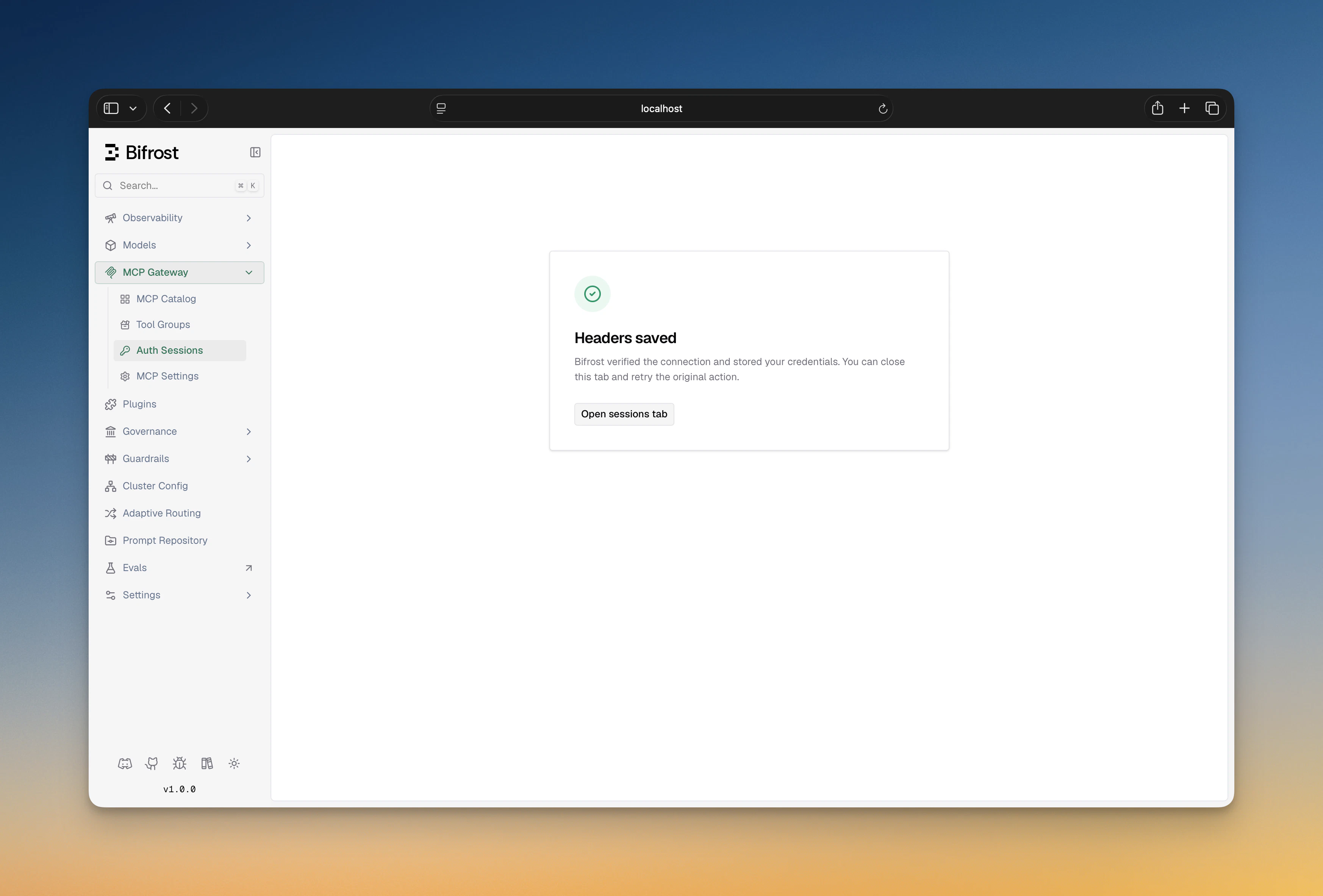
- On success, the credential is persisted; the user sees a “Headers saved” confirmation and can close the tab
- On failure (bad key, upstream rejected), the page shows the error and offers Retry
Identity modes
Same model as Per-User OAuth —user > vk > session. A per-user-headers request with no identity is rejected with an inline-401 explaining the caller must send a VK, sign in, or set x-bf-mcp-session-id.
Cross-gateway sharing
Header credentials are stored against an identity, not a gateway. The same identity reaching either gateway reuses the credential. See Per-User OAuth — Cross-gateway sharing — the model is identical.Lifecycle and sessions
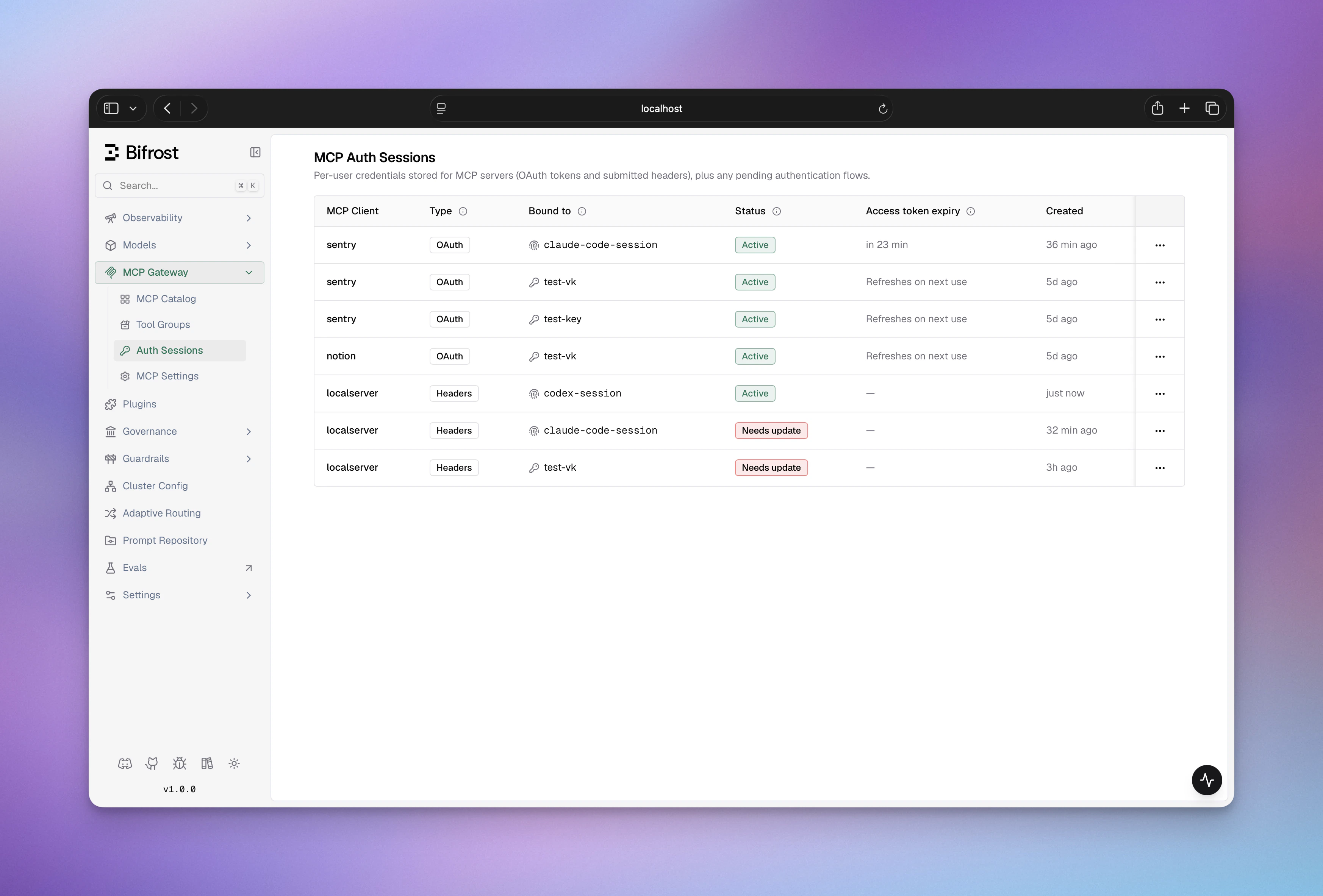
Every per-user header credential shows up on the MCP Sessions page with one of these statuses:
From the sessions table the user can Edit values (mints a fresh submission flow against the same MCP/identity) or Revoke outright. See MCP Sessions for the full lifecycle and the orphan/reactivate behavior on VK changes.
The client-level admin discovery credential is deliberately excluded from this page: it is not an end-user credential, and it is managed from the client sheet instead.
Admin discovery credential
When admin verification runs through theverify-headers flow (the Verify dialog on a pending_verification client, or the endpoint directly), the sample values are retained as a client-level admin discovery credential (auth mode admin). Its role is deliberately narrow:
- Tool-list refresh only. The periodic tool syncer uses it for a one-shot connect,
tools/list, disconnect cycle on the client’s tool sync interval. It is never used for end-user tool calls; those always run under the caller’s own submitted values. - Invisible on the sessions page. Admin credentials are excluded from MCP Sessions; they are managed from the client sheet instead.
needs_update (typically because per_user_header_keys changed), the client list projects a needs_reauth badge next to the client’s View sessions link. This is a display-level state: end-user credentials and tool calls keep working, only tool-list refresh pauses until an admin repairs it. Clients created with inline user_headers before running verify-headers have no admin row and simply stay healthy (their tool list just cannot refresh periodically).
To repair it, open the client sheet and click Update headers: the same sample-values dialog re-runs the upstream verify, re-discovers tools, and flips the credential back to active. The scriptable equivalent is a repeat POST /api/mcp/client/{id}/verify-headers call, which is accepted while the admin credential sits in needs_update (any other repeat returns 409).

Periodic tool sync
Per-user clients hold no persistent upstream connection, but their tool list still refreshes on a schedule using the admin discovery credential. The cadence follows the per-clienttool_sync_interval (minutes, on the create/update API):
- Positive: sync every N minutes for this client
0/ unset: inherit the globalmcp_tool_sync_intervalclient setting (minutes, default 10)- Negative: disable periodic sync for this client
config.json, the field also accepts duration strings such as "10m" (recommended); a bare number there is a legacy nanosecond value, unlike the API which takes minutes.
Every sync’s result persists to the database (skipped when it’s byte-identical to what’s already stored), so a restart doesn’t revert the tool list to whatever was discovered at the client’s original bootstrap verification.
Configuration reference
MCP client names cannot contain hyphens — Bifrost prefixes tools as
<client>-<tool> and uses the hyphen to split the two halves at execution time.Troubleshooting
Verification failed on create
Verification failed on create
The admin sample values you supplied (
user_headers) didn’t pass upstream auth. Double-check the value spelling (some upstreams care about prefixes like Bearer or hex casing), then retry.End-users see requires an identity even though they sent a VK
End-users see requires an identity even though they sent a VK
The VK isn’t resolving. Confirm the VK exists and the caller is sending it under one of
x-bf-vk, Authorization: Bearer …, x-api-key, or x-goog-api-key. If you’re behind a proxy that strips Authorization, switch the caller to x-bf-vk.Headers submission flow has expired
Headers submission flow has expired
Pending submission flows have a 15-minute TTL. Trigger the original action again to mint a fresh flow.
Edit values on the sessions page does nothing
Edit values on the sessions page does nothing
Make sure Bifrost can build a public URL — if behind a proxy, set
mcp_external_client_url so the redirect lands on the right host.Next Steps
- Per-User OAuth — when the upstream provides OAuth
- Headers — when one admin key fits everyone
- MCP Sessions — credential lifecycle, orphan/reactivate, revoke
- MCP Gateway Mode — expose Bifrost as an MCP server for Claude Code / Cursor