

Compatibility Transformations
The LiteLLM compatibility plugin provides two transformations:- Text-to-Chat Conversion - Automatically converts text completion requests to chat completion format for models that only support chat APIs
- Chat-to-Responses Conversion - Automatically converts chat completion requests to responses format for models that only support responses APIs
- Drop Unsupported Params - Automatically drops unsupported parameters if the model doesn’t support them. A
reasoning.summaryvalue the datasheet marks unsupported (supports_reasoning_summary_detailed,supports_reasoning_summary_conciseorsupports_reasoning_summary_autoset tofalse) becomesautowhen the model acceptsauto, and is dropped otherwise. Reasoning effort is always kept - Unsupported Parameter Conversion - Automatically converts unsupported parameters to their supported equivalents
- Reasoning-Only Models to Responses - Routes chat completion requests to the Responses API for models that cannot reason alongside tool calls on chat completions
- Decision-to-Responses Emulation - Answers decision requests for models without a native decisions endpoint by prompting the model through the Responses API (off by default)
extra_fields.converted_request_type: <transformed_request_type>. If request parameters are dropped, the keys are added in extra_fields.dropped_compat_plugin_params.
1. Text-to-Chat Conversion
Many modern AI models (like GPT-3.5-turbo, GPT-4, Claude, etc.) only support the chat completion API and don’t have native text completion endpoints. LiteLLM compatibility mode automatically handles this by:- Checking if the model supports text completion natively (using the model catalog)
- If not supported, converting your text prompt to chat message format
- Calling the chat completion endpoint internally
- Transforming the response back to text completion format
- Returning content in
choices[0].textinstead ofchoices[0].message.content
Smart Conversion: The conversion only happens when the model doesn’t support text completions natively. If a model has native text completion support (like OpenAI’s davinci models), Bifrost uses the text completion endpoint directly without any conversion.
How It Works
When LiteLLM compatibility is enabled and you make a text completion request, Bifrost first checks if the model supports text completion: Request Transformation:- Your text prompt becomes a user message:
{"role": "user", "content": "your prompt"} - Parameters like
max_tokens,temperature,top_pare mapped to chat equivalents - Fallbacks are preserved
choices[0].message.content→choices[0].textobject: "chat.completion"→object: "text_completion"- Usage statistics and metadata are preserved
2. Chat-to-Responses Conversion
Some AI models (like OpenAI o1-pro) only support the responses API and don’t support native chat completion endpoints. LiteLLM compatibility mode automatically handles this by:- Checking if the model supports chat completion natively (using the model catalog)
- If not supported, converting your chat message to responses API format
- Calling the responses endpoint internally
- Transforming the response back to chat completion format
Smart Conversion: The conversion only happens when the model doesn’t support chat completions natively. If a model has native chat completion support (like OpenAI’s gpt-4 models), Bifrost uses the chat completion endpoint directly without any conversion.
How It Works
When LiteLLM compatibility is enabled and you make a chat completion request, Bifrost first checks if the model supports chat completion:3. Reasoning-Only Models to Responses
Some models (for example several GPT-5 series models) do not support reasoning together with tool calls on the chat completions API. Their datasheet entry setssupports_reasoning_with_tool_calls: false. For any chat completion request on such a model, with or without tools, Bifrost:
- Calls the Responses API instead, where reasoning and tools work together
- Transforms the response back to chat completion format
force_reasoning_only_models_to_responses off, the request stays on chat completions. What happens to reasoning then depends on should_drop_params:
should_drop_paramson: when the request carries tools, reasoning is turned off (dropped, or set tononewhen the model supports it).should_drop_paramsoff: the request is sent with its reasoning setting unchanged.
force_reasoning_only_models_to_responses (on by default).
4. Decision-to-Responses Emulation
Decision requests (/v1/decisions, /openai/v1/decisions, /typesafe/v1/systemone) are served natively only by decision models. With this setting off, a decision request for any other model, such as openai/gpt-4o, fails with HTTP 400 and code unsupported_operation:
convert_decision_to_responses on, Bifrost instead:
- Checks whether the model is a native decisions model: its
supports_decisionsdatasheet entry, or without one the models Bifrost recognizes by name:- OpenAI’s
gpt-6-lunafamily (except on OpenRouter, which serves it under its own decisions ID) - Typesafe’s
typesafe/models, and every model on thetypesafeprovider clefmodels (clef,clef-flash,clef-omni, by bare name or@cf/cloudflare/ID) oncloudflarepplx-decider-*onperplexitynimble,tev1,clef,clef-flash, andlaya(any tag) onollama
- OpenAI’s
- If it is, calls the provider’s decisions endpoint without any conversion
- If not, encodes the questions as a forced function tool, sends the input to the model’s Responses API, and maps the call’s arguments back to typed answers
- The check runs on every attempt, fallbacks included.
- An emulated response reports
extra_fields.converted_request_type: "responses"and is billed as the chat call it is. - A request with an image or other non-text part is rejected, as are passthrough extra params (
x-bf-passthrough-extra-params). - Per request, the header
x-bf-compat: ["convert_decision_to_responses"]turns it on for that request only. - In the Go SDK, it is on when the compat plugin is registered with
compat.Config{ConvertDecisionToResponses: true}.
Enabling LiteLLM Compatibility
- Gateway UI
- Configuration File
- Open the Bifrost dashboard
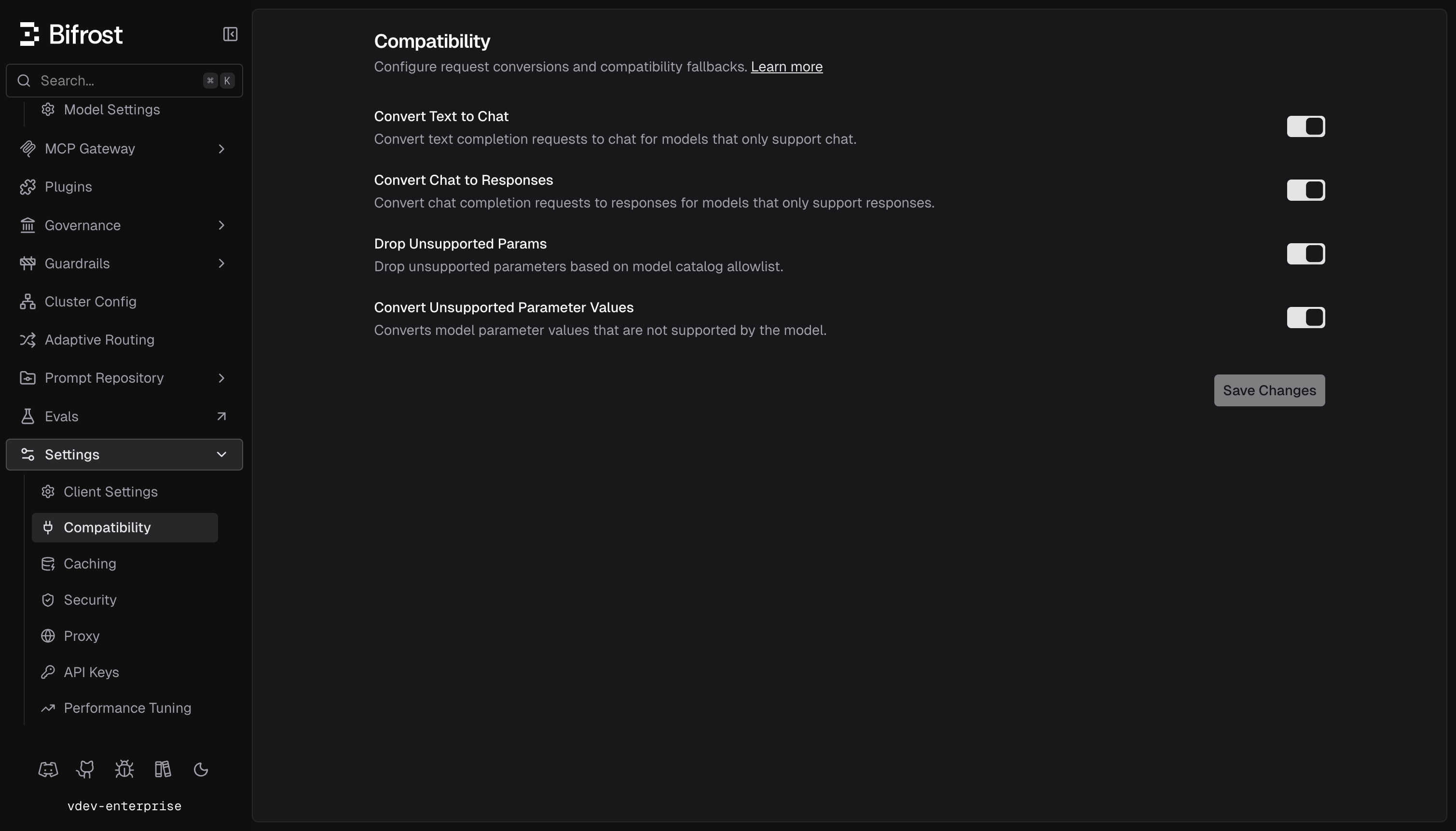
- Navigate to Settings → Compatibility
-
There you can enable the features you need:
- Convert Text to Chat - converts text completion requests to chat for models that only support chat
- Convert Chat to Responses - converts chat completion requests to responses for models that only support responses
- Drop Unsupported Params - drops unsupported parameters based on model catalog allowlist
- Convert Unsupported Params Values - converts parameter values the model cannot accept, such as a token cap above the model limit, to values it can. See the list of supported parameters below.
- Azure DeepSeek - converts Azure DeepSeek responses requests to chat completions so reasoning is preserved for coding harnesses
- Reasoning-only models to Responses - routes chat completion requests to the Responses API for models that cannot reason with tool calls on chat completions
- Emulate Decisions API on non-decision models - answers decision requests for models without a native decisions endpoint through the Responses API
-
Save your configuration
Supported Parameters
The following parameter values are converted to values the model accepts:
Limits come from the model catalog, with built-in fallbacks for Claude output limits and Claude and Gemini 2.5 thinking budgets. Only values present in the request are changed; none are added. Budgets of
0 and -1 are left as sent. The conversion runs again for each fallback, so every fallback model is fitted to its own limits. Each conversion is logged as a warning on the request, for example max_output_tokens: 1000000 -> 65536.
developer role messages are mapped to system by the Gemini, Vertex and Bedrock providers themselves, so that works without this setting.
Namespace-scoped tools are no longer handled by this plugin. Bifrost core flattens them for every provider whose wire does not support the namespace tool type, renames each nested function to <namespace>__<function> so names stay unique, and maps returned function_call items back to the original name plus namespace.
Supported Providers
Text completion to chat completion conversion works with any provider that supports chat completions but lacks native text completion support:
Chat completion to responses conversion works with any provider that supports responses but lacks native chat completion support:
Behavior Details
Model Capability Detection:- Bifrost uses the model catalog to check if a model supports text completion
- If the model has a “completion” mode in its pricing data, it supports text completion
- Conversion only happens when the model lacks native text completion support
Transformations Reference
Transformation 1: Text-to-Chat Conversion
Applies to: Text completion requests on chat-only modelsTransformation 2: Chat-to-Responses Conversion
Applies to: Chat completion requests on responses-only modelsMetadata Set on Transformed Responses
When either transformation is applied:extra_fields.request_type: Reflects the original request typeextra_fields.original_model_requested: The originally requested modelextra_fields.resolved_model_used: The actual provider API identifier used (equals original_model_requested when no alias mapping exists)
Error Handling
When errors occur on transformed requests:- Original request type and model are preserved in error metadata
extra_fields.converted_request_type: Set to type of request that was converted to (i.e.,chat_completionorresponses)extra_fields.provider: The provider that handled the requestextra_fields.original_model_requested: The originally requested modelextra_fields.dropped_compat_plugin_params: If any unsupported parameters were dropped, the keys are added here
Header Overrides
To enable compat plugins per request, you can usex-bf-compat header:
- When
x-bf-compat: trueorx-bf-compat: ["*"], enables all compat plugins options - When
x-bf-compat: ["<setting1>","<setting2>"], enables the specified settings (available settings:convert_text_to_chat,convert_chat_to_responses,should_drop_params,should_convert_params,azure_deepseek,force_reasoning_only_models_to_responses,convert_decision_to_responses)
What’s Preserved
- Model selection and fallback chain
- Temperature, top_p, max_tokens, and other generation parameters
- Stop sequences and frequency/presence penalties
- Usage statistics and token counts
When to Use This
Good Use Cases:- Migrating from LiteLLM to Bifrost without code changes
- Maintaining backward compatibility with text completion interfaces or chat completion interfaces
- Using a unified API across providers with different capabilities
- You need chat-specific features (system messages, conversation history)
- You want explicit control over message formatting
- Performance is critical (direct chat requests avoid conversion overhead)
Related Features
- Fallbacks - Automatic provider failover
- Drop-in Replacement - Use existing SDKs with Bifrost
- LiteLLM Integration - Using LiteLLM SDK with Bifrost