

Overview
Audit Logs in Bifrost Enterprise record administrative activity so operators can review who changed what, when it happened, and which resource was affected. Audit log entries can be signed with an HMAC key, retained for a configurable number of days, viewed in the dashboard, and exported for downstream review.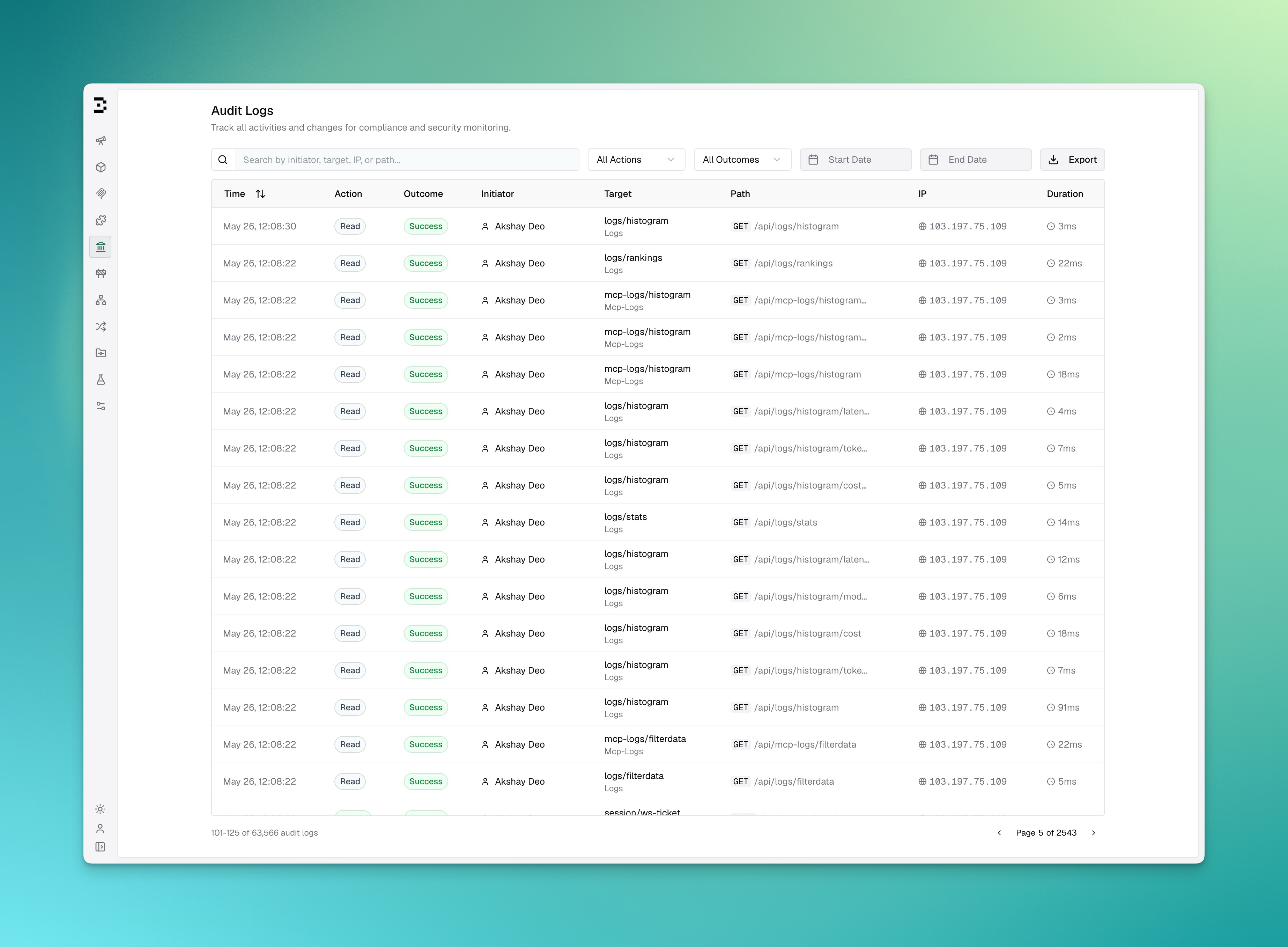
Key Features
Configuration
Configuration Fields
The
archive_* fields only take effect when object_storage is configured.config.schema.json constrains these fields, so an editor wired to it (via $schema) will flag a malformed duration like "6 hours" or an out-of-range archive_max_object_bytes as you type. The gateway itself does not reject such values at startup: each field is normalized independently at runtime, so a value that gets past the schema falls back to its default or is clamped into range rather than failing startup. A typo like "6 hours" silently yields the 24h default, and archive_interval: "10s" is quietly raised to the 5m floor.Because a bad value fails quietly rather than loudly, confirm what actually took effect from the startup log line, which reports all three:What gets recorded
Every create, update and delete on the management API writes an audit event, including changes to/api/config.
Reads are not recorded by default, since dashboard polling would bury the changes. These reads are still recorded:
- Revealing or copying a virtual key (
/reveal,/copy). - Exporting audit logs and downloading skill bundles.
- SSO login callbacks, and any request a handler tags with an explicit action or a high severity.
include_reads to true to record every GET as before.
Each event also carries what changed, who acted and how:
Event names and diffs
Bifrost records each management change as a named event and stores a diff of the fields that changed:auth.login (password and SSO), auth.logout, auth.session_refreshed, auth.setup_session_started, and auth.agent_token_issued, auth.agent_token_refreshed and auth.agent_logout for the edge agent. A sign-in that also provisions a new user writes both rows.
Changes your identity provider pushes over SCIM are recorded as system events (scim.user_created, scim.user_updated, scim.user_deactivated, scim.user_deleted and the matching scim.group_* events) with initiator system:scim.
A request that has no named event still gets a name derived from the route. A write below an entity is named after the sub-route with action update, so it never reads as the entity itself being deleted. Route-derived names are not listed in the event reference.
POST routes that only test or preview something are recorded with action read, so a dry run never reads as a change. POST /api/cluster/diagnostic reads cluster.diagnostic_run, and webhook tests, previews, verify and discovery calls read .tested, .previewed, .verified and .config_discovered (or .endpoints_discovered, .claims_discovered).
Role assignment, role permission changes, API key creation and updates, identity provider changes, license uploads, SCIM provisioning token rotation, trusted network changes, Edge app approvals and changes to the Edge legacy CA key cutoff are recorded at severity high.
Diffs leave out secret values. A field whose name looks like a secret shows up with redacted: true and no values. That covers value, key, secret, token, password, api_key, client_secret, private_key, authorization, cookie, credential, credentials, and any name ending in _key, _secret, _token or _password. Provider configs, provider keys, MCP clients, identity providers and guardrail configs are diffed from their redacted forms. URLs have their credentials and query values masked, but not their path. So one gap remains: a secret embedded in a URL path, such as a Slack incoming webhook or an MCP library entry’s connection URL, shows up in the diff, the same way it shows up in the API response. Fields that change on every write without anyone choosing to change them are left out: created_at, updated_at, usage counters, reset times, config hashes, and the row IDs and owner keys of nested records. Adding a budget to a virtual key reports its limit and reset window, not a dozen bookkeeping fields. A diff stops at 200 fields or 16 KB and sets truncated: true.
System events
Background jobs write events too. Their initiator has typesystem and ID system:<job>. When a user queued the job, onBehalfOfId names that user.
At every boot Bifrost compares the
audit_logs settings with those of the previous boot. If they differ, it records audit.settings_changed with the diff. Signing keys appear only as key IDs and a short fingerprint of hmac_key, never the key itself. Audit settings are read at startup, so turning logging off takes effect on the next boot. That first boot with disabled: true writes audit.logging_disabled straight to the store and records nothing after it. Someone who turns audit logging off to hide their tracks still leaves that event as the last row.
Event reference
Every event Bifrost records by name, grouped by area. Events marked “System event” are written by Bifrost itself, with initiatorsystem:<job>; the rest are written when someone calls the management API. Requests that have no named event get a name derived from the route, as described in Event names and diffs, and are not listed here.
Sign-in and sessions
Virtual keys
Providers, models and pricing
Routing
Teams, customers, business units and projects
Users, roles and access profiles
Identity providers and directory sync
MCP
Guardrails
Prompts
Skills and agents
Edge
Logs, alerts and webhooks
Configuration and platform
Audit logging
Signing keys
Bifrost signs every audit row with HMAC-SHA256. New rows use the v2 format,v2:<key id>:<hex>, and the signature covers every field except tags, attachments and reason (handlers may set these after insert), the request IP and initiator host (omit_ip_addresses blanks these), and created_at. Rows written before v2 keep their v1 signatures and still verify.
GET /api/governance/audit-logs/{id}/verify returns valid, the algorithm (hmac-sha256-v1 or hmac-sha256-v2), the key_id, and a reason when the check fails. It no longer returns the computed and stored signatures, since a reader holding the expected HMAC could forge a matching row.
If you configure no key, Bifrost generates one, encrypts it, and stores it in the config store under the ID generated. Every node uses that key and it survives restarts. Earlier versions generated a random key per node on every boot, so signatures from before a restart never verified.
Rotating the signing key
Add the new key tohmac_keys, point active_key_id at it, and keep the old key in the list:
2026-q1. Rows signed with 2025-q4 keep verifying as long as that key stays in the list. Remove a key and its rows can no longer be verified. The verify endpoint then returns valid: false with a reason naming the missing key.
An existing hmac_key keeps working as the key with ID default. To rotate away from it, leave hmac_key set, add the new key to hmac_keys, and set active_key_id to the new key’s ID. Don’t reuse the ID default in hmac_keys.
Bifrost refuses to start if a key is shorter than 32 bytes, a key ID is invalid, active_key_id names no configured key, or several keys are configured without active_key_id.
Rows signed with the generated key keep verifying after you configure hmac_key or hmac_keys: Bifrost still loads the generated key, under the ID generated, but only to verify. New rows are signed with your configured key.
Omitting IP Addresses
Some deployments can’t record where employees connect from. Employee privacy law and works council agreements, common in Germany, often rule it out. Setomit_ip_addresses to keep the audit trail without IPs:
- The gateway never reads the client IP (
X-Forwarded-For,X-Real-IPor the socket address) for audit events. New rows have an emptyrequest_ipand initiator host. - The initiator, action, target, path, method, user agent, outcome and duration are still recorded. HMAC signatures don’t cover the IP fields, so signature verification keeps working.
- IPs in rows written before you turned the setting on are hidden from the list and detail APIs, the dashboard and every export format.
- Search no longer matches on IP, IP filters are ignored, and the filter data endpoint returns no request IPs. Otherwise a caller could filter older rows by an address to learn who used it.
- Events that object storage archival copies after the change carry no IP, including events from older rows.
Viewing Audit Logs
Open Governance > Audit Logs in the Bifrost dashboard. The table shows:
You can search by initiator, target, IP, or path, and filter by event, action, outcome, severity, start date, and end date. With
omit_ip_addresses on, search skips IPs and the IP filter disappears. The API filters by event name with event_name or event_names.
Viewing an event
Click a row to open the event. The event ID goes into the page URL asaudit_log=, so you can share a link that opens straight to it. The event view shows:
- Changes. Each changed field with its value before and after. Paths read as labels, such as “Budgets › 1 › Max limit”, with the raw path on hover. Secret fields read “Changed, value hidden”. Events recorded before Bifrost dropped bookkeeping fields from diffs keep those fields behind a “Show internal fields” toggle.
- Who. The initiator, auth method, on-behalf-of user, session reference and IP address.
- Target and request. The target’s name and type, and the request path, request ID, duration, user agent and event ID. IDs have copy buttons.
- Integrity. A Verify signature button that checks the event’s signature and reports the key it was signed with, or why it couldn’t be verified.
Exporting Audit Logs
Users withAuditLogs:Download permission can export the currently filtered audit log results from the dashboard. The export endpoint enforces the same permission, so a role with only AuditLogs:View gets a 403 from the API as well.
Supported export formats:
Exported events include the
changes diff. With omit_ip_addresses on, exports contain no IP addresses in any format. The syslog clientIP parameter is left out.
Where audit logs are stored
From v2.3.3, Bifrost writes audit events to the log store when the log store is Postgres or ClickHouse. They go to theenterprise_audit_events table, which keeps a growing audit trail out of the database that holds your gateway configuration.
Events recorded before the upgrade stay where they were, in the config store’s enterprise_audit_logs table. Bifrost does not copy or move them.
If the log store is disabled or uses SQLite, nothing changes. Audit events stay in the config store and the dashboard shows no legacy view. Bifrost skips SQLite because each node keeps its own file, so no single node would see the whole audit trail.
Legacy view
The Legacy view switch on the Audit Logs page reads the config store’s table instead of the log store’s. It is off by default. With the switch off, you see events in the log store’senterprise_audit_events table. With it on, you see events in the config store’s enterprise_audit_logs table. The two never mix in one list.
The split is by table, not by time. Events recorded during a rolling upgrade by nodes still on an older version land in the legacy view too. See Upgrading a cluster.
The switch appears only when audit events go to the log store and the config store’s table still holds at least one event. On a fresh install, or once retention has removed the last legacy event, it is gone.
The switch applies to the whole page: the list, search, filters, the event view, Verify signature and export. Turning it on or off returns you to the first page and closes any open event.
Each viewer has their own setting, saved in their browser. Turning it on changes nothing for other users or for the gateway.
Retention and archival
retention_days applies to both tables. Legacy events age out on the same schedule as new ones. With retention on, the legacy view empties by itself once the last event in the config store’s table passes the retention window, and the switch disappears.
Archival to object storage reads both tables, so a window that spans the upgrade is archived with events from both. That holds only when object_storage is configured and the window’s rows are still in the database when the archiver gets to it. Retention does not wait for archival, so a short retention_days such as 1 can delete rows first. See the warning on retention and archival for the safe minimum.
Migrating older audit events
Why audit events moved
The config store holds the gateway’s own configuration: providers, keys, users, roles and settings. Audit events are different. They are written on every management change, never updated, and on a busy deployment the audit table grows into the largest table in that database. Backups, restores and schema migrations of the config store then take longer because of data the gateway never reads to serve a request. The log store is built for that kind of data. It already holds request logs, which are append-only and read by time range, and on ClickHouse it stores large volumes cheaply. Moving audit events there keeps the config store small.What changed
The new table has the same columns as the old one, with the same names and meanings:
id, type_uri, event_type, event_time, event_name, action, outcome, severity, initiator_id, initiator_type, initiator_name, initiator_host, target_id, target_type, target_name, observer_id, observer_name, reason_code, reason_type, reason_message, attachments, changes, tags, request_method, request_path, request_ip, user_agent, request_id, session_id, auth_method, on_behalf_of_id, duration, signature, created_at.
Event names, actions, outcomes, severities and the changes diff format are unchanged, so the event reference applies to both tables. A row moved from one table to the other keeps its signature, and Verify signature checks it against the same signing keys.
A few details differ by database:
- On Postgres, the indexes have different names from the old table’s. Postgres index names are unique per schema, and the config store and log store can share one database.
- On ClickHouse,
event_timeandcreated_atareDateTime64(6, 'UTC'). Signatures coverevent_timeto the microsecond, so a coarser column would fail verification. The table also has avercolumn for ClickHouse’s own deduplication, partitions by month and has no TTL. Retention stays underretention_days.
Moving older events
Bifrost does not move older events on its own, and nothing is lost if you never move them. They stay readable in the legacy view until retention removes them. To bring them into the default view, so you can search or export the whole trail in one place, contact the Bifrost team for the audit log migration script. Tell us which databases your config store and log store use, whether they share a database, and roughly how many audit events you have. We will help you plan the move for your deployment.Upgrading a cluster
During a rolling upgrade, nodes still on an older version keep writing to the config store. Those events show only in the legacy view. Once every node runs v2.3.3, all new events go to the log store.API
Passsource=legacy to read the config store’s table:
GET /api/governance/audit-logsGET /api/governance/audit-logs/filterdataGET /api/governance/audit-logs/exportGET /api/governance/audit-logs/{id}GET /api/governance/audit-logs/{id}/verify
source=legacy is ignored.
GET /api/governance/audit-logs/sources returns {"legacy": true} when a legacy table with events can be read, and {"legacy": false} otherwise.
Event type URI
Every audit event has atypeURI field. New events use https://getbifrost.ai/schemas/auditlog.json. Older events keep http://schemas.bifrost.io/audit/api/v1.
Stored events are not rewritten, so exports and searches that cover both periods return both values. If a SIEM rule matches on typeURI, make it accept both.
Archiving to Object Storage
By default, audit events live only in the database, which is the source of truth for everything you see in the dashboard (viewing, filtering, HMAC verification, and export). Databases, however, are not ideal for multi-year compliance retention or off-box durability. When you configureobject_storage, a background job additionally copies every audit event to an S3-compatible bucket (S3, GCS, MinIO, R2), one time window at a time. This is a copy, not an offload: the full event ends up in both the database and object storage, so each store holds a complete, independent copy.
This differs from Log Exports, where object storage offloads the heavy request/response payload out of the database. For audit logs, object storage is a complete mirror — the database is never trimmed of data by enabling it.
Database vs. Object Storage
Because the two are decoupled, the archive can outlive the database: once
retention_days deletes an old row, its object in the bucket is left untouched. Use S3 Object Lock / WORM and bucket lifecycle rules to govern how long the archive is kept.
How Archival Works
Archival runs as a periodic background job, not as part of the request path. Time is divided into fixed windows ofarchive_interval, and each closed window is archived as a unit, in order:
- A window closes. The window
[start, end)becomes eligible only onceendis further in the past thanarchive_grace_period. The grace period absorbs clock skew and rows that land slightly late, so a window is not archived while events may still be arriving for it. - A job is enqueued. One job archives one window. Job IDs derive from the window bounds, so in a multi-node cluster every node can tick while exactly one job row is created and exactly one node runs it — no leader election or lock is involved.
- Rows are streamed into part objects. Committed rows in the window are streamed from the database and encoded as JSON Lines. A new part is rolled each time the accumulated uncompressed JSONL crosses
archive_max_object_bytes; a part boundary never splits a JSON line. - A manifest commits the window. After every part has been durably stored, a
manifest.jsonlisting exactly those parts is written. The manifest is the commit point — only once it lands does the archival watermark advance toend, making the next window eligible.
"prefix": "acme-prod", "compress": true, and a 24h interval:
Every object also carries tags (
type, window_start, window_end, count, and part/parts) so lifecycle rules and consumers can select objects without listing and pattern-matching keys. Manifests are tagged type=audit-logs-manifest, parts type=audit-logs.
Reading the Archive
Always read a window through its manifest, and ignore any object the manifest does not list. A retried window can leave behind an orphaned part from an earlier attempt; the manifest lists exactly the parts that belong to the window, which is what makes it authoritative.parts array — a positive record that the window was examined and held nothing. The absence of a manifest means the window is not yet committed, not that it was empty.
Delivery Guarantees
Unlike the earlier per-flush implementation, archival is no longer best-effort — a failed upload is retried rather than logged and dropped, and the watermark will not advance past a window that did not commit. The database nevertheless remains the source of truth: it is what the dashboard, API, export, and HMAC verification read, and it is written independently of whether the bucket is reachable. Object-storage problems delay the archive; they never block audit logging or request handling.
Tuning
archive_intervaltrades archive freshness against object count. Longer windows mean fewer, larger objects and a longer lag before events reach the bucket; shorter windows mean fresher data and more objects. The job wakes at least hourly regardless, so a window that closes shortly after a tick is not left waiting a full 24h.archive_max_object_bytesbounds peak memory: a part is buffered in memory before upload, so expect roughly 2× this value per archiving node whencompressis enabled (compression allocates a second buffer). The 128 MiB default implies a ~256 MiB peak. Raise it for fewer, larger objects on nodes with headroom; lower it on memory-constrained nodes.archive_grace_periodrarely needs changing. Raise it if you run with meaningful clock skew across nodes.
Configuration
- S3 / MinIO / R2
- GCS
Object Storage Fields
You can point audit archival at its own dedicated (ideally write-once/locked) bucket, or reuse the same bucket as request
logs_store with a distinct prefix. The audit-logs/ path segment keeps the two from overlapping.retention_days guidance above protects.
Catch-up is paced, though: each pass enqueues one window, and passes run every archive_interval (capped at hourly). After a long outage, expect a backlog of N windows to take roughly N passes to drain — so a multi-day outage with a 24h interval clears at about one window per hour, not all at once.
On shutdown the archiver stops before the object store is released, and an in-flight window is allowed to finish rather than being cancelled, so parts are never left behind without a manifest.