

What it does
Adaptive routing never sends requests of its own to a provider: no health checks, pings or test calls. Everything it knows comes from your live traffic and from how the routing decisions it made turned out. Even a held key is checked by letting one of your real requests through to it.
Where it fits
Adaptive routing runs after routing rules and virtual keys, and before session affinity. See with other routing features for how they combine.How It Works
Provider and key states, requests that name a provider, and how held keys are checked and released.
Incidents & Monitoring
Read the dashboard, work through incidents, and follow a request in the logs.
Settings
The scoring, thresholds and wait times are tuned in Bifrost and are not configurable. The settings decide what adaptive routing is allowed to change, and how it records history.
Every setting applies at once on every node, except the retention, which is read when Bifrost starts.
Changing settings
- Web UI
- API
- config.json
Open Adaptive Routing > Settings in the sidebar. Saving applies the settings to every node in the cluster.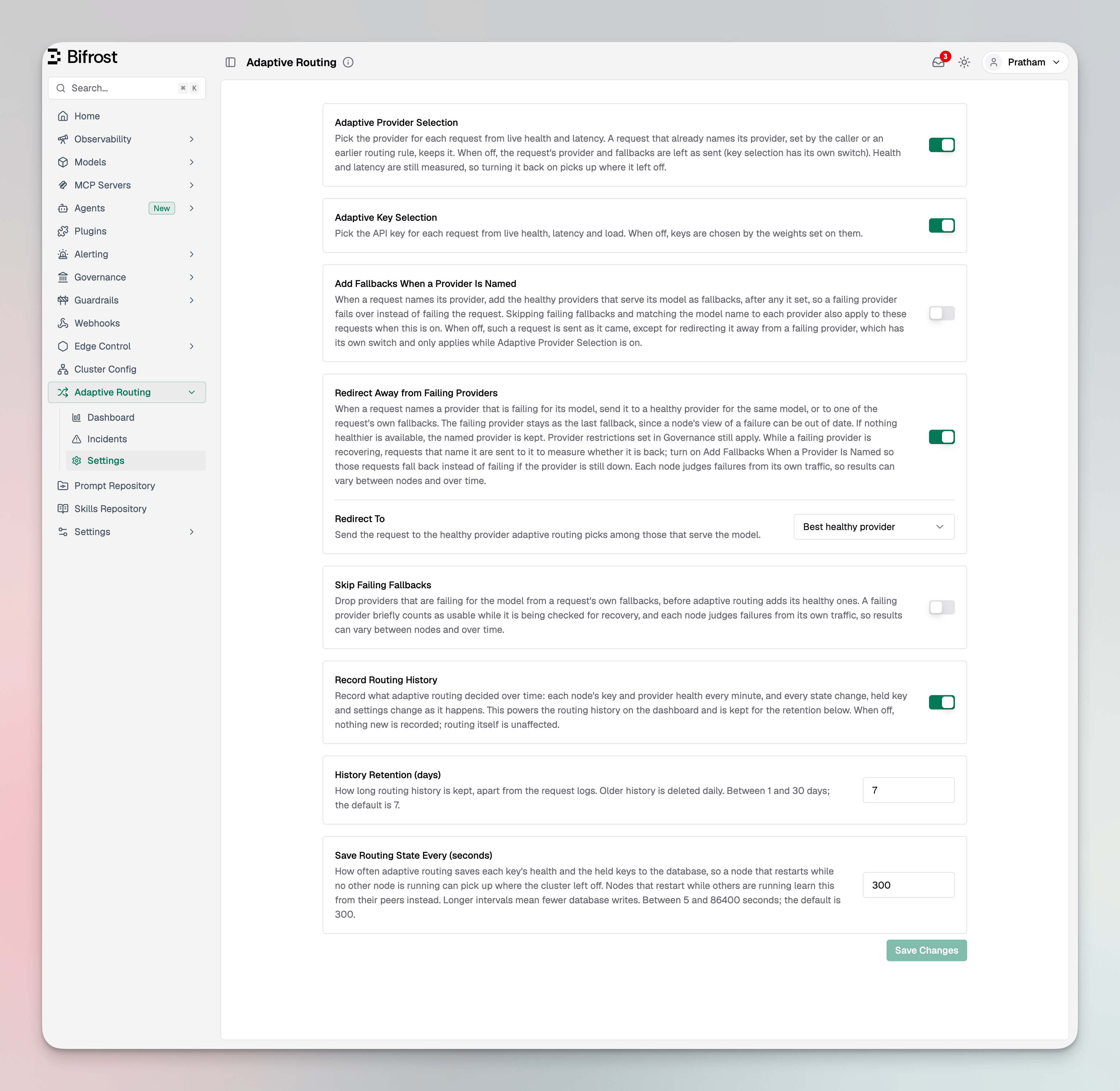
Which requests name a provider
Several settings only matter for requests that already name a provider when they reach adaptive routing. A request names its provider when:- the caller sends
provider/model, - a routing rule sets a provider, or
- the virtual key’s weighted provider configs pick one.
Choosing each setting
Adaptive Provider Selection
Picks the provider for requests that name none, and is what allows the three switches for named requests to act at all.- Keep it on in almost every deployment.
- Turn it off only to stop adaptive routing from choosing or changing providers, for example while you debug another routing layer. Requests keep the provider and fallbacks they arrive with, and a request with no provider goes to the model catalog’s default pick, which does not look at health. Health is still measured and refused keys are still held, so turning it back on picks up where it left off.
Adaptive Key Selection
Picks the key on a provider from live health, latency and load. While it is on, the weights set on keys are not used; to take a key out of rotation, disable it.- Keep it on unless your key weights must decide the split, for example to divide traffic by contract.
- With it off, keys are picked by their weights. Held keys are still skipped, but a key that keeps failing is no longer avoided.
- Neither mode applies to a key the request pins, a key the caller sends, or a provider with one key. Those are used as given; see API key selection.
Add Fallbacks When a Provider Is Named
Gives a named request the healthy providers for its model as fallbacks, after its own. Requests that name no provider always get them, so this setting changes nothing for them.- Turn it on when callers, routing rules or virtual keys name providers and you want those requests to fail over instead of failing.
- Leave it off when a named request must only reach the providers it lists, for example for data residency or a contract.
Redirect Away from Failing Providers and Redirect To
Moves a request whose named provider is failing for its model, and keeps the failing provider as its last fallback. It reacts only to a provider that is failing on every key it could use; a degraded or recovering provider keeps its requests. See how a redirect works.- Turn it on when named traffic should not spend its first attempt on a provider that is down. With it off, the dashboard counts these requests as kept on a failing provider, and their incident points here.
- Redirect To: Best healthy provider moves the request to another healthy provider for the same model. Use this by default.
- Redirect To: The request’s own fallbacks moves it to the first of its own fallbacks that is not failing, which can be another model or a specific key. Use this when the fallbacks say what should happen next, such as stepping down to a smaller model.
- Leave it off for strictly pinned traffic, and for traffic that sends its own key: a direct key goes to whichever provider the request is moved to.
Skip Failing Fallbacks
Drops providers that are failing for the model from a request’s own fallbacks. It applies to requests that name no provider, and to named requests when Add Fallbacks When a Provider Is Named is on or the request was redirected.- Turn it on when requests carry long fallback lists and you would rather not spend attempts on providers that are down.
- Leave it off if you want every configured fallback tried. Each node judges failures from its own traffic, and a skipped fallback is not tried for that request at all.
History
Record Routing History, History Retention (days) and Save Routing State Every (seconds) do not change routing. They decide what the dashboard and incidents can show, and how often key health and held keys are saved so a restarted node can pick up where the cluster left off.Common setups
With other routing features
- Routing rules run before adaptive routing. A rule that sets a provider makes the request named, its fallbacks become the request’s own, and its key pin wins over the caller’s.
- Virtual keys limit every provider adaptive routing picks or adds. Their weighted provider configs pick before adaptive routing, so that traffic is named.
- Session affinity runs after adaptive routing and can keep a session on its provider and key, but not on one that adaptive routing has failing or held on this node.
- Retries and fallbacks run per attempt on the chain adaptive routing leaves, and decide which failures retry a key, rotate to another, or move to the next fallback.
Limits
- Health is per node. Each node scores providers and keys from its own traffic, so two nodes can briefly disagree, and nodes in different regions see their own latency. Held keys are shared across the cluster.
- Changes follow traffic. Health is recalculated every few seconds, so a provider that starts failing loses traffic within seconds, not on the first error. Retries and fallbacks protect each request in the meantime.
- New keys start at full share. A key or provider adaptive routing has not measured yet competes at a fair share and settles within a cycle or two.
- Ranking is relative. Providers and keys are ranked against each other, not against a fixed latency or cost target. Cost and budget decisions belong to governance.