

Overview
A prompt deployment is a rule attached to a single prompt in the Prompt Repository that decides which committed version of that prompt serves a request. Each deployment pairs a matching rule (a CEL expression over request attributes) with a traffic distribution (a weighted split across version numbers). This lets you ship a prompt change without changing any client code: callers keep sending the same prompt ID, and the gateway picks the version. What it enables:- A/B testing - split traffic 50/50 (or any ratio) across two committed versions and compare them in logs.
- Staged rollout - start a new version at 10%, widen as it proves out.
- Conditional versions - serve a different version per model, per provider, per request type, or per request header.
Prompt deployments are part of the Bifrost enterprise license. Open-source Bifrost ships the Prompt Repository and the prompts plugin, where the caller picks the version explicitly with the
x-bf-prompt-version header. Server-side version selection is what enterprise adds.How it works
Deployments do not change how a prompt is selected - the request still names the prompt with thex-bf-prompt-id header. They only change which version of that prompt is injected.
Resolution, in order:
- No
x-bf-prompt-idheader - the plugin does nothing and the request passes through untouched. - Deployments for that prompt are evaluated newest-first (by creation time, descending). A deployment with an empty traffic distribution is skipped entirely.
- The first deployment whose CEL expression matches wins. Evaluation stops there - later deployments are not consulted.
- A version is drawn from that deployment’s traffic distribution by weighted random selection. Entries at
0%are never drawn. - If no deployment matches, the plugin falls back to the
x-bf-prompt-versionheader, and if that is absent, to the prompt’s latest committed version.
A matching deployment overrides the
x-bf-prompt-version header. The header is only honoured when no deployment matches the request.Prerequisites
- An enterprise Bifrost deployment with a config store that holds the Prompt Repository tables (typically PostgreSQL).
- A prompt with at least two committed versions - deployments route between version numbers, so there is nothing to split until you have committed more than one.
- The
enterprise-promptsplugin, which is initialized automatically by the enterprise gateway. There is noconfig.jsonsection for deployments; they are stored in the database and managed through the UI or the API.
Creating a deployment
- Web UI
- API
- Open the Prompt Repository and select the prompt you want to route. Deployments are scoped to one prompt, so the panel is empty until a prompt is open.
- In the right-hand settings panel, expand the Deployments section.
- Click Add to open the deployment sheet.
- Enter a Name (required, and unique across all prompts) and an optional Description.
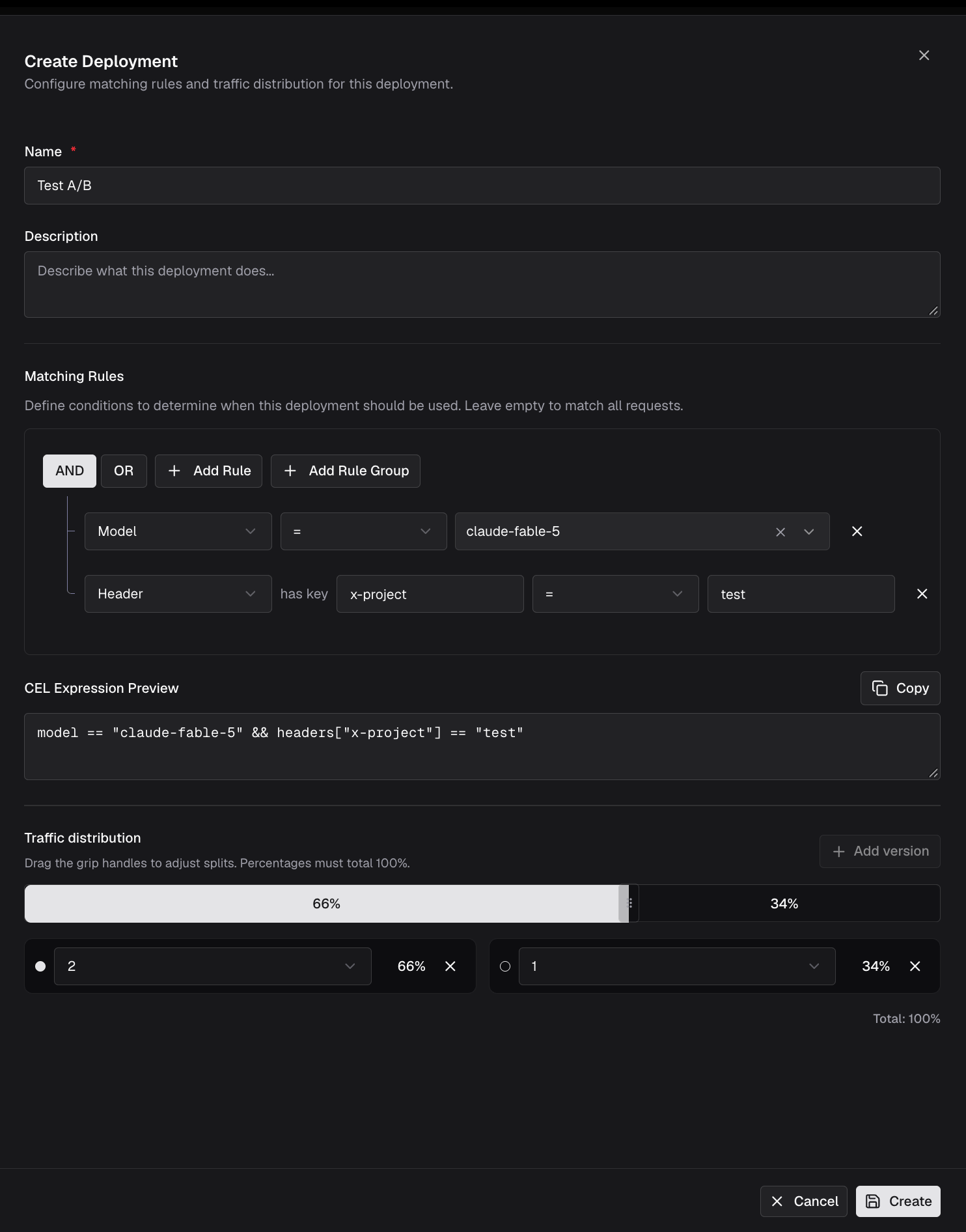
- Under Matching Rules, build the condition that selects this deployment with Add Rule and Add Rule Group, combining clauses with AND or OR. The CEL Expression Preview below the builder shows the expression that will actually be saved. Leave the builder empty to match every request for this prompt.
- Under Traffic distribution, click Add version for each version you want in the split, pick the version number, and drag the grip handles on the bar to set percentages. The total must be exactly 100%, and a version can appear only once.
-
Click Create.
Matching rules
Matching rules are CEL expressions, the same language used by routing rules. An expression must evaluate to a boolean. These variables are available:
Examples:
Header and query-parameter keys are lowercased both when the expression is saved and when it is evaluated, so
headers["X-Team"] and headers["x-team"] behave identically. Values are matched as-is and are case-sensitive.Traffic distribution
The traffic distribution is the weighted split that decides the version once a deployment matches.- Percentages must sum to exactly 100; each entry must be between 0 and 100.
- Each version may appear at most once in a distribution.
- Entries at
0%are excluded from the draw, so you can park a version without removing it. - The version is chosen by weighted random selection on every request.
Confirming which version served a request
When a prompt is resolved, the gateway echoes the decision on the response:
These are the fastest way to verify a split is behaving - send a batch of identical requests and count the versions that come back.
Ordering and overlap
Deployments for a prompt are evaluated newest-first, and the first match wins. Two consequences are worth planning around:- A newly created deployment takes precedence over older ones whose rules overlap with it.
- A catch-all deployment (
true, or an empty expression) shadows every deployment created before it. Create catch-alls first, narrow rules after.
Permissions and visibility
Deployments are governed by thePromptDeploymentStrategy RBAC resource, with Create, View, Update, and Delete operations. In the default roles:
Data access control scope is inherited from the parent prompt: a deployment attached to a prompt outside your scope is not listed, and fetching it by ID returns
404.
Clustering
In a cluster, every create, update, and delete reloads the local deployment cache, gossips to the other nodes under theprompt_deployment entity type, and notifies connected UI clients. CEL expressions are compiled once at cache load, so matching stays off the request path.
Troubleshooting
My deployment never serves its new version
Symptom:bf-resolved-prompt-version always comes back as the old version, or as 0.
Causes: the deployment has no traffic distribution; a newer deployment with an overlapping rule is matching first; or the expression does not match the request.
Fix: confirm the distribution totals 100%, check whether a more recently created deployment shadows this one, and simplify the expression to true temporarily to confirm the rest of the path works.
Saving the deployment returns a CEL compile error
Symptom:400 CEL compile error: undeclared reference to '<field>'.
Cause: the expression references a variable that is not in the deployment CEL environment.
Fix: rewrite the rule using the variables listed under Matching rules.
Versions alternate between requests from the same user
Symptom: a multi-turn conversation gets different prompt versions on different turns. Cause: weighted selection is per request and not sticky. Fix: pin the version withx-bf-prompt-version for those requests, and exclude them from the deployment’s matching rule.
Budget or usage rules never match
Symptom: a rule onbudget_used, tokens_used, or request never fires.
Cause: governance is not supplying usage data, so all three evaluate to 0.0.
Fix: enable the governance plugin and configure budgets or rate limits for the provider and model in question.
Next steps
- Prompt Repository - author prompts, commit versions, and find a prompt’s ID.
- Prompts plugin - how committed versions are injected into requests, and the header contract.
- Routing rules - the same CEL builder applied to provider and model selection.
- RBAC - grant or restrict deployment management per role.