

Overview
Budgeting and rate limiting are a core feature of Bifrost’s governance system managed through Virtual Keys. Bifrost’s budget management system provides comprehensive cost control and financial governance for enterprise AI deployments. It operates through a hierarchical budget structure that enables granular cost management, usage tracking, and financial oversight across your entire organization. Core Hierarchy:- Virtual Keys - Primary access control via
x-bf-vkheader (exclusive team OR customer attachment) - Budget Management - Independent budget limits at each hierarchy level with cumulative checking
- Rate Limiting - Request and token-based throttling at both VK and provider config levels
- Provider-Level Governance - Granular budgets and rate limits per AI provider within a virtual key
- Model/Provider Filtering - Granular access control per virtual key
- Usage Tracking - Real-time monitoring and audit trails
- Audit Headers - Optional team and customer identification
Budget Management
Cost Calculation
Bifrost automatically calculates costs based on:- Provider Pricing - Real-time model pricing data
- Token Usage - Input + output tokens from API responses
- Request Type - Different pricing for chat, text, embedding, speech, transcription
- Cache Status - Reduced costs for cached responses
- Batch Operations - Volume discounts for batch requests
Budget Checking Flow
When a request is made with a virtual key, Bifrost checks all applicable budgets independently in the hierarchy. Each budget must have sufficient remaining balance for the request to proceed. Checking Sequence: For VK → Team → Customer:- All applicable budgets must pass - any single budget failure blocks the request
- Budgets are independent - each tracks its own usage and limits
- Costs are deducted from all applicable budgets - same cost applied to each level
- Rate limits checked at provider config and VK levels - teams and customers have no rate limits
- Provider selection - providers that exceed their budget or rate limits are excluded from routing
Rate Limiting
Rate limits protect your system from abuse and manage traffic by setting thresholds on request frequency and token usage over a specific time window. Rate limits can be configured at both the Virtual Key level and Provider Config level for granular control. Bifrost supports two types of rate limits that work in parallel:- Request Limits: Control the maximum number of API calls that can be made within a set duration (e.g., 100 requests per minute).
- Token Limits: Control the maximum number of tokens (prompt + completion) that can be processed within a set duration (e.g., 50,000 tokens per hour).
Rate Limit Hierarchy
Rate limits are checked in hierarchical order:Provider-Level Rate Limiting
Provider configs within a virtual key can have independent rate limits, enabling:- Per-Provider Throttling: Different rate limits for OpenAI vs Anthropic
- Provider Isolation: Rate limit violations on one provider don’t affect others
- Granular Control: Fine-tune limits based on provider capabilities and costs
Reset Durations
Budgets and rate limits support flexible reset durations: Format Examples:1m- 1 minute5m- 5 minutes1h- 1 hour1d- 1 day1w- 1 week1M- 1 month1Q- 1 quarter (budgets only)1Y- 1 year
- Rate Limits:
1m,1h,1dfor request throttling - Budgets:
1d,1w,1M,1Q,1Yfor cost control
1Q is available on budgets only. Rate limits carry no quarter definition, so a quarterly token or request limit is not offered.Calendar-aligned budgets
By default, a budget rolls: afterreset_duration elapses since last_reset, usage resets. With calendar_aligned: true, the budget resets at the start of each calendar period in UTC instead (same instant for every customer of that configuration).
Supported reset_duration suffixes: only day (d), week (w), month (M), quarter (Q), and year (Y). Examples: 1d → midnight UTC each day; 1w → Monday 00:00 UTC each week; 1M → first day of each month; 1Q → first day of the fiscal quarter; 1Y → January 1 each year. Sub-day durations (for example 1h, 30m) have no calendar boundary to snap to. Setting calendar_aligned alongside one is accepted rather than rejected, and simply has no effect: that window keeps resetting on its rolling schedule.
Calendar alignment applies to budgets on customers, teams, virtual keys, and per-provider-config budgets. calendar_aligned is an owner-level field, not a per-budget one: send it at the top level of the customer, team, virtual key, or provider-governance request body, on both POST (create) and PUT (update). Omitting it on a PUT leaves the current setting unchanged.
The flag applies to everything that owner resets, not to budgets alone. That owner’s rate limits follow the same rule, so its token and request counters align too.
It sets the alignment mode, not a shared reset instant. An owner holds one window per budget plus one each for its token and request counters, and every one of them keeps its own reset_duration and its own last_reset. Each aligns to its own boundary: on an aligned owner, a 1M budget resets on the 1st while a 1d token limit resets at midnight. They do not reset together.
Alignment only applies to durations that have a calendar boundary:
1d, 1w, 1M, 1Q and 1Y. A sub-day window such as a 1h request limit stays on its rolling schedule even when its owner is aligned, and the flag changes nothing for it.- Windows do not move together. A
1Mbudget adopts the month boundary while a1dcounter beside it adopts midnight. - Sub-day windows are not adopted at all, because they have no boundary to adopt. A
1hcounter keeps its rolling schedule, as described above.
The boundary only ever moves forward. A window that already opened after its most recent boundary is current, so it is left exactly as it is. This forward-only rule is what keeps every node in a cluster agreeing on which window is open.
Quarterly budgets and fiscal quarters
A quarterly budget uses the same rule as a monthly one - it resets on the 1st of a month at 00:00 UTC - and only differs in which 1st. By default that is January, April, July and October. Setreset_config.quarter_start_month to move the fiscal year:
Quarter boundaries repeat every three months, so
quarter_start_month only changes reset dates modulo 3. January, April, July and October all reset on the same days - which covers the UK and India (April), the US federal year (October) and Australia (July). For those, the setting changes only which quarter is labelled Q1, not when the budget resets. The eight other months genuinely move the boundaries: February, for example, gives Feb-Apr / May-Jul / Aug-Oct / Nov-Jan.reset_config is valid only on a quarterly reset_duration; the API rejects it on any other window rather than storing a setting that would do nothing. A quarterly budget that is not calendar-aligned ignores the fiscal calendar entirely and rolls on a 90-day window anchored to its creation time.
Changing quarter_start_month on a live calendar-aligned budget takes effect on the next reset tick rather than instantly. The new definition is stored immediately, which moves where the current window starts; if that boundary has moved forward, the budget reads as due and resets shortly after, zeroing usage. That is the honest outcome - under the new calendar the current quarter genuinely began on a later date.
Resetting budget usage
Changing a budget’s amount or reset frequency does not clear the spend already recorded against it. To clear it, sendreset_budget_usage: true on the update request. The UI asks before saving whenever a
budget’s configuration changed, offering Preserve Usage or Reset Usage.
The reset clears usage only. The reset window keeps its existing start and end, because
last_reset
only ever advances and never moves as a side effect of a configuration write. That rule is what keeps
every node in a cluster agreeing on which window is currently open. The normal scheduled reset is
unaffected and still advances last_reset when the window closes, so a manually cleared budget resets
again at its usual boundary rather than starting a fresh window from the moment you cleared it.Budget overrides
A budget can carry a temporary override that adds spending capacity on top of its configured limit without touching the base limit, current usage, or reset schedule. While an override is active, enforcement uses:PUT/DELETE on /api/governance/virtual-keys/{vk_id}/budgets/{budget_id}/override — see Budget Overrides for the UI walkthrough and API examples.
Customer-scoped requests
Customer scoping is a Bifrost Enterprise feature. It applies to requests made with a team-attached virtual key when that team is linked to more than one customer.
When a scope header is present, only the named customer is charged, rate-limited, and recorded in that request’s usage logs — the team’s other customers are left untouched. The team’s own budget, the virtual key budget, and provider-config limits are always enforced regardless of scope.
Resolution rules:
x-bf-customer-idtakes precedence overx-bf-customer-namewhen both are sent.- Surrounding whitespace is trimmed, and the header name is case-insensitive (like all Bifrost headers).
- Send no customer-scope header to charge and enforce all of the team’s customers (the default).
Examples
Scope a chat request to a customer by ID:Validation
The customer scope is validated before the request reaches a provider, and it fails closed: an invalid scope is rejected even when budget and rate-limit enforcement is otherwise skipped. A request is rejected with 400 Bad Request when the scope header is:- present but empty or whitespace-only,
- an ID or name that does not match any customer, or
- a customer that exists but is not attached to the virtual key’s team.
Configuration Guide
Configure provider-level budgets and rate limits using any of these methods:- Web UI
- API
- config.json
The Bifrost Web UI provides an intuitive interface for configuring provider-level governance through the Virtual Keys management page.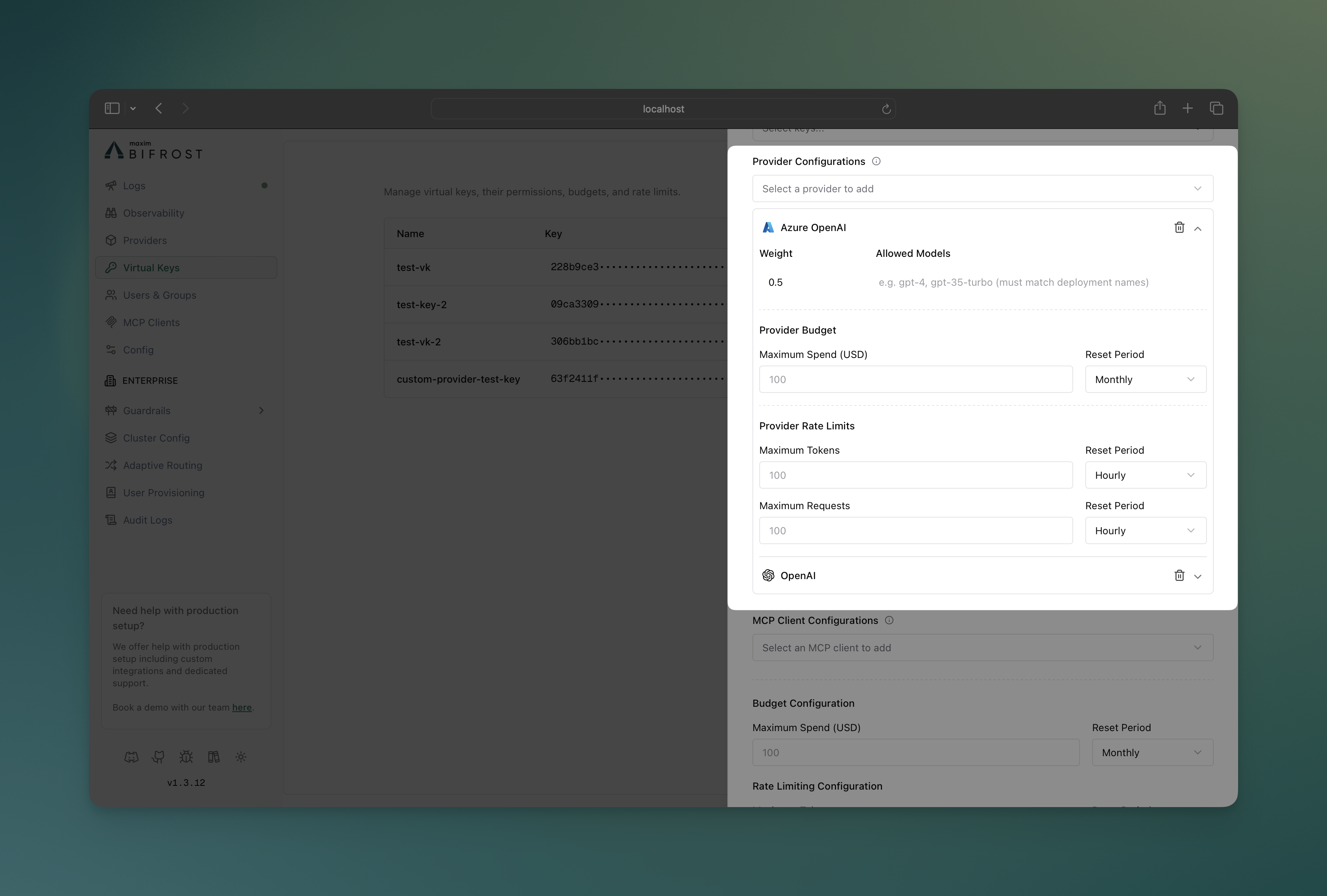
Creating Virtual Keys with Provider Configs
- Navigate to Virtual Keys: Go to Virtual Keys page in the Bifrost dashboard
- Create New Virtual Key: Click “Create Virtual Key” button
- Configure Providers: In the “Provider Configurations” section:
- Add multiple providers with individual weights
- Set provider-specific budgets and rate limits
- Configure allowed models per provider
Provider Configuration Interface
- Visual Provider Cards: Each provider displays as an expandable card
- Budget Controls: Set spending limits with reset periods per provider
- Rate Limit Controls: Configure token and request limits independently
- Model Filtering: Specify allowed models for each provider
- Weight Distribution: Visual indicators for load balancing weights
- Real-time Validation: Immediate feedback on configuration errors
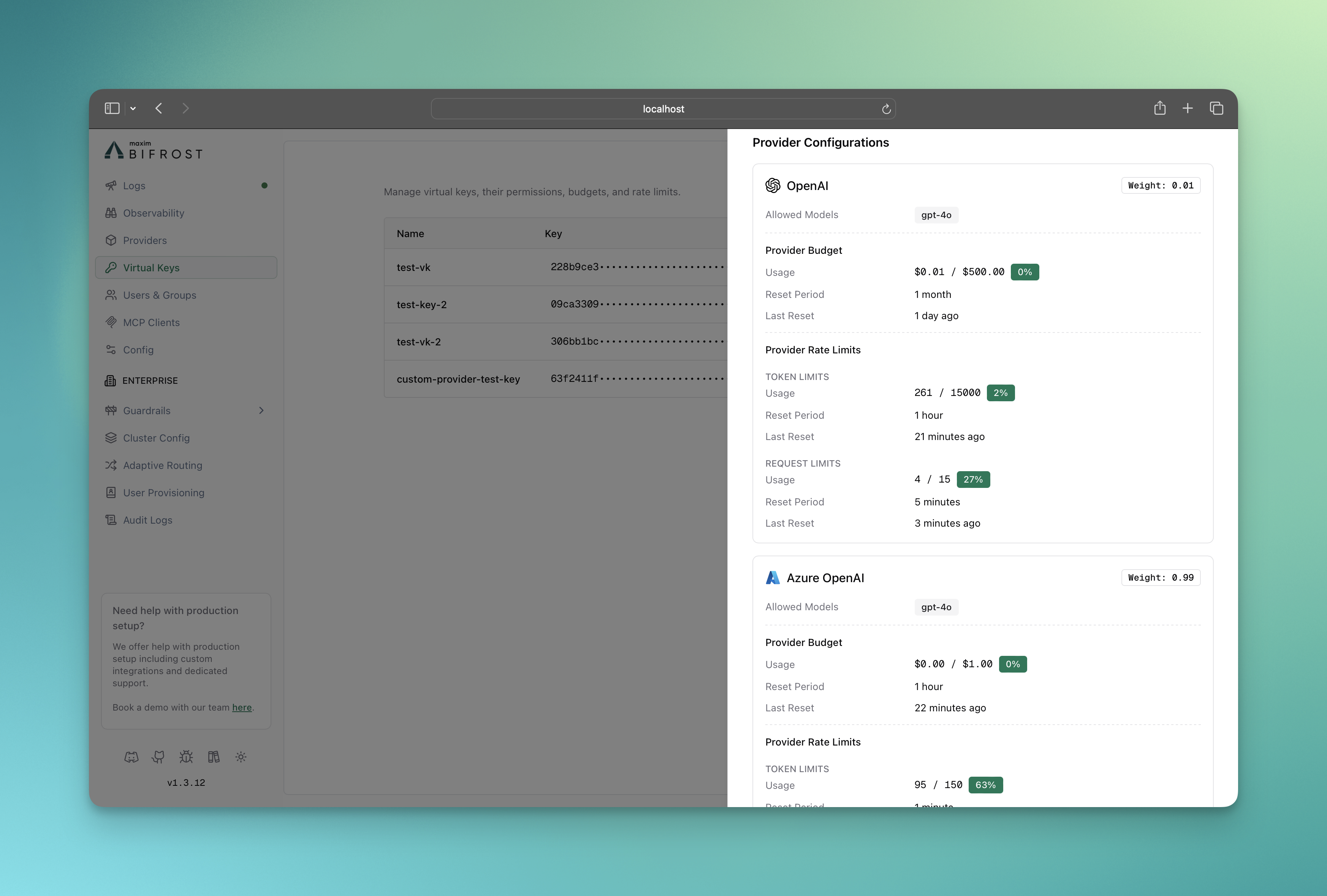
Monitoring Provider Usage
- Budget consumption per provider
- Rate limit utilization (tokens and requests)
- Provider availability status
- Usage trends and forecasting
Provider-Level Governance Examples
Example 1: Mixed Provider Budgets
A virtual key configured with multiple providers and different budget allocations:- OpenAI requests limited to 50 dollars/month at provider level + 100 dollars/month at VK level
- Anthropic requests limited to 30 dollars/month at provider level + 100 dollars/month at VK level
- If any provider’s budget is exhausted, all requests to that provider will be blocked
Example 2: Provider-Specific Rate Limits
Different rate limits based on provider capabilities:- OpenAI: 1000 requests/hour, 1M tokens/hour
- Anthropic: 500 requests/hour, 500K tokens/hour
- If any provider’s rate limits are exceeded, all requests to that provider will be blocked
Example 3: Failover Strategy
Provider configurations with budget-based failover:- Primary: Use cheap provider until $10 daily budget exhausted
- Fallback: Automatically switch to premium provider when cheap option unavailable. To enable this, you should not send
providername in the request body, read Routing for more details. - Cost containment: Prevent unexpected overspend on premium resources and limit the number of requests to the premium provider
Key Benefits of Provider-Level Governance
- Granular Control: Set specific spending limits and rate limits per AI provider
- Automatic Fallback: Route to alternative providers when budgets or rate limits are exceeded
- Cost Control: Track and control spending by provider for better financial oversight
- Performance Testing: A/B testing across providers with controlled budgets
- Multi-Provider Strategies: Primary/backup provider configurations
- Cost-Tiered Access: Cheap providers for basic tasks, premium for complex workloads
Next Steps
- Routing - Direct requests to specific AI models, providers, and keys using Virtual Keys.
- MCP Tool Filtering - Manage MCP clients/tools for virtual keys.
- Tracing - Audit trails and request tracking