

Overview
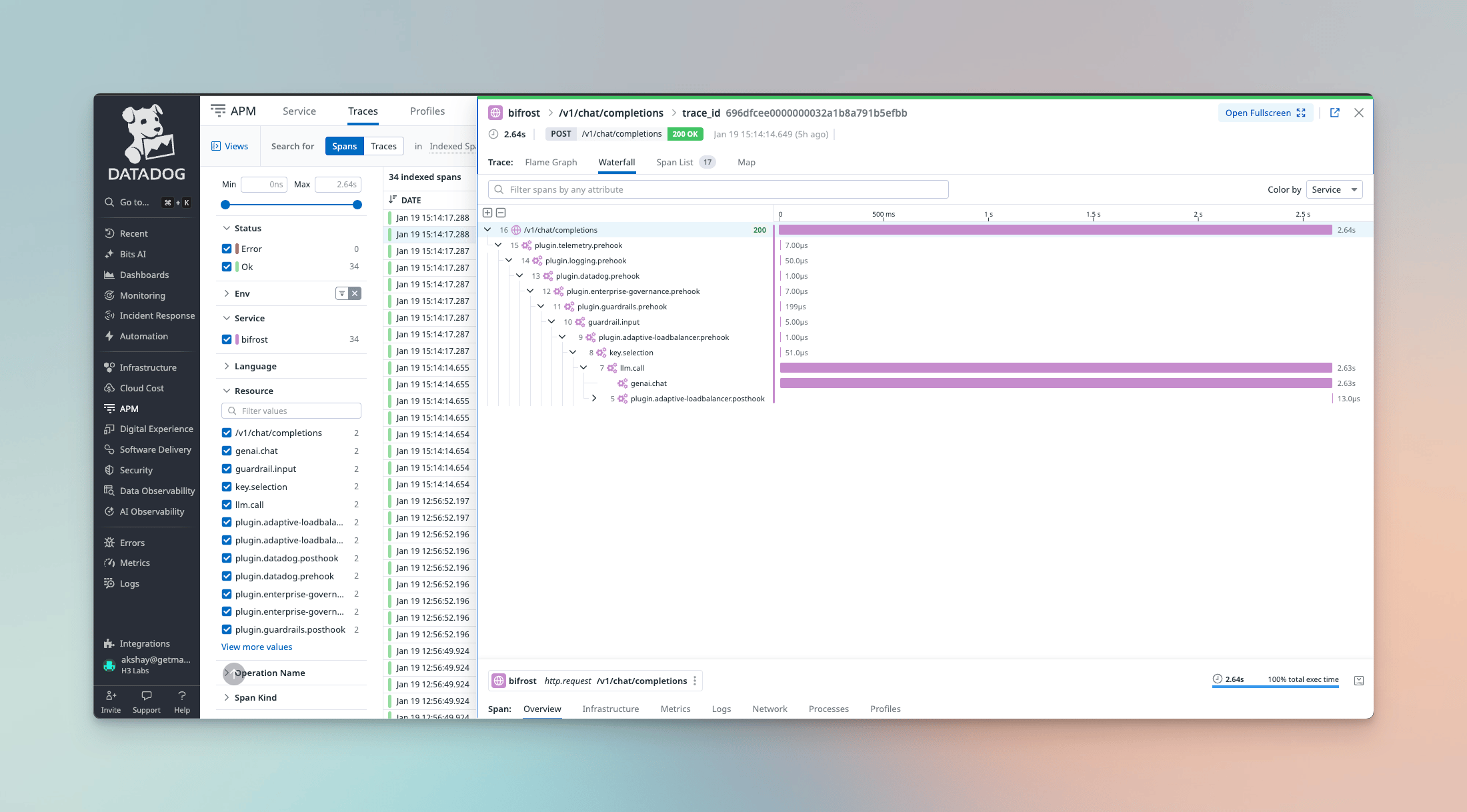
- APM Traces - Distributed tracing via dd-trace-go v2 with W3C Trace Context support for end-to-end request visibility
- LLM Observability - Native Datadog LLM Obs integration for AI/ML-specific monitoring
- Metrics - Operational metrics via DogStatsD or the Metrics API
Deployment Modes
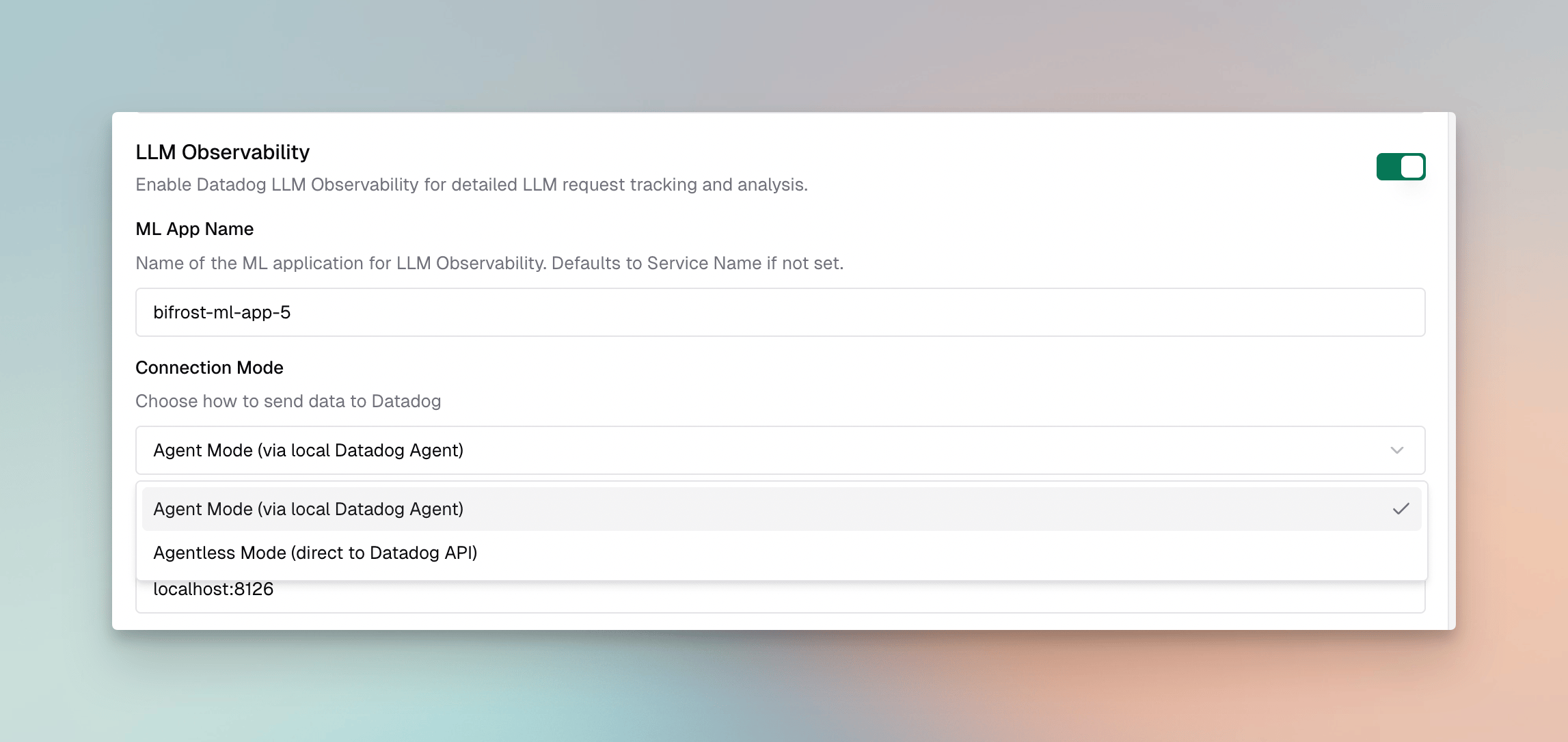
Agent Mode
In agent mode, the plugin communicates with a locally running Datadog Agent:- APM Traces → Agent at
localhost:8126 - Metrics → DogStatsD at
localhost:8125
Agentless Mode
In agentless mode, the plugin sends data directly to Datadog’s intake APIs ({site} is your configured Datadog site, e.g. datadoghq.com):
- LLM Observability →
https://api.{site}/api/intake/llm-obs/v1/trace/spans - Metrics →
https://api.{site}Metrics API (series to/api/v2/series, distributions to/api/v1/distribution_points)
Datadog officially supports agentless submission for LLM Observability and metrics, but not for general APM tracing - the dd-trace-go setup assumes a running Agent (or the serverless extension). The plugin points the tracer at the public trace intake so APM spans are still emitted, but if you need fully-supported APM, run the Datadog Agent (agent mode). LLM Observability and metrics are unaffected.
Configuration
Required Fields
Environment Variable Substitution
Theservice_name, ml_app, env, version, api_key, agent_addr, agent_host, agent_port, dogstatsd_addr, dogstatsd_host, dogstatsd_port, and custom_tags fields support environment variable substitution using the env. prefix:
Substitution is whole-value only —
"env.DD_HOST:8125" does not work, because the entire field is treated as one variable reference. If your environment exposes the agent host and port as separate variables (common in Kubernetes, where the host is injected from the downward API status.hostIP and the port is fixed), use the separate agent_host / agent_port and dogstatsd_host / dogstatsd_port fields instead of agent_addr / dogstatsd_addr. When a *_host field is set it takes precedence over the combined *_addr, and the matching *_port defaults to 8126 (agent) / 8125 (DogStatsD).Separate host and port (Kubernetes)
8126 (agent) and 8125 (DogStatsD). Set agent_port / dogstatsd_port (literal or env. reference) only if your agent listens on non-standard ports.
With the Kubernetes downward API injecting the node IP:
Setup
- UI
- Go SDK
- config.json
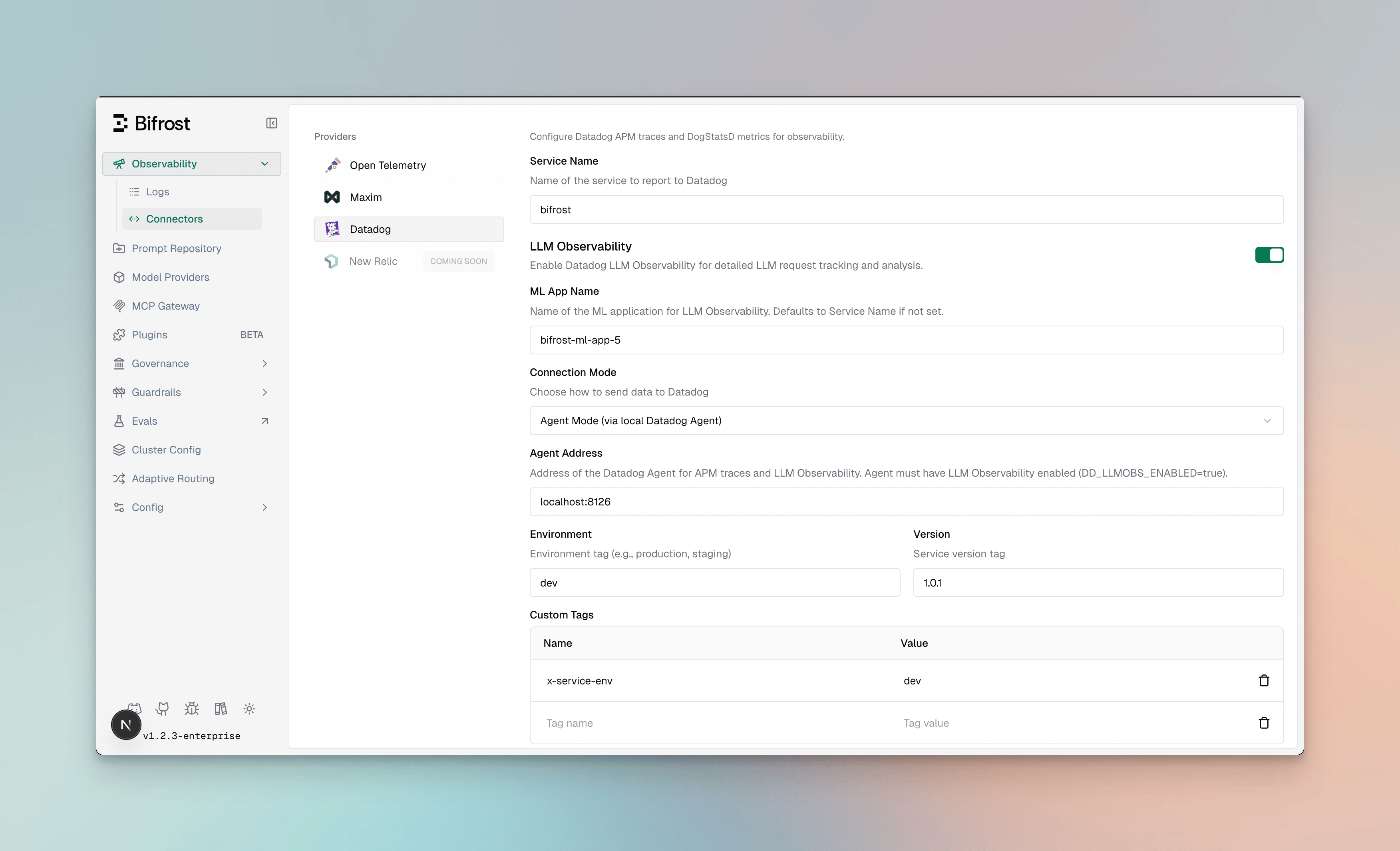
- Navigate to Plugins
- Enable the Datadog plugin
- Configure the required fields based on your deployment mode
Datadog Sites
The plugin supports all Datadog regional sites. Set thesite field to match your Datadog account region:
Ensure your API key corresponds to the selected site. API keys from one region will not work with another.
LLM Observability
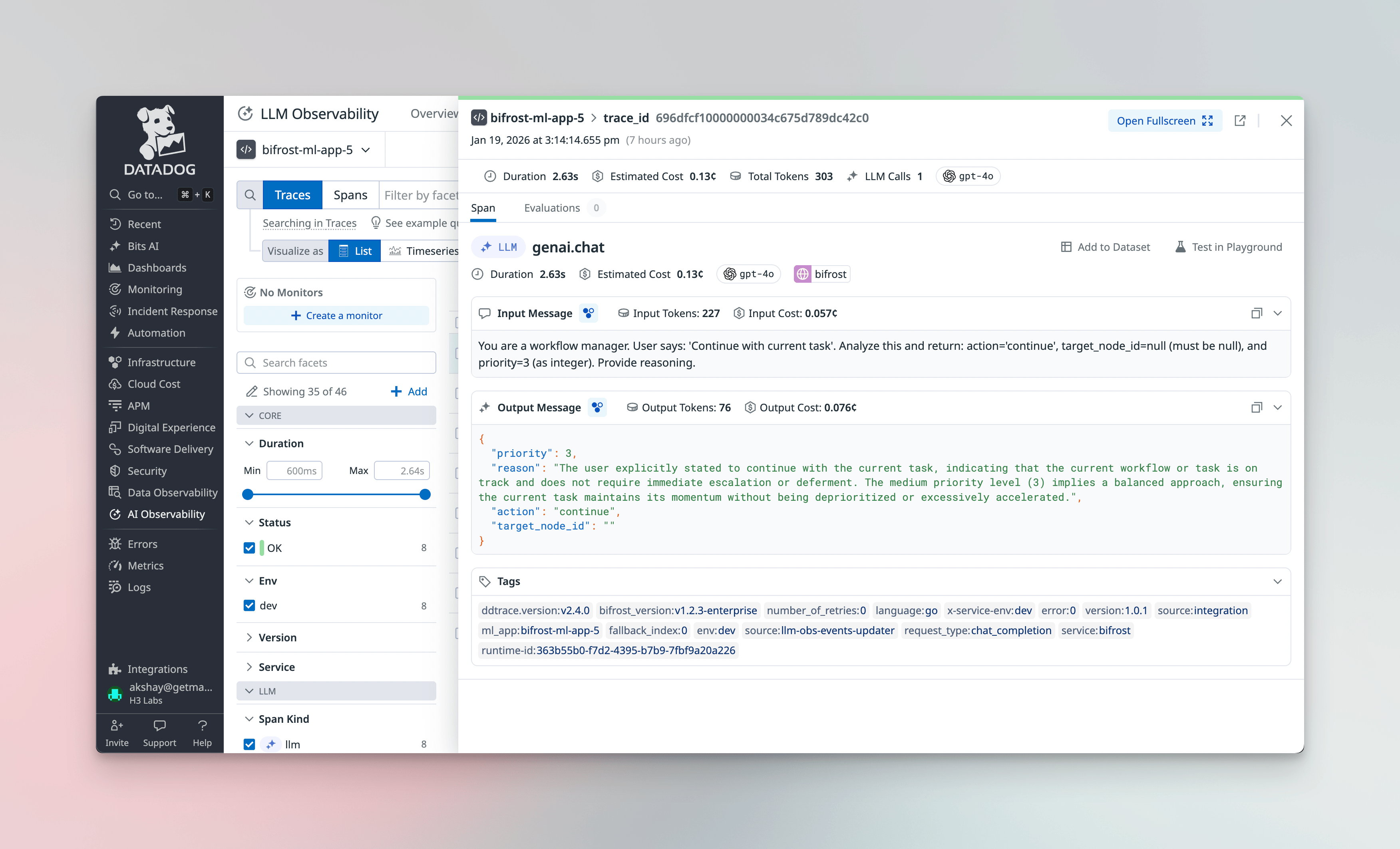
ML App Grouping
LLM traces are grouped under an ML App in Datadog. By default, this uses yourservice_name, but you can specify a dedicated ML App name:
- Group related LLM operations across multiple services
- Track costs and performance by application
- Apply ML-specific alerts and dashboards
Session Tracking
The plugin supports session tracking via thex-bf-session-id header. Include this header in your requests to group related LLM calls into a conversation session:
Grouping APM Traces by Session
By default, every request is its own APM trace, so a multi-turn conversation appears as many separate traces in the APM trace view. (Cross-trace grouping normally lives in LLM Observability sessions, a separate product from APM.) Enablegroup_traces_by_session to instead group every request sharing the same x-bf-session-id into a single APM trace, where each request renders as a top-level sibling span:
x-bf-session-id value, so all requests carrying that header resolve to the same trace.
- Agent mode only. APM spans are emitted only in agent mode. In agentless mode the plugin emits LLM Observability spans only, which already group via session tracking.
- W3C traceparent takes precedence. If a request carries an inbound
traceparentheader, it stays on that distributed trace and is not regrouped by session. - APM traces are not built for long-lived sessions. Datadog has practical limits on spans-per-trace and trace-assembly windows; very long sessions may render with large time gaps or be truncated. For long conversations, prefer LLM Observability sessions.
W3C Distributed Tracing
The plugin supports W3C Trace Context for distributed tracing across services. When your upstream service sends atraceparent header, Bifrost automatically links its spans as children of the parent trace.
- End-to-end visibility - See LLM calls in the context of your full application trace
- Cross-service correlation - Link frontend requests → backend services → Bifrost → LLM providers
- Latency attribution - Understand how LLM latency contributes to overall request time
traceparent header format follows the W3C standard:
tracestate header sent alongside traceparent is carried through as well. This matters
when the calling service runs a Datadog tracing library with LLM Observability enabled: its
vendor entry holds the ML app and parent of the caller’s LLM Observability trace, and
without it those are lost at the gateway. A propagated ML app takes precedence over the one
Bifrost is configured with, so gateway traffic is attributed to the calling application.
tracestate, including services using a vendor-neutral tracing
library, are unaffected: the parent is linked from traceparent as before.
Datadog-Side Conversion
Bifrost sends LLM Observability spans directly. Datadog can also build its own from any trace carrying GenAI attributes, which would duplicate what Bifrost already sent, so by default Bifrost marks its traces to opt out. That opt-out applies to the whole trace, including spans from your own services on it. If your services instrument their own LLM calls and expect Datadog to convert them, change this setting:inherit or enabled, Bifrost keeps sending its own LLM Observability spans and
leaves the GenAI attributes off its APM spans, so Datadog has only your services’ spans to
convert and nothing is counted twice. The trade-off is that gen_ai.* is no longer
available for APM span search on Bifrost’s spans; the gateway version stays on every span
as bifrost.version.
If you would rather Datadog build every LLM Observability span, including Bifrost’s, set
enable_llm_obs to false alongside inherit or enabled. Bifrost then stops sending
its own and keeps the GenAI attributes on its APM spans for Datadog to convert. Those
converted spans carry less detail than the ones Bifrost sends directly.
Gateway Mode
Datadog documents a pattern for proxy and gateway services that makes all traffic through a gateway queryable in one place. Turning it on changes two things:- A workflow span is opened for each request, named
bifrost.request. Filtering LLM Observability on your service plus that name lists gateway requests rather than raw model calls, and each request’s LLM span sits underneath it. - MCP tool and task spans are exported, so an agentic request shows the tools it ran alongside its model calls.
This changes the shape of exported LLM Observability data: a span is added per request and
existing LLM spans are nested under it. Saved views, dashboards and breakdowns built on the
previous shape may need updating, which is why it is off by default. Leaving it off keeps
exported spans exactly as before.
What’s Captured
For each LLM operation, the plugin sends to LLM Observability:- Input/Output Messages - Full conversation history with role attribution
- Token Usage - Input, output, and total token counts
- Cost - Calculated cost in USD based on model pricing
- Latency - Request duration and time-to-first-token for streaming
- Model Info - Provider, model name, and request parameters
- Tool Calls - Function/tool call details for agentic workflows
- Tool Results - Results of tool calls, matched to the call they answer
- Tool Definitions - The tool list the request offered the model
- Prompt Tracking - Prompt ID and version when the request used a stored prompt
Prompt Tracking
A request that names a stored prompt (x-bf-prompt-id) carries that prompt’s ID and version
on its LLM Observability span. Datadog uses them for the prompt breakdown in the cost view,
for prompt-version comparison, and for filtering traces by prompt.
The prompt ID, name and version are also sent as span tags and as metric tags, so cost and
latency can be broken down by prompt version in dashboards. They are only present on
requests that used a stored prompt.
Prompt tracking is part of exported content: with disable_content_logging set, or a prompt
that has no ID, nothing is annotated.
Grouping Cost by Attribution
Datadog’s cost and token metrics carry only a fixed set of dimensions of their own. Bifrost propagates its attribution onto them, so spend is groupable by team, customer, virtual key, project, business unit and user with no configuration:*_id tags are UUIDs, which group poorly in a cost view and
multiply cost-metric cardinality on the Datadog side for no gain. A tag with no value on a
given span is skipped for that span, so a request without governance attribution simply
contributes nothing to that breakdown.
user_name is the expensive one. The others are bounded by how many teams, customers,
virtual keys, projects and business units exist; users are not, so this is the key most
likely to grow your cost-metric series count. Datadog can drop a tag server-side if it
does.
Renamed Token and Cost Metrics
Six span metrics now use the names Datadog recognises, which is what lets cached tokens and cost appear in the LLM Observability cost view:
The previous names are still sent alongside the current ones, so existing dashboards keep
working. They are deprecated and will be removed in a future release. Update any saved query
or dashboard that reads
@metrics.<previous name>.
Dimensions in Metrics
Per-request dimensions sent asx-bf-dim-* headers reach Datadog APM spans automatically — every span attribute becomes a tag, so x-bf-dim-team: platform appears as team:platform on the request span with no configuration.
Metrics are opt-in. DogStatsD tags are not added unless the dimension is named in metric_dimensions:
x-bf-dim-team: platform adds team:platform to every bifrost.* metric. A dimension not listed is ignored for metrics (it still reaches spans).
Prometheus has the same opt-in model via its
custom_labels setting. Per-user attribution without the cardinality cost is available from BigQuery columns or Splunk event fields.Metrics Reference
The plugin emits the following metrics to Datadog:Error tags
bifrost.errors.total carries two error dimensions, mirroring bifrost_error_requests_total on the Prometheus and OTel sides.
status_code is the status the failure resolves to. For a failure answered over HTTP that is the status the caller received, and it includes the 500s Bifrost raises internally — a request that fails during conversion or on an unparseable provider response has no upstream status of its own. For an error delivered inside an already-committed stream the caller saw HTTP 200 and the error in the event body, so this is the status the failure would have carried, not the wire status. Alert on this.
reason is a per-provider vocabulary kept for existing dashboards and is deprecated; it resolves from bifrost.error.type, then gen_ai.error.type, then gen_ai.error.code, then unknown. Prefer status_code, or the normalized bifrost.error.type on the span.
Before Bifrost 2.2.2 these internally-raised failures were tagged
status_code:unknown, so 5xx dashboards under-counted them. If you have alerts or dashboards keyed on status_code:unknown, repoint them — that value is now emitted only for a span carrying no status at all.Migrating from bifrost.cost.usd
The cost metric was renamed from bifrost.cost.usd to bifrost.request.cost.usd, and its type changed from Gauge to Distribution. The gauge was last-write-wins per flush window, so concurrent requests with the same tags collapsed to a single value and no query could recover the true total spend. The new name is required because Datadog permanently associates a metric name with its first-seen type per organization — orgs that previously received the gauge cannot receive the same name as a distribution.
Affected assets: any dashboards, monitors, saved views, or alerts that query bifrost.cost.usd.
To migrate:
- Replace
bifrost.cost.usdwithbifrost.request.cost.usdin all queries. - Update aggregations for Distribution semantics — each sample is one request’s cost:
- Total spend:
sum:bifrost.request.cost.usd{*}(do not append.as_count()or.rollup(sum); thesum:aggregator already returns the additive total) - Per-request statistics:
avg:,max:, or percentile aggregators
- Total spend:
- Recreate monitors and alerts on the new metric, adjusting thresholds if they assumed gauge behavior (the gauge systematically under-reported under concurrent load).
bifrost.cost.usd stops receiving data once the upgrade completes; during a rolling deploy both metrics receive data, so update dashboards at or shortly after the upgrade. Historical gauge data remains queryable under the old name for Datadog’s standard retention window.
Custom Tags
All metrics include your configuredcustom_tags plus automatic tags for:
provider- LLM provider (openai, anthropic, etc.)model- Model namemethod- Type of request (chat, embedding, etc.)bifrost_node- Per-instance identity (BIFROST_NODE_IDif set, otherwisehostname-pid)- plus Bifrost-context tags when available (virtual key, selected key, team, customer, fallback index, complexity tier/mechanism)
complexity_tier, two additional tags are set:
complexity_tier- The complexity tier the request was classified into:SIMPLE,MEDIUM, orCOMPLEX(Datadog normalizes tag values to lowercase, so query assimple/medium/complex)complexity_mechanism- How the tier was determined:semantic,decision,llm,session, orskippedwhen classification produced no tier
sum:bifrost.request.cost.usd{complexity_tier:complex} by {model}. The raw complexity score is not exported as a metric tag because its cardinality is unbounded; it remains available in request logs and trace attributes.
Captured Data
Each APM trace includes comprehensive LLM operation metadata:Span Attributes
- Span Name - Based on request type (
genai.chat,genai.embedding, etc.) - Service Info -
service.name,service.version,env(Datadog’s unified service tagging:service,version,env) - Provider & Model -
gen_ai.provider.name,gen_ai.request.model
Request Parameters
- Temperature, max_tokens, top_p, stop sequences
- Presence/frequency penalties
- Tool configurations and parallel tool calls
- Custom parameters via
ExtraParams
Input/Output Data
- Complete chat history with role-based messages
- Prompt text for completions
- Response content with role attribution
- Tool calls and results
- Reasoning and refusal content (when present)
Controlling Exported Content
Setdisable_content_logging: true to stop message content from reaching Datadog. Input and output messages, prompt and instructions, embedding inputs, model reasoning, tool definitions, calls, and results, and the stored-prompt identifiers used for prompt tracking are dropped from both APM spans and LLM Observability payloads. Metadata is still exported, including model, provider, tokens, cost, latency, status, and governance attribution, so metrics and dashboards are unaffected.
Performance Metrics
- Token usage (prompt, completion, total)
- Cost calculations in USD
- Latency and timing (start/end timestamps)
- Time to first token (streaming)
- Error details with status codes
Bifrost Context
- Virtual key ID and name
- Selected key ID and name
- Team ID and name
- Customer ID and name
- Complexity tier and mechanism (only when a routing rule references
complexity_tier) - Retry count and fallback index
Excluding Attributes
Some span attributes are large and not needed downstream. Tool definitions are a common example. List the attribute names you want left out of exported spans:excluded_attributes to drop individual attributes from the spans you do export.
Plugin Span Filtering
By default every plugin’s pre- and post-hook execution generates a span, which can bloat APM traces when many plugins are active (e.g. 8 built-in plugins × 2 hooks = 16 plugin spans per request). Useplugin_span_filter inside the Datadog plugin config to control which plugin spans are exported. It selects whole spans by plugin name, not individual attributes. To drop an attribute, see Excluding Attributes. This affects only the exported APM trace spans; plugin execution and metrics are unchanged.
Via config.json (inside the Datadog plugin config):
source_of_truth: "config.json" makes the file authoritative.
Filter modes:
Plugin names: list each plugin using the exact name shown for it in the Configure Plugin Tracing sheet — this is the same name that appears in the span (
plugin.<name>.<stage>), and it is what the filter matches against. Note that some plugins are registered under a different name than their config key: the enterprise prompts and governance plugins appear as enterprise-prompts and enterprise-governance (not prompts/governance). Common names include telemetry, logging, otel, semantic_cache, compat, maxim, enterprise-prompts, enterprise-governance, datadog, bigquery, guardrails, adaptive-loadbalancer, and model-catalog-resolver. The exact set depends on which plugins are loaded in your deployment.
When a plugin span is filtered out, its children are automatically re-parented to the nearest exported ancestor so the trace hierarchy stays connected. The filter applies to APM trace spans only; it does not change DogStatsD metrics, which are never derived from plugin spans.
Each observability connector has its own independent
plugin_span_filter — filtering plugin spans for Datadog does not affect OTEL, BigQuery, or any other connector. plugin_span_filter follows the standard plugin config precedence rules; to make a config.json value override UI-saved DB settings on restart, set source_of_truth: "config.json". See Source of Truth & Reconciliation for details.Supported Request Types
The Datadog plugin captures all Bifrost request types:When to Use
Datadog Plugin
Choose the Datadog plugin when you:- Use Datadog as your primary observability platform
- Want native LLM Observability integration with ML App grouping
- Need seamless correlation with existing Datadog APM traces via W3C distributed tracing
- Require Datadog-specific features like notebooks and dashboards
- Want session tracking for conversation flows
vs. OTel Plugin
Use the OTel plugin when you:- Need multi-vendor observability (send to multiple backends)
- Are using Datadog via an OpenTelemetry Collector
- Want vendor flexibility to switch backends without code changes
- Prefer standardized OpenTelemetry semantic conventions
You can use both plugins simultaneously if needed. The Datadog plugin provides native integration while OTel can send to additional backends.
vs. Built-in Observability
Use Built-in Observability for:- Local development and testing
- Simple self-hosted deployments
- No external dependencies required
- Direct database access to logs
Agent Gateway
A2A operations are exported as APM spans through the configured agent or agentless mode. Whenenable_llm_obs is enabled, they also appear as agent spans in LLM Observability. The existing service, environment, ML app, session, and tracing configuration applies.
Spans carry the operation name, agent, status, timing, and available task, conversation, transport, and governance attributes. Structured input and output include messages, returned tasks, artifacts, and accumulated streaming output. Streaming updates are available as span events or event metadata. disable_content_logging, virtual-key content suppression, and excluded_attributes apply before export. Raw HTTP capture is not exported by this connector.
bifrost.a2a.client.operation.duration records operation duration in seconds. Its dimensions are operation, the available method and upstream_transport, governance attribution, and error_type on failures. Failed and rejected tasks retain their error classification; push callback failures and retries are recorded as separate delivery attempts. Task and session IDs remain span attributes rather than metric tags.
See Agent Gateway observability for operation coverage and correlation.
Troubleshooting
Agent Connectivity Issues
Verify the Datadog Agent is running and accessible:Agentless Mode Not Working
- Verify your API key is valid:
-
Ensure the
sitematches your API key’s region - Check that the API key environment variable is set:
Missing Traces
- Enable debug logging in Bifrost:
- Verify traces are enabled in your configuration:
- Check for errors in the Bifrost logs related to the Datadog plugin
Missing Metrics
- Verify DogStatsD is running (agent mode):
- Ensure metrics are enabled:
- For agentless mode, verify your API key has metrics submission permissions
LLM Observability Not Appearing
- LLM Observability requires
enable_llm_obs: true(default) - Verify your Datadog plan includes LLM Observability
- Check the ML App name in Datadog under LLM Observability → Applications
Next Steps
- OTel Plugin - OpenTelemetry integration for multi-vendor observability
- Built-in Observability - Local logging for development
- Telemetry - Prometheus metrics and dashboards