

Documentation Index
Fetch the complete documentation index at: https://docs.getbifrost.ai/llms.txt
Use this file to discover all available pages before exploring further.
Overview
Custom Regex is a Bifrost Enterprise guardrail provider that evaluates request and response text against regex patterns you define.
It is useful when you need a simple, local policy check without calling an external guardrail provider. Common uses include blocking organization-specific IDs, internal project names, environment-specific secrets, and PII-like text patterns.
Custom Regex runs in-process and uses Go’s RE2-compatible regexp engine. It does not support lookaheads, lookbehinds, or backreferences. Server-side RE2 validation is authoritative.
How It Works
- You create a guardrail provider with
provider_name: "regex".
- You add one or more regex patterns.
- You attach that provider to a guardrail rule.
- The rule decides when to run the provider and whether to scan
input, output, or both.
- If any pattern matches any evaluated text block, Bifrost returns
GUARDRAIL_INTERVENED.
Custom Regex currently evaluates text content. It does not inspect image pixels or binary file contents.
Pattern Fields
| Field | Required | Description |
|---|
pattern | Yes | RE2-compatible regex pattern |
description | No | Human-readable label used in the intervention reason |
flags | No | Optional flag or flag combination. Leave empty for no flag. |
The Web UI exposes these flag choices:
| Flag | Meaning |
|---|
| None | No regex flag |
i | Case-insensitive matching |
m | Multiline mode |
s | Dot matches newline |
im | Case-insensitive + multiline |
is | Case-insensitive + dot matches newline |
ms | Multiline + dot matches newline |
ims | Case-insensitive + multiline + dot matches newline |
PII Detection Template
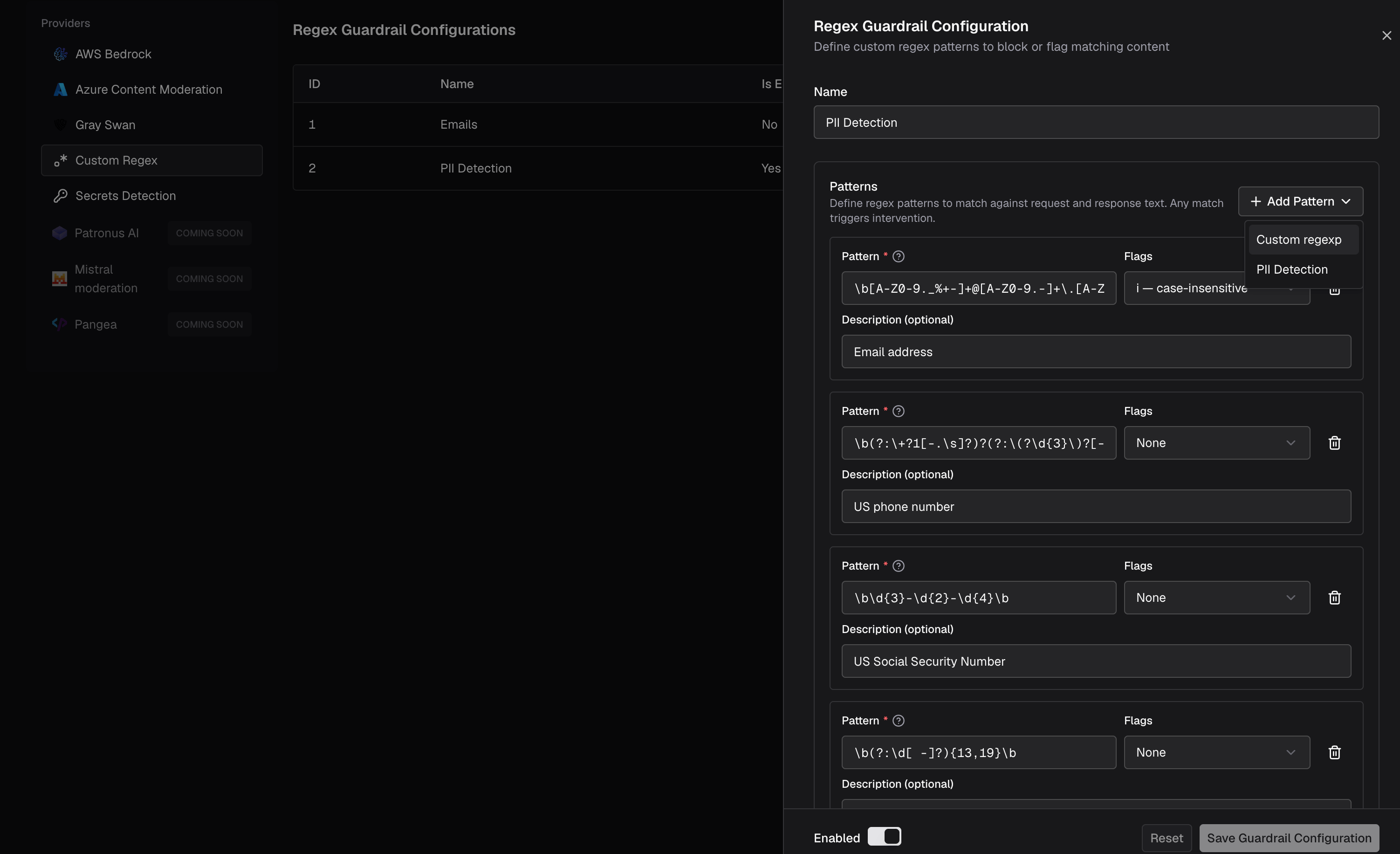
The Web UI includes a PII Detection template under Add Pattern. It pre-fills a Custom Regex configuration with common PII-like patterns:
| Description | Flags |
|---|
| Email address | i |
| US phone number | - |
| US Social Security Number | - |
| Credit-card-like number | - |
| IPv4 address | - |
The exact template patterns are shown in the config.json and Helm examples below.
The PII Detection template is pattern-based. It is fast and transparent, but it is not semantic PII classification. Expect some false positives and false negatives, especially for international phone numbers and unformatted values. For national IDs outside the US, add your own Custom Regex patterns for the exact country and format you need to enforce.
Configuration
Web UI
API
config.json
Helm
- Go to Guardrails > Providers.
- Select Custom Regex.
- Click Add Configuration.
- Set a descriptive Name, for example
pii-detection.
- Click Add Pattern.
- Choose either Custom regexp or PII Detection.
- Enable the configuration and save it.
- Attach the configuration to a guardrail rule under Guardrails > Configuration.
Create the Custom Regex provider configuration directly with the management API. The current Enterprise backend registers guardrail provider APIs at /api/guardrails/{provider}; the provider type is the path segment (regex), and the API assigns the configuration ID after creation.curl -X POST http://localhost:8080/api/guardrails/regex \
-H "Content-Type: application/json" \
-d '{
"name": "pii-detection",
"enabled": true,
"config": {
"timeout": 5,
"patterns": [
{
"pattern": "\\b[A-Z0-9._%+-]+@[A-Z0-9.-]+\\.[A-Z]{2,}\\b",
"description": "Email address",
"flags": "i"
},
{
"pattern": "\\b(?:\\+?1[-.\\s]?)?(?:\\(?\\d{3}\\)?[-.\\s]?)\\d{3}[-.\\s]?\\d{4}\\b",
"description": "US phone number"
},
{
"pattern": "\\b\\d{3}-\\d{2}-\\d{4}\\b",
"description": "US Social Security Number"
},
{
"pattern": "\\b(?:\\d[ -]?){13,19}\\b",
"description": "Credit card-like number"
},
{
"pattern": "\\b(?:25[0-5]|2[0-4]\\d|1\\d\\d|[1-9]?\\d)(?:\\.(?:25[0-5]|2[0-4]\\d|1\\d\\d|[1-9]?\\d)){3}\\b",
"description": "IPv4 address"
}
]
}
}'
To attach it through the API, fetch the generated ID with GET /api/guardrails/regex, then reference it in selectedGuardrailProfiles on POST /api/guardrails/rules. {
"guardrails_config": {
"guardrail_providers": [
{
"id": 20,
"provider_name": "regex",
"policy_name": "pii-detection",
"enabled": true,
"timeout": 5,
"config": {
"patterns": [
{
"pattern": "\\b[A-Z0-9._%+-]+@[A-Z0-9.-]+\\.[A-Z]{2,}\\b",
"description": "Email address",
"flags": "i"
},
{
"pattern": "\\b(?:\\+?1[-.\\s]?)?(?:\\(?\\d{3}\\)?[-.\\s]?)\\d{3}[-.\\s]?\\d{4}\\b",
"description": "US phone number"
},
{
"pattern": "\\b\\d{3}-\\d{2}-\\d{4}\\b",
"description": "US Social Security Number"
},
{
"pattern": "\\b(?:\\d[ -]?){13,19}\\b",
"description": "Credit card-like number"
},
{
"pattern": "\\b(?:25[0-5]|2[0-4]\\d|1\\d\\d|[1-9]?\\d)(?:\\.(?:25[0-5]|2[0-4]\\d|1\\d\\d|[1-9]?\\d)){3}\\b",
"description": "IPv4 address"
}
]
}
}
],
"guardrail_rules": [
{
"id": 201,
"name": "block-pii-in-prompts",
"description": "Block prompts containing common PII-like values",
"enabled": true,
"cel_expression": "headers[\"x-bf-tenant\"] == \"external\"",
"query": {
"combinator": "and",
"rules": [
{
"field": "headers",
"operator": "=",
"value": "x-bf-tenant:external",
"valueSource": "value"
}
]
},
"apply_to": "input",
"sampling_rate": 100,
"timeout": 10,
"provider_config_ids": [20]
}
]
}
}
bifrost:
guardrails:
providers:
- id: 20
provider_name: "regex"
policy_name: "pii-detection"
enabled: true
timeout: 5
config:
patterns:
- pattern: "\\b[A-Z0-9._%+-]+@[A-Z0-9.-]+\\.[A-Z]{2,}\\b"
description: "Email address"
flags: "i"
- pattern: "\\b(?:\\+?1[-.\\s]?)?(?:\\(?\\d{3}\\)?[-.\\s]?)\\d{3}[-.\\s]?\\d{4}\\b"
description: "US phone number"
- pattern: "\\b\\d{3}-\\d{2}-\\d{4}\\b"
description: "US Social Security Number"
- pattern: "\\b(?:\\d[ -]?){13,19}\\b"
description: "Credit card-like number"
- pattern: "\\b(?:25[0-5]|2[0-4]\\d|1\\d\\d|[1-9]?\\d)(?:\\.(?:25[0-5]|2[0-4]\\d|1\\d\\d|[1-9]?\\d)){3}\\b"
description: "IPv4 address"
rules:
- id: 201
name: "block-pii-in-prompts"
description: "Block prompts containing common PII-like values"
enabled: true
cel_expression: 'headers["x-bf-tenant"] == "external"'
query:
combinator: "and"
rules:
- field: "headers"
operator: "="
value: "x-bf-tenant:external"
valueSource: "value"
apply_to: "input"
sampling_rate: 100
timeout: 10
provider_config_ids: [20]
When To Use Custom Regex
Use Custom Regex when:
- You need transparent, deterministic matching.
- You want to block a known organization-specific identifier or data format.
- You want the built-in PII Detection template.
- You need a local guardrail with no external service dependency.
Use Secrets Detection instead when you want broad credential and API key coverage from the built-in Gitleaks rules.