

Overview
Alerting in Bifrost Enterprise evaluates CEL expressions against live governance metrics - budgets and rate limits - and dispatches notifications through alert channels when a threshold is crossed. Rules are scoped to virtual keys, teams, or customers and can optionally target a specific budget. Every evaluation and delivery attempt is recorded in alert history so you can audit what fired, what was skipped by cooldowns, and what failed to deliver. Open Alerting in the Bifrost dashboard to manage rules, channels, and history.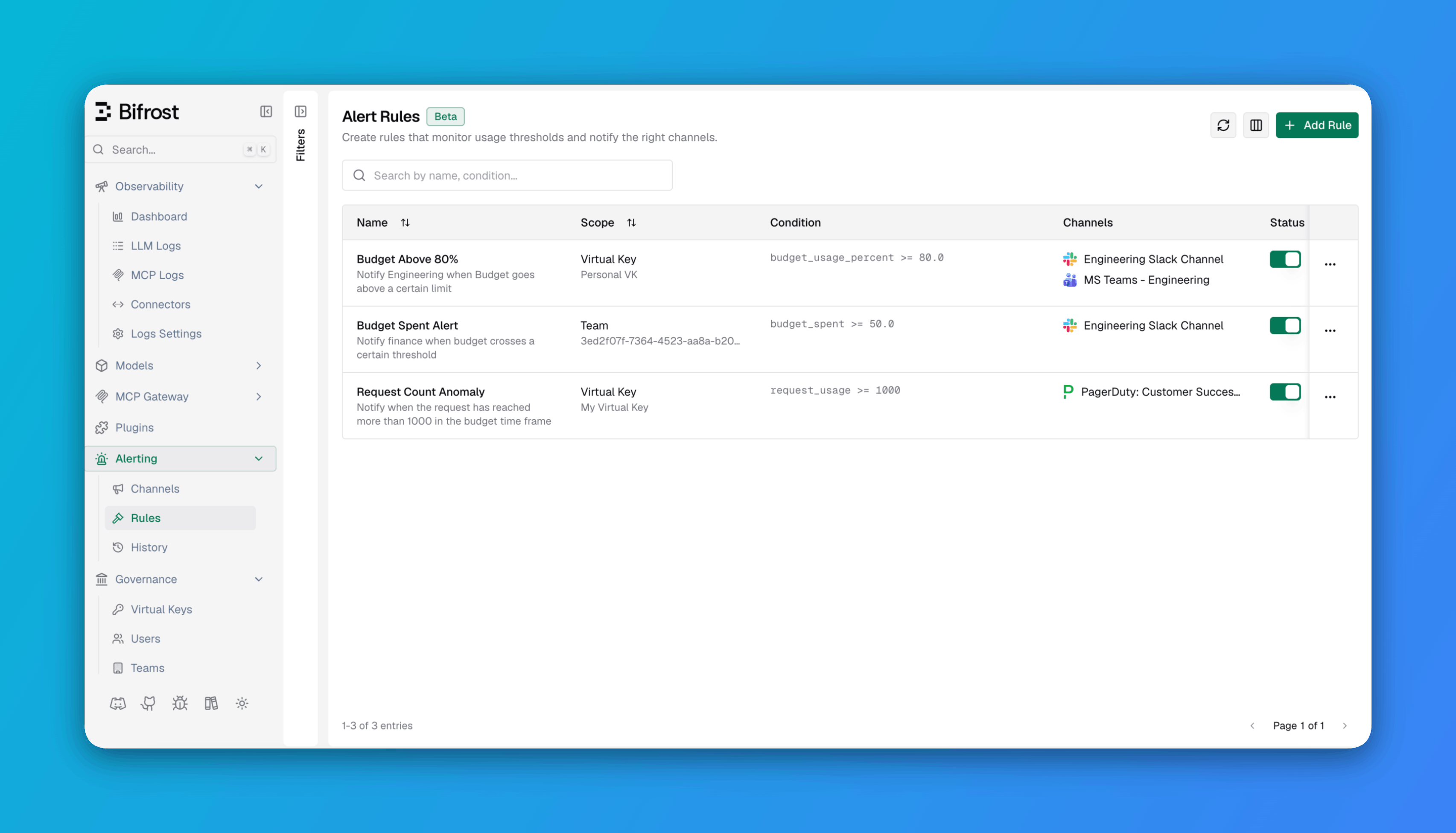
Key features
How it works
Bifrost evaluates alert rules on a periodic sweep and dispatches notifications subject to cooldowns.1
Governance snapshots are collected
The alert engine reads the current governance state - budget consumption and rate limit usage - from the in-memory governance store. This includes per-budget spend versus its limit and per-rate-limit request and token usage versus their configured maximums.
2
Rules are evaluated
Each enabled rule’s CEL expression is evaluated against the governance metrics for its scope. If the rule has a
target_type of "budget" and a specific target_id, only metrics for that budget are used. If no target is specified, the expression is evaluated against every budget in the scope.3
Cooldowns are applied
When a rule matches, its cooldown suppresses repeat notifications for the same rule, scope, and target. Bifrost checks compact successful-send state in the shared key-value store. Channels can define their own optional cooldown on top of the rule cooldown.
4
Notifications are dispatched
The rule’s channels are notified. Every outcome -
sent, failed, or skipped - is written to alert history.CEL variables
Each rule’s CEL expression can reference the following variables, which are populated from the current governance snapshot:It’s advisable to set
scope_type, scope_id, and target_type/target_id through the UI’s Scope Type, Scope ID, and Evaluate On fields or through config.json rather than the condition builder.When a rule does not target a specific budget, the engine evaluates the expression once per budget in the scope. Each evaluation receives the
target_type and target_id for that budget along with its budget_spent and budget_limit. Rate limit variables (request_usage, token_usage, and their limits) are populated from the scope’s highest-utilization rate limits.==, !=, >, <, >=, and <=, combinable with && and ||. The engine places no restriction beyond that on the standard CEL function library — arithmetic, ternary (?:), in, and string functions like .contains(), .matches(), and size() are all valid as long as the expression evaluates to a boolean. See Alert Rules for CEL expression examples.
Scopes
Every rule must specify a scope type and a scope ID. The following scopes are supported:
A scope ID is required. There are no wildcard or global scopes.
Budget targeting
In addition to the scope, a rule can optionally target a specific governance object. The only supported target type is"budget".
When a target is set, only metrics for that specific budget are evaluated. Rate limit variables are still populated from the scope’s active rate limits.
Cooldowns
Alerting uses a dual-layer cooldown system to prevent alert storms:- Rule cooldown: Suppresses repeat notifications for the same rule, scope, and target until the cooldown window elapses. Default is 60 seconds. The cooldown window is measured from the latest successful send for that rule and target.
- Channel cooldown: An optional per-channel cooldown that suppresses a channel after it receives any alert. Default is 0 seconds (no suppression). Useful when one channel (such as PagerDuty) should be notified less frequently than another (such as Slack) for the same rule.
Clustering behavior
When Bifrost runs as a cluster, only the leader node evaluates rules and dispatches notifications. Successful-send state is shared through the cluster key-value store. A newly elected leader recovers and reconciles that state before its first scheduled dispatch. When a node loses leadership, its alerting engine stops until leadership is regained. No additional configuration is required; leader-aware alerting activates automatically in cluster mode.Configuration
Webhook network behavior is configured through thealerting section of config.json. Channels and rules can also be managed via the Web UI or API.
config.json, see the relevant pages: Alert Rules and Alert Channels.
Configuration fields
Next steps
Alert Channels
Configure where alerts are delivered: Slack, Microsoft Teams, PagerDuty, and webhooks.
Alert Rules
Define the conditions, scopes, and channels that trigger alerts.
Alert History
Review delivered notifications, skipped alerts, and failed delivery attempts.