> ## Documentation Index
> Fetch the complete documentation index at: https://docs.getbifrost.ai/llms.txt
> Use this file to discover all available pages before exploring further.
# Set up Claude Code with Amazon Bedrock
> Configure Bedrock model deployments in Bifrost and connect Claude Code end to end.
This runbook connects Claude Code to Claude models on Amazon Bedrock through Bifrost. It covers the Bifrost and Claude Code configuration only.
```text theme={null}
Claude Code model: bedrock/claude-sonnet-5
-> Bifrost deployment: claude-sonnet-5
-> Bedrock model ID: global.anthropic.claude-sonnet-5
```
## Choose the model mappings
In this guide, a **deployment name** is the stable alias that you configure on a Bifrost provider key. Claude Code sends that name to Bifrost; Bifrost replaces it with the corresponding Bedrock model ID before inference.
The following mappings are sample configurations based on the model IDs in the linked Amazon Bedrock model cards:
| Claude model | Bedrock global model ID (select region applicable to your policy) | Recommended Bifrost deployment name | Direct Claude Code model |
| ----------------- | ----------------------------------------------------------------- | ----------------------------------- | ------------------------------------ |
| Claude Opus 4.8 | `global.anthropic.claude-opus-4-8` | `claude-opus-4-8` | `bedrock/claude-opus-4-8` |
| Claude Sonnet 5 | `global.anthropic.claude-sonnet-5` | `claude-sonnet-5` | `bedrock/claude-sonnet-5` |
| Claude Sonnet 4.6 | `global.anthropic.claude-sonnet-4-6` | `claude-sonnet-4-6` | `bedrock/claude-sonnet-4-6` |
| Claude Haiku 4.5 | `global.anthropic.claude-haiku-4-5-20251001-v1:0` | `claude-haiku-4-5-20251001` | `bedrock/claude-haiku-4-5-2025-1001` |
Sources: [Claude Opus 4.8](https://docs.aws.amazon.com/bedrock/latest/userguide/model-card-anthropic-claude-opus-4-8.html), [Claude Sonnet 5](https://docs.aws.amazon.com/bedrock/latest/userguide/model-card-anthropic-claude-sonnet-5.html), [Claude Sonnet 4.6](https://docs.aws.amazon.com/bedrock/latest/userguide/model-card-anthropic-claude-sonnet-4-6.html), and [Claude Haiku 4.5](https://docs.aws.amazon.com/bedrock/latest/userguide/model-card-anthropic-claude-haiku-4-5.html).
The recommended deployment names are Bifrost aliases and are required by claude code harness to make accurate inference calls. If you enable Claude Code gateway model discovery, however, each discovered name must begin with `claude` or `anthropic`.
## 1. Configure the Bedrock provider in Bifrost
In Bifrost, go to **Models > Model Providers > AWS Bedrock**, then add or edit the provider key that Claude Code will use.
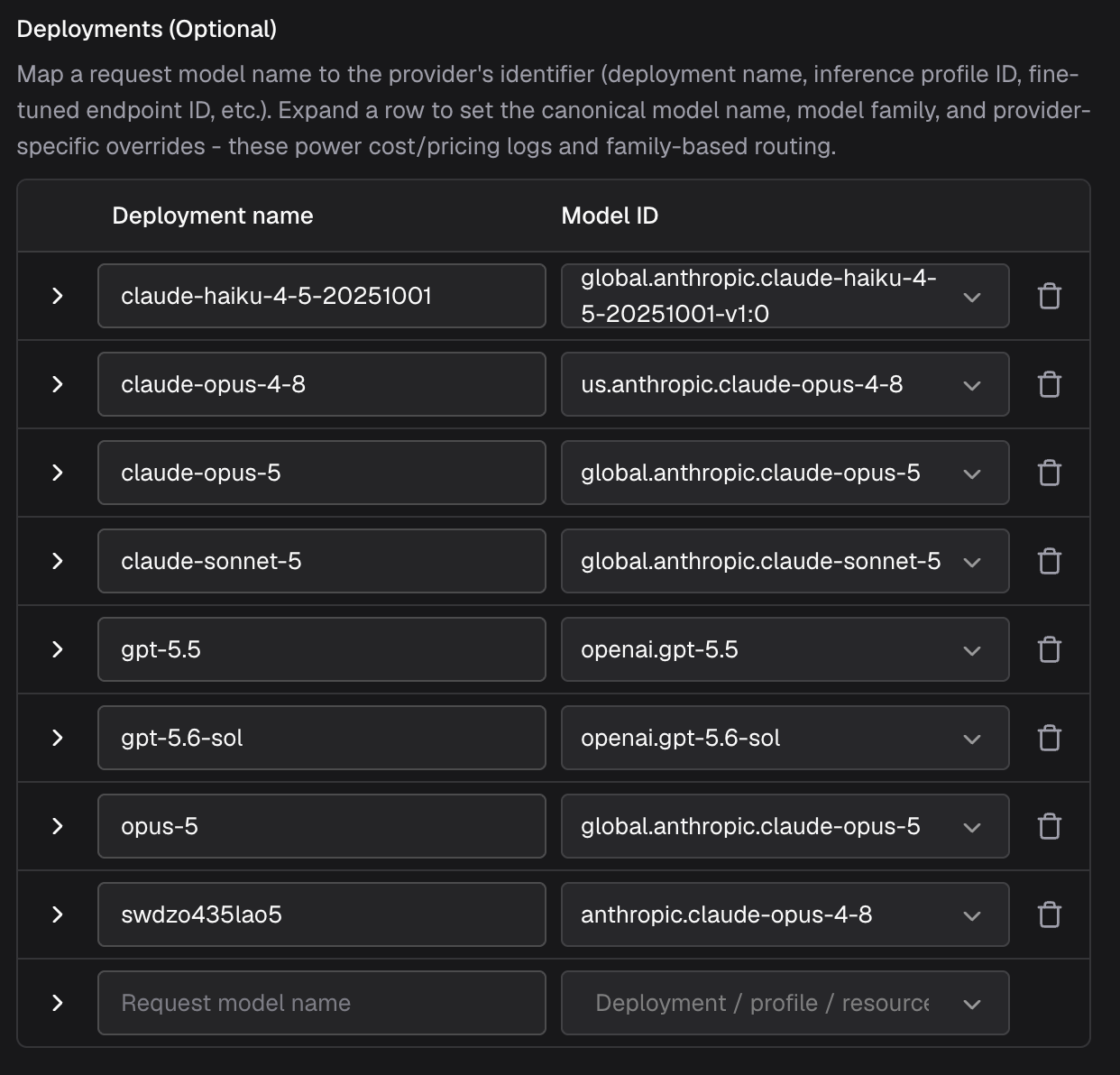 Deployment mappings do not automatically expand a restricted provider key's model allowlist. If `models` is not `*`, include every deployment name in `models` exactly as it appears in `deployments`.
### Allow Claude Code headers
In **Settings > Client Settings**, set **Allowed Headers** to `*` or explicitly allow the headers Claude Code sends, including:
```text theme={null}
anthropic-beta, anthropic-dangerous-direct-browser-access, anthropic-version, authorization, content-type, user-agent, x-api-key
```
Keep `anthropic-beta` as an open value because Claude Code adds capability values over time.
## 2. Configure the virtual key
Create or edit the virtual key used by Claude Code:
1. Allow the `bedrock` provider.
2. Confirm the virtual key is active and has sufficient budget and rate limits.
## 3. Setup harness
Bifrost Edge provides the more seamless setup: it routes Claude Code traffic through Bifrost at the machine level, so you do not need to configure a gateway URL or virtual key in Claude Code.
1. Install or deploy Bifrost Edge by following [Deploy with MDM](/edge/deployment-mdm). If Edge is already installed, skip this step.
2. Complete the one-time setup approval and sign in through your browser.
3. Open Edge from the menu bar or system tray, select the virtual key configured in the previous step, and confirm that Edge is connected.
4. Confirm that Claude Code is allowed by your organization's [AI app policy](/edge/app-governance).
5. Install Claude Code using [Anthropic's installation guide](https://code.claude.com/docs/en/overview), then start it normally. No changes to `.claude/settings.json`, `ANTHROPIC_BASE_URL`, or `ANTHROPIC_AUTH_TOKEN` are required.
Edge now routes Claude Code requests through Bifrost in the background. For more detail about the user experience, see [How Edge works](/edge/how-it-works).
Install Claude Code using [Anthropic's installation guide](https://code.claude.com/docs/en/overview). Then edit the most specific settings file that applies:
* User: `~/.claude/settings.json`
* Project: `.claude/settings.json`
* Personal project override: `.claude/settings.local.json`
Remove a top-level `model` setting if one is present because it overrides the environment-based model selection below.
### Without gateway model discovery
Use provider-qualified Bifrost deployment names for deterministic routing:
```json theme={null}
{
"env": {
"ANTHROPIC_BASE_URL": "https://gateway.example.com/anthropic",
"ANTHROPIC_AUTH_TOKEN": "your-bifrost-virtual-key",
"ANTHROPIC_MODEL": "bedrock/claude-sonnet-5",
"ANTHROPIC_DEFAULT_OPUS_MODEL": "bedrock/claude-opus-4-8",
"ANTHROPIC_DEFAULT_SONNET_MODEL": "bedrock/claude-sonnet-5",
"ANTHROPIC_DEFAULT_HAIKU_MODEL": "bedrock/claude-haiku-4-5-20251001"
}
}
```
Remove any tier mapping for a model that you did not configure in Bifrost. Restart Claude Code after changing the file.
Without discovery, Claude Code does not call the gateway model endpoint. Its `/model` picker shows its built-in choices, while the configured environment variables determine which Bifrost deployment each built-in tier uses.
### With gateway model discovery
Add `CLAUDE_CODE_ENABLE_GATEWAY_MODEL_DISCOVERY` to the same configuration:
```json theme={null}
{
"env": {
"ANTHROPIC_BASE_URL": "https://gateway.example.com/anthropic",
"ANTHROPIC_AUTH_TOKEN": "your-bifrost-virtual-key",
"CLAUDE_CODE_ENABLE_GATEWAY_MODEL_DISCOVERY": "1"
}
}
```
Gateway discovery requires Claude Code 2.1.129 or later. Claude Code calls `GET /v1/models?limit=1000` relative to `ANTHROPIC_BASE_URL`, which becomes `GET /anthropic/v1/models?limit=1000` on Bifrost. Once that's done, you can call `/model` primitive on your claude code. That will show you list of models configured on Bifrost for the virtual key.
Claude Code silently ignores every discovered model ID that does not begin with `claude` or `anthropic`. A deployment such as `coding-sonnet` can work when pinned directly as `bedrock/coding-sonnet`, but it will not appear in `/model` when gateway discovery is enabled.
Additional behavior:
* Results are cached in `~/.claude/cache/gateway-models.json`.
* A managed `availableModels` policy can filter the discovered list further.
* Bifrost's Anthropic-compatible model response removes the `bedrock/` prefix. Selecting a discovered entry therefore sends a bare deployment name, which must resolve to Bedrock through the virtual key or a routing rule.
See Claude Code's [gateway protocol reference](https://code.claude.com/docs/en/llm-gateway-protocol) and [model configuration guide](https://code.claude.com/docs/en/model-config) for the current discovery behavior and tier variables.
## 4. Test Claude Code
Start Claude Code normally and run:
```text theme={null}
/model
```
* **Discovery disabled:** Select the built-in Claude tier that maps to the deployment you configured through `ANTHROPIC_MODEL` or the corresponding default tier variable.
* **Discovery enabled:** Select either the configured `claude-*` deployment under **From gateway** or the matching built-in Claude tier.
* **With Edge:** Select the desired model as you normally would.
After selecting the model, send:
```text theme={null}
Reply with claude-code-bedrock-ok. Do not call any tools.
```
Open **Logs** in Bifrost and confirm the request used `bedrock` and resolved the expected deployment to its Bedrock model ID.
## Troubleshooting
| Symptom | Cause | Fix |
| ---------------------------------------------------------------------- | ------------------------------------------------------------------------------------------------------------ | --------------------------------------------------------------------------------------------- |
| Deployment is absent from `/anthropic/v1/models` | It is missing from the provider-key or virtual-key allowlist | Add the bare deployment name to both allowlists, or intentionally use `*` on the provider key |
| Bifrost lists the deployment but Claude Code does not | Its name does not begin with `claude` or `anthropic`, discovery was skipped, or managed settings filtered it | Rename the deployment, check the discovery variables, and inspect the discovery cache |
| `could not auto resolve a provider` after selecting a discovered model | Claude Code sent a bare deployment name that did not resolve unambiguously | Use a Bedrock-only virtual key or add a Bedrock routing rule |
| The wrong model is used | A top-level Claude Code `model` setting overrides the environment variables | Remove the setting, restart Claude Code, and check `/model` |
| Request headers are rejected | Bifrost Client Settings do not allow all required Claude Code headers | Set Allowed Headers to `*` or add the missing headers |
Deployment mappings do not automatically expand a restricted provider key's model allowlist. If `models` is not `*`, include every deployment name in `models` exactly as it appears in `deployments`.
### Allow Claude Code headers
In **Settings > Client Settings**, set **Allowed Headers** to `*` or explicitly allow the headers Claude Code sends, including:
```text theme={null}
anthropic-beta, anthropic-dangerous-direct-browser-access, anthropic-version, authorization, content-type, user-agent, x-api-key
```
Keep `anthropic-beta` as an open value because Claude Code adds capability values over time.
## 2. Configure the virtual key
Create or edit the virtual key used by Claude Code:
1. Allow the `bedrock` provider.
2. Confirm the virtual key is active and has sufficient budget and rate limits.
## 3. Setup harness
Bifrost Edge provides the more seamless setup: it routes Claude Code traffic through Bifrost at the machine level, so you do not need to configure a gateway URL or virtual key in Claude Code.
1. Install or deploy Bifrost Edge by following [Deploy with MDM](/edge/deployment-mdm). If Edge is already installed, skip this step.
2. Complete the one-time setup approval and sign in through your browser.
3. Open Edge from the menu bar or system tray, select the virtual key configured in the previous step, and confirm that Edge is connected.
4. Confirm that Claude Code is allowed by your organization's [AI app policy](/edge/app-governance).
5. Install Claude Code using [Anthropic's installation guide](https://code.claude.com/docs/en/overview), then start it normally. No changes to `.claude/settings.json`, `ANTHROPIC_BASE_URL`, or `ANTHROPIC_AUTH_TOKEN` are required.
Edge now routes Claude Code requests through Bifrost in the background. For more detail about the user experience, see [How Edge works](/edge/how-it-works).
Install Claude Code using [Anthropic's installation guide](https://code.claude.com/docs/en/overview). Then edit the most specific settings file that applies:
* User: `~/.claude/settings.json`
* Project: `.claude/settings.json`
* Personal project override: `.claude/settings.local.json`
Remove a top-level `model` setting if one is present because it overrides the environment-based model selection below.
### Without gateway model discovery
Use provider-qualified Bifrost deployment names for deterministic routing:
```json theme={null}
{
"env": {
"ANTHROPIC_BASE_URL": "https://gateway.example.com/anthropic",
"ANTHROPIC_AUTH_TOKEN": "your-bifrost-virtual-key",
"ANTHROPIC_MODEL": "bedrock/claude-sonnet-5",
"ANTHROPIC_DEFAULT_OPUS_MODEL": "bedrock/claude-opus-4-8",
"ANTHROPIC_DEFAULT_SONNET_MODEL": "bedrock/claude-sonnet-5",
"ANTHROPIC_DEFAULT_HAIKU_MODEL": "bedrock/claude-haiku-4-5-20251001"
}
}
```
Remove any tier mapping for a model that you did not configure in Bifrost. Restart Claude Code after changing the file.
Without discovery, Claude Code does not call the gateway model endpoint. Its `/model` picker shows its built-in choices, while the configured environment variables determine which Bifrost deployment each built-in tier uses.
### With gateway model discovery
Add `CLAUDE_CODE_ENABLE_GATEWAY_MODEL_DISCOVERY` to the same configuration:
```json theme={null}
{
"env": {
"ANTHROPIC_BASE_URL": "https://gateway.example.com/anthropic",
"ANTHROPIC_AUTH_TOKEN": "your-bifrost-virtual-key",
"CLAUDE_CODE_ENABLE_GATEWAY_MODEL_DISCOVERY": "1"
}
}
```
Gateway discovery requires Claude Code 2.1.129 or later. Claude Code calls `GET /v1/models?limit=1000` relative to `ANTHROPIC_BASE_URL`, which becomes `GET /anthropic/v1/models?limit=1000` on Bifrost. Once that's done, you can call `/model` primitive on your claude code. That will show you list of models configured on Bifrost for the virtual key.
Claude Code silently ignores every discovered model ID that does not begin with `claude` or `anthropic`. A deployment such as `coding-sonnet` can work when pinned directly as `bedrock/coding-sonnet`, but it will not appear in `/model` when gateway discovery is enabled.
Additional behavior:
* Results are cached in `~/.claude/cache/gateway-models.json`.
* A managed `availableModels` policy can filter the discovered list further.
* Bifrost's Anthropic-compatible model response removes the `bedrock/` prefix. Selecting a discovered entry therefore sends a bare deployment name, which must resolve to Bedrock through the virtual key or a routing rule.
See Claude Code's [gateway protocol reference](https://code.claude.com/docs/en/llm-gateway-protocol) and [model configuration guide](https://code.claude.com/docs/en/model-config) for the current discovery behavior and tier variables.
## 4. Test Claude Code
Start Claude Code normally and run:
```text theme={null}
/model
```
* **Discovery disabled:** Select the built-in Claude tier that maps to the deployment you configured through `ANTHROPIC_MODEL` or the corresponding default tier variable.
* **Discovery enabled:** Select either the configured `claude-*` deployment under **From gateway** or the matching built-in Claude tier.
* **With Edge:** Select the desired model as you normally would.
After selecting the model, send:
```text theme={null}
Reply with claude-code-bedrock-ok. Do not call any tools.
```
Open **Logs** in Bifrost and confirm the request used `bedrock` and resolved the expected deployment to its Bedrock model ID.
## Troubleshooting
| Symptom | Cause | Fix |
| ---------------------------------------------------------------------- | ------------------------------------------------------------------------------------------------------------ | --------------------------------------------------------------------------------------------- |
| Deployment is absent from `/anthropic/v1/models` | It is missing from the provider-key or virtual-key allowlist | Add the bare deployment name to both allowlists, or intentionally use `*` on the provider key |
| Bifrost lists the deployment but Claude Code does not | Its name does not begin with `claude` or `anthropic`, discovery was skipped, or managed settings filtered it | Rename the deployment, check the discovery variables, and inspect the discovery cache |
| `could not auto resolve a provider` after selecting a discovered model | Claude Code sent a bare deployment name that did not resolve unambiguously | Use a Bedrock-only virtual key or add a Bedrock routing rule |
| The wrong model is used | A top-level Claude Code `model` setting overrides the environment variables | Remove the setting, restart Claude Code, and check `/model` |
| Request headers are rejected | Bifrost Client Settings do not allow all required Claude Code headers | Set Allowed Headers to `*` or add the missing headers |