> ## Documentation Index
> Fetch the complete documentation index at: https://docs.getbifrost.ai/llms.txt
> Use this file to discover all available pages before exploring further.
# vLLM
> vLLM API guide - OpenAI-compatible self-hosted inference, chat, text, embeddings, rerank, and streaming
## Overview
vLLM is an **OpenAI-compatible provider** for self-hosted inference. Bifrost delegates to the shared OpenAI provider implementation. Key characteristics:
* **OpenAI compatibility** - Chat, text completions, embeddings, rerank, and streaming
* **Self-hosted** - Typically runs at `http://localhost:8000` or your own server
* **Optional authentication** - API key often omitted for local instances
* **Responses API** - Supported via chat completion fallback
### Supported Operations
| Operation | Non-Streaming | Streaming | Endpoint |
| -------------------- | ------------- | --------- | ---------------------------------- |
| Chat Completions | ✅ | ✅ | `/v1/chat/completions` |
| Responses API | ✅ | ✅ | `/v1/chat/completions` |
| Text Completions | ✅ | ✅ | `/v1/completions` |
| Embeddings | ✅ | - | `/v1/embeddings` |
| Rerank | ✅ | - | `/v1/rerank` (fallback: `/rerank`) |
| List Models | ✅ | - | `/v1/models` |
| Image Generation | ❌ | ❌ | - |
| Speech (TTS) | ❌ | ❌ | - |
| Transcriptions (STT) | ✅ | ✅ | `/v1/audio/transcriptions` |
| Files | ❌ | ❌ | - |
| Batch | ❌ | ❌ | - |
**Unsupported Operations** (❌): Image Generation, Speech, Files, and Batch are not supported and return `UnsupportedOperationError`.
***
## Setup & Configuration
Configure vLLM as a provider.
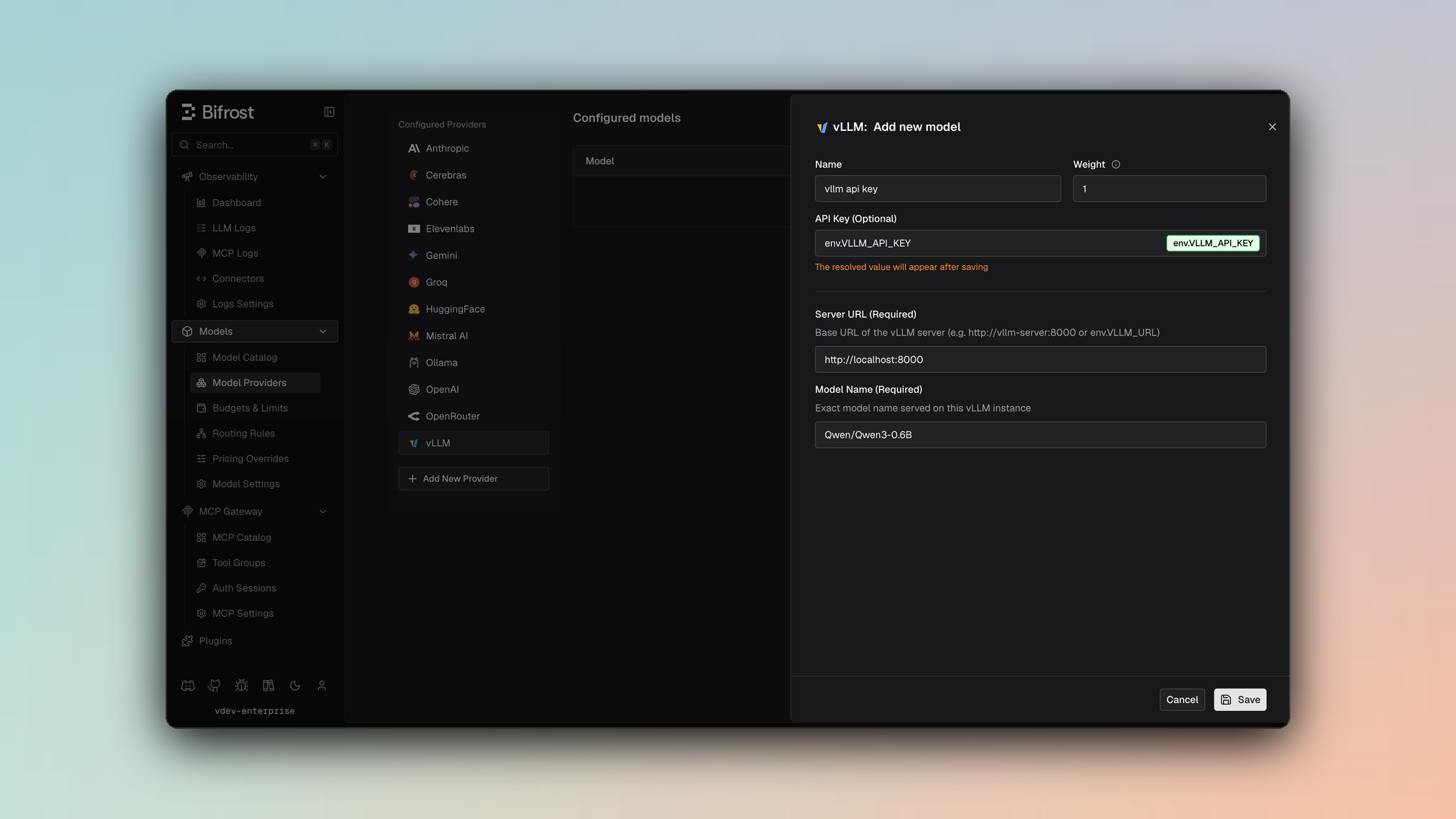 1. Navigate to **Models** > **Model Providers**. Look for **vLLM** under **Configured Providers**. If it is missing, click on **Add New Provider** and select **vLLM**.
2. Click **Add New Model** or edit an existing key.
3. Set a name for your key.
4. Leave **API Key** blank for local servers. If your endpoint requires auth, paste a bearer token directly or use an environment variable.
5. Set **vLLM URL** to `http://localhost:8000` and **Model Name** to the exact model loaded by the server.
6. Set **Allowed Models** to **All Models** (default) or the specific model allowlist you want this key to serve.
7. Save the provider configuration.
```json theme={null}
{
"providers": {
"vllm": {
"keys": [
{
"name": "vllm-local",
"value": "",
"models": [
"meta-llama/Llama-3.2-1B-Instruct"
],
"weight": 1.0,
"vllm_key_config": {
"url": "http://localhost:8000",
"model_name": "meta-llama/Llama-3.2-1B-Instruct"
}
}
]
}
}
}
```
Refer to the API documentation for [Provider Keys Management](https://docs.getbifrost.ai/api-reference/providers/create-a-key-for-a-provider).
```go theme={null}
case schemas.VLLM:
return []schemas.Key{{
Name: "vllm-local",
Value: *schemas.NewEnvVar(""),
Models: []string{"meta-llama/Llama-3.2-1B-Instruct"},
Weight: 1.0,
VLLMKeyConfig: &schemas.VLLMKeyConfig{
URL: *schemas.NewEnvVar("http://localhost:8000"),
ModelName: "meta-llama/Llama-3.2-1B-Instruct",
},
}}, nil
```
***
## Getting started
1. Run a vLLM server (Docker or pip). Example with Docker:
```bash theme={null}
docker run --gpus all -p 8000:8000 vllm/vllm-openai:latest --model meta-llama/Llama-3.2-1B-Instruct
```
2. Verify the server:
```bash theme={null}
curl http://localhost:8000/v1/models
```
3. Use Bifrost with model prefix `vllm/` (e.g. `vllm/meta-llama/Llama-3.2-1B-Instruct`).
***
# 1. Chat Completions
vLLM supports standard OpenAI chat completion parameters. For full parameter reference, see [OpenAI Chat Completions](/providers/supported-providers/openai#1-chat-completions). Message types, tools, and streaming follow the same behavior.
***
# 2. Responses API
Bifrost converts Responses API requests to Chat Completions and back:
```
BifrostResponsesRequest
→ ToChatRequest()
→ ChatCompletion
→ ToBifrostResponsesResponse()
```
***
# 3. Text Completions
| Parameter | Mapping |
| ------------- | -------------- |
| `prompt` | Sent as-is |
| `max_tokens` | max\_tokens |
| `temperature` | temperature |
| `top_p` | top\_p |
| `stop` | stop sequences |
***
# 4. Embeddings
vLLM supports `/v1/embeddings`. Use model IDs exposed by your vLLM server (e.g. `BAAI/bge-m3`).
***
# 5. List Models
Lists models from your vLLM instance via `/v1/models`. Available models depend on what is loaded on the server.
***
# 6. Rerank
vLLM supports reranking for pooling/cross-encoder reranker models. Bifrost sends requests to `/v1/rerank` and automatically falls back to `/rerank` when required by your vLLM deployment.
```bash theme={null}
curl -X POST http://localhost:8080/v1/rerank \
-H "Content-Type: application/json" \
-d '{
"model": "vllm/BAAI/bge-reranker-v2-m3",
"query": "What is machine learning?",
"documents": [
{"text": "Machine learning is a subset of AI."},
{"text": "Python is a programming language."},
{"text": "Deep learning uses neural networks."}
],
"params": {
"return_documents": true
}
}'
```
Your upstream vLLM server must be started with a rerank-capable model (pooling/cross-encoder task support).
***
## Caveats
**Severity**: High
**Behavior**: vLLM resolves request routing from `vllm_key_config.url`.
**Impact**: Requests fail without `vllm_key_config.url`, even if a provider-level `network_config.base_url` is present.
**Severity**: Low\
**Behavior**: vLLM may return HTTP 200 with an error payload (e.g. `{"error": {"code": 404, "message": "..."}}`) instead of 4xx/5xx.\
**Impact**: Bifrost normalizes these into standard error responses so clients see consistent error handling.
1. Navigate to **Models** > **Model Providers**. Look for **vLLM** under **Configured Providers**. If it is missing, click on **Add New Provider** and select **vLLM**.
2. Click **Add New Model** or edit an existing key.
3. Set a name for your key.
4. Leave **API Key** blank for local servers. If your endpoint requires auth, paste a bearer token directly or use an environment variable.
5. Set **vLLM URL** to `http://localhost:8000` and **Model Name** to the exact model loaded by the server.
6. Set **Allowed Models** to **All Models** (default) or the specific model allowlist you want this key to serve.
7. Save the provider configuration.
```json theme={null}
{
"providers": {
"vllm": {
"keys": [
{
"name": "vllm-local",
"value": "",
"models": [
"meta-llama/Llama-3.2-1B-Instruct"
],
"weight": 1.0,
"vllm_key_config": {
"url": "http://localhost:8000",
"model_name": "meta-llama/Llama-3.2-1B-Instruct"
}
}
]
}
}
}
```
Refer to the API documentation for [Provider Keys Management](https://docs.getbifrost.ai/api-reference/providers/create-a-key-for-a-provider).
```go theme={null}
case schemas.VLLM:
return []schemas.Key{{
Name: "vllm-local",
Value: *schemas.NewEnvVar(""),
Models: []string{"meta-llama/Llama-3.2-1B-Instruct"},
Weight: 1.0,
VLLMKeyConfig: &schemas.VLLMKeyConfig{
URL: *schemas.NewEnvVar("http://localhost:8000"),
ModelName: "meta-llama/Llama-3.2-1B-Instruct",
},
}}, nil
```
***
## Getting started
1. Run a vLLM server (Docker or pip). Example with Docker:
```bash theme={null}
docker run --gpus all -p 8000:8000 vllm/vllm-openai:latest --model meta-llama/Llama-3.2-1B-Instruct
```
2. Verify the server:
```bash theme={null}
curl http://localhost:8000/v1/models
```
3. Use Bifrost with model prefix `vllm/` (e.g. `vllm/meta-llama/Llama-3.2-1B-Instruct`).
***
# 1. Chat Completions
vLLM supports standard OpenAI chat completion parameters. For full parameter reference, see [OpenAI Chat Completions](/providers/supported-providers/openai#1-chat-completions). Message types, tools, and streaming follow the same behavior.
***
# 2. Responses API
Bifrost converts Responses API requests to Chat Completions and back:
```
BifrostResponsesRequest
→ ToChatRequest()
→ ChatCompletion
→ ToBifrostResponsesResponse()
```
***
# 3. Text Completions
| Parameter | Mapping |
| ------------- | -------------- |
| `prompt` | Sent as-is |
| `max_tokens` | max\_tokens |
| `temperature` | temperature |
| `top_p` | top\_p |
| `stop` | stop sequences |
***
# 4. Embeddings
vLLM supports `/v1/embeddings`. Use model IDs exposed by your vLLM server (e.g. `BAAI/bge-m3`).
***
# 5. List Models
Lists models from your vLLM instance via `/v1/models`. Available models depend on what is loaded on the server.
***
# 6. Rerank
vLLM supports reranking for pooling/cross-encoder reranker models. Bifrost sends requests to `/v1/rerank` and automatically falls back to `/rerank` when required by your vLLM deployment.
```bash theme={null}
curl -X POST http://localhost:8080/v1/rerank \
-H "Content-Type: application/json" \
-d '{
"model": "vllm/BAAI/bge-reranker-v2-m3",
"query": "What is machine learning?",
"documents": [
{"text": "Machine learning is a subset of AI."},
{"text": "Python is a programming language."},
{"text": "Deep learning uses neural networks."}
],
"params": {
"return_documents": true
}
}'
```
Your upstream vLLM server must be started with a rerank-capable model (pooling/cross-encoder task support).
***
## Caveats
**Severity**: High
**Behavior**: vLLM resolves request routing from `vllm_key_config.url`.
**Impact**: Requests fail without `vllm_key_config.url`, even if a provider-level `network_config.base_url` is present.
**Severity**: Low\
**Behavior**: vLLM may return HTTP 200 with an error payload (e.g. `{"error": {"code": 404, "message": "..."}}`) instead of 4xx/5xx.\
**Impact**: Bifrost normalizes these into standard error responses so clients see consistent error handling.