> ## Documentation Index
> Fetch the complete documentation index at: https://docs.getbifrost.ai/llms.txt
> Use this file to discover all available pages before exploring further.
# Replicate
> Replicate API conversion guide - prediction-based architecture, model-specific parameters, and async/sync modes
## Overview
Replicate is architecturally different from other providers in Bifrost. It uses a **prediction-based API** where every request creates a "prediction" that runs asynchronously. Each model on Replicate defines its own input schema, making it highly flexible but requiring model-specific parameter knowledge.
### Key Architectural Differences
1. **Prediction-Based System**: All operations create predictions via `/v1/predictions` or deployment endpoints
2. **Model-Specific Inputs**: Each model has its own parameter schema (use `extra_params` for model-specific fields)
3. **Async/Sync Modes**: Predictions can run synchronously (with `Prefer: wait` header) or asynchronously (with polling)
4. **Flexible Output**: Output can be strings, arrays, URLs, or data URIs depending on the model
### Supported Operations
| Operation | Non-Streaming | Streaming | Endpoint |
| -------------------- | ------------- | --------- | ----------------- |
| Chat Completions | ✅ | ✅ | `/v1/predictions` |
| Responses API | ✅ | ✅ | `/v1/predictions` |
| Text Completions | ✅ | ✅ | `/v1/predictions` |
| Image Generation | ✅ | ✅ | `/v1/predictions` |
| Image Edit | ✅ | ✅ | `/v1/predictions` |
| Video Generation | ✅ | - | `/v1/predictions` |
| Image Variation | ❌ | ❌ | - |
| Files | ✅ | - | `/v1/files` |
| List Models | ✅ | - | `/v1/deployments` |
| Embeddings | ❌ | ❌ | - |
| Speech (TTS) | ❌ | ❌ | - |
| Transcriptions (STT) | ❌ | ❌ | - |
| Batch | ❌ | ❌ | - |
**List Models** returns account-specific deployments only, not all public models on Replicate.
## Setup & Configuration
Configure Replicate as a provider.
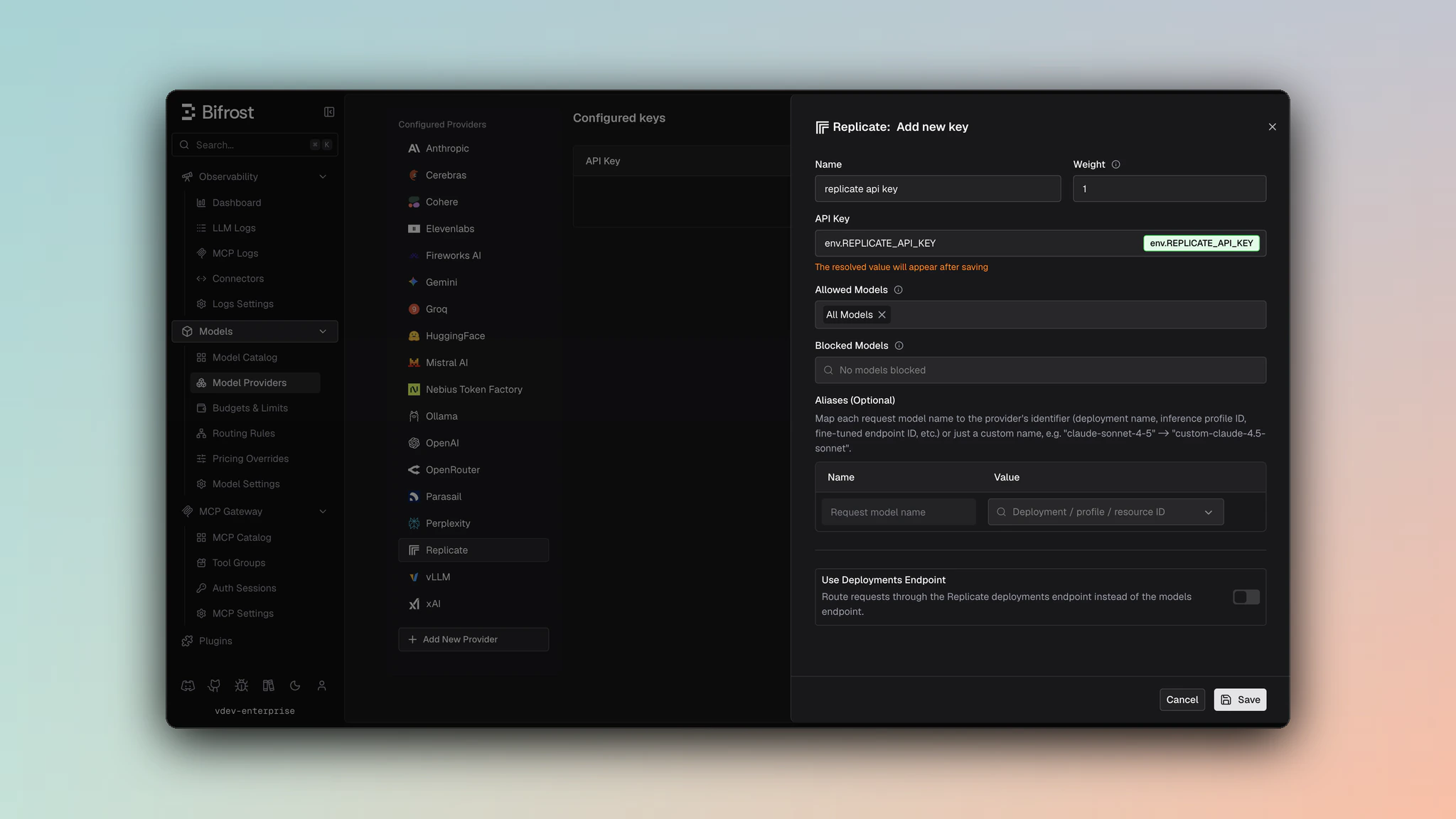 1. Navigate to **Models** > **Model Providers**. Look for **Replicate** under **Configured Providers**. If it is missing, click on **Add New Provider** and select **Replicate**.
2. Click **Add Key** or edit an existing key.
3. Set a name for your key.
4. Paste your API key directly or use an environment variable (for example, `env.REPLICATE_API_TOKEN`).
5. Leave **Use Deployments Endpoint** disabled for public model/version requests, or enable it for deployment routes.
6. Set **Allowed Models** to **All Models** (default) or the specific model allowlist you want this key to serve.
7. Save the provider configuration.
```json theme={null}
{
"providers": {
"replicate": {
"keys": [
{
"name": "replicate-key-1",
"value": "env.REPLICATE_API_TOKEN",
"models": [
"*"
],
"weight": 1.0,
"replicate_key_config": {
"use_deployments_endpoint": false
}
}
]
}
}
}
```
Refer to the API documentation for [Provider Keys Management](https://docs.getbifrost.ai/api-reference/providers/create-a-key-for-a-provider).
```go theme={null}
case schemas.Replicate:
return []schemas.Key{{
Name: "replicate-key-1",
Value: *schemas.NewEnvVar("env.REPLICATE_API_TOKEN"),
Models: []string{"*"},
Weight: 1.0,
ReplicateKeyConfig: &schemas.ReplicateKeyConfig{
UseDeploymentsEndpoint: false,
},
}}, nil
```
Set `replicate_key_config.use_deployments_endpoint` to `true` when requests should target `/v1/deployments/{owner}/{deployment}/predictions`. Use key `aliases` to map a Bifrost model name to the Replicate deployment path.
***
# Model Identification
Replicate models can be specified in three ways:
## 1. Version ID
```bash theme={null}
curl -X POST http://localhost:8080/v1/chat/completions \
-H "Content-Type: application/json" \
-d '{
"model": "replicate/5c7d5dc6dd8bf75c1acaa8565735e7986bc5b66206b55cca93cb72c9bf15ccaa",
"messages": [{"role": "user", "content": "Hello"}]
}'
```
## 2. Model Name
Format: `owner/model-name`
```bash theme={null}
curl -X POST http://localhost:8080/v1/chat/completions \
-H "Content-Type: application/json" \
-d '{
"model": "replicate/meta/llama-2-7b-chat",
"messages": [{"role": "user", "content": "Hello"}]
}'
```
## 3. Deployment
Configure deployed models in the Replicate key configuration. Deployments map custom model identifiers to actual deployment paths.
**Configuration Example:**
```json theme={null}
{
"provider": "replicate",
"keys": [
{
"name": "replicate-deployments",
"value": "env.REPLICATE_API_TOKEN",
"models": ["my-model"],
"weight": 1.0,
"aliases": {
"my-model": "owner/my-deployment-name"
},
"replicate_key_config": {
"use_deployments_endpoint": true
}
}
]
}
```
**Usage:**
```bash theme={null}
curl -X POST http://localhost:8080/v1/chat/completions \
-H "Content-Type: application/json" \
-d '{
"model": "replicate/my-model",
"messages": [{"role": "user", "content": "Hello"}]
}'
```
***
# Prediction Modes
## Sync Mode
Bifrost uses sync mode with the `Prefer: wait` header if it is present in the request headers. The request blocks until the prediction completes or times out (default 60 seconds).
**How it works:**
1. Creates prediction with `Prefer: wait=60` header
2. Replicate holds connection open for up to 60 seconds
3. If prediction completes within timeout, returns result immediately
4. If timeout expires, falls back to polling mode
## Async Mode (Polling)
It is the default mode of Replicate predictions. Bifrost automatically polls the prediction URL every 2 seconds until completion.
**Status Flow**: `starting` → `processing` → `succeeded`/`failed`/`canceled`
***
# 1. Chat Completions
### Message Conversion
**System Messages**: Extracted from messages array and concatenated into `system_prompt` field.
**User/Assistant Messages**: Preserved as conversation context. Text content from content blocks is concatenated with newlines.
**Image Content**: Non-base64 image URLs from message content blocks are extracted and passed as `image_input` array.
```json theme={null}
// Input
{
"messages": [
{"role": "system", "content": "You are helpful"},
{"role": "user", "content": "Hello"}
]
}
// Converted to Replicate format
{
"input": {
"system_prompt": "You are helpful",
"prompt": "Hello",
"messages": [...] // Original messages array also included
}
}
```
### System Prompt Filtering
**Important**: Not all Replicate models support the `system_prompt` field. For unsupported models, the system prompt is automatically prepended to the conversation prompt.
**Models without system\_prompt support:**
* `meta/meta-llama-3-8b`
* `meta/llama-2-70b`
* `openai/gpt-oss-20b`
* `openai/o1-mini`
* `xai/grok-4`
* All `deepseek-ai/deepseek*` models (e.g., `deepseek-r1`, `deepseek-v3`)
### Model-Specific Parameters
Use `extra_params` to pass model-specific parameters. These are **flattened into the input object**:
```bash theme={null}
curl -X POST http://localhost:8080/v1/chat/completions \
-H "Content-Type: application/json" \
-d '{
"model": "replicate/meta/llama-2-7b-chat",
"messages": [{"role": "user", "content": "Hello"}],
"temperature": 0.7,
"top_k": 50,
"repetition_penalty": 1.1,
"min_new_tokens": 10
}'
```
```go theme={null}
resp, err := client.ChatCompletionRequest(schemas.NewBifrostContext(ctx, schemas.NoDeadline), &schemas.BifrostChatRequest{
Provider: schemas.Replicate,
Model: "meta/llama-2-7b-chat",
Input: messages,
Params: &schemas.ChatParameters{
Temperature: schemas.Ptr(0.7),
ExtraParams: map[string]interface{}{
"top_k": 50,
"repetition_penalty": 1.1,
"min_new_tokens": 10,
},
},
})
```
**Model Schema Discovery**: Each Replicate model has unique parameters. Check the model's documentation on replicate.com or use the OpenAPI schema from the model version to discover available parameters.
## Response Conversion
### Field Mapping
* **Output**:
* String → `choices[0].message.content`
* Array of strings → joined and mapped to `choices[0].message.content`
* Object with `text` field → `text` value mapped to `choices[0].message.content`
* **Status**: `succeeded` → `finish_reason: "stop"`, `failed` → `finish_reason: "error"`
* **Metrics**: `input_token_count` → `prompt_tokens`, `output_token_count` → `completion_tokens`
### Example Response
```json theme={null}
{
"id": "abc123",
"model": "meta/llama-2-7b-chat",
"object": "chat.completion",
"created": 1234567890,
"choices": [
{
"index": 0,
"message": {
"role": "assistant",
"content": "Hello! How can I help you?"
},
"finish_reason": "stop"
}
],
"usage": {
"prompt_tokens": 10,
"completion_tokens": 8,
"total_tokens": 18
}
}
```
## Streaming
Replicate streaming uses Server-Sent Events (SSE) with the following event types:
| Event Type | Description | Data Format |
| ---------- | -------------- | ---------------------------------------- |
| `output` | Content chunk | Plain text string |
| `done` | Completion | JSON: `{"reason": ""}` (empty = success) |
| `error` | Error occurred | JSON: `{"detail": "error message"}` |
**Streaming Flow:**
1. Bifrost sets `stream: true` in prediction input
2. Replicate returns `urls.stream` in initial response
3. Bifrost connects to stream URL and processes SSE events
4. `output` events → content deltas
5. `done` event → final chunk with `finish_reason`
**Done Event Reasons:**
* Empty or no reason = success (`finish_reason: "stop"`)
* `"canceled"` = prediction was canceled
* `"error"` = prediction failed
***
# 2. Responses API
The Responses API is converted internally to Chat Completions or native Replicate format depending on the model:
```go theme={null}
// Responses request → Replicate prediction conversion
ResponsesRequest → ReplicatePredictionRequest → ReplicatePredictionResponse → BifrostResponsesResponse
```
**Conversion Logic:**
1. **For OpenAI models with `gpt-5-structured`**: Uses native Responses format with `input_item_list`, `tools`, and `json_schema` support
2. **For all other models**: Converted to Chat Completions format using message conversion logic
Same parameter mapping and system prompt handling as [Chat Completions](#1-chat-completions).
## Response Format
Responses follow standard Responses API format with status mapping:
| Replicate Status | Responses Status |
| ---------------- | ---------------- |
| `succeeded` | `completed` |
| `failed` | `failed` |
| `canceled` | `cancelled` |
| `processing` | `in_progress` |
| `starting` | `queued` |
***
# 3. Text Completions (Legacy)
### Conversion
* **Prompt array**: Joined with newlines into single `prompt` field
* **top\_k**: Pass via `extra_params` (model-specific)
### Example
```bash theme={null}
curl -X POST http://localhost:8080/v1/completions \
-H "Content-Type: application/json" \
-d '{
"model": "replicate/meta/llama-2-7b",
"prompt": "Once upon a time",
"max_tokens": 100,
"temperature": 0.8,
"top_k": 40
}'
```
## Response
Same conversion as chat completions: output string/array → `choices[0].text`, with usage metrics from prediction metrics.
***
# 4. Image Generation
### Parameter Mapping
```json theme={null}
{
"prompt": "prompt",
"n": "number_of_images",
"aspect_ratio": "aspect_ratio",
"resolution": "resolution",
"output_format": "output_format",
"quality": "quality",
"background": "background",
"seed": "seed",
"negative_prompt": "negative_prompt",
"num_inference_steps": "num_inference_steps",
"input_images": "input_images"
}
```
### Input Image Field Mapping
**Important**: Different Replicate models expect input images in different fields. Bifrost automatically maps `input_images` to the correct field based on the model.
**Field Mapping by Model:**
| Field | Models |
| -------------- | -------------------------------------------------------------------------------------------------------------------------------------------------------------------- |
| `image_prompt` | `black-forest-labs/flux-1.1-pro`
1. Navigate to **Models** > **Model Providers**. Look for **Replicate** under **Configured Providers**. If it is missing, click on **Add New Provider** and select **Replicate**.
2. Click **Add Key** or edit an existing key.
3. Set a name for your key.
4. Paste your API key directly or use an environment variable (for example, `env.REPLICATE_API_TOKEN`).
5. Leave **Use Deployments Endpoint** disabled for public model/version requests, or enable it for deployment routes.
6. Set **Allowed Models** to **All Models** (default) or the specific model allowlist you want this key to serve.
7. Save the provider configuration.
```json theme={null}
{
"providers": {
"replicate": {
"keys": [
{
"name": "replicate-key-1",
"value": "env.REPLICATE_API_TOKEN",
"models": [
"*"
],
"weight": 1.0,
"replicate_key_config": {
"use_deployments_endpoint": false
}
}
]
}
}
}
```
Refer to the API documentation for [Provider Keys Management](https://docs.getbifrost.ai/api-reference/providers/create-a-key-for-a-provider).
```go theme={null}
case schemas.Replicate:
return []schemas.Key{{
Name: "replicate-key-1",
Value: *schemas.NewEnvVar("env.REPLICATE_API_TOKEN"),
Models: []string{"*"},
Weight: 1.0,
ReplicateKeyConfig: &schemas.ReplicateKeyConfig{
UseDeploymentsEndpoint: false,
},
}}, nil
```
Set `replicate_key_config.use_deployments_endpoint` to `true` when requests should target `/v1/deployments/{owner}/{deployment}/predictions`. Use key `aliases` to map a Bifrost model name to the Replicate deployment path.
***
# Model Identification
Replicate models can be specified in three ways:
## 1. Version ID
```bash theme={null}
curl -X POST http://localhost:8080/v1/chat/completions \
-H "Content-Type: application/json" \
-d '{
"model": "replicate/5c7d5dc6dd8bf75c1acaa8565735e7986bc5b66206b55cca93cb72c9bf15ccaa",
"messages": [{"role": "user", "content": "Hello"}]
}'
```
## 2. Model Name
Format: `owner/model-name`
```bash theme={null}
curl -X POST http://localhost:8080/v1/chat/completions \
-H "Content-Type: application/json" \
-d '{
"model": "replicate/meta/llama-2-7b-chat",
"messages": [{"role": "user", "content": "Hello"}]
}'
```
## 3. Deployment
Configure deployed models in the Replicate key configuration. Deployments map custom model identifiers to actual deployment paths.
**Configuration Example:**
```json theme={null}
{
"provider": "replicate",
"keys": [
{
"name": "replicate-deployments",
"value": "env.REPLICATE_API_TOKEN",
"models": ["my-model"],
"weight": 1.0,
"aliases": {
"my-model": "owner/my-deployment-name"
},
"replicate_key_config": {
"use_deployments_endpoint": true
}
}
]
}
```
**Usage:**
```bash theme={null}
curl -X POST http://localhost:8080/v1/chat/completions \
-H "Content-Type: application/json" \
-d '{
"model": "replicate/my-model",
"messages": [{"role": "user", "content": "Hello"}]
}'
```
***
# Prediction Modes
## Sync Mode
Bifrost uses sync mode with the `Prefer: wait` header if it is present in the request headers. The request blocks until the prediction completes or times out (default 60 seconds).
**How it works:**
1. Creates prediction with `Prefer: wait=60` header
2. Replicate holds connection open for up to 60 seconds
3. If prediction completes within timeout, returns result immediately
4. If timeout expires, falls back to polling mode
## Async Mode (Polling)
It is the default mode of Replicate predictions. Bifrost automatically polls the prediction URL every 2 seconds until completion.
**Status Flow**: `starting` → `processing` → `succeeded`/`failed`/`canceled`
***
# 1. Chat Completions
### Message Conversion
**System Messages**: Extracted from messages array and concatenated into `system_prompt` field.
**User/Assistant Messages**: Preserved as conversation context. Text content from content blocks is concatenated with newlines.
**Image Content**: Non-base64 image URLs from message content blocks are extracted and passed as `image_input` array.
```json theme={null}
// Input
{
"messages": [
{"role": "system", "content": "You are helpful"},
{"role": "user", "content": "Hello"}
]
}
// Converted to Replicate format
{
"input": {
"system_prompt": "You are helpful",
"prompt": "Hello",
"messages": [...] // Original messages array also included
}
}
```
### System Prompt Filtering
**Important**: Not all Replicate models support the `system_prompt` field. For unsupported models, the system prompt is automatically prepended to the conversation prompt.
**Models without system\_prompt support:**
* `meta/meta-llama-3-8b`
* `meta/llama-2-70b`
* `openai/gpt-oss-20b`
* `openai/o1-mini`
* `xai/grok-4`
* All `deepseek-ai/deepseek*` models (e.g., `deepseek-r1`, `deepseek-v3`)
### Model-Specific Parameters
Use `extra_params` to pass model-specific parameters. These are **flattened into the input object**:
```bash theme={null}
curl -X POST http://localhost:8080/v1/chat/completions \
-H "Content-Type: application/json" \
-d '{
"model": "replicate/meta/llama-2-7b-chat",
"messages": [{"role": "user", "content": "Hello"}],
"temperature": 0.7,
"top_k": 50,
"repetition_penalty": 1.1,
"min_new_tokens": 10
}'
```
```go theme={null}
resp, err := client.ChatCompletionRequest(schemas.NewBifrostContext(ctx, schemas.NoDeadline), &schemas.BifrostChatRequest{
Provider: schemas.Replicate,
Model: "meta/llama-2-7b-chat",
Input: messages,
Params: &schemas.ChatParameters{
Temperature: schemas.Ptr(0.7),
ExtraParams: map[string]interface{}{
"top_k": 50,
"repetition_penalty": 1.1,
"min_new_tokens": 10,
},
},
})
```
**Model Schema Discovery**: Each Replicate model has unique parameters. Check the model's documentation on replicate.com or use the OpenAPI schema from the model version to discover available parameters.
## Response Conversion
### Field Mapping
* **Output**:
* String → `choices[0].message.content`
* Array of strings → joined and mapped to `choices[0].message.content`
* Object with `text` field → `text` value mapped to `choices[0].message.content`
* **Status**: `succeeded` → `finish_reason: "stop"`, `failed` → `finish_reason: "error"`
* **Metrics**: `input_token_count` → `prompt_tokens`, `output_token_count` → `completion_tokens`
### Example Response
```json theme={null}
{
"id": "abc123",
"model": "meta/llama-2-7b-chat",
"object": "chat.completion",
"created": 1234567890,
"choices": [
{
"index": 0,
"message": {
"role": "assistant",
"content": "Hello! How can I help you?"
},
"finish_reason": "stop"
}
],
"usage": {
"prompt_tokens": 10,
"completion_tokens": 8,
"total_tokens": 18
}
}
```
## Streaming
Replicate streaming uses Server-Sent Events (SSE) with the following event types:
| Event Type | Description | Data Format |
| ---------- | -------------- | ---------------------------------------- |
| `output` | Content chunk | Plain text string |
| `done` | Completion | JSON: `{"reason": ""}` (empty = success) |
| `error` | Error occurred | JSON: `{"detail": "error message"}` |
**Streaming Flow:**
1. Bifrost sets `stream: true` in prediction input
2. Replicate returns `urls.stream` in initial response
3. Bifrost connects to stream URL and processes SSE events
4. `output` events → content deltas
5. `done` event → final chunk with `finish_reason`
**Done Event Reasons:**
* Empty or no reason = success (`finish_reason: "stop"`)
* `"canceled"` = prediction was canceled
* `"error"` = prediction failed
***
# 2. Responses API
The Responses API is converted internally to Chat Completions or native Replicate format depending on the model:
```go theme={null}
// Responses request → Replicate prediction conversion
ResponsesRequest → ReplicatePredictionRequest → ReplicatePredictionResponse → BifrostResponsesResponse
```
**Conversion Logic:**
1. **For OpenAI models with `gpt-5-structured`**: Uses native Responses format with `input_item_list`, `tools`, and `json_schema` support
2. **For all other models**: Converted to Chat Completions format using message conversion logic
Same parameter mapping and system prompt handling as [Chat Completions](#1-chat-completions).
## Response Format
Responses follow standard Responses API format with status mapping:
| Replicate Status | Responses Status |
| ---------------- | ---------------- |
| `succeeded` | `completed` |
| `failed` | `failed` |
| `canceled` | `cancelled` |
| `processing` | `in_progress` |
| `starting` | `queued` |
***
# 3. Text Completions (Legacy)
### Conversion
* **Prompt array**: Joined with newlines into single `prompt` field
* **top\_k**: Pass via `extra_params` (model-specific)
### Example
```bash theme={null}
curl -X POST http://localhost:8080/v1/completions \
-H "Content-Type: application/json" \
-d '{
"model": "replicate/meta/llama-2-7b",
"prompt": "Once upon a time",
"max_tokens": 100,
"temperature": 0.8,
"top_k": 40
}'
```
## Response
Same conversion as chat completions: output string/array → `choices[0].text`, with usage metrics from prediction metrics.
***
# 4. Image Generation
### Parameter Mapping
```json theme={null}
{
"prompt": "prompt",
"n": "number_of_images",
"aspect_ratio": "aspect_ratio",
"resolution": "resolution",
"output_format": "output_format",
"quality": "quality",
"background": "background",
"seed": "seed",
"negative_prompt": "negative_prompt",
"num_inference_steps": "num_inference_steps",
"input_images": "input_images"
}
```
### Input Image Field Mapping
**Important**: Different Replicate models expect input images in different fields. Bifrost automatically maps `input_images` to the correct field based on the model.
**Field Mapping by Model:**
| Field | Models |
| -------------- | -------------------------------------------------------------------------------------------------------------------------------------------------------------------- |
| `image_prompt` | `black-forest-labs/flux-1.1-pro`
`black-forest-labs/flux-1.1-pro-ultra`
`black-forest-labs/flux-pro`
`black-forest-labs/flux-1.1-pro-ultra-finetuned` |
| `input_image` | `black-forest-labs/flux-kontext-pro`
`black-forest-labs/flux-kontext-max`
`black-forest-labs/flux-kontext-dev` |
| `image` | `black-forest-labs/flux-dev`
`black-forest-labs/flux-fill-pro`
`black-forest-labs/flux-dev-lora`
`black-forest-labs/flux-krea-dev` |
| `input_images` | All other models (default) |
For models that expect a single image field (`image_prompt`, `input_image`, `image`), only the first image from the `input_images` array is used.
### Example
```bash theme={null}
curl -X POST http://localhost:8080/v1/images/generations \
-H "Content-Type: application/json" \
-d '{
"model": "replicate/black-forest-labs/flux-schnell",
"prompt": "A serene mountain landscape at sunset",
"aspect_ratio": "16:9",
"output_format": "webp",
"num_inference_steps": 4,
"seed": 42
}'
```
```go theme={null}
resp, err := client.ImageGenerationRequest(schemas.NewBifrostContext(ctx, schemas.NoDeadline), &schemas.BifrostImageGenerationRequest{
Provider: schemas.Replicate,
Model: "black-forest-labs/flux-schnell",
Input: &schemas.ImageGenerationInput{
Prompt: "A serene mountain landscape at sunset",
},
Params: &schemas.ImageGenerationParameters{
AspectRatio: schemas.Ptr("16:9"),
OutputFormat: schemas.Ptr("webp"),
NumInferenceSteps: schemas.Ptr(4),
Seed: schemas.Ptr(42),
},
})
```
## Response Conversion
Replicate output can be:
* **Single URL**: String → `data[0].url`
* **Multiple URLs**: Array → `data[i].url` for each image
* **Data URIs**: Base64-encoded images in data URI format
```json theme={null}
{
"id": "xyz789",
"created": 1234567890,
"model": "black-forest-labs/flux-schnell",
"data": [
{
"url": "https://replicate.delivery/pbxt/...",
"index": 0
}
],
"usage": {
"input_tokens": 15,
"output_tokens": 0,
"total_tokens": 15
}
}
```
## Streaming
Image generation streaming provides progressive image updates as data URIs:
**SSE Events:**
* `output`: Data URI chunk (partial image)
* `done`: Final completion with reason
* `error`: Error details
**Flow:**
1. Each `output` event contains a complete data URI (e.g., `data:image/webp;base64,...`)
2. Progressive refinement shows generation progress
3. `done` event signals completion with final image
4. Each chunk includes `Index`, `ChunkIndex`, and `B64JSON` fields
***
# 5. Image Edit
Image edit runs as a prediction like image generation. You send one or more input images plus a prompt; the model returns edited image(s). The same **input image field mapping** as Image Generation applies (see [Field Mapping by Model](#field-mapping-by-model-1) below).
**Endpoint**: `/v1/images/edits` (Bifrost) → Replicate `/v1/predictions` or deployment predictions.
### Parameter Mapping
| Bifrost / Request | Replicate input |
| ---------------------------- | ---------------------------------------------------------------------------- |
| `input.images` | Mapped to `image_prompt`, `input_image`, `image`, or `input_images` by model |
| `input.prompt` | `prompt` |
| `params.n` | `number_of_images` |
| `params.output_format` | `output_format` |
| `params.quality` | `quality` |
| `params.background` | `background` |
| `params.seed` | `seed` |
| `params.negative_prompt` | `negative_prompt` |
| `params.num_inference_steps` | `num_inference_steps` |
| `params.extra_params` | Merged into prediction input |
### Field Mapping by Model
Input images are mapped to the same fields as in [Image Generation](#field-mapping-by-model):
| Field | Models |
| -------------- | -------------------------------------------------------------------------------------------------------------------------------------------------------- |
| `image_prompt` | `black-forest-labs/flux-1.1-pro`, `black-forest-labs/flux-1.1-pro-ultra`, `black-forest-labs/flux-pro`, `black-forest-labs/flux-1.1-pro-ultra-finetuned` |
| `input_image` | `black-forest-labs/flux-kontext-pro`, `black-forest-labs/flux-kontext-max`, `black-forest-labs/flux-kontext-dev` |
| `image` | `black-forest-labs/flux-dev`, `black-forest-labs/flux-fill-pro`, `black-forest-labs/flux-dev-lora`, `black-forest-labs/flux-krea-dev` |
| `input_images` | All other models (default) |
For single-image fields (`image_prompt`, `input_image`, `image`), only the first image from `input.images` is used.
### Example
```bash theme={null}
curl -X POST 'http://localhost:8080/v1/images/edits' \
--form 'model="replicate/black-forest-labs/flux-fill-pro"' \
--form 'image[]=@"image.png"' \
--form 'prompt="Replace the sky with a starry night"' \
--form 'mask=@"mask.png"'
```
```go theme={null}
resp, err := client.ImageEditRequest(schemas.NewBifrostContext(ctx, schemas.NoDeadline), &schemas.BifrostImageEditRequest{
Provider: schemas.Replicate,
Model: "black-forest-labs/flux-fill-pro",
Input: &schemas.ImageEditInput{
Prompt: "Replace the sky with a starry night",
Images: []schemas.ImageInput{
{ Image: imageBytes },
},
},
})
```
### Response
Same as Image Generation: single URL → `data[0].url`, array of URLs → `data[i].url`, or data URIs. Response shape is `BifrostImageGenerationResponse` with `data[].url` or `data[].b64_json`.
### Streaming
Image edit streaming is supported. Events use the same prediction log stream as image generation:
* **Partial chunks**: `type: "image_edit.partial_image"` with `b64_json` (or data URI) until completion.
* **Completed**: `type: "image_edit.completed"` with final image and usage.
Use `Prefer: wait` for sync behavior or rely on polling (async) like other Replicate predictions.
***
# 6. Files API
Replicate's Files API supports uploading, listing, and managing files for use in predictions.
## Upload
**Request**: Multipart form-data
| Field | Type | Required | Notes |
| -------------- | ------ | -------- | ---------------------------------------- |
| `file` | binary | ✅ | File content |
| `filename` | string | ❌ | Custom filename |
| `content_type` | string | ❌ | MIME type (auto-detected from extension) |
**Example:**
```bash theme={null}
curl -X POST http://localhost:8080/v1/files \
-H "Authorization: Bearer $API_KEY" \
-F "file=@document.pdf" \
-F "filename=my-document.pdf"
```
**Response:**
```json theme={null}
{
"id": "file_abc123",
"object": "file",
"bytes": 12345,
"created_at": 1234567890,
"filename": "my-document.pdf",
"purpose": "batch",
"status": "processed"
}
```
## List Files
**Query Parameters:**
| Parameter | Type | Notes |
| --------- | ------ | ----------------- |
| `limit` | int | Results per page |
| `after` | string | Pagination cursor |
**Example:**
```bash theme={null}
curl -X GET "http://localhost:8080/v1/files?limit=20" \
-H "Authorization: Bearer $API_KEY"
```
**Pagination**: Uses cursor-based pagination with `next` URL in response. Bifrost serializes this into the `after` cursor.
## Retrieve / Delete
**Operations:**
* GET `/v1/files/{file_id}` - Retrieve file metadata
* DELETE `/v1/files/{file_id}` - Delete file
## File Content Download
Replicate requires signed download URLs with `owner`, `expiry`, and `signature` parameters.
**Required Parameters in ExtraParams:**
| Parameter | Type | Description |
| ----------- | ------ | ------------------------------------ |
| `owner` | string | File owner username |
| `expiry` | int64 | Unix timestamp for expiration |
| `signature` | string | Base64-encoded HMAC-SHA256 signature |
**Signature Format**: HMAC-SHA256 of `"{owner} {file_id} {expiry}"` using Files API signing secret
**Example:**
```bash theme={null}
curl -X POST http://localhost:8080/v1/files/file_abc123/content \
-H "Content-Type: application/json" \
-d '{
"owner": "my-username",
"expiry": 1735689600,
"signature": "base64-encoded-signature"
}'
```
***
# 7. List Models
**Endpoint**: `/v1/models`
List Models returns **account-specific deployments only**, not all public models on Replicate.
Deployments are private or organization models with dedicated infrastructure. The response includes:
```json theme={null}
{
"data": [
{
"id": "replicate/my-org/my-deployment",
"name": "my-deployment",
"owner": "my-org"
}
],
"has_more": false
}
```
**Usage:**
1. List your deployments via this endpoint
2. Use deployment name as model identifier: `replicate/my-org/my-deployment`
3. Predictions route to deployment-specific endpoint: `/v1/deployments/my-org/my-deployment/predictions`
***
# Extra Parameters
## Model-Specific Parameters
The most important feature for Replicate integration is **extra\_params**. Parameters not in Bifrost's standard schema are flattened directly into the prediction `input` object.
### How It Works
```json theme={null}
// Request with extra params
{
"model": "replicate/stability-ai/sdxl",
"prompt": "A photo of an astronaut",
"temperature": 0.7, // Standard param
"guidance_scale": 7.5, // Model-specific (extra param)
"num_inference_steps": 50, // Model-specific (extra param)
"scheduler": "DPMSolverMultistep" // Model-specific (extra param)
}
// Converted to Replicate prediction input
{
"version": "...",
"input": {
"prompt": "A photo of an astronaut",
"temperature": 0.7,
"guidance_scale": 7.5, // Flattened from extra_params
"num_inference_steps": 50, // Flattened from extra_params
"scheduler": "DPMSolverMultistep" // Flattened from extra_params
}
}
```
### Discovering Model Parameters
Each Replicate model has unique parameters. To find available parameters:
1. **Model Page**: Visit the model on [replicate.com](https://replicate.com)
2. **OpenAPI Schema**: Available at `/v1/models/{owner}/{name}/versions/{version_id}` (includes `openapi_schema`)
3. **Cog Definition**: Check the model's source code (if public)
***
## Caveats
**Severity**: Medium
**Behavior**: Not all models support `system_prompt` field. For unsupported models, system prompt is prepended to conversation prompt.
**Impact**: Prompt structure differs between models
**Models Affected**: `meta/meta-llama-3-8b`, `meta/llama-2-70b`, `openai/gpt-oss-20b`, `openai/o1-mini`, `xai/grok-4`, and all `deepseek-ai/deepseek*` models
**Code**: `chat.go:300-318`
**Severity**: Medium
**Behavior**: Different models expect input images in different fields (`image_prompt`, `input_image`, `image`, `input_images`)
**Impact**: Bifrost automatically maps to correct field based on model
**Models Affected**: Flux family models (see Input Image Field Mapping table)
**Code**: `images.go:192-209`
**Severity**: Low
**Behavior**: Only non-base64 image URLs from message content blocks are extracted to `image_input`
**Impact**: Base64-encoded images in messages are ignored
**Code**: `chat.go:58-63`
**Severity**: Medium
**Behavior**: Each model has unique input schema; standard parameters may not work for all models
**Impact**: Requires checking model documentation for available parameters
**Mitigation**: Use `extra_params` for model-specific fields
***
## Video Generation
### Generate (`POST /v1/videos`)
**Request Parameters**
| Parameter | Type | Required | Notes |
| ----------------- | ------ | -------- | -------------------------------------------------------------------------------------------------------------- |
| `model` | string | ✅ | Replicate model (owner/model or version ID) |
| `prompt` | string | ✅ | Text description of the video |
| `input_reference` | string | ❌ | Reference image (base64 data URL or URL) → mapped to `image` field; OpenAI-hosted models use `input_reference` |
| `seconds` | string | ❌ | Duration → `duration` |
| `seed` | int | ❌ | Seed for reproducibility |
| `negative_prompt` | string | ❌ | What to avoid |
**Extra Params**: Pass model-specific fields directly in the JSON body (unrecognized fields become `extra_params` and are flattened into the prediction input). `webhook` and `webhook_events_filter` are extracted automatically.
**Response**: [`BifrostVideoGenerationResponse`](https://github.com/maximhq/bifrost/blob/main/core/schemas/videos.go) - `id`, `status`, `model`, `videos[]`
**Job Statuses**: `queued` (starting) → `in_progress` (processing) → `completed` / `failed`
### Retrieve / Download
| Operation | Endpoint | Notes |
| ---------- | ----------------------------- | ---------------------------------------- |
| Get status | `GET /v1/videos/{id}` | Maps to `/v1/predictions/{id}` |
| Download | `GET /v1/videos/{id}/content` | Downloads from the prediction output URL |
Video Delete, List, and Remix are not supported by Replicate.
***
## Reference Links
* [Replicate API Documentation](https://replicate.com/docs/topics/predictions/create-a-prediction)
* [Replicate Models](https://replicate.com/explore)
* [Bifrost Replicate Provider Source](https://github.com/maximhq/bifrost/tree/main/core/providers/replicate)