> ## Documentation Index
> Fetch the complete documentation index at: https://docs.getbifrost.ai/llms.txt
> Use this file to discover all available pages before exploring further.
# Hugging Face
> Detailed guide on Hugging Face provider implementation specifics, including model aliases and unique request handling.
The Hugging Face provider in Bifrost (`core/providers/huggingface`) implements a complex integration that supports multiple inference providers (like `hf-inference`, `fal-ai`, `cerebras`, `sambanova`, etc.) through a unified interface.
## Overview
The Hugging Face provider implements custom logic for:
* **Multiple inference backends**: Routes requests to 19+ different inference providers
* **Dynamic model aliasing**: Transforms model IDs based on provider-specific mappings
* **Heterogeneous request formats**: Supports JSON, raw binary, and base64-encoded payloads
* **Provider-specific constraints**: Handles varying payload limits and format restrictions
## Supported Inference Providers
The Hugging Face provider supports routing to 20+ inference backends. Below is the current list of supported providers and their capabilities (as of December 2025):
| Provider | Chat | Embedding | Speech (TTS) | Transcription (ASR) | Image Generation | Image Generation (stream) | Image Edit | Image Edit (stream) |
| ----------------------- | ---- | --------- | ------------ | ------------------- | ---------------- | ------------------------- | ---------- | ------------------- |
| `hf-inference` | ✅ | ✅ | ❌ | ✅ | ✅ | ❌ | ❌ | ❌ |
| `cerebras` | ✅ | ❌ | ❌ | ❌ | ❌ | ❌ | ❌ | ❌ |
| `cohere` | ✅ | ❌ | ❌ | ❌ | ❌ | ❌ | ❌ | ❌ |
| `fal-ai` | ❌ | ❌ | ✅ | ✅ | ✅ | ✅ | ✅ | ✅ |
| `featherless-ai` | ✅ | ❌ | ❌ | ❌ | ❌ | ❌ | ❌ | ❌ |
| `fireworks` | ✅ | ❌ | ❌ | ❌ | ❌ | ❌ | ❌ | ❌ |
| `groq` | ✅ | ❌ | ❌ | ❌ | ❌ | ❌ | ❌ | ❌ |
| `hyperbolic` | ✅ | ❌ | ❌ | ❌ | ❌ | ❌ | ❌ | ❌ |
| `nebius` | ✅ | ✅ | ❌ | ❌ | ✅ | ❌ | ❌ | ❌ |
| `novita` | ✅ | ❌ | ❌ | ❌ | ❌ | ❌ | ❌ | ❌ |
| `nscale` | ✅ | ❌ | ❌ | ❌ | ❌ | ❌ | ❌ | ❌ |
| `ovhcloud-ai-endpoints` | ✅ | ❌ | ❌ | ❌ | ❌ | ❌ | ❌ | ❌ |
| `public-ai` | ✅ | ❌ | ❌ | ❌ | ❌ | ❌ | ❌ | ❌ |
| `replicate` | ❌ | ❌ | ✅ | ✅ | ❌ | ❌ | ❌ | ❌ |
| `sambanova` | ✅ | ✅ | ❌ | ❌ | ❌ | ❌ | ❌ | ❌ |
| `scaleway` | ✅ | ✅ | ❌ | ❌ | ❌ | ❌ | ❌ | ❌ |
| `together` | ✅ | ❌ | ❌ | ❌ | ✅ | ❌ | ❌ | ❌ |
| `z-ai` | ✅ | ❌ | ❌ | ❌ | ❌ | ❌ | ❌ | ❌ |
Provider capabilities may change over time. For the most up-to-date information, refer to the [Hugging Face Inference Providers documentation](https://huggingface.co/docs/inference-providers/en/index#partners). Also checkmarks (✅) indicate capabilities supported by the inference provider itself.
All Chat-supported models automatically support Responses(`v1/responses`) as well via Bifrost's internal conversion logic.
## Setup & Configuration
Configure Hugging Face as a provider.
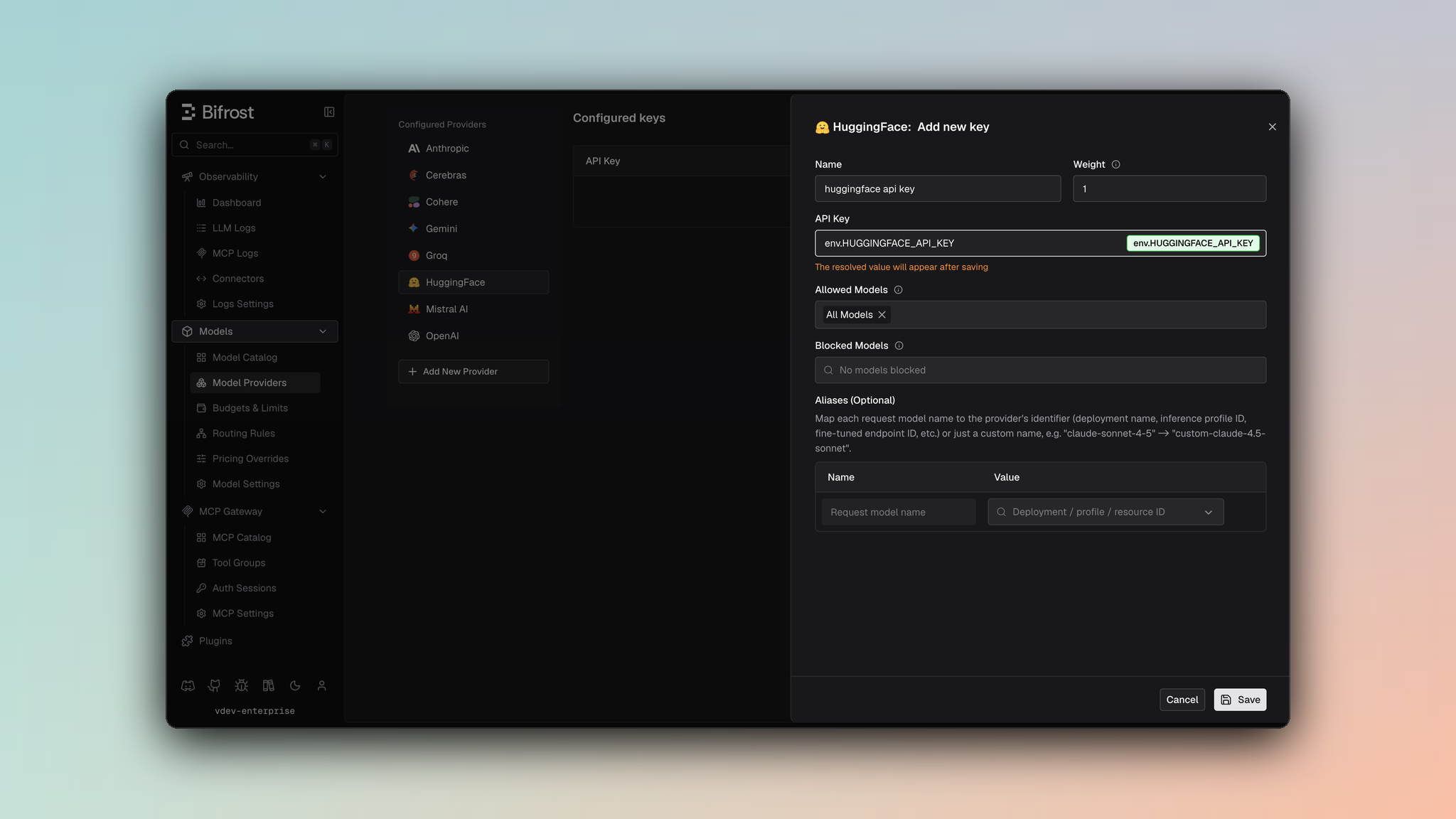 1. Navigate to **Models** > **Model Providers**. Look for **Hugging Face** under **Configured Providers**. If it is missing, click on **Add New Provider** and select **Hugging Face**.
2. Click **Add Key** or edit an existing key.
3. Set a name for your key.
4. Paste your API key directly or use an environment variable (for example, `env.HUGGINGFACE_API_KEY`).
5. Set **Allowed Models** to **All Models** (default) or the specific model allowlist you want this key to serve.
6. Save the provider configuration.
```json theme={null}
{
"providers": {
"huggingface": {
"keys": [
{
"name": "huggingface-key-1",
"value": "env.HUGGINGFACE_API_KEY",
"models": [
"*"
],
"weight": 1.0
}
]
}
}
}
```
Refer to the API documentation for [Provider Keys Management](https://docs.getbifrost.ai/api-reference/providers/create-a-key-for-a-provider).
```go theme={null}
case schemas.HuggingFace:
return []schemas.Key{{
Name: "huggingface-key-1",
Value: *schemas.NewEnvVar("env.HUGGINGFACE_API_KEY"),
Models: []string{"*"},
Weight: 1.0,
}}, nil
```
Requests use the model format `huggingface//` so Bifrost can route each call to the correct Hugging Face inference backend.
## Model Aliases & Identification
Unlike standard providers where model IDs are direct strings (e.g., `gpt-4`), Hugging Face models in Bifrost are identified by a composite key to route requests to the correct inference backend.
**Format**: `huggingface/[inference_provider]/[model_id]`
* **inference\_provider**: The backend service (e.g., `hf-inference`, `fal-ai`, `cerebras`).
* **model\_id**: The actual model identifier on Hugging Face Hub (e.g., `meta-llama/Meta-Llama-3-8B-Instruct`).
**Example**: `huggingface/hf-inference/meta-llama/Meta-Llama-3-8B-Instruct`
This parsing logic is handled in `utils.go` and `models.go`, allowing Bifrost to dynamically route requests based on the model string.
## Request Handling Differences
The Hugging Face provider handles various tasks (Chat, Speech, Transcription) which often require different request structures depending on the underlying inference provider.
### Inference Provider Constraints
Different inference providers have specific limitations and requirements:
#### Payload Limit
HuggingFace API enforces a **2 MB request body limit** across all request types (Chat, Embedding, Speech, Transcription). This constraint applies to:
* JSON request payloads
* Raw audio bytes in transcription requests
* Any other request body data
**Impact**: Large audio files, extensive chat histories, or bulk embedding requests may need to be split or compressed before sending.
#### `fal-ai` Audio Format Restrictions
The `fal-ai` provider has strict audio format requirements:
* **Supported Format**: Only **MP3** (`audio/mpeg`) is accepted
* **Rejected Formats**: WAV (`audio/wav`) and other formats are explicitly rejected
* **Encoding**: Audio must be provided as a **base64-encoded Data URI** in the `audio_url` field
**Validation Logic** (from `core/providers/huggingface/transcription.go`):
```go theme={null}
mimeType := getMimeTypeForAudioType(utils.DetectAudioMimeType(request.Input.File))
if mimeType == "audio/wav" {
return nil, fmt.Errorf("fal-ai provider does not support audio/wav format; please use a different format like mp3 or ogg")
}
encoded = fmt.Sprintf("data:%s;base64,%s", mimeType, encoded)
```
### Speech (Text-to-Speech)
For Text-to-Speech (TTS) requests, the implementation differs from a standard pipeline request:
* **No Pipeline Tag**: The `HuggingFaceSpeechRequest` struct does not include a `pipeline_tag` field in the JSON body, even though the model might be tagged as `text-to-speech` on the Hub.
* **Structure**:
```go theme={null}
type HuggingFaceSpeechRequest struct {
Text string `json:"text"`
Provider string `json:"provider" validate:"required"`
Model string `json:"model" validate:"required"`
Parameters *HuggingFaceSpeechParameters `json:"parameters,omitempty"`
}
```
* **Implementation**: See `core/providers/huggingface/speech.go`.
### Transcription (Automatic Speech Recognition)
The Transcription implementation (`core/providers/huggingface/transcription.go`) exhibits a "pattern-breaking" behavior where the request format changes significantly based on the inference provider.
#### 1. `hf-inference` (Raw Bytes)
When using the standard `hf-inference` provider, the API expects the **raw audio bytes** directly in the request body, not a JSON object.
* **Content-Type**: Audio mime type (e.g., `audio/mpeg`).
* **Body**: Raw binary data from `request.Input.File`.
* **Payload Limit**: **Maximum 2 MB** for the raw audio bytes.
* **Logic**:
```go theme={null}
// core/providers/huggingface/huggingface.go
if inferenceProvider == hfInference {
jsonData = request.Input.File // Raw bytes (max 2 MB)
isHFInferenceAudioRequest = true
}
```
* **URL Pattern**: `/hf-inference/models/{model_name}` (no `/pipeline/` suffix for ASR).
#### 2. `fal-ai` (JSON with Base64 Data URI)
When using `fal-ai` through HuggingFace provider, the API expects a **JSON body** containing the audio as a **base64-encoded Data URI**.
* **Content-Type**: `application/json`.
* **Body**: JSON object with `audio_url` field.
* **Audio Format Restriction**: **Only MP3** (`audio/mpeg`) is supported. WAV files are rejected.
* **Encoding**: Audio is base64-encoded and prefixed with a Data URI scheme.
* **Logic**:
```go theme={null}
// core/providers/huggingface/transcription.go
encoded = base64.StdEncoding.EncodeToString(request.Input.File)
mimeType := getMimeTypeForAudioType(utils.DetectAudioMimeType(request.Input.File))
if mimeType == "audio/wav" {
return nil, fmt.Errorf("fal-ai provider does not support audio/wav format; please use a different format like mp3 or ogg")
}
encoded = fmt.Sprintf("data:%s;base64,%s", mimeType, encoded)
hfRequest = &HuggingFaceTranscriptionRequest{
AudioURL: encoded,
}
```
#### Dual Fields in `types.go`
To support these divergent requirements, the `HuggingFaceTranscriptionRequest` struct in `types.go` contains fields for both scenarios, which are used mutually exclusively:
```go theme={null}
type HuggingFaceTranscriptionRequest struct {
Inputs []byte `json:"inputs,omitempty"` // For standard JSON providers (NOT hf-inference raw body)
AudioURL string `json:"audio_url,omitempty"` // For fal-ai (base64 Data URI, MP3 only)
Provider *string `json:"provider,omitempty"`
Model *string `json:"model,omitempty"`
Parameters *HuggingFaceTranscriptionRequestParameters `json:"parameters,omitempty"`
}
```
**Key Points**:
* `Inputs`: Used when JSON body is sent with raw bytes (most providers except `hf-inference` and `fal-ai`).
* `AudioURL`: Used exclusively for `fal-ai`, must be a base64-encoded Data URI with MP3 format.
* **Note**: For `hf-inference`, the entire request body is raw audio bytes-no JSON structure is used at all.
## Image Generation
The Hugging Face provider supports image generation through multiple inference providers, each with different request formats and capabilities.
### Supported Inference Providers
| Provider | Non-Streaming | Streaming | Notes |
| -------------- | ------------- | --------- | ----------------------------------------------------------------- |
| `hf-inference` | ✅ | ❌ | Simple prompt-only format, returns raw image bytes |
| `fal-ai` | ✅ | ✅ | Full parameter support, supports streaming via Server-Sent Events |
| `nebius` | ✅ | ❌ | Uses Nebius-specific format with width/height, LoRAs support |
| `together` | ✅ | ❌ | OpenAI-compatible format |
### Request Conversion
The provider automatically routes to the appropriate inference provider based on the model string format: `huggingface/{provider}/{model_id}`.
#### 1. `hf-inference`
The simplest format, only requires a prompt:
* **Request Structure**:
```go theme={null}
type HuggingFaceHFInferenceImageGenerationRequest struct {
Inputs string `json:"inputs"` // The prompt text
}
```
* **Response**: Raw image bytes (PNG/JPEG), automatically base64-encoded in Bifrost response
* **Limitations**: No size, quality, or other parameter support
#### 2. `fal-ai`
The most feature-rich provider with extensive parameter support:
* **Request Structure**:
```go theme={null}
type HuggingFaceFalAIImageGenerationRequest struct {
Prompt string `json:"prompt"`
NumImages *int `json:"num_images,omitempty"` // Maps from params.n
ResponseFormat *string `json:"response_format,omitempty"` // "url" or "b64_json"
ImageSize *HuggingFaceFalAISize `json:"image_size,omitempty"` // {width, height} from size
NegativePrompt *string `json:"negative_prompt,omitempty"`
GuidanceScale *float64 `json:"guidance_scale,omitempty"` // From extra_params
NumInferenceSteps *int `json:"num_inference_steps,omitempty"`
Seed *int `json:"seed,omitempty"`
OutputFormat *string `json:"output_format,omitempty"` // "png", "jpeg", "webp" (jpg→jpeg)
SyncMode *bool `json:"sync_mode,omitempty"` // Auto-set if response_format="b64_json"
EnableSafetyChecker *bool `json:"enable_safety_checker,omitempty"` // Auto-set if moderation="low"
Acceleration *string `json:"acceleration,omitempty"` // From extra_params
EnablePromptExpansion *bool `json:"enable_prompt_expansion,omitempty"` // From extra_params
}
```
* **Parameter Mappings**:
* `n` → `num_images`
* `size` (e.g., `"1024x1024"`) → `image_size: {width: 1024, height: 1024}`
* `output_format: "jpg"` → `output_format: "jpeg"` (normalized)
* `response_format: "b64_json"` → `sync_mode: true`
* `moderation: "low"` → `enable_safety_checker: false`
* **Response**: JSON with `images[]` array containing `url` and/or `b64_json` fields
* **Extra Parameters**: Supports `guidance_scale`, `acceleration`, `enable_prompt_expansion`, `enable_safety_checker` via `extra_params`
#### 3. `nebius`
Uses Nebius-specific format with support for LoRAs:
* **Request Structure**: Uses `NebiusImageGenerationRequest` (see Nebius provider docs)
* **Parameter Mappings**:
* `size` (e.g., `"1024x1024"`) → `width` and `height` integers
* `output_format` → `response_extension` (normalized: "jpeg" → "jpg")
* `seed`, `negative_prompt` → Passed directly
* `extra_params.num_inference_steps` → `num_inference_steps`
* `extra_params.guidance_scale` → `guidance_scale`
* `extra_params.loras` → `loras[]` array (supports both map and array formats)
* **Response**: Uses Nebius response format, converted to Bifrost format
#### 4. `together`
OpenAI-compatible format:
* **Request Structure**:
```go theme={null}
type HuggingFaceTogetherImageGenerationRequest struct {
Prompt string `json:"prompt"`
Model string `json:"model"`
ResponseFormat *string `json:"response_format,omitempty"`
Size *string `json:"size,omitempty"` // Passed directly
N *int `json:"n,omitempty"`
Steps *int `json:"steps,omitempty"` // From num_inference_steps
}
```
* **Parameter Mappings**:
* `response_format: "b64_json"` → `response_format: "base64"`
* `num_inference_steps` → `steps`
* **Response**: OpenAI-compatible format with `data[]` array
### Response Conversion
Each provider's response is converted to Bifrost's unified `BifrostImageGenerationResponse` format:
* **hf-inference**: Raw bytes → base64-encoded in `b64_json`
* **fal-ai**: `images[]` array → `ImageData[]` with `url` and/or `b64_json`
* **nebius**: Uses Nebius converter → Bifrost format
* **together**: `data[]` array → `ImageData[]` with `b64_json` and/or `url`
### Image Generation Streaming
**Only `fal-ai` supports streaming** for HuggingFace image generation. Streaming uses Server-Sent Events (SSE) format.
#### Streaming Request Format
```go theme={null}
type HuggingFaceFalAIImageStreamRequest struct {
Prompt string `json:"prompt"`
ResponseFormat *string `json:"response_format,omitempty"`
NumImages *int `json:"num_images,omitempty"`
ImageSize *HuggingFaceFalAISize `json:"image_size,omitempty"`
// ... same parameters as non-streaming
}
```
#### Streaming Response Format
* **Event Type**: Server-Sent Events with `data:` prefix
* **Chunk Format**: Each SSE event contains JSON with `images[]` array
* **Stream Processing**:
* Each image in `images[]` becomes a separate stream chunk
* Chunks have `type: "partial"` until stream completion
* Final chunk has `type: "completed"` with the last image data
* Images can be delivered as `url` (public URL) or `b64_json` (base64-encoded)
* **URL Pattern**: `/fal-ai/{model_id}/stream` (appended to base URL)
#### Streaming Behavior
* **Chunk Indexing**: Each chunk has an `Index` field (0, 1, 2, ...) and `ChunkIndex` for ordering
* **Completion**: Final chunk includes all image data from the last SSE event
* **Error Handling**: Errors in SSE format are parsed and sent as `BifrostError` chunks
### Example Usage
```bash theme={null}
curl -X POST http://localhost:8080/v1/images/generations \
-H "Content-Type: application/json" \
-d '{
"model": "huggingface/fal-ai/fal-ai/flux/dev",
"prompt": "A futuristic cityscape at sunset",
"size": "1024x1024",
"n": 2,
"output_format": "png",
"response_format": "url"
}'
```
```bash theme={null}
curl -X POST http://localhost:8080/v1/images/generations \
-H "Content-Type: application/json" \
-d '{
"model": "huggingface/fal-ai/fal-ai/flux/dev",
"prompt": "A futuristic cityscape at sunset",
"size": "1024x1024",
"stream": true
}'
```
```go theme={null}
resp, err := client.ImageGenerationRequest(schemas.NewBifrostContext(ctx, schemas.NoDeadline), &schemas.BifrostImageGenerationRequest{
Provider: schemas.HuggingFace,
Model: "huggingface/fal-ai/fal-ai/flux/dev",
Input: &schemas.ImageGenerationInput{
Prompt: "A futuristic cityscape at sunset",
},
Params: &schemas.ImageGenerationParameters{
Size: schemas.Ptr("1024x1024"),
N: schemas.Ptr(2),
OutputFormat: schemas.Ptr("png"),
ResponseFormat: schemas.Ptr("url"),
Seed: schemas.Ptr(42),
NegativePrompt: schemas.Ptr("blurry, low quality"),
NumInferenceSteps: schemas.Ptr(50),
ExtraParams: map[string]interface{}{
"guidance_scale": 7.5,
"acceleration": "t4",
"enable_prompt_expansion": true,
},
},
})
```
```go theme={null}
streamChan, err := client.ImageGenerationStreamRequest(schemas.NewBifrostContext(ctx, schemas.NoDeadline), &schemas.BifrostImageGenerationRequest{
Provider: schemas.HuggingFace,
Model: "huggingface/fal-ai/fal-ai/flux/dev",
Input: &schemas.ImageGenerationInput{
Prompt: "A futuristic cityscape at sunset",
},
Params: &schemas.ImageGenerationParameters{
Size: schemas.Ptr("1024x1024"),
N: schemas.Ptr(2),
},
})
for stream := range streamChan {
if stream.BifrostImageGenerationStreamResponse != nil {
chunk := stream.BifrostImageGenerationStreamResponse
if chunk.URL != "" {
// Handle image URL
} else if chunk.B64JSON != "" {
// Handle base64 image data
}
}
}
```
### Provider-Specific Notes
* **fal-ai**:
* When `response_format="b64_json"`, `sync_mode` is automatically set to `true`
* When `moderation="low"`, `enable_safety_checker` is set to `false`
* `output_format: "jpg"` is normalized to `"jpeg"`
* **nebius**:
* `response_extension: "jpeg"` is normalized to `"jpg"` (Nebius inconsistency)
* LoRAs can be provided as `{"url": scale}` map or `[{"url": "...", "scale": ...}]` array
* **hf-inference**:
* Minimal format, only prompt supported
* Returns raw image bytes (automatically base64-encoded)
* **together**:
* OpenAI-compatible format
* `response_format: "b64_json"` is converted to `"base64"`
## Image Edit
Requests use **multipart/form-data**, not JSON.
**Only `fal-ai` supports image editing** for HuggingFace. Image edit requests are routed to fal-ai inference provider.
**Request Parameters**
| Parameter | Type | Required | Notes |
| ----------------------- | ------ | -------- | ------------------------------------------------------------------------------------ |
| `model` | string | ✅ | Model identifier (must be `huggingface/fal-ai/{model_id}`) |
| `prompt` | string | ✅ | Text description of the edit |
| `image[]` | binary | ✅ | Image file(s) to edit (supports multiple images for some models) |
| `n` | int | ❌ | Number of images to generate (1-10) |
| `size` | string | ❌ | Image size: `"WxH"` format (e.g., `"1024x1024"`) |
| `output_format` | string | ❌ | Output format: `"png"`, `"webp"`, `"jpeg"` (note: `"jpg"` is normalized to `"jpeg"`) |
| `seed` | int | ❌ | Seed for reproducibility (via `ExtraParams["seed"]`) |
| `num_inference_steps` | int | ❌ | Number of inference steps (via `ExtraParams["num_inference_steps"]`) |
| `guidance_scale` | float | ❌ | Guidance scale (via `ExtraParams["guidance_scale"]`) |
| `acceleration` | string | ❌ | Acceleration mode (via `ExtraParams["acceleration"]`) |
| `enable_safety_checker` | bool | ❌ | Enable safety checker (via `ExtraParams["enable_safety_checker"]`) |
| `use_image_urls` | bool | ❌ | Override image field selection (via `ExtraParams["use_image_urls"]`) |
***
**Request Conversion**
* **Model Validation**: Only `fal-ai` inference provider supports image edit. Other providers return `UnsupportedOperationError`.
* **Image Conversion**: Each image in `bifrostReq.Input.Images` is converted to a base64 data URL:
* Format: `data:{mimeType};base64,{base64Data}`
* MIME type detection: `image/jpeg`, `image/webp`, `image/png` (via `http.DetectContentType`)
* **Image Field Selection**: The provider uses different image fields based on model capabilities:
* **Multi-image models** (e.g., `fal-ai/flux-2/edit`, `fal-ai/flux-2-pro/edit`): Uses `image_urls` array field
* **Single-image models** (e.g., `fal-ai/flux-pro/kontext`, `fal-ai/flux/dev/image-to-image`): Uses `image_url` string field
* **Override**: `ExtraParams["use_image_urls"]` can override the automatic selection
* **Fallback**: For unknown models, uses `image_url` if single image, `image_urls` if multiple images
* **Parameter Mapping**:
* `prompt` → `Prompt`
* `n` → `NumImages`
* `size` → `ImageSize` (converted from `"WxH"` string to `{Width, Height}` object)
* `output_format` → `OutputFormat` (`"jpg"` normalized to `"jpeg"`)
* `seed` (via `ExtraParams["seed"]`) → `Seed`
* `num_inference_steps` (via `ExtraParams["num_inference_steps"]`) → `NumInferenceSteps`
* `guidance_scale` (via `ExtraParams["guidance_scale"]`) → `GuidanceScale`
* `acceleration` (via `ExtraParams["acceleration"]`) → `Acceleration`
* `enable_safety_checker` (via `ExtraParams["enable_safety_checker"]`) → `EnableSafetyChecker`
**Response Conversion**
* **Non-streaming**: Uses the same response conversion as image generation (see Image Generation section)
* **Streaming**: fal-ai streaming responses use Server-Sent Events (SSE) format:
* **Event Type**: Server-Sent Events with `data:` prefix
* **Chunk Format**: Each SSE event contains JSON with `images[]` array (or `data.images[]` in API envelope format)
* **Stream Processing**:
* Each image in `images[]` becomes a separate stream chunk
* Chunks have `type: "image_edit.partial_image"` until stream completion
* Final chunk has `type: "image_edit.completed"` with the last image data
* Images can be delivered as `url` (public URL) or `b64_json` (base64-encoded)
* **Response Structure**: Handles both API envelope format (`Data.Images`) and legacy flattened format (`Images`)
* **URL Pattern**: `/fal-ai/{model_id}/stream` (appended to base URL)
**Endpoint**: `/fal-ai/{model_id}` (non-streaming), `/fal-ai/{model_id}/stream` (streaming)
**Image Variation**
Image variation is not supported by HuggingFace.
## Raw JSON Body Handling
While most providers strictly serialize a struct to JSON, the Hugging Face provider's `Transcription` method demonstrates a hybrid approach depending on the inference provider:
### Embedding Requests
For embedding requests, different providers expect different field names:
* **Standard providers** (most): Use `input` field
* **`hf-inference`**: Uses `inputs` field (plural)
**Request Structure**:
```go theme={null}
type HuggingFaceEmbeddingRequest struct {
Input interface{} `json:"input,omitempty"` // Used by all providers except hf-inference
Inputs interface{} `json:"inputs,omitempty"` // Used by hf-inference
Provider *string `json:"provider,omitempty"` // Identifies the inference backend
Model *string `json:"model,omitempty"`
// ... other fields
}
```
The converter in `embedding.go` populates both fields to ensure compatibility across providers.
### Differences in Inference Provider Constraints
This multi-mode approach allows the provider to support diverse API contracts within a single implementation structure, accommodating:
1. **Legacy endpoints** that expect raw binary data
2. **Modern JSON APIs** with different schema expectations
3. **Third-party providers** (like `fal-ai`) with custom requirements
4. **Performance optimizations** (raw bytes avoid JSON overhead for `hf-inference`)
This flexibility allows the provider to support diverse API contracts within a single implementation structure.
## Model Discovery & Caching
The provider implements sophisticated model discovery using the Hugging Face Hub API:
### List Models Flow
1. **Parallel Queries**: Fetches models from multiple inference providers concurrently
2. **Filter by Pipeline Tag**: Uses `pipeline_tag` (e.g., `text-to-speech`, `feature-extraction`) to determine supported methods
3. **Aggregate Results**: Combines responses from all providers into a unified list
4. **Model ID Format**: Returns models as `huggingface/{provider}/{model_id}`
### Provider Model Mapping Cache
The provider maintains a cache (`modelProviderMappingCache`) to map Hugging Face model IDs to provider-specific model identifiers:
```go theme={null}
// Example: "meta-llama/Meta-Llama-3-8B-Instruct" -> provider mappings
{
"cerebras": {
"ProviderTask": "chat-completion",
"ProviderModelID": "llama3-8b-8192"
},
"groq": {
"ProviderTask": "chat-completion",
"ProviderModelID": "llama3-8b-instant"
}
}
```
**Cache Invalidation**: On HTTP 404 errors, the cache is cleared and the mapping is re-fetched, then the request is retried with the updated model ID.
## Best Practices
When working with the Hugging Face provider:
1. **Check Payload Size**: Ensure request bodies are under 2 MB
2. **Audio Format**: Use MP3 for `fal-ai`, avoid WAV files
3. **Model Aliases**: Always specify provider in model string: `huggingface/{provider}/{model}`
4. **Error Handling**: Implement retries for 404 errors (cache invalidation scenarios)
5. **Provider Selection**: Use `auto` for automatic provider selection based on model capabilities
6. **Pipeline Tags**: Verify model's `pipeline_tag` matches your use case (chat, embedding, TTS, ASR)
## File Structure Reference
```
core/providers/huggingface/
├── huggingface.go # Main provider implementation, HTTP request handling
├── types.go # All provider-specific types (Request/Response DTOs)
├── utils.go # Helpers, constants, URL builders, model mapping
├── chat.go # Chat completion converters (Bifrost ↔ HF)
├── embedding.go # Embedding converters
├── speech.go # Text-to-speech converters
├── transcription.go # Speech-to-text converters
├── models.go # Model listing and capability detection
├── images.go # Image generation converters
├── errors.go # Error handling
└── huggingface_test.go # Comprehensive test suite
```
Each file follows strict separation of concerns as outlined in the [Adding a Provider](/contributing/adding-a-provider) guide.
1. Navigate to **Models** > **Model Providers**. Look for **Hugging Face** under **Configured Providers**. If it is missing, click on **Add New Provider** and select **Hugging Face**.
2. Click **Add Key** or edit an existing key.
3. Set a name for your key.
4. Paste your API key directly or use an environment variable (for example, `env.HUGGINGFACE_API_KEY`).
5. Set **Allowed Models** to **All Models** (default) or the specific model allowlist you want this key to serve.
6. Save the provider configuration.
```json theme={null}
{
"providers": {
"huggingface": {
"keys": [
{
"name": "huggingface-key-1",
"value": "env.HUGGINGFACE_API_KEY",
"models": [
"*"
],
"weight": 1.0
}
]
}
}
}
```
Refer to the API documentation for [Provider Keys Management](https://docs.getbifrost.ai/api-reference/providers/create-a-key-for-a-provider).
```go theme={null}
case schemas.HuggingFace:
return []schemas.Key{{
Name: "huggingface-key-1",
Value: *schemas.NewEnvVar("env.HUGGINGFACE_API_KEY"),
Models: []string{"*"},
Weight: 1.0,
}}, nil
```
Requests use the model format `huggingface//` so Bifrost can route each call to the correct Hugging Face inference backend.
## Model Aliases & Identification
Unlike standard providers where model IDs are direct strings (e.g., `gpt-4`), Hugging Face models in Bifrost are identified by a composite key to route requests to the correct inference backend.
**Format**: `huggingface/[inference_provider]/[model_id]`
* **inference\_provider**: The backend service (e.g., `hf-inference`, `fal-ai`, `cerebras`).
* **model\_id**: The actual model identifier on Hugging Face Hub (e.g., `meta-llama/Meta-Llama-3-8B-Instruct`).
**Example**: `huggingface/hf-inference/meta-llama/Meta-Llama-3-8B-Instruct`
This parsing logic is handled in `utils.go` and `models.go`, allowing Bifrost to dynamically route requests based on the model string.
## Request Handling Differences
The Hugging Face provider handles various tasks (Chat, Speech, Transcription) which often require different request structures depending on the underlying inference provider.
### Inference Provider Constraints
Different inference providers have specific limitations and requirements:
#### Payload Limit
HuggingFace API enforces a **2 MB request body limit** across all request types (Chat, Embedding, Speech, Transcription). This constraint applies to:
* JSON request payloads
* Raw audio bytes in transcription requests
* Any other request body data
**Impact**: Large audio files, extensive chat histories, or bulk embedding requests may need to be split or compressed before sending.
#### `fal-ai` Audio Format Restrictions
The `fal-ai` provider has strict audio format requirements:
* **Supported Format**: Only **MP3** (`audio/mpeg`) is accepted
* **Rejected Formats**: WAV (`audio/wav`) and other formats are explicitly rejected
* **Encoding**: Audio must be provided as a **base64-encoded Data URI** in the `audio_url` field
**Validation Logic** (from `core/providers/huggingface/transcription.go`):
```go theme={null}
mimeType := getMimeTypeForAudioType(utils.DetectAudioMimeType(request.Input.File))
if mimeType == "audio/wav" {
return nil, fmt.Errorf("fal-ai provider does not support audio/wav format; please use a different format like mp3 or ogg")
}
encoded = fmt.Sprintf("data:%s;base64,%s", mimeType, encoded)
```
### Speech (Text-to-Speech)
For Text-to-Speech (TTS) requests, the implementation differs from a standard pipeline request:
* **No Pipeline Tag**: The `HuggingFaceSpeechRequest` struct does not include a `pipeline_tag` field in the JSON body, even though the model might be tagged as `text-to-speech` on the Hub.
* **Structure**:
```go theme={null}
type HuggingFaceSpeechRequest struct {
Text string `json:"text"`
Provider string `json:"provider" validate:"required"`
Model string `json:"model" validate:"required"`
Parameters *HuggingFaceSpeechParameters `json:"parameters,omitempty"`
}
```
* **Implementation**: See `core/providers/huggingface/speech.go`.
### Transcription (Automatic Speech Recognition)
The Transcription implementation (`core/providers/huggingface/transcription.go`) exhibits a "pattern-breaking" behavior where the request format changes significantly based on the inference provider.
#### 1. `hf-inference` (Raw Bytes)
When using the standard `hf-inference` provider, the API expects the **raw audio bytes** directly in the request body, not a JSON object.
* **Content-Type**: Audio mime type (e.g., `audio/mpeg`).
* **Body**: Raw binary data from `request.Input.File`.
* **Payload Limit**: **Maximum 2 MB** for the raw audio bytes.
* **Logic**:
```go theme={null}
// core/providers/huggingface/huggingface.go
if inferenceProvider == hfInference {
jsonData = request.Input.File // Raw bytes (max 2 MB)
isHFInferenceAudioRequest = true
}
```
* **URL Pattern**: `/hf-inference/models/{model_name}` (no `/pipeline/` suffix for ASR).
#### 2. `fal-ai` (JSON with Base64 Data URI)
When using `fal-ai` through HuggingFace provider, the API expects a **JSON body** containing the audio as a **base64-encoded Data URI**.
* **Content-Type**: `application/json`.
* **Body**: JSON object with `audio_url` field.
* **Audio Format Restriction**: **Only MP3** (`audio/mpeg`) is supported. WAV files are rejected.
* **Encoding**: Audio is base64-encoded and prefixed with a Data URI scheme.
* **Logic**:
```go theme={null}
// core/providers/huggingface/transcription.go
encoded = base64.StdEncoding.EncodeToString(request.Input.File)
mimeType := getMimeTypeForAudioType(utils.DetectAudioMimeType(request.Input.File))
if mimeType == "audio/wav" {
return nil, fmt.Errorf("fal-ai provider does not support audio/wav format; please use a different format like mp3 or ogg")
}
encoded = fmt.Sprintf("data:%s;base64,%s", mimeType, encoded)
hfRequest = &HuggingFaceTranscriptionRequest{
AudioURL: encoded,
}
```
#### Dual Fields in `types.go`
To support these divergent requirements, the `HuggingFaceTranscriptionRequest` struct in `types.go` contains fields for both scenarios, which are used mutually exclusively:
```go theme={null}
type HuggingFaceTranscriptionRequest struct {
Inputs []byte `json:"inputs,omitempty"` // For standard JSON providers (NOT hf-inference raw body)
AudioURL string `json:"audio_url,omitempty"` // For fal-ai (base64 Data URI, MP3 only)
Provider *string `json:"provider,omitempty"`
Model *string `json:"model,omitempty"`
Parameters *HuggingFaceTranscriptionRequestParameters `json:"parameters,omitempty"`
}
```
**Key Points**:
* `Inputs`: Used when JSON body is sent with raw bytes (most providers except `hf-inference` and `fal-ai`).
* `AudioURL`: Used exclusively for `fal-ai`, must be a base64-encoded Data URI with MP3 format.
* **Note**: For `hf-inference`, the entire request body is raw audio bytes-no JSON structure is used at all.
## Image Generation
The Hugging Face provider supports image generation through multiple inference providers, each with different request formats and capabilities.
### Supported Inference Providers
| Provider | Non-Streaming | Streaming | Notes |
| -------------- | ------------- | --------- | ----------------------------------------------------------------- |
| `hf-inference` | ✅ | ❌ | Simple prompt-only format, returns raw image bytes |
| `fal-ai` | ✅ | ✅ | Full parameter support, supports streaming via Server-Sent Events |
| `nebius` | ✅ | ❌ | Uses Nebius-specific format with width/height, LoRAs support |
| `together` | ✅ | ❌ | OpenAI-compatible format |
### Request Conversion
The provider automatically routes to the appropriate inference provider based on the model string format: `huggingface/{provider}/{model_id}`.
#### 1. `hf-inference`
The simplest format, only requires a prompt:
* **Request Structure**:
```go theme={null}
type HuggingFaceHFInferenceImageGenerationRequest struct {
Inputs string `json:"inputs"` // The prompt text
}
```
* **Response**: Raw image bytes (PNG/JPEG), automatically base64-encoded in Bifrost response
* **Limitations**: No size, quality, or other parameter support
#### 2. `fal-ai`
The most feature-rich provider with extensive parameter support:
* **Request Structure**:
```go theme={null}
type HuggingFaceFalAIImageGenerationRequest struct {
Prompt string `json:"prompt"`
NumImages *int `json:"num_images,omitempty"` // Maps from params.n
ResponseFormat *string `json:"response_format,omitempty"` // "url" or "b64_json"
ImageSize *HuggingFaceFalAISize `json:"image_size,omitempty"` // {width, height} from size
NegativePrompt *string `json:"negative_prompt,omitempty"`
GuidanceScale *float64 `json:"guidance_scale,omitempty"` // From extra_params
NumInferenceSteps *int `json:"num_inference_steps,omitempty"`
Seed *int `json:"seed,omitempty"`
OutputFormat *string `json:"output_format,omitempty"` // "png", "jpeg", "webp" (jpg→jpeg)
SyncMode *bool `json:"sync_mode,omitempty"` // Auto-set if response_format="b64_json"
EnableSafetyChecker *bool `json:"enable_safety_checker,omitempty"` // Auto-set if moderation="low"
Acceleration *string `json:"acceleration,omitempty"` // From extra_params
EnablePromptExpansion *bool `json:"enable_prompt_expansion,omitempty"` // From extra_params
}
```
* **Parameter Mappings**:
* `n` → `num_images`
* `size` (e.g., `"1024x1024"`) → `image_size: {width: 1024, height: 1024}`
* `output_format: "jpg"` → `output_format: "jpeg"` (normalized)
* `response_format: "b64_json"` → `sync_mode: true`
* `moderation: "low"` → `enable_safety_checker: false`
* **Response**: JSON with `images[]` array containing `url` and/or `b64_json` fields
* **Extra Parameters**: Supports `guidance_scale`, `acceleration`, `enable_prompt_expansion`, `enable_safety_checker` via `extra_params`
#### 3. `nebius`
Uses Nebius-specific format with support for LoRAs:
* **Request Structure**: Uses `NebiusImageGenerationRequest` (see Nebius provider docs)
* **Parameter Mappings**:
* `size` (e.g., `"1024x1024"`) → `width` and `height` integers
* `output_format` → `response_extension` (normalized: "jpeg" → "jpg")
* `seed`, `negative_prompt` → Passed directly
* `extra_params.num_inference_steps` → `num_inference_steps`
* `extra_params.guidance_scale` → `guidance_scale`
* `extra_params.loras` → `loras[]` array (supports both map and array formats)
* **Response**: Uses Nebius response format, converted to Bifrost format
#### 4. `together`
OpenAI-compatible format:
* **Request Structure**:
```go theme={null}
type HuggingFaceTogetherImageGenerationRequest struct {
Prompt string `json:"prompt"`
Model string `json:"model"`
ResponseFormat *string `json:"response_format,omitempty"`
Size *string `json:"size,omitempty"` // Passed directly
N *int `json:"n,omitempty"`
Steps *int `json:"steps,omitempty"` // From num_inference_steps
}
```
* **Parameter Mappings**:
* `response_format: "b64_json"` → `response_format: "base64"`
* `num_inference_steps` → `steps`
* **Response**: OpenAI-compatible format with `data[]` array
### Response Conversion
Each provider's response is converted to Bifrost's unified `BifrostImageGenerationResponse` format:
* **hf-inference**: Raw bytes → base64-encoded in `b64_json`
* **fal-ai**: `images[]` array → `ImageData[]` with `url` and/or `b64_json`
* **nebius**: Uses Nebius converter → Bifrost format
* **together**: `data[]` array → `ImageData[]` with `b64_json` and/or `url`
### Image Generation Streaming
**Only `fal-ai` supports streaming** for HuggingFace image generation. Streaming uses Server-Sent Events (SSE) format.
#### Streaming Request Format
```go theme={null}
type HuggingFaceFalAIImageStreamRequest struct {
Prompt string `json:"prompt"`
ResponseFormat *string `json:"response_format,omitempty"`
NumImages *int `json:"num_images,omitempty"`
ImageSize *HuggingFaceFalAISize `json:"image_size,omitempty"`
// ... same parameters as non-streaming
}
```
#### Streaming Response Format
* **Event Type**: Server-Sent Events with `data:` prefix
* **Chunk Format**: Each SSE event contains JSON with `images[]` array
* **Stream Processing**:
* Each image in `images[]` becomes a separate stream chunk
* Chunks have `type: "partial"` until stream completion
* Final chunk has `type: "completed"` with the last image data
* Images can be delivered as `url` (public URL) or `b64_json` (base64-encoded)
* **URL Pattern**: `/fal-ai/{model_id}/stream` (appended to base URL)
#### Streaming Behavior
* **Chunk Indexing**: Each chunk has an `Index` field (0, 1, 2, ...) and `ChunkIndex` for ordering
* **Completion**: Final chunk includes all image data from the last SSE event
* **Error Handling**: Errors in SSE format are parsed and sent as `BifrostError` chunks
### Example Usage
```bash theme={null}
curl -X POST http://localhost:8080/v1/images/generations \
-H "Content-Type: application/json" \
-d '{
"model": "huggingface/fal-ai/fal-ai/flux/dev",
"prompt": "A futuristic cityscape at sunset",
"size": "1024x1024",
"n": 2,
"output_format": "png",
"response_format": "url"
}'
```
```bash theme={null}
curl -X POST http://localhost:8080/v1/images/generations \
-H "Content-Type: application/json" \
-d '{
"model": "huggingface/fal-ai/fal-ai/flux/dev",
"prompt": "A futuristic cityscape at sunset",
"size": "1024x1024",
"stream": true
}'
```
```go theme={null}
resp, err := client.ImageGenerationRequest(schemas.NewBifrostContext(ctx, schemas.NoDeadline), &schemas.BifrostImageGenerationRequest{
Provider: schemas.HuggingFace,
Model: "huggingface/fal-ai/fal-ai/flux/dev",
Input: &schemas.ImageGenerationInput{
Prompt: "A futuristic cityscape at sunset",
},
Params: &schemas.ImageGenerationParameters{
Size: schemas.Ptr("1024x1024"),
N: schemas.Ptr(2),
OutputFormat: schemas.Ptr("png"),
ResponseFormat: schemas.Ptr("url"),
Seed: schemas.Ptr(42),
NegativePrompt: schemas.Ptr("blurry, low quality"),
NumInferenceSteps: schemas.Ptr(50),
ExtraParams: map[string]interface{}{
"guidance_scale": 7.5,
"acceleration": "t4",
"enable_prompt_expansion": true,
},
},
})
```
```go theme={null}
streamChan, err := client.ImageGenerationStreamRequest(schemas.NewBifrostContext(ctx, schemas.NoDeadline), &schemas.BifrostImageGenerationRequest{
Provider: schemas.HuggingFace,
Model: "huggingface/fal-ai/fal-ai/flux/dev",
Input: &schemas.ImageGenerationInput{
Prompt: "A futuristic cityscape at sunset",
},
Params: &schemas.ImageGenerationParameters{
Size: schemas.Ptr("1024x1024"),
N: schemas.Ptr(2),
},
})
for stream := range streamChan {
if stream.BifrostImageGenerationStreamResponse != nil {
chunk := stream.BifrostImageGenerationStreamResponse
if chunk.URL != "" {
// Handle image URL
} else if chunk.B64JSON != "" {
// Handle base64 image data
}
}
}
```
### Provider-Specific Notes
* **fal-ai**:
* When `response_format="b64_json"`, `sync_mode` is automatically set to `true`
* When `moderation="low"`, `enable_safety_checker` is set to `false`
* `output_format: "jpg"` is normalized to `"jpeg"`
* **nebius**:
* `response_extension: "jpeg"` is normalized to `"jpg"` (Nebius inconsistency)
* LoRAs can be provided as `{"url": scale}` map or `[{"url": "...", "scale": ...}]` array
* **hf-inference**:
* Minimal format, only prompt supported
* Returns raw image bytes (automatically base64-encoded)
* **together**:
* OpenAI-compatible format
* `response_format: "b64_json"` is converted to `"base64"`
## Image Edit
Requests use **multipart/form-data**, not JSON.
**Only `fal-ai` supports image editing** for HuggingFace. Image edit requests are routed to fal-ai inference provider.
**Request Parameters**
| Parameter | Type | Required | Notes |
| ----------------------- | ------ | -------- | ------------------------------------------------------------------------------------ |
| `model` | string | ✅ | Model identifier (must be `huggingface/fal-ai/{model_id}`) |
| `prompt` | string | ✅ | Text description of the edit |
| `image[]` | binary | ✅ | Image file(s) to edit (supports multiple images for some models) |
| `n` | int | ❌ | Number of images to generate (1-10) |
| `size` | string | ❌ | Image size: `"WxH"` format (e.g., `"1024x1024"`) |
| `output_format` | string | ❌ | Output format: `"png"`, `"webp"`, `"jpeg"` (note: `"jpg"` is normalized to `"jpeg"`) |
| `seed` | int | ❌ | Seed for reproducibility (via `ExtraParams["seed"]`) |
| `num_inference_steps` | int | ❌ | Number of inference steps (via `ExtraParams["num_inference_steps"]`) |
| `guidance_scale` | float | ❌ | Guidance scale (via `ExtraParams["guidance_scale"]`) |
| `acceleration` | string | ❌ | Acceleration mode (via `ExtraParams["acceleration"]`) |
| `enable_safety_checker` | bool | ❌ | Enable safety checker (via `ExtraParams["enable_safety_checker"]`) |
| `use_image_urls` | bool | ❌ | Override image field selection (via `ExtraParams["use_image_urls"]`) |
***
**Request Conversion**
* **Model Validation**: Only `fal-ai` inference provider supports image edit. Other providers return `UnsupportedOperationError`.
* **Image Conversion**: Each image in `bifrostReq.Input.Images` is converted to a base64 data URL:
* Format: `data:{mimeType};base64,{base64Data}`
* MIME type detection: `image/jpeg`, `image/webp`, `image/png` (via `http.DetectContentType`)
* **Image Field Selection**: The provider uses different image fields based on model capabilities:
* **Multi-image models** (e.g., `fal-ai/flux-2/edit`, `fal-ai/flux-2-pro/edit`): Uses `image_urls` array field
* **Single-image models** (e.g., `fal-ai/flux-pro/kontext`, `fal-ai/flux/dev/image-to-image`): Uses `image_url` string field
* **Override**: `ExtraParams["use_image_urls"]` can override the automatic selection
* **Fallback**: For unknown models, uses `image_url` if single image, `image_urls` if multiple images
* **Parameter Mapping**:
* `prompt` → `Prompt`
* `n` → `NumImages`
* `size` → `ImageSize` (converted from `"WxH"` string to `{Width, Height}` object)
* `output_format` → `OutputFormat` (`"jpg"` normalized to `"jpeg"`)
* `seed` (via `ExtraParams["seed"]`) → `Seed`
* `num_inference_steps` (via `ExtraParams["num_inference_steps"]`) → `NumInferenceSteps`
* `guidance_scale` (via `ExtraParams["guidance_scale"]`) → `GuidanceScale`
* `acceleration` (via `ExtraParams["acceleration"]`) → `Acceleration`
* `enable_safety_checker` (via `ExtraParams["enable_safety_checker"]`) → `EnableSafetyChecker`
**Response Conversion**
* **Non-streaming**: Uses the same response conversion as image generation (see Image Generation section)
* **Streaming**: fal-ai streaming responses use Server-Sent Events (SSE) format:
* **Event Type**: Server-Sent Events with `data:` prefix
* **Chunk Format**: Each SSE event contains JSON with `images[]` array (or `data.images[]` in API envelope format)
* **Stream Processing**:
* Each image in `images[]` becomes a separate stream chunk
* Chunks have `type: "image_edit.partial_image"` until stream completion
* Final chunk has `type: "image_edit.completed"` with the last image data
* Images can be delivered as `url` (public URL) or `b64_json` (base64-encoded)
* **Response Structure**: Handles both API envelope format (`Data.Images`) and legacy flattened format (`Images`)
* **URL Pattern**: `/fal-ai/{model_id}/stream` (appended to base URL)
**Endpoint**: `/fal-ai/{model_id}` (non-streaming), `/fal-ai/{model_id}/stream` (streaming)
**Image Variation**
Image variation is not supported by HuggingFace.
## Raw JSON Body Handling
While most providers strictly serialize a struct to JSON, the Hugging Face provider's `Transcription` method demonstrates a hybrid approach depending on the inference provider:
### Embedding Requests
For embedding requests, different providers expect different field names:
* **Standard providers** (most): Use `input` field
* **`hf-inference`**: Uses `inputs` field (plural)
**Request Structure**:
```go theme={null}
type HuggingFaceEmbeddingRequest struct {
Input interface{} `json:"input,omitempty"` // Used by all providers except hf-inference
Inputs interface{} `json:"inputs,omitempty"` // Used by hf-inference
Provider *string `json:"provider,omitempty"` // Identifies the inference backend
Model *string `json:"model,omitempty"`
// ... other fields
}
```
The converter in `embedding.go` populates both fields to ensure compatibility across providers.
### Differences in Inference Provider Constraints
This multi-mode approach allows the provider to support diverse API contracts within a single implementation structure, accommodating:
1. **Legacy endpoints** that expect raw binary data
2. **Modern JSON APIs** with different schema expectations
3. **Third-party providers** (like `fal-ai`) with custom requirements
4. **Performance optimizations** (raw bytes avoid JSON overhead for `hf-inference`)
This flexibility allows the provider to support diverse API contracts within a single implementation structure.
## Model Discovery & Caching
The provider implements sophisticated model discovery using the Hugging Face Hub API:
### List Models Flow
1. **Parallel Queries**: Fetches models from multiple inference providers concurrently
2. **Filter by Pipeline Tag**: Uses `pipeline_tag` (e.g., `text-to-speech`, `feature-extraction`) to determine supported methods
3. **Aggregate Results**: Combines responses from all providers into a unified list
4. **Model ID Format**: Returns models as `huggingface/{provider}/{model_id}`
### Provider Model Mapping Cache
The provider maintains a cache (`modelProviderMappingCache`) to map Hugging Face model IDs to provider-specific model identifiers:
```go theme={null}
// Example: "meta-llama/Meta-Llama-3-8B-Instruct" -> provider mappings
{
"cerebras": {
"ProviderTask": "chat-completion",
"ProviderModelID": "llama3-8b-8192"
},
"groq": {
"ProviderTask": "chat-completion",
"ProviderModelID": "llama3-8b-instant"
}
}
```
**Cache Invalidation**: On HTTP 404 errors, the cache is cleared and the mapping is re-fetched, then the request is retried with the updated model ID.
## Best Practices
When working with the Hugging Face provider:
1. **Check Payload Size**: Ensure request bodies are under 2 MB
2. **Audio Format**: Use MP3 for `fal-ai`, avoid WAV files
3. **Model Aliases**: Always specify provider in model string: `huggingface/{provider}/{model}`
4. **Error Handling**: Implement retries for 404 errors (cache invalidation scenarios)
5. **Provider Selection**: Use `auto` for automatic provider selection based on model capabilities
6. **Pipeline Tags**: Verify model's `pipeline_tag` matches your use case (chat, embedding, TTS, ASR)
## File Structure Reference
```
core/providers/huggingface/
├── huggingface.go # Main provider implementation, HTTP request handling
├── types.go # All provider-specific types (Request/Response DTOs)
├── utils.go # Helpers, constants, URL builders, model mapping
├── chat.go # Chat completion converters (Bifrost ↔ HF)
├── embedding.go # Embedding converters
├── speech.go # Text-to-speech converters
├── transcription.go # Speech-to-text converters
├── models.go # Model listing and capability detection
├── images.go # Image generation converters
├── errors.go # Error handling
└── huggingface_test.go # Comprehensive test suite
```
Each file follows strict separation of concerns as outlined in the [Adding a Provider](/contributing/adding-a-provider) guide.