> ## Documentation Index
> Fetch the complete documentation index at: https://docs.getbifrost.ai/llms.txt
> Use this file to discover all available pages before exploring further.
# Cerebras
> Cerebras API conversion guide - OpenAI-compatible format, full feature support, streaming, tool calling, and parameter handling
## Overview
Cerebras is a **fully OpenAI-compatible provider** leveraging the complete set of OpenAI API features. Bifrost delegates all functionality to the OpenAI provider implementation with standard parameter filtering. Key characteristics:
* **Complete OpenAI compatibility** - All chat, text, and streaming features supported
* **Full tool calling** - Function definitions and parallel tool execution
* **Streaming support** - Server-Sent Events with token usage tracking
* **Parameter preservation** - Passes through all standard OpenAI parameters
* **Responses API** - Full support with format conversion
### Supported Operations
| Operation | Non-Streaming | Streaming | Endpoint |
| -------------------- | ------------- | --------- | ---------------------- |
| Chat Completions | ✅ | ✅ | `/v1/chat/completions` |
| Responses API | ✅ | ✅ | `/v1/chat/completions` |
| Text Completions | ✅ | ✅ | `/v1/completions` |
| List Models | ✅ | - | `/v1/models` |
| Embeddings | ❌ | ❌ | - |
| Image Generation | ❌ | ❌ | - |
| Speech (TTS) | ❌ | ❌ | - |
| Transcriptions (STT) | ❌ | ❌ | - |
| Files | ❌ | ❌ | - |
| Batch | ❌ | ❌ | - |
**Unsupported Operations** (❌): Embeddings, Image Generation, Speech, Transcriptions, Files, and Batch are not supported by the upstream Cerebras API. These return `UnsupportedOperationError`.
## Setup & Configuration
Configure Cerebras as a provider.
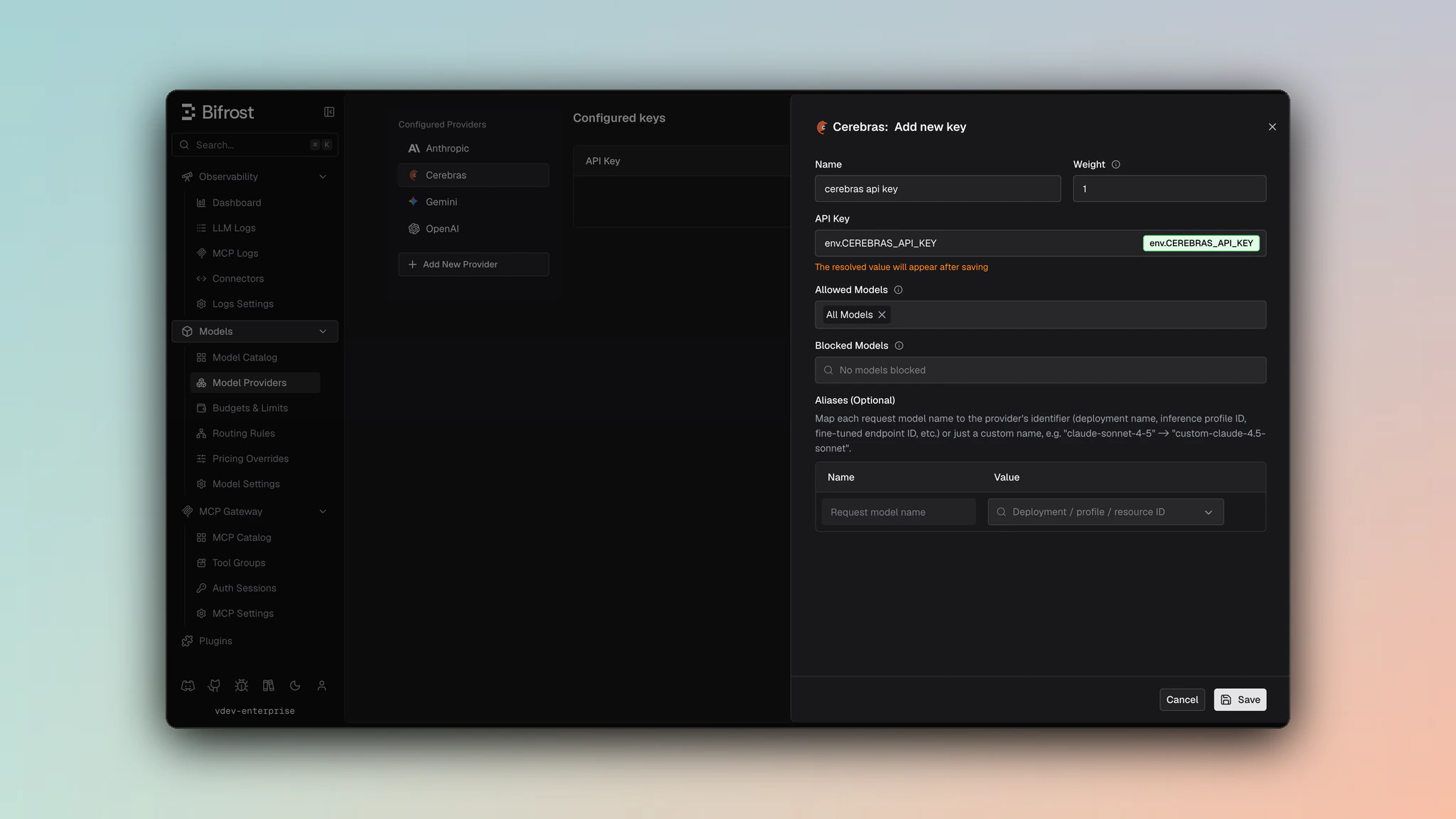 1. Navigate to **Models** > **Model Providers**. Look for **Cerebras** under **Configured Providers**. If it is missing, click on **Add New Provider** and select **Cerebras**.
2. Click **Add Key** or edit an existing key.
3. Set a name for your key.
4. Paste your API key directly or use an environment variable (for example, `env.CEREBRAS_API_KEY`).
5. Set **Allowed Models** to **All Models** (default) or the specific model allowlist you want this key to serve.
6. Save the provider configuration.
```json theme={null}
{
"providers": {
"cerebras": {
"keys": [
{
"name": "cerebras-key-1",
"value": "env.CEREBRAS_API_KEY",
"models": [
"*"
],
"weight": 1.0
}
]
}
}
}
```
Refer to the API documentation for [Provider Keys Management](https://docs.getbifrost.ai/api-reference/providers/create-a-key-for-a-provider).
```go theme={null}
case schemas.Cerebras:
return []schemas.Key{{
Name: "cerebras-key-1",
Value: *schemas.NewEnvVar("env.CEREBRAS_API_KEY"),
Models: []string{"*"},
Weight: 1.0,
}}, nil
```
***
# 1. Chat Completions
## Request Parameters
Cerebras supports all standard OpenAI chat completion parameters. For full parameter reference and behavior, see [OpenAI Chat Completions](/providers/supported-providers/openai#1-chat-completions).
### Filtered Parameters
Removed for Cerebras compatibility:
* `prompt_cache_key` - Not supported
* `verbosity` - Anthropic-specific
* `store` - Not supported
* `service_tier` - OpenAI-specific
### Reasoning Parameter
Cerebras delegates to OpenAI via `ToOpenAIChatRequest`, so reasoning parameters are transformed: `reasoning.effort` values (e.g., `minimal` → `low`) are mapped per the OpenAI-compatible providers convention, and `reasoning.max_tokens` is cleared/omitted (removed during conversion).
Cerebras supports all standard OpenAI message types, tools, responses, and streaming formats. For details on message handling, tool conversion, responses, and streaming, refer to [OpenAI Chat Completions](/providers/supported-providers/openai#1-chat-completions).
***
# 2. Responses API
Bifrost converts Responses API format to Chat Completions internally, then converts response back:
```
BifrostResponsesRequest
→ ToChatRequest()
→ ChatCompletion
→ ToBifrostResponsesResponse()
```
Same parameter support as Chat Completions with response format differences (output items instead of message content).
***
# 3. Text Completions
Cerebras supports legacy text completion API:
| Parameter | Mapping |
| ------------- | -------------- |
| `prompt` | Sent as-is |
| `max_tokens` | max\_tokens |
| `temperature` | temperature |
| `top_p` | top\_p |
| `stop` | stop sequences |
Response returns `choices[].text` with completion text.
***
# 4. Text Completions Streaming
Streaming text completions use same SSE format as chat streaming.
***
# 5. List Models
Lists available models from Cerebras with capabilities and context length information.
***
## Unsupported Features
| Feature | Reason |
| ----------------- | --------------------------- |
| Embedding | Not offered by Cerebras API |
| Image Generation | Not offered by Cerebras API |
| Speech/TTS | Not offered by Cerebras API |
| Transcription/STT | Not offered by Cerebras API |
| Batch Operations | Not offered by Cerebras API |
| File Management | Not offered by Cerebras API |
***
## Caveats
**Severity**: Low
**Behavior**: User field > 64 characters is silently dropped
**Impact**: Longer user identifiers are lost
**Code**: SanitizeUserField enforces 64-char max
1. Navigate to **Models** > **Model Providers**. Look for **Cerebras** under **Configured Providers**. If it is missing, click on **Add New Provider** and select **Cerebras**.
2. Click **Add Key** or edit an existing key.
3. Set a name for your key.
4. Paste your API key directly or use an environment variable (for example, `env.CEREBRAS_API_KEY`).
5. Set **Allowed Models** to **All Models** (default) or the specific model allowlist you want this key to serve.
6. Save the provider configuration.
```json theme={null}
{
"providers": {
"cerebras": {
"keys": [
{
"name": "cerebras-key-1",
"value": "env.CEREBRAS_API_KEY",
"models": [
"*"
],
"weight": 1.0
}
]
}
}
}
```
Refer to the API documentation for [Provider Keys Management](https://docs.getbifrost.ai/api-reference/providers/create-a-key-for-a-provider).
```go theme={null}
case schemas.Cerebras:
return []schemas.Key{{
Name: "cerebras-key-1",
Value: *schemas.NewEnvVar("env.CEREBRAS_API_KEY"),
Models: []string{"*"},
Weight: 1.0,
}}, nil
```
***
# 1. Chat Completions
## Request Parameters
Cerebras supports all standard OpenAI chat completion parameters. For full parameter reference and behavior, see [OpenAI Chat Completions](/providers/supported-providers/openai#1-chat-completions).
### Filtered Parameters
Removed for Cerebras compatibility:
* `prompt_cache_key` - Not supported
* `verbosity` - Anthropic-specific
* `store` - Not supported
* `service_tier` - OpenAI-specific
### Reasoning Parameter
Cerebras delegates to OpenAI via `ToOpenAIChatRequest`, so reasoning parameters are transformed: `reasoning.effort` values (e.g., `minimal` → `low`) are mapped per the OpenAI-compatible providers convention, and `reasoning.max_tokens` is cleared/omitted (removed during conversion).
Cerebras supports all standard OpenAI message types, tools, responses, and streaming formats. For details on message handling, tool conversion, responses, and streaming, refer to [OpenAI Chat Completions](/providers/supported-providers/openai#1-chat-completions).
***
# 2. Responses API
Bifrost converts Responses API format to Chat Completions internally, then converts response back:
```
BifrostResponsesRequest
→ ToChatRequest()
→ ChatCompletion
→ ToBifrostResponsesResponse()
```
Same parameter support as Chat Completions with response format differences (output items instead of message content).
***
# 3. Text Completions
Cerebras supports legacy text completion API:
| Parameter | Mapping |
| ------------- | -------------- |
| `prompt` | Sent as-is |
| `max_tokens` | max\_tokens |
| `temperature` | temperature |
| `top_p` | top\_p |
| `stop` | stop sequences |
Response returns `choices[].text` with completion text.
***
# 4. Text Completions Streaming
Streaming text completions use same SSE format as chat streaming.
***
# 5. List Models
Lists available models from Cerebras with capabilities and context length information.
***
## Unsupported Features
| Feature | Reason |
| ----------------- | --------------------------- |
| Embedding | Not offered by Cerebras API |
| Image Generation | Not offered by Cerebras API |
| Speech/TTS | Not offered by Cerebras API |
| Transcription/STT | Not offered by Cerebras API |
| Batch Operations | Not offered by Cerebras API |
| File Management | Not offered by Cerebras API |
***
## Caveats
**Severity**: Low
**Behavior**: User field > 64 characters is silently dropped
**Impact**: Longer user identifiers are lost
**Code**: SanitizeUserField enforces 64-char max