> ## Documentation Index
> Fetch the complete documentation index at: https://docs.getbifrost.ai/llms.txt
> Use this file to discover all available pages before exploring further.
# AWS Bedrock
> AWS Bedrock API conversion guide - model families, parameter mapping, message handling, reasoning/thinking, tool conversion, and AWS authentication
## Overview
AWS Bedrock supports multiple model families (Claude, Nova, Mistral, Llama, Cohere, Titan) with significant structural differences from OpenAI's format. Bifrost performs extensive conversion including:
* **Model family detection** - Automatic routing based on model ID to handle family-specific parameters
* **Parameter renaming** - e.g., `max_completion_tokens` → `maxTokens`, `stop` → `stopSequences`
* **Reasoning transformation** - `reasoning` parameters mapped to model-specific thinking/reasoning structures (Anthropic, Nova)
* **Tool restructuring** - Function definitions converted to Bedrock's ToolConfig format
* **Message conversion** - System message extraction, tool message grouping, image format adaptation (base64 only)
* **AWS authentication** - Automatic SigV4 request signing with credential chain support
* **Structured output** - `response_format` converted to specialized tool definitions
* **Service tier & guardrails** - Support for Bedrock-specific performance and safety configurations
### Model Family Support
| Family | Chat | Responses | Text | Embeddings | Image Generation | Image Edit | Image Variation |
| ---------------------- | ---- | --------- | ---- | ---------- | ---------------- | ---------- | --------------- |
| **Claude (Anthropic)** | ✅ | ✅ | ✅ | ❌ | ❌ | ❌ | ❌ |
| **Nova (Anthropic)** | ✅ | ✅ | ❌ | ❌ | ✅ | ✅ | ✅ |
| **Mistral** | ✅ | ✅ | ✅ | ❌ | ❌ | ❌ | ❌ |
| **Llama** | ✅ | ✅ | ❌ | ❌ | ❌ | ❌ | ❌ |
| **Cohere** | ✅ | ✅ | ❌ | ✅ | ❌ | ❌ | ❌ |
| **Titan** | ✅ | ✅ | ❌ | ✅ | ✅ | ✅ | ✅ |
| **Stability AI** | ❌ | ❌ | ❌ | ❌ | ✅ | ✅ | ❌ |
### Supported Operations
| Operation | Non-Streaming | Streaming | Endpoint |
| -------------------- | ------------- | --------- | ---------------------- |
| Chat Completions | ✅ | ✅ | `converse` |
| Responses API | ✅ | ✅ | `converse` |
| Text Completions | ✅ | ❌ | `invoke` |
| Embeddings | ✅ | - | `invoke` |
| Files | ✅ | - | S3 (via SDK) |
| Batch | ✅ | - | `batch` |
| List Models | ✅ | - | `listFoundationModels` |
| Image Generation | ✅ | ❌ | `invoke` |
| Image Edit | ✅ | ❌ | `invoke` |
| Image Variation | ✅ | ❌ | `invoke` |
| Count Tokens | ✅ | - | `count-tokens` |
| Speech (TTS) | ❌ | ❌ | - |
| Transcriptions (STT) | ❌ | ❌ | - |
**Unsupported Operations** (❌): Speech (TTS) and Transcriptions (STT) are not supported by the upstream AWS Bedrock API. These return `UnsupportedOperationError`.
**Limitations**: Images must be in base64 or data URI format (remote URLs not supported). Text completion streaming is not supported.
***
## Setup & Configuration
Bedrock supports both SigV4-based authentication and direct API-key authentication. Four authentication flows are supported - choose the one that matches your deployment environment.
The `aliases` field (mapping model names to inference profile IDs, ARNs, or
deployment identifiers) requires **v1.5.0-prerelease2 or later**. On v1.4.x,
use `deployments` inside `bedrock_key_config` instead - see the [v1.5.0
Migration
Guide](/migration-guides/v1.5.0#breaking-change-9-provider-deployments-removed-migrate-to-aliases)
for details.
### 1. Explicit Credentials
Provide `access_key` and `secret_key` directly. Optionally include `session_token` for temporary credentials.
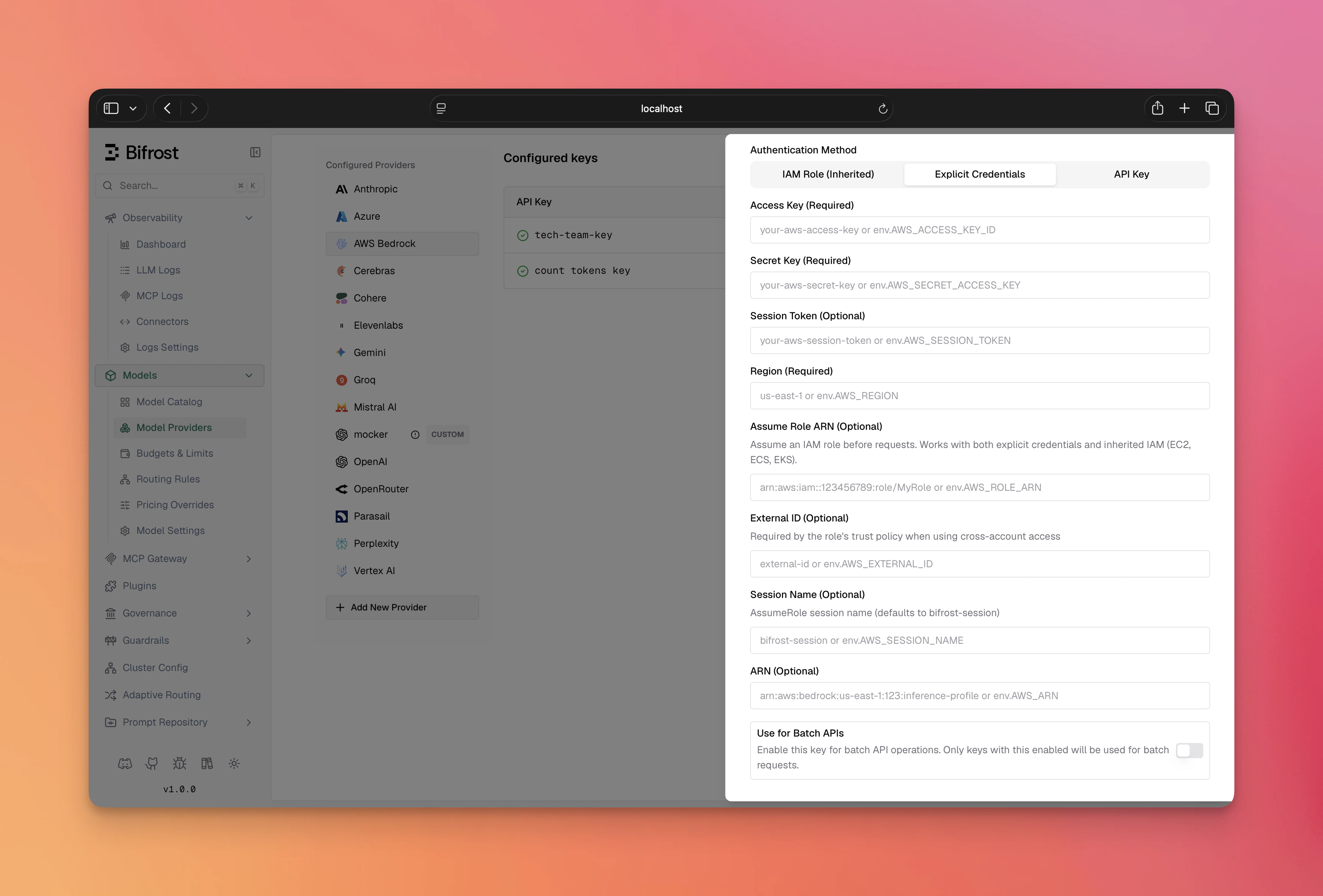 1. Navigate to **"Model Providers"** → **"Configurations"** → **"AWS Bedrock"**
2. Click **"Add Key"** (or edit an existing key)
3. Under **Authentication Method**, select **"Explicit Credentials"**
4. Set **Access Key**: Your AWS access key ID
5. Set **Secret Key**: Your AWS secret access key
6. Set **Session Token** (Optional): For temporary/assumed credentials
7. Set **Region**: e.g., `us-east-1`
8. Configure **Aliases**: Map model names to inference profile IDs
9. Save
```bash theme={null}
# Step 1: Create the provider
curl -X POST http://localhost:8080/api/providers \
-H "Content-Type: application/json" \
-d '{"provider": "bedrock"}'
# Step 2: Create a key (Explicit Credentials)
curl -X POST http://localhost:8080/api/providers/bedrock/keys \
-H "Content-Type: application/json" \
-d '{
"name": "bedrock-key",
"models": ["*"],
"weight": 1.0,
"aliases": {
"claude-3-5-sonnet": "us.anthropic.claude-3-5-sonnet-20241022-v2:0"
},
"bedrock_key_config": {
"access_key": "env.AWS_ACCESS_KEY_ID",
"secret_key": "env.AWS_SECRET_ACCESS_KEY",
"session_token": "env.AWS_SESSION_TOKEN",
"region": "us-east-1"
}
}'
```
**On v1.4.x**, two differences apply:
* Pass `keys` directly in the `POST /api/providers` body - there is no separate `/api/providers/{provider}/keys` endpoint.
* Replace the top-level `aliases` with `"deployments"` inside `bedrock_key_config`:
```json theme={null}
"bedrock_key_config": {
"access_key": "env.AWS_ACCESS_KEY_ID",
"secret_key": "env.AWS_SECRET_ACCESS_KEY",
"region": "us-east-1",
"deployments": {
"claude-3-5-sonnet": "arn:aws:bedrock:us-east-1::foundation-model/..."
}
}
```
```json theme={null}
{
"providers": {
"bedrock": {
"keys": [
{
"name": "bedrock-key",
"models": ["*"],
"weight": 1.0,
"aliases": {
"claude-3-5-sonnet": "us.anthropic.claude-3-5-sonnet-20241022-v2:0"
},
"bedrock_key_config": {
"access_key": "env.AWS_ACCESS_KEY_ID",
"secret_key": "env.AWS_SECRET_ACCESS_KEY",
"session_token": "env.AWS_SESSION_TOKEN",
"region": "us-east-1"
}
}
]
}
}
}
```
On **v1.4.x**, use `deployments` inside `bedrock_key_config` instead of the
top-level `aliases` field.
```go theme={null}
func (a *MyAccount) GetKeysForProvider(ctx *context.Context, provider schemas.ModelProvider) ([]schemas.Key, error) {
switch provider {
case schemas.Bedrock:
return []schemas.Key{
{
Models: []string{"*"},
Weight: 1.0,
Aliases: schemas.KeyAliases{
"claude-3-5-sonnet": "us.anthropic.claude-3-5-sonnet-20241022-v2:0",
},
BedrockKeyConfig: &schemas.BedrockKeyConfig{
AccessKey: *schemas.NewEnvVar("env.AWS_ACCESS_KEY_ID"),
SecretKey: *schemas.NewEnvVar("env.AWS_SECRET_ACCESS_KEY"),
SessionToken: schemas.NewEnvVar("env.AWS_SESSION_TOKEN"),
Region: schemas.NewEnvVar("us-east-1"),
},
},
}, nil
}
return nil, fmt.Errorf("provider %s not supported", provider)
}
```
### 2. Inherited AWS Credentials / IAM Role
Uses AWS's default credential chain when static credentials are not configured. That includes IAM roles (IRSA in EKS, ECS task role, EC2 instance profile), environment variables (`AWS_ACCESS_KEY_ID`/`AWS_SECRET_ACCESS_KEY`), and shared credential files.
1. Navigate to **"Model Providers"** → **"Configurations"** → **"AWS Bedrock"**
2. Click **"Add Key"** (or edit an existing key)
3. Under **Authentication Method**, select **"Explicit Credentials"**
4. Set **Access Key**: Your AWS access key ID
5. Set **Secret Key**: Your AWS secret access key
6. Set **Session Token** (Optional): For temporary/assumed credentials
7. Set **Region**: e.g., `us-east-1`
8. Configure **Aliases**: Map model names to inference profile IDs
9. Save
```bash theme={null}
# Step 1: Create the provider
curl -X POST http://localhost:8080/api/providers \
-H "Content-Type: application/json" \
-d '{"provider": "bedrock"}'
# Step 2: Create a key (Explicit Credentials)
curl -X POST http://localhost:8080/api/providers/bedrock/keys \
-H "Content-Type: application/json" \
-d '{
"name": "bedrock-key",
"models": ["*"],
"weight": 1.0,
"aliases": {
"claude-3-5-sonnet": "us.anthropic.claude-3-5-sonnet-20241022-v2:0"
},
"bedrock_key_config": {
"access_key": "env.AWS_ACCESS_KEY_ID",
"secret_key": "env.AWS_SECRET_ACCESS_KEY",
"session_token": "env.AWS_SESSION_TOKEN",
"region": "us-east-1"
}
}'
```
**On v1.4.x**, two differences apply:
* Pass `keys` directly in the `POST /api/providers` body - there is no separate `/api/providers/{provider}/keys` endpoint.
* Replace the top-level `aliases` with `"deployments"` inside `bedrock_key_config`:
```json theme={null}
"bedrock_key_config": {
"access_key": "env.AWS_ACCESS_KEY_ID",
"secret_key": "env.AWS_SECRET_ACCESS_KEY",
"region": "us-east-1",
"deployments": {
"claude-3-5-sonnet": "arn:aws:bedrock:us-east-1::foundation-model/..."
}
}
```
```json theme={null}
{
"providers": {
"bedrock": {
"keys": [
{
"name": "bedrock-key",
"models": ["*"],
"weight": 1.0,
"aliases": {
"claude-3-5-sonnet": "us.anthropic.claude-3-5-sonnet-20241022-v2:0"
},
"bedrock_key_config": {
"access_key": "env.AWS_ACCESS_KEY_ID",
"secret_key": "env.AWS_SECRET_ACCESS_KEY",
"session_token": "env.AWS_SESSION_TOKEN",
"region": "us-east-1"
}
}
]
}
}
}
```
On **v1.4.x**, use `deployments` inside `bedrock_key_config` instead of the
top-level `aliases` field.
```go theme={null}
func (a *MyAccount) GetKeysForProvider(ctx *context.Context, provider schemas.ModelProvider) ([]schemas.Key, error) {
switch provider {
case schemas.Bedrock:
return []schemas.Key{
{
Models: []string{"*"},
Weight: 1.0,
Aliases: schemas.KeyAliases{
"claude-3-5-sonnet": "us.anthropic.claude-3-5-sonnet-20241022-v2:0",
},
BedrockKeyConfig: &schemas.BedrockKeyConfig{
AccessKey: *schemas.NewEnvVar("env.AWS_ACCESS_KEY_ID"),
SecretKey: *schemas.NewEnvVar("env.AWS_SECRET_ACCESS_KEY"),
SessionToken: schemas.NewEnvVar("env.AWS_SESSION_TOKEN"),
Region: schemas.NewEnvVar("us-east-1"),
},
},
}, nil
}
return nil, fmt.Errorf("provider %s not supported", provider)
}
```
### 2. Inherited AWS Credentials / IAM Role
Uses AWS's default credential chain when static credentials are not configured. That includes IAM roles (IRSA in EKS, ECS task role, EC2 instance profile), environment variables (`AWS_ACCESS_KEY_ID`/`AWS_SECRET_ACCESS_KEY`), and shared credential files.
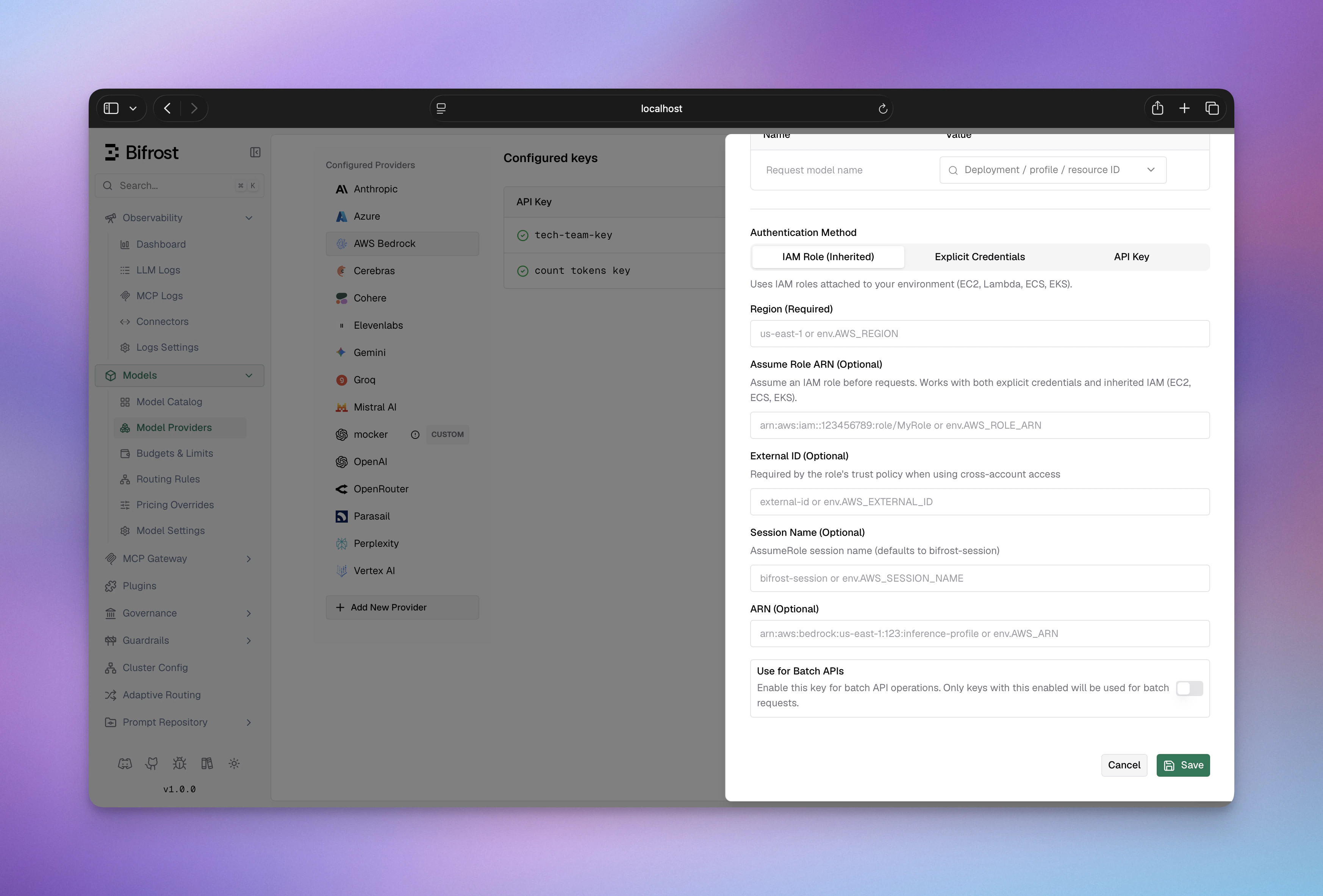 1. Navigate to **"Model Providers"** → **"Configurations"** → **"AWS Bedrock"**
2. Click **"Add Key"** (or edit an existing key)
3. Under **Authentication Method**, select **"IAM Role (Inherited)"**
4. Set **Region**: e.g., `us-east-1`
5. Configure **Aliases** if needed
6. *(Optional)* Set **Assume Role ARN**: to assume an IAM role before signing (e.g., `arn:aws:iam::123456789012:role/BedrockRole`)
7. *(Optional)* Set **External ID**: required when the role's trust policy demands it
8. *(Optional)* Set **Session Name**: identifies the session in CloudTrail (default: `bifrost-session`)
9. Save
For system identity, leave steps 6–8 blank. Ensure your workload has an IAM role with Bedrock permissions attached (via IRSA, ECS task role, or EC2 instance profile), or that `AWS_ACCESS_KEY_ID`/`AWS_SECRET_ACCESS_KEY` are set in the environment.
```bash theme={null}
# Step 1: Create the provider
curl -X POST http://localhost:8080/api/providers \
-H "Content-Type: application/json" \
-d '{"provider": "bedrock"}'
# Step 2a: System identity - leave credentials empty
curl -X POST http://localhost:8080/api/providers/bedrock/keys \
-H "Content-Type: application/json" \
-d '{
"name": "bedrock-iam",
"models": ["*"],
"weight": 1.0,
"aliases": {
"claude-3-5-sonnet": "us.anthropic.claude-3-5-sonnet-20241022-v2:0"
},
"bedrock_key_config": {
"region": "us-east-1"
}
}'
# Step 2b: AssumeRole - add role_arn on top
curl -X POST http://localhost:8080/api/providers/bedrock/keys \
-H "Content-Type: application/json" \
-d '{
"name": "bedrock-assume-role",
"models": ["*"],
"weight": 1.0,
"bedrock_key_config": {
"region": "us-east-1",
"role_arn": "env.AWS_ROLE_ARN",
"external_id": "env.AWS_EXTERNAL_ID",
"session_name": "bifrost-session"
}
}'
```
**On v1.4.x**, two differences apply: - Pass `keys` directly in the `POST
/api/providers` body - there is no separate `/api/providers/{provider}/keys`
endpoint. - Replace the top-level `aliases` with `"deployments"` inside
`bedrock_key_config`.
```json theme={null}
{
"providers": {
"bedrock": {
"keys": [
{
"name": "bedrock-iam",
"models": ["*"],
"weight": 1.0,
"aliases": {
"claude-3-5-sonnet": "us.anthropic.claude-3-5-sonnet-20241022-v2:0"
},
"bedrock_key_config": {
"region": "us-east-1",
"role_arn": "env.AWS_ROLE_ARN",
"external_id": "env.AWS_EXTERNAL_ID",
"session_name": "bifrost-session"
}
}
]
}
}
}
```
Omit `role_arn`, `external_id`, and `session_name` for plain system identity
with no role assumption.
```go theme={null}
func (a *MyAccount) GetKeysForProvider(ctx *context.Context, provider schemas.ModelProvider) ([]schemas.Key, error) {
switch provider {
case schemas.Bedrock:
return []schemas.Key{
{
Models: []string{"*"},
Weight: 1.0,
Aliases: schemas.KeyAliases{
"claude-3-5-sonnet": "us.anthropic.claude-3-5-sonnet-20241022-v2:0",
},
BedrockKeyConfig: &schemas.BedrockKeyConfig{
// Leave AccessKey and SecretKey empty - resolved from IRSA/instance profile/env vars
Region: schemas.NewEnvVar("us-east-1"),
RoleARN: schemas.NewEnvVar("env.AWS_ROLE_ARN"), // optional
ExternalID: schemas.NewEnvVar("env.AWS_EXTERNAL_ID"), // optional
RoleSessionName: schemas.NewEnvVar("bifrost-session"), // optional
},
},
}, nil
}
return nil, fmt.Errorf("provider %s not supported", provider)
}
```
### 3. API Key
Set `value` to a Bearer token for direct API key authentication. This method uses a Bearer token instead of SigV4 signing and does not support STS AssumeRole.
1. Navigate to **"Model Providers"** → **"Configurations"** → **"AWS Bedrock"**
2. Click **"Add Key"** (or edit an existing key)
3. Under **Authentication Method**, select **"IAM Role (Inherited)"**
4. Set **Region**: e.g., `us-east-1`
5. Configure **Aliases** if needed
6. *(Optional)* Set **Assume Role ARN**: to assume an IAM role before signing (e.g., `arn:aws:iam::123456789012:role/BedrockRole`)
7. *(Optional)* Set **External ID**: required when the role's trust policy demands it
8. *(Optional)* Set **Session Name**: identifies the session in CloudTrail (default: `bifrost-session`)
9. Save
For system identity, leave steps 6–8 blank. Ensure your workload has an IAM role with Bedrock permissions attached (via IRSA, ECS task role, or EC2 instance profile), or that `AWS_ACCESS_KEY_ID`/`AWS_SECRET_ACCESS_KEY` are set in the environment.
```bash theme={null}
# Step 1: Create the provider
curl -X POST http://localhost:8080/api/providers \
-H "Content-Type: application/json" \
-d '{"provider": "bedrock"}'
# Step 2a: System identity - leave credentials empty
curl -X POST http://localhost:8080/api/providers/bedrock/keys \
-H "Content-Type: application/json" \
-d '{
"name": "bedrock-iam",
"models": ["*"],
"weight": 1.0,
"aliases": {
"claude-3-5-sonnet": "us.anthropic.claude-3-5-sonnet-20241022-v2:0"
},
"bedrock_key_config": {
"region": "us-east-1"
}
}'
# Step 2b: AssumeRole - add role_arn on top
curl -X POST http://localhost:8080/api/providers/bedrock/keys \
-H "Content-Type: application/json" \
-d '{
"name": "bedrock-assume-role",
"models": ["*"],
"weight": 1.0,
"bedrock_key_config": {
"region": "us-east-1",
"role_arn": "env.AWS_ROLE_ARN",
"external_id": "env.AWS_EXTERNAL_ID",
"session_name": "bifrost-session"
}
}'
```
**On v1.4.x**, two differences apply: - Pass `keys` directly in the `POST
/api/providers` body - there is no separate `/api/providers/{provider}/keys`
endpoint. - Replace the top-level `aliases` with `"deployments"` inside
`bedrock_key_config`.
```json theme={null}
{
"providers": {
"bedrock": {
"keys": [
{
"name": "bedrock-iam",
"models": ["*"],
"weight": 1.0,
"aliases": {
"claude-3-5-sonnet": "us.anthropic.claude-3-5-sonnet-20241022-v2:0"
},
"bedrock_key_config": {
"region": "us-east-1",
"role_arn": "env.AWS_ROLE_ARN",
"external_id": "env.AWS_EXTERNAL_ID",
"session_name": "bifrost-session"
}
}
]
}
}
}
```
Omit `role_arn`, `external_id`, and `session_name` for plain system identity
with no role assumption.
```go theme={null}
func (a *MyAccount) GetKeysForProvider(ctx *context.Context, provider schemas.ModelProvider) ([]schemas.Key, error) {
switch provider {
case schemas.Bedrock:
return []schemas.Key{
{
Models: []string{"*"},
Weight: 1.0,
Aliases: schemas.KeyAliases{
"claude-3-5-sonnet": "us.anthropic.claude-3-5-sonnet-20241022-v2:0",
},
BedrockKeyConfig: &schemas.BedrockKeyConfig{
// Leave AccessKey and SecretKey empty - resolved from IRSA/instance profile/env vars
Region: schemas.NewEnvVar("us-east-1"),
RoleARN: schemas.NewEnvVar("env.AWS_ROLE_ARN"), // optional
ExternalID: schemas.NewEnvVar("env.AWS_EXTERNAL_ID"), // optional
RoleSessionName: schemas.NewEnvVar("bifrost-session"), // optional
},
},
}, nil
}
return nil, fmt.Errorf("provider %s not supported", provider)
}
```
### 3. API Key
Set `value` to a Bearer token for direct API key authentication. This method uses a Bearer token instead of SigV4 signing and does not support STS AssumeRole.
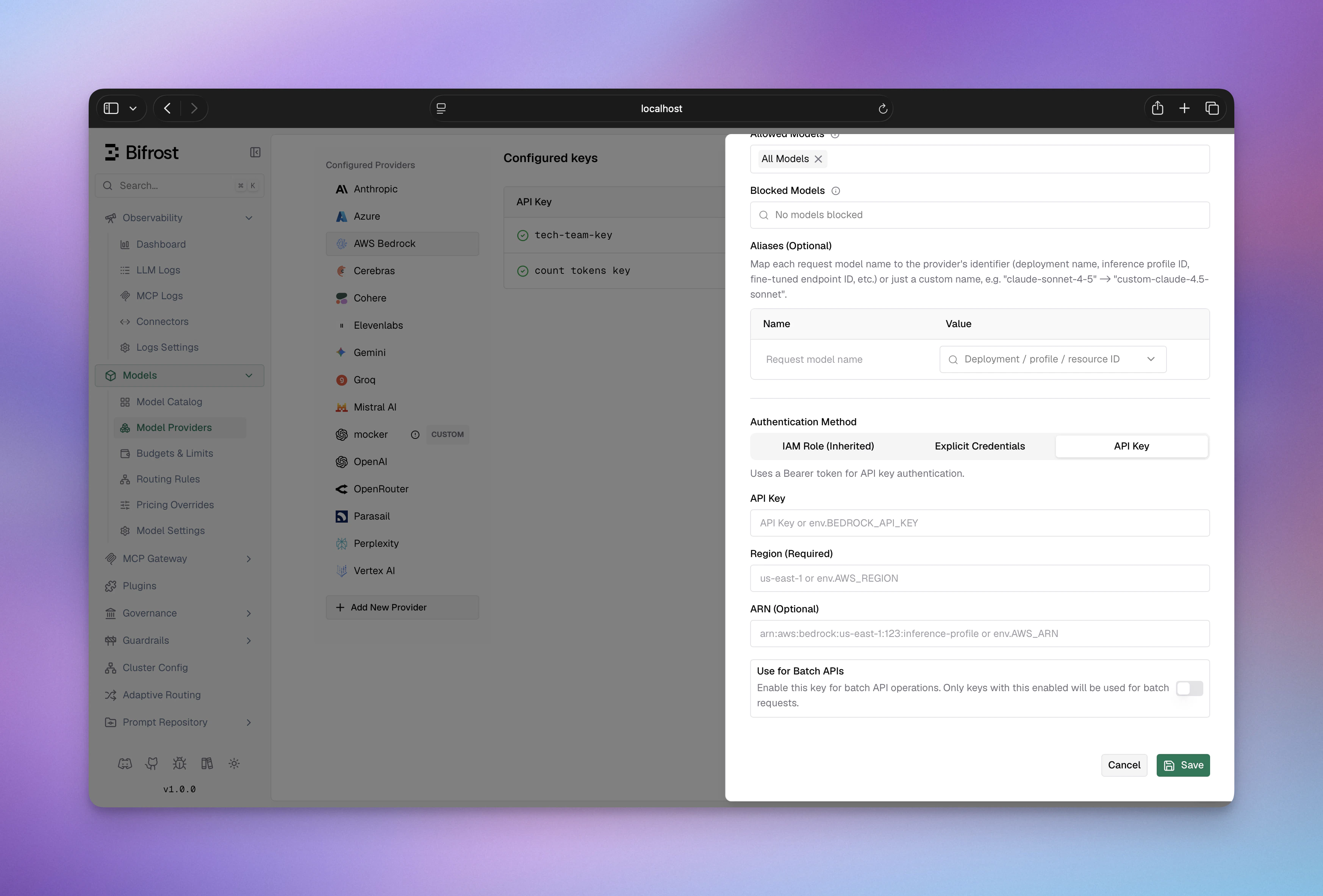 1. Navigate to **"Model Providers"** → **"Configurations"** → **"AWS Bedrock"**
2. Click **"Add Key"** (or edit an existing key)
3. Under **Authentication Method**, select **"API Key"**
4. Set **API Key**: Your Bedrock API key (Bearer token)
5. Set **Region**: e.g., `us-east-1`
6. Configure **Aliases** if needed
7. Save
```bash theme={null}
# Step 1: Create the provider
curl -X POST http://localhost:8080/api/providers \
-H "Content-Type: application/json" \
-d '{"provider": "bedrock"}'
# Step 2: Create a key (API Key / Bearer token)
curl -X POST http://localhost:8080/api/providers/bedrock/keys \
-H "Content-Type: application/json" \
-d '{
"name": "bedrock-api-key",
"value": "env.BEDROCK_API_KEY",
"models": ["*"],
"weight": 1.0,
"bedrock_key_config": {
"region": "us-east-1"
}
}'
```
```json theme={null}
{
"providers": {
"bedrock": {
"keys": [
{
"name": "bedrock-api-key",
"value": "env.BEDROCK_API_KEY",
"models": ["*"],
"weight": 1.0,
"bedrock_key_config": {
"region": "us-east-1"
}
}
]
}
}
}
```
```go theme={null}
func (a *MyAccount) GetKeysForProvider(ctx *context.Context, provider schemas.ModelProvider) ([]schemas.Key, error) {
switch provider {
case schemas.Bedrock:
return []schemas.Key{
{
Value: *schemas.NewEnvVar("env.BEDROCK_API_KEY"),
Models: []string{"*"},
Weight: 1.0,
BedrockKeyConfig: &schemas.BedrockKeyConfig{
Region: schemas.NewEnvVar("us-east-1"),
},
},
}, nil
}
return nil, fmt.Errorf("provider %s not supported", provider)
}
```
**`bedrock_key_config` fields:**
| Field | Required | Default | Description |
| --------------- | -------- | ----------------- | --------------------------------------------------------------------------------------------------------------------- |
| `region` | Yes | - | AWS region (e.g., `us-east-1`) |
| `access_key` | No | - | AWS access key ID |
| `secret_key` | No | - | AWS secret access key |
| `session_token` | No | - | AWS session token (for temporary credentials) |
| `arn` | No | - | ARN prefix for constructing inference profile URLs (see [Inference Profiles](#inference-profiles--arn-configuration)) |
| `role_arn` | No | - | IAM role ARN for STS AssumeRole |
| `external_id` | No | - | External ID for AssumeRole (when required by trust policy) |
| `session_name` | No | `bifrost-session` | Session name for AssumeRole CloudTrail logs |
**Key-level fields:**
| Field | Required | Description |
| --------- | -------- | ----------------------------------------------------------------------------------- |
| `aliases` | No | Map model names to inference profile IDs or Bedrock model IDs (v1.5.0-prerelease2+) |
| `models` | Yes | Models this key can serve; use `["*"]` to allow all |
***
## Beta Headers
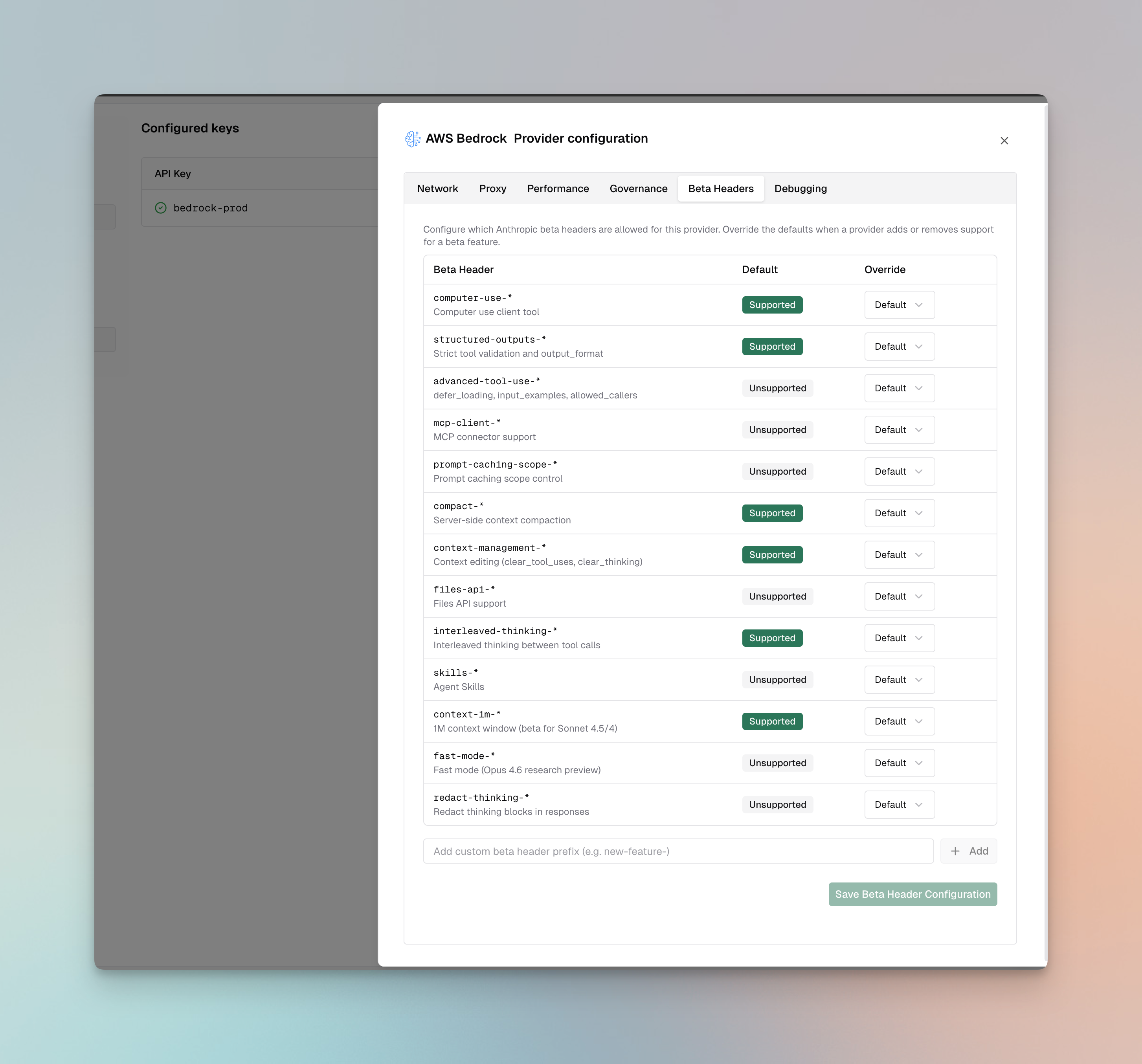
For Claude models on Bedrock, Bifrost validates `anthropic-beta` headers and drops unsupported headers from the request.
**Supported**: `computer-use-*`, `structured-outputs-*`, `compact-*`, `context-management-*`, `interleaved-thinking-*`, `context-1m-*`
**Not supported**: `advanced-tool-use-*`, `mcp-client-*`, `prompt-caching-scope-*`, `files-api-*`, `skills-*`, `fast-mode-*`, `redact-thinking-*`
You can override these defaults per provider via the **Beta Headers** tab in provider configuration or via [`beta_header_overrides`](/quickstart/gateway/provider-configuration#beta-header-overrides). See the full support matrix in the [Anthropic provider docs](/providers/supported-providers/anthropic#beta-headers).
1. Navigate to **"Model Providers"** → **"Configurations"** → **"AWS Bedrock"**
2. Click **"Add Key"** (or edit an existing key)
3. Under **Authentication Method**, select **"API Key"**
4. Set **API Key**: Your Bedrock API key (Bearer token)
5. Set **Region**: e.g., `us-east-1`
6. Configure **Aliases** if needed
7. Save
```bash theme={null}
# Step 1: Create the provider
curl -X POST http://localhost:8080/api/providers \
-H "Content-Type: application/json" \
-d '{"provider": "bedrock"}'
# Step 2: Create a key (API Key / Bearer token)
curl -X POST http://localhost:8080/api/providers/bedrock/keys \
-H "Content-Type: application/json" \
-d '{
"name": "bedrock-api-key",
"value": "env.BEDROCK_API_KEY",
"models": ["*"],
"weight": 1.0,
"bedrock_key_config": {
"region": "us-east-1"
}
}'
```
```json theme={null}
{
"providers": {
"bedrock": {
"keys": [
{
"name": "bedrock-api-key",
"value": "env.BEDROCK_API_KEY",
"models": ["*"],
"weight": 1.0,
"bedrock_key_config": {
"region": "us-east-1"
}
}
]
}
}
}
```
```go theme={null}
func (a *MyAccount) GetKeysForProvider(ctx *context.Context, provider schemas.ModelProvider) ([]schemas.Key, error) {
switch provider {
case schemas.Bedrock:
return []schemas.Key{
{
Value: *schemas.NewEnvVar("env.BEDROCK_API_KEY"),
Models: []string{"*"},
Weight: 1.0,
BedrockKeyConfig: &schemas.BedrockKeyConfig{
Region: schemas.NewEnvVar("us-east-1"),
},
},
}, nil
}
return nil, fmt.Errorf("provider %s not supported", provider)
}
```
**`bedrock_key_config` fields:**
| Field | Required | Default | Description |
| --------------- | -------- | ----------------- | --------------------------------------------------------------------------------------------------------------------- |
| `region` | Yes | - | AWS region (e.g., `us-east-1`) |
| `access_key` | No | - | AWS access key ID |
| `secret_key` | No | - | AWS secret access key |
| `session_token` | No | - | AWS session token (for temporary credentials) |
| `arn` | No | - | ARN prefix for constructing inference profile URLs (see [Inference Profiles](#inference-profiles--arn-configuration)) |
| `role_arn` | No | - | IAM role ARN for STS AssumeRole |
| `external_id` | No | - | External ID for AssumeRole (when required by trust policy) |
| `session_name` | No | `bifrost-session` | Session name for AssumeRole CloudTrail logs |
**Key-level fields:**
| Field | Required | Description |
| --------- | -------- | ----------------------------------------------------------------------------------- |
| `aliases` | No | Map model names to inference profile IDs or Bedrock model IDs (v1.5.0-prerelease2+) |
| `models` | Yes | Models this key can serve; use `["*"]` to allow all |
***
## Beta Headers
For Claude models on Bedrock, Bifrost validates `anthropic-beta` headers and drops unsupported headers from the request.
**Supported**: `computer-use-*`, `structured-outputs-*`, `compact-*`, `context-management-*`, `interleaved-thinking-*`, `context-1m-*`
**Not supported**: `advanced-tool-use-*`, `mcp-client-*`, `prompt-caching-scope-*`, `files-api-*`, `skills-*`, `fast-mode-*`, `redact-thinking-*`
You can override these defaults per provider via the **Beta Headers** tab in provider configuration or via [`beta_header_overrides`](/quickstart/gateway/provider-configuration#beta-header-overrides). See the full support matrix in the [Anthropic provider docs](/providers/supported-providers/anthropic#beta-headers).
 ***
# 1. Chat Completions
## Request Parameters
### Parameter Mapping
| Parameter | Transformation | Notes |
| ----------------------- | --------------------------------------------------------------------------------- | -------------------------- |
| `max_completion_tokens` | → `inferenceConfig.maxTokens` | Required field in Bedrock |
| `temperature`, `top_p` | Direct pass-through to `inferenceConfig` | |
| `stop` | → `inferenceConfig.stopSequences` | Array of strings |
| `response_format` | → Structured output tool (see [Structured Output](#structured-output)) | Creates `bf_so_*` tool |
| `tools` | Schema restructured (see [Tool Conversion](#tool-conversion)) | |
| `tool_choice` | Type mapped (see [Tool Conversion](#tool-conversion)) | |
| `reasoning` | Model-specific thinking config (see [Reasoning / Thinking](#reasoning--thinking)) | |
| `user` | → `metadata.userID` (if provided) | Bedrock-specific metadata |
| `service_tier` | → `serviceModelTier` (if provided) | Performance tier selection |
| `top_k` | Via `extra_params` (model-specific) | Bedrock-specific sampling |
### Dropped Parameters
The following parameters are silently ignored: `frequency_penalty`, `presence_penalty`, `logit_bias`, `logprobs`, `top_logprobs`, `seed`, `parallel_tool_calls`
### Extra Parameters
Use `extra_params` (SDK) or pass directly in request body (Gateway) for Bedrock-specific fields:
```bash theme={null}
curl -X POST http://localhost:8080/v1/chat/completions \
-H "Content-Type: application/json" \
-d '{
"model": "bedrock/anthropic.claude-3-5-sonnet-20241022-v2:0",
"messages": [{"role": "user", "content": "Hello"}],
"guardrailConfig": {
"guardrailIdentifier": "guardrail-id",
"guardrailVersion": "1",
"trace": "enabled"
},
"performanceConfig": {
"latency": "optimized"
}
}'
```
```go theme={null}
resp, err := client.ChatCompletionRequest(schemas.NewBifrostContext(ctx, schemas.NoDeadline), &schemas.BifrostChatRequest{
Provider: schemas.Bedrock,
Model: "anthropic.claude-3-5-sonnet-20241022-v2:0",
Input: messages,
Params: &schemas.ChatParameters{
ExtraParams: map[string]interface{}{
"guardrailConfig": map[string]interface{}{
"guardrailIdentifier": "guardrail-id",
"guardrailVersion": "1",
"trace": "enabled",
},
"performanceConfig": map[string]interface{}{
"latency": "optimized",
},
},
},
})
```
**Available Extra Parameters:**
* `guardrailConfig` - Bedrock guardrail configuration with `guardrailIdentifier`, `guardrailVersion`, `trace`
* `performanceConfig` - Performance optimization with `latency` ("optimized" or "standard")
* `additionalModelRequestFieldPaths` - Pass-through for model-specific fields not in standard schema
* `promptVariables` - Variables for prompt templates (if using prompt caching)
* `requestMetadata` - Custom metadata for request tracking
### Cache Control
Prompt caching is supported via cache control directives:
```bash theme={null}
curl -X POST http://localhost:8080/v1/chat/completions \
-H "Content-Type: application/json" \
-d '{
"model": "bedrock/anthropic.claude-3-5-sonnet-20241022-v2:0",
"messages": [
{
"role": "user",
"content": [
{
"type": "text",
"text": "This context will be cached",
"cache_control": {"type": "ephemeral"}
}
]
}
],
"system": [
{
"type": "text",
"text": "You are a helpful assistant",
"cache_control": {"type": "ephemeral"}
}
]
}'
```
```go theme={null}
resp, err := client.ChatCompletionRequest(schemas.NewBifrostContext(ctx, schemas.NoDeadline), &schemas.BifrostChatRequest{
Provider: schemas.Bedrock,
Model: "anthropic.claude-3-5-sonnet-20241022-v2:0",
Input: []schemas.ChatMessage{
{
Role: schemas.ChatMessageRoleUser,
Content: &schemas.ChatMessageContent{
ContentBlocks: []schemas.ChatContentBlock{
{
Text: schemas.Ptr("This context will be cached"),
CacheControl: &schemas.CacheControl{
Type: schemas.Ptr("ephemeral"),
},
},
},
},
},
},
SystemMessages: []schemas.ChatMessage{
{
Role: schemas.ChatMessageRoleSystem,
Content: &schemas.ChatMessageContent{
ContentBlocks: []schemas.ChatContentBlock{
{
Text: schemas.Ptr("You are a helpful assistant"),
CacheControl: &schemas.CacheControl{
Type: schemas.Ptr("ephemeral"),
},
},
},
},
},
},
})
```
## Reasoning / Thinking
**Documentation**: See [Bifrost Reasoning Reference](/providers/reasoning)
Reasoning/thinking support varies by model family:
### Anthropic Claude Models
**Parameter Mapping:**
* `reasoning.effort` → `thinkingConfig.type = "enabled"` (always enabled when reasoning present)
* `reasoning.max_tokens` → `thinkingConfig.budgetTokens` (token budget for thinking)
**Critical Constraints:**
* **Minimum budget**: 1024 tokens required; requests below this **fail with error**
* **Dynamic budget**: `-1` is converted to `1024` automatically
```json theme={null}
// Request
{"reasoning": {"effort": "high", "max_tokens": 2048}}
// Bedrock conversion
{"thinkingConfig": {"type": "enabled", "budgetTokens": 2048}}
```
### Anthropic Nova Models
**Parameter Mapping:**
* `reasoning.effort` → `reasoningConfig.thinkingLevel` ("low" → `low`, "high" → `high`)
* `reasoning.max_tokens` → Max reasoning tokens (affects inference configuration)
```json theme={null}
// Request
{"reasoning": {"effort": "high", "max_tokens": 10000}}
// Bedrock conversion
{"reasoningConfig": {"type": "enabled", "thinkingLevel": "high"}}
```
## Message Conversion
### Critical Caveats
* **System message extraction**: System messages are **removed from messages array** and placed in separate `system` field
* **Tool message grouping**: Consecutive tool messages are **merged into single user message** with tool result content blocks
* **Image format**: **Only base64/data URI supported**; remote image URLs are **not supported** by Bedrock Converse API
* **Document support**: Bifrost's Bedrock conversion path currently supports PDF, CSV, DOC, DOCX, XLS, XLSX, HTML, TXT, MD formats
### Supported Chat Content Blocks
The Chat Completions request format is OpenAI-compatible for standard blocks (`type: "text"`, `type: "image_url"`, `type: "file"`). Bifrost converts these blocks to Bedrock Converse blocks internally. Bedrock-specific extensions (for example, standalone `cachePoint`) are also accepted when using the Bedrock provider.
| Block Type | Request Shape (Bifrost/OpenAI) | Bedrock Handling | Support |
| ---------------------- | ---------------------------------------------------------------------- | ----------------------------------------------------------- | ------------------------------ |
| Text | `{"type":"text","text":"..."}` | Converted to Bedrock `text` block | ✅ |
| Image | `{"type":"image_url","image_url":{"url":"data:image/png;base64,..."}}` | Converted to Bedrock `image.source.bytes` | ✅ (base64/data URI only) |
| File | `{"type":"file","file":{...}}` | Converted to Bedrock `document` block | ✅ |
| Input audio | `{"type":"input_audio",...}` | Returns `audio input not supported in Bedrock Converse API` | ❌ |
| Standalone cache point | `{"cachePoint":{"type":"default"}}` (no outer `type` field) | Converted to Bedrock `cachePoint` marker | ✅ (Bedrock-specific extension) |
### Image Conversion
* **Request shape (client → Bifrost)**: `type: "image_url"` with `image_url.url` set to a data URI/base64 image
* **Internal Bedrock shape (Bifrost → Bedrock)**: Converted to `image: { format, source: { bytes } }`
* **URL images**: ❌ **Not supported** - Will fail if attempted
* **Documents**: Converted to document content blocks with MIME types
### Image Block Example (`image_url`)
```bash theme={null}
curl -X POST http://localhost:8080/v1/chat/completions \
-H "Content-Type: application/json" \
-d '{
"model": "bedrock/anthropic.claude-3-5-sonnet-20241022-v2:0",
"messages": [
{
"role": "user",
"content": [
{"type": "text", "text": "What is in this image?"},
{
"type": "image_url",
"image_url": {
"url": "data:image/png;base64,iVBORw0KGgoAAAANSUhEUgAA..."
}
}
]
}
]
}'
```
```go theme={null}
// Note: In the Go SDK, ChatContentBlockTypeImage maps to the OpenAI-compatible "image_url" block.
resp, err := client.ChatCompletionRequest(schemas.NewBifrostContext(ctx, schemas.NoDeadline), &schemas.BifrostChatRequest{
Provider: schemas.Bedrock,
Model: "anthropic.claude-3-5-sonnet-20241022-v2:0",
Input: []schemas.ChatMessage{
{
Role: schemas.ChatMessageRoleUser,
Content: &schemas.ChatMessageContent{
ContentBlocks: []schemas.ChatContentBlock{
{
Type: schemas.ChatContentBlockTypeText,
Text: schemas.Ptr("What is in this image?"),
},
{
Type: schemas.ChatContentBlockTypeImage,
ImageURLStruct: &schemas.ChatInputImage{
URL: "data:image/png;base64,iVBORw0KGgoAAAANSUhEUgAA...",
},
},
},
},
},
},
})
```
### File Block Example (`file` → Bedrock `document`)
```bash theme={null}
curl -X POST http://localhost:8080/v1/chat/completions \
-H "Content-Type: application/json" \
-d '{
"model": "bedrock/anthropic.claude-3-5-sonnet-20241022-v2:0",
"messages": [
{
"role": "user",
"content": [
{"type": "text", "text": "Summarize this document."},
{
"type": "file",
"file": {
"file_data": "JVBERi0xLjQKJcfs...",
"filename": "report.pdf",
"file_type": "application/pdf"
}
}
]
}
]
}'
```
```go theme={null}
resp, err := client.ChatCompletionRequest(schemas.NewBifrostContext(ctx, schemas.NoDeadline), &schemas.BifrostChatRequest{
Provider: schemas.Bedrock,
Model: "anthropic.claude-3-5-sonnet-20241022-v2:0",
Input: []schemas.ChatMessage{
{
Role: schemas.ChatMessageRoleUser,
Content: &schemas.ChatMessageContent{
ContentBlocks: []schemas.ChatContentBlock{
{
Type: schemas.ChatContentBlockTypeText,
Text: schemas.Ptr("Summarize this document."),
},
{
Type: schemas.ChatContentBlockTypeFile,
File: &schemas.ChatInputFile{
FileData: schemas.Ptr("JVBERi0xLjQKJcfs..."),
Filename: schemas.Ptr("report.pdf"),
FileType: schemas.Ptr("application/pdf"),
},
},
},
},
},
},
})
```
Note: `file_data` is raw base64-encoded content (no `data:` URI prefix, unlike `image_url`).
Formats currently supported by Bifrost's Bedrock document conversion path: `pdf`, `txt`, `md`, `html`, `csv`, `doc`, `docx`, `xls`, `xlsx`.
### Standalone Cache Point Example (Bedrock-specific)
```json theme={null}
{
"role": "system",
"content": [
{ "type": "text", "text": "Long context to cache" },
{ "cachePoint": { "type": "default" } }
]
}
```
This standalone `cachePoint` block is a Bifrost/Bedrock extension (not OpenAI-standard) and should be used only with the Bedrock provider.
### Unsupported Block Notes
* `input_audio` blocks are not supported by Bedrock Converse and return an error.
* For chat content conversion, use `file.file_data` for document payloads. `file_url` and `file_id` are not the documented Bedrock chat-content path here.
### Cache Control Locations
Cache directives supported on:
* System content blocks (entire system message)
* User message content blocks (specific parts)
* Tool definitions within tool configuration
## Tool Conversion
Tool definitions are restructured:
* `function.name` → `name` (preserved)
* `function.parameters` → `inputSchema` (Schema format)
* `function.strict` → Dropped (not supported by Bedrock)
### Tool Choice Mapping
| OpenAI | Bedrock |
| ------------- | ---------------------------------- |
| `"auto"` | `auto` (default) |
| `"none"` | Omitted (not explicitly supported) |
| `"required"` | `any` |
| Specific tool | `{type: "tool", name: "X"}` |
### Tool Call Handling
Tool calls are converted between formats:
* **Bifrost → Bedrock**: Tool call arguments converted from JSON object to `input` field
* **Bedrock → Bifrost**: Tool use results with `toolUseId`, converted back to Bifrost format
* **Tool results**: Merged consecutive tool messages into single user message
## Structured Output
Structured output uses a special tool-based approach:
```json theme={null}
// Request with structured output
{
"response_format": {
"type": "json_schema",
"json_schema": {
"name": "response",
"schema": {
"type": "object",
"properties": {
"name": {"type": "string"},
"age": {"type": "number"}
}
}
}
}
}
// Bedrock conversion (internal)
{
"tools": [{
"name": "bf_so_response",
"description": "Structured output tool",
"inputSchema": {
"type": "object",
"properties": {...}
}
}],
"toolChoice": {"type": "tool", "name": "bf_so_response"}
}
// Response extraction
// Tool use input is extracted and returned as contentStr
```
## Response Conversion
### Field Mapping
* `stopReason` → `finish_reason`: `endTurn`/`stopSequence` → `stop`, `maxTokens` → `length`, `toolUse` → `tool_calls`
* `usage.inputTokens + usage.cacheReadInputTokens + usage.cacheWriteInputTokens` → `prompt_tokens` (all cache counts rolled into the total)
* Cache token breakdown surfaced in `prompt_tokens_details`:
* `usage.cacheReadInputTokens` → `prompt_tokens_details.cached_read_tokens`
* `usage.cacheWriteInputTokens` → `prompt_tokens_details.cached_write_tokens`
* `usage.outputTokens` → `completion_tokens`
* `reasoning`/`thinking` blocks → `reasoning_details` with index, type, text, and signature
* Tool call `input` (object) → `arguments` (JSON string)
### Structured Output Response
When structured output is detected:
* Tool call with name `bf_so_*` is treated as structured output
* `input` object is extracted and returned as `contentStr`
* Removed from `toolCalls` array
## Streaming
### Chat Completions Streaming
Event sequence from Bedrock Converse Stream API:
1. **Initial message role**: `contentBlockIndex` and role information
2. **Content block starts**: `toolUse` blocks with `toolUseId`, `name`
3. **Content block deltas**:
* Text delta: Incremental text content
* Tool use delta: Accumulated tool call arguments (JSON)
* Reasoning delta: Reasoning text and optional signature
4. **Message completion**: `stopReason` and final token counts
5. **Usage metrics**: Token counts, cached tokens, performance metrics
**Streaming event conversion**:
* Each Bedrock streaming event → Multiple Bifrost chunks as needed
* Tool arguments accumulated across deltas and emitted on block end
* Reasoning content emitted with signature if present
### Text Completion Streaming
❌ **Not supported** - AWS Bedrock's text completion API does not support streaming.
### Responses API Streaming
Streaming responses use OpenAI-compatible lifecycle events:
* `response.created`
* `response.in_progress`
* `content_part.start`
* `content_part.delta`
* `content_part.done`
* `function_call_arguments.delta`
* `function_call_arguments.done`
* `output_item.done`
Special handling:
* Tool arguments accumulated across deltas
* Content block indices mapped to output indices
* Synthetic events emitted for text/reasoning content
***
# 2. Responses API
The Responses API uses the same underlying `converse` endpoint but converts between OpenAI's Responses format and Bedrock's Messages format.
## Request Parameters
### Parameter Mapping
| Parameter | Transformation |
| ---------------------- | -------------------------------------------------------------------------------------- |
| `max_output_tokens` | Renamed to `maxTokens` (via `inferenceConfig`) |
| `temperature`, `top_p` | Direct pass-through |
| `instructions` | Becomes system message |
| `tools` | Schema restructured (see [Chat Completions](#1-chat-completions)) |
| `tool_choice` | Type mapped (see [Chat Completions](#1-chat-completions)) |
| `reasoning` | Mapped to thinking/reasoning config (see [Reasoning / Thinking](#reasoning--thinking)) |
| `text` | Converted to `output_format` (Bedrock-specific) |
| `include` | Via `extra_params` (Bedrock-specific) |
| `stop` | Via `extra_params`, renamed to `stopSequences` |
| `truncation` | Auto-set to `"auto"` for computer tools |
### Extra Parameters
Use `extra_params` (SDK) or pass directly in request body (Gateway):
```bash theme={null}
curl -X POST http://localhost:8080/v1/responses \
-H "Content-Type: application/json" \
-d '{
"model": "bedrock/anthropic.claude-3-5-sonnet-20241022-v2:0",
"input": "Hello, how are you?",
"stop": ["###"]
}'
```
```go theme={null}
resp, err := client.ResponsesRequest(schemas.NewBifrostContext(ctx, schemas.NoDeadline), &schemas.BifrostResponsesRequest{
Provider: schemas.Bedrock,
Model: "anthropic.claude-3-5-sonnet-20241022-v2:0",
Input: messages,
Params: &schemas.ResponsesParameters{
ExtraParams: map[string]interface{}{
"stop": []string{"###"},
},
},
})
```
## Input & Instructions
* **Input**: String wrapped as user message or array converted to messages
* **Instructions**: Becomes system message (same extraction as [Chat Completions](#1-chat-completions))
* **Cache control**: Supported on instructions (system) and input messages
## Response Conversion
* `stopReason` → `status`: `endTurn`/`stopSequence` → `completed`, `maxTokens` → `incomplete`
* `usage.inputTokens` is aggregated into `input_tokens` (same semantics as [Chat](#1-chat-completions): Bedrock's `inputTokens` + `cacheReadInputTokens` + `cacheWriteInputTokens` rolled up into `input_tokens`); `usage.outputTokens` → `output_tokens` (preserved as-is)
* Cache tokens: `cacheReadInputTokens` → `input_tokens_details.cached_read_tokens` | `cacheWriteInputTokens` → `input_tokens_details.cached_write_tokens`
* Output items: `text` → `message` | `toolUse` → `function_call` | `thinking` → `reasoning`
## Streaming
Event sequence: `response.created` → `response.in_progress` → `content_part.start` → `content_part.delta` → `content_part.done` → `output_item.done`
***
# 3. Text Completions (Legacy)
Legacy API using `invoke` endpoint. Streaming not supported. Only Claude
(Anthropic) and Mistral models supported.
**Request conversion**:
* **Claude models**: Uses Anthropic's `/v1/complete` format with prompt wrapping
* `prompt` auto-wrapped with `\n\nHuman: {prompt}\n\nAssistant:`
* `max_tokens` → `max_tokens_to_sample`
* `temperature`, `top_p` direct pass-through
* `top_k`, `stop` via `extra_params`
* **Mistral models**: Uses standard format
* `max_tokens` → `max_tokens`
* `temperature`, `top_p` direct pass-through
* `stop` → `stop`
**Response conversion**:
* **Claude**: `completion` → `choices[0].text`
* **Mistral**: `outputs[].text` → `choices[]` (supports multiple)
* `stopReason` → `finish_reason`
***
# 4. Embeddings
Supported embedding models: **Titan**, **Cohere**
## Request Parameters
### Parameter Mapping
| Parameter | Transformation | Notes |
| ----------------- | ------------------- | ------------------------------------ |
| `input` | Direct pass-through | Text or array of texts |
| `dimensions` | ⚠️ Not supported | Titan has fixed dimensions per model |
| `encoding_format` | Via `extra_params` | "base64" or "float" |
**Titan-specific**:
* No dimension customization
* Fixed output size per model version
**Cohere-specific**:
* Reuses Cohere format conversion
* Similar parameter mapping to standard Cohere
## Response Conversion
* **Titan**: `embedding` → single embedding vector
* **Cohere**: Reuses Cohere response format with `embeddings` array
* `usage.inputTokens` → `usage.prompt_tokens`
***
# 5. Image Generation
Supported image generation models: **Titan Image Generator v1**, **Titan Image Generator v2**, **Nova Canvas v1**
## Request Conversion
| Parameter(Bifrost) | Transformation (Bedrock) |
| ------------------ | ------------------------------------------------------------------------- |
| `prompt` | `textToImageParams.text` |
| `n` | `imageGenerationConfig.numberOfImages` |
| `negativePrompt` | `textToImageParams.negativeText` |
| `seed` | `imageGenerationConfig.seed` |
| `quality` | `imageGenerationConfig.quality` (see [Quality Mapping](#quality-mapping)) |
| `style` | `textToImageParams.style` |
| `size` | `imageGenerationConfig.width` & `imageGenerationConfig.height` |
### Quality Mapping
The `quality` parameter is automatically mapped to Bedrock's expected format:
| Input Value | Bedrock Value | Notes |
| ----------- | ------------- | --------------------------------- |
| `"low"` | `"standard"` | Mapped automatically |
| `"medium"` | `"standard"` | Mapped automatically |
| `"high"` | `"premium"` | Mapped automatically |
| `"default"` | `"standard"` | Passed through (case-insensitive) |
| `"premium"` | `"premium"` | Passed through (case-insensitive) |
## Response Conversion
| Parameter(Bedrock) | Transformation (Bifrost) |
| ------------------ | ------------------------ |
| `images` | `data.b64_json` |
### Example Request
```bash theme={null}
curl -X POST http://localhost:8080/v1/images/generations \
-H "Content-Type: application/json" \
-d '{
"model": "bedrock/amazon.nova-canvas-v1:0",
"prompt": "A futuristic cityscape with a flying car",
"size": "1024x1024",
"seed": 123,
"negative_prompt": "bikes",
"n": 2
}'
```
```go theme={null}
resp, err := client.ImageGenerationRequest(schemas.NewBifrostContext(ctx, schemas.NoDeadline), &schemas.BifrostImageGenerationRequest{
Provider: schemas.Bedrock,
Model: "amazon.nova-canvas-v1:0",
Input: &schemas.ImageGenerationInput{
Prompt: "A futuristic cityscape with a flying car",
},
Params: &schemas.ImageGenerationParameters{
N: schemas.Ptr(2),
Seed: schemas.Ptr(123),
NegativePrompt: schemas.Ptr("bikes"),
Quality: schemas.Ptr("auto"),
Style: schemas.Ptr("natural"),
Size: schemas.Ptr("1024x1024"),
},
})
```
## Stability AI models
Supported generation models: **`stability.stable-image-core-v1:1`**, **`stability.stable-image-ultra-v1:1`**
These models use a flat JSON body (not the nested Bedrock `taskType` structure). Bifrost detects them automatically - any model ID containing `"stability."` is converted via `ToStabilityAIImageGenerationRequest`.
**Request Parameters**
| Parameter | Type | Required | Notes |
| ----------------- | ------ | -------- | -------------------------------------------------------------------------------------------- |
| `prompt` | string | ✅ | Text description of the image |
| `negative_prompt` | string | ❌ | What to exclude |
| `seed` | int | ❌ | Reproducibility seed |
| `aspect_ratio` | string | ❌ | e.g. `"16:9"`, `"1:1"`, `"21:9"` - via `aspect_ratio` param or `ExtraParams["aspect_ratio"]` |
| `output_format` | string | ❌ | `"png"`, `"jpeg"`, `"webp"` - via `output_format` param |
### Example Request
```bash theme={null}
curl -X POST http://localhost:8080/v1/images/generations \
-H "Content-Type: application/json" \
-d '{
"model": "bedrock/us.stability.stable-image-ultra-v1:1",
"prompt": "A majestic mountain range at golden hour",
"negative_prompt": "blurry, low quality",
"aspect_ratio": "16:9",
"output_format": "png",
"seed": 42
}'
```
```go theme={null}
resp, err := client.ImageGenerationRequest(schemas.NewBifrostContext(ctx, schemas.NoDeadline), &schemas.BifrostImageGenerationRequest{
Provider: schemas.Bedrock,
Model: "us.stability.stable-image-ultra-v1:1",
Input: &schemas.ImageGenerationInput{
Prompt: "A majestic mountain range at golden hour",
},
Params: &schemas.ImageGenerationParameters{
NegativePrompt: schemas.Ptr("blurry, low quality"),
AspectRatio: schemas.Ptr("16:9"),
OutputFormat: schemas.Ptr("png"),
Seed: schemas.Ptr(42),
},
})
```
***
# 6. Image Edit
Requests use **multipart/form-data**, not JSON.
Supported image edit models: **Titan Image Generator v1**, **Titan Image Generator v2**, **Nova Canvas v1**
Bedrock supports three image edit task types: **INPAINTING**, **OUTPAINTING**, and **BACKGROUND\_REMOVAL**. The `type` field is required and must be one of these values.
**Request Parameters**
| Parameter | Type | Required | Notes |
| ------------------ | ------ | -------- | -------------------------------------------------------------------------------------------------------------- |
| `model` | string | ✅ | Model identifier (must be Titan or Nova Canvas model) |
| `type` | string | ✅ | Edit type: `"inpainting"`, `"outpainting"`, or `"background_removal"` |
| `prompt` | string | ❌ | Text description of the edit (required for inpainting/outpainting) |
| `image[]` | binary | ✅ | Image file(s) to edit (only first image used) |
| `mask` | binary | ❌ | Mask image file (for inpainting/outpainting) |
| `n` | int | ❌ | Number of images to generate (1-10, for inpainting/outpainting only) |
| `size` | string | ❌ | Image size: `"WxH"` format (e.g., `"1024x1024"`, for inpainting/outpainting only) |
| `quality` | string | ❌ | Image quality (for inpainting/outpainting only). See [Quality Mapping](#quality-mapping) for supported values. |
| `cfgScale` | float | ❌ | CFG scale (via `ExtraParams["cfgScale"]`, for inpainting/outpainting only) |
| `negative_text` | string | ❌ | Negative prompt (via `ExtraParams["negative_text"]`, for inpainting/outpainting only) |
| `mask_prompt` | string | ❌ | Mask prompt (via `ExtraParams["mask_prompt"]`, for inpainting/outpainting only) |
| `return_mask` | bool | ❌ | Return mask in response (via `ExtraParams["return_mask"]`, for inpainting/outpainting only) |
| `outpainting_mode` | string | ❌ | Outpainting mode (via `ExtraParams["outpainting_mode"]`, outpainting only): `"DEFAULT"` or `"PRECISE"` |
***
**Request Conversion**
* **Task Type Mapping**: `Params.Type` is mapped to `taskType`:
* `"inpainting"` → `"INPAINTING"`
* `"outpainting"` → `"OUTPAINTING"`
* `"background_removal"` → `"BACKGROUND_REMOVAL"`
* Any other value returns an error: `"unsupported type for Bedrock"`
* **Image Conversion**: First image in `Input.Images` is converted to base64: `image.Image` → base64 string
* **Task-Specific Parameters**:
* **INPAINTING**: Uses `inPaintingParams`:
* `prompt` → `inPaintingParams.text`
* `image` (base64) → `inPaintingParams.image`
* `mask` (if present) → `inPaintingParams.maskImage` (base64)
* `negative_text` (via `ExtraParams`) → `inPaintingParams.negativeText`
* `mask_prompt` (via `ExtraParams`) → `inPaintingParams.maskPrompt`
* `return_mask` (via `ExtraParams`) → `inPaintingParams.returnMask`
* **OUTPAINTING**: Uses `outPaintingParams`:
* `prompt` → `outPaintingParams.text`
* `image` (base64) → `outPaintingParams.image`
* `mask` (if present) → `outPaintingParams.maskImage` (base64)
* `negative_text` (via `ExtraParams`) → `outPaintingParams.negativeText`
* `mask_prompt` (via `ExtraParams`) → `outPaintingParams.maskPrompt`
* `return_mask` (via `ExtraParams`) → `outPaintingParams.returnMask`
* `outpainting_mode` (via `ExtraParams`, validated to `"DEFAULT"` or `"PRECISE"`) → `outPaintingParams.outPaintingMode`
* **BACKGROUND\_REMOVAL**: Uses `backgroundRemovalParams`:
* `image` (base64) → `backgroundRemovalParams.image`
* No other parameters supported
* **Image Generation Config** (for INPAINTING and OUTPAINTING only):
* `n` → `imageGenerationConfig.numberOfImages`
* `size` → `imageGenerationConfig.width` and `imageGenerationConfig.height` (parsed from `"WxH"` format)
* `quality` → `imageGenerationConfig.quality` (see [Quality Mapping](#quality-mapping))
* `cfgScale` (via `ExtraParams["cfgScale"]`) → `imageGenerationConfig.cfgScale`
**Response Conversion**
* Uses the same response structure as image generation: `BedrockImageGenerationResponse` → `BifrostImageGenerationResponse`
* Response includes:
* `images[]`: Array of base64-encoded images
* `maskImage`: Base64-encoded mask image (if `return_mask` was true)
* `error`: Error message (if present)
**Endpoint**: Same as image generation: `invoke` endpoint
**Streaming**: Image edit streaming is not supported by Bedrock.
***
## Stability AI models
Requests use **multipart/form-data**, not JSON.
Stability AI edit models are automatically detected by their model ID (contains `"stability."`). The **task type is inferred from the model name** by default, but you can also set the `type` field explicitly - useful when using deployment aliases. See [Type values for explicit task selection](#type-values-for-explicit-task-selection) below.
### Supported models
| Model ID | Task | Images required | Prompt |
| ----------------------------------------------- | -------------------- | ----------------- | ------ |
| `stability.stable-image-inpaint-v1:0` | inpaint | 1 + mask | ✅ |
| `stability.stable-outpaint-v1:0` | outpaint | 1 (optional mask) | ✅ |
| `stability.stable-image-search-recolor-v1:0` | recolor | 1 | ✅ |
| `stability.stable-image-search-replace-v1:0` | search-replace | 1 | ✅ |
| `stability.stable-image-erase-object-v1:0` | erase-object | 1 + mask | ❌ |
| `stability.stable-image-remove-background-v1:0` | remove-bg | 1 | ❌ |
| `stability.stable-image-control-sketch-v1:0` | control-sketch | 1 | ✅ |
| `stability.stable-image-control-structure-v1:0` | control-structure | 1 | ✅ |
| `stability.stable-image-style-guide-v1:0` | style-guide | 1 | ✅ |
| `stability.stable-style-transfer-v1:0` | style-transfer | **2 required** | ✅ |
| `stability.stable-creative-upscale-v1:0` | upscale-creative | 1 | ✅ |
| `stability.stable-conservative-upscale-v1:0` | upscale-conservative | 1 | ✅ |
| `stability.stable-fast-upscale-v1:0` | upscale-fast | 1 | ❌ |
### Common parameters
| Parameter | Type | Required | Notes |
| ----------------- | ------ | -------------- | ----------------------------------------------------------------------------------------------------------------------------------------------------------------------------------------------------------------------------------- |
| `model` | string | ✅ | Stability AI model ID (see table above) |
| `image[]` | binary | ✅ | Input image(s). `style-transfer` requires exactly 2. |
| `prompt` | string | task-dependent | Required for all tasks except `remove-bg`, `upscale-fast`, and `erase-object`. For these no-prompt operations, set `type` to `remove_background`, `upscale_fast`, or `erase_object` to skip prompt validation at the gateway level. |
| `negative_prompt` | string | ❌ | Not applied for: `remove-bg`, `upscale-fast`, `erase-object` |
| `seed` | int | ❌ | Not applied for: `remove-bg`, `upscale-fast` |
| `mask` | binary | task-dependent | Required for: `inpaint`, `erase-object`; ignored for others |
### Task-specific extra parameters
Pass these via `extra_params` (Go SDK) or as top-level form fields (Gateway).
| Extra parameter | Type | Task(s) |
| ----------------------------- | ------ | ------------------------------------------------------------------------------------------------------------ |
| `output_format` | string | All - `"png"`, `"jpeg"`, `"webp"` |
| `style_preset` | string | inpaint, outpaint, recolor, search-replace, control-sketch, control-structure, style-guide, upscale-creative |
| `grow_mask` | int | inpaint, recolor, search-replace, erase-object |
| `left`, `right`, `up`, `down` | int | outpaint - pixels to expand in each direction |
| `creativity` | float | upscale-creative, upscale-conservative, outpaint |
| `select_prompt` | string | recolor - which region to recolor |
| `search_prompt` | string | search-replace - what object to find and replace |
| `control_strength` | float | control-sketch, control-structure - 0.0–1.0 |
| `aspect_ratio` | string | style-guide - output aspect ratio |
| `fidelity` | float | style-guide - 0.0–1.0 |
| `style_strength` | float | style-transfer - 0.0–1.0 |
| `composition_fidelity` | float | style-transfer - 0.0–1.0 |
| `change_strength` | float | style-transfer - 0.0–1.0 |
**Style-transfer image order matters.** The first image (`image[0]`) becomes
`init_image` (the content to transform) and the second (`image[1]`) becomes
`style_image` (the artistic reference). Both images must be non-empty.
### Type values for explicit task selection
You can set the `type` field to override model-name inference. This is especially useful with deployment aliases where the alias name may not contain the Stability AI model pattern.
| `type` value | Stability AI task |
| ---------------------------------------------------------- | -------------------- |
| `inpainting` or `inpaint` | inpaint |
| `outpainting` or `outpaint` | outpaint |
| `background_removal` or `remove_background` or `remove_bg` | remove-bg |
| `erase_object` | erase-object |
| `upscale_fast` | upscale-fast |
| `upscale_creative` | upscale-creative |
| `upscale_conservative` | upscale-conservative |
| `recolor` | recolor |
| `search_replace` | search-replace |
| `control_sketch` | control-sketch |
| `control_structure` | control-structure |
| `style_guide` | style-guide |
| `style_transfer` | style-transfer |
### Example requests
```bash theme={null}
curl -X POST http://localhost:8080/v1/images/edits \
-F "model=bedrock/us.stability.stable-image-inpaint-v1:0" \
-F "image[]=@photo.png;type=image/png" \
-F "mask=@mask.png;type=image/png" \
-F "prompt=A beautiful garden replacing the masked area" \
-F "negative_prompt=ugly, blurry" \
-F "output_format=png"
```
```bash theme={null}
curl -X POST http://localhost:8080/v1/images/edits \
-F "model=bedrock/us.stability.stable-style-transfer-v1:0" \
-F "image[]=@content.png;type=image/png" \
-F "image[]=@style.png;type=image/png" \
-F "prompt=Apply the artistic style to the content image" \
-F "style_strength=0.8" \
-F "composition_fidelity=0.5" \
-F "change_strength=0.4" \
-F "output_format=png"
```
```bash theme={null}
curl -X POST http://localhost:8080/v1/images/edits \
-F "model=bedrock/us.stability.stable-outpaint-v1:0" \
-F "image[]=@photo.png;type=image/png" \
-F "prompt=Extend the scene naturally" \
-F "left=200" \
-F "right=200" \
-F "output_format=png"
```
```bash theme={null}
curl -X POST http://localhost:8080/v1/images/edits \
-F "model=bedrock/us.stability.stable-image-remove-background-v1:0" \
-F "image[]=@photo.png;type=image/png" \
-F "output_format=png"
```
No prompt required. Set `type=erase_object` to skip gateway prompt validation.
```bash theme={null}
curl -X POST http://localhost:8080/v1/images/edits \
-F "model=bedrock/us.stability.stable-image-erase-object-v1:0" \
-F "image[]=@photo.png;type=image/png" \
-F "mask=@mask.png;type=image/png" \
-F "type=erase_object" \
-F "output_format=png"
```
No prompt required. Set `type=upscale_fast` to skip gateway prompt validation.
```bash theme={null}
curl -X POST http://localhost:8080/v1/images/edits \
-F "model=bedrock/us.stability.stable-fast-upscale-v1:0" \
-F "image[]=@photo.png;type=image/png" \
-F "type=upscale_fast" \
-F "output_format=png"
```
**Endpoint**: `invoke` endpoint (same as all other Bedrock image operations)
**Streaming**: Not supported.
***
# 7. Image Variation
Requests use **multipart/form-data**, not JSON.
Supported image variation models: **Titan Image Generator v1**, **Titan Image Generator v2**, **Nova Canvas v1**
**Request Parameters**
| Parameter | Type | Required | Notes |
| -------------------- | ------ | -------- | ------------------------------------------------------------------------------- |
| `model` | string | ✅ | Model identifier (must be Titan or Nova Canvas model) |
| `image` | binary | ✅ | Image file to create variations from (supports multiple images via `image[]`) |
| `n` | int | ❌ | Number of images to generate (1-10) |
| `size` | string | ❌ | Image size: `"WxH"` format (e.g., `"1024x1024"`) |
| `quality` | string | ❌ | Image quality. See [Quality Mapping](#quality-mapping) for supported values. |
| `cfgScale` | float | ❌ | CFG scale (via `ExtraParams["cfgScale"]`) |
| `prompt` | string | ❌ | Prompt/text for variation (via `ExtraParams["prompt"]`) |
| `negativeText` | string | ❌ | Negative prompt (via `ExtraParams["negativeText"]`) |
| `similarityStrength` | float | ❌ | Similarity strength (via `ExtraParams["similarityStrength"]`): Range 0.2 to 1.0 |
***
**Request Conversion**
* **Task Type**: `taskType` is set to `"IMAGE_VARIATION"`
* **Image Conversion**: All images are converted to base64 strings:
* Primary image: `Input.Image.Image` → base64 string → `imageVariationParams.images[0]`
* Additional images: `ExtraParams["images"]` (stored as `[][]byte` by HTTP handler) → base64 strings → appended to `imageVariationParams.images[]`
* **Image Variation Parameters**:
* `prompt` (via `ExtraParams["prompt"]`) → `imageVariationParams.text`
* `negativeText` (via `ExtraParams["negativeText"]`) → `imageVariationParams.negativeText`
* `similarityStrength` (via `ExtraParams["similarityStrength"]`) → `imageVariationParams.similarityStrength` (validated to range \[0.2, 1.0])
* **Image Generation Config**:
* `n` → `imageGenerationConfig.numberOfImages`
* `size` → `imageGenerationConfig.width` and `imageGenerationConfig.height` (parsed from `"WxH"` format)
* `quality` (via `ExtraParams["quality"]`) → `imageGenerationConfig.quality` (see [Quality Mapping](#quality-mapping))
* `cfgScale` (via `ExtraParams["cfgScale"]`) → `imageGenerationConfig.cfgScale`
**Response Conversion**
* Uses the same response structure as image generation: `BedrockImageGenerationResponse` → `BifrostImageGenerationResponse`
* Response includes:
* `images[]`: Array of base64-encoded image variations
* `error`: Error message (if present)
**Endpoint**: Same as image generation: `invoke` endpoint
**Streaming**: Image variation streaming is not supported by Bedrock.
***
# 8. Batch API
**Request formats**: `requests` array (CustomID + Params) or `input_file_id`
**Pagination**: Cursor-based with `afterId`, `beforeId`, `limit`
**Endpoints**:
* POST `/batch` - Create batch
* GET `/batch` - List batches
* GET `/batch/{batch_id}` - Retrieve batch
* POST `/batch/{batch_id}/cancel` - Cancel batch
**Response**: JSONL format with `{recordId, modelOutput: {...}}` or `{recordId, error: {...}}`
**Status mapping**:
| Bedrock Status | Bifrost Mapping |
| ------------------------------ | --------------- |
| `Submitted`, `Validating` | `Validating` |
| `InProgress` | `InProgress` |
| `Completed` | `Completed` |
| `Failed`, `PartiallyCompleted` | `Failed` |
| `Stopping` | `Cancelling` |
| `Stopped` | `Cancelled` |
| `Expired` | `Expired` |
**Note**: RFC3339Nano timestamps converted to Unix timestamps, multi-key retry supported
***
# 9. Files API
S3-backed file operations. Files are stored in S3 buckets integrated with
Bedrock.
**Upload**: Multipart/form-data with `file` (required) and `filename` (optional)
**Field mapping**:
* `id` (file ID)
* `filename`
* `size_bytes` (from S3 object size)
* `created_at` (Unix timestamp from S3 LastModified)
* `mime_type` (derived from content or explicitly set)
**Endpoints**:
* POST `/v1/files` - Upload
* GET `/v1/files` - List (cursor pagination)
* GET `/v1/files/{file_id}` - Retrieve metadata
* DELETE `/v1/files/{file_id}` - Delete
* GET `/v1/files/{file_id}/content` - Download content
**Note**: File purpose always `"batch"`, status always `"processed"`
***
# 10. List Models
**Request**: GET `/v1/models` (no body)
**Field mapping**:
* `id` (model name with deployment prefix if applicable)
* `display_name` → `name`
* `created_at` (Unix timestamp)
**Pagination**: Token-based with `NextPageToken`, `FirstID`, `LastID`
**Filtering**:
* Region-based model filtering
* Deployment mapping from configuration
* Model allowlist support (`allowed_models` config)
**Multi-key support**: Results aggregated from all keys, filtered by the key-level `models` allowlist if configured
***
# 11. AWS Authentication & Configuration
Bifrost signs every Bedrock request with AWS Signature Version 4 (SigV4). Credentials are resolved in the following priority order, and STS AssumeRole can be layered on top of any of them.
## Authentication Methods
### 1. Explicit Credentials
Provide `access_key` and `secret_key` directly in `bedrock_key_config`. Optionally include a `session_token` for pre-obtained temporary credentials.
```json theme={null}
{
"bedrock_key_config": {
"access_key": "your-aws-access-key",
"secret_key": "your-aws-secret-key",
"session_token": "optional-session-token",
"region": "us-east-1"
}
}
```
### 2. Default Credential Chain (IAM Role / Instance Profile)
Leave `access_key` and `secret_key` empty (or omit them). Bifrost calls AWS `LoadDefaultConfig` which automatically resolves credentials from the environment in this order:
* Environment variables (`AWS_ACCESS_KEY_ID`, `AWS_SECRET_ACCESS_KEY`, `AWS_SESSION_TOKEN`)
* EKS IRSA (`AWS_WEB_IDENTITY_TOKEN_FILE` + `AWS_ROLE_ARN`)
* ECS task role
* EC2 instance profile (IMDS)
* `~/.aws/credentials` default profile
```json theme={null}
{
"bedrock_key_config": {
"region": "us-east-1"
}
}
```
### 3. STS AssumeRole
Set `role_arn` to assume an IAM role before signing requests. AssumeRole requires a valid source identity - it works when credentials are available either via explicit `access_key`/`secret_key` in key config, or via the default credential chain (environment variables, EC2 instance profile, ECS task role, EKS IRSA, etc.). **If no credentials are available from either source, AssumeRole will fail.**
```json theme={null}
{
"bedrock_key_config": {
"role_arn": "arn:aws:iam::123456789012:role/BedrockRole",
"external_id": "optional-external-id",
"session_name": "my-session",
"region": "us-east-1"
}
}
```
| Field | Required | Default | Notes |
| -------------- | ------------- | ----------------- | ------------------------------------------------ |
| `role_arn` | Yes (for STS) | - | IAM role ARN to assume |
| `external_id` | No | - | Required when the role's trust policy demands it |
| `session_name` | No | `bifrost-session` | Identifies the session in CloudTrail logs |
## Inference Profiles & ARN Configuration
### How to Use ARNs and Application Inference Profiles
When using AWS Bedrock inference profiles or application inference profiles, you must split the configuration correctly to avoid `UnknownOperationException`:
| Field | Purpose |
| ------------- | ------------------------------------------------------------------------------------------------------------------------------------------------------------ |
| **`arn`** | The ARN prefix (everything before the final `/resource-id`). Required for URL formation when using inference profiles. |
| **`aliases`** | Map logical model names to the **model ID or inference profile resource ID only** - not the full ARN. Set at the key level, not inside `bedrock_key_config`. |
**Do not** put the full ARN in the aliases mapping. The resource ID (e.g.,
`abc12xyz`) goes in `aliases`; the ARN prefix goes in the dedicated `arn`
field inside `bedrock_key_config`. Putting the full ARN in `aliases` causes
malformed URLs and `UnknownOperationException`.
**Application inference profiles** - use the resource ID (short alphanumeric suffix) in aliases:
```json theme={null}
{
"aliases": {
"claude-opus-4-6": "ghi56rst",
"claude-sonnet-4-5": "jkl78mno"
},
"bedrock_key_config": {
"access_key": "your-aws-access-key",
"secret_key": "your-aws-secret-key",
"session_token": "optional-session-token",
"region": "eu-west-1",
"arn": "arn:aws:bedrock:eu-west-1:123456789012:application-inference-profile"
}
}
```
**Cross-region inference profiles** - use the model identifier (e.g., `us.anthropic.claude-3-5-sonnet-v1:0`) in aliases:
```json theme={null}
{
"aliases": {
"claude-sonnet": "us.anthropic.claude-3-5-sonnet-v1:0"
},
"bedrock_key_config": {
"access_key": "your-aws-access-key",
"secret_key": "your-aws-secret-key",
"session_token": "optional-session-token",
"region": "us-east-1",
"arn": "arn:aws:bedrock:us-east-1:123456789012:inference-profile"
}
}
```
### Endpoints
* **Runtime API**: `bedrock-runtime.{region}.amazonaws.com/model/{path}`
* **Control Plane**: `bedrock.{region}.amazonaws.com` (list models)
* **Batch API**: Via bedrock-runtime
***
# 12. Error Handling
**HTTP Status Mapping**:
| Status | Bifrost Error Type | Notes |
| ------ | ------------------------- | ------------------------------- |
| 400 | `invalid_request_error` | Bad request parameters |
| 401 | `authentication_error` | Invalid/expired credentials |
| 403 | `permission_denied_error` | Access denied to model/resource |
| 404 | `not_found_error` | Model or resource not found |
| 429 | `rate_limit_error` | Rate limit exceeded |
| 500 | `api_error` | Server error |
| 529 | `overloaded_error` | Service overloaded |
**Error Response Structure**:
```go theme={null}
type BifrostError struct {
IsBifrostError bool
StatusCode *int
Error: {
Type: string // Error classification
Message: string // Human-readable message
Error: error // Underlying error
}
}
```
**Special Cases**:
* Context cancellation → `RequestCancelled`
* Request timeout → `ErrProviderRequestTimedOut`
* Streaming errors → Sent via channel with stream end indicator
* Response unmarshalling → `ErrProviderResponseUnmarshal`
***
## Caveats
**Severity**: High **Behavior**: Only base64/data URI images supported; remote
URLs not supported **Impact**: Requests with URL-based images fail **Code**:
`chat.go:image handling`
**Severity**: High
**Behavior**: `reasoning.max_tokens` must be >= 1024
**Impact**: Requests with lower values fail with error
**Code**: `chat.go:reasoning validation`
**Severity**: High **Behavior**: System messages removed from array, placed in
separate `system` field **Impact**: Message array structure differs from input
**Code**: `chat.go:message conversion`
**Severity**: High **Behavior**: Consecutive tool messages merged into single
user message **Impact**: Message count and structure changes **Code**:
`chat.go:tool message handling`
**Severity**: Medium **Behavior**: Reasoning/thinking config varies
significantly by model family **Impact**: Parameter mapping differs for Claude
vs Nova vs other families **Code**: `chat.go, utils.go:model detection`
**Severity**: Medium **Behavior**: Text completion streaming returns error
**Impact**: Streaming not available for legacy completions API **Code**:
`text.go:streaming`
**Severity**: Low **Behavior**: `response_format` converted to special
`bf_so_*` tool **Impact**: Tool call count and structure changes internally
**Code**: `chat.go:structured output handling`
**Severity**: Low **Behavior**: Model IDs with region prefixes matched against
deployment config **Impact**: Model availability depends on deployment
configuration **Code**: `models.go:deployment matching`
***
# 1. Chat Completions
## Request Parameters
### Parameter Mapping
| Parameter | Transformation | Notes |
| ----------------------- | --------------------------------------------------------------------------------- | -------------------------- |
| `max_completion_tokens` | → `inferenceConfig.maxTokens` | Required field in Bedrock |
| `temperature`, `top_p` | Direct pass-through to `inferenceConfig` | |
| `stop` | → `inferenceConfig.stopSequences` | Array of strings |
| `response_format` | → Structured output tool (see [Structured Output](#structured-output)) | Creates `bf_so_*` tool |
| `tools` | Schema restructured (see [Tool Conversion](#tool-conversion)) | |
| `tool_choice` | Type mapped (see [Tool Conversion](#tool-conversion)) | |
| `reasoning` | Model-specific thinking config (see [Reasoning / Thinking](#reasoning--thinking)) | |
| `user` | → `metadata.userID` (if provided) | Bedrock-specific metadata |
| `service_tier` | → `serviceModelTier` (if provided) | Performance tier selection |
| `top_k` | Via `extra_params` (model-specific) | Bedrock-specific sampling |
### Dropped Parameters
The following parameters are silently ignored: `frequency_penalty`, `presence_penalty`, `logit_bias`, `logprobs`, `top_logprobs`, `seed`, `parallel_tool_calls`
### Extra Parameters
Use `extra_params` (SDK) or pass directly in request body (Gateway) for Bedrock-specific fields:
```bash theme={null}
curl -X POST http://localhost:8080/v1/chat/completions \
-H "Content-Type: application/json" \
-d '{
"model": "bedrock/anthropic.claude-3-5-sonnet-20241022-v2:0",
"messages": [{"role": "user", "content": "Hello"}],
"guardrailConfig": {
"guardrailIdentifier": "guardrail-id",
"guardrailVersion": "1",
"trace": "enabled"
},
"performanceConfig": {
"latency": "optimized"
}
}'
```
```go theme={null}
resp, err := client.ChatCompletionRequest(schemas.NewBifrostContext(ctx, schemas.NoDeadline), &schemas.BifrostChatRequest{
Provider: schemas.Bedrock,
Model: "anthropic.claude-3-5-sonnet-20241022-v2:0",
Input: messages,
Params: &schemas.ChatParameters{
ExtraParams: map[string]interface{}{
"guardrailConfig": map[string]interface{}{
"guardrailIdentifier": "guardrail-id",
"guardrailVersion": "1",
"trace": "enabled",
},
"performanceConfig": map[string]interface{}{
"latency": "optimized",
},
},
},
})
```
**Available Extra Parameters:**
* `guardrailConfig` - Bedrock guardrail configuration with `guardrailIdentifier`, `guardrailVersion`, `trace`
* `performanceConfig` - Performance optimization with `latency` ("optimized" or "standard")
* `additionalModelRequestFieldPaths` - Pass-through for model-specific fields not in standard schema
* `promptVariables` - Variables for prompt templates (if using prompt caching)
* `requestMetadata` - Custom metadata for request tracking
### Cache Control
Prompt caching is supported via cache control directives:
```bash theme={null}
curl -X POST http://localhost:8080/v1/chat/completions \
-H "Content-Type: application/json" \
-d '{
"model": "bedrock/anthropic.claude-3-5-sonnet-20241022-v2:0",
"messages": [
{
"role": "user",
"content": [
{
"type": "text",
"text": "This context will be cached",
"cache_control": {"type": "ephemeral"}
}
]
}
],
"system": [
{
"type": "text",
"text": "You are a helpful assistant",
"cache_control": {"type": "ephemeral"}
}
]
}'
```
```go theme={null}
resp, err := client.ChatCompletionRequest(schemas.NewBifrostContext(ctx, schemas.NoDeadline), &schemas.BifrostChatRequest{
Provider: schemas.Bedrock,
Model: "anthropic.claude-3-5-sonnet-20241022-v2:0",
Input: []schemas.ChatMessage{
{
Role: schemas.ChatMessageRoleUser,
Content: &schemas.ChatMessageContent{
ContentBlocks: []schemas.ChatContentBlock{
{
Text: schemas.Ptr("This context will be cached"),
CacheControl: &schemas.CacheControl{
Type: schemas.Ptr("ephemeral"),
},
},
},
},
},
},
SystemMessages: []schemas.ChatMessage{
{
Role: schemas.ChatMessageRoleSystem,
Content: &schemas.ChatMessageContent{
ContentBlocks: []schemas.ChatContentBlock{
{
Text: schemas.Ptr("You are a helpful assistant"),
CacheControl: &schemas.CacheControl{
Type: schemas.Ptr("ephemeral"),
},
},
},
},
},
},
})
```
## Reasoning / Thinking
**Documentation**: See [Bifrost Reasoning Reference](/providers/reasoning)
Reasoning/thinking support varies by model family:
### Anthropic Claude Models
**Parameter Mapping:**
* `reasoning.effort` → `thinkingConfig.type = "enabled"` (always enabled when reasoning present)
* `reasoning.max_tokens` → `thinkingConfig.budgetTokens` (token budget for thinking)
**Critical Constraints:**
* **Minimum budget**: 1024 tokens required; requests below this **fail with error**
* **Dynamic budget**: `-1` is converted to `1024` automatically
```json theme={null}
// Request
{"reasoning": {"effort": "high", "max_tokens": 2048}}
// Bedrock conversion
{"thinkingConfig": {"type": "enabled", "budgetTokens": 2048}}
```
### Anthropic Nova Models
**Parameter Mapping:**
* `reasoning.effort` → `reasoningConfig.thinkingLevel` ("low" → `low`, "high" → `high`)
* `reasoning.max_tokens` → Max reasoning tokens (affects inference configuration)
```json theme={null}
// Request
{"reasoning": {"effort": "high", "max_tokens": 10000}}
// Bedrock conversion
{"reasoningConfig": {"type": "enabled", "thinkingLevel": "high"}}
```
## Message Conversion
### Critical Caveats
* **System message extraction**: System messages are **removed from messages array** and placed in separate `system` field
* **Tool message grouping**: Consecutive tool messages are **merged into single user message** with tool result content blocks
* **Image format**: **Only base64/data URI supported**; remote image URLs are **not supported** by Bedrock Converse API
* **Document support**: Bifrost's Bedrock conversion path currently supports PDF, CSV, DOC, DOCX, XLS, XLSX, HTML, TXT, MD formats
### Supported Chat Content Blocks
The Chat Completions request format is OpenAI-compatible for standard blocks (`type: "text"`, `type: "image_url"`, `type: "file"`). Bifrost converts these blocks to Bedrock Converse blocks internally. Bedrock-specific extensions (for example, standalone `cachePoint`) are also accepted when using the Bedrock provider.
| Block Type | Request Shape (Bifrost/OpenAI) | Bedrock Handling | Support |
| ---------------------- | ---------------------------------------------------------------------- | ----------------------------------------------------------- | ------------------------------ |
| Text | `{"type":"text","text":"..."}` | Converted to Bedrock `text` block | ✅ |
| Image | `{"type":"image_url","image_url":{"url":"data:image/png;base64,..."}}` | Converted to Bedrock `image.source.bytes` | ✅ (base64/data URI only) |
| File | `{"type":"file","file":{...}}` | Converted to Bedrock `document` block | ✅ |
| Input audio | `{"type":"input_audio",...}` | Returns `audio input not supported in Bedrock Converse API` | ❌ |
| Standalone cache point | `{"cachePoint":{"type":"default"}}` (no outer `type` field) | Converted to Bedrock `cachePoint` marker | ✅ (Bedrock-specific extension) |
### Image Conversion
* **Request shape (client → Bifrost)**: `type: "image_url"` with `image_url.url` set to a data URI/base64 image
* **Internal Bedrock shape (Bifrost → Bedrock)**: Converted to `image: { format, source: { bytes } }`
* **URL images**: ❌ **Not supported** - Will fail if attempted
* **Documents**: Converted to document content blocks with MIME types
### Image Block Example (`image_url`)
```bash theme={null}
curl -X POST http://localhost:8080/v1/chat/completions \
-H "Content-Type: application/json" \
-d '{
"model": "bedrock/anthropic.claude-3-5-sonnet-20241022-v2:0",
"messages": [
{
"role": "user",
"content": [
{"type": "text", "text": "What is in this image?"},
{
"type": "image_url",
"image_url": {
"url": "data:image/png;base64,iVBORw0KGgoAAAANSUhEUgAA..."
}
}
]
}
]
}'
```
```go theme={null}
// Note: In the Go SDK, ChatContentBlockTypeImage maps to the OpenAI-compatible "image_url" block.
resp, err := client.ChatCompletionRequest(schemas.NewBifrostContext(ctx, schemas.NoDeadline), &schemas.BifrostChatRequest{
Provider: schemas.Bedrock,
Model: "anthropic.claude-3-5-sonnet-20241022-v2:0",
Input: []schemas.ChatMessage{
{
Role: schemas.ChatMessageRoleUser,
Content: &schemas.ChatMessageContent{
ContentBlocks: []schemas.ChatContentBlock{
{
Type: schemas.ChatContentBlockTypeText,
Text: schemas.Ptr("What is in this image?"),
},
{
Type: schemas.ChatContentBlockTypeImage,
ImageURLStruct: &schemas.ChatInputImage{
URL: "data:image/png;base64,iVBORw0KGgoAAAANSUhEUgAA...",
},
},
},
},
},
},
})
```
### File Block Example (`file` → Bedrock `document`)
```bash theme={null}
curl -X POST http://localhost:8080/v1/chat/completions \
-H "Content-Type: application/json" \
-d '{
"model": "bedrock/anthropic.claude-3-5-sonnet-20241022-v2:0",
"messages": [
{
"role": "user",
"content": [
{"type": "text", "text": "Summarize this document."},
{
"type": "file",
"file": {
"file_data": "JVBERi0xLjQKJcfs...",
"filename": "report.pdf",
"file_type": "application/pdf"
}
}
]
}
]
}'
```
```go theme={null}
resp, err := client.ChatCompletionRequest(schemas.NewBifrostContext(ctx, schemas.NoDeadline), &schemas.BifrostChatRequest{
Provider: schemas.Bedrock,
Model: "anthropic.claude-3-5-sonnet-20241022-v2:0",
Input: []schemas.ChatMessage{
{
Role: schemas.ChatMessageRoleUser,
Content: &schemas.ChatMessageContent{
ContentBlocks: []schemas.ChatContentBlock{
{
Type: schemas.ChatContentBlockTypeText,
Text: schemas.Ptr("Summarize this document."),
},
{
Type: schemas.ChatContentBlockTypeFile,
File: &schemas.ChatInputFile{
FileData: schemas.Ptr("JVBERi0xLjQKJcfs..."),
Filename: schemas.Ptr("report.pdf"),
FileType: schemas.Ptr("application/pdf"),
},
},
},
},
},
},
})
```
Note: `file_data` is raw base64-encoded content (no `data:` URI prefix, unlike `image_url`).
Formats currently supported by Bifrost's Bedrock document conversion path: `pdf`, `txt`, `md`, `html`, `csv`, `doc`, `docx`, `xls`, `xlsx`.
### Standalone Cache Point Example (Bedrock-specific)
```json theme={null}
{
"role": "system",
"content": [
{ "type": "text", "text": "Long context to cache" },
{ "cachePoint": { "type": "default" } }
]
}
```
This standalone `cachePoint` block is a Bifrost/Bedrock extension (not OpenAI-standard) and should be used only with the Bedrock provider.
### Unsupported Block Notes
* `input_audio` blocks are not supported by Bedrock Converse and return an error.
* For chat content conversion, use `file.file_data` for document payloads. `file_url` and `file_id` are not the documented Bedrock chat-content path here.
### Cache Control Locations
Cache directives supported on:
* System content blocks (entire system message)
* User message content blocks (specific parts)
* Tool definitions within tool configuration
## Tool Conversion
Tool definitions are restructured:
* `function.name` → `name` (preserved)
* `function.parameters` → `inputSchema` (Schema format)
* `function.strict` → Dropped (not supported by Bedrock)
### Tool Choice Mapping
| OpenAI | Bedrock |
| ------------- | ---------------------------------- |
| `"auto"` | `auto` (default) |
| `"none"` | Omitted (not explicitly supported) |
| `"required"` | `any` |
| Specific tool | `{type: "tool", name: "X"}` |
### Tool Call Handling
Tool calls are converted between formats:
* **Bifrost → Bedrock**: Tool call arguments converted from JSON object to `input` field
* **Bedrock → Bifrost**: Tool use results with `toolUseId`, converted back to Bifrost format
* **Tool results**: Merged consecutive tool messages into single user message
## Structured Output
Structured output uses a special tool-based approach:
```json theme={null}
// Request with structured output
{
"response_format": {
"type": "json_schema",
"json_schema": {
"name": "response",
"schema": {
"type": "object",
"properties": {
"name": {"type": "string"},
"age": {"type": "number"}
}
}
}
}
}
// Bedrock conversion (internal)
{
"tools": [{
"name": "bf_so_response",
"description": "Structured output tool",
"inputSchema": {
"type": "object",
"properties": {...}
}
}],
"toolChoice": {"type": "tool", "name": "bf_so_response"}
}
// Response extraction
// Tool use input is extracted and returned as contentStr
```
## Response Conversion
### Field Mapping
* `stopReason` → `finish_reason`: `endTurn`/`stopSequence` → `stop`, `maxTokens` → `length`, `toolUse` → `tool_calls`
* `usage.inputTokens + usage.cacheReadInputTokens + usage.cacheWriteInputTokens` → `prompt_tokens` (all cache counts rolled into the total)
* Cache token breakdown surfaced in `prompt_tokens_details`:
* `usage.cacheReadInputTokens` → `prompt_tokens_details.cached_read_tokens`
* `usage.cacheWriteInputTokens` → `prompt_tokens_details.cached_write_tokens`
* `usage.outputTokens` → `completion_tokens`
* `reasoning`/`thinking` blocks → `reasoning_details` with index, type, text, and signature
* Tool call `input` (object) → `arguments` (JSON string)
### Structured Output Response
When structured output is detected:
* Tool call with name `bf_so_*` is treated as structured output
* `input` object is extracted and returned as `contentStr`
* Removed from `toolCalls` array
## Streaming
### Chat Completions Streaming
Event sequence from Bedrock Converse Stream API:
1. **Initial message role**: `contentBlockIndex` and role information
2. **Content block starts**: `toolUse` blocks with `toolUseId`, `name`
3. **Content block deltas**:
* Text delta: Incremental text content
* Tool use delta: Accumulated tool call arguments (JSON)
* Reasoning delta: Reasoning text and optional signature
4. **Message completion**: `stopReason` and final token counts
5. **Usage metrics**: Token counts, cached tokens, performance metrics
**Streaming event conversion**:
* Each Bedrock streaming event → Multiple Bifrost chunks as needed
* Tool arguments accumulated across deltas and emitted on block end
* Reasoning content emitted with signature if present
### Text Completion Streaming
❌ **Not supported** - AWS Bedrock's text completion API does not support streaming.
### Responses API Streaming
Streaming responses use OpenAI-compatible lifecycle events:
* `response.created`
* `response.in_progress`
* `content_part.start`
* `content_part.delta`
* `content_part.done`
* `function_call_arguments.delta`
* `function_call_arguments.done`
* `output_item.done`
Special handling:
* Tool arguments accumulated across deltas
* Content block indices mapped to output indices
* Synthetic events emitted for text/reasoning content
***
# 2. Responses API
The Responses API uses the same underlying `converse` endpoint but converts between OpenAI's Responses format and Bedrock's Messages format.
## Request Parameters
### Parameter Mapping
| Parameter | Transformation |
| ---------------------- | -------------------------------------------------------------------------------------- |
| `max_output_tokens` | Renamed to `maxTokens` (via `inferenceConfig`) |
| `temperature`, `top_p` | Direct pass-through |
| `instructions` | Becomes system message |
| `tools` | Schema restructured (see [Chat Completions](#1-chat-completions)) |
| `tool_choice` | Type mapped (see [Chat Completions](#1-chat-completions)) |
| `reasoning` | Mapped to thinking/reasoning config (see [Reasoning / Thinking](#reasoning--thinking)) |
| `text` | Converted to `output_format` (Bedrock-specific) |
| `include` | Via `extra_params` (Bedrock-specific) |
| `stop` | Via `extra_params`, renamed to `stopSequences` |
| `truncation` | Auto-set to `"auto"` for computer tools |
### Extra Parameters
Use `extra_params` (SDK) or pass directly in request body (Gateway):
```bash theme={null}
curl -X POST http://localhost:8080/v1/responses \
-H "Content-Type: application/json" \
-d '{
"model": "bedrock/anthropic.claude-3-5-sonnet-20241022-v2:0",
"input": "Hello, how are you?",
"stop": ["###"]
}'
```
```go theme={null}
resp, err := client.ResponsesRequest(schemas.NewBifrostContext(ctx, schemas.NoDeadline), &schemas.BifrostResponsesRequest{
Provider: schemas.Bedrock,
Model: "anthropic.claude-3-5-sonnet-20241022-v2:0",
Input: messages,
Params: &schemas.ResponsesParameters{
ExtraParams: map[string]interface{}{
"stop": []string{"###"},
},
},
})
```
## Input & Instructions
* **Input**: String wrapped as user message or array converted to messages
* **Instructions**: Becomes system message (same extraction as [Chat Completions](#1-chat-completions))
* **Cache control**: Supported on instructions (system) and input messages
## Response Conversion
* `stopReason` → `status`: `endTurn`/`stopSequence` → `completed`, `maxTokens` → `incomplete`
* `usage.inputTokens` is aggregated into `input_tokens` (same semantics as [Chat](#1-chat-completions): Bedrock's `inputTokens` + `cacheReadInputTokens` + `cacheWriteInputTokens` rolled up into `input_tokens`); `usage.outputTokens` → `output_tokens` (preserved as-is)
* Cache tokens: `cacheReadInputTokens` → `input_tokens_details.cached_read_tokens` | `cacheWriteInputTokens` → `input_tokens_details.cached_write_tokens`
* Output items: `text` → `message` | `toolUse` → `function_call` | `thinking` → `reasoning`
## Streaming
Event sequence: `response.created` → `response.in_progress` → `content_part.start` → `content_part.delta` → `content_part.done` → `output_item.done`
***
# 3. Text Completions (Legacy)
Legacy API using `invoke` endpoint. Streaming not supported. Only Claude
(Anthropic) and Mistral models supported.
**Request conversion**:
* **Claude models**: Uses Anthropic's `/v1/complete` format with prompt wrapping
* `prompt` auto-wrapped with `\n\nHuman: {prompt}\n\nAssistant:`
* `max_tokens` → `max_tokens_to_sample`
* `temperature`, `top_p` direct pass-through
* `top_k`, `stop` via `extra_params`
* **Mistral models**: Uses standard format
* `max_tokens` → `max_tokens`
* `temperature`, `top_p` direct pass-through
* `stop` → `stop`
**Response conversion**:
* **Claude**: `completion` → `choices[0].text`
* **Mistral**: `outputs[].text` → `choices[]` (supports multiple)
* `stopReason` → `finish_reason`
***
# 4. Embeddings
Supported embedding models: **Titan**, **Cohere**
## Request Parameters
### Parameter Mapping
| Parameter | Transformation | Notes |
| ----------------- | ------------------- | ------------------------------------ |
| `input` | Direct pass-through | Text or array of texts |
| `dimensions` | ⚠️ Not supported | Titan has fixed dimensions per model |
| `encoding_format` | Via `extra_params` | "base64" or "float" |
**Titan-specific**:
* No dimension customization
* Fixed output size per model version
**Cohere-specific**:
* Reuses Cohere format conversion
* Similar parameter mapping to standard Cohere
## Response Conversion
* **Titan**: `embedding` → single embedding vector
* **Cohere**: Reuses Cohere response format with `embeddings` array
* `usage.inputTokens` → `usage.prompt_tokens`
***
# 5. Image Generation
Supported image generation models: **Titan Image Generator v1**, **Titan Image Generator v2**, **Nova Canvas v1**
## Request Conversion
| Parameter(Bifrost) | Transformation (Bedrock) |
| ------------------ | ------------------------------------------------------------------------- |
| `prompt` | `textToImageParams.text` |
| `n` | `imageGenerationConfig.numberOfImages` |
| `negativePrompt` | `textToImageParams.negativeText` |
| `seed` | `imageGenerationConfig.seed` |
| `quality` | `imageGenerationConfig.quality` (see [Quality Mapping](#quality-mapping)) |
| `style` | `textToImageParams.style` |
| `size` | `imageGenerationConfig.width` & `imageGenerationConfig.height` |
### Quality Mapping
The `quality` parameter is automatically mapped to Bedrock's expected format:
| Input Value | Bedrock Value | Notes |
| ----------- | ------------- | --------------------------------- |
| `"low"` | `"standard"` | Mapped automatically |
| `"medium"` | `"standard"` | Mapped automatically |
| `"high"` | `"premium"` | Mapped automatically |
| `"default"` | `"standard"` | Passed through (case-insensitive) |
| `"premium"` | `"premium"` | Passed through (case-insensitive) |
## Response Conversion
| Parameter(Bedrock) | Transformation (Bifrost) |
| ------------------ | ------------------------ |
| `images` | `data.b64_json` |
### Example Request
```bash theme={null}
curl -X POST http://localhost:8080/v1/images/generations \
-H "Content-Type: application/json" \
-d '{
"model": "bedrock/amazon.nova-canvas-v1:0",
"prompt": "A futuristic cityscape with a flying car",
"size": "1024x1024",
"seed": 123,
"negative_prompt": "bikes",
"n": 2
}'
```
```go theme={null}
resp, err := client.ImageGenerationRequest(schemas.NewBifrostContext(ctx, schemas.NoDeadline), &schemas.BifrostImageGenerationRequest{
Provider: schemas.Bedrock,
Model: "amazon.nova-canvas-v1:0",
Input: &schemas.ImageGenerationInput{
Prompt: "A futuristic cityscape with a flying car",
},
Params: &schemas.ImageGenerationParameters{
N: schemas.Ptr(2),
Seed: schemas.Ptr(123),
NegativePrompt: schemas.Ptr("bikes"),
Quality: schemas.Ptr("auto"),
Style: schemas.Ptr("natural"),
Size: schemas.Ptr("1024x1024"),
},
})
```
## Stability AI models
Supported generation models: **`stability.stable-image-core-v1:1`**, **`stability.stable-image-ultra-v1:1`**
These models use a flat JSON body (not the nested Bedrock `taskType` structure). Bifrost detects them automatically - any model ID containing `"stability."` is converted via `ToStabilityAIImageGenerationRequest`.
**Request Parameters**
| Parameter | Type | Required | Notes |
| ----------------- | ------ | -------- | -------------------------------------------------------------------------------------------- |
| `prompt` | string | ✅ | Text description of the image |
| `negative_prompt` | string | ❌ | What to exclude |
| `seed` | int | ❌ | Reproducibility seed |
| `aspect_ratio` | string | ❌ | e.g. `"16:9"`, `"1:1"`, `"21:9"` - via `aspect_ratio` param or `ExtraParams["aspect_ratio"]` |
| `output_format` | string | ❌ | `"png"`, `"jpeg"`, `"webp"` - via `output_format` param |
### Example Request
```bash theme={null}
curl -X POST http://localhost:8080/v1/images/generations \
-H "Content-Type: application/json" \
-d '{
"model": "bedrock/us.stability.stable-image-ultra-v1:1",
"prompt": "A majestic mountain range at golden hour",
"negative_prompt": "blurry, low quality",
"aspect_ratio": "16:9",
"output_format": "png",
"seed": 42
}'
```
```go theme={null}
resp, err := client.ImageGenerationRequest(schemas.NewBifrostContext(ctx, schemas.NoDeadline), &schemas.BifrostImageGenerationRequest{
Provider: schemas.Bedrock,
Model: "us.stability.stable-image-ultra-v1:1",
Input: &schemas.ImageGenerationInput{
Prompt: "A majestic mountain range at golden hour",
},
Params: &schemas.ImageGenerationParameters{
NegativePrompt: schemas.Ptr("blurry, low quality"),
AspectRatio: schemas.Ptr("16:9"),
OutputFormat: schemas.Ptr("png"),
Seed: schemas.Ptr(42),
},
})
```
***
# 6. Image Edit
Requests use **multipart/form-data**, not JSON.
Supported image edit models: **Titan Image Generator v1**, **Titan Image Generator v2**, **Nova Canvas v1**
Bedrock supports three image edit task types: **INPAINTING**, **OUTPAINTING**, and **BACKGROUND\_REMOVAL**. The `type` field is required and must be one of these values.
**Request Parameters**
| Parameter | Type | Required | Notes |
| ------------------ | ------ | -------- | -------------------------------------------------------------------------------------------------------------- |
| `model` | string | ✅ | Model identifier (must be Titan or Nova Canvas model) |
| `type` | string | ✅ | Edit type: `"inpainting"`, `"outpainting"`, or `"background_removal"` |
| `prompt` | string | ❌ | Text description of the edit (required for inpainting/outpainting) |
| `image[]` | binary | ✅ | Image file(s) to edit (only first image used) |
| `mask` | binary | ❌ | Mask image file (for inpainting/outpainting) |
| `n` | int | ❌ | Number of images to generate (1-10, for inpainting/outpainting only) |
| `size` | string | ❌ | Image size: `"WxH"` format (e.g., `"1024x1024"`, for inpainting/outpainting only) |
| `quality` | string | ❌ | Image quality (for inpainting/outpainting only). See [Quality Mapping](#quality-mapping) for supported values. |
| `cfgScale` | float | ❌ | CFG scale (via `ExtraParams["cfgScale"]`, for inpainting/outpainting only) |
| `negative_text` | string | ❌ | Negative prompt (via `ExtraParams["negative_text"]`, for inpainting/outpainting only) |
| `mask_prompt` | string | ❌ | Mask prompt (via `ExtraParams["mask_prompt"]`, for inpainting/outpainting only) |
| `return_mask` | bool | ❌ | Return mask in response (via `ExtraParams["return_mask"]`, for inpainting/outpainting only) |
| `outpainting_mode` | string | ❌ | Outpainting mode (via `ExtraParams["outpainting_mode"]`, outpainting only): `"DEFAULT"` or `"PRECISE"` |
***
**Request Conversion**
* **Task Type Mapping**: `Params.Type` is mapped to `taskType`:
* `"inpainting"` → `"INPAINTING"`
* `"outpainting"` → `"OUTPAINTING"`
* `"background_removal"` → `"BACKGROUND_REMOVAL"`
* Any other value returns an error: `"unsupported type for Bedrock"`
* **Image Conversion**: First image in `Input.Images` is converted to base64: `image.Image` → base64 string
* **Task-Specific Parameters**:
* **INPAINTING**: Uses `inPaintingParams`:
* `prompt` → `inPaintingParams.text`
* `image` (base64) → `inPaintingParams.image`
* `mask` (if present) → `inPaintingParams.maskImage` (base64)
* `negative_text` (via `ExtraParams`) → `inPaintingParams.negativeText`
* `mask_prompt` (via `ExtraParams`) → `inPaintingParams.maskPrompt`
* `return_mask` (via `ExtraParams`) → `inPaintingParams.returnMask`
* **OUTPAINTING**: Uses `outPaintingParams`:
* `prompt` → `outPaintingParams.text`
* `image` (base64) → `outPaintingParams.image`
* `mask` (if present) → `outPaintingParams.maskImage` (base64)
* `negative_text` (via `ExtraParams`) → `outPaintingParams.negativeText`
* `mask_prompt` (via `ExtraParams`) → `outPaintingParams.maskPrompt`
* `return_mask` (via `ExtraParams`) → `outPaintingParams.returnMask`
* `outpainting_mode` (via `ExtraParams`, validated to `"DEFAULT"` or `"PRECISE"`) → `outPaintingParams.outPaintingMode`
* **BACKGROUND\_REMOVAL**: Uses `backgroundRemovalParams`:
* `image` (base64) → `backgroundRemovalParams.image`
* No other parameters supported
* **Image Generation Config** (for INPAINTING and OUTPAINTING only):
* `n` → `imageGenerationConfig.numberOfImages`
* `size` → `imageGenerationConfig.width` and `imageGenerationConfig.height` (parsed from `"WxH"` format)
* `quality` → `imageGenerationConfig.quality` (see [Quality Mapping](#quality-mapping))
* `cfgScale` (via `ExtraParams["cfgScale"]`) → `imageGenerationConfig.cfgScale`
**Response Conversion**
* Uses the same response structure as image generation: `BedrockImageGenerationResponse` → `BifrostImageGenerationResponse`
* Response includes:
* `images[]`: Array of base64-encoded images
* `maskImage`: Base64-encoded mask image (if `return_mask` was true)
* `error`: Error message (if present)
**Endpoint**: Same as image generation: `invoke` endpoint
**Streaming**: Image edit streaming is not supported by Bedrock.
***
## Stability AI models
Requests use **multipart/form-data**, not JSON.
Stability AI edit models are automatically detected by their model ID (contains `"stability."`). The **task type is inferred from the model name** by default, but you can also set the `type` field explicitly - useful when using deployment aliases. See [Type values for explicit task selection](#type-values-for-explicit-task-selection) below.
### Supported models
| Model ID | Task | Images required | Prompt |
| ----------------------------------------------- | -------------------- | ----------------- | ------ |
| `stability.stable-image-inpaint-v1:0` | inpaint | 1 + mask | ✅ |
| `stability.stable-outpaint-v1:0` | outpaint | 1 (optional mask) | ✅ |
| `stability.stable-image-search-recolor-v1:0` | recolor | 1 | ✅ |
| `stability.stable-image-search-replace-v1:0` | search-replace | 1 | ✅ |
| `stability.stable-image-erase-object-v1:0` | erase-object | 1 + mask | ❌ |
| `stability.stable-image-remove-background-v1:0` | remove-bg | 1 | ❌ |
| `stability.stable-image-control-sketch-v1:0` | control-sketch | 1 | ✅ |
| `stability.stable-image-control-structure-v1:0` | control-structure | 1 | ✅ |
| `stability.stable-image-style-guide-v1:0` | style-guide | 1 | ✅ |
| `stability.stable-style-transfer-v1:0` | style-transfer | **2 required** | ✅ |
| `stability.stable-creative-upscale-v1:0` | upscale-creative | 1 | ✅ |
| `stability.stable-conservative-upscale-v1:0` | upscale-conservative | 1 | ✅ |
| `stability.stable-fast-upscale-v1:0` | upscale-fast | 1 | ❌ |
### Common parameters
| Parameter | Type | Required | Notes |
| ----------------- | ------ | -------------- | ----------------------------------------------------------------------------------------------------------------------------------------------------------------------------------------------------------------------------------- |
| `model` | string | ✅ | Stability AI model ID (see table above) |
| `image[]` | binary | ✅ | Input image(s). `style-transfer` requires exactly 2. |
| `prompt` | string | task-dependent | Required for all tasks except `remove-bg`, `upscale-fast`, and `erase-object`. For these no-prompt operations, set `type` to `remove_background`, `upscale_fast`, or `erase_object` to skip prompt validation at the gateway level. |
| `negative_prompt` | string | ❌ | Not applied for: `remove-bg`, `upscale-fast`, `erase-object` |
| `seed` | int | ❌ | Not applied for: `remove-bg`, `upscale-fast` |
| `mask` | binary | task-dependent | Required for: `inpaint`, `erase-object`; ignored for others |
### Task-specific extra parameters
Pass these via `extra_params` (Go SDK) or as top-level form fields (Gateway).
| Extra parameter | Type | Task(s) |
| ----------------------------- | ------ | ------------------------------------------------------------------------------------------------------------ |
| `output_format` | string | All - `"png"`, `"jpeg"`, `"webp"` |
| `style_preset` | string | inpaint, outpaint, recolor, search-replace, control-sketch, control-structure, style-guide, upscale-creative |
| `grow_mask` | int | inpaint, recolor, search-replace, erase-object |
| `left`, `right`, `up`, `down` | int | outpaint - pixels to expand in each direction |
| `creativity` | float | upscale-creative, upscale-conservative, outpaint |
| `select_prompt` | string | recolor - which region to recolor |
| `search_prompt` | string | search-replace - what object to find and replace |
| `control_strength` | float | control-sketch, control-structure - 0.0–1.0 |
| `aspect_ratio` | string | style-guide - output aspect ratio |
| `fidelity` | float | style-guide - 0.0–1.0 |
| `style_strength` | float | style-transfer - 0.0–1.0 |
| `composition_fidelity` | float | style-transfer - 0.0–1.0 |
| `change_strength` | float | style-transfer - 0.0–1.0 |
**Style-transfer image order matters.** The first image (`image[0]`) becomes
`init_image` (the content to transform) and the second (`image[1]`) becomes
`style_image` (the artistic reference). Both images must be non-empty.
### Type values for explicit task selection
You can set the `type` field to override model-name inference. This is especially useful with deployment aliases where the alias name may not contain the Stability AI model pattern.
| `type` value | Stability AI task |
| ---------------------------------------------------------- | -------------------- |
| `inpainting` or `inpaint` | inpaint |
| `outpainting` or `outpaint` | outpaint |
| `background_removal` or `remove_background` or `remove_bg` | remove-bg |
| `erase_object` | erase-object |
| `upscale_fast` | upscale-fast |
| `upscale_creative` | upscale-creative |
| `upscale_conservative` | upscale-conservative |
| `recolor` | recolor |
| `search_replace` | search-replace |
| `control_sketch` | control-sketch |
| `control_structure` | control-structure |
| `style_guide` | style-guide |
| `style_transfer` | style-transfer |
### Example requests
```bash theme={null}
curl -X POST http://localhost:8080/v1/images/edits \
-F "model=bedrock/us.stability.stable-image-inpaint-v1:0" \
-F "image[]=@photo.png;type=image/png" \
-F "mask=@mask.png;type=image/png" \
-F "prompt=A beautiful garden replacing the masked area" \
-F "negative_prompt=ugly, blurry" \
-F "output_format=png"
```
```bash theme={null}
curl -X POST http://localhost:8080/v1/images/edits \
-F "model=bedrock/us.stability.stable-style-transfer-v1:0" \
-F "image[]=@content.png;type=image/png" \
-F "image[]=@style.png;type=image/png" \
-F "prompt=Apply the artistic style to the content image" \
-F "style_strength=0.8" \
-F "composition_fidelity=0.5" \
-F "change_strength=0.4" \
-F "output_format=png"
```
```bash theme={null}
curl -X POST http://localhost:8080/v1/images/edits \
-F "model=bedrock/us.stability.stable-outpaint-v1:0" \
-F "image[]=@photo.png;type=image/png" \
-F "prompt=Extend the scene naturally" \
-F "left=200" \
-F "right=200" \
-F "output_format=png"
```
```bash theme={null}
curl -X POST http://localhost:8080/v1/images/edits \
-F "model=bedrock/us.stability.stable-image-remove-background-v1:0" \
-F "image[]=@photo.png;type=image/png" \
-F "output_format=png"
```
No prompt required. Set `type=erase_object` to skip gateway prompt validation.
```bash theme={null}
curl -X POST http://localhost:8080/v1/images/edits \
-F "model=bedrock/us.stability.stable-image-erase-object-v1:0" \
-F "image[]=@photo.png;type=image/png" \
-F "mask=@mask.png;type=image/png" \
-F "type=erase_object" \
-F "output_format=png"
```
No prompt required. Set `type=upscale_fast` to skip gateway prompt validation.
```bash theme={null}
curl -X POST http://localhost:8080/v1/images/edits \
-F "model=bedrock/us.stability.stable-fast-upscale-v1:0" \
-F "image[]=@photo.png;type=image/png" \
-F "type=upscale_fast" \
-F "output_format=png"
```
**Endpoint**: `invoke` endpoint (same as all other Bedrock image operations)
**Streaming**: Not supported.
***
# 7. Image Variation
Requests use **multipart/form-data**, not JSON.
Supported image variation models: **Titan Image Generator v1**, **Titan Image Generator v2**, **Nova Canvas v1**
**Request Parameters**
| Parameter | Type | Required | Notes |
| -------------------- | ------ | -------- | ------------------------------------------------------------------------------- |
| `model` | string | ✅ | Model identifier (must be Titan or Nova Canvas model) |
| `image` | binary | ✅ | Image file to create variations from (supports multiple images via `image[]`) |
| `n` | int | ❌ | Number of images to generate (1-10) |
| `size` | string | ❌ | Image size: `"WxH"` format (e.g., `"1024x1024"`) |
| `quality` | string | ❌ | Image quality. See [Quality Mapping](#quality-mapping) for supported values. |
| `cfgScale` | float | ❌ | CFG scale (via `ExtraParams["cfgScale"]`) |
| `prompt` | string | ❌ | Prompt/text for variation (via `ExtraParams["prompt"]`) |
| `negativeText` | string | ❌ | Negative prompt (via `ExtraParams["negativeText"]`) |
| `similarityStrength` | float | ❌ | Similarity strength (via `ExtraParams["similarityStrength"]`): Range 0.2 to 1.0 |
***
**Request Conversion**
* **Task Type**: `taskType` is set to `"IMAGE_VARIATION"`
* **Image Conversion**: All images are converted to base64 strings:
* Primary image: `Input.Image.Image` → base64 string → `imageVariationParams.images[0]`
* Additional images: `ExtraParams["images"]` (stored as `[][]byte` by HTTP handler) → base64 strings → appended to `imageVariationParams.images[]`
* **Image Variation Parameters**:
* `prompt` (via `ExtraParams["prompt"]`) → `imageVariationParams.text`
* `negativeText` (via `ExtraParams["negativeText"]`) → `imageVariationParams.negativeText`
* `similarityStrength` (via `ExtraParams["similarityStrength"]`) → `imageVariationParams.similarityStrength` (validated to range \[0.2, 1.0])
* **Image Generation Config**:
* `n` → `imageGenerationConfig.numberOfImages`
* `size` → `imageGenerationConfig.width` and `imageGenerationConfig.height` (parsed from `"WxH"` format)
* `quality` (via `ExtraParams["quality"]`) → `imageGenerationConfig.quality` (see [Quality Mapping](#quality-mapping))
* `cfgScale` (via `ExtraParams["cfgScale"]`) → `imageGenerationConfig.cfgScale`
**Response Conversion**
* Uses the same response structure as image generation: `BedrockImageGenerationResponse` → `BifrostImageGenerationResponse`
* Response includes:
* `images[]`: Array of base64-encoded image variations
* `error`: Error message (if present)
**Endpoint**: Same as image generation: `invoke` endpoint
**Streaming**: Image variation streaming is not supported by Bedrock.
***
# 8. Batch API
**Request formats**: `requests` array (CustomID + Params) or `input_file_id`
**Pagination**: Cursor-based with `afterId`, `beforeId`, `limit`
**Endpoints**:
* POST `/batch` - Create batch
* GET `/batch` - List batches
* GET `/batch/{batch_id}` - Retrieve batch
* POST `/batch/{batch_id}/cancel` - Cancel batch
**Response**: JSONL format with `{recordId, modelOutput: {...}}` or `{recordId, error: {...}}`
**Status mapping**:
| Bedrock Status | Bifrost Mapping |
| ------------------------------ | --------------- |
| `Submitted`, `Validating` | `Validating` |
| `InProgress` | `InProgress` |
| `Completed` | `Completed` |
| `Failed`, `PartiallyCompleted` | `Failed` |
| `Stopping` | `Cancelling` |
| `Stopped` | `Cancelled` |
| `Expired` | `Expired` |
**Note**: RFC3339Nano timestamps converted to Unix timestamps, multi-key retry supported
***
# 9. Files API
S3-backed file operations. Files are stored in S3 buckets integrated with
Bedrock.
**Upload**: Multipart/form-data with `file` (required) and `filename` (optional)
**Field mapping**:
* `id` (file ID)
* `filename`
* `size_bytes` (from S3 object size)
* `created_at` (Unix timestamp from S3 LastModified)
* `mime_type` (derived from content or explicitly set)
**Endpoints**:
* POST `/v1/files` - Upload
* GET `/v1/files` - List (cursor pagination)
* GET `/v1/files/{file_id}` - Retrieve metadata
* DELETE `/v1/files/{file_id}` - Delete
* GET `/v1/files/{file_id}/content` - Download content
**Note**: File purpose always `"batch"`, status always `"processed"`
***
# 10. List Models
**Request**: GET `/v1/models` (no body)
**Field mapping**:
* `id` (model name with deployment prefix if applicable)
* `display_name` → `name`
* `created_at` (Unix timestamp)
**Pagination**: Token-based with `NextPageToken`, `FirstID`, `LastID`
**Filtering**:
* Region-based model filtering
* Deployment mapping from configuration
* Model allowlist support (`allowed_models` config)
**Multi-key support**: Results aggregated from all keys, filtered by the key-level `models` allowlist if configured
***
# 11. AWS Authentication & Configuration
Bifrost signs every Bedrock request with AWS Signature Version 4 (SigV4). Credentials are resolved in the following priority order, and STS AssumeRole can be layered on top of any of them.
## Authentication Methods
### 1. Explicit Credentials
Provide `access_key` and `secret_key` directly in `bedrock_key_config`. Optionally include a `session_token` for pre-obtained temporary credentials.
```json theme={null}
{
"bedrock_key_config": {
"access_key": "your-aws-access-key",
"secret_key": "your-aws-secret-key",
"session_token": "optional-session-token",
"region": "us-east-1"
}
}
```
### 2. Default Credential Chain (IAM Role / Instance Profile)
Leave `access_key` and `secret_key` empty (or omit them). Bifrost calls AWS `LoadDefaultConfig` which automatically resolves credentials from the environment in this order:
* Environment variables (`AWS_ACCESS_KEY_ID`, `AWS_SECRET_ACCESS_KEY`, `AWS_SESSION_TOKEN`)
* EKS IRSA (`AWS_WEB_IDENTITY_TOKEN_FILE` + `AWS_ROLE_ARN`)
* ECS task role
* EC2 instance profile (IMDS)
* `~/.aws/credentials` default profile
```json theme={null}
{
"bedrock_key_config": {
"region": "us-east-1"
}
}
```
### 3. STS AssumeRole
Set `role_arn` to assume an IAM role before signing requests. AssumeRole requires a valid source identity - it works when credentials are available either via explicit `access_key`/`secret_key` in key config, or via the default credential chain (environment variables, EC2 instance profile, ECS task role, EKS IRSA, etc.). **If no credentials are available from either source, AssumeRole will fail.**
```json theme={null}
{
"bedrock_key_config": {
"role_arn": "arn:aws:iam::123456789012:role/BedrockRole",
"external_id": "optional-external-id",
"session_name": "my-session",
"region": "us-east-1"
}
}
```
| Field | Required | Default | Notes |
| -------------- | ------------- | ----------------- | ------------------------------------------------ |
| `role_arn` | Yes (for STS) | - | IAM role ARN to assume |
| `external_id` | No | - | Required when the role's trust policy demands it |
| `session_name` | No | `bifrost-session` | Identifies the session in CloudTrail logs |
## Inference Profiles & ARN Configuration
### How to Use ARNs and Application Inference Profiles
When using AWS Bedrock inference profiles or application inference profiles, you must split the configuration correctly to avoid `UnknownOperationException`:
| Field | Purpose |
| ------------- | ------------------------------------------------------------------------------------------------------------------------------------------------------------ |
| **`arn`** | The ARN prefix (everything before the final `/resource-id`). Required for URL formation when using inference profiles. |
| **`aliases`** | Map logical model names to the **model ID or inference profile resource ID only** - not the full ARN. Set at the key level, not inside `bedrock_key_config`. |
**Do not** put the full ARN in the aliases mapping. The resource ID (e.g.,
`abc12xyz`) goes in `aliases`; the ARN prefix goes in the dedicated `arn`
field inside `bedrock_key_config`. Putting the full ARN in `aliases` causes
malformed URLs and `UnknownOperationException`.
**Application inference profiles** - use the resource ID (short alphanumeric suffix) in aliases:
```json theme={null}
{
"aliases": {
"claude-opus-4-6": "ghi56rst",
"claude-sonnet-4-5": "jkl78mno"
},
"bedrock_key_config": {
"access_key": "your-aws-access-key",
"secret_key": "your-aws-secret-key",
"session_token": "optional-session-token",
"region": "eu-west-1",
"arn": "arn:aws:bedrock:eu-west-1:123456789012:application-inference-profile"
}
}
```
**Cross-region inference profiles** - use the model identifier (e.g., `us.anthropic.claude-3-5-sonnet-v1:0`) in aliases:
```json theme={null}
{
"aliases": {
"claude-sonnet": "us.anthropic.claude-3-5-sonnet-v1:0"
},
"bedrock_key_config": {
"access_key": "your-aws-access-key",
"secret_key": "your-aws-secret-key",
"session_token": "optional-session-token",
"region": "us-east-1",
"arn": "arn:aws:bedrock:us-east-1:123456789012:inference-profile"
}
}
```
### Endpoints
* **Runtime API**: `bedrock-runtime.{region}.amazonaws.com/model/{path}`
* **Control Plane**: `bedrock.{region}.amazonaws.com` (list models)
* **Batch API**: Via bedrock-runtime
***
# 12. Error Handling
**HTTP Status Mapping**:
| Status | Bifrost Error Type | Notes |
| ------ | ------------------------- | ------------------------------- |
| 400 | `invalid_request_error` | Bad request parameters |
| 401 | `authentication_error` | Invalid/expired credentials |
| 403 | `permission_denied_error` | Access denied to model/resource |
| 404 | `not_found_error` | Model or resource not found |
| 429 | `rate_limit_error` | Rate limit exceeded |
| 500 | `api_error` | Server error |
| 529 | `overloaded_error` | Service overloaded |
**Error Response Structure**:
```go theme={null}
type BifrostError struct {
IsBifrostError bool
StatusCode *int
Error: {
Type: string // Error classification
Message: string // Human-readable message
Error: error // Underlying error
}
}
```
**Special Cases**:
* Context cancellation → `RequestCancelled`
* Request timeout → `ErrProviderRequestTimedOut`
* Streaming errors → Sent via channel with stream end indicator
* Response unmarshalling → `ErrProviderResponseUnmarshal`
***
## Caveats
**Severity**: High **Behavior**: Only base64/data URI images supported; remote
URLs not supported **Impact**: Requests with URL-based images fail **Code**:
`chat.go:image handling`
**Severity**: High
**Behavior**: `reasoning.max_tokens` must be >= 1024
**Impact**: Requests with lower values fail with error
**Code**: `chat.go:reasoning validation`
**Severity**: High **Behavior**: System messages removed from array, placed in
separate `system` field **Impact**: Message array structure differs from input
**Code**: `chat.go:message conversion`
**Severity**: High **Behavior**: Consecutive tool messages merged into single
user message **Impact**: Message count and structure changes **Code**:
`chat.go:tool message handling`
**Severity**: Medium **Behavior**: Reasoning/thinking config varies
significantly by model family **Impact**: Parameter mapping differs for Claude
vs Nova vs other families **Code**: `chat.go, utils.go:model detection`
**Severity**: Medium **Behavior**: Text completion streaming returns error
**Impact**: Streaming not available for legacy completions API **Code**:
`text.go:streaming`
**Severity**: Low **Behavior**: `response_format` converted to special
`bf_so_*` tool **Impact**: Tool call count and structure changes internally
**Code**: `chat.go:structured output handling`
**Severity**: Low **Behavior**: Model IDs with region prefixes matched against
deployment config **Impact**: Model availability depends on deployment
configuration **Code**: `models.go:deployment matching`