> ## Documentation Index
> Fetch the complete documentation index at: https://docs.getbifrost.ai/llms.txt
> Use this file to discover all available pages before exploring further.
# Azure
> Azure OpenAI Service API conversion guide - deployment management, authentication, multi-model support
## Overview
Azure is a cloud provider offering access to OpenAI and Anthropic models through the Azure OpenAI Service. Bifrost performs conversions including:
* **Deployment mapping** - Model identifiers mapped to Azure deployment IDs with version handling
* **Authentication modes** - API key, Entra ID (Service Principal), or Managed Identity (DefaultAzureCredential) with
automatic environment detection
* **Model routing** - Automatic provider detection (OpenAI vs Anthropic) based on deployment
* **v1 API** - Uses `/openai/v1/` endpoints for all operations except transcription, which uses the classic `/openai/deployments/{model}/audio/transcriptions?api-version=...` path as the v1 equivalent is not yet available
* **Custom endpoints** - Full control over Azure endpoint configuration
* **Multi-model support** - Unified interface for OpenAI, Anthropic (via Azure), and Gemini models
* **Request/response pass-through** - Support for raw request/response bodies for advanced use cases
### Supported Operations
| Operation | Non-Streaming | Streaming | Endpoint |
| ------------------ | ------------- | --------- | ------------------------------- |
| Chat Completions | ✅ | ✅ | `/openai/v1/chat/completions` |
| Responses API | ✅ | ✅ | `/openai/v1/responses` |
| Embeddings | ✅ | - | `/openai/v1/embeddings` |
| Files | ✅ | - | `/openai/v1/files` |
| List Models | ✅ | - | `/openai/v1/models` |
| Image Generation | ✅ | ✅ | `/openai/v1/images/generations` |
| Image Edit | ✅ | ✅ | `/openai/v1/images/edits` |
| Video Generation | ✅ | - | `/openai/v1/videos` |
| Context Compaction | ✅ | - | `/openai/v1/responses/compact` |
| Image Variation | ❌ | ❌ | - |
| Batch | ❌ | ❌ | - |
| Text Completions | ❌ | ❌ | - |
| Speech (TTS) | ❌ | ❌ | - |
**Azure-specific**: Batch operations and Text Completions are not supported by
Azure OpenAI Service. Responses API is available for both OpenAI and Anthropic models.
***
## Setup & Configuration
Azure requires an endpoint URL, deployment mappings, and authentication configuration. Three authentication methods are supported.
The `aliases` field (mapping model names to Azure deployment IDs) requires
**v1.5.0-prerelease2 or later**. On v1.4.x, use `deployments` inside
`azure_key_config` instead - see the [v1.5.0 Migration
Guide](/migration-guides/v1.5.0#breaking-change-9-provider-deployments-removed-migrate-to-aliases)
for details.
### 1. Default Credential (System Identity)
Leave `value` and all Entra ID fields empty. Bifrost calls `azidentity.NewDefaultAzureCredential(nil)`, which tries credential sources in this order:
1. Environment variables (`AZURE_CLIENT_ID` + `AZURE_CLIENT_SECRET` + `AZURE_TENANT_ID`, or certificate/username variants)
2. Workload Identity (AKS with Workload Identity Federation)
3. Managed Identity (Azure VMs, App Service, AKS, Container Instances)
4. Azure CLI (`az login`)
5. Azure Developer CLI (`azd auth login`)
This covers managed identity on Azure infrastructure, workload identity in AKS, and local development via `az login`. No credentials need to be stored or rotated.
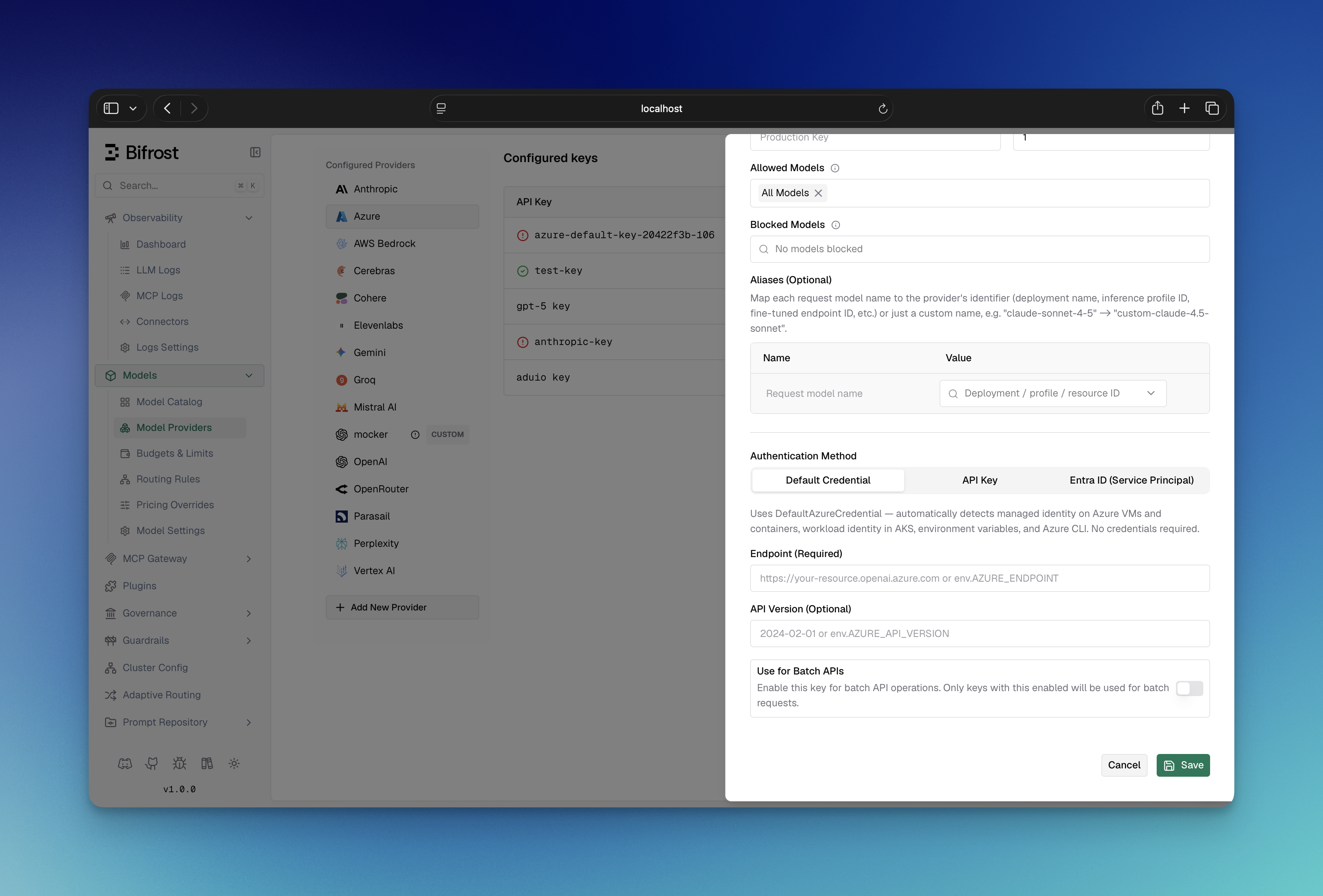 1. Navigate to **"Model Providers"** → **"Configurations"** → **"Azure"**
2. Click **"Add Key"** (or edit an existing key)
3. Under **Authentication Method**, select **"Default Credential"**
4. Set **Endpoint**: Your Azure OpenAI resource URL (e.g., `https://your-org.openai.azure.com`)
5. Configure **Aliases**: Map model names to deployment IDs (e.g., `gpt-4o` → `my-gpt4o-deployment`)
6. Save
Ensure the appropriate credential source is available - a managed identity attached to the Azure resource, `AZURE_CLIENT_ID`/`AZURE_CLIENT_SECRET`/`AZURE_TENANT_ID` env vars, or `az login` for local development.
```bash theme={null}
# Step 1: Create the provider
curl -X POST http://localhost:8080/api/providers \
-H "Content-Type: application/json" \
-d '{"provider": "azure"}'
# Step 2: Create a key (Default Credential - leave value empty)
curl -X POST http://localhost:8080/api/providers/azure/keys \
-H "Content-Type: application/json" \
-d '{
"name": "azure-default-credential",
"value": "",
"models": ["*"],
"weight": 1.0,
"aliases": {
"gpt-4o": "my-gpt4o-deployment",
"gpt-4o-mini": "my-mini-deployment"
},
"azure_key_config": {
"endpoint": "env.AZURE_ENDPOINT"
}
}'
```
**On v1.4.x**, two differences apply:
* Pass `keys` directly in the `POST /api/providers` body - there is no separate `/api/providers/{provider}/keys` endpoint.
* Replace the top-level `aliases` with `"deployments"` inside `azure_key_config`:
```json theme={null}
"azure_key_config": {
"endpoint": "env.AZURE_ENDPOINT",
"deployments": {
"gpt-4o": "my-gpt4o-deployment"
}
}
```
```json theme={null}
{
"providers": {
"azure": {
"keys": [
{
"name": "azure-default-credential",
"value": "",
"models": ["*"],
"weight": 1.0,
"aliases": {
"gpt-4o": "my-gpt4o-deployment",
"gpt-4o-mini": "my-mini-deployment"
},
"azure_key_config": {
"endpoint": "env.AZURE_ENDPOINT"
}
}
]
}
}
}
```
On **v1.4.x**, use `deployments` inside `azure_key_config` instead of the
top-level `aliases` field.
```go theme={null}
func (a *MyAccount) GetKeysForProvider(ctx *context.Context, provider schemas.ModelProvider) ([]schemas.Key, error) {
switch provider {
case schemas.Azure:
return []schemas.Key{
{
Value: schemas.EnvVar{}, // Leave empty - Bifrost uses DefaultAzureCredential
Models: []string{"*"},
Weight: 1.0,
Aliases: schemas.KeyAliases{
"gpt-4o": "my-gpt4o-deployment",
"gpt-4o-mini": "my-mini-deployment",
},
AzureKeyConfig: &schemas.AzureKeyConfig{
Endpoint: *schemas.NewEnvVar(os.Getenv("AZURE_ENDPOINT")),
},
},
}, nil
}
return nil, fmt.Errorf("provider %s not supported", provider)
}
```
### 2. Azure Entra ID (Service Principal)
Set `client_id`, `client_secret`, and `tenant_id` to authenticate with a Service Principal. This takes priority over API key and managed identity.
1. Navigate to **"Model Providers"** → **"Configurations"** → **"Azure"**
2. Click **"Add Key"** (or edit an existing key)
3. Under **Authentication Method**, select **"Default Credential"**
4. Set **Endpoint**: Your Azure OpenAI resource URL (e.g., `https://your-org.openai.azure.com`)
5. Configure **Aliases**: Map model names to deployment IDs (e.g., `gpt-4o` → `my-gpt4o-deployment`)
6. Save
Ensure the appropriate credential source is available - a managed identity attached to the Azure resource, `AZURE_CLIENT_ID`/`AZURE_CLIENT_SECRET`/`AZURE_TENANT_ID` env vars, or `az login` for local development.
```bash theme={null}
# Step 1: Create the provider
curl -X POST http://localhost:8080/api/providers \
-H "Content-Type: application/json" \
-d '{"provider": "azure"}'
# Step 2: Create a key (Default Credential - leave value empty)
curl -X POST http://localhost:8080/api/providers/azure/keys \
-H "Content-Type: application/json" \
-d '{
"name": "azure-default-credential",
"value": "",
"models": ["*"],
"weight": 1.0,
"aliases": {
"gpt-4o": "my-gpt4o-deployment",
"gpt-4o-mini": "my-mini-deployment"
},
"azure_key_config": {
"endpoint": "env.AZURE_ENDPOINT"
}
}'
```
**On v1.4.x**, two differences apply:
* Pass `keys` directly in the `POST /api/providers` body - there is no separate `/api/providers/{provider}/keys` endpoint.
* Replace the top-level `aliases` with `"deployments"` inside `azure_key_config`:
```json theme={null}
"azure_key_config": {
"endpoint": "env.AZURE_ENDPOINT",
"deployments": {
"gpt-4o": "my-gpt4o-deployment"
}
}
```
```json theme={null}
{
"providers": {
"azure": {
"keys": [
{
"name": "azure-default-credential",
"value": "",
"models": ["*"],
"weight": 1.0,
"aliases": {
"gpt-4o": "my-gpt4o-deployment",
"gpt-4o-mini": "my-mini-deployment"
},
"azure_key_config": {
"endpoint": "env.AZURE_ENDPOINT"
}
}
]
}
}
}
```
On **v1.4.x**, use `deployments` inside `azure_key_config` instead of the
top-level `aliases` field.
```go theme={null}
func (a *MyAccount) GetKeysForProvider(ctx *context.Context, provider schemas.ModelProvider) ([]schemas.Key, error) {
switch provider {
case schemas.Azure:
return []schemas.Key{
{
Value: schemas.EnvVar{}, // Leave empty - Bifrost uses DefaultAzureCredential
Models: []string{"*"},
Weight: 1.0,
Aliases: schemas.KeyAliases{
"gpt-4o": "my-gpt4o-deployment",
"gpt-4o-mini": "my-mini-deployment",
},
AzureKeyConfig: &schemas.AzureKeyConfig{
Endpoint: *schemas.NewEnvVar(os.Getenv("AZURE_ENDPOINT")),
},
},
}, nil
}
return nil, fmt.Errorf("provider %s not supported", provider)
}
```
### 2. Azure Entra ID (Service Principal)
Set `client_id`, `client_secret`, and `tenant_id` to authenticate with a Service Principal. This takes priority over API key and managed identity.
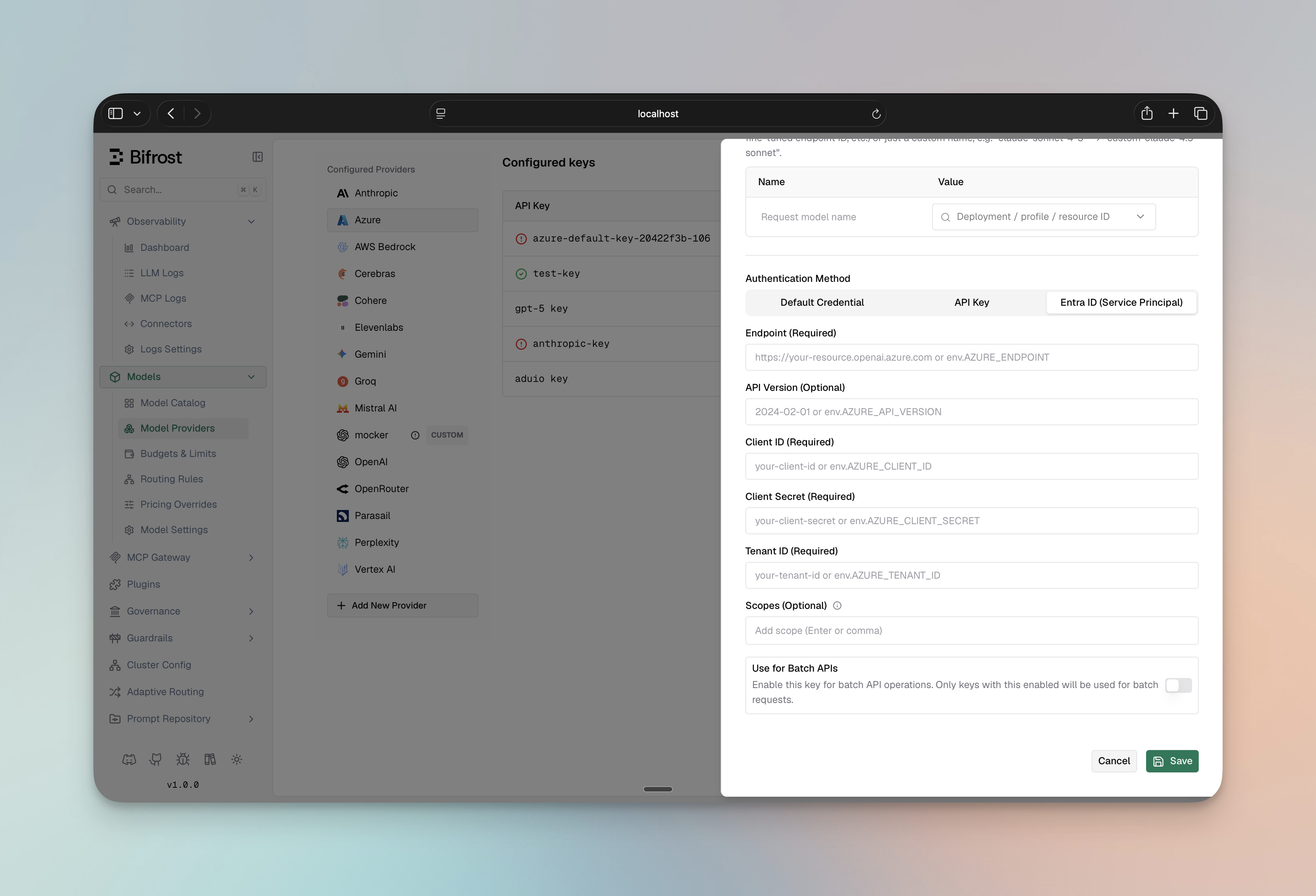 1. Navigate to **"Model Providers"** → **"Configurations"** → **"Azure"**
2. Click **"Add Key"** (or edit an existing key)
3. Under **Authentication Method**, select **"Entra ID (Service Principal)"**
4. Set **Client ID**: Your Azure Entra ID client ID
5. Set **Client Secret**: Your Azure Entra ID client secret
6. Set **Tenant ID**: Your Azure Entra ID tenant ID
7. Set **Endpoint**: Your Azure OpenAI resource URL
8. Set **Scopes** (Optional): Override the default OAuth scope (`https://cognitiveservices.azure.com/.default`). Any configured scopes **replace** the default entirely - if you customize this field, you must include all required scopes (the default is not automatically added)
9. Configure **Aliases**: Map model names to deployment IDs
10. Save
```bash theme={null}
# Step 1: Create the provider
curl -X POST http://localhost:8080/api/providers \
-H "Content-Type: application/json" \
-d '{"provider": "azure"}'
# Step 2: Create a key (Service Principal)
curl -X POST http://localhost:8080/api/providers/azure/keys \
-H "Content-Type: application/json" \
-d '{
"name": "azure-entra-key",
"value": "",
"models": ["*"],
"weight": 1.0,
"aliases": {
"gpt-4o": "my-gpt4o-deployment",
"gpt-4o-mini": "my-mini-deployment",
"claude-3-5-sonnet": "my-claude-deployment"
},
"azure_key_config": {
"endpoint": "env.AZURE_ENDPOINT",
"client_id": "env.AZURE_CLIENT_ID",
"client_secret": "env.AZURE_CLIENT_SECRET",
"tenant_id": "env.AZURE_TENANT_ID",
"scopes": ["https://cognitiveservices.azure.com/.default"]
}
}'
```
**On v1.4.x**, two differences apply: - Pass `keys` directly in the `POST
/api/providers` body - there is no separate `/api/providers/{provider}/keys`
endpoint. - Move the model mappings from `aliases` into
`azure_key_config.deployments`.
```json theme={null}
{
"providers": {
"azure": {
"keys": [
{
"name": "azure-entra-key",
"value": "",
"models": ["*"],
"weight": 1.0,
"aliases": {
"gpt-4o": "my-gpt4o-deployment",
"gpt-4o-mini": "my-mini-deployment",
"claude-3-5-sonnet": "my-claude-deployment"
},
"azure_key_config": {
"endpoint": "env.AZURE_ENDPOINT",
"client_id": "env.AZURE_CLIENT_ID",
"client_secret": "env.AZURE_CLIENT_SECRET",
"tenant_id": "env.AZURE_TENANT_ID",
"scopes": ["https://cognitiveservices.azure.com/.default"]
}
}
]
}
}
}
```
On **v1.4.x**, use `deployments` inside `azure_key_config` instead of the
top-level `aliases` field.
```go theme={null}
func (a *MyAccount) GetKeysForProvider(ctx *context.Context, provider schemas.ModelProvider) ([]schemas.Key, error) {
switch provider {
case schemas.Azure:
return []schemas.Key{
{
Value: schemas.EnvVar{}, // Leave empty for Service Principal auth
Models: []string{"*"},
Weight: 1.0,
Aliases: schemas.KeyAliases{
"gpt-4o": "my-gpt4o-deployment",
"gpt-4o-mini": "my-mini-deployment",
"claude-3-5-sonnet": "my-claude-deployment",
},
AzureKeyConfig: &schemas.AzureKeyConfig{
Endpoint: *schemas.NewEnvVar(os.Getenv("AZURE_ENDPOINT")),
ClientID: schemas.NewEnvVar(os.Getenv("AZURE_CLIENT_ID")),
ClientSecret: schemas.NewEnvVar(os.Getenv("AZURE_CLIENT_SECRET")),
TenantID: schemas.NewEnvVar(os.Getenv("AZURE_TENANT_ID")),
Scopes: []string{"https://cognitiveservices.azure.com/.default"},
},
},
}, nil
}
return nil, fmt.Errorf("provider %s not supported", provider)
}
```
**Required Azure roles:**
* OpenAI models: `Cognitive Services OpenAI User`
* Anthropic models: `Cognitive Services AI Services User`
### 3. Direct Authentication (API Key)
Provide the Azure API key in the `value` field. Use this for simple setups without managed identity or Service Principal.
1. Navigate to **"Model Providers"** → **"Configurations"** → **"Azure"**
2. Click **"Add Key"** (or edit an existing key)
3. Under **Authentication Method**, select **"Entra ID (Service Principal)"**
4. Set **Client ID**: Your Azure Entra ID client ID
5. Set **Client Secret**: Your Azure Entra ID client secret
6. Set **Tenant ID**: Your Azure Entra ID tenant ID
7. Set **Endpoint**: Your Azure OpenAI resource URL
8. Set **Scopes** (Optional): Override the default OAuth scope (`https://cognitiveservices.azure.com/.default`). Any configured scopes **replace** the default entirely - if you customize this field, you must include all required scopes (the default is not automatically added)
9. Configure **Aliases**: Map model names to deployment IDs
10. Save
```bash theme={null}
# Step 1: Create the provider
curl -X POST http://localhost:8080/api/providers \
-H "Content-Type: application/json" \
-d '{"provider": "azure"}'
# Step 2: Create a key (Service Principal)
curl -X POST http://localhost:8080/api/providers/azure/keys \
-H "Content-Type: application/json" \
-d '{
"name": "azure-entra-key",
"value": "",
"models": ["*"],
"weight": 1.0,
"aliases": {
"gpt-4o": "my-gpt4o-deployment",
"gpt-4o-mini": "my-mini-deployment",
"claude-3-5-sonnet": "my-claude-deployment"
},
"azure_key_config": {
"endpoint": "env.AZURE_ENDPOINT",
"client_id": "env.AZURE_CLIENT_ID",
"client_secret": "env.AZURE_CLIENT_SECRET",
"tenant_id": "env.AZURE_TENANT_ID",
"scopes": ["https://cognitiveservices.azure.com/.default"]
}
}'
```
**On v1.4.x**, two differences apply: - Pass `keys` directly in the `POST
/api/providers` body - there is no separate `/api/providers/{provider}/keys`
endpoint. - Move the model mappings from `aliases` into
`azure_key_config.deployments`.
```json theme={null}
{
"providers": {
"azure": {
"keys": [
{
"name": "azure-entra-key",
"value": "",
"models": ["*"],
"weight": 1.0,
"aliases": {
"gpt-4o": "my-gpt4o-deployment",
"gpt-4o-mini": "my-mini-deployment",
"claude-3-5-sonnet": "my-claude-deployment"
},
"azure_key_config": {
"endpoint": "env.AZURE_ENDPOINT",
"client_id": "env.AZURE_CLIENT_ID",
"client_secret": "env.AZURE_CLIENT_SECRET",
"tenant_id": "env.AZURE_TENANT_ID",
"scopes": ["https://cognitiveservices.azure.com/.default"]
}
}
]
}
}
}
```
On **v1.4.x**, use `deployments` inside `azure_key_config` instead of the
top-level `aliases` field.
```go theme={null}
func (a *MyAccount) GetKeysForProvider(ctx *context.Context, provider schemas.ModelProvider) ([]schemas.Key, error) {
switch provider {
case schemas.Azure:
return []schemas.Key{
{
Value: schemas.EnvVar{}, // Leave empty for Service Principal auth
Models: []string{"*"},
Weight: 1.0,
Aliases: schemas.KeyAliases{
"gpt-4o": "my-gpt4o-deployment",
"gpt-4o-mini": "my-mini-deployment",
"claude-3-5-sonnet": "my-claude-deployment",
},
AzureKeyConfig: &schemas.AzureKeyConfig{
Endpoint: *schemas.NewEnvVar(os.Getenv("AZURE_ENDPOINT")),
ClientID: schemas.NewEnvVar(os.Getenv("AZURE_CLIENT_ID")),
ClientSecret: schemas.NewEnvVar(os.Getenv("AZURE_CLIENT_SECRET")),
TenantID: schemas.NewEnvVar(os.Getenv("AZURE_TENANT_ID")),
Scopes: []string{"https://cognitiveservices.azure.com/.default"},
},
},
}, nil
}
return nil, fmt.Errorf("provider %s not supported", provider)
}
```
**Required Azure roles:**
* OpenAI models: `Cognitive Services OpenAI User`
* Anthropic models: `Cognitive Services AI Services User`
### 3. Direct Authentication (API Key)
Provide the Azure API key in the `value` field. Use this for simple setups without managed identity or Service Principal.
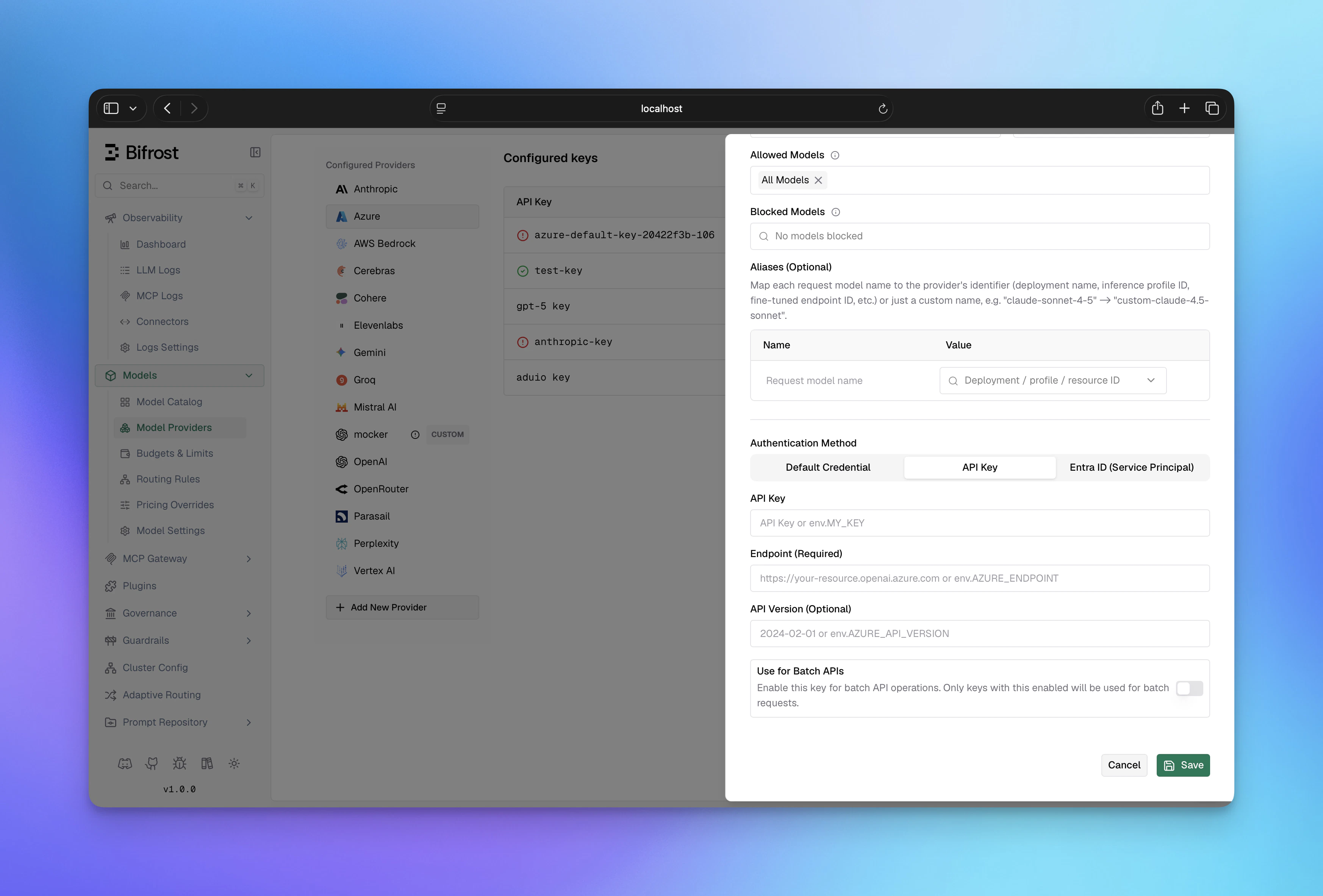 1. Navigate to **"Model Providers"** → **"Configurations"** → **"Azure"**
2. Click **"Add Key"** (or edit an existing key)
3. Under **Authentication Method**, select **"API Key"**
4. Set **API Key**: Your Azure API key
5. Set **Endpoint**: Your Azure OpenAI resource URL
6. Configure **Aliases**: Map model names to deployment IDs
7. Save
```bash theme={null}
# Step 1: Create the provider
curl -X POST http://localhost:8080/api/providers \
-H "Content-Type: application/json" \
-d '{"provider": "azure"}'
# Step 2: Create a key (API Key auth)
curl -X POST http://localhost:8080/api/providers/azure/keys \
-H "Content-Type: application/json" \
-d '{
"name": "azure-api-key",
"value": "env.AZURE_API_KEY",
"models": ["*"],
"weight": 1.0,
"aliases": {
"gpt-4o": "my-gpt4o-deployment",
"gpt-4o-mini": "my-mini-deployment"
},
"azure_key_config": {
"endpoint": "env.AZURE_ENDPOINT"
}
}'
```
**On v1.4.x**, two differences apply: - Pass `keys` directly in the `POST
/api/providers` body - there is no separate `/api/providers/{provider}/keys`
endpoint. - Move the model mappings from `aliases` into
`azure_key_config.deployments`.
```json theme={null}
{
"providers": {
"azure": {
"keys": [
{
"name": "azure-api-key",
"value": "env.AZURE_API_KEY",
"models": ["*"],
"weight": 1.0,
"aliases": {
"gpt-4o": "my-gpt4o-deployment",
"gpt-4o-mini": "my-mini-deployment"
},
"azure_key_config": {
"endpoint": "env.AZURE_ENDPOINT"
}
}
]
}
}
}
```
On **v1.4.x**, use `deployments` inside `azure_key_config` instead of the
top-level `aliases` field.
```go theme={null}
func (a *MyAccount) GetKeysForProvider(ctx *context.Context, provider schemas.ModelProvider) ([]schemas.Key, error) {
switch provider {
case schemas.Azure:
return []schemas.Key{
{
Value: *schemas.NewEnvVar("env.AZURE_OPENAI_KEY"),
Models: []string{"*"},
Weight: 1.0,
Aliases: schemas.KeyAliases{
"gpt-4o": "my-gpt4o-deployment",
"gpt-4o-mini": "my-mini-deployment",
},
AzureKeyConfig: &schemas.AzureKeyConfig{
Endpoint: *schemas.NewEnvVar(os.Getenv("AZURE_ENDPOINT")),
},
},
}, nil
}
return nil, fmt.Errorf("provider %s not supported", provider)
}
```
**Authentication precedence:** (1) Entra ID if `client_id`, `client_secret`,
and `tenant_id` are all set; (2) API key if `value` is non-empty; (3)
DefaultAzureCredential (managed identity) if neither is provided.
**`azure_key_config` fields:**
| Field | Required | Default | Description |
| --------------- | -------- | -------------------------------------------------- | ----------------------------------------------- |
| `endpoint` | Yes | - | Azure OpenAI resource endpoint URL |
| `client_id` | No | - | Entra ID client ID (Service Principal auth) |
| `client_secret` | No | - | Entra ID client secret (Service Principal auth) |
| `tenant_id` | No | - | Entra ID tenant ID (Service Principal auth) |
| `scopes` | No | `["https://cognitiveservices.azure.com/.default"]` | OAuth scopes for token requests |
**Key-level fields:**
| Field | Required | Description |
| --------- | -------- | ------------------------------------------------------------- |
| `aliases` | No | Map model names to Azure deployment IDs (v1.5.0-prerelease2+) |
| `value` | No | Azure API key (leave empty for Entra ID or managed identity) |
| `models` | Yes | Models this key can serve; use `["*"]` to allow all |
***
## Beta Headers
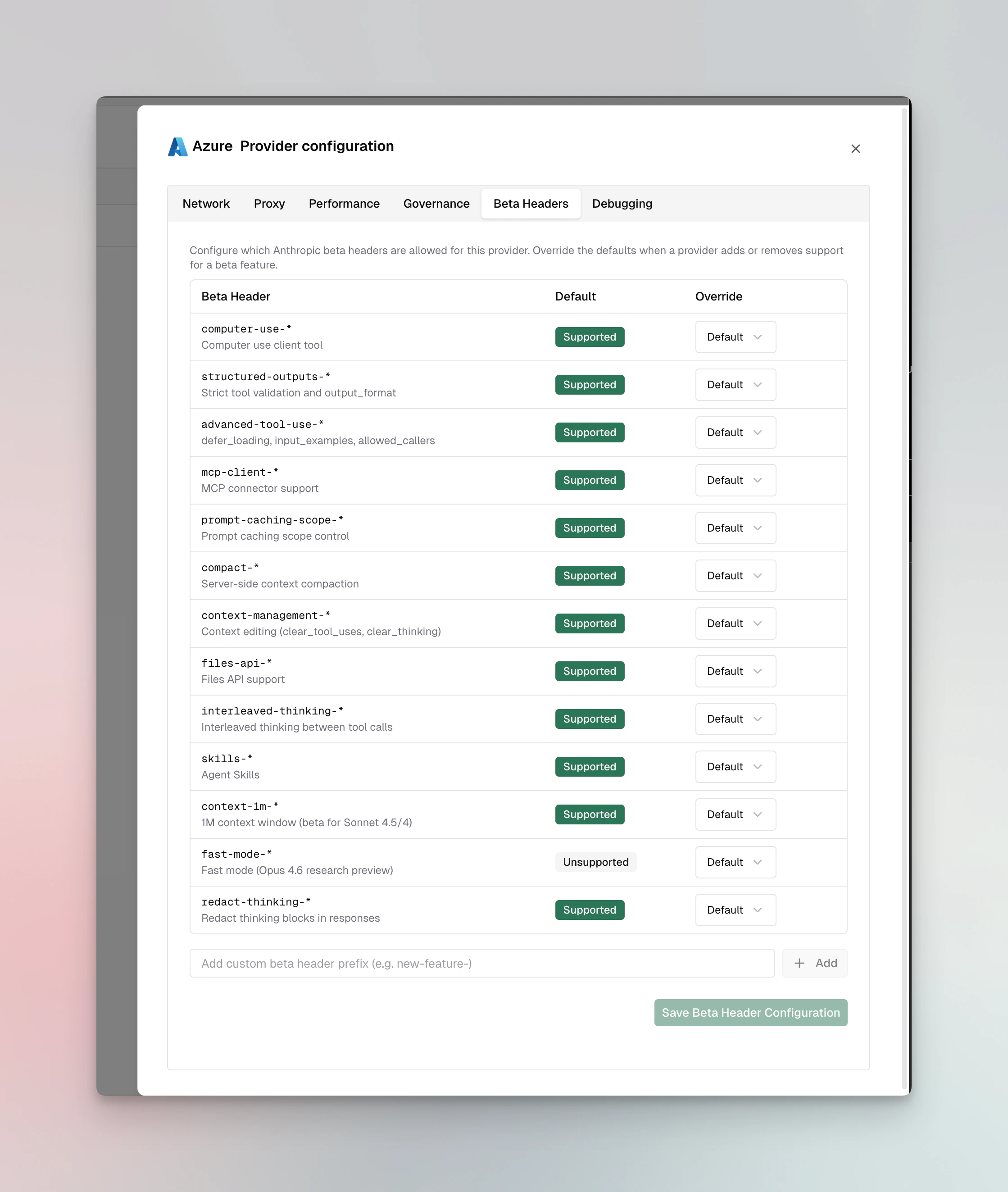
For Anthropic models on Azure, Bifrost validates `anthropic-beta` headers and drops unsupported headers from the request. Azure supports most Anthropic beta features.
**Supported**: `computer-use-*`, `structured-outputs-*`, `advanced-tool-use-*`, `mcp-client-*`, `prompt-caching-scope-*`, `compact-*`, `context-management-*`, `files-api-*`, `interleaved-thinking-*`, `skills-*`, `context-1m-*`, `redact-thinking-*`
**Not supported**: `fast-mode-*`
You can override these defaults per provider via the **Beta Headers** tab in provider configuration or via [`beta_header_overrides`](/quickstart/gateway/provider-configuration#beta-header-overrides). See the full support matrix in the [Anthropic provider docs](/providers/supported-providers/anthropic#beta-headers).
1. Navigate to **"Model Providers"** → **"Configurations"** → **"Azure"**
2. Click **"Add Key"** (or edit an existing key)
3. Under **Authentication Method**, select **"API Key"**
4. Set **API Key**: Your Azure API key
5. Set **Endpoint**: Your Azure OpenAI resource URL
6. Configure **Aliases**: Map model names to deployment IDs
7. Save
```bash theme={null}
# Step 1: Create the provider
curl -X POST http://localhost:8080/api/providers \
-H "Content-Type: application/json" \
-d '{"provider": "azure"}'
# Step 2: Create a key (API Key auth)
curl -X POST http://localhost:8080/api/providers/azure/keys \
-H "Content-Type: application/json" \
-d '{
"name": "azure-api-key",
"value": "env.AZURE_API_KEY",
"models": ["*"],
"weight": 1.0,
"aliases": {
"gpt-4o": "my-gpt4o-deployment",
"gpt-4o-mini": "my-mini-deployment"
},
"azure_key_config": {
"endpoint": "env.AZURE_ENDPOINT"
}
}'
```
**On v1.4.x**, two differences apply: - Pass `keys` directly in the `POST
/api/providers` body - there is no separate `/api/providers/{provider}/keys`
endpoint. - Move the model mappings from `aliases` into
`azure_key_config.deployments`.
```json theme={null}
{
"providers": {
"azure": {
"keys": [
{
"name": "azure-api-key",
"value": "env.AZURE_API_KEY",
"models": ["*"],
"weight": 1.0,
"aliases": {
"gpt-4o": "my-gpt4o-deployment",
"gpt-4o-mini": "my-mini-deployment"
},
"azure_key_config": {
"endpoint": "env.AZURE_ENDPOINT"
}
}
]
}
}
}
```
On **v1.4.x**, use `deployments` inside `azure_key_config` instead of the
top-level `aliases` field.
```go theme={null}
func (a *MyAccount) GetKeysForProvider(ctx *context.Context, provider schemas.ModelProvider) ([]schemas.Key, error) {
switch provider {
case schemas.Azure:
return []schemas.Key{
{
Value: *schemas.NewEnvVar("env.AZURE_OPENAI_KEY"),
Models: []string{"*"},
Weight: 1.0,
Aliases: schemas.KeyAliases{
"gpt-4o": "my-gpt4o-deployment",
"gpt-4o-mini": "my-mini-deployment",
},
AzureKeyConfig: &schemas.AzureKeyConfig{
Endpoint: *schemas.NewEnvVar(os.Getenv("AZURE_ENDPOINT")),
},
},
}, nil
}
return nil, fmt.Errorf("provider %s not supported", provider)
}
```
**Authentication precedence:** (1) Entra ID if `client_id`, `client_secret`,
and `tenant_id` are all set; (2) API key if `value` is non-empty; (3)
DefaultAzureCredential (managed identity) if neither is provided.
**`azure_key_config` fields:**
| Field | Required | Default | Description |
| --------------- | -------- | -------------------------------------------------- | ----------------------------------------------- |
| `endpoint` | Yes | - | Azure OpenAI resource endpoint URL |
| `client_id` | No | - | Entra ID client ID (Service Principal auth) |
| `client_secret` | No | - | Entra ID client secret (Service Principal auth) |
| `tenant_id` | No | - | Entra ID tenant ID (Service Principal auth) |
| `scopes` | No | `["https://cognitiveservices.azure.com/.default"]` | OAuth scopes for token requests |
**Key-level fields:**
| Field | Required | Description |
| --------- | -------- | ------------------------------------------------------------- |
| `aliases` | No | Map model names to Azure deployment IDs (v1.5.0-prerelease2+) |
| `value` | No | Azure API key (leave empty for Entra ID or managed identity) |
| `models` | Yes | Models this key can serve; use `["*"]` to allow all |
***
## Beta Headers
For Anthropic models on Azure, Bifrost validates `anthropic-beta` headers and drops unsupported headers from the request. Azure supports most Anthropic beta features.
**Supported**: `computer-use-*`, `structured-outputs-*`, `advanced-tool-use-*`, `mcp-client-*`, `prompt-caching-scope-*`, `compact-*`, `context-management-*`, `files-api-*`, `interleaved-thinking-*`, `skills-*`, `context-1m-*`, `redact-thinking-*`
**Not supported**: `fast-mode-*`
You can override these defaults per provider via the **Beta Headers** tab in provider configuration or via [`beta_header_overrides`](/quickstart/gateway/provider-configuration#beta-header-overrides). See the full support matrix in the [Anthropic provider docs](/providers/supported-providers/anthropic#beta-headers).
 ***
# 1. Chat Completions
## Request Parameters
### Core Parameter Mapping
| Parameter | Azure Handling | Notes |
| ----------------------- | ------------------------- | ---------------------------------------------------- |
| `model` | Mapped to `deployment_id` | Supports version matching and base model matching |
| `max_completion_tokens` | Direct pass-through | OpenAI models only |
| `temperature`, `top_p` | Direct pass-through | Same across all models |
| All other params | Model-specific conversion | Converted per underlying provider (OpenAI/Anthropic) |
### Authentication Configuration
Azure uses custom endpoint and deployment configuration:
```bash theme={null}
curl -X POST http://localhost:8080/v1/chat/completions \
-H "Content-Type: application/json" \
-d '{
"model": "azure/gpt-4-deployment",
"messages": [{"role": "user", "content": "Hello"}],
"deployment": "my-gpt4-deployment",
"endpoint": "https://my-org.openai.azure.com"
}' \
-H "api-key: YOUR_AZURE_API_KEY"
```
```go theme={null}
resp, err := client.ChatCompletionRequest(schemas.NewBifrostContext(ctx, schemas.NoDeadline), &schemas.BifrostChatRequest{
Provider: schemas.Azure,
Model: "gpt-4",
Input: messages,
Params: &schemas.ChatParameters{
ExtraParams: map[string]interface{}{
"deployment": "my-gpt4-deployment",
"endpoint": "https://my-org.openai.azure.com",
},
},
})
```
### Key Configuration
Azure supports three authentication methods: **Managed Identity** (DefaultAzureCredential), **Entra ID** (Service Principal), and **Direct** (API Key). Precedence: Entra ID (if configured) → API key (if `value` set) → DefaultAzureCredential.
#### Managed Identity / DefaultAzureCredential
If no API key and no Entra ID credentials are provided, Bifrost automatically uses `DefaultAzureCredential`, which
detects the auth environment.
```json theme={null}
{
"aliases": {
"gpt-4": "my-gpt4-deployment"
},
"azure_key_config": {
"endpoint": "https://your-org.openai.azure.com"
}
}
```
#### Azure Entra ID (Service Principal)
If you set `client_id`, `client_secret`, and `tenant_id`, Azure Entra ID authentication will be used with priority over API key authentication.
```json theme={null}
{
"aliases": {
"gpt-4": "my-gpt4-deployment",
"gpt-4-turbo": "my-gpt4-turbo-deployment",
"claude-3": "my-claude-deployment"
},
"azure_key_config": {
"endpoint": "https://your-org.openai.azure.com",
"client_id": "your-client-id",
"client_secret": "your-client-secret",
"tenant_id": "your-tenant-id",
"scopes": ["https://cognitiveservices.azure.com/.default"]
}
}
```
**Required Azure Roles**:
* For OpenAI models: `Cognitive Services OpenAI User`
* For Anthropic models: `Cognitive Services AI Services User`
#### Direct Authentication (API Key)
```json theme={null}
{
"value": "your-azure-api-key",
"aliases": {
"gpt-4": "my-gpt4-deployment",
"gpt-4-turbo": "my-gpt4-turbo-deployment",
"claude-3": "my-claude-deployment"
},
"azure_key_config": {
"endpoint": "https://your-org.openai.azure.com"
}
}
```
**Configuration Details**:
* `endpoint` - Azure OpenAI resource endpoint (required)
* `client_id` - Azure Entra ID client ID (optional, for Service Principal auth)
* `client_secret` - Azure Entra ID client secret (optional, for Service Principal auth)
* `tenant_id` - Azure Entra ID tenant ID (optional, for Service Principal auth)
* `scopes` - OAuth scopes for token requests (default: `["https://cognitiveservices.azure.com/.default"]`)
* `aliases` - Map of model names to Azure deployment IDs (optional, set at key level)
* `allowed_models` - List of allowed models to use from this key (optional)
### Deployment Selection
Deployments can be specified at three levels (in order of precedence):
1. **Per-request** (highest priority)
```json theme={null}
{ "deployment": "custom-deployment" }
```
2. **Key configuration**
```json theme={null}
{ "aliases": { "gpt-4": "my-gpt4-deployment" } }
```
3. **Model name** (lowest priority, if no deployment specified)
Model name is used as deployment ID directly
## OpenAI Models
When using OpenAI models (GPT-4, GPT-4 Turbo, GPT-3.5-Turbo, etc.), Bifrost passes through OpenAI-compatible parameters directly.
### Parameter Mapping for OpenAI
All OpenAI-standard parameters are supported. Refer to [OpenAI documentation](/providers/supported-providers/openai) for detailed conversion details.
## Anthropic Models
When using Anthropic models through Azure (Claude 3 family), Bifrost converts requests to Anthropic format.
### Parameter Mapping for Anthropic
All Anthropic-standard parameters are supported with special handling:
* **Reasoning/Thinking**: `reasoning` parameters converted to Anthropic's `thinking` structure
* **System messages**: Extracted and placed in separate `system` field
* **Tool message grouping**: Consecutive tool messages merged
Refer to [Anthropic documentation](/providers/supported-providers/anthropic) for detailed conversion details.
### Special Notes for Azure + Anthropic
* API version automatically set to `2023-06-01` for Anthropic models
* Endpoints use `/anthropic/v1/` paths internally
* Authentication uses `x-api-key` header for Anthropic models
* Minimum reasoning budget: 1024 tokens
## Streaming
Streaming uses OpenAI or Anthropic format depending on model type:
* **OpenAI models**: Standard OpenAI streaming with `chat.completion.chunk` events
* **Anthropic models**: Anthropic streaming format with content blocks
***
# 2. Responses API
The Responses API is available for both OpenAI and Anthropic models on Azure using the `/openai/v1/responses` endpoint.
## Request Parameters
### Core Parameter Mapping
| Parameter | Azure Handling | Notes |
| ------------------- | ---------------------------- | --------------------------------- |
| `instructions` | Becomes system message | Model-specific conversion |
| `input` | Converted to user message(s) | String or array support |
| `max_output_tokens` | Model-specific field mapping | OpenAI vs Anthropic conversion |
| All other params | Model-specific conversion | Converted per underlying provider |
### OpenAI Models
For OpenAI models (GPT-4, etc.), conversion follows OpenAI's Responses API format.
### Anthropic Models
For Anthropic models (Claude, etc.), conversion follows Anthropic's message format:
* `instructions` becomes system message
* `reasoning` mapped to `thinking` structure
### Endpoint Configuration
```bash theme={null}
curl -X POST http://localhost:8080/v1/responses \
-H "Content-Type: application/json" \
-d '{
"model": "azure/claude-3-sonnet",
"input": "Hello, how are you?",
"instructions": "You are a helpful assistant",
"deployment": "my-claude-deployment",
"endpoint": "https://my-org.openai.azure.com"
}' \
-H "api-key: YOUR_AZURE_API_KEY"
```
```go theme={null}
resp, err := client.ResponsesRequest(schemas.NewBifrostContext(ctx, schemas.NoDeadline), &schemas.BifrostResponsesRequest{
Provider: schemas.Azure,
Model: "claude-3-sonnet",
Input: messages,
Params: &schemas.ResponsesParameters{
Instructions: schemas.Ptr("You are a helpful assistant"),
},
})
```
### Special Handling
* Uses `/openai/v1/responses` endpoint
* All request body conversions handled automatically
* Supports raw request body passthrough for advanced cases
**OpenAI Models - gpt-oss Special Message Handling:**
For OpenAI models through Azure, see [OpenAI Responses API documentation](/providers/supported-providers/openai) for details on special gpt-oss model handling regarding reasoning conversion (summaries vs. content blocks).
**Anthropic Models:**
Refer to [Anthropic Responses API](/providers/supported-providers/anthropic#2-responses-api) for parameter details.
***
# 3. Embeddings
Embeddings are supported for OpenAI models only (not available for Anthropic models on Azure).
## Request Parameters
| Parameter | Azure Handling |
| ------------ | ------------------------------------ |
| `input` | Direct pass-through |
| `model` | Mapped to deployment |
| `dimensions` | Direct pass-through (when supported) |
```bash theme={null}
curl -X POST http://localhost:8080/v1/embeddings \
-H "Content-Type: application/json" \
-d '{
"model": "text-embedding-3-small",
"input": ["text to embed"],
"deployment": "my-embedding-deployment"
}' \
-H "api-key: YOUR_AZURE_API_KEY"
```
```go theme={null}
resp, err := client.EmbeddingRequest(schemas.NewBifrostContext(ctx, schemas.NoDeadline), &schemas.BifrostEmbeddingRequest{
Provider: schemas.Azure,
Model: "text-embedding-3-small",
Input: &schemas.EmbeddingInput{
Texts: []string{"text to embed"},
},
})
```
## Response Conversion
Embeddings response is passed through directly from Azure OpenAI with standard format:
```json theme={null}
{
"data": [
{
"object": "embedding",
"embedding": [0.1234, -0.5678, ...],
"index": 0
}
],
"model": "text-embedding-3-small",
"usage": {
"prompt_tokens": 10,
"total_tokens": 10
}
}
```
***
# 4. Files API
Files operations are supported for OpenAI models only.
## Supported Operations
| Operation | Support |
| ----------- | ------- |
| Upload | ✅ |
| List | ✅ |
| Retrieve | ✅ |
| Delete | ✅ |
| Get Content | ✅ |
Files are stored in Azure and can be used with batch operations.
***
# 5. Image Generation
Image Generation is supported for OpenAI models on Azure and uses the OpenAI-compatible format.
## Request Parameters
### Core Parameter Mapping
| Parameter | Azure Handling | Notes |
| ---------------- | ------------------------- | -------------------------------- |
| `model` | Mapped to `deployment_id` | Deployment ID must be configured |
| `prompt` | Direct pass-through | Prompt text for image generation |
| All other params | Direct pass-through | Uses OpenAI format |
Azure uses the same conversion as OpenAI (see [OpenAI Image Generation](/providers/supported-providers/openai#7-image-generation)):
* **Model & Prompt**: `bifrostReq.Model` → `req.Model` (mapped to deployment), `bifrostReq.Prompt` → `req.Prompt`
* **Parameters**: All other fields from `bifrostReq` are embedded directly into the request struct via struct embedding
### Configuration
```bash theme={null}
curl -X POST http://localhost:8080/v1/images/generations \
-H "Content-Type: application/json" \
-d '{
"model": "azure/dall-e-3",
"prompt": "A sunset over the mountains",
"size": "1024x1024",
"n": 1,
"deployment": "my-image-gen-deployment"
}' \
-H "api-key: YOUR_AZURE_API_KEY"
```
```go theme={null}
resp, err := client.ImageGenerationRequest(schemas.NewBifrostContext(ctx, schemas.NoDeadline), &schemas.BifrostImageGenerationRequest{
Provider: schemas.Azure,
Model: "dall-e-3",
Input: &schemas.ImageGenerationInput{
Prompt: "A sunset over the mountains",
},
Params: &schemas.ImageGenerationParameters{
Size: schemas.Ptr("1024x1024"),
N: schemas.Ptr(1),
},
})
```
## Response Conversion
* **Non-streaming**: Azure responses are unmarshaled directly into `BifrostImageGenerationResponse` since Bifrost's response schema is a superset of OpenAI's format. All fields are passed through as-is.
* **Streaming**: Azure streaming responses use Server-Sent Events (SSE) format with the same event types as OpenAI (see [OpenAI Image Generation Streaming](/providers/supported-providers/openai#streaming)).
## Streaming
Image generation streaming is supported and uses OpenAI's streaming format with Server-Sent Events (SSE).
***
# 6. Image Edit
Requests use **multipart/form-data**, not JSON.
Image Edit is supported for OpenAI models on Azure and uses the OpenAI-compatible format.
Azure uses the same conversion as OpenAI (see [OpenAI Image Edit](/providers/supported-providers/openai#8-image-edit)):
* **Request Conversion**: Uses `openai.HandleOpenAIImageEditRequest` with Azure-specific URL construction
* **URL Format**: `{endpoint}/openai/v1/images/edits`
* **Authentication**: Azure API key or OAuth bearer token (via `getAzureAuthHeaders`)
* **Deployment Mapping**: Model identifier mapped to Azure deployment ID
* **Response Conversion**: Same as OpenAI - responses unmarshaled directly into `BifrostImageGenerationResponse`
* **Streaming**: Supported via `openai.HandleOpenAIImageEditStreamRequest` with Azure-specific URL and authentication
***
# 7. List Models
## Request Parameters
None required.
## Response Conversion
Lists available models/deployments configured in the Azure key. Response includes model metadata, capabilities, and lifecycle status.
```json theme={null}
{
"data": [
{
"id": "gpt-4",
"object": "model",
"created": 1687882411,
"status": "active",
"lifecycle_status": "stable",
"capabilities": {
"chat_completion": true,
"embeddings": false
}
}
]
}
```
***
## Caveats
**Severity**: High **Behavior**: Model names must map to Azure deployment IDs
**Impact**: Request fails without valid deployment mapping **Code**:
`azure.go:145-200`
**Severity**: Medium **Behavior**: Automatic detection of OpenAI vs Anthropic
based on model name **Impact**: Different conversion logic applied
transparently **Code**: `azure.go:92-114`
**Severity**: Low **Behavior**: Model version differences ignored when
matching to deployments **Impact**: `gpt-4` and `gpt-4-turbo` can map to same
deployment **Code**: `models.go:13-58`
***
# 8. Video Generation
Azure routes video generation to OpenAI's Sora models via the Azure OpenAI-compatible endpoint. All parameters are identical to [OpenAI Video Generation](/providers/supported-providers/openai#video-generation).
**Supported Operations**
| Operation | Supported | Notes |
| --------- | --------- | ----------------------------- |
| Generate | ✅ | `POST /v1/videos` |
| Retrieve | ✅ | `GET /v1/videos/{id}` |
| Download | ✅ | `GET /v1/videos/{id}/content` |
| Delete | ✅ | `DELETE /v1/videos/{id}` |
| List | ✅ | `GET /v1/videos` |
| Remix | ❌ | Not supported |
***
# 9. Context Compaction
Context compaction is supported for OpenAI models on Azure. It follows the same request and response format as [OpenAI Context Compaction](/providers/supported-providers/openai#14-context-compaction).
**Endpoint**: `POST /openai/v1/responses/compact`
Bifrost routes the request to `{endpoint}/openai/v1/responses/compact` using the configured Azure deployment. Deployment mapping and authentication (API key, Entra ID, or managed identity) are applied automatically, identical to the Responses API.
***
## Configuration
**HTTP Settings**: Max Connections 5000 | Max Idle 60 seconds
**Endpoint Format**: `https://{resource-name}.openai.azure.com/openai/v1/{path}`
**Note**: Bifrost uses the Azure OpenAI v1 API. No `api-version` query parameter is needed.
## Setup & Configuration
See the [Setup & Configuration](#setup--configuration) section at the top of this page for authentication instructions and full configuration examples.
***
# 1. Chat Completions
## Request Parameters
### Core Parameter Mapping
| Parameter | Azure Handling | Notes |
| ----------------------- | ------------------------- | ---------------------------------------------------- |
| `model` | Mapped to `deployment_id` | Supports version matching and base model matching |
| `max_completion_tokens` | Direct pass-through | OpenAI models only |
| `temperature`, `top_p` | Direct pass-through | Same across all models |
| All other params | Model-specific conversion | Converted per underlying provider (OpenAI/Anthropic) |
### Authentication Configuration
Azure uses custom endpoint and deployment configuration:
```bash theme={null}
curl -X POST http://localhost:8080/v1/chat/completions \
-H "Content-Type: application/json" \
-d '{
"model": "azure/gpt-4-deployment",
"messages": [{"role": "user", "content": "Hello"}],
"deployment": "my-gpt4-deployment",
"endpoint": "https://my-org.openai.azure.com"
}' \
-H "api-key: YOUR_AZURE_API_KEY"
```
```go theme={null}
resp, err := client.ChatCompletionRequest(schemas.NewBifrostContext(ctx, schemas.NoDeadline), &schemas.BifrostChatRequest{
Provider: schemas.Azure,
Model: "gpt-4",
Input: messages,
Params: &schemas.ChatParameters{
ExtraParams: map[string]interface{}{
"deployment": "my-gpt4-deployment",
"endpoint": "https://my-org.openai.azure.com",
},
},
})
```
### Key Configuration
Azure supports three authentication methods: **Managed Identity** (DefaultAzureCredential), **Entra ID** (Service Principal), and **Direct** (API Key). Precedence: Entra ID (if configured) → API key (if `value` set) → DefaultAzureCredential.
#### Managed Identity / DefaultAzureCredential
If no API key and no Entra ID credentials are provided, Bifrost automatically uses `DefaultAzureCredential`, which
detects the auth environment.
```json theme={null}
{
"aliases": {
"gpt-4": "my-gpt4-deployment"
},
"azure_key_config": {
"endpoint": "https://your-org.openai.azure.com"
}
}
```
#### Azure Entra ID (Service Principal)
If you set `client_id`, `client_secret`, and `tenant_id`, Azure Entra ID authentication will be used with priority over API key authentication.
```json theme={null}
{
"aliases": {
"gpt-4": "my-gpt4-deployment",
"gpt-4-turbo": "my-gpt4-turbo-deployment",
"claude-3": "my-claude-deployment"
},
"azure_key_config": {
"endpoint": "https://your-org.openai.azure.com",
"client_id": "your-client-id",
"client_secret": "your-client-secret",
"tenant_id": "your-tenant-id",
"scopes": ["https://cognitiveservices.azure.com/.default"]
}
}
```
**Required Azure Roles**:
* For OpenAI models: `Cognitive Services OpenAI User`
* For Anthropic models: `Cognitive Services AI Services User`
#### Direct Authentication (API Key)
```json theme={null}
{
"value": "your-azure-api-key",
"aliases": {
"gpt-4": "my-gpt4-deployment",
"gpt-4-turbo": "my-gpt4-turbo-deployment",
"claude-3": "my-claude-deployment"
},
"azure_key_config": {
"endpoint": "https://your-org.openai.azure.com"
}
}
```
**Configuration Details**:
* `endpoint` - Azure OpenAI resource endpoint (required)
* `client_id` - Azure Entra ID client ID (optional, for Service Principal auth)
* `client_secret` - Azure Entra ID client secret (optional, for Service Principal auth)
* `tenant_id` - Azure Entra ID tenant ID (optional, for Service Principal auth)
* `scopes` - OAuth scopes for token requests (default: `["https://cognitiveservices.azure.com/.default"]`)
* `aliases` - Map of model names to Azure deployment IDs (optional, set at key level)
* `allowed_models` - List of allowed models to use from this key (optional)
### Deployment Selection
Deployments can be specified at three levels (in order of precedence):
1. **Per-request** (highest priority)
```json theme={null}
{ "deployment": "custom-deployment" }
```
2. **Key configuration**
```json theme={null}
{ "aliases": { "gpt-4": "my-gpt4-deployment" } }
```
3. **Model name** (lowest priority, if no deployment specified)
Model name is used as deployment ID directly
## OpenAI Models
When using OpenAI models (GPT-4, GPT-4 Turbo, GPT-3.5-Turbo, etc.), Bifrost passes through OpenAI-compatible parameters directly.
### Parameter Mapping for OpenAI
All OpenAI-standard parameters are supported. Refer to [OpenAI documentation](/providers/supported-providers/openai) for detailed conversion details.
## Anthropic Models
When using Anthropic models through Azure (Claude 3 family), Bifrost converts requests to Anthropic format.
### Parameter Mapping for Anthropic
All Anthropic-standard parameters are supported with special handling:
* **Reasoning/Thinking**: `reasoning` parameters converted to Anthropic's `thinking` structure
* **System messages**: Extracted and placed in separate `system` field
* **Tool message grouping**: Consecutive tool messages merged
Refer to [Anthropic documentation](/providers/supported-providers/anthropic) for detailed conversion details.
### Special Notes for Azure + Anthropic
* API version automatically set to `2023-06-01` for Anthropic models
* Endpoints use `/anthropic/v1/` paths internally
* Authentication uses `x-api-key` header for Anthropic models
* Minimum reasoning budget: 1024 tokens
## Streaming
Streaming uses OpenAI or Anthropic format depending on model type:
* **OpenAI models**: Standard OpenAI streaming with `chat.completion.chunk` events
* **Anthropic models**: Anthropic streaming format with content blocks
***
# 2. Responses API
The Responses API is available for both OpenAI and Anthropic models on Azure using the `/openai/v1/responses` endpoint.
## Request Parameters
### Core Parameter Mapping
| Parameter | Azure Handling | Notes |
| ------------------- | ---------------------------- | --------------------------------- |
| `instructions` | Becomes system message | Model-specific conversion |
| `input` | Converted to user message(s) | String or array support |
| `max_output_tokens` | Model-specific field mapping | OpenAI vs Anthropic conversion |
| All other params | Model-specific conversion | Converted per underlying provider |
### OpenAI Models
For OpenAI models (GPT-4, etc.), conversion follows OpenAI's Responses API format.
### Anthropic Models
For Anthropic models (Claude, etc.), conversion follows Anthropic's message format:
* `instructions` becomes system message
* `reasoning` mapped to `thinking` structure
### Endpoint Configuration
```bash theme={null}
curl -X POST http://localhost:8080/v1/responses \
-H "Content-Type: application/json" \
-d '{
"model": "azure/claude-3-sonnet",
"input": "Hello, how are you?",
"instructions": "You are a helpful assistant",
"deployment": "my-claude-deployment",
"endpoint": "https://my-org.openai.azure.com"
}' \
-H "api-key: YOUR_AZURE_API_KEY"
```
```go theme={null}
resp, err := client.ResponsesRequest(schemas.NewBifrostContext(ctx, schemas.NoDeadline), &schemas.BifrostResponsesRequest{
Provider: schemas.Azure,
Model: "claude-3-sonnet",
Input: messages,
Params: &schemas.ResponsesParameters{
Instructions: schemas.Ptr("You are a helpful assistant"),
},
})
```
### Special Handling
* Uses `/openai/v1/responses` endpoint
* All request body conversions handled automatically
* Supports raw request body passthrough for advanced cases
**OpenAI Models - gpt-oss Special Message Handling:**
For OpenAI models through Azure, see [OpenAI Responses API documentation](/providers/supported-providers/openai) for details on special gpt-oss model handling regarding reasoning conversion (summaries vs. content blocks).
**Anthropic Models:**
Refer to [Anthropic Responses API](/providers/supported-providers/anthropic#2-responses-api) for parameter details.
***
# 3. Embeddings
Embeddings are supported for OpenAI models only (not available for Anthropic models on Azure).
## Request Parameters
| Parameter | Azure Handling |
| ------------ | ------------------------------------ |
| `input` | Direct pass-through |
| `model` | Mapped to deployment |
| `dimensions` | Direct pass-through (when supported) |
```bash theme={null}
curl -X POST http://localhost:8080/v1/embeddings \
-H "Content-Type: application/json" \
-d '{
"model": "text-embedding-3-small",
"input": ["text to embed"],
"deployment": "my-embedding-deployment"
}' \
-H "api-key: YOUR_AZURE_API_KEY"
```
```go theme={null}
resp, err := client.EmbeddingRequest(schemas.NewBifrostContext(ctx, schemas.NoDeadline), &schemas.BifrostEmbeddingRequest{
Provider: schemas.Azure,
Model: "text-embedding-3-small",
Input: &schemas.EmbeddingInput{
Texts: []string{"text to embed"},
},
})
```
## Response Conversion
Embeddings response is passed through directly from Azure OpenAI with standard format:
```json theme={null}
{
"data": [
{
"object": "embedding",
"embedding": [0.1234, -0.5678, ...],
"index": 0
}
],
"model": "text-embedding-3-small",
"usage": {
"prompt_tokens": 10,
"total_tokens": 10
}
}
```
***
# 4. Files API
Files operations are supported for OpenAI models only.
## Supported Operations
| Operation | Support |
| ----------- | ------- |
| Upload | ✅ |
| List | ✅ |
| Retrieve | ✅ |
| Delete | ✅ |
| Get Content | ✅ |
Files are stored in Azure and can be used with batch operations.
***
# 5. Image Generation
Image Generation is supported for OpenAI models on Azure and uses the OpenAI-compatible format.
## Request Parameters
### Core Parameter Mapping
| Parameter | Azure Handling | Notes |
| ---------------- | ------------------------- | -------------------------------- |
| `model` | Mapped to `deployment_id` | Deployment ID must be configured |
| `prompt` | Direct pass-through | Prompt text for image generation |
| All other params | Direct pass-through | Uses OpenAI format |
Azure uses the same conversion as OpenAI (see [OpenAI Image Generation](/providers/supported-providers/openai#7-image-generation)):
* **Model & Prompt**: `bifrostReq.Model` → `req.Model` (mapped to deployment), `bifrostReq.Prompt` → `req.Prompt`
* **Parameters**: All other fields from `bifrostReq` are embedded directly into the request struct via struct embedding
### Configuration
```bash theme={null}
curl -X POST http://localhost:8080/v1/images/generations \
-H "Content-Type: application/json" \
-d '{
"model": "azure/dall-e-3",
"prompt": "A sunset over the mountains",
"size": "1024x1024",
"n": 1,
"deployment": "my-image-gen-deployment"
}' \
-H "api-key: YOUR_AZURE_API_KEY"
```
```go theme={null}
resp, err := client.ImageGenerationRequest(schemas.NewBifrostContext(ctx, schemas.NoDeadline), &schemas.BifrostImageGenerationRequest{
Provider: schemas.Azure,
Model: "dall-e-3",
Input: &schemas.ImageGenerationInput{
Prompt: "A sunset over the mountains",
},
Params: &schemas.ImageGenerationParameters{
Size: schemas.Ptr("1024x1024"),
N: schemas.Ptr(1),
},
})
```
## Response Conversion
* **Non-streaming**: Azure responses are unmarshaled directly into `BifrostImageGenerationResponse` since Bifrost's response schema is a superset of OpenAI's format. All fields are passed through as-is.
* **Streaming**: Azure streaming responses use Server-Sent Events (SSE) format with the same event types as OpenAI (see [OpenAI Image Generation Streaming](/providers/supported-providers/openai#streaming)).
## Streaming
Image generation streaming is supported and uses OpenAI's streaming format with Server-Sent Events (SSE).
***
# 6. Image Edit
Requests use **multipart/form-data**, not JSON.
Image Edit is supported for OpenAI models on Azure and uses the OpenAI-compatible format.
Azure uses the same conversion as OpenAI (see [OpenAI Image Edit](/providers/supported-providers/openai#8-image-edit)):
* **Request Conversion**: Uses `openai.HandleOpenAIImageEditRequest` with Azure-specific URL construction
* **URL Format**: `{endpoint}/openai/v1/images/edits`
* **Authentication**: Azure API key or OAuth bearer token (via `getAzureAuthHeaders`)
* **Deployment Mapping**: Model identifier mapped to Azure deployment ID
* **Response Conversion**: Same as OpenAI - responses unmarshaled directly into `BifrostImageGenerationResponse`
* **Streaming**: Supported via `openai.HandleOpenAIImageEditStreamRequest` with Azure-specific URL and authentication
***
# 7. List Models
## Request Parameters
None required.
## Response Conversion
Lists available models/deployments configured in the Azure key. Response includes model metadata, capabilities, and lifecycle status.
```json theme={null}
{
"data": [
{
"id": "gpt-4",
"object": "model",
"created": 1687882411,
"status": "active",
"lifecycle_status": "stable",
"capabilities": {
"chat_completion": true,
"embeddings": false
}
}
]
}
```
***
## Caveats
**Severity**: High **Behavior**: Model names must map to Azure deployment IDs
**Impact**: Request fails without valid deployment mapping **Code**:
`azure.go:145-200`
**Severity**: Medium **Behavior**: Automatic detection of OpenAI vs Anthropic
based on model name **Impact**: Different conversion logic applied
transparently **Code**: `azure.go:92-114`
**Severity**: Low **Behavior**: Model version differences ignored when
matching to deployments **Impact**: `gpt-4` and `gpt-4-turbo` can map to same
deployment **Code**: `models.go:13-58`
***
# 8. Video Generation
Azure routes video generation to OpenAI's Sora models via the Azure OpenAI-compatible endpoint. All parameters are identical to [OpenAI Video Generation](/providers/supported-providers/openai#video-generation).
**Supported Operations**
| Operation | Supported | Notes |
| --------- | --------- | ----------------------------- |
| Generate | ✅ | `POST /v1/videos` |
| Retrieve | ✅ | `GET /v1/videos/{id}` |
| Download | ✅ | `GET /v1/videos/{id}/content` |
| Delete | ✅ | `DELETE /v1/videos/{id}` |
| List | ✅ | `GET /v1/videos` |
| Remix | ❌ | Not supported |
***
# 9. Context Compaction
Context compaction is supported for OpenAI models on Azure. It follows the same request and response format as [OpenAI Context Compaction](/providers/supported-providers/openai#14-context-compaction).
**Endpoint**: `POST /openai/v1/responses/compact`
Bifrost routes the request to `{endpoint}/openai/v1/responses/compact` using the configured Azure deployment. Deployment mapping and authentication (API key, Entra ID, or managed identity) are applied automatically, identical to the Responses API.
***
## Configuration
**HTTP Settings**: Max Connections 5000 | Max Idle 60 seconds
**Endpoint Format**: `https://{resource-name}.openai.azure.com/openai/v1/{path}`
**Note**: Bifrost uses the Azure OpenAI v1 API. No `api-version` query parameter is needed.
## Setup & Configuration
See the [Setup & Configuration](#setup--configuration) section at the top of this page for authentication instructions and full configuration examples.