> ## Documentation Index
> Fetch the complete documentation index at: https://docs.getbifrost.ai/llms.txt
> Use this file to discover all available pages before exploring further.
# Azure Model Router
> Use Azure model-router deployments with Bifrost - native Chat Completions support and a custom-provider workaround for Responses
## Overview
Azure model router is an Azure OpenAI deployment family that automatically picks the best underlying model for a request. Bifrost's native Azure provider supports model-router deployments for Chat Completions today.
The Responses API is not yet exposed for model-router deployments through the native Azure provider. Until that lands, you can reach model-router's Responses endpoint directly through your Azure AI Foundry project by configuring **Azure Foundry as a custom provider**, as described below.
This page covers model-router specifically. For general endpoint setup, authentication, aliases, and deployment configuration on the native Azure provider, see the main [Azure provider guide](./azure).
### Supported operations
| Operation | Support | Notes |
| ------------------------- | ------- | ------------------------------------------------------ |
| Chat Completions | ✅ | Native Azure provider or Azure Foundry custom provider |
| Chat Completions (stream) | ✅ | Native Azure provider or Azure Foundry custom provider |
| Responses API | ⚠️ | Requires adding Azure Foundry as a custom-provider |
| Responses API (stream) | ⚠️ | Requires adding Azure Foundry as a custom-provider |
***
## Adding Azure Foundry as a custom provider
Azure AI Foundry projects expose an OpenAI-Responses-API-shaped endpoint (`*.ai.azure.com/api/projects//openai/v1/responses`) that is distinct from the classic Azure OpenAI resource endpoint (`*.openai.azure.com`) used by the native Azure provider. You can reach it by creating a [custom provider](../custom-providers) named e.g. `azure-foundry` with `base_provider_type: "openai"` and a full-URL [request path override](../custom-providers#request-path-overrides) for the `responses` and `responses_stream` request types. A full URL in `request_path_overrides` bypasses `base_url` entirely, so requests go straight to your Azure AI Foundry project's Responses endpoint.
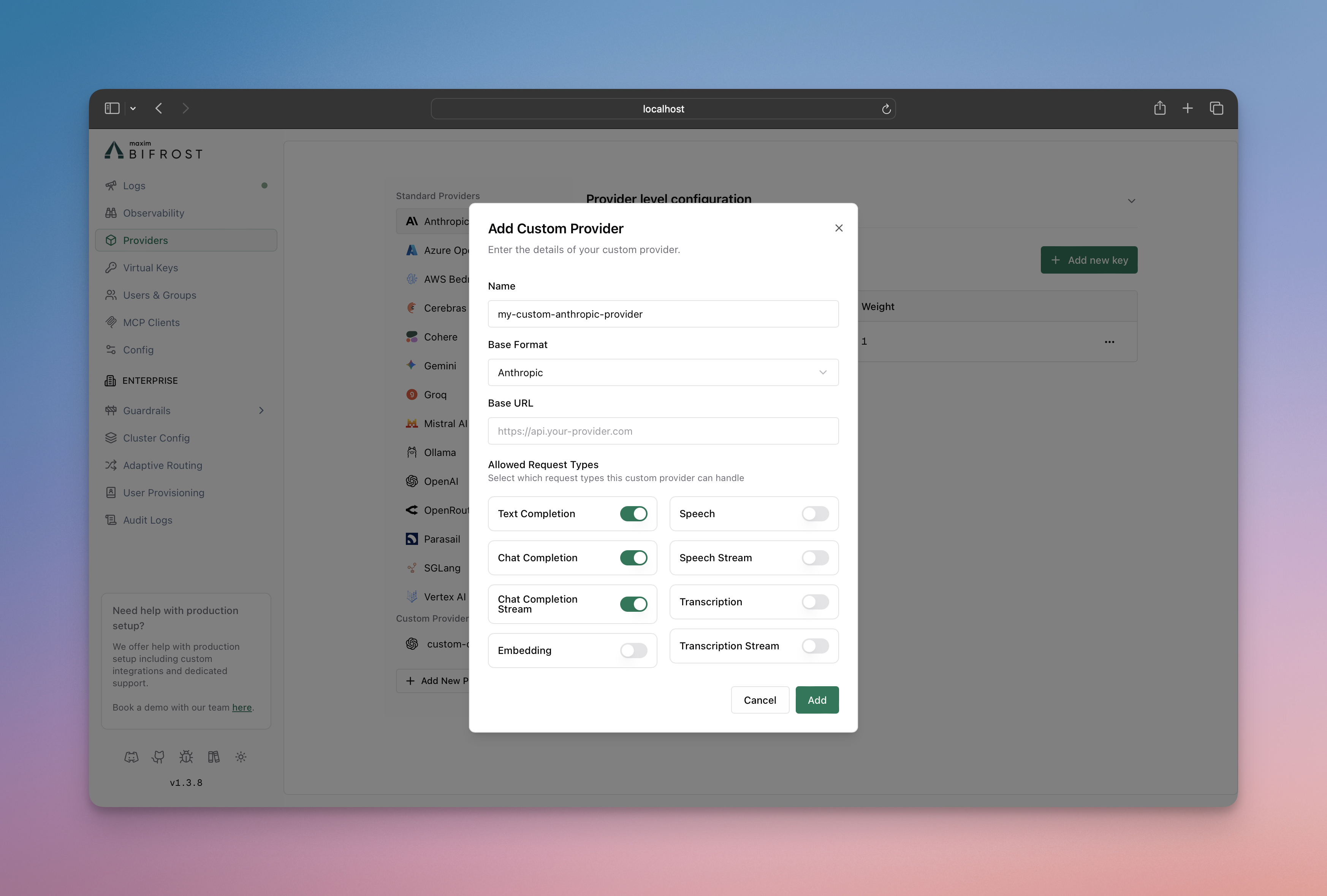 1. Go to **Providers** in the sidebar and click **Add New Provider**.
2. Name the provider `azure-foundry` (or similar).
3. Set **Base Format** to **OpenAI**.
4. Set **Base URL** to `https://.ai.azure.com/openai`.
5. Under **Allowed Request Types**, toggle on **Responses** and **Responses Stream**.
6. Click the settings icon next to each and enter the full Azure AI Foundry Responses URL in **Custom Path or URL**:
`https://.ai.azure.com/api/projects//openai/v1/responses`
7. Add your Azure API key and save.
Refer to the API documentation for [Provider Keys Management](https://docs.getbifrost.ai/api-reference/providers/create-a-key-for-a-provider).
```json theme={null}
{
"providers": {
"azure-foundry": {
"keys": [
{
"name": "azure-foundry-key-1",
"value": "env.AZURE_API_KEY",
"models": ["*"],
"weight": 1.0
}
],
"network_config": {
"base_url": "https://.ai.azure.com/openai"
},
"custom_provider_config": {
"base_provider_type": "openai",
"allowed_requests": {
"responses": true,
"responses_stream": true
},
"request_path_overrides": {
"responses": "https://.ai.azure.com/api/projects//openai/v1/responses",
"responses_stream": "https://.ai.azure.com/api/projects//openai/v1/responses"
}
}
}
}
}
```
| Field | Type | Required | Description |
| ----------------------------------------------- | ------ | -------- | ------------------------------------------------------------------ |
| `custom_provider_config.base_provider_type` | string | Yes | Must be `openai` so requests are shaped as OpenAI-compatible calls |
| `custom_provider_config.allowed_requests` | object | No | Restricts this provider to only the request types you enable |
| `custom_provider_config.request_path_overrides` | object | No | Full URL per request type; bypasses `network_config.base_url` |
| `network_config.base_url` | string | No | Used for any request type without a full-URL override |
If you also want Chat Completions routed through this same custom provider instead of the native Azure provider, enable `chat_completion` / `chat_completion_stream` in `allowed_requests` and add matching entries in `request_path_overrides`. Otherwise, keep using the native Azure provider for Chat Completions and this custom provider only for Responses.
***
## Usage
Call the Responses endpoint using the `azure-foundry` custom provider and your model-router deployment name:
```bash theme={null}
curl -X POST http://localhost:8080/v1/responses \
-H "Content-Type: application/json" \
-d '{
"model": "azure-foundry/model-router",
"input": "Write a short haiku about gateways."
}'
```
If you need to inspect provider-specific extra parameters, enable [Send Back Raw Response](/providers/request-options#send-back-raw-response). If you do not want those raw bytes persisted in logs, also set [Store Raw Request/Response](/providers/request-options#store-raw-request/response).
***
## Limitations
* Chat Completions for model-router deployments works through the native Azure provider; no extra configuration is needed.
* Responses support for model-router requires the custom-provider workaround on this page until native support is added to the Azure provider.
* This page does not change Azure authentication or endpoint setup for the native Azure provider - see the [Azure provider guide](./azure) for that.
## Related docs
* [Azure](./azure)
* [Custom Providers](../custom-providers)
* [Request Options](/providers/request-options)
1. Go to **Providers** in the sidebar and click **Add New Provider**.
2. Name the provider `azure-foundry` (or similar).
3. Set **Base Format** to **OpenAI**.
4. Set **Base URL** to `https://.ai.azure.com/openai`.
5. Under **Allowed Request Types**, toggle on **Responses** and **Responses Stream**.
6. Click the settings icon next to each and enter the full Azure AI Foundry Responses URL in **Custom Path or URL**:
`https://.ai.azure.com/api/projects//openai/v1/responses`
7. Add your Azure API key and save.
Refer to the API documentation for [Provider Keys Management](https://docs.getbifrost.ai/api-reference/providers/create-a-key-for-a-provider).
```json theme={null}
{
"providers": {
"azure-foundry": {
"keys": [
{
"name": "azure-foundry-key-1",
"value": "env.AZURE_API_KEY",
"models": ["*"],
"weight": 1.0
}
],
"network_config": {
"base_url": "https://.ai.azure.com/openai"
},
"custom_provider_config": {
"base_provider_type": "openai",
"allowed_requests": {
"responses": true,
"responses_stream": true
},
"request_path_overrides": {
"responses": "https://.ai.azure.com/api/projects//openai/v1/responses",
"responses_stream": "https://.ai.azure.com/api/projects//openai/v1/responses"
}
}
}
}
}
```
| Field | Type | Required | Description |
| ----------------------------------------------- | ------ | -------- | ------------------------------------------------------------------ |
| `custom_provider_config.base_provider_type` | string | Yes | Must be `openai` so requests are shaped as OpenAI-compatible calls |
| `custom_provider_config.allowed_requests` | object | No | Restricts this provider to only the request types you enable |
| `custom_provider_config.request_path_overrides` | object | No | Full URL per request type; bypasses `network_config.base_url` |
| `network_config.base_url` | string | No | Used for any request type without a full-URL override |
If you also want Chat Completions routed through this same custom provider instead of the native Azure provider, enable `chat_completion` / `chat_completion_stream` in `allowed_requests` and add matching entries in `request_path_overrides`. Otherwise, keep using the native Azure provider for Chat Completions and this custom provider only for Responses.
***
## Usage
Call the Responses endpoint using the `azure-foundry` custom provider and your model-router deployment name:
```bash theme={null}
curl -X POST http://localhost:8080/v1/responses \
-H "Content-Type: application/json" \
-d '{
"model": "azure-foundry/model-router",
"input": "Write a short haiku about gateways."
}'
```
If you need to inspect provider-specific extra parameters, enable [Send Back Raw Response](/providers/request-options#send-back-raw-response). If you do not want those raw bytes persisted in logs, also set [Store Raw Request/Response](/providers/request-options#store-raw-request/response).
***
## Limitations
* Chat Completions for model-router deployments works through the native Azure provider; no extra configuration is needed.
* Responses support for model-router requires the custom-provider workaround on this page until native support is added to the Azure provider.
* This page does not change Azure authentication or endpoint setup for the native Azure provider - see the [Azure provider guide](./azure) for that.
## Related docs
* [Azure](./azure)
* [Custom Providers](../custom-providers)
* [Request Options](/providers/request-options)