> ## Documentation Index
> Fetch the complete documentation index at: https://docs.getbifrost.ai/llms.txt
> Use this file to discover all available pages before exploring further.
# Self-Hosted Decision Models
> Run Laya and Nimble decision models on your own infrastructure and serve them through Bifrost's /v1/decisions as custom TypeSafe providers.
## Overview
[Laya](https://github.com/NandhaKishorM/laya) and [Nimble](https://github.com/bespokelabsai/nimble) are open decision models you run yourself. Both serve TypeSafe's System One API (`POST /v1/systemone`), so you add each one as a [custom provider](/providers/custom-providers) on the **Typesafe** base format. They then work like any other decision model: on [`/v1/decisions`](/quickstart/gateway/decisions), on `/typesafe/v1/systemone`, and as the [Complexity Router](/features/complexity-router) classifier.
| | Laya | Nimble |
| - | - | - |
| **Runs as** | `laya-serve`, a local Python server | An SGLang server deployed on Modal |
| **Models** | `english`, `multilingual`, `typed-decisions` | `nimble-latest` |
| **Model listing** | No `/v1/models`: turn **List Models** off | Has `/v1/models`: leave it on |
| **Auth** | Optional bearer token (`LAYA_API_KEY`) | None on a public deployment |
| **Input** | Text only | Text only |
Running these models in Ollama? Use the [Ollama provider](/providers/supported-providers/ollama#6-decisions) instead; it needs no custom provider.
***
## Laya
### 1. Run the server
```bash theme={null}
pip install "laya[serve]"
laya-serve
```
It listens on `0.0.0.0:8000` and loads all three checkpoints at startup. Useful settings:
| Variable | Default | Purpose |
| - | - | - |
| `LAYA_PORT` | `8000` | Port to listen on |
| `LAYA_API_KEY` | unset | When set, every request must send `Authorization: Bearer ` |
| `LAYA_PRELOAD` | `1` | Load checkpoints at startup instead of on first use |
| `LAYA_MODELS` | all | Comma-separated checkpoints to preload |
| `LAYA_MAX_LOADED` | `2` | Checkpoints kept in memory, for those loaded on demand |
### 2. Add the provider
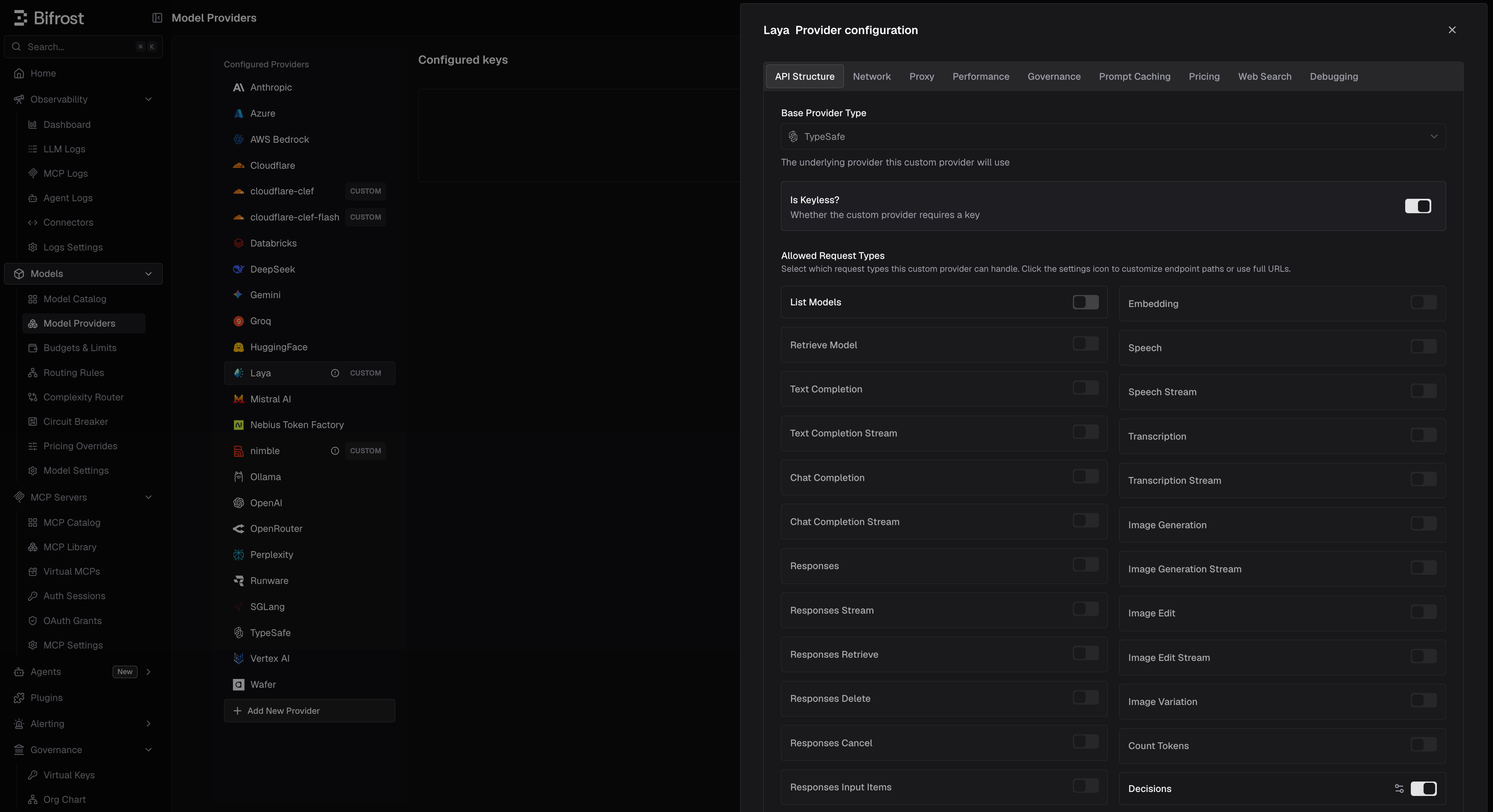 1. Navigate to **Models** > **Model Providers** and click **Add New Provider**.
2. In **Add Custom Provider**, set **Name** (for example `laya`) and **Base Format** to **Typesafe**.
3. Set **Base URL** to your server, for example `http://localhost:8000`.
4. Under **Allowed Request Types**, turn on **Decisions** and turn **List Models** off.
5. If `LAYA_API_KEY` is set, add a key with that value. Otherwise, turn on **Is Keyless?**.
6. In the key's **Allowed Models**, type the checkpoints you use: `english`, `multilingual`, `typed-decisions`.
7. Save.
```json theme={null}
{
"providers": {
"laya": {
"keys": [
{
"name": "laya-key",
"value": "env.LAYA_API_KEY",
"models": ["english", "multilingual", "typed-decisions"],
"weight": 1
}
],
"network_config": {
"base_url": "http://localhost:8000"
},
"custom_provider_config": {
"base_provider_type": "typesafe",
"allowed_requests": {
"list_models": false,
"decisions": true
}
}
}
}
}
```
Without `LAYA_API_KEY`, drop `keys` and add `"is_key_less": true` to `custom_provider_config`.
**Two settings make the provider look broken if missed.**
* **List Models off.** Laya has no `/v1/models`. With listing on, the provider is marked `list_models_failed` and the Complexity Router reports it as failing its checks.
* **Allowed Models set.** A key that allows every model, on a provider that lists none, makes Bifrost treat Laya as serving *every* model. Requests without a provider prefix, of any type, are then tried on Laya first.
### 3. Send a decision
```bash theme={null}
curl http://localhost:8080/v1/decisions \
-H "Content-Type: application/json" \
-H "x-bf-passthrough-extra-params: true" \
-d '{
"model": "laya/english",
"input": "Customer message: I was double charged and nobody replied to my two emails.",
"questions": [
{ "type": "predicate", "name": "is_frustrated", "instructions": "Is the customer frustrated?" }
],
"min_confidence": 0.8
}'
```
* **Choosing a checkpoint.** `english` reads 512 tokens, `multilingual` 1,024, and `typed-decisions` 1,024; longer input is truncated (see `usage.truncated`). Any other name without a slash, such as `auto`, lets Laya's router pick by language. A name with a slash is a `422`.
* **Laya-only fields** (`min_confidence`, `lang`, `max_len`, `task`) need the `x-bf-passthrough-extra-params: true` header on `/v1/decisions`. On `/typesafe/v1/systemone` they pass through without it.
* **Extra response fields** such as `answer_confidence`, `abstention`, and `routing` are listed under [Provider-Specific Fields](/quickstart/gateway/decisions#provider-specific-fields). A server started with `LAYA_JEV_STRICT=1` leaves them out.
* **Images** are rejected with a `400` before the call, so a [fallback](/quickstart/gateway/decisions#fallbacks) can serve the request.
***
## Nimble
### 1. Run the server
Nimble is served by an SGLang deployment on Modal. Follow Nimble's [serving guide](https://github.com/bespokelabsai/nimble/blob/main/docs/MODAL_SERVING.md) to deploy your own, or try the public demo at `https://bespokelabs--nimble-sglang-nimble.us-west.modal.direct`, which needs no key.
### 2. Add the provider
1. Navigate to **Models** > **Model Providers** and click **Add New Provider**.
2. In **Add Custom Provider**, set **Name** (for example `laya`) and **Base Format** to **Typesafe**.
3. Set **Base URL** to your server, for example `http://localhost:8000`.
4. Under **Allowed Request Types**, turn on **Decisions** and turn **List Models** off.
5. If `LAYA_API_KEY` is set, add a key with that value. Otherwise, turn on **Is Keyless?**.
6. In the key's **Allowed Models**, type the checkpoints you use: `english`, `multilingual`, `typed-decisions`.
7. Save.
```json theme={null}
{
"providers": {
"laya": {
"keys": [
{
"name": "laya-key",
"value": "env.LAYA_API_KEY",
"models": ["english", "multilingual", "typed-decisions"],
"weight": 1
}
],
"network_config": {
"base_url": "http://localhost:8000"
},
"custom_provider_config": {
"base_provider_type": "typesafe",
"allowed_requests": {
"list_models": false,
"decisions": true
}
}
}
}
}
```
Without `LAYA_API_KEY`, drop `keys` and add `"is_key_less": true` to `custom_provider_config`.
**Two settings make the provider look broken if missed.**
* **List Models off.** Laya has no `/v1/models`. With listing on, the provider is marked `list_models_failed` and the Complexity Router reports it as failing its checks.
* **Allowed Models set.** A key that allows every model, on a provider that lists none, makes Bifrost treat Laya as serving *every* model. Requests without a provider prefix, of any type, are then tried on Laya first.
### 3. Send a decision
```bash theme={null}
curl http://localhost:8080/v1/decisions \
-H "Content-Type: application/json" \
-H "x-bf-passthrough-extra-params: true" \
-d '{
"model": "laya/english",
"input": "Customer message: I was double charged and nobody replied to my two emails.",
"questions": [
{ "type": "predicate", "name": "is_frustrated", "instructions": "Is the customer frustrated?" }
],
"min_confidence": 0.8
}'
```
* **Choosing a checkpoint.** `english` reads 512 tokens, `multilingual` 1,024, and `typed-decisions` 1,024; longer input is truncated (see `usage.truncated`). Any other name without a slash, such as `auto`, lets Laya's router pick by language. A name with a slash is a `422`.
* **Laya-only fields** (`min_confidence`, `lang`, `max_len`, `task`) need the `x-bf-passthrough-extra-params: true` header on `/v1/decisions`. On `/typesafe/v1/systemone` they pass through without it.
* **Extra response fields** such as `answer_confidence`, `abstention`, and `routing` are listed under [Provider-Specific Fields](/quickstart/gateway/decisions#provider-specific-fields). A server started with `LAYA_JEV_STRICT=1` leaves them out.
* **Images** are rejected with a `400` before the call, so a [fallback](/quickstart/gateway/decisions#fallbacks) can serve the request.
***
## Nimble
### 1. Run the server
Nimble is served by an SGLang deployment on Modal. Follow Nimble's [serving guide](https://github.com/bespokelabsai/nimble/blob/main/docs/MODAL_SERVING.md) to deploy your own, or try the public demo at `https://bespokelabs--nimble-sglang-nimble.us-west.modal.direct`, which needs no key.
### 2. Add the provider
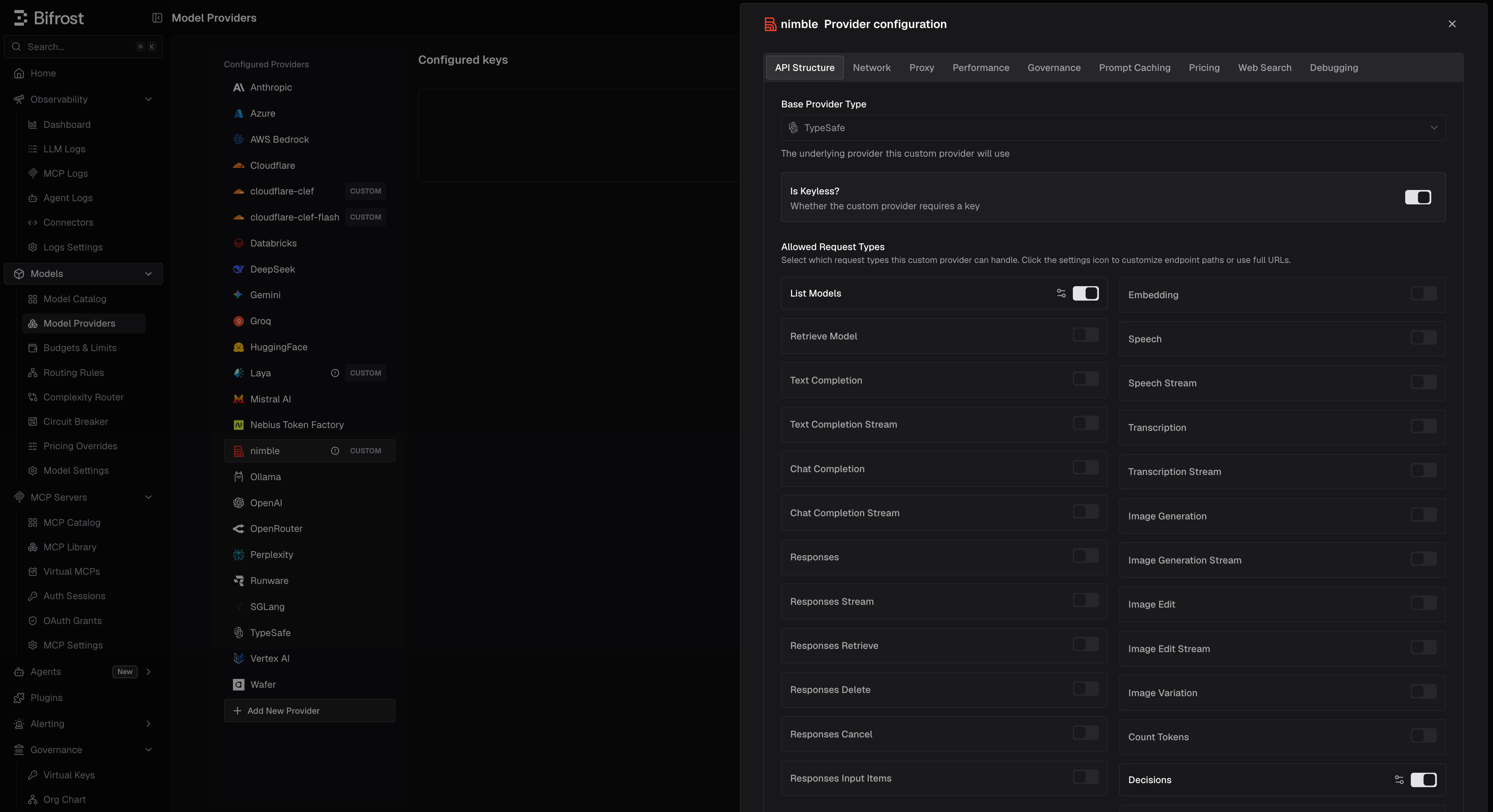 1. Navigate to **Models** > **Model Providers** and click **Add New Provider**.
2. In **Add Custom Provider**, set **Name** (for example `nimble`) and **Base Format** to **Typesafe**.
3. Set **Base URL** to your deployment's URL.
4. Under **Allowed Request Types**, turn on **Decisions** and **List Models**.
5. Turn on **Is Keyless?**. For a private deployment, send its auth headers through **Network** > **Extra Headers** instead.
6. Save.
```json theme={null}
{
"providers": {
"nimble": {
"network_config": {
"base_url": "https://bespokelabs--nimble-sglang-nimble.us-west.modal.direct"
},
"custom_provider_config": {
"base_provider_type": "typesafe",
"is_key_less": true,
"allowed_requests": {
"list_models": true,
"decisions": true
}
}
}
}
}
```
### 3. Send a decision
```bash theme={null}
curl http://localhost:8080/v1/decisions \
-H "Content-Type: application/json" \
-d '{
"model": "nimble/nimble-latest",
"input": "Customer message: I was double charged and nobody replied to my two emails.",
"questions": [
{ "type": "predicate", "name": "is_frustrated", "instructions": "Is the customer frustrated?" }
]
}'
```
* **Limits.** Choice and score questions take 2-26 options, a request takes at most 64 questions, and each question's prompt must fit in 8,192 tokens. Oversized prompts are rejected, not truncated.
* **Question names matter.** Nimble keeps names and option keys in its prompt, so renaming a question can change its answer.
* **Cold starts.** A Modal deployment scales to zero after 2 idle minutes and takes a few minutes to wake, returning `503` meanwhile. Under load it can return `529`; retry.
* **Images** are rejected with a `400` before the call.
***
## Pricing
A custom provider has no price in Bifrost's model catalog, so its decisions cost `$0` until you add a [pricing override](/providers/custom-pricing):
* **Scope**: the provider (optionally one key)
* **Match**: **Exact** on a model name such as `english`, or **Wildcard** for several
* **Request types**: `decisions`
* **Rates**: `input_cost_per_token_decisions` and `output_cost_per_token_decisions`, in **USD per token**. For \$0.50 per million input tokens, set `0.0000005`.
Laya reports 0 output tokens, so only its input rate is charged. Nimble reports one output token per question plus one.
```json theme={null}
{
"governance": {
"pricing_overrides": [
{
"id": "8a1f6c2e-3b7d-4e59-9c1a-2f4d6e8b0a13",
"name": "Laya english",
"scope_kind": "provider",
"provider_id": "laya",
"match_type": "exact",
"pattern": "english",
"request_types": ["decisions"],
"pricing_patch": "{\"input_cost_per_token_decisions\":0.0000005}"
}
]
}
}
```
***
## Using them in the Complexity Router
Pick the custom provider as the decision model in [**Complexity Router**](/features/complexity-router#choosing-the-decision-model). Nimble's models come from its listing. For Laya, which lists none, the UI offers the known checkpoints, starting on `english` when the provider is named after Laya.
* **Keep guidance short on Laya.** All tier guidance is sent on every request, and `english` reads only 512 tokens. `multilingual` reads 1,024.
* **Keep the model loaded.** A request that waits for a model to load goes unclassified once it passes `decision.timeout` (`1.5s` by default). For Laya, keep `LAYA_PRELOAD=1` with every checkpoint you use, or raise `LAYA_MAX_LOADED`. For Nimble on Modal, keep the deployment warm, since waking takes minutes.
***
## Troubleshooting
| Symptom | Cause | Fix |
| - | - | - |
| Laya shows `list_models_failed`, and the Complexity Router says it is failing its checks | List Models is on | Turn **List Models** off |
| Unrelated requests (chat, embeddings) go to Laya | The key allows every model | List the checkpoints in **Allowed Models** |
| `401` from Laya | `LAYA_API_KEY` is set but the provider is keyless, or the key differs | Add a key with the same value |
| `422` from Laya | The model name contains a slash | Use a checkpoint name, or a name like `auto` |
| `min_confidence` has no effect | Extra params are not passed through | Add `x-bf-passthrough-extra-params: true` |
| `503` from Nimble | The deployment is waking from idle | Wait and retry |
| Cost is `$0` | No pricing override | Add a `decisions` override |
***
## Next Steps
* **[Decisions](/quickstart/gateway/decisions)** - Request and response format
* **[TypeSafe](/providers/supported-providers/typesafe)** - How System One requests are converted
* **[Complexity Router](/features/complexity-router)** - Route requests by complexity with a decision model
* **[Custom Pricing](/providers/custom-pricing)** - Price self-hosted models
This documentation is built and hosted on [Mintlify](https://mintlify.com), a developer documentation platform.
1. Navigate to **Models** > **Model Providers** and click **Add New Provider**.
2. In **Add Custom Provider**, set **Name** (for example `nimble`) and **Base Format** to **Typesafe**.
3. Set **Base URL** to your deployment's URL.
4. Under **Allowed Request Types**, turn on **Decisions** and **List Models**.
5. Turn on **Is Keyless?**. For a private deployment, send its auth headers through **Network** > **Extra Headers** instead.
6. Save.
```json theme={null}
{
"providers": {
"nimble": {
"network_config": {
"base_url": "https://bespokelabs--nimble-sglang-nimble.us-west.modal.direct"
},
"custom_provider_config": {
"base_provider_type": "typesafe",
"is_key_less": true,
"allowed_requests": {
"list_models": true,
"decisions": true
}
}
}
}
}
```
### 3. Send a decision
```bash theme={null}
curl http://localhost:8080/v1/decisions \
-H "Content-Type: application/json" \
-d '{
"model": "nimble/nimble-latest",
"input": "Customer message: I was double charged and nobody replied to my two emails.",
"questions": [
{ "type": "predicate", "name": "is_frustrated", "instructions": "Is the customer frustrated?" }
]
}'
```
* **Limits.** Choice and score questions take 2-26 options, a request takes at most 64 questions, and each question's prompt must fit in 8,192 tokens. Oversized prompts are rejected, not truncated.
* **Question names matter.** Nimble keeps names and option keys in its prompt, so renaming a question can change its answer.
* **Cold starts.** A Modal deployment scales to zero after 2 idle minutes and takes a few minutes to wake, returning `503` meanwhile. Under load it can return `529`; retry.
* **Images** are rejected with a `400` before the call.
***
## Pricing
A custom provider has no price in Bifrost's model catalog, so its decisions cost `$0` until you add a [pricing override](/providers/custom-pricing):
* **Scope**: the provider (optionally one key)
* **Match**: **Exact** on a model name such as `english`, or **Wildcard** for several
* **Request types**: `decisions`
* **Rates**: `input_cost_per_token_decisions` and `output_cost_per_token_decisions`, in **USD per token**. For \$0.50 per million input tokens, set `0.0000005`.
Laya reports 0 output tokens, so only its input rate is charged. Nimble reports one output token per question plus one.
```json theme={null}
{
"governance": {
"pricing_overrides": [
{
"id": "8a1f6c2e-3b7d-4e59-9c1a-2f4d6e8b0a13",
"name": "Laya english",
"scope_kind": "provider",
"provider_id": "laya",
"match_type": "exact",
"pattern": "english",
"request_types": ["decisions"],
"pricing_patch": "{\"input_cost_per_token_decisions\":0.0000005}"
}
]
}
}
```
***
## Using them in the Complexity Router
Pick the custom provider as the decision model in [**Complexity Router**](/features/complexity-router#choosing-the-decision-model). Nimble's models come from its listing. For Laya, which lists none, the UI offers the known checkpoints, starting on `english` when the provider is named after Laya.
* **Keep guidance short on Laya.** All tier guidance is sent on every request, and `english` reads only 512 tokens. `multilingual` reads 1,024.
* **Keep the model loaded.** A request that waits for a model to load goes unclassified once it passes `decision.timeout` (`1.5s` by default). For Laya, keep `LAYA_PRELOAD=1` with every checkpoint you use, or raise `LAYA_MAX_LOADED`. For Nimble on Modal, keep the deployment warm, since waking takes minutes.
***
## Troubleshooting
| Symptom | Cause | Fix |
| - | - | - |
| Laya shows `list_models_failed`, and the Complexity Router says it is failing its checks | List Models is on | Turn **List Models** off |
| Unrelated requests (chat, embeddings) go to Laya | The key allows every model | List the checkpoints in **Allowed Models** |
| `401` from Laya | `LAYA_API_KEY` is set but the provider is keyless, or the key differs | Add a key with the same value |
| `422` from Laya | The model name contains a slash | Use a checkpoint name, or a name like `auto` |
| `min_confidence` has no effect | Extra params are not passed through | Add `x-bf-passthrough-extra-params: true` |
| `503` from Nimble | The deployment is waking from idle | Wait and retry |
| Cost is `$0` | No pricing override | Add a `decisions` override |
***
## Next Steps
* **[Decisions](/quickstart/gateway/decisions)** - Request and response format
* **[TypeSafe](/providers/supported-providers/typesafe)** - How System One requests are converted
* **[Complexity Router](/features/complexity-router)** - Route requests by complexity with a decision model
* **[Custom Pricing](/providers/custom-pricing)** - Price self-hosted models
This documentation is built and hosted on [Mintlify](https://mintlify.com), a developer documentation platform.