> ## Documentation Index
> Fetch the complete documentation index at: https://docs.getbifrost.ai/llms.txt
> Use this file to discover all available pages before exploring further.
# Plugin Sequencing
> Control the execution order of custom plugins relative to Bifrost's built-in plugins using placement groups and ordering.
## Overview
When you have multiple plugins - both built-in and custom - the order in which they execute matters. A logging plugin should capture the final request, an auth plugin should validate before anything else runs, and a response transformer should run after the provider returns data.
Plugin sequencing lets you control **where** your custom plugins execute relative to Bifrost's built-in plugins (telemetry, logging, governance, etc.) and **in what order** they execute relative to each other.
***
## How it works
Bifrost organizes plugins into three **placement groups** that execute in a fixed order:
```mermaid theme={null}
graph LR
A["Pre-builtin plugins"] --> B["Built-in plugins"]
B --> C["Post-builtin plugins"]
```
| Placement Group | Pre-hooks (request) | Post-hooks (response) |
| --------------- | ------------------- | --------------------- |
| `pre_builtin` | Runs **first** | Runs **last** |
| `builtin` | Runs **second** | Runs **second** |
| `post_builtin` | Runs **third** | Runs **first** |
Post-hooks execute in **reverse order** of pre-hooks (LIFO pattern). This means a `pre_builtin` plugin's `PreLLMHook` runs first, but its `PostLLMHook` runs last - ensuring proper cleanup and state unwinding.
### Routing layer order (PreRequestHook)
`PreRequestHook` is the per-request **routing phase**. All routing-capable plugins fire here in registration order, and each one sees the routing decisions of those that ran before it. Built-in routing plugins are sequenced as follows within the `builtin` group:
| Order | Plugin | Role |
| -------- | ---------------------------------- | --------------------------------------------------------------------------------------------------------------------------- |
| 4 | governance | Routing rules (CEL) + VK-scoped weighted load balancing |
| Higher | adaptive-loadbalancer (Enterprise) | Performance-based provider selection across the model catalog |
| 9 (last) | model-catalog-resolver | **Final fallback** — fills in `req.Provider` from the model catalog for unprefixed models when no earlier plugin picked one |
The resolver runs last so CEL routing rules can match on `provider == ""` (the unresolved state) and earlier plugins always get the canonical bare model. After `PreRequestHook` returns, the core validates that `req.Provider` is non-empty — an unresolvable request returns a 400 with a clear error.
Custom routing plugins can slot into this chain via `placement` + `order` like any other plugin. Place them in `pre_builtin` to override governance, or `post_builtin` to act as a custom fallback after all built-ins.
### Ordering within a group
Within each placement group, plugins are sorted by their `order` value (lower executes earlier). Plugins with the same order preserve their registration order.
**Example:** Three custom plugins configured as:
| Plugin | Placement | Order | Pre-hook runs | Post-hook runs |
| ------------------ | -------------- | ----- | ------------- | -------------- |
| auth-validator | `pre_builtin` | 0 | 1st | 5th (last) |
| request-enricher | `pre_builtin` | 1 | 2nd | 4th |
| *Built-in plugins* | - | - | 3rd | 3rd |
| response-logger | `post_builtin` | 0 | 4th | 2nd |
| analytics | `post_builtin` | 1 | 5th (last) | 1st |
***
## Configuration
1. Navigate to the **Plugins** page in the sidebar
2. Click the **Edit Plugin Sequence** button (appears when you have at least one custom plugin installed)
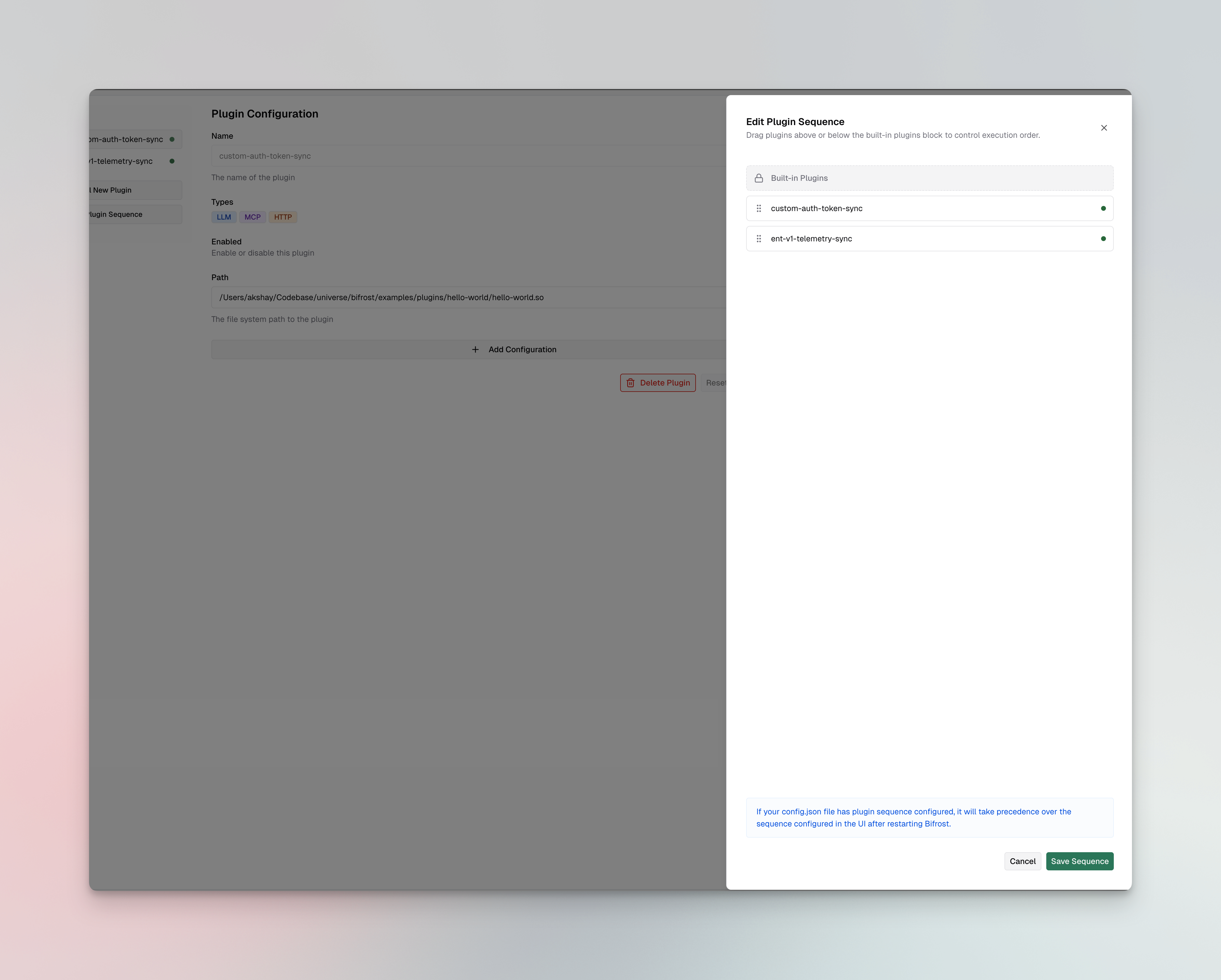 3. **Drag** custom plugins above or below the **Built-in Plugins** block:
* Plugins **above** the block get `pre_builtin` placement
* Plugins **below** the block get `post_builtin` placement
4. The order within each group is determined by position (top = lowest order value)
5. Click **Save Sequence** to apply the changes
If your `config.json` file has plugin sequence configured, it will take precedence over the sequence configured in the UI after restarting Bifrost.
Update a plugin's placement and order using the update endpoint:
```bash theme={null}
curl -X PUT http://localhost:8080/api/plugins/my-plugin \
-H "Content-Type: application/json" \
-d '{
"enabled": true,
"path": "/path/to/my-plugin.so",
"placement": "pre_builtin",
"order": 0
}'
```
**Response:**
```json theme={null}
{
"message": "Plugin updated successfully",
"plugin": {
"name": "my-plugin",
"enabled": true,
"isCustom": true,
"path": "/path/to/my-plugin.so",
"placement": "pre_builtin",
"order": 0,
"status": {
"status": "active"
}
}
}
```
You can also set placement when creating a plugin:
```bash theme={null}
curl -X POST http://localhost:8080/api/plugins \
-H "Content-Type: application/json" \
-d '{
"name": "my-plugin",
"enabled": true,
"path": "/path/to/my-plugin.so",
"placement": "pre_builtin",
"order": 0
}'
```
Set `placement` and `order` on each plugin in the `plugins` array:
```json theme={null}
{
"plugins": [
{
"name": "auth-validator",
"enabled": true,
"path": "/plugins/auth-validator.so",
"placement": "pre_builtin",
"order": 0
},
{
"name": "request-enricher",
"enabled": true,
"path": "/plugins/request-enricher.so",
"placement": "pre_builtin",
"order": 1
},
{
"name": "response-logger",
"enabled": true,
"path": "/plugins/response-logger.so",
"placement": "post_builtin",
"order": 0
}
]
}
```
| Field | Type | Required | Default | Description |
| ----------- | ------- | -------- | -------------- | ------------------------------------------------------------------------------------------------------- |
| `placement` | string | No | `post_builtin` | `"pre_builtin"` or `"post_builtin"`. Controls whether the plugin runs before or after built-in plugins. |
| `order` | integer | No | `0` | Position within the placement group. Lower values execute earlier. |
***
## When to use each placement
### `pre_builtin` - run before built-in plugins
Use this when your plugin needs to:
* **Validate or authenticate** requests before any built-in processing
* **Enrich requests** with data that built-in plugins should see (e.g., injecting headers or metadata)
* **Short-circuit** requests before they reach governance checks or telemetry
### `post_builtin` (default) - run after built-in plugins
Use this when your plugin needs to:
* **Transform responses** after all built-in processing is complete
* **Log or analyze** the final request/response (after governance, telemetry, etc.)
* **Add custom headers** or modify the response before it reaches the client
When in doubt, use the default `post_builtin` placement. Most custom plugins - logging, analytics, response transformations - work best after built-in plugins have finished their processing.
***
## Next steps
* **[Writing a Go plugin](./writing-go-plugin)** - Build your first custom plugin with `PreRequestHook`, `PreLLMHook`, and `PostLLMHook`
* **[Writing a WASM plugin](./writing-wasm-plugin)** - Build a portable WASM plugin
* **[Plugin architecture](../architecture/core/plugins)** - Deep dive into the plugin lifecycle and hook execution model
3. **Drag** custom plugins above or below the **Built-in Plugins** block:
* Plugins **above** the block get `pre_builtin` placement
* Plugins **below** the block get `post_builtin` placement
4. The order within each group is determined by position (top = lowest order value)
5. Click **Save Sequence** to apply the changes
If your `config.json` file has plugin sequence configured, it will take precedence over the sequence configured in the UI after restarting Bifrost.
Update a plugin's placement and order using the update endpoint:
```bash theme={null}
curl -X PUT http://localhost:8080/api/plugins/my-plugin \
-H "Content-Type: application/json" \
-d '{
"enabled": true,
"path": "/path/to/my-plugin.so",
"placement": "pre_builtin",
"order": 0
}'
```
**Response:**
```json theme={null}
{
"message": "Plugin updated successfully",
"plugin": {
"name": "my-plugin",
"enabled": true,
"isCustom": true,
"path": "/path/to/my-plugin.so",
"placement": "pre_builtin",
"order": 0,
"status": {
"status": "active"
}
}
}
```
You can also set placement when creating a plugin:
```bash theme={null}
curl -X POST http://localhost:8080/api/plugins \
-H "Content-Type: application/json" \
-d '{
"name": "my-plugin",
"enabled": true,
"path": "/path/to/my-plugin.so",
"placement": "pre_builtin",
"order": 0
}'
```
Set `placement` and `order` on each plugin in the `plugins` array:
```json theme={null}
{
"plugins": [
{
"name": "auth-validator",
"enabled": true,
"path": "/plugins/auth-validator.so",
"placement": "pre_builtin",
"order": 0
},
{
"name": "request-enricher",
"enabled": true,
"path": "/plugins/request-enricher.so",
"placement": "pre_builtin",
"order": 1
},
{
"name": "response-logger",
"enabled": true,
"path": "/plugins/response-logger.so",
"placement": "post_builtin",
"order": 0
}
]
}
```
| Field | Type | Required | Default | Description |
| ----------- | ------- | -------- | -------------- | ------------------------------------------------------------------------------------------------------- |
| `placement` | string | No | `post_builtin` | `"pre_builtin"` or `"post_builtin"`. Controls whether the plugin runs before or after built-in plugins. |
| `order` | integer | No | `0` | Position within the placement group. Lower values execute earlier. |
***
## When to use each placement
### `pre_builtin` - run before built-in plugins
Use this when your plugin needs to:
* **Validate or authenticate** requests before any built-in processing
* **Enrich requests** with data that built-in plugins should see (e.g., injecting headers or metadata)
* **Short-circuit** requests before they reach governance checks or telemetry
### `post_builtin` (default) - run after built-in plugins
Use this when your plugin needs to:
* **Transform responses** after all built-in processing is complete
* **Log or analyze** the final request/response (after governance, telemetry, etc.)
* **Add custom headers** or modify the response before it reaches the client
When in doubt, use the default `post_builtin` placement. Most custom plugins - logging, analytics, response transformations - work best after built-in plugins have finished their processing.
***
## Next steps
* **[Writing a Go plugin](./writing-go-plugin)** - Build your first custom plugin with `PreRequestHook`, `PreLLMHook`, and `PostLLMHook`
* **[Writing a WASM plugin](./writing-wasm-plugin)** - Build a portable WASM plugin
* **[Plugin architecture](../architecture/core/plugins)** - Deep dive into the plugin lifecycle and hook execution model