> ## Documentation Index
> Fetch the complete documentation index at: https://docs.getbifrost.ai/llms.txt
> Use this file to discover all available pages before exploring further.
# OAuth 2.0 Authentication
> Admin-side OAuth 2.0 for MCP servers. Single shared token, automatic refresh, PKCE, dynamic client registration.
## Overview
`auth_type: "oauth"` covers **server-level OAuth**: the admin authenticates once during MCP client setup, Bifrost stores the resulting token, and every subsequent request to that MCP server uses the same token regardless of which caller hit Bifrost.
If you need each end-user to authenticate themselves (personal Notion workspace, personal GitHub repos, etc.), use [Per-User OAuth](./per-user-oauth) instead.
This auth type is only valid for **HTTP** and **SSE** connections.
What Bifrost handles for you:
* **Automatic token refresh** before expiration
* **PKCE** for public clients (no client secret)
* **Dynamic Client Registration** (RFC 7591)
* **OAuth discovery** from server URLs (`.well-known/oauth-authorization-server`, `.well-known/openid-configuration`)
* **Secure token storage** (encrypted at rest)
***
## OAuth flow
Bifrost implements the **Authorization Code** flow:
```mermaid theme={null}
sequenceDiagram
participant User as "Admin"
participant Bifrost
participant AuthServer as "OAuth Provider"
participant MCPServer as "MCP Server"
User->>Bifrost: Create MCP client (auth_type=oauth)
Bifrost-->>User: authorize_url
User->>AuthServer: Sign in and authorize
AuthServer-->>Bifrost: /api/oauth/callback?code=…&state=…
Bifrost->>AuthServer: Exchange code for token
AuthServer-->>Bifrost: access_token + refresh_token
Bifrost->>Bifrost: Encrypt and store
Bifrost->>MCPServer: Connect with Authorization: Bearer …
Bifrost-->>User: MCP client connected
```
***
## Configuration
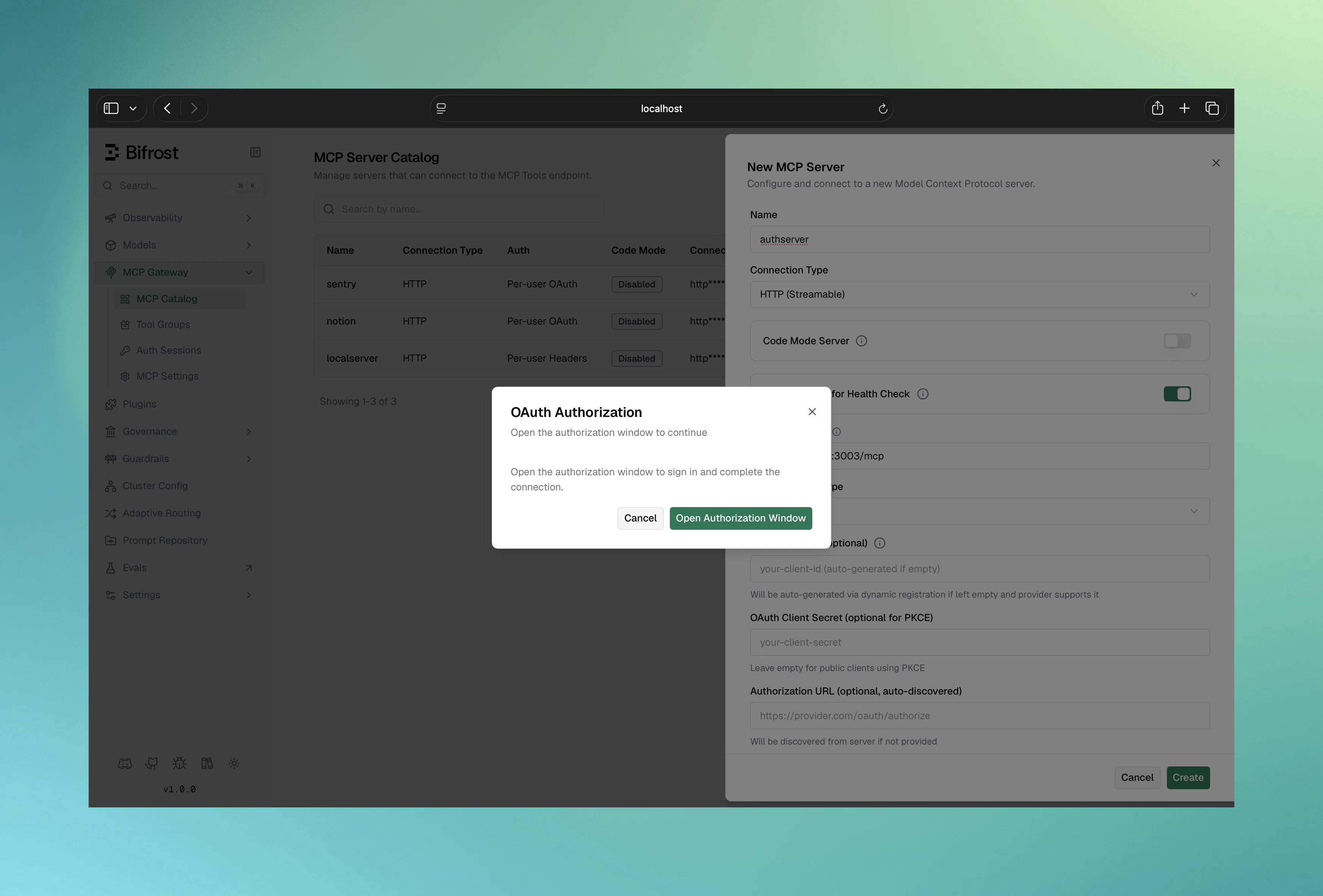
1. Navigate to **MCP Gateway** and click **New MCP Server**
2. Pick **HTTP** or **SSE** as the connection type, fill in the **Connection URL**
3. Set **Auth Type** to **OAuth 2.0**
4. Fill in the OAuth fields:
* **Client ID** (optional — leave blank for Dynamic Client Registration)
* **Client Secret** (optional — omit for PKCE public clients)
* **Authorize URL** (optional — leave blank to use OAuth discovery)
* **Token URL** (optional — same)
* **Scopes** (comma-separated)
5. Click **Create** — Bifrost runs the OAuth dance in a popup
6. Sign in and authorize on the upstream provider
7. The popup closes and the MCP client is persisted with the token
 ```bash theme={null}
curl -X POST http://localhost:8080/api/mcp/client \
-H "Content-Type: application/json" \
-d '{
"name": "authenticated-service",
"connection_type": "http",
"connection_string": "https://api.example.com/mcp",
"auth_type": "oauth",
"oauth_config": {
"client_id": "your-client-id",
"client_secret": "your-client-secret",
"authorize_url": "https://auth.example.com/oauth/authorize",
"token_url": "https://auth.example.com/oauth/token",
"scopes": ["mcp:read", "mcp:write"]
},
"tools_to_execute": ["*"]
}'
```
Response:
```json theme={null}
{
"status": "pending_oauth",
"message": "OAuth authorization required",
"oauth_config_id": "oauth_cfg_abc123",
"authorize_url": "https://auth.example.com/oauth/authorize?client_id=…&state=…",
"expires_at": "2026-05-30T12:30:00Z",
"mcp_client_id": "mcp_client_abc123"
}
```
Redirect the admin to `authorize_url`. After they authorize, the upstream redirects to `/api/oauth/callback`, Bifrost exchanges the code for tokens, and you finalize the client:
```bash theme={null}
curl -X POST http://localhost:8080/api/mcp/client/mcp_client_abc123/complete-oauth
```
OAuth-based MCP clients are configured through the dashboard or API rather than file-based config, because the create call returns `pending_oauth` and needs an interactive authorize step. If you want a fully declarative setup, run the create + complete-oauth dance once via API, then check the resulting `oauth_config_id` into your config:
```json theme={null}
{
"mcp": {
"client_configs": [
{
"name": "authenticated-service",
"connection_type": "http",
"connection_string": "https://api.example.com/mcp",
"auth_type": "oauth",
"oauth_config_id": "oauth_cfg_abc123",
"tools_to_execute": ["*"]
}
]
}
}
```
The OAuth credentials themselves live in the encrypted `oauth_configs` table — they are not represented in `config.json`. Rotate them through the dashboard or API; see [Token management](#token-management).
***
## PKCE for public clients
For applications without a client secret, omit `client_secret` and Bifrost will automatically generate PKCE code verifiers:
```json theme={null}
{
"oauth_config": {
"client_id": "your-public-client-id",
"authorize_url": "https://auth.example.com/oauth/authorize",
"token_url": "https://auth.example.com/oauth/token",
"scopes": ["mcp:read"]
}
}
```
***
## Dynamic Client Registration (RFC 7591)
If your OAuth provider supports DCR, omit `client_id` and `client_secret` and provide a `registration_url` (or just a `server_url` for discovery):
```json theme={null}
{
"oauth_config": {
"registration_url": "https://auth.example.com/oauth/register",
"server_url": "https://api.example.com",
"scopes": ["mcp:read", "mcp:write"]
}
}
```
Bifrost will:
1. Discover OAuth endpoints from `server_url` (if needed)
2. Register a new client via `registration_url`
3. Continue with the standard authorize / token exchange flow
The `redirect_uri` Bifrost registers with the upstream provider is locked to Bifrost's current public URL (`mcp_external_client_url`, or the request `Host` header if unset). If you change Bifrost's public URL later, the upstream provider will reject the next authorize call with **"Invalid redirect URI"**. To recover, clear the stored client credentials for the affected MCP server so Bifrost re-runs DCR with the new URL.
***
## OAuth discovery
If only `client_id` and `server_url` are provided, Bifrost will probe in order:
1. `/.well-known/oauth-authorization-server` (RFC 8414)
2. `/.well-known/openid-configuration`
3. MCP server metadata returned by the server itself
```json theme={null}
{
"oauth_config": {
"client_id": "your-client-id",
"server_url": "https://api.example.com",
"scopes": ["mcp:read"]
}
}
```
***
## Token management
### Status
```bash theme={null}
curl http://localhost:8080/api/oauth/config/oauth_cfg_abc123/status
```
```json theme={null}
{
"id": "oauth_cfg_abc123",
"status": "authorized",
"created_at": "2026-05-20T10:00:00Z",
"expires_at": "2026-05-27T10:00:00Z",
"token_id": "oauth_token_xyz",
"token_expires_at": "2026-05-22T10:00:00Z",
"token_scopes": ["mcp:read", "mcp:write"]
}
```
Status values:
* `pending` — admin hasn't authorized yet
* `authorized` — token is valid and active
* `failed` — authorization failed or token is invalid
* `revoked` — the token was revoked (via DELETE); the config row is retained with no live token
### Automatic refresh
Bifrost refreshes access tokens automatically using the stored refresh token, in two layers:
* **In the background** — a worker periodically refreshes tokens that are about to expire, so active clients always have a valid token ready.
* **On use** — if a token is already expired when a request needs it, Bifrost refreshes it inline before forwarding the request.
Background refresh only runs while the MCP client is enabled. Disabling a client pauses it; on re-enable, the token is refreshed on first use. If a client stays disabled long enough for the provider to expire the idle refresh token, re-authorization is required.
### Rotation
The MCP client edit flow lets you rotate `client_id` / `client_secret` while preserving the same client ID. `connection_type`, `auth_type`, and `connection_string` are immutable after creation.
### Revoke
```bash theme={null}
curl -X DELETE http://localhost:8080/api/oauth/config/oauth_cfg_abc123
```
This deletes the stored token from Bifrost and marks the OAuth configuration `revoked` (the config row is kept, not deleted). Bifrost does **not** call the upstream provider's revocation endpoint — revoke at the provider's dashboard if you need the upstream token invalidated there.
***
## Provider snippets
### GitHub
```json theme={null}
{
"oauth_config": {
"client_id": "your-github-app-id",
"client_secret": "your-github-app-secret",
"authorize_url": "https://github.com/login/oauth/authorize",
"token_url": "https://github.com/login/oauth/access_token",
"scopes": ["repo", "user"]
}
}
```
1. GitHub → **Settings → Developer settings → OAuth Apps → New OAuth App**
2. **Homepage URL**: `https://your-bifrost-domain.com`
3. **Authorization callback URL**: `https://your-bifrost-domain.com/api/oauth/callback`
4. Copy **Client ID** and generate a **Client Secret**
5. Paste into the Bifrost config above
### Google
```json theme={null}
{
"oauth_config": {
"client_id": "your-google-client-id.apps.googleusercontent.com",
"client_secret": "your-google-client-secret",
"authorize_url": "https://accounts.google.com/o/oauth2/v2/auth",
"token_url": "https://oauth2.googleapis.com/token",
"scopes": ["openid", "email", "profile"]
}
}
```
1. [Google Cloud Console](https://console.cloud.google.com) → create a project
2. Configure the OAuth consent screen
3. Create an **OAuth 2.0 Client ID** (Web application)
4. Add `https://your-bifrost-domain.com/api/oauth/callback` to **Authorized redirect URIs**
5. Copy Client ID + Client Secret into the Bifrost config above
***
## Public URL configuration
The `redirect_uri` Bifrost registers and the consent URLs it builds are derived from the request `Host` header by default. Behind a reverse proxy, override them with:
* `mcp_external_client_url` — public base URL Bifrost uses both for the consent pages it surfaces and as the `redirect_uri` registered with upstream providers
See [Reverse Proxy configuration →](../../deployment-guides/config-json/client#reverse-proxy) for the full reference.
**Changing `mcp_external_client_url` after an upstream provider has been registered breaks already-authorized clients.** Upstream providers lock the `redirect_uri` to whatever was registered during DCR. To recover, clear the stored OAuth client credentials so Bifrost re-registers with the new URL.
***
## Troubleshooting
* Ensure `auth_type` is exactly `"oauth"`
* Confirm `oauth_config` is on the request body
* Provide `authorize_url` or a `server_url` Bifrost can discover from
* Check that the refresh token is still valid (some providers expire refresh tokens after long idle)
* If the client was disabled for a long stretch, background refresh was paused for it — the refresh token may have expired at the provider in the meantime
* Verify scopes are still sufficient
* Re-authorize: `DELETE /api/oauth/config/{id}` then create a new client
* Confirm Bifrost is reachable at the registered redirect URI (DNS, firewall, reverse-proxy headers)
* Check `mcp_external_client_url` matches what was registered upstream
* Look at Bifrost logs for `oauth` errors
You changed Bifrost's public URL after the upstream client was registered. Clear the stored credentials so Bifrost re-runs DCR with the new URL.
***
## API reference
| Endpoint | Method | Purpose |
| -------------------------------------------- | ------ | --------------------------------------------------------------- |
| `/api/mcp/client` | POST | Create MCP client; returns `pending_oauth` + `authorize_url` |
| `/api/mcp/client/{id}/complete-oauth` | POST | Finalize after upstream redirect lands on `/api/oauth/callback` |
| `/api/oauth/callback` | GET | Upstream provider redirects here; handled internally |
| `/api/oauth/config/{oauth_config_id}/status` | GET | Current OAuth config status + token metadata |
| `/api/oauth/config/{oauth_config_id}` | DELETE | Revoke token + remove OAuth config |
***
## Security notes
* Tokens are stored encrypted at rest (set `BIFROST_ENCRYPTION_KEY`)
* PKCE is enforced automatically for public clients
* The OAuth `state` parameter is verified server-side for CSRF protection
* Use HTTPS — most upstream providers refuse HTTP redirect URIs in production
* Request only the scopes your tools need
***
## Next Steps
* [Per-User OAuth](./per-user-oauth) — when each user should authenticate themselves
* [Headers](./headers) — when there's no OAuth, just a static key
* [MCP Sessions](../sessions) — per-user credential lifecycle (does not surface server-level OAuth)
```bash theme={null}
curl -X POST http://localhost:8080/api/mcp/client \
-H "Content-Type: application/json" \
-d '{
"name": "authenticated-service",
"connection_type": "http",
"connection_string": "https://api.example.com/mcp",
"auth_type": "oauth",
"oauth_config": {
"client_id": "your-client-id",
"client_secret": "your-client-secret",
"authorize_url": "https://auth.example.com/oauth/authorize",
"token_url": "https://auth.example.com/oauth/token",
"scopes": ["mcp:read", "mcp:write"]
},
"tools_to_execute": ["*"]
}'
```
Response:
```json theme={null}
{
"status": "pending_oauth",
"message": "OAuth authorization required",
"oauth_config_id": "oauth_cfg_abc123",
"authorize_url": "https://auth.example.com/oauth/authorize?client_id=…&state=…",
"expires_at": "2026-05-30T12:30:00Z",
"mcp_client_id": "mcp_client_abc123"
}
```
Redirect the admin to `authorize_url`. After they authorize, the upstream redirects to `/api/oauth/callback`, Bifrost exchanges the code for tokens, and you finalize the client:
```bash theme={null}
curl -X POST http://localhost:8080/api/mcp/client/mcp_client_abc123/complete-oauth
```
OAuth-based MCP clients are configured through the dashboard or API rather than file-based config, because the create call returns `pending_oauth` and needs an interactive authorize step. If you want a fully declarative setup, run the create + complete-oauth dance once via API, then check the resulting `oauth_config_id` into your config:
```json theme={null}
{
"mcp": {
"client_configs": [
{
"name": "authenticated-service",
"connection_type": "http",
"connection_string": "https://api.example.com/mcp",
"auth_type": "oauth",
"oauth_config_id": "oauth_cfg_abc123",
"tools_to_execute": ["*"]
}
]
}
}
```
The OAuth credentials themselves live in the encrypted `oauth_configs` table — they are not represented in `config.json`. Rotate them through the dashboard or API; see [Token management](#token-management).
***
## PKCE for public clients
For applications without a client secret, omit `client_secret` and Bifrost will automatically generate PKCE code verifiers:
```json theme={null}
{
"oauth_config": {
"client_id": "your-public-client-id",
"authorize_url": "https://auth.example.com/oauth/authorize",
"token_url": "https://auth.example.com/oauth/token",
"scopes": ["mcp:read"]
}
}
```
***
## Dynamic Client Registration (RFC 7591)
If your OAuth provider supports DCR, omit `client_id` and `client_secret` and provide a `registration_url` (or just a `server_url` for discovery):
```json theme={null}
{
"oauth_config": {
"registration_url": "https://auth.example.com/oauth/register",
"server_url": "https://api.example.com",
"scopes": ["mcp:read", "mcp:write"]
}
}
```
Bifrost will:
1. Discover OAuth endpoints from `server_url` (if needed)
2. Register a new client via `registration_url`
3. Continue with the standard authorize / token exchange flow
The `redirect_uri` Bifrost registers with the upstream provider is locked to Bifrost's current public URL (`mcp_external_client_url`, or the request `Host` header if unset). If you change Bifrost's public URL later, the upstream provider will reject the next authorize call with **"Invalid redirect URI"**. To recover, clear the stored client credentials for the affected MCP server so Bifrost re-runs DCR with the new URL.
***
## OAuth discovery
If only `client_id` and `server_url` are provided, Bifrost will probe in order:
1. `/.well-known/oauth-authorization-server` (RFC 8414)
2. `/.well-known/openid-configuration`
3. MCP server metadata returned by the server itself
```json theme={null}
{
"oauth_config": {
"client_id": "your-client-id",
"server_url": "https://api.example.com",
"scopes": ["mcp:read"]
}
}
```
***
## Token management
### Status
```bash theme={null}
curl http://localhost:8080/api/oauth/config/oauth_cfg_abc123/status
```
```json theme={null}
{
"id": "oauth_cfg_abc123",
"status": "authorized",
"created_at": "2026-05-20T10:00:00Z",
"expires_at": "2026-05-27T10:00:00Z",
"token_id": "oauth_token_xyz",
"token_expires_at": "2026-05-22T10:00:00Z",
"token_scopes": ["mcp:read", "mcp:write"]
}
```
Status values:
* `pending` — admin hasn't authorized yet
* `authorized` — token is valid and active
* `failed` — authorization failed or token is invalid
* `revoked` — the token was revoked (via DELETE); the config row is retained with no live token
### Automatic refresh
Bifrost refreshes access tokens automatically using the stored refresh token, in two layers:
* **In the background** — a worker periodically refreshes tokens that are about to expire, so active clients always have a valid token ready.
* **On use** — if a token is already expired when a request needs it, Bifrost refreshes it inline before forwarding the request.
Background refresh only runs while the MCP client is enabled. Disabling a client pauses it; on re-enable, the token is refreshed on first use. If a client stays disabled long enough for the provider to expire the idle refresh token, re-authorization is required.
### Rotation
The MCP client edit flow lets you rotate `client_id` / `client_secret` while preserving the same client ID. `connection_type`, `auth_type`, and `connection_string` are immutable after creation.
### Revoke
```bash theme={null}
curl -X DELETE http://localhost:8080/api/oauth/config/oauth_cfg_abc123
```
This deletes the stored token from Bifrost and marks the OAuth configuration `revoked` (the config row is kept, not deleted). Bifrost does **not** call the upstream provider's revocation endpoint — revoke at the provider's dashboard if you need the upstream token invalidated there.
***
## Provider snippets
### GitHub
```json theme={null}
{
"oauth_config": {
"client_id": "your-github-app-id",
"client_secret": "your-github-app-secret",
"authorize_url": "https://github.com/login/oauth/authorize",
"token_url": "https://github.com/login/oauth/access_token",
"scopes": ["repo", "user"]
}
}
```
1. GitHub → **Settings → Developer settings → OAuth Apps → New OAuth App**
2. **Homepage URL**: `https://your-bifrost-domain.com`
3. **Authorization callback URL**: `https://your-bifrost-domain.com/api/oauth/callback`
4. Copy **Client ID** and generate a **Client Secret**
5. Paste into the Bifrost config above
### Google
```json theme={null}
{
"oauth_config": {
"client_id": "your-google-client-id.apps.googleusercontent.com",
"client_secret": "your-google-client-secret",
"authorize_url": "https://accounts.google.com/o/oauth2/v2/auth",
"token_url": "https://oauth2.googleapis.com/token",
"scopes": ["openid", "email", "profile"]
}
}
```
1. [Google Cloud Console](https://console.cloud.google.com) → create a project
2. Configure the OAuth consent screen
3. Create an **OAuth 2.0 Client ID** (Web application)
4. Add `https://your-bifrost-domain.com/api/oauth/callback` to **Authorized redirect URIs**
5. Copy Client ID + Client Secret into the Bifrost config above
***
## Public URL configuration
The `redirect_uri` Bifrost registers and the consent URLs it builds are derived from the request `Host` header by default. Behind a reverse proxy, override them with:
* `mcp_external_client_url` — public base URL Bifrost uses both for the consent pages it surfaces and as the `redirect_uri` registered with upstream providers
See [Reverse Proxy configuration →](../../deployment-guides/config-json/client#reverse-proxy) for the full reference.
**Changing `mcp_external_client_url` after an upstream provider has been registered breaks already-authorized clients.** Upstream providers lock the `redirect_uri` to whatever was registered during DCR. To recover, clear the stored OAuth client credentials so Bifrost re-registers with the new URL.
***
## Troubleshooting
* Ensure `auth_type` is exactly `"oauth"`
* Confirm `oauth_config` is on the request body
* Provide `authorize_url` or a `server_url` Bifrost can discover from
* Check that the refresh token is still valid (some providers expire refresh tokens after long idle)
* If the client was disabled for a long stretch, background refresh was paused for it — the refresh token may have expired at the provider in the meantime
* Verify scopes are still sufficient
* Re-authorize: `DELETE /api/oauth/config/{id}` then create a new client
* Confirm Bifrost is reachable at the registered redirect URI (DNS, firewall, reverse-proxy headers)
* Check `mcp_external_client_url` matches what was registered upstream
* Look at Bifrost logs for `oauth` errors
You changed Bifrost's public URL after the upstream client was registered. Clear the stored credentials so Bifrost re-runs DCR with the new URL.
***
## API reference
| Endpoint | Method | Purpose |
| -------------------------------------------- | ------ | --------------------------------------------------------------- |
| `/api/mcp/client` | POST | Create MCP client; returns `pending_oauth` + `authorize_url` |
| `/api/mcp/client/{id}/complete-oauth` | POST | Finalize after upstream redirect lands on `/api/oauth/callback` |
| `/api/oauth/callback` | GET | Upstream provider redirects here; handled internally |
| `/api/oauth/config/{oauth_config_id}/status` | GET | Current OAuth config status + token metadata |
| `/api/oauth/config/{oauth_config_id}` | DELETE | Revoke token + remove OAuth config |
***
## Security notes
* Tokens are stored encrypted at rest (set `BIFROST_ENCRYPTION_KEY`)
* PKCE is enforced automatically for public clients
* The OAuth `state` parameter is verified server-side for CSRF protection
* Use HTTPS — most upstream providers refuse HTTP redirect URIs in production
* Request only the scopes your tools need
***
## Next Steps
* [Per-User OAuth](./per-user-oauth) — when each user should authenticate themselves
* [Headers](./headers) — when there's no OAuth, just a static key
* [MCP Sessions](../sessions) — per-user credential lifecycle (does not surface server-level OAuth)