> ## Documentation Index
> Fetch the complete documentation index at: https://docs.getbifrost.ai/llms.txt
> Use this file to discover all available pages before exploring further.
# No Authentication
> Connect to MCP servers that don't require any upstream credential.
## Overview
`auth_type: "none"` is the default. Use it for MCP servers that don't require any upstream authentication — public MCP services, local STDIO tools, internal services already protected at the network layer, etc.
This is also the only valid `auth_type` for STDIO connections; STDIO subprocesses inherit their environment from the spawning process and there is no per-call header to attach.
***
## When to use
* Public MCP servers with no auth
* Local STDIO tools (`@anthropic/mcp-filesystem`, etc.)
* Internal services already gated at the network or VPN layer
* Anything you'd hit with `curl` and no extra headers
If the upstream eventually adds a key, switch to [Headers](./headers) and refill the `headers` map. Note: `connection_type` and `auth_type` are immutable after creation — to change either, delete the MCP client and re-create it.
***
## Configuration
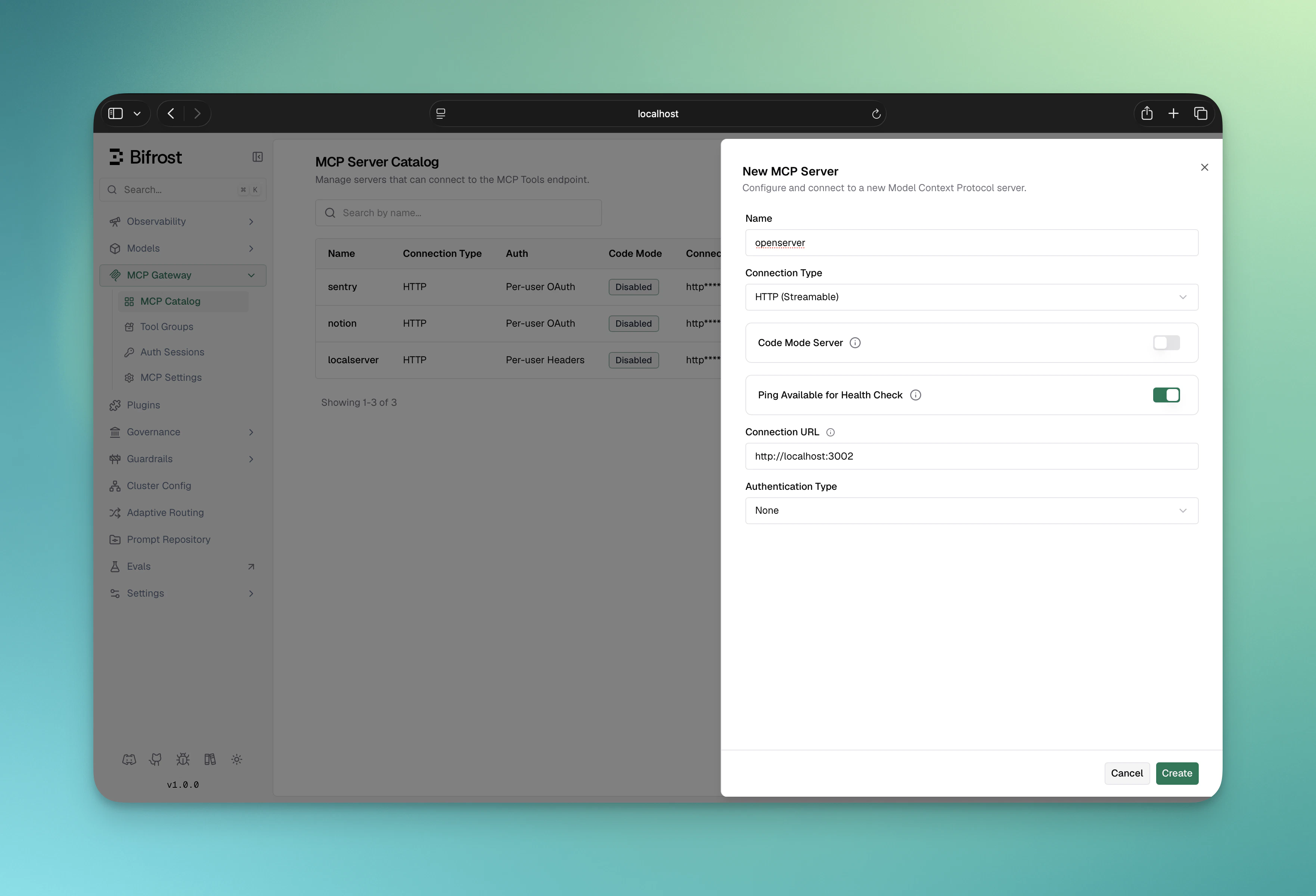
1. Navigate to **MCP Gateway** in the sidebar
2. Click **New MCP Server**
3. Pick a **Connection Type** (STDIO, HTTP, or SSE) and fill in the connection target
4. Leave **Auth Type** on **None** (the default)
5. Optionally configure `tools_to_execute` / `tools_to_auto_execute`
6. Click **Create**
 ```bash theme={null}
curl -X POST http://localhost:8080/api/mcp/client \
-H "Content-Type: application/json" \
-d '{
"name": "public-service",
"connection_type": "http",
"connection_string": "https://public-mcp.example.com/mcp",
"auth_type": "none",
"tools_to_execute": ["*"]
}'
```
Response:
```json theme={null}
{
"status": "success",
"message": "MCP client created"
}
```
```json theme={null}
{
"mcp": {
"client_configs": [
{
"name": "public-service",
"connection_type": "http",
"connection_string": "https://public-mcp.example.com/mcp",
"auth_type": "none",
"tools_to_execute": ["*"]
}
]
}
}
```
***
## STDIO example
STDIO connections must use `auth_type: "none"`:
1. **New MCP Server** → **Connection Type: STDIO**
2. Fill in **Command**, **Args** (comma-separated), and **Envs** (env-var names to pass through)
3. Auth Type stays on **None**
4. Click **Create**
```bash theme={null}
curl -X POST http://localhost:8080/api/mcp/client \
-H "Content-Type: application/json" \
-d '{
"name": "filesystem",
"connection_type": "stdio",
"stdio_config": {
"command": "npx",
"args": ["-y", "@anthropic/mcp-filesystem"],
"envs": ["HOME", "PATH"]
},
"auth_type": "none",
"tools_to_execute": ["*"]
}'
```
```json theme={null}
{
"mcp": {
"client_configs": [
{
"name": "filesystem",
"connection_type": "stdio",
"stdio_config": {
"command": "npx",
"args": ["-y", "@anthropic/mcp-filesystem"],
"envs": ["HOME", "PATH"]
},
"auth_type": "none",
"tools_to_execute": ["*"]
}
]
}
}
```
**Docker users:** STDIO connections won't work if the spawned command (e.g., `npx`, `python`) isn't installed in the container. For STDIO-based MCP servers, build a custom Docker image that includes the dependencies, or host the server separately and connect via HTTP/SSE.
***
## Next Steps
* [Headers](./headers) — when the upstream needs an API key
* [OAuth 2.0](./oauth) — for shared OAuth services
* [Connecting to MCP Servers](../connecting-to-servers) — connection-type details (STDIO, HTTP, SSE)
```bash theme={null}
curl -X POST http://localhost:8080/api/mcp/client \
-H "Content-Type: application/json" \
-d '{
"name": "public-service",
"connection_type": "http",
"connection_string": "https://public-mcp.example.com/mcp",
"auth_type": "none",
"tools_to_execute": ["*"]
}'
```
Response:
```json theme={null}
{
"status": "success",
"message": "MCP client created"
}
```
```json theme={null}
{
"mcp": {
"client_configs": [
{
"name": "public-service",
"connection_type": "http",
"connection_string": "https://public-mcp.example.com/mcp",
"auth_type": "none",
"tools_to_execute": ["*"]
}
]
}
}
```
***
## STDIO example
STDIO connections must use `auth_type: "none"`:
1. **New MCP Server** → **Connection Type: STDIO**
2. Fill in **Command**, **Args** (comma-separated), and **Envs** (env-var names to pass through)
3. Auth Type stays on **None**
4. Click **Create**
```bash theme={null}
curl -X POST http://localhost:8080/api/mcp/client \
-H "Content-Type: application/json" \
-d '{
"name": "filesystem",
"connection_type": "stdio",
"stdio_config": {
"command": "npx",
"args": ["-y", "@anthropic/mcp-filesystem"],
"envs": ["HOME", "PATH"]
},
"auth_type": "none",
"tools_to_execute": ["*"]
}'
```
```json theme={null}
{
"mcp": {
"client_configs": [
{
"name": "filesystem",
"connection_type": "stdio",
"stdio_config": {
"command": "npx",
"args": ["-y", "@anthropic/mcp-filesystem"],
"envs": ["HOME", "PATH"]
},
"auth_type": "none",
"tools_to_execute": ["*"]
}
]
}
}
```
**Docker users:** STDIO connections won't work if the spawned command (e.g., `npx`, `python`) isn't installed in the container. For STDIO-based MCP servers, build a custom Docker image that includes the dependencies, or host the server separately and connect via HTTP/SSE.
***
## Next Steps
* [Headers](./headers) — when the upstream needs an API key
* [OAuth 2.0](./oauth) — for shared OAuth services
* [Connecting to MCP Servers](../connecting-to-servers) — connection-type details (STDIO, HTTP, SSE)