> ## Documentation Index
> Fetch the complete documentation index at: https://docs.getbifrost.ai/llms.txt
> Use this file to discover all available pages before exploring further.
# CrowdStrike AIDR
> Integrate CrowdStrike AI Detection and Response with Bifrost Enterprise to inspect LLM inputs and outputs, block policy violations, redact sensitive content, and send AI security telemetry to AIDR.
## Overview
Bifrost Enterprise supports **CrowdStrike AI Detection and Response (AIDR)** as a third-party guardrail provider for LLM request and response traffic.
Use it when your organization already manages AI security policies in CrowdStrike and you want Bifrost to enforce those policies inline before prompts reach an LLM and before model responses reach users.
CrowdStrike owns the detection policy. Bifrost owns the gateway enforcement path: it selects when to call AIDR, sends the relevant AI traffic, then blocks or rewrites the Bifrost request/response based on AIDR's verdict.
**Streaming output:** When this profile is used in an `output` or `both` rule, Bifrost accumulates the stream until the model response is complete, then checks the full response. It does not check individual stream chunks. See [Streaming Output Guardrails](/enterprise/guardrails#streaming-output-guardrails) for details.
## When To Use It
CrowdStrike AIDR is useful for:
* Detecting and blocking prompt injection or jailbreak attempts
* Preventing sensitive data, credentials, PII, or custom entities from being sent to an LLM
* Redacting or defanging content when your AIDR policy returns transformed text
* Evaluating both input prompts and output completions with different AIDR policy rules
* Sending AI security findings and metadata into the CrowdStrike AIDR console
* Inspecting tool definitions, assistant tool calls, and tool results in chat-based agent flows
Bifrost follows the AIDR policy response. Detector findings alone do not block traffic unless AIDR returns `blocked: true`. If you want Bifrost to stop a request, configure the relevant AIDR policy rule action to block.
## Prerequisites
* Bifrost Enterprise with the guardrails plugin enabled
* A CrowdStrike Falcon tenant in a supported AIDR cloud: US-1, US-2, or EU-1
* An AIDR subscription: **AIDR for Workforce** or **AIDR for Agents**. For Bifrost gateway/application traffic, **AIDR for Agents** is the relevant subscription.
* A Falcon user with permission to manage AIDR collectors, typically the AIDR Admin role
* A CrowdStrike AIDR collector assigned to the policy you want Bifrost to enforce
* Network egress from Bifrost to the configured AIDR API URL over HTTPS
For CrowdStrike-side subscription, role, supported cloud, policy, and collector details, see the [CrowdStrike AIDR overview](https://aidr-docs.crowdstrike.com/docs/aidr/).
## Set Up The AIDR Collector
Before configuring Bifrost, create or open the CrowdStrike AIDR collector that Bifrost will use:
1. In the Falcon console, open the menu and go to **AI Detection and Response** > **Collectors**.
2. Create an **Application** collector for Bifrost, or open an existing collector your security team already created.
3. Configure the collector name, logging mode, and policy.
* Assign a policy if you want AIDR to block or redact traffic.
* If no policy is assigned, AIDR can still provide visibility, but Bifrost will not receive policy block/redaction decisions to enforce.
4. Save the collector.
5. Open the collector's **Config** tab.
6. Copy the **API token** into Bifrost as `api_key`.
7. Copy the **Base URL** into Bifrost as `base_url`.
For US-1, the base URL is usually `https://api.crowdstrike.com/aidr/aiguard`. For US-2 or EU-1 tenants, use the regional base URL shown in the collector configuration.
## How It Works
1. Create a Bifrost guardrail provider with `provider_name: "crowdstrike-aidr"`.
2. Attach that provider configuration to one or more guardrail rules.
3. When a rule matches, Bifrost extracts text content and tool context from the request or response.
4. Bifrost calls AIDR at `{base_url}/v1/guard_chat_completions` with `event_type: "input"` or `event_type: "output"`.
5. AIDR evaluates the payload with the policy assigned to your collector.
6. If AIDR returns `blocked: true`, Bifrost returns `GUARDRAIL_INTERVENED` and does not continue that request/response path.
7. If AIDR returns `transformed: true` with `guard_output`, Bifrost applies the transformed text to the request or response.
8. If AIDR returns neither `blocked` nor `transformed`, Bifrost allows the original content through.
### Payload Sent To AIDR
Bifrost sends AIDR an OpenAI Chat Completions-shaped `guard_input` payload:
```json theme={null}
{
"event_type": "input",
"guard_input": {
"messages": [
{
"role": "system",
"content": "You are a helpful assistant."
},
{
"role": "user",
"content": "Find the employee record for Jane Doe."
}
],
"tools": [
{
"type": "function",
"function": {
"name": "hr_lookup",
"description": "Return employee details by name"
}
}
]
},
"app_id": "bifrost-production",
"collector_instance_id": "prod-us-east-1",
"llm_provider": "openai",
"model": "gpt-4o-mini"
}
```
Bifrost sets:
| Field | Source |
| ------------------------------- | --------------------------------------------------------------------------------------------------------------------------------------------------------------------------------- |
| `event_type` | Guardrail rule phase: `input` or `output` |
| `guard_input.messages` | Text fields extracted by the guardrail layer from chat, Responses API, text completions, rerank queries/documents, image prompts, and other text-bearing request/response objects |
| `guard_input.tools` | Chat tool definitions from the request, when present |
| `tool_calls` and `tool_call_id` | Assistant tool calls and tool response IDs, when present |
| `app_id` | Optional value from the CrowdStrike provider configuration |
| `collector_instance_id` | Optional value from the CrowdStrike provider configuration |
| `llm_provider` | Provider selected by Bifrost for the LLM request |
| `model` | Model requested through Bifrost |
## Configuration Fields
| Field | Type | Required | Default | Description |
| ----------------------- | ------- | -------- | ------------------------------------------ | --------------------------------------------------------------------------------------------------------------------------------------------------------------------------------------------------- |
| `api_key` | string | Yes | - | AIDR collector token. Use `env.CS_AIDR_TOKEN` for production. |
| `base_url` | string | No | `https://api.crowdstrike.com/aidr/aiguard` | AIDR API base URL. Bifrost appends `/v1/guard_chat_completions`; it also accepts a value that already includes that suffix. |
| `app_id` | string | No | - | Application or service identifier shown in AIDR logs. |
| `collector_instance_id` | string | No | - | Deployment or instance label shown in AIDR logs. |
| `timeout` | integer | No | `30` | Provider execution timeout in seconds. In `config.json`, this is a provider-level field. In the management API and UI, it is submitted with the provider config and stored as the provider timeout. |
Use the base URL and collector token from the CrowdStrike AIDR collector's configuration page. Regional tenants commonly use base URLs under `https://api.us-2.crowdstrike.com/aidr/aiguard` or `https://api.eu-1.crowdstrike.com/aidr/aiguard`.
## Configuration
1. Go to **Guardrails** > **Providers**.
2. Select **CrowdStrike AIDR**.
3. Click **Add Configuration**.
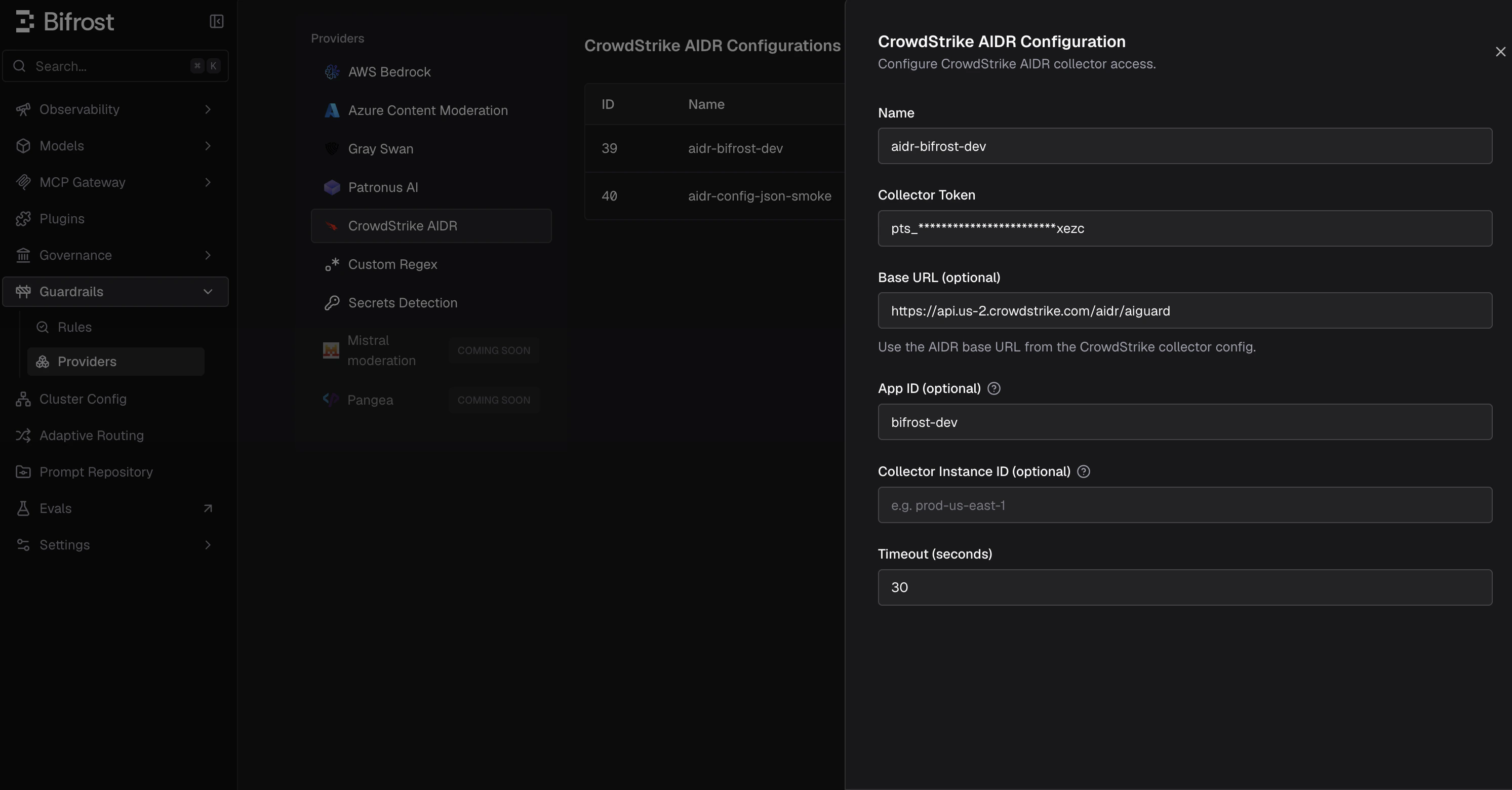 4. Enter a descriptive **Name**, such as `crowdstrike-aidr-prod`.
5. Set **Collector Token** directly or through an environment variable such as `env.CS_AIDR_TOKEN`.
6. Set **Base URL** to the AIDR base URL from the collector configuration. Leave it empty to use `https://api.crowdstrike.com/aidr/aiguard`.
7. Optionally set **App ID** and **Collector Instance ID** to improve AIDR log attribution.
8. Set the timeout and save the configuration.
9. Go to **Guardrails** > **Configuration** and attach the CrowdStrike AIDR profile to an input, output, or both-phase rule.
Create the CrowdStrike AIDR provider configuration directly with the management API. The provider route is `/api/guardrails/crowdstrike-aidr`.
```bash theme={null}
curl -X POST http://localhost:8080/api/guardrails/crowdstrike-aidr \
-H "Content-Type: application/json" \
-d '{
"name": "crowdstrike-aidr-prod",
"enabled": true,
"config": {
"api_key": "env.CS_AIDR_TOKEN",
"base_url": "env.CS_AIDR_BASE_URL",
"app_id": "bifrost-production",
"collector_instance_id": "prod-us-east-1",
"timeout": 30
}
}'
```
Fetch the generated configuration ID:
```bash theme={null}
curl -X GET http://localhost:8080/api/guardrails/crowdstrike-aidr \
-H "Content-Type: application/json"
```
Attach it to a rule by referencing `crowdstrike-aidr:` in `selectedGuardrailProfiles`:
```bash theme={null}
curl -X POST http://localhost:8080/api/guardrails/rules \
-H "Content-Type: application/json" \
-d '{
"name": "crowdstrike-aidr-all-chat",
"description": "Run CrowdStrike AIDR on prompts and completions",
"enabled": true,
"celExpression": "true",
"applyTo": "both",
"samplingRate": 100,
"timeout": 60,
"maxTurnsToSend": 8,
"selectedGuardrailProfiles": ["crowdstrike-aidr:12"]
}'
```
```json theme={null}
{
"guardrails_config": {
"guardrail_providers": [
{
"id": 70,
"provider_name": "crowdstrike-aidr",
"policy_name": "crowdstrike-aidr-prod",
"enabled": true,
"timeout": 30,
"config": {
"api_key": "env.CS_AIDR_TOKEN",
"base_url": "env.CS_AIDR_BASE_URL",
"app_id": "bifrost-production",
"collector_instance_id": "prod-us-east-1"
}
}
],
"guardrail_rules": [
{
"id": 701,
"name": "crowdstrike-aidr-all-chat",
"description": "Run CrowdStrike AIDR on prompts and completions",
"enabled": true,
"cel_expression": "true",
"apply_to": "both",
"sampling_rate": 100,
"timeout": 60,
"max_turns_to_send": 8,
"provider_config_ids": [70]
}
]
}
}
```
```yaml theme={null}
bifrost:
guardrails:
providers:
- id: 70
provider_name: "crowdstrike-aidr"
policy_name: "crowdstrike-aidr-prod"
enabled: true
timeout: 30
config:
api_key: "env.CS_AIDR_TOKEN"
base_url: "env.CS_AIDR_BASE_URL"
app_id: "bifrost-production"
collector_instance_id: "prod-us-east-1"
rules:
- id: 701
name: "crowdstrike-aidr-all-chat"
description: "Run CrowdStrike AIDR on prompts and completions"
enabled: true
cel_expression: "true"
apply_to: "both"
sampling_rate: 100
timeout: 60
max_turns_to_send: 8
provider_config_ids: [70]
```
## Policy Outcomes
Bifrost maps the AIDR response into Bifrost guardrail behavior like this:
| AIDR response | Bifrost behavior |
| ----------------------------------------------------------------------------------------------------- | ------------------------------------------------------------------------------------------------------------------------------------------ |
| `result.blocked: true` | Blocks with `GUARDRAIL_INTERVENED`. The error reason uses AIDR `display_message`, top-level `summary`, or result `summary`, in that order. |
| `result.blocked: false`, `result.transformed: true`, valid `guard_output` | Allows the request/response but replaces the original text with the transformed AIDR output. |
| `result.blocked: false`, `result.transformed: false` | Allows the original content unchanged. |
| Missing `result`, malformed response, timeout, non-2xx response, or transformed output count mismatch | Treats the provider call as failed. Check Bifrost logs for the exact guardrail error. |
Bifrost also records AIDR usage metadata for logs and spans:
* Evaluated AIDR policy name
* Whether AIDR blocked the interaction
* Whether AIDR transformed the content
* Detector count
* Detector names
## Blocked Error Response
When CrowdStrike AIDR blocks content, Bifrost returns HTTP `400` with `type: "guardrail_intervention"`. The error message uses the AIDR-provided reason when available.
For an input guardrail, the LLM request is not sent to the model. For an output guardrail, the model response is replaced by the error response.
Trimmed example:
```json theme={null}
{
"type": "guardrail_intervention",
"is_bifrost_error": false,
"status_code": 400,
"error": {
"type": "guardrail_intervention",
"message": "Blocked by CrowdStrike AIDR policy: Malicious Prompt was detected and blocked."
},
"extra_fields": {
"request_type": "chat_completion"
}
}
```
If AIDR does not return a display message or summary, the message is:
```text theme={null}
Blocked by CrowdStrike AIDR policy
```
CrowdStrike AIDR inspects and can block streaming output after Bifrost accumulates the complete response. Streaming output transformation or redaction is not supported: if AIDR returns `transformed: true` for a streaming response, Bifrost ends the stream rather than applying `guard_output`.
## Useful Rule Patterns
Run AIDR only for external-user traffic:
```text theme={null}
headers["x-user-type"] == "external"
```
Run AIDR only for production virtual keys:
```text theme={null}
headers["x-bf-vk"] == "prod"
```
Run AIDR only for a specific provider or model:
```text theme={null}
provider == "openai" && model.startsWith("gpt-4")
```
Run AIDR on all requests while limiting historical context sent to AIDR:
```json theme={null}
{
"celExpression": "true",
"applyTo": "both",
"maxTurnsToSend": 8
}
```
## Troubleshooting
| Symptom | What to check |
| -------------------------------------- | ------------------------------------------------------------------------------------------------------------------------------------------------------------------------ |
| AIDR does not block a prompt | Confirm the AIDR policy action is set to block. Bifrost does not independently block on detector findings when `blocked` is false. |
| Redaction does not appear | Confirm AIDR returned `transformed: true` with `guard_output.messages`. Bifrost only rewrites content when the transformed output count matches the original text count. |
| AIDR returns `401` or `403` | Check the collector token and make sure Bifrost is using the token for the correct AIDR collector. |
| AIDR request times out | Increase the provider or rule timeout, reduce the conversation history with `maxTurnsToSend`, or narrow the CEL rule so fewer large requests are evaluated. |
| No AIDR findings are easy to correlate | Set `app_id` and `collector_instance_id`, and use Bifrost request logs/spans alongside the AIDR Findings page. |
For general rule and profile concepts, see [Guardrails](/enterprise/guardrails). For direct `config.json` setup, see [Guardrails in config.json](/deployment-guides/config-json/guardrails).
4. Enter a descriptive **Name**, such as `crowdstrike-aidr-prod`.
5. Set **Collector Token** directly or through an environment variable such as `env.CS_AIDR_TOKEN`.
6. Set **Base URL** to the AIDR base URL from the collector configuration. Leave it empty to use `https://api.crowdstrike.com/aidr/aiguard`.
7. Optionally set **App ID** and **Collector Instance ID** to improve AIDR log attribution.
8. Set the timeout and save the configuration.
9. Go to **Guardrails** > **Configuration** and attach the CrowdStrike AIDR profile to an input, output, or both-phase rule.
Create the CrowdStrike AIDR provider configuration directly with the management API. The provider route is `/api/guardrails/crowdstrike-aidr`.
```bash theme={null}
curl -X POST http://localhost:8080/api/guardrails/crowdstrike-aidr \
-H "Content-Type: application/json" \
-d '{
"name": "crowdstrike-aidr-prod",
"enabled": true,
"config": {
"api_key": "env.CS_AIDR_TOKEN",
"base_url": "env.CS_AIDR_BASE_URL",
"app_id": "bifrost-production",
"collector_instance_id": "prod-us-east-1",
"timeout": 30
}
}'
```
Fetch the generated configuration ID:
```bash theme={null}
curl -X GET http://localhost:8080/api/guardrails/crowdstrike-aidr \
-H "Content-Type: application/json"
```
Attach it to a rule by referencing `crowdstrike-aidr:` in `selectedGuardrailProfiles`:
```bash theme={null}
curl -X POST http://localhost:8080/api/guardrails/rules \
-H "Content-Type: application/json" \
-d '{
"name": "crowdstrike-aidr-all-chat",
"description": "Run CrowdStrike AIDR on prompts and completions",
"enabled": true,
"celExpression": "true",
"applyTo": "both",
"samplingRate": 100,
"timeout": 60,
"maxTurnsToSend": 8,
"selectedGuardrailProfiles": ["crowdstrike-aidr:12"]
}'
```
```json theme={null}
{
"guardrails_config": {
"guardrail_providers": [
{
"id": 70,
"provider_name": "crowdstrike-aidr",
"policy_name": "crowdstrike-aidr-prod",
"enabled": true,
"timeout": 30,
"config": {
"api_key": "env.CS_AIDR_TOKEN",
"base_url": "env.CS_AIDR_BASE_URL",
"app_id": "bifrost-production",
"collector_instance_id": "prod-us-east-1"
}
}
],
"guardrail_rules": [
{
"id": 701,
"name": "crowdstrike-aidr-all-chat",
"description": "Run CrowdStrike AIDR on prompts and completions",
"enabled": true,
"cel_expression": "true",
"apply_to": "both",
"sampling_rate": 100,
"timeout": 60,
"max_turns_to_send": 8,
"provider_config_ids": [70]
}
]
}
}
```
```yaml theme={null}
bifrost:
guardrails:
providers:
- id: 70
provider_name: "crowdstrike-aidr"
policy_name: "crowdstrike-aidr-prod"
enabled: true
timeout: 30
config:
api_key: "env.CS_AIDR_TOKEN"
base_url: "env.CS_AIDR_BASE_URL"
app_id: "bifrost-production"
collector_instance_id: "prod-us-east-1"
rules:
- id: 701
name: "crowdstrike-aidr-all-chat"
description: "Run CrowdStrike AIDR on prompts and completions"
enabled: true
cel_expression: "true"
apply_to: "both"
sampling_rate: 100
timeout: 60
max_turns_to_send: 8
provider_config_ids: [70]
```
## Policy Outcomes
Bifrost maps the AIDR response into Bifrost guardrail behavior like this:
| AIDR response | Bifrost behavior |
| ----------------------------------------------------------------------------------------------------- | ------------------------------------------------------------------------------------------------------------------------------------------ |
| `result.blocked: true` | Blocks with `GUARDRAIL_INTERVENED`. The error reason uses AIDR `display_message`, top-level `summary`, or result `summary`, in that order. |
| `result.blocked: false`, `result.transformed: true`, valid `guard_output` | Allows the request/response but replaces the original text with the transformed AIDR output. |
| `result.blocked: false`, `result.transformed: false` | Allows the original content unchanged. |
| Missing `result`, malformed response, timeout, non-2xx response, or transformed output count mismatch | Treats the provider call as failed. Check Bifrost logs for the exact guardrail error. |
Bifrost also records AIDR usage metadata for logs and spans:
* Evaluated AIDR policy name
* Whether AIDR blocked the interaction
* Whether AIDR transformed the content
* Detector count
* Detector names
## Blocked Error Response
When CrowdStrike AIDR blocks content, Bifrost returns HTTP `400` with `type: "guardrail_intervention"`. The error message uses the AIDR-provided reason when available.
For an input guardrail, the LLM request is not sent to the model. For an output guardrail, the model response is replaced by the error response.
Trimmed example:
```json theme={null}
{
"type": "guardrail_intervention",
"is_bifrost_error": false,
"status_code": 400,
"error": {
"type": "guardrail_intervention",
"message": "Blocked by CrowdStrike AIDR policy: Malicious Prompt was detected and blocked."
},
"extra_fields": {
"request_type": "chat_completion"
}
}
```
If AIDR does not return a display message or summary, the message is:
```text theme={null}
Blocked by CrowdStrike AIDR policy
```
CrowdStrike AIDR inspects and can block streaming output after Bifrost accumulates the complete response. Streaming output transformation or redaction is not supported: if AIDR returns `transformed: true` for a streaming response, Bifrost ends the stream rather than applying `guard_output`.
## Useful Rule Patterns
Run AIDR only for external-user traffic:
```text theme={null}
headers["x-user-type"] == "external"
```
Run AIDR only for production virtual keys:
```text theme={null}
headers["x-bf-vk"] == "prod"
```
Run AIDR only for a specific provider or model:
```text theme={null}
provider == "openai" && model.startsWith("gpt-4")
```
Run AIDR on all requests while limiting historical context sent to AIDR:
```json theme={null}
{
"celExpression": "true",
"applyTo": "both",
"maxTurnsToSend": 8
}
```
## Troubleshooting
| Symptom | What to check |
| -------------------------------------- | ------------------------------------------------------------------------------------------------------------------------------------------------------------------------ |
| AIDR does not block a prompt | Confirm the AIDR policy action is set to block. Bifrost does not independently block on detector findings when `blocked` is false. |
| Redaction does not appear | Confirm AIDR returned `transformed: true` with `guard_output.messages`. Bifrost only rewrites content when the transformed output count matches the original text count. |
| AIDR returns `401` or `403` | Check the collector token and make sure Bifrost is using the token for the correct AIDR collector. |
| AIDR request times out | Increase the provider or rule timeout, reduce the conversation history with `maxTurnsToSend`, or narrow the CEL rule so fewer large requests are evaluated. |
| No AIDR findings are easy to correlate | Set `app_id` and `collector_instance_id`, and use Bifrost request logs/spans alongside the AIDR Findings page. |
For general rule and profile concepts, see [Guardrails](/enterprise/guardrails). For direct `config.json` setup, see [Guardrails in config.json](/deployment-guides/config-json/guardrails).