> ## Documentation Index
> Fetch the complete documentation index at: https://docs.getbifrost.ai/llms.txt
> Use this file to discover all available pages before exploring further.
# Required Headers
> Enforce mandatory headers on every request through governance.
## Overview
Required headers let you enforce that specific HTTP headers are present on every LLM and MCP request passing through Bifrost. If a request is missing any required header, the governance plugin rejects it with a **400 Bad Request** error before it reaches the provider.
This is useful for:
* **Tenant isolation** - Require `X-Tenant-ID` to identify the calling tenant
* **Audit trails** - Require `X-Correlation-ID` for request tracing across services
* **Custom routing metadata** - Require headers your infrastructure depends on
Required headers validation requires **governance to be enabled**. The check runs in both `PreLLMHook` and `PreMCPHook`, so it applies to all inference and MCP tool execution requests.
Header matching is **case-insensitive** - configuring `X-Tenant-ID` will match `x-tenant-id`, `X-TENANT-ID`, or any other casing.
***
## How it works
```mermaid theme={null}
graph LR
A[Request] --> B{All required
headers present?}
B -->|Yes| C[Continue to
governance evaluation]
B -->|No| D[400 Bad Request
missing_required_headers]
```
When a request arrives:
1. The HTTP transport middleware stores all request headers in the Bifrost context (lowercased keys)
2. The governance plugin's `PreLLMHook` / `PreMCPHook` checks for each required header
3. If any are missing, the request is rejected immediately with a `400` status and a JSON error listing the missing headers
**Example error response:**
```json theme={null}
{
"error": {
"message": "missing required headers: x-tenant-id, x-correlation-id",
"type": "missing_required_headers"
}
}
```
***
## Configuration
1. Navigate to **Config** > **Security Settings**
2. Ensure **Governance** is enabled (the required headers section only appears when governance is active)
3. Scroll to **Required Headers**
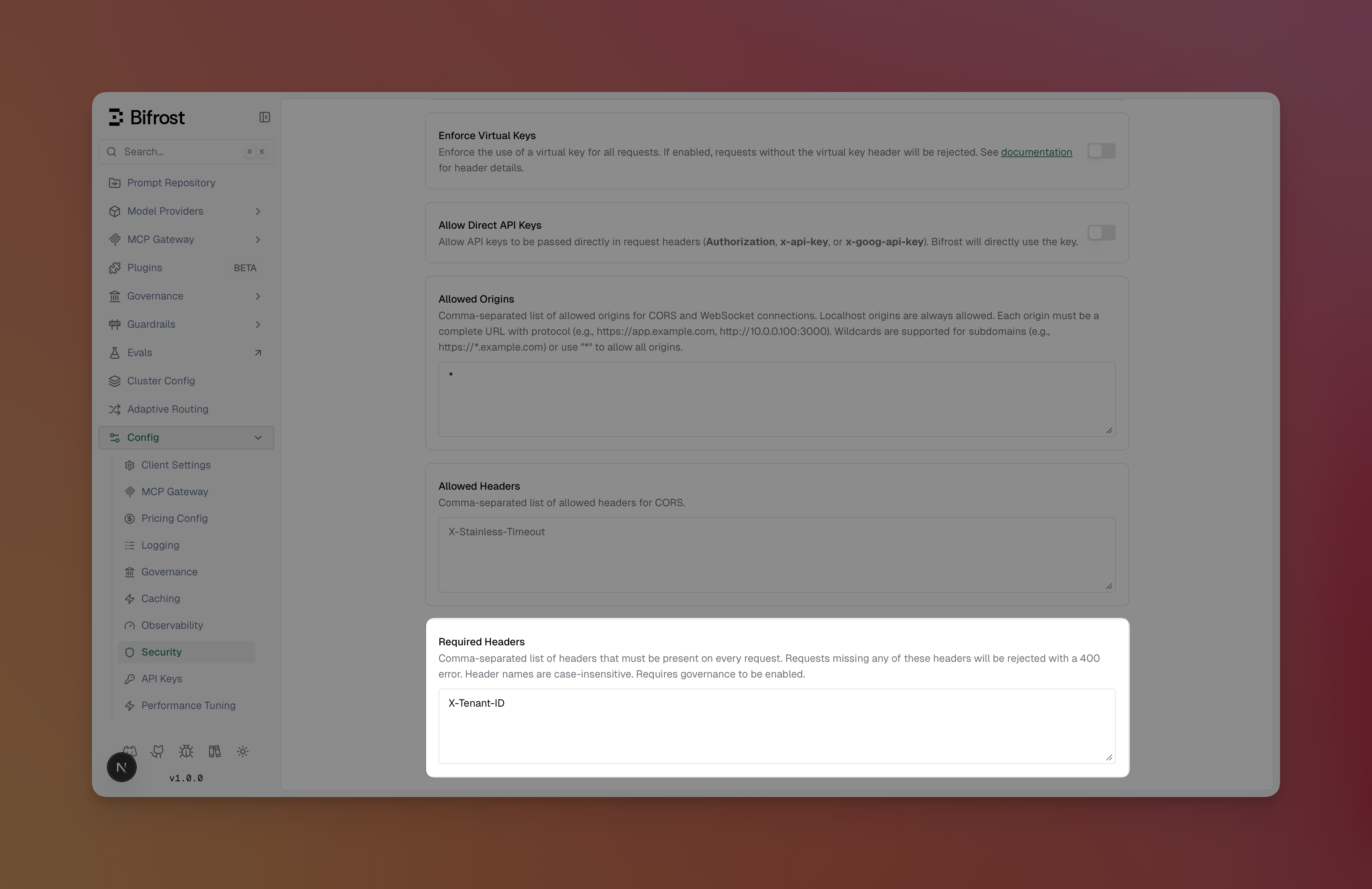 4. Enter a comma-separated list of header names (e.g., `X-Tenant-ID, X-Correlation-ID`)
5. Click **Save Changes**
Changes take effect immediately - no restart required.
Include `required_headers` in the `client_config` when updating the configuration:
```bash theme={null}
curl -X PUT http://localhost:8080/api/config \
-H "Content-Type: application/json" \
-d '{
"client_config": {
"required_headers": ["X-Tenant-ID", "X-Correlation-ID"]
}
}'
```
To clear required headers, pass an empty array:
```bash theme={null}
curl -X PUT http://localhost:8080/api/config \
-H "Content-Type: application/json" \
-d '{
"client_config": {
"required_headers": []
}
}'
```
Add `required_headers` to the `client` section:
```json theme={null}
{
"client": {
"required_headers": ["X-Tenant-ID", "X-Correlation-ID"]
}
}
```
| Field | Type | Required | Description |
| ------------------ | ---------- | -------- | ----------------------------------------------------------------------------- |
| `required_headers` | `string[]` | No | List of header names that must be present on every request. Case-insensitive. |
***
## Examples
### Requiring a tenant header
Configure a single required header to enforce tenant identification:
```json theme={null}
{
"client": {
"required_headers": ["X-Tenant-ID"]
}
}
```
**Valid request:**
```bash theme={null}
curl http://localhost:8080/v1/chat/completions \
-H "Content-Type: application/json" \
-H "X-Tenant-ID: tenant-123" \
-d '{"model": "gpt-4o", "messages": [{"role": "user", "content": "Hello"}]}'
```
**Rejected request** (missing header):
```bash theme={null}
curl http://localhost:8080/v1/chat/completions \
-H "Content-Type: application/json" \
-d '{"model": "gpt-4o", "messages": [{"role": "user", "content": "Hello"}]}'
# → 400: missing required headers: x-tenant-id
```
### Combining with virtual keys
Required headers work alongside virtual key enforcement. When both are configured, the governance plugin checks required headers first, then validates the virtual key:
```json theme={null}
{
"client": {
"enforce_auth_on_inference": true,
"required_headers": ["X-Tenant-ID"]
}
}
```
A request must include **both** the virtual key header and `X-Tenant-ID` to pass governance.
***
## Next steps
* **[Virtual Keys](./virtual-keys)** - Set up access control with virtual keys
* **[Budget and Limits](./budget-and-limits)** - Configure budgets and rate limits
* **[Routing](./routing)** - Route requests based on headers and other criteria
4. Enter a comma-separated list of header names (e.g., `X-Tenant-ID, X-Correlation-ID`)
5. Click **Save Changes**
Changes take effect immediately - no restart required.
Include `required_headers` in the `client_config` when updating the configuration:
```bash theme={null}
curl -X PUT http://localhost:8080/api/config \
-H "Content-Type: application/json" \
-d '{
"client_config": {
"required_headers": ["X-Tenant-ID", "X-Correlation-ID"]
}
}'
```
To clear required headers, pass an empty array:
```bash theme={null}
curl -X PUT http://localhost:8080/api/config \
-H "Content-Type: application/json" \
-d '{
"client_config": {
"required_headers": []
}
}'
```
Add `required_headers` to the `client` section:
```json theme={null}
{
"client": {
"required_headers": ["X-Tenant-ID", "X-Correlation-ID"]
}
}
```
| Field | Type | Required | Description |
| ------------------ | ---------- | -------- | ----------------------------------------------------------------------------- |
| `required_headers` | `string[]` | No | List of header names that must be present on every request. Case-insensitive. |
***
## Examples
### Requiring a tenant header
Configure a single required header to enforce tenant identification:
```json theme={null}
{
"client": {
"required_headers": ["X-Tenant-ID"]
}
}
```
**Valid request:**
```bash theme={null}
curl http://localhost:8080/v1/chat/completions \
-H "Content-Type: application/json" \
-H "X-Tenant-ID: tenant-123" \
-d '{"model": "gpt-4o", "messages": [{"role": "user", "content": "Hello"}]}'
```
**Rejected request** (missing header):
```bash theme={null}
curl http://localhost:8080/v1/chat/completions \
-H "Content-Type: application/json" \
-d '{"model": "gpt-4o", "messages": [{"role": "user", "content": "Hello"}]}'
# → 400: missing required headers: x-tenant-id
```
### Combining with virtual keys
Required headers work alongside virtual key enforcement. When both are configured, the governance plugin checks required headers first, then validates the virtual key:
```json theme={null}
{
"client": {
"enforce_auth_on_inference": true,
"required_headers": ["X-Tenant-ID"]
}
}
```
A request must include **both** the virtual key header and `X-Tenant-ID` to pass governance.
***
## Next steps
* **[Virtual Keys](./virtual-keys)** - Set up access control with virtual keys
* **[Budget and Limits](./budget-and-limits)** - Configure budgets and rate limits
* **[Routing](./routing)** - Route requests based on headers and other criteria