> ## Documentation Index
> Fetch the complete documentation index at: https://docs.getbifrost.ai/llms.txt
> Use this file to discover all available pages before exploring further.
# Budget and Limits
> Enterprise-grade budget management and cost control with hierarchical budget allocation through virtual keys, teams, and customers.
## Overview
Running multiple OSS Bifrost nodes with a Postgres backend is not supported.
Here is the short technical explanation:
* Bifrost is designed to keep all critical information in memory, including provider configs, API keys, budgets, usage, and traffic distribution.
* Once a node is initialized, it does not read this information back from the database.
* In the Enterprise version, we use a slightly modified version of RAFT to synchronize this state in real time across nodes, while the database acts only as a dumb store.
* Based on our current view, OSS is sufficient for startups and medium-scale teams, and can easily handle around 3,000–5,000 RPS on a single instance.
* If you need high availability and enterprise capabilities such as real-time synchronization, the Enterprise plan is the right fit.
* And yes, that is part of how we draw the OSS vs Enterprise line 💰.
Budgeting and rate limiting are a core feature of Bifrost's governance system managed through [Virtual Keys](./virtual-keys).
Bifrost's budget management system provides comprehensive cost control and financial governance for enterprise AI deployments. It operates through a **hierarchical budget structure** that enables granular cost management, usage tracking, and financial oversight across your entire organization.
**Core Hierarchy:**
```
Customer (has independent budget)
↓ (one-to-many)
Team (has independent budget)
↓ (one-to-many)
Virtual Key (has independent budget + rate limits)
↓ (one-to-many)
Provider Config (has independent budget + rate limits)
OR
Customer (has independent budget)
↓ (direct attachment)
Virtual Key (has independent budget + rate limits)
↓ (one-to-many)
Provider Config (has independent budget + rate limits)
OR
Virtual Key (standalone - has independent budget + rate limits)
↓ (one-to-many)
Provider Config (has independent budget + rate limits)
```
**Key Capabilities:**
* **Virtual Keys** - Primary access control via `x-bf-vk` header (exclusive team OR customer attachment)
* **Budget Management** - Independent budget limits at each hierarchy level with cumulative checking
* **Rate Limiting** - Request and token-based throttling at both VK and provider config levels
* **Provider-Level Governance** - Granular budgets and rate limits per AI provider within a virtual key
* **Model/Provider Filtering** - Granular access control per virtual key
* **Usage Tracking** - Real-time monitoring and audit trails
* **Audit Headers** - Optional team and customer identification
***
## Budget Management
### Cost Calculation
Bifrost automatically calculates costs based on:
* **Provider Pricing** - Real-time model pricing data
* **Token Usage** - Input + output tokens from API responses
* **Request Type** - Different pricing for chat, text, embedding, speech, transcription
* **Cache Status** - Reduced costs for cached responses
* **Batch Operations** - Volume discounts for batch requests
All cost calculation details are covered in [Architecture > Framework > Model Catalog](../../architecture/framework/model-catalog).
### Budget Checking Flow
When a request is made with a virtual key, Bifrost checks **all applicable budgets independently** in the hierarchy. Each budget must have sufficient remaining balance for the request to proceed.
**Checking Sequence:**
**For VK → Team → Customer:**
```
1. ✓ Provider Config Budget (if provider config has budget)
2. ✓ VK Budget (if VK has budget)
3. ✓ Team Budget (if VK's team has budget)
4. ✓ Customer Budget (if team's customer has budget)
```
**For VK → Customer (direct):**
```
1. ✓ Provider Config Budget (if provider config has budget)
2. ✓ VK Budget (if VK has budget)
3. ✓ Customer Budget (if VK's customer has budget)
```
**For Standalone VK:**
```
1. ✓ Provider Config Budget (if provider config has budget)
2. ✓ VK Budget (if VK has budget)
```
**Important Notes:**
* **All applicable budgets must pass** - any single budget failure blocks the request
* **Budgets are independent** - each tracks its own usage and limits
* **Costs are deducted from all applicable budgets** - same cost applied to each level
* **Rate limits checked at provider config and VK levels** - teams and customers have no rate limits
* **Provider selection** - providers that exceed their budget or rate limits are excluded from [routing](./routing)
**Example:**
```
- Provider config budget: $4/$5 remaining ✓
- VK budget: $9/$10 remaining ✓
- Team budget: $15/$20 remaining ✓
- Customer budget: $45/$50 remaining ✓
- Result: Allowed (no budget is exceeded)
- After request:
- Request cost: $2
- Updated Provider=$6/$5, VK=$11/$10, Team=$17/$20, Customer=$47/$50
- Then the next request will be blocked (both provider and VK budgets exceeded).
```
## Rate Limiting
Rate limits protect your system from abuse and manage traffic by setting thresholds on request frequency and token usage over a specific time window. Rate limits can be configured at **both the Virtual Key level and Provider Config level** for granular control.
Bifrost supports two types of rate limits that work in parallel:
* **Request Limits**: Control the maximum number of API calls that can be made within a set duration (e.g., 100 requests per minute).
* **Token Limits**: Control the maximum number of tokens (prompt + completion) that can be processed within a set duration (e.g., 50,000 tokens per hour).
### Rate Limit Hierarchy
Rate limits are checked in hierarchical order:
```
1. ✓ Provider Config Rate Limits (if provider config has rate limits)
2. ✓ Virtual Key Rate Limits (if VK has rate limits)
```
For a request to be allowed, it must pass both the request limit and token limit checks at **all applicable levels**. If a provider config exceeds its rate limits, that provider is excluded from routing, but other providers within the same virtual key remain available.
### Provider-Level Rate Limiting
Provider configs within a virtual key can have independent rate limits, enabling:
* **Per-Provider Throttling**: Different rate limits for OpenAI vs Anthropic
* **Provider Isolation**: Rate limit violations on one provider don't affect others
* **Granular Control**: Fine-tune limits based on provider capabilities and costs
## Reset Durations
Budgets and rate limits support flexible reset durations:
**Format Examples:**
* `1m` - 1 minute
* `5m` - 5 minutes
* `1h` - 1 hour
* `1d` - 1 day
* `1w` - 1 week
* `1M` - 1 month
* `1Y` - 1 year
**Common Patterns:**
* **Rate Limits**: `1m`, `1h`, `1d` for request throttling
* **Budgets**: `1d`, `1w`, `1M`, `1Y` for cost control
### Calendar-aligned budgets
By default, a budget **rolls**: after `reset_duration` elapses since `last_reset`, usage resets. With **`calendar_aligned`: `true`**, the budget resets at the **start of each calendar period in UTC** instead (same instant for every customer of that configuration).
**Supported `reset_duration` suffixes:** only day (`d`), week (`w`), month (`M`), and year (`Y`). Examples: `1d` → midnight UTC each day; `1w` → Monday 00:00 UTC each week; `1M` → first day of each month; `1Y` → January 1 each year. Sub-day durations (for example `1h`, `30m`) **cannot** use calendar alignment; the API rejects invalid combinations.
Calendar alignment applies to budgets on **customers**, **teams**, **virtual keys**, and **per–provider-config** budgets. You can set it when creating a budget (`calendar_aligned` on create) or toggle it on update (`calendar_aligned` on the budget in `PUT` requests). Turning calendar alignment **on** for an existing budget resets **current usage to zero** and snaps **`last_reset`** to the current period start.
### Budget overrides
A budget can carry a temporary **override** that adds spending capacity on top of its configured limit without touching the base limit, current usage, or reset schedule. While an override is active, enforcement uses:
```text theme={null}
Effective limit = max_limit + override_amount
```
An override lasts either for a fixed number of reset cycles (the current cycle counts as the first) or until it is explicitly removed. Manage it from the virtual key's **Budget Information** panel, or through `PUT`/`DELETE` on `/api/governance/virtual-keys/{vk_id}/budgets/{budget_id}/override` — see [Budget Overrides](./virtual-keys#budget-overrides) for the UI walkthrough and API examples.
***
## Customer-scoped requests
Customer scoping is a **Bifrost Enterprise** feature. It applies to requests made with a **team-attached virtual key** when that team is linked to more than one customer.
In Enterprise deployments a team can be attached to multiple customers. By default, a request through a team's virtual key charges and enforces **every** customer the team belongs to. To attribute a single request to **one** specific customer, send a customer-scope header:
| Header | Description |
| -------------------- | ------------------------------------------------------ |
| `x-bf-customer-id` | The customer's ID. |
| `x-bf-customer-name` | The customer's display name (must be globally unique). |
When a scope header is present, only the named customer is charged, rate-limited, and recorded in that request's usage logs — the team's other customers are left untouched. The team's own budget, the virtual key budget, and provider-config limits are always enforced regardless of scope.
**Resolution rules:**
* `x-bf-customer-id` takes precedence over `x-bf-customer-name` when both are sent.
* Surrounding whitespace is trimmed, and the header name is **case-insensitive** (like all Bifrost headers).
* Send no customer-scope header to charge and enforce all of the team's customers (the default).
### Examples
Scope a chat request to a customer by ID:
```bash theme={null}
curl http://localhost:8080/v1/chat/completions \
-H "Content-Type: application/json" \
-H "x-bf-vk: " \
-H "x-bf-customer-id: cust_acme" \
-d '{"model": "gpt-4o", "messages": [{"role": "user", "content": "Hello"}]}'
```
Or scope by name instead:
```bash theme={null}
curl http://localhost:8080/v1/chat/completions \
-H "Content-Type: application/json" \
-H "x-bf-vk: " \
-H "x-bf-customer-name: Acme Corp" \
-d '{"model": "gpt-4o", "messages": [{"role": "user", "content": "Hello"}]}'
```
### Validation
The customer scope is validated **before** the request reaches a provider, and it **fails closed**: an invalid scope is rejected even when budget and rate-limit enforcement is otherwise skipped. A request is rejected with **400 Bad Request** when the scope header is:
* present but empty or whitespace-only,
* an ID or name that does not match any customer, or
* a customer that exists but is **not** attached to the virtual key's team.
**Example error response:**
```json theme={null}
{
"error": {
"message": "customer \"Acme Corp\" is not attached to this team"
}
}
```
***
## Configuration Guide
Configure provider-level budgets and rate limits using any of these methods:
The Bifrost Web UI provides an intuitive interface for configuring provider-level governance through the Virtual Keys management page.
### Creating Virtual Keys with Provider Configs
1. **Navigate to Virtual Keys**: Go to **Virtual Keys** page in the Bifrost dashboard
2. **Create New Virtual Key**: Click "Create Virtual Key" button
3. **Configure Providers**: In the "Provider Configurations" section:
* Add multiple providers with individual weights
* Set provider-specific budgets and rate limits
* Configure allowed models per provider
### Provider Configuration Interface
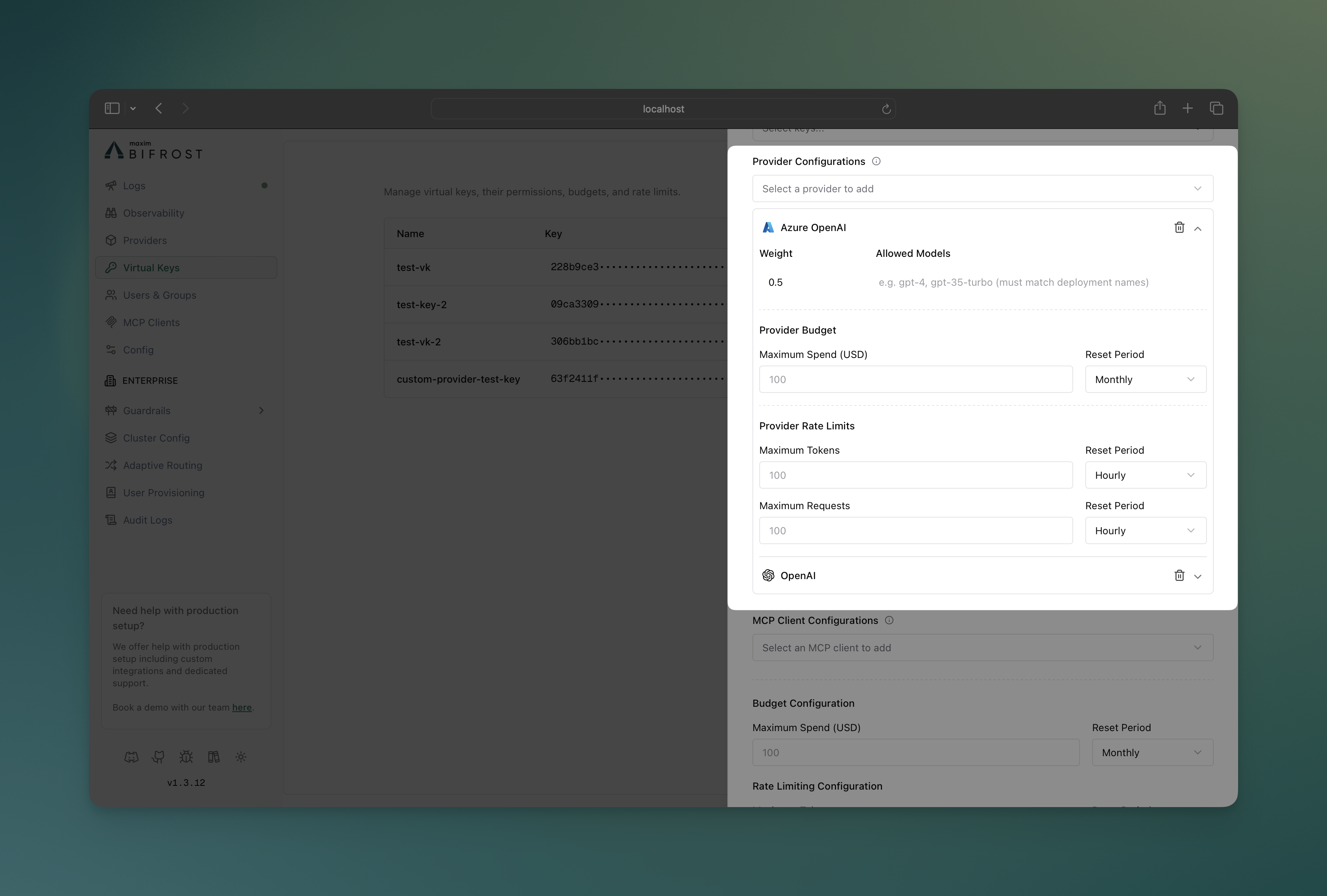 **Key Features:**
* **Visual Provider Cards**: Each provider displays as an expandable card
* **Budget Controls**: Set spending limits with reset periods per provider
* **Rate Limit Controls**: Configure token and request limits independently
* **Model Filtering**: Specify allowed models for each provider
* **Weight Distribution**: Visual indicators for load balancing weights
* **Real-time Validation**: Immediate feedback on configuration errors
### Monitoring Provider Usage
**Key Features:**
* **Visual Provider Cards**: Each provider displays as an expandable card
* **Budget Controls**: Set spending limits with reset periods per provider
* **Rate Limit Controls**: Configure token and request limits independently
* **Model Filtering**: Specify allowed models for each provider
* **Weight Distribution**: Visual indicators for load balancing weights
* **Real-time Validation**: Immediate feedback on configuration errors
### Monitoring Provider Usage
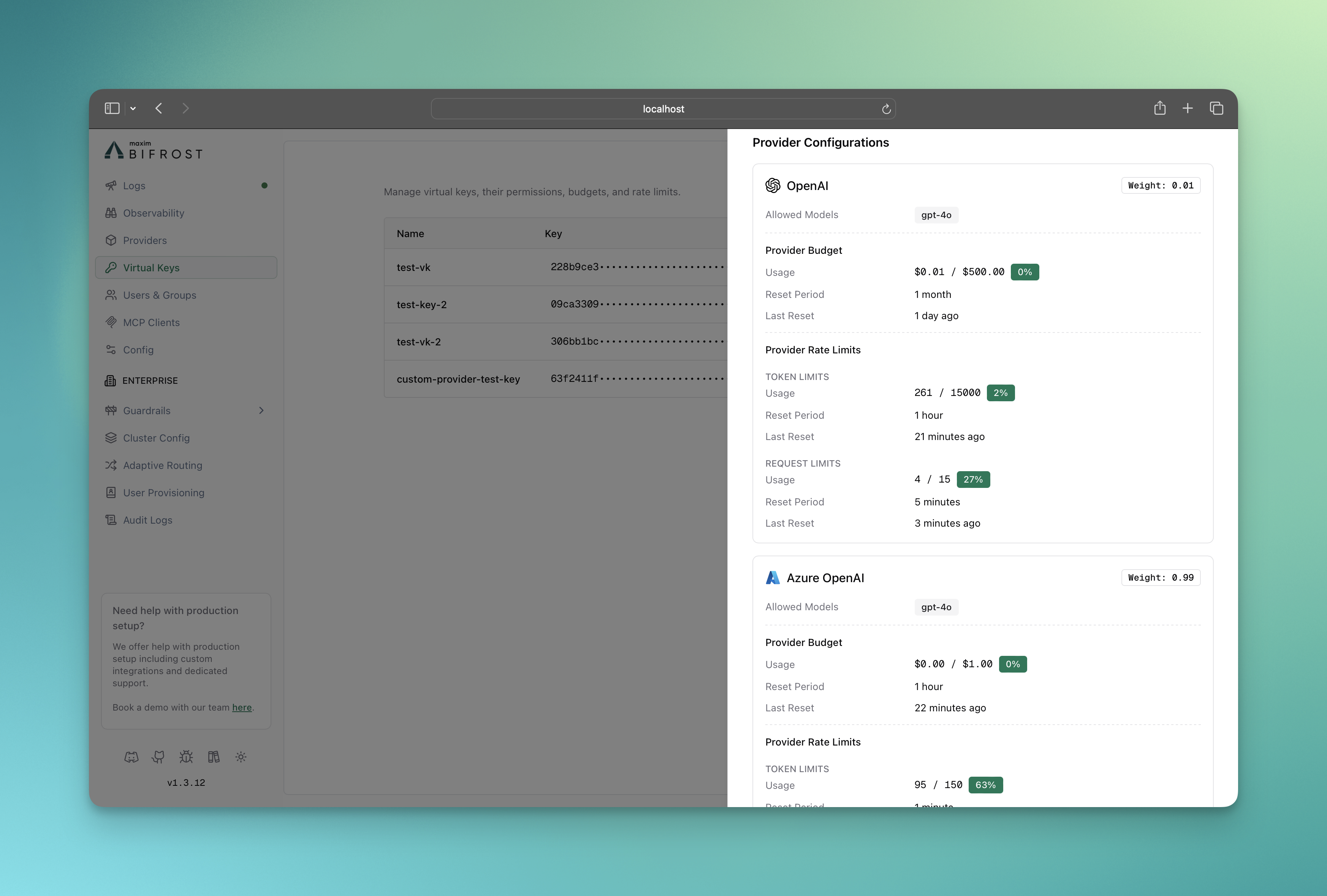 The info sheet for the virtual key provides real-time monitoring of:
* Budget consumption per provider
* Rate limit utilization (tokens and requests)
* Provider availability status
* Usage trends and forecasting
Use the Bifrost HTTP API to programmatically manage provider-level governance configurations.
### Create Virtual Key with Provider Configs
```bash theme={null}
curl -X POST "https://your-bifrost-instance.com/api/governance/virtual-keys" \
-H "Content-Type: application/json" \
-d '{
"name": "marketing-team-vk",
"description": "Marketing team virtual key with provider-specific limits",
"provider_configs": [
{
"provider": "openai",
"weight": 0.7,
"allowed_models": ["gpt-4", "gpt-3.5-turbo"],
"budget": {
"max_limit": 500.00,
"reset_duration": "1M",
"calendar_aligned": true
},
"rate_limit": {
"token_max_limit": 1000000,
"token_reset_duration": "1h",
"request_max_limit": 1000,
"request_reset_duration": "1h"
}
},
{
"provider": "anthropic",
"weight": 0.3,
"allowed_models": ["claude-3-opus", "claude-3-sonnet"],
"budget": {
"max_limit": 200.00,
"reset_duration": "1M"
},
"rate_limit": {
"token_max_limit": 500000,
"token_reset_duration": "1h",
"request_max_limit": 500,
"request_reset_duration": "1h"
}
}
],
"budget": {
"max_limit": 1000.00,
"reset_duration": "1M",
"calendar_aligned": true
},
"is_active": true
}'
```
Use `calendar_aligned` only with `d` / `w` / `M` / `Y` reset durations (see [Calendar-aligned budgets](#calendar-aligned-budgets)).
### Update Provider Configuration
```bash theme={null}
curl -X PUT "https://your-bifrost-instance.com/api/governance/virtual-keys/{vk_id}" \
-H "Content-Type: application/json" \
-d '{
"provider_configs": [
{
"id": 1,
"provider": "openai",
"weight": 0.8,
"budget": {
"max_limit": 600.00,
"reset_duration": "1M"
},
"rate_limit": {
"token_max_limit": 1200000,
"token_reset_duration": "1h"
}
}
]
}'
```
### API Response Structure
```json theme={null}
{
"message": "Virtual key created successfully",
"virtual_key": {
"id": "vk_123",
"name": "marketing-team-vk",
"value": "vk_abc123def456",
"provider_configs": [
{
"id": 1,
"provider": "openai",
"weight": 0.7,
"allowed_models": ["gpt-4", "gpt-3.5-turbo"],
"budget": {
"id": "budget_789",
"max_limit": 500.00,
"current_usage": 0.00,
"reset_duration": "1M",
"calendar_aligned": true,
"last_reset": "2024-01-01T00:00:00Z"
},
"rate_limit": {
"id": "rate_limit_456",
"token_max_limit": 1000000,
"token_current_usage": 0,
"token_reset_duration": "1h",
"token_last_reset": "2024-01-01T00:00:00Z",
"request_max_limit": 1000,
"request_current_usage": 0,
"request_reset_duration": "1h",
"request_last_reset": "2024-01-01T00:00:00Z"
}
}
]
}
}
```
### Field Descriptions
| Field | Type | Description |
| ------------------------------ | ------- | ------------------------------------------------------------------------------------ |
| `provider` | string | AI provider name (e.g., "openai", "anthropic") |
| `weight` | float | Load balancing weight (0.0-1.0) |
| `allowed_models` | array | Specific models allowed for this provider |
| `budget.max_limit` | float | Maximum spend in USD |
| `budget.reset_duration` | string | Reset period (e.g., "1h", "1d", "1M") |
| `budget.calendar_aligned` | boolean | When true, resets at calendar boundaries in UTC (requires `d`/`w`/`M`/`Y` durations) |
| `rate_limit.token_max_limit` | integer | Maximum tokens per period |
| `rate_limit.request_max_limit` | integer | Maximum requests per period |
Configure provider-level governance through Bifrost's configuration file for declarative management.
### Basic Configuration Structure
```json theme={null}
{
"governance": {
"virtual_keys": [
{
"id": "vk-dev-001",
"name": "development-team-vk",
"description": "Development team with multi-provider setup",
"is_active": true,
"rate_limit_id": "rl-vk-dev",
"provider_configs": [
{
"id": 1,
"provider": "openai",
"weight": 0.6,
"allowed_models": ["gpt-4", "gpt-3.5-turbo"],
"rate_limit_id": "rl-pc-openai"
},
{
"id": 2,
"provider": "anthropic",
"weight": 0.4,
"allowed_models": ["claude-3-opus", "claude-3-sonnet"],
"rate_limit_id": "rl-pc-anthropic"
}
]
}
],
"budgets": [
{
"id": "budget-vk-dev",
"virtual_key_id": "vk-dev-001",
"max_limit": 2000.00,
"reset_duration": "1M",
"calendar_aligned": true
},
{
"id": "budget-pc-openai",
"provider_config_id": 1,
"max_limit": 1000.00,
"reset_duration": "1M"
},
{
"id": "budget-pc-anthropic",
"provider_config_id": 2,
"max_limit": 500.00,
"reset_duration": "1M"
}
],
"rate_limits": [
{
"id": "rl-vk-dev",
"token_max_limit": 5000000,
"token_reset_duration": "1h",
"request_max_limit": 3000,
"request_reset_duration": "1h"
},
{
"id": "rl-pc-openai",
"token_max_limit": 2000000,
"token_reset_duration": "1h",
"request_max_limit": 2000,
"request_reset_duration": "1h"
},
{
"id": "rl-pc-anthropic",
"token_max_limit": 1000000,
"token_reset_duration": "1h",
"request_max_limit": 1000,
"request_reset_duration": "1h"
}
]
}
}
```
Budgets and rate limits live as **separate top-level arrays** inside `governance`. Virtual keys and provider configs reference them by id (`rate_limit_id`) or are referenced back (`virtual_key_id` / `provider_config_id` on each `budgets[]` entry). Optional `calendar_aligned` on each `budget` matches the HTTP API and [calendar-aligned behavior](#calendar-aligned-budgets).
### Advanced Configuration Examples
#### Cost-Optimized Setup
```json theme={null}
{
"governance": {
"virtual_keys": [
{
"id": "vk-cost-opt",
"name": "cost-optimized-vk",
"provider_configs": [
{"id": 10, "provider": "openai-gpt-3.5", "weight": 0.8, "rate_limit_id": "rl-cheap"},
{"id": 11, "provider": "openai-gpt-4", "weight": 0.2, "rate_limit_id": "rl-premium"}
]
}
],
"budgets": [
{"id": "b-cheap", "provider_config_id": 10, "max_limit": 50.00, "reset_duration": "1d"},
{"id": "b-premium", "provider_config_id": 11, "max_limit": 200.00, "reset_duration": "1d"}
],
"rate_limits": [
{"id": "rl-cheap", "request_max_limit": 1000, "request_reset_duration": "1h"},
{"id": "rl-premium", "request_max_limit": 100, "request_reset_duration": "1h"}
]
}
}
```
#### High-Volume Production Setup
```json theme={null}
{
"governance": {
"virtual_keys": [
{
"id": "vk-prod-hv",
"name": "production-high-volume-vk",
"provider_configs": [
{"id": 20, "provider": "openai", "weight": 0.5, "rate_limit_id": "rl-openai"},
{"id": 21, "provider": "anthropic", "weight": 0.3, "rate_limit_id": "rl-anthropic"},
{"id": 22, "provider": "azure-openai", "weight": 0.2, "rate_limit_id": "rl-azure"}
]
}
],
"budgets": [
{"id": "b-openai", "provider_config_id": 20, "max_limit": 5000.00, "reset_duration": "1M"},
{"id": "b-anthropic", "provider_config_id": 21, "max_limit": 3000.00, "reset_duration": "1M"},
{"id": "b-azure", "provider_config_id": 22, "max_limit": 2000.00, "reset_duration": "1M"}
],
"rate_limits": [
{"id": "rl-openai", "token_max_limit": 10000000, "token_reset_duration": "1h", "request_max_limit": 10000, "request_reset_duration": "1h"},
{"id": "rl-anthropic", "token_max_limit": 6000000, "token_reset_duration": "1h", "request_max_limit": 6000, "request_reset_duration": "1h"},
{"id": "rl-azure", "token_max_limit": 4000000, "token_reset_duration": "1h", "request_max_limit": 4000, "request_reset_duration": "1h"}
]
}
}
```
**Validation Rules:**
* Budget limits must be positive numbers
* Reset durations must be valid time formats
* Rate limits must be positive integers
* Provider names must match configured providers
## Provider-Level Governance Examples
### Example 1: Mixed Provider Budgets
A virtual key configured with multiple providers and different budget allocations:
```json theme={null}
{
"governance": {
"virtual_keys": [
{
"id": "vk-mkt",
"name": "marketing-team-vk",
"provider_configs": [
{"id": 30, "provider": "openai", "weight": 0.7},
{"id": 31, "provider": "anthropic", "weight": 0.3}
]
}
],
"budgets": [
{"id": "b-vk-mkt", "virtual_key_id": "vk-mkt", "max_limit": 100, "reset_duration": "1M"},
{"id": "b-openai", "provider_config_id": 30, "max_limit": 50, "reset_duration": "1M"},
{"id": "b-anth", "provider_config_id": 31, "max_limit": 30, "reset_duration": "1M"}
]
}
}
```
**Behavior:**
* OpenAI requests limited to 50 dollars/month at provider level + 100 dollars/month at VK level
* Anthropic requests limited to 30 dollars/month at provider level + 100 dollars/month at VK level
* If any provider's budget is exhausted, all requests to that provider will be blocked
### Example 2: Provider-Specific Rate Limits
Different rate limits based on provider capabilities:
```json theme={null}
{
"governance": {
"virtual_keys": [
{
"id": "vk-hv",
"name": "high-volume-vk",
"provider_configs": [
{"id": 40, "provider": "openai", "rate_limit_id": "rl-openai"},
{"id": 41, "provider": "anthropic", "rate_limit_id": "rl-anthropic"}
]
}
],
"rate_limits": [
{"id": "rl-openai", "request_max_limit": 1000, "request_reset_duration": "1h", "token_max_limit": 1000000, "token_reset_duration": "1h"},
{"id": "rl-anthropic", "request_max_limit": 500, "request_reset_duration": "1h", "token_max_limit": 500000, "token_reset_duration": "1h"}
]
}
}
```
**Behavior:**
* OpenAI: 1000 requests/hour, 1M tokens/hour
* Anthropic: 500 requests/hour, 500K tokens/hour
* If any provider's rate limits are exceeded, all requests to that provider will be blocked
### Example 3: Failover Strategy
Provider configurations with budget-based failover:
```json theme={null}
{
"governance": {
"virtual_keys": [
{
"id": "vk-cost",
"name": "cost-optimized-vk",
"provider_configs": [
{"id": 50, "provider": "openai-cheap", "weight": 1.0},
{"id": 51, "provider": "openai-premium", "weight": 0.0, "rate_limit_id": "rl-premium"}
]
}
],
"budgets": [
{"id": "b-cheap", "provider_config_id": 50, "max_limit": 10, "reset_duration": "1d"},
{"id": "b-premium", "provider_config_id": 51, "max_limit": 50, "reset_duration": "1d"}
],
"rate_limits": [
{"id": "rl-premium", "request_max_limit": 100, "request_reset_duration": "1h", "token_max_limit": 50000, "token_reset_duration": "1h"}
]
}
}
```
**Behavior:**
* Primary: Use cheap provider until \$10 daily budget exhausted
* Fallback: Automatically switch to premium provider when cheap option unavailable. To enable this, you should not send `provider` name in the request body, read [Routing](./routing#automatic-fallbacks) for more details.
* Cost containment: Prevent unexpected overspend on premium resources and limit the number of requests to the premium provider
## Key Benefits of Provider-Level Governance
* **Granular Control**: Set specific spending limits and rate limits per AI provider
* **Automatic Fallback**: Route to alternative providers when budgets or rate limits are exceeded
* **Cost Control**: Track and control spending by provider for better financial oversight
* **Performance Testing**: A/B testing across providers with controlled budgets
* **Multi-Provider Strategies**: Primary/backup provider configurations
* **Cost-Tiered Access**: Cheap providers for basic tasks, premium for complex workloads
***
## Next Steps
* **[Routing](./routing)** - Direct requests to specific AI models, providers, and keys using Virtual Keys.
* **[MCP Tool Filtering](./mcp-tools)** - Manage MCP clients/tools for virtual keys.
* **[Tracing](../observability/default)** - Audit trails and request tracking
The info sheet for the virtual key provides real-time monitoring of:
* Budget consumption per provider
* Rate limit utilization (tokens and requests)
* Provider availability status
* Usage trends and forecasting
Use the Bifrost HTTP API to programmatically manage provider-level governance configurations.
### Create Virtual Key with Provider Configs
```bash theme={null}
curl -X POST "https://your-bifrost-instance.com/api/governance/virtual-keys" \
-H "Content-Type: application/json" \
-d '{
"name": "marketing-team-vk",
"description": "Marketing team virtual key with provider-specific limits",
"provider_configs": [
{
"provider": "openai",
"weight": 0.7,
"allowed_models": ["gpt-4", "gpt-3.5-turbo"],
"budget": {
"max_limit": 500.00,
"reset_duration": "1M",
"calendar_aligned": true
},
"rate_limit": {
"token_max_limit": 1000000,
"token_reset_duration": "1h",
"request_max_limit": 1000,
"request_reset_duration": "1h"
}
},
{
"provider": "anthropic",
"weight": 0.3,
"allowed_models": ["claude-3-opus", "claude-3-sonnet"],
"budget": {
"max_limit": 200.00,
"reset_duration": "1M"
},
"rate_limit": {
"token_max_limit": 500000,
"token_reset_duration": "1h",
"request_max_limit": 500,
"request_reset_duration": "1h"
}
}
],
"budget": {
"max_limit": 1000.00,
"reset_duration": "1M",
"calendar_aligned": true
},
"is_active": true
}'
```
Use `calendar_aligned` only with `d` / `w` / `M` / `Y` reset durations (see [Calendar-aligned budgets](#calendar-aligned-budgets)).
### Update Provider Configuration
```bash theme={null}
curl -X PUT "https://your-bifrost-instance.com/api/governance/virtual-keys/{vk_id}" \
-H "Content-Type: application/json" \
-d '{
"provider_configs": [
{
"id": 1,
"provider": "openai",
"weight": 0.8,
"budget": {
"max_limit": 600.00,
"reset_duration": "1M"
},
"rate_limit": {
"token_max_limit": 1200000,
"token_reset_duration": "1h"
}
}
]
}'
```
### API Response Structure
```json theme={null}
{
"message": "Virtual key created successfully",
"virtual_key": {
"id": "vk_123",
"name": "marketing-team-vk",
"value": "vk_abc123def456",
"provider_configs": [
{
"id": 1,
"provider": "openai",
"weight": 0.7,
"allowed_models": ["gpt-4", "gpt-3.5-turbo"],
"budget": {
"id": "budget_789",
"max_limit": 500.00,
"current_usage": 0.00,
"reset_duration": "1M",
"calendar_aligned": true,
"last_reset": "2024-01-01T00:00:00Z"
},
"rate_limit": {
"id": "rate_limit_456",
"token_max_limit": 1000000,
"token_current_usage": 0,
"token_reset_duration": "1h",
"token_last_reset": "2024-01-01T00:00:00Z",
"request_max_limit": 1000,
"request_current_usage": 0,
"request_reset_duration": "1h",
"request_last_reset": "2024-01-01T00:00:00Z"
}
}
]
}
}
```
### Field Descriptions
| Field | Type | Description |
| ------------------------------ | ------- | ------------------------------------------------------------------------------------ |
| `provider` | string | AI provider name (e.g., "openai", "anthropic") |
| `weight` | float | Load balancing weight (0.0-1.0) |
| `allowed_models` | array | Specific models allowed for this provider |
| `budget.max_limit` | float | Maximum spend in USD |
| `budget.reset_duration` | string | Reset period (e.g., "1h", "1d", "1M") |
| `budget.calendar_aligned` | boolean | When true, resets at calendar boundaries in UTC (requires `d`/`w`/`M`/`Y` durations) |
| `rate_limit.token_max_limit` | integer | Maximum tokens per period |
| `rate_limit.request_max_limit` | integer | Maximum requests per period |
Configure provider-level governance through Bifrost's configuration file for declarative management.
### Basic Configuration Structure
```json theme={null}
{
"governance": {
"virtual_keys": [
{
"id": "vk-dev-001",
"name": "development-team-vk",
"description": "Development team with multi-provider setup",
"is_active": true,
"rate_limit_id": "rl-vk-dev",
"provider_configs": [
{
"id": 1,
"provider": "openai",
"weight": 0.6,
"allowed_models": ["gpt-4", "gpt-3.5-turbo"],
"rate_limit_id": "rl-pc-openai"
},
{
"id": 2,
"provider": "anthropic",
"weight": 0.4,
"allowed_models": ["claude-3-opus", "claude-3-sonnet"],
"rate_limit_id": "rl-pc-anthropic"
}
]
}
],
"budgets": [
{
"id": "budget-vk-dev",
"virtual_key_id": "vk-dev-001",
"max_limit": 2000.00,
"reset_duration": "1M",
"calendar_aligned": true
},
{
"id": "budget-pc-openai",
"provider_config_id": 1,
"max_limit": 1000.00,
"reset_duration": "1M"
},
{
"id": "budget-pc-anthropic",
"provider_config_id": 2,
"max_limit": 500.00,
"reset_duration": "1M"
}
],
"rate_limits": [
{
"id": "rl-vk-dev",
"token_max_limit": 5000000,
"token_reset_duration": "1h",
"request_max_limit": 3000,
"request_reset_duration": "1h"
},
{
"id": "rl-pc-openai",
"token_max_limit": 2000000,
"token_reset_duration": "1h",
"request_max_limit": 2000,
"request_reset_duration": "1h"
},
{
"id": "rl-pc-anthropic",
"token_max_limit": 1000000,
"token_reset_duration": "1h",
"request_max_limit": 1000,
"request_reset_duration": "1h"
}
]
}
}
```
Budgets and rate limits live as **separate top-level arrays** inside `governance`. Virtual keys and provider configs reference them by id (`rate_limit_id`) or are referenced back (`virtual_key_id` / `provider_config_id` on each `budgets[]` entry). Optional `calendar_aligned` on each `budget` matches the HTTP API and [calendar-aligned behavior](#calendar-aligned-budgets).
### Advanced Configuration Examples
#### Cost-Optimized Setup
```json theme={null}
{
"governance": {
"virtual_keys": [
{
"id": "vk-cost-opt",
"name": "cost-optimized-vk",
"provider_configs": [
{"id": 10, "provider": "openai-gpt-3.5", "weight": 0.8, "rate_limit_id": "rl-cheap"},
{"id": 11, "provider": "openai-gpt-4", "weight": 0.2, "rate_limit_id": "rl-premium"}
]
}
],
"budgets": [
{"id": "b-cheap", "provider_config_id": 10, "max_limit": 50.00, "reset_duration": "1d"},
{"id": "b-premium", "provider_config_id": 11, "max_limit": 200.00, "reset_duration": "1d"}
],
"rate_limits": [
{"id": "rl-cheap", "request_max_limit": 1000, "request_reset_duration": "1h"},
{"id": "rl-premium", "request_max_limit": 100, "request_reset_duration": "1h"}
]
}
}
```
#### High-Volume Production Setup
```json theme={null}
{
"governance": {
"virtual_keys": [
{
"id": "vk-prod-hv",
"name": "production-high-volume-vk",
"provider_configs": [
{"id": 20, "provider": "openai", "weight": 0.5, "rate_limit_id": "rl-openai"},
{"id": 21, "provider": "anthropic", "weight": 0.3, "rate_limit_id": "rl-anthropic"},
{"id": 22, "provider": "azure-openai", "weight": 0.2, "rate_limit_id": "rl-azure"}
]
}
],
"budgets": [
{"id": "b-openai", "provider_config_id": 20, "max_limit": 5000.00, "reset_duration": "1M"},
{"id": "b-anthropic", "provider_config_id": 21, "max_limit": 3000.00, "reset_duration": "1M"},
{"id": "b-azure", "provider_config_id": 22, "max_limit": 2000.00, "reset_duration": "1M"}
],
"rate_limits": [
{"id": "rl-openai", "token_max_limit": 10000000, "token_reset_duration": "1h", "request_max_limit": 10000, "request_reset_duration": "1h"},
{"id": "rl-anthropic", "token_max_limit": 6000000, "token_reset_duration": "1h", "request_max_limit": 6000, "request_reset_duration": "1h"},
{"id": "rl-azure", "token_max_limit": 4000000, "token_reset_duration": "1h", "request_max_limit": 4000, "request_reset_duration": "1h"}
]
}
}
```
**Validation Rules:**
* Budget limits must be positive numbers
* Reset durations must be valid time formats
* Rate limits must be positive integers
* Provider names must match configured providers
## Provider-Level Governance Examples
### Example 1: Mixed Provider Budgets
A virtual key configured with multiple providers and different budget allocations:
```json theme={null}
{
"governance": {
"virtual_keys": [
{
"id": "vk-mkt",
"name": "marketing-team-vk",
"provider_configs": [
{"id": 30, "provider": "openai", "weight": 0.7},
{"id": 31, "provider": "anthropic", "weight": 0.3}
]
}
],
"budgets": [
{"id": "b-vk-mkt", "virtual_key_id": "vk-mkt", "max_limit": 100, "reset_duration": "1M"},
{"id": "b-openai", "provider_config_id": 30, "max_limit": 50, "reset_duration": "1M"},
{"id": "b-anth", "provider_config_id": 31, "max_limit": 30, "reset_duration": "1M"}
]
}
}
```
**Behavior:**
* OpenAI requests limited to 50 dollars/month at provider level + 100 dollars/month at VK level
* Anthropic requests limited to 30 dollars/month at provider level + 100 dollars/month at VK level
* If any provider's budget is exhausted, all requests to that provider will be blocked
### Example 2: Provider-Specific Rate Limits
Different rate limits based on provider capabilities:
```json theme={null}
{
"governance": {
"virtual_keys": [
{
"id": "vk-hv",
"name": "high-volume-vk",
"provider_configs": [
{"id": 40, "provider": "openai", "rate_limit_id": "rl-openai"},
{"id": 41, "provider": "anthropic", "rate_limit_id": "rl-anthropic"}
]
}
],
"rate_limits": [
{"id": "rl-openai", "request_max_limit": 1000, "request_reset_duration": "1h", "token_max_limit": 1000000, "token_reset_duration": "1h"},
{"id": "rl-anthropic", "request_max_limit": 500, "request_reset_duration": "1h", "token_max_limit": 500000, "token_reset_duration": "1h"}
]
}
}
```
**Behavior:**
* OpenAI: 1000 requests/hour, 1M tokens/hour
* Anthropic: 500 requests/hour, 500K tokens/hour
* If any provider's rate limits are exceeded, all requests to that provider will be blocked
### Example 3: Failover Strategy
Provider configurations with budget-based failover:
```json theme={null}
{
"governance": {
"virtual_keys": [
{
"id": "vk-cost",
"name": "cost-optimized-vk",
"provider_configs": [
{"id": 50, "provider": "openai-cheap", "weight": 1.0},
{"id": 51, "provider": "openai-premium", "weight": 0.0, "rate_limit_id": "rl-premium"}
]
}
],
"budgets": [
{"id": "b-cheap", "provider_config_id": 50, "max_limit": 10, "reset_duration": "1d"},
{"id": "b-premium", "provider_config_id": 51, "max_limit": 50, "reset_duration": "1d"}
],
"rate_limits": [
{"id": "rl-premium", "request_max_limit": 100, "request_reset_duration": "1h", "token_max_limit": 50000, "token_reset_duration": "1h"}
]
}
}
```
**Behavior:**
* Primary: Use cheap provider until \$10 daily budget exhausted
* Fallback: Automatically switch to premium provider when cheap option unavailable. To enable this, you should not send `provider` name in the request body, read [Routing](./routing#automatic-fallbacks) for more details.
* Cost containment: Prevent unexpected overspend on premium resources and limit the number of requests to the premium provider
## Key Benefits of Provider-Level Governance
* **Granular Control**: Set specific spending limits and rate limits per AI provider
* **Automatic Fallback**: Route to alternative providers when budgets or rate limits are exceeded
* **Cost Control**: Track and control spending by provider for better financial oversight
* **Performance Testing**: A/B testing across providers with controlled budgets
* **Multi-Provider Strategies**: Primary/backup provider configurations
* **Cost-Tiered Access**: Cheap providers for basic tasks, premium for complex workloads
***
## Next Steps
* **[Routing](./routing)** - Direct requests to specific AI models, providers, and keys using Virtual Keys.
* **[MCP Tool Filtering](./mcp-tools)** - Manage MCP clients/tools for virtual keys.
* **[Tracing](../observability/default)** - Audit trails and request tracking