> ## Documentation Index
> Fetch the complete documentation index at: https://docs.getbifrost.ai/llms.txt
> Use this file to discover all available pages before exploring further.
# Push notifications
> Receive A2A task updates at your callback endpoint and manage their registrations through Bifrost.
An agent may take minutes to finish a task. With A2A push notifications, your application gives it a callback URL and receives updates there. Your application can close its original connection instead of keeping a stream open or repeatedly fetching the task.
A push configuration belongs to an A2A task. It describes where to send updates and how to authenticate to that receiver. It is separate from the credentials Bifrost uses to call your agent.
Before registering a callback, configure the public base URL and callback route in [Gateway settings and transports](./configuration#set-the-public-base-url). The upstream agent must support A2A push notifications.
## Register your application's callback
Use your A2A client's create-task-push-configuration operation through the registered agent's Bifrost endpoint. Supply the task ID, your callback URL, and any callback authentication. You can also include a push configuration when sending a message.
Your callback must accept HTTP `POST` requests with `Content-Type: application/a2a+json`. If you supply a notification token, Bifrost sends it in `A2A-Notification-Token`.
Callback authentication supports **Basic** and **Bearer** schemes. Both require a credential.
For example, a callback request using Bearer authentication includes:
```http theme={null}
POST /callbacks/research HTTP/1.1
Content-Type: application/a2a+json
A2A-Notification-Token:
Authorization: Bearer
```
Use an absolute HTTP or HTTPS callback URL without credentials embedded in the URL.
Bifrost replaces your callback URL and credentials with its own callback URL and a separate notification token before calling the upstream agent. It stores your original callback configuration so it can deliver updates to your application.
An explicit create operation registers the upstream configuration first, then saves the local configuration. If local storage fails, Bifrost attempts to remove the upstream registration and returns an error.
Get and list operations read Bifrost's stored configuration without calling the upstream agent. They return your original callback URL, omit the notification token, and include only the authentication scheme. Callback credentials are write-only.
Bifrost stores both callback registrations and pending deliveries in the configuration database. An accepted update must survive a crash, and each delivery attempt needs to update its retry count, next attempt time, and status reliably. The configuration database provides durable storage, immediate reads, and transactional updates for this work.
An in-memory KV store loses pending deliveries on restart. Log stores such as ClickHouse are built for recording and querying events, rather than repeatedly updating a delivery queue. Agent Logs still record notification and delivery attempts, while the configuration database tracks what remains to be delivered.
## Manage saved configurations
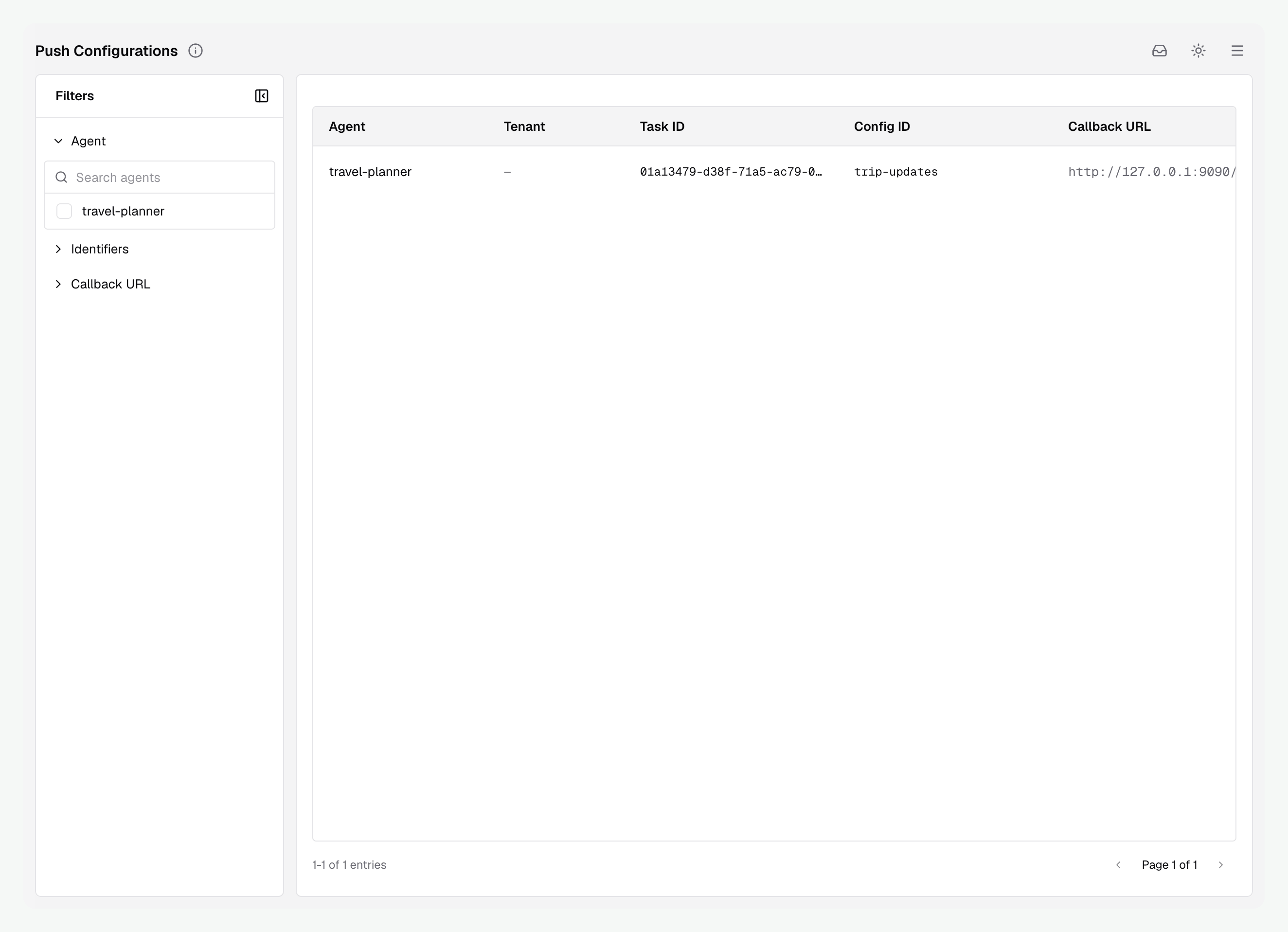
Open **Agent Gateway → Push Configurations** to find registrations by agent, task ID, config ID, or callback URL. The table also shows the tenant and last update time. Click an agent, identifier, or callback URL to filter by it. Right-click the same value to copy it.
Configurations are not automatically removed when a task finishes. Your application should call the A2A delete-task-push-configuration operation through Bifrost when it no longer needs updates. This removes the registration from both the agent server and Bifrost.
 | Action | What it removes |
| - | - |
| A2A delete-task-push-configuration operation through Bifrost | Removes the upstream registration first, then the local configuration. If the upstream operation fails, Bifrost keeps the local configuration. |
| Delete in the dashboard, last resort | Removes only Bifrost's stored configuration. Bifrost stops accepting and delivering notifications for it. The registration on the agent server remains. |
Use dashboard deletion only as a last resort to clean up abandoned registrations, for example when an application failed to call the A2A delete operation. It does not clean up the agent server's copy. You still need to remove that registration through the agent's A2A API or its own management tools.
If you delete a configuration by mistake, call the A2A create-task-push-configuration operation **through Bifrost** again with the task ID, callback URL, and callback authentication. This registers both sides again. The dashboard cannot manually recreate a registration.
## Check delivery and errors
In Agent Logs, distinguish **Push notification** from **Push delivery**. The first records the agent's update arriving at Bifrost. The second records an attempt to send it to your application's callback. Follow the task ID, push config ID, and delivery ID to connect them.
A `202 Accepted` response to the upstream agent means Bifrost queued the notification. It does not mean your application has received it.
Bifrost treats any callback HTTP `2xx` response as success. Timeouts and other HTTP statuses cause retries, up to six delivery attempts. Each attempt has a 30-second timeout. Redirects are not followed.
Delivery is at least once. Your callback may receive the same event again if it processed a request but Bifrost did not receive its successful response. Make callback processing idempotent. After the retry limit, the delivery stops and records the failure. A delivery whose configuration has been deleted stops without further retries.
1. Confirm the upstream agent can reach Bifrost's External Client URL and callback route.
2. Find the task's **Push notification** event. A missing event points to the agent-to-Bifrost hop. Invalid notification tokens, malformed events, and events for another task are rejected.
3. Find its **Push delivery** attempts. Check for callback authentication errors, timeouts, or non-`2xx` responses.
4. Confirm the registration still appears in Push Configurations and its callback URL is correct.
Bifrost blocks delivery to private and loopback callback destinations by default. For a controlled development or test environment, enable this server setting in `config.json`:
```json theme={null}
{
"server": {
"read_buffer_size": 65536,
"a2a_allow_private_push_callbacks": true
}
}
```
`read_buffer_size` is required by the server configuration schema and controls the HTTP header read buffer. It is unrelated to private callback delivery; keep your existing value when updating this configuration.
The equivalent Helm value is:
```yaml theme={null}
bifrost:
server:
a2aAllowPrivatePushCallbacks: true
```
This option is configured at server startup and is not available in the dashboard.
Keep `a2a_allow_private_push_callbacks` **disabled in production**. Enable it only in controlled development or test environments. It allows callback delivery to private and loopback addresses that Bifrost normally blocks.
Next, [Export agent telemetry](./connectors) to send agent traces and metrics to your observability tools.
This documentation is built and hosted on [Mintlify](https://mintlify.com), a developer documentation platform.
| Action | What it removes |
| - | - |
| A2A delete-task-push-configuration operation through Bifrost | Removes the upstream registration first, then the local configuration. If the upstream operation fails, Bifrost keeps the local configuration. |
| Delete in the dashboard, last resort | Removes only Bifrost's stored configuration. Bifrost stops accepting and delivering notifications for it. The registration on the agent server remains. |
Use dashboard deletion only as a last resort to clean up abandoned registrations, for example when an application failed to call the A2A delete operation. It does not clean up the agent server's copy. You still need to remove that registration through the agent's A2A API or its own management tools.
If you delete a configuration by mistake, call the A2A create-task-push-configuration operation **through Bifrost** again with the task ID, callback URL, and callback authentication. This registers both sides again. The dashboard cannot manually recreate a registration.
## Check delivery and errors
In Agent Logs, distinguish **Push notification** from **Push delivery**. The first records the agent's update arriving at Bifrost. The second records an attempt to send it to your application's callback. Follow the task ID, push config ID, and delivery ID to connect them.
A `202 Accepted` response to the upstream agent means Bifrost queued the notification. It does not mean your application has received it.
Bifrost treats any callback HTTP `2xx` response as success. Timeouts and other HTTP statuses cause retries, up to six delivery attempts. Each attempt has a 30-second timeout. Redirects are not followed.
Delivery is at least once. Your callback may receive the same event again if it processed a request but Bifrost did not receive its successful response. Make callback processing idempotent. After the retry limit, the delivery stops and records the failure. A delivery whose configuration has been deleted stops without further retries.
1. Confirm the upstream agent can reach Bifrost's External Client URL and callback route.
2. Find the task's **Push notification** event. A missing event points to the agent-to-Bifrost hop. Invalid notification tokens, malformed events, and events for another task are rejected.
3. Find its **Push delivery** attempts. Check for callback authentication errors, timeouts, or non-`2xx` responses.
4. Confirm the registration still appears in Push Configurations and its callback URL is correct.
Bifrost blocks delivery to private and loopback callback destinations by default. For a controlled development or test environment, enable this server setting in `config.json`:
```json theme={null}
{
"server": {
"read_buffer_size": 65536,
"a2a_allow_private_push_callbacks": true
}
}
```
`read_buffer_size` is required by the server configuration schema and controls the HTTP header read buffer. It is unrelated to private callback delivery; keep your existing value when updating this configuration.
The equivalent Helm value is:
```yaml theme={null}
bifrost:
server:
a2aAllowPrivatePushCallbacks: true
```
This option is configured at server startup and is not available in the dashboard.
Keep `a2a_allow_private_push_callbacks` **disabled in production**. Enable it only in controlled development or test environments. It allows callback delivery to private and loopback addresses that Bifrost normally blocks.
Next, [Export agent telemetry](./connectors) to send agent traces and metrics to your observability tools.
This documentation is built and hosted on [Mintlify](https://mintlify.com), a developer documentation platform.