> ## Documentation Index
> Fetch the complete documentation index at: https://docs.getbifrost.ai/llms.txt
> Use this file to discover all available pages before exploring further.
# User Provisioning (OIDC + SCIM)
> Authenticate users, sync teams, and provision roles and business units from your identity provider using OAuth 2.0 / OIDC, background directory sync, and inbound SCIM 2.0.
## Overview
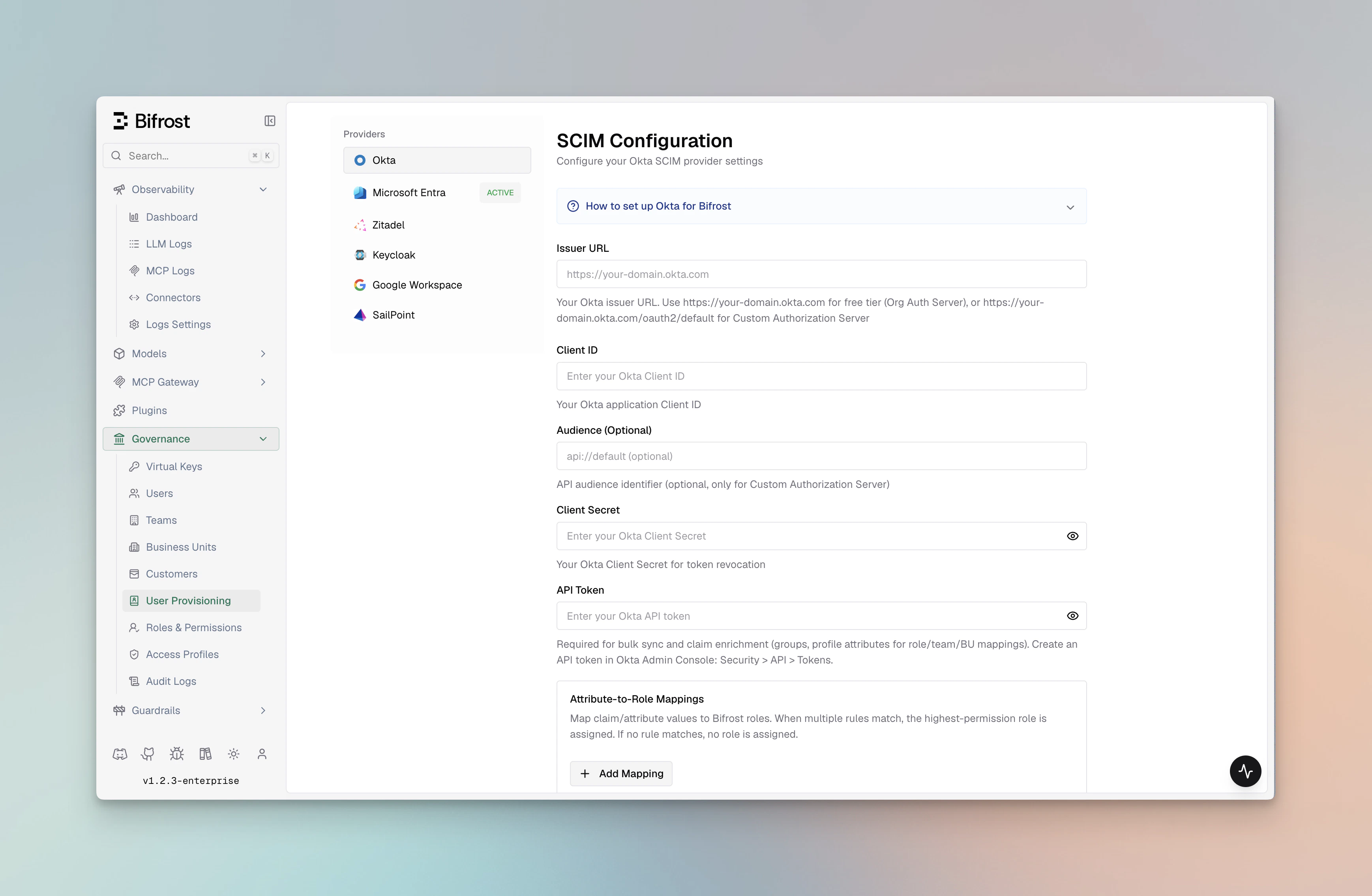
Bifrost Enterprise connects your organization's identity provider to Bifrost through OAuth 2.0 / OIDC login, provider-backed directory sync, and inbound SCIM 2.0 provisioning. A single configuration gives you:
* **Single sign-on (SSO)** via OAuth 2.0 / OIDC with JWKS-based JWT validation
* **Automatic role assignment** using custom claims, app roles, or group-to-role mappings
* **Team synchronization** from IdP groups into Bifrost teams
* **Business unit mapping** from IdP attributes to Bifrost business units
* **Bulk user provisioning** with filter-preview before import
* **Background lifecycle reconciliation** every **24 hours** for imported users
* **OIDC session refresh checks** every **15 minutes** to confirm users are still active with the IdP
* **Silent token refresh** using server-stored refresh tokens when the user remains active
* **Inbound SCIM 2.0** — IdPs can push user and group changes to Bifrost in real time via the `/scim/v2` API
Once configured, users sign in to Bifrost with their corporate credentials and inherit the right [role and permissions](./rbac) immediately — no manual account creation.
 ***
## Supported Identity Providers
Pick your IdP to follow a step-by-step setup guide. All providers share the same Bifrost configuration surface — the only difference is how the OAuth client and role/group claims are created on the provider side.
OIDC with Org or Custom Authorization Servers, plus group-to-role mapping and API tokens for bulk user sync and 24-hour background reconciliation.
Entra ID (Azure AD) with app roles, group claims, and v1.0 / v2.0 token support.
Self-hosted or managed Keycloak with OIDC login and Admin REST API based user provisioning.
Cloud or self-hosted Zitadel with project-scoped role claims and service-account-based provisioning.
Google Workspace domains with OAuth login plus optional Directory API sync via a service account.
Auth0 with Post Login Actions for custom claims, role-to-role mapping, and optional M2M app for bulk user sync.
Any standards-compliant OIDC provider — PingIdentity, ForgeRock, OneLogin, JumpCloud, and others not covered by a dedicated guide.
***
## How it works
***
## Supported Identity Providers
Pick your IdP to follow a step-by-step setup guide. All providers share the same Bifrost configuration surface — the only difference is how the OAuth client and role/group claims are created on the provider side.
OIDC with Org or Custom Authorization Servers, plus group-to-role mapping and API tokens for bulk user sync and 24-hour background reconciliation.
Entra ID (Azure AD) with app roles, group claims, and v1.0 / v2.0 token support.
Self-hosted or managed Keycloak with OIDC login and Admin REST API based user provisioning.
Cloud or self-hosted Zitadel with project-scoped role claims and service-account-based provisioning.
Google Workspace domains with OAuth login plus optional Directory API sync via a service account.
Auth0 with Post Login Actions for custom claims, role-to-role mapping, and optional M2M app for bulk user sync.
Any standards-compliant OIDC provider — PingIdentity, ForgeRock, OneLogin, JumpCloud, and others not covered by a dedicated guide.
***
## How it works
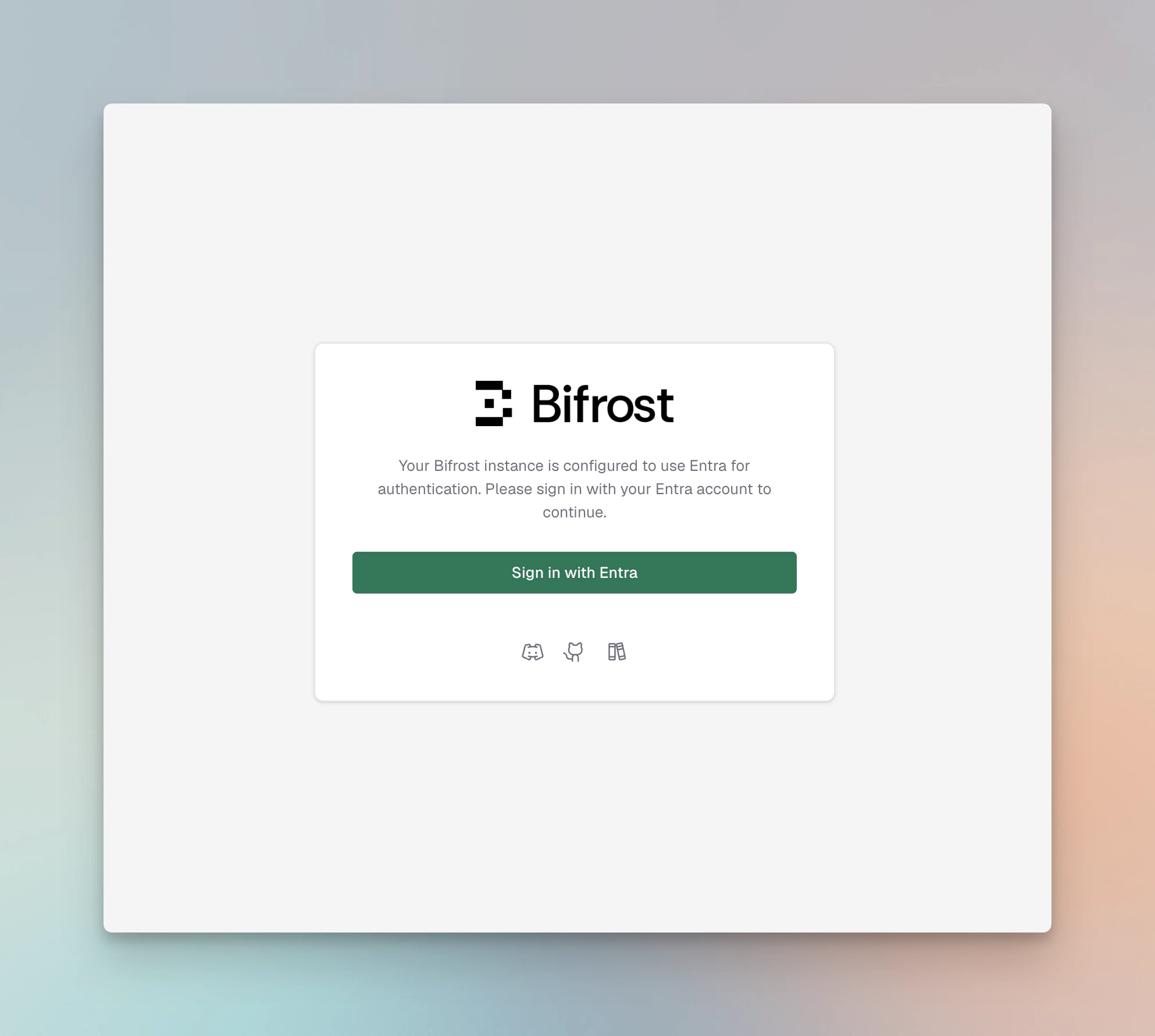 1. **Login** — Bifrost redirects unauthenticated users to the provider's authorization endpoint (Authorization Code flow).
2. **Token exchange** — on callback, Bifrost exchanges the code for an access token and refresh token, stores them in an `HttpOnly` cookie / server session, and validates the JWT against the provider's JWKS.
3. **Identity extraction** — configurable JWT claims (`userIdField`, `rolesField`, `teamIdsField`) are mapped to a Bifrost user, role, and teams. Provider-specific app roles or custom attributes override claim lookup.
4. **Attribute mapping** — optional `attributeRoleMappings`, `attributeTeamMappings`, and `attributeBusinessUnitMappings` translate arbitrary claim values (e.g., a department string or Okta group name) into Bifrost roles, teams, or business units.
5. **Session refresh checks** — every 15 minutes, Bifrost refreshes the OIDC session. If the session cannot be refreshed, Bifrost checks with the OIDC server whether the user is still active.
6. **Background reconciliation** — Bifrost periodically calls the configured provider's directory APIs to reconcile imported users and mapped roles, teams, and business units.
7. **Bulk import** — admins can preview users matching a filter and bulk-import them via the dashboard, which calls the provider's user directory API.
8. **Daily sync** — Bifrost reconciles imported users every 24 hours.
9. **SCIM push** — IdPs configured with a SCIM provisioning connector can push user creates, updates, and deletes to Bifrost in real time via `/scim/v2`.
10. **Decommissioning** — if the OIDC server reports that a user is no longer active, the 24-hour reconciliation no longer finds them in the active source set, or a SCIM DELETE arrives, Bifrost decommissions that user locally.
***
## Capabilities
| Capability | Description |
| -------------------------- | ------------------------------------------------------------------------------------------------------------------------------------------------------------------------------------------------------------------------------------------------------------------------------------------------------------------------------------ |
| **OAuth 2.0 / OIDC SSO** | Authorization Code + PKCE with configurable scopes (`openid profile email offline_access`). |
| **JWKS validation** | JWTs are validated against the provider's published JWKS keys; configuration is cached and auto-refreshed. |
| **Role mapping** | Map from a claim value (string or array) to Admin / Developer / Viewer or a custom role. Highest-privilege wins when multiple match. |
| **Team mapping** | Map multiple claim values to Bifrost teams in a single pass (a user can belong to many teams). |
| **Business unit mapping** | Same as team mapping but scoped to business units. |
| **Provisioning preview** | Preview up to 50 users matching filters (groups, roles, departments) before importing. |
| **Bulk import** | Import matched users into Bifrost with role + team + BU assignments applied. |
| **Team sync** | Sync IdP groups as Bifrost teams with a single action. |
| **Business unit sync** | Sync IdP organizational units as Bifrost business units. |
| **Inbound SCIM 2.0** | IdPs push user and group changes to Bifrost via `/scim/v2` in real time. Bearer-token authenticated. |
| **SCIM attribute mapping** | SCIM user attributes (including enterprise extension fields) drive role, team, and BU assignments automatically on every SCIM write. |
| **Deprovisioning** | Bifrost checks user status during each 15-minute OIDC session refresh and reconciles imported users against the provider directory every 24 hours. SCIM DELETE/deactivation (`active: false`) is also handled immediately. Users that are inactive, disabled, unassigned, or missing from the source set are decommissioned locally. |
| **API key pass-through** | Requests using Bifrost API keys (`bfst-*`) bypass OIDC user-provisioning middleware so inference traffic is not affected. |
***
## Background lifecycle reconciliation
Bifrost's lifecycle model combines source-side reconciliation, OIDC session validation, and real-time SCIM push.
Every **15 minutes**, Bifrost refreshes active OIDC sessions. If a session cannot be refreshed, Bifrost checks with the OIDC server whether the user is still active; if the provider reports the user is inactive, Bifrost decommissions that user locally.
After users are imported, Bifrost also uses the configured provider credentials to sync with the IdP in the background every **24 hours**. That sync updates mapped roles, teams, and business units, and decommissions imported users that are disabled, unassigned, or no longer present in the provider source set.
When an IdP SCIM connector is configured, user deactivation and deletion are also handled immediately as the IdP pushes changes.
***
## Configuration reference
All providers share the same outer config shape in `config.json`:
```json theme={null}
{
"scim_config": {
"enabled": true,
"provider": "okta | entra | zitadel | keycloak | google | sailpoint",
"config": {
"...": "provider-specific fields - see each IdP guide"
}
}
}
```
Shared fields across providers:
| Field | Required | Description |
| ------------------------------- | -------- | ------------------------------------------------------------------------------------------------------ |
| `clientId` | Yes | OAuth client ID from the identity provider. |
| `clientSecret` | Usually | Client secret. Required for confidential clients and (where applicable) token revocation. |
| `audience` | Optional | JWT audience to validate against. Defaults vary per provider. |
| `attributeRoleMappings` | Optional | Ordered list of `{ attribute, value, role }` rules evaluated top-to-bottom. |
| `attributeTeamMappings` | Optional | List of `{ attribute, value, team, attributeType, attributeValue }` rules (all matches apply). |
| `attributeBusinessUnitMappings` | Optional | List of `{ attribute, value, businessUnit, attributeType, attributeValue }` rules (all matches apply). |
Provider-specific fields (domain, tenant ID, server URL, service-account credentials) are documented in each IdP's setup guide.
Changing `scim_config` at runtime through the UI is applied after saving. For file-based configuration, restart the Bifrost server to pick up changes.
***
## Environment variable support
Fields marked **env.\* supported** accept `"env.VAR_NAME"` in addition to a literal value — Bifrost resolves the variable from the process environment at startup. Attribute mapping arrays are always plain JSON (they cannot reference env vars).
### Okta
| Field | JSON key | Required | env.\* supported | Notes |
| ---------------------- | ------------------------------- | -------- | ---------------- | ------------------------------------------------------------------------------------ |
| Issuer URL | `issuerUrl` | Yes | Yes | Org server: `https://domain.okta.com`; Custom: `…/oauth2/default` |
| Client ID | `clientId` | Yes | Yes | Application Client ID |
| Client Secret | `clientSecret` | No | Yes | Required for token revocation |
| API Token | `apiToken` | No | Yes | Required for bulk user sync, team sync, and 24-hour Okta background reconciliation |
| Audience | `audience` | No | Yes | Only applies to Custom Authorization Server |
| Team IDs field | `teamIdsField` | No | Yes | JWT claim for group IDs (default: `"groups"`) |
| Role mappings | `attributeRoleMappings` | No | **Plain only** | Array of `{ attribute, value, role }` objects |
| Team mappings | `attributeTeamMappings` | No | **Plain only** | Array of `{ attribute, value, team, attributeType, attributeValue }` objects |
| Business unit mappings | `attributeBusinessUnitMappings` | No | **Plain only** | Array of `{ attribute, value, businessUnit, attributeType, attributeValue }` objects |
### Microsoft Entra ID
| Field | JSON key | Required | env.\* supported | Notes |
| ---------------------- | ------------------------------- | -------- | ---------------- | ------------------------------------------------------------------------------------ |
| Tenant ID | `tenantId` | Yes | Yes | Azure tenant ID or `"common"` for multi-tenant |
| Client ID | `clientId` | Yes | Yes | Application (client) ID |
| Client Secret | `clientSecret` | Yes | Yes | Client secret for OAuth authentication |
| Cloud | `cloud` | No | Yes | `"commercial"` (default) \| `"gcc-high"` \| `"dod"` |
| Audience | `audience` | No | Yes | JWT audience override (default: `clientId`) |
| App ID URI | `appIdUri` | No | Yes | App ID URI for v1.0 tokens (e.g. `api://{clientId}`) |
| Team IDs field | `teamIdsField` | No | Yes | JWT claim for group IDs (default: `"groups"`) |
| Role mappings | `attributeRoleMappings` | No | **Plain only** | Array of `{ attribute, value, role }` objects |
| Team mappings | `attributeTeamMappings` | No | **Plain only** | Array of `{ attribute, value, team, attributeType, attributeValue }` objects |
| Business unit mappings | `attributeBusinessUnitMappings` | No | **Plain only** | Array of `{ attribute, value, businessUnit, attributeType, attributeValue }` objects |
### Keycloak
| Field | JSON key | Required | env.\* supported | Notes |
| ---------------------- | ------------------------------- | -------- | ---------------- | ------------------------------------------------------------------------------------ |
| Server URL | `serverUrl` | Yes | Yes | Base URL, e.g. `https://keycloak.company.com` (no `/realms/…`) |
| Realm | `realm` | Yes | Yes | e.g. `"master"` or `"my-app"` |
| Client ID | `clientId` | Yes | Yes | Application client ID |
| Client Secret | `clientSecret` | No | Yes | For confidential clients |
| Audience | `audience` | No | Yes | JWT audience for token validation |
| Team IDs field | `teamIdsField` | No | Yes | JWT claim for group IDs (default: `"groups"`) |
| Role mappings | `attributeRoleMappings` | No | **Plain only** | Array of `{ attribute, value, role }` objects |
| Team mappings | `attributeTeamMappings` | No | **Plain only** | Array of `{ attribute, value, team, attributeType, attributeValue }` objects |
| Business unit mappings | `attributeBusinessUnitMappings` | No | **Plain only** | Array of `{ attribute, value, businessUnit, attributeType, attributeValue }` objects |
### Zitadel
| Field | JSON key | Required | env.\* supported | Notes |
| ----------------------------- | ------------------------------- | -------- | ---------------- | ------------------------------------------------------------------------------------ |
| Domain | `domain` | Yes | Yes | e.g. `"my-instance.zitadel.cloud"` or `"auth.company.com"` |
| Client ID | `clientId` | Yes | Yes | Application client ID |
| Client Secret | `clientSecret` | No | Yes | For confidential clients |
| Project ID | `projectId` | No | Yes | For project-scoped role claims |
| Audience | `audience` | No | Yes | Access-token audience override |
| Service account client ID | `serviceAccountClientId` | No | Yes | Service account for provisioning API access |
| Service account client secret | `serviceAccountClientSecret` | No | Yes | Service account secret |
| Team IDs field | `teamIdsField` | No | Yes | JWT claim for group IDs |
| Role mappings | `attributeRoleMappings` | No | **Plain only** | Array of `{ attribute, value, role }` objects |
| Team mappings | `attributeTeamMappings` | No | **Plain only** | Array of `{ attribute, value, team, attributeType, attributeValue }` objects |
| Business unit mappings | `attributeBusinessUnitMappings` | No | **Plain only** | Array of `{ attribute, value, businessUnit, attributeType, attributeValue }` objects |
### Google Workspace
| Field | JSON key | Required | env.\* supported | Notes |
| --------------------------- | ------------------------------- | ----------- | ---------------- | ------------------------------------------------------------------------------------ |
| Domain | `domain` | Yes | Yes | Google Workspace domain (e.g. `"company.com"`) |
| Client ID | `clientId` | Yes | Yes | Google OAuth2 client ID |
| Client Secret | `clientSecret` | No | Yes | For token revocation |
| Credential mode | `credentialMode` | No | Yes | `"inherit"` (ADC) \| `"env"` \| `"file"` |
| Service account JSON | `serviceAccountJson` | No | Yes | Raw service account JSON string |
| Service account env var | `serviceAccountEnvVar` | No | Yes | Env var containing the service account JSON |
| Service account file | `serviceAccountFile` | No | Yes | Path to the service account JSON key file |
| Admin email | `adminEmail` | Conditional | Yes | Required for Directory API / domain-wide delegation |
| Impersonate service account | `impersonateServiceAccount` | No | Yes | GCP SA email to impersonate when using ADC + Workload Identity |
| Audience | `audience` | No | Yes | Optional JWT audience override |
| Team IDs field | `teamIdsField` | No | Yes | Claim field for group IDs (default: `"groups"`) |
| Role mappings | `attributeRoleMappings` | No | **Plain only** | Array of `{ attribute, value, role }` objects |
| Team mappings | `attributeTeamMappings` | No | **Plain only** | Array of `{ attribute, value, team, attributeType, attributeValue }` objects |
| Business unit mappings | `attributeBusinessUnitMappings` | No | **Plain only** | Array of `{ attribute, value, businessUnit, attributeType, attributeValue }` objects |
## Configuring from the dashboard
1. Navigate to **Governance → User Provisioning** in the Bifrost dashboard.
2. Select your identity provider from the **OIDC Provider** dropdown.
3. Fill in the provider-specific fields. Required fields are marked and validated on **Verify**.
1. **Login** — Bifrost redirects unauthenticated users to the provider's authorization endpoint (Authorization Code flow).
2. **Token exchange** — on callback, Bifrost exchanges the code for an access token and refresh token, stores them in an `HttpOnly` cookie / server session, and validates the JWT against the provider's JWKS.
3. **Identity extraction** — configurable JWT claims (`userIdField`, `rolesField`, `teamIdsField`) are mapped to a Bifrost user, role, and teams. Provider-specific app roles or custom attributes override claim lookup.
4. **Attribute mapping** — optional `attributeRoleMappings`, `attributeTeamMappings`, and `attributeBusinessUnitMappings` translate arbitrary claim values (e.g., a department string or Okta group name) into Bifrost roles, teams, or business units.
5. **Session refresh checks** — every 15 minutes, Bifrost refreshes the OIDC session. If the session cannot be refreshed, Bifrost checks with the OIDC server whether the user is still active.
6. **Background reconciliation** — Bifrost periodically calls the configured provider's directory APIs to reconcile imported users and mapped roles, teams, and business units.
7. **Bulk import** — admins can preview users matching a filter and bulk-import them via the dashboard, which calls the provider's user directory API.
8. **Daily sync** — Bifrost reconciles imported users every 24 hours.
9. **SCIM push** — IdPs configured with a SCIM provisioning connector can push user creates, updates, and deletes to Bifrost in real time via `/scim/v2`.
10. **Decommissioning** — if the OIDC server reports that a user is no longer active, the 24-hour reconciliation no longer finds them in the active source set, or a SCIM DELETE arrives, Bifrost decommissions that user locally.
***
## Capabilities
| Capability | Description |
| -------------------------- | ------------------------------------------------------------------------------------------------------------------------------------------------------------------------------------------------------------------------------------------------------------------------------------------------------------------------------------ |
| **OAuth 2.0 / OIDC SSO** | Authorization Code + PKCE with configurable scopes (`openid profile email offline_access`). |
| **JWKS validation** | JWTs are validated against the provider's published JWKS keys; configuration is cached and auto-refreshed. |
| **Role mapping** | Map from a claim value (string or array) to Admin / Developer / Viewer or a custom role. Highest-privilege wins when multiple match. |
| **Team mapping** | Map multiple claim values to Bifrost teams in a single pass (a user can belong to many teams). |
| **Business unit mapping** | Same as team mapping but scoped to business units. |
| **Provisioning preview** | Preview up to 50 users matching filters (groups, roles, departments) before importing. |
| **Bulk import** | Import matched users into Bifrost with role + team + BU assignments applied. |
| **Team sync** | Sync IdP groups as Bifrost teams with a single action. |
| **Business unit sync** | Sync IdP organizational units as Bifrost business units. |
| **Inbound SCIM 2.0** | IdPs push user and group changes to Bifrost via `/scim/v2` in real time. Bearer-token authenticated. |
| **SCIM attribute mapping** | SCIM user attributes (including enterprise extension fields) drive role, team, and BU assignments automatically on every SCIM write. |
| **Deprovisioning** | Bifrost checks user status during each 15-minute OIDC session refresh and reconciles imported users against the provider directory every 24 hours. SCIM DELETE/deactivation (`active: false`) is also handled immediately. Users that are inactive, disabled, unassigned, or missing from the source set are decommissioned locally. |
| **API key pass-through** | Requests using Bifrost API keys (`bfst-*`) bypass OIDC user-provisioning middleware so inference traffic is not affected. |
***
## Background lifecycle reconciliation
Bifrost's lifecycle model combines source-side reconciliation, OIDC session validation, and real-time SCIM push.
Every **15 minutes**, Bifrost refreshes active OIDC sessions. If a session cannot be refreshed, Bifrost checks with the OIDC server whether the user is still active; if the provider reports the user is inactive, Bifrost decommissions that user locally.
After users are imported, Bifrost also uses the configured provider credentials to sync with the IdP in the background every **24 hours**. That sync updates mapped roles, teams, and business units, and decommissions imported users that are disabled, unassigned, or no longer present in the provider source set.
When an IdP SCIM connector is configured, user deactivation and deletion are also handled immediately as the IdP pushes changes.
***
## Configuration reference
All providers share the same outer config shape in `config.json`:
```json theme={null}
{
"scim_config": {
"enabled": true,
"provider": "okta | entra | zitadel | keycloak | google | sailpoint",
"config": {
"...": "provider-specific fields - see each IdP guide"
}
}
}
```
Shared fields across providers:
| Field | Required | Description |
| ------------------------------- | -------- | ------------------------------------------------------------------------------------------------------ |
| `clientId` | Yes | OAuth client ID from the identity provider. |
| `clientSecret` | Usually | Client secret. Required for confidential clients and (where applicable) token revocation. |
| `audience` | Optional | JWT audience to validate against. Defaults vary per provider. |
| `attributeRoleMappings` | Optional | Ordered list of `{ attribute, value, role }` rules evaluated top-to-bottom. |
| `attributeTeamMappings` | Optional | List of `{ attribute, value, team, attributeType, attributeValue }` rules (all matches apply). |
| `attributeBusinessUnitMappings` | Optional | List of `{ attribute, value, businessUnit, attributeType, attributeValue }` rules (all matches apply). |
Provider-specific fields (domain, tenant ID, server URL, service-account credentials) are documented in each IdP's setup guide.
Changing `scim_config` at runtime through the UI is applied after saving. For file-based configuration, restart the Bifrost server to pick up changes.
***
## Environment variable support
Fields marked **env.\* supported** accept `"env.VAR_NAME"` in addition to a literal value — Bifrost resolves the variable from the process environment at startup. Attribute mapping arrays are always plain JSON (they cannot reference env vars).
### Okta
| Field | JSON key | Required | env.\* supported | Notes |
| ---------------------- | ------------------------------- | -------- | ---------------- | ------------------------------------------------------------------------------------ |
| Issuer URL | `issuerUrl` | Yes | Yes | Org server: `https://domain.okta.com`; Custom: `…/oauth2/default` |
| Client ID | `clientId` | Yes | Yes | Application Client ID |
| Client Secret | `clientSecret` | No | Yes | Required for token revocation |
| API Token | `apiToken` | No | Yes | Required for bulk user sync, team sync, and 24-hour Okta background reconciliation |
| Audience | `audience` | No | Yes | Only applies to Custom Authorization Server |
| Team IDs field | `teamIdsField` | No | Yes | JWT claim for group IDs (default: `"groups"`) |
| Role mappings | `attributeRoleMappings` | No | **Plain only** | Array of `{ attribute, value, role }` objects |
| Team mappings | `attributeTeamMappings` | No | **Plain only** | Array of `{ attribute, value, team, attributeType, attributeValue }` objects |
| Business unit mappings | `attributeBusinessUnitMappings` | No | **Plain only** | Array of `{ attribute, value, businessUnit, attributeType, attributeValue }` objects |
### Microsoft Entra ID
| Field | JSON key | Required | env.\* supported | Notes |
| ---------------------- | ------------------------------- | -------- | ---------------- | ------------------------------------------------------------------------------------ |
| Tenant ID | `tenantId` | Yes | Yes | Azure tenant ID or `"common"` for multi-tenant |
| Client ID | `clientId` | Yes | Yes | Application (client) ID |
| Client Secret | `clientSecret` | Yes | Yes | Client secret for OAuth authentication |
| Cloud | `cloud` | No | Yes | `"commercial"` (default) \| `"gcc-high"` \| `"dod"` |
| Audience | `audience` | No | Yes | JWT audience override (default: `clientId`) |
| App ID URI | `appIdUri` | No | Yes | App ID URI for v1.0 tokens (e.g. `api://{clientId}`) |
| Team IDs field | `teamIdsField` | No | Yes | JWT claim for group IDs (default: `"groups"`) |
| Role mappings | `attributeRoleMappings` | No | **Plain only** | Array of `{ attribute, value, role }` objects |
| Team mappings | `attributeTeamMappings` | No | **Plain only** | Array of `{ attribute, value, team, attributeType, attributeValue }` objects |
| Business unit mappings | `attributeBusinessUnitMappings` | No | **Plain only** | Array of `{ attribute, value, businessUnit, attributeType, attributeValue }` objects |
### Keycloak
| Field | JSON key | Required | env.\* supported | Notes |
| ---------------------- | ------------------------------- | -------- | ---------------- | ------------------------------------------------------------------------------------ |
| Server URL | `serverUrl` | Yes | Yes | Base URL, e.g. `https://keycloak.company.com` (no `/realms/…`) |
| Realm | `realm` | Yes | Yes | e.g. `"master"` or `"my-app"` |
| Client ID | `clientId` | Yes | Yes | Application client ID |
| Client Secret | `clientSecret` | No | Yes | For confidential clients |
| Audience | `audience` | No | Yes | JWT audience for token validation |
| Team IDs field | `teamIdsField` | No | Yes | JWT claim for group IDs (default: `"groups"`) |
| Role mappings | `attributeRoleMappings` | No | **Plain only** | Array of `{ attribute, value, role }` objects |
| Team mappings | `attributeTeamMappings` | No | **Plain only** | Array of `{ attribute, value, team, attributeType, attributeValue }` objects |
| Business unit mappings | `attributeBusinessUnitMappings` | No | **Plain only** | Array of `{ attribute, value, businessUnit, attributeType, attributeValue }` objects |
### Zitadel
| Field | JSON key | Required | env.\* supported | Notes |
| ----------------------------- | ------------------------------- | -------- | ---------------- | ------------------------------------------------------------------------------------ |
| Domain | `domain` | Yes | Yes | e.g. `"my-instance.zitadel.cloud"` or `"auth.company.com"` |
| Client ID | `clientId` | Yes | Yes | Application client ID |
| Client Secret | `clientSecret` | No | Yes | For confidential clients |
| Project ID | `projectId` | No | Yes | For project-scoped role claims |
| Audience | `audience` | No | Yes | Access-token audience override |
| Service account client ID | `serviceAccountClientId` | No | Yes | Service account for provisioning API access |
| Service account client secret | `serviceAccountClientSecret` | No | Yes | Service account secret |
| Team IDs field | `teamIdsField` | No | Yes | JWT claim for group IDs |
| Role mappings | `attributeRoleMappings` | No | **Plain only** | Array of `{ attribute, value, role }` objects |
| Team mappings | `attributeTeamMappings` | No | **Plain only** | Array of `{ attribute, value, team, attributeType, attributeValue }` objects |
| Business unit mappings | `attributeBusinessUnitMappings` | No | **Plain only** | Array of `{ attribute, value, businessUnit, attributeType, attributeValue }` objects |
### Google Workspace
| Field | JSON key | Required | env.\* supported | Notes |
| --------------------------- | ------------------------------- | ----------- | ---------------- | ------------------------------------------------------------------------------------ |
| Domain | `domain` | Yes | Yes | Google Workspace domain (e.g. `"company.com"`) |
| Client ID | `clientId` | Yes | Yes | Google OAuth2 client ID |
| Client Secret | `clientSecret` | No | Yes | For token revocation |
| Credential mode | `credentialMode` | No | Yes | `"inherit"` (ADC) \| `"env"` \| `"file"` |
| Service account JSON | `serviceAccountJson` | No | Yes | Raw service account JSON string |
| Service account env var | `serviceAccountEnvVar` | No | Yes | Env var containing the service account JSON |
| Service account file | `serviceAccountFile` | No | Yes | Path to the service account JSON key file |
| Admin email | `adminEmail` | Conditional | Yes | Required for Directory API / domain-wide delegation |
| Impersonate service account | `impersonateServiceAccount` | No | Yes | GCP SA email to impersonate when using ADC + Workload Identity |
| Audience | `audience` | No | Yes | Optional JWT audience override |
| Team IDs field | `teamIdsField` | No | Yes | Claim field for group IDs (default: `"groups"`) |
| Role mappings | `attributeRoleMappings` | No | **Plain only** | Array of `{ attribute, value, role }` objects |
| Team mappings | `attributeTeamMappings` | No | **Plain only** | Array of `{ attribute, value, team, attributeType, attributeValue }` objects |
| Business unit mappings | `attributeBusinessUnitMappings` | No | **Plain only** | Array of `{ attribute, value, businessUnit, attributeType, attributeValue }` objects |
## Configuring from the dashboard
1. Navigate to **Governance → User Provisioning** in the Bifrost dashboard.
2. Select your identity provider from the **OIDC Provider** dropdown.
3. Fill in the provider-specific fields. Required fields are marked and validated on **Verify**.
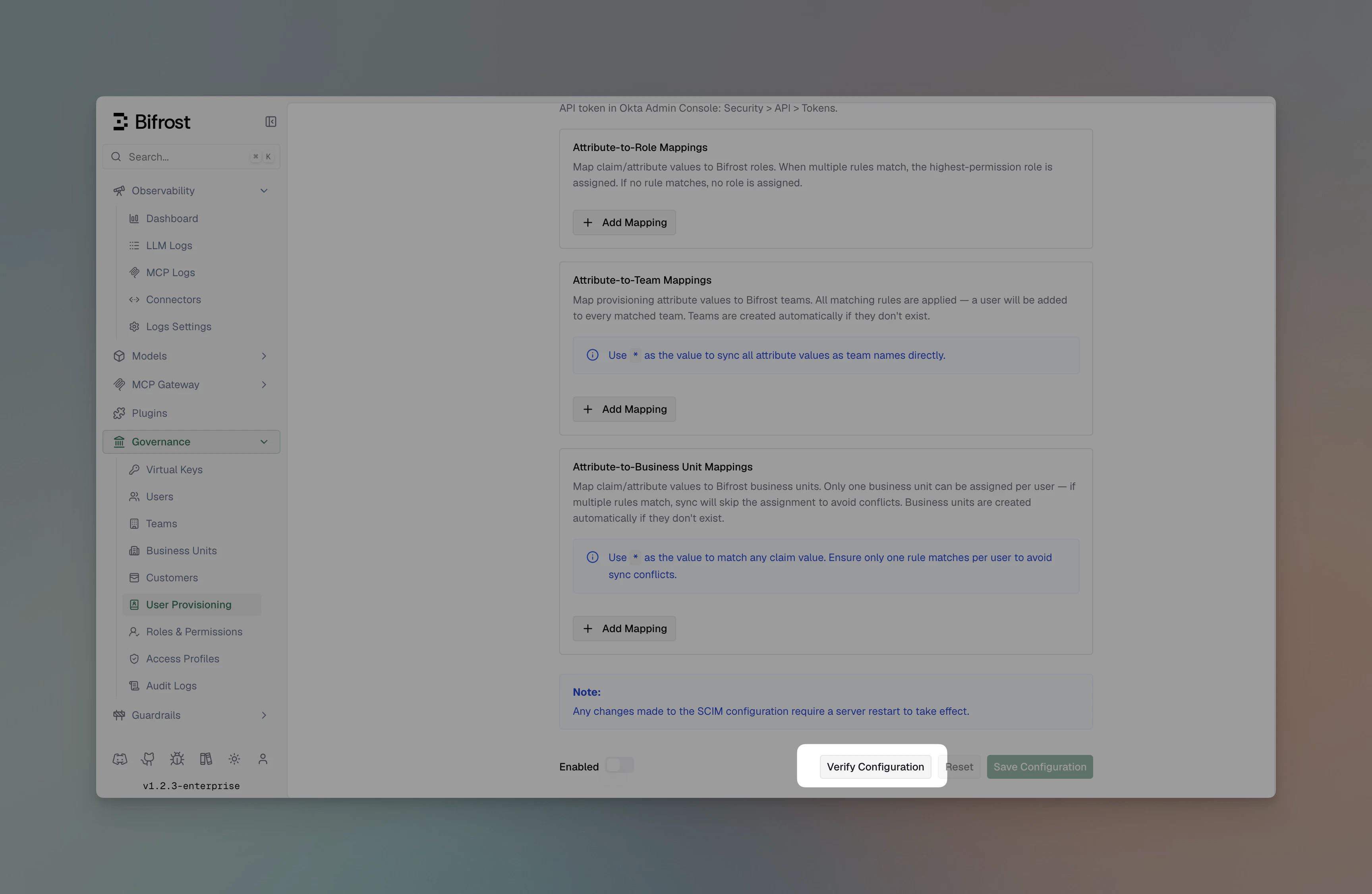 4. Click **Verify** to test credentials end-to-end. Bifrost will reach the provider's JWKS / directory endpoint and report any failures.
5. Configure **Attribute → Role / Team / Business Unit** mappings as needed.
6. Toggle **Enabled** and click **Save Configuration**.
After enabling a new provider, the next dashboard load redirects to your IdP for login. Test in an incognito window first to avoid being locked out of your current session.
***
## Attribute mappings
Attribute mappings let you translate claim values into Bifrost roles, teams, or business units without forcing your IdP admins to restructure claim names.
4. Click **Verify** to test credentials end-to-end. Bifrost will reach the provider's JWKS / directory endpoint and report any failures.
5. Configure **Attribute → Role / Team / Business Unit** mappings as needed.
6. Toggle **Enabled** and click **Save Configuration**.
After enabling a new provider, the next dashboard load redirects to your IdP for login. Test in an incognito window first to avoid being locked out of your current session.
***
## Attribute mappings
Attribute mappings let you translate claim values into Bifrost roles, teams, or business units without forcing your IdP admins to restructure claim names.
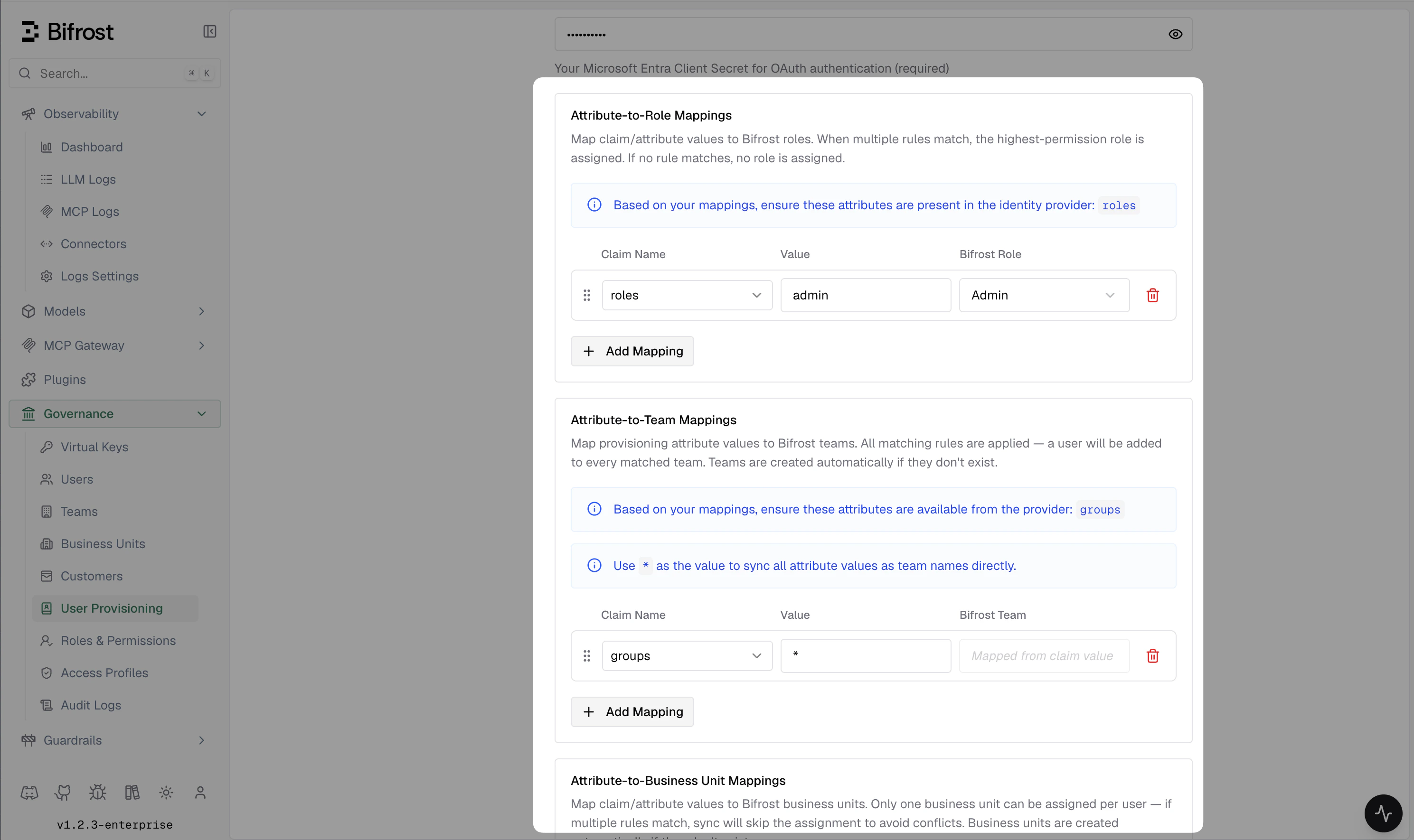 Each mapping is an ordered rule:
```json theme={null}
{
"attribute": "department",
"value": "Engineering",
"role": "developer"
}
```
Rules are evaluated top-to-bottom:
* **Role mappings** — first match wins. Set a fallback with `"value": "*"` at the end.
* **Team mappings** and **business unit mappings** — all matching rules apply, so a user with `department=Platform` and `group=sre` can be placed on multiple teams.
Claim values can be strings, arrays, or nested objects — Bifrost resolves dotted paths (e.g., `realm_access.roles`).
### `attributeType` field
Team and business unit mappings have an optional `attributeType` field:
| Value | Meaning |
| ------------------ | ----------------------------------------------------------------------------------------------------------------------------------------------------------------------- |
| `"user"` (default) | Match against JWT claims or SCIM user attributes (e.g. `department`, `title`). |
| `"group"` | Match against the `displayName` of groups pushed via SCIM. Use this when your IdP pushes group membership via SCIM rather than embedding group names in the user token. |
```json theme={null}
{
"attribute": "displayName",
"value": "platform-team",
"team": "Platform",
"attributeType": "group"
}
```
Leave `attributeType` unset (or `"user"`) for all OIDC claim-based mappings.
### `attributeValue` field
Team and business unit mappings also support an optional `attributeValue` field. This is the key Bifrost uses to look up the attribute in a SCIM-provisioned user's stored profile (a flat key-value map).
`attribute` and `attributeValue` serve different codepaths:
* `attribute` is used for **OIDC JWT claim lookup** and supports dotted paths into nested objects (e.g. `realm_access.roles`).
* `attributeValue` is used for **SCIM profile lookup** against the flat map stored from inbound SCIM pushes. It defaults to `attribute` when not set.
For standard SCIM attributes (`department`, `title`, `userType`, `costCenter`, etc.) the two values are identical, so you never need to set `attributeValue` — the same name works for both OIDC and SCIM paths.
You only need `attributeValue` when a single mapping rule must cover both OIDC and inbound SCIM, and the OIDC claim path differs from the SCIM storage key — for example, a custom attribute sent under `profile.jobFunction` in the JWT but stored as `jobFunction` in the SCIM profile:
```json theme={null}
{
"attribute": "profile.jobFunction",
"attributeValue": "jobFunction",
"value": "platform-engineer",
"team": "Platform"
}
```
If you only use OIDC (no inbound SCIM push), `attributeValue` has no effect.
### SCIM attribute suggestions
When configuring attribute mappings for SCIM-provisioned users, the following attributes are available from the user payload:
**Core attributes** — sent by all SCIM-capable providers:
| Attribute | Description |
| ------------- | ------------------------------------------------------------- |
| `userName` | The user's unique identifier (usually email) at the provider. |
| `displayName` | The user's display name. |
| `title` | Job title. |
| `userType` | User category (e.g. `"Employee"`, `"Contractor"`). |
**Enterprise extension attributes** — sent by most providers via `urn:ietf:params:scim:schemas:extension:enterprise:2.0:User`:
| Attribute | Description |
| ---------------- | ------------------ |
| `department` | Department name. |
| `costCenter` | Cost center code. |
| `organization` | Organization name. |
| `division` | Division name. |
| `employeeNumber` | Employee ID. |
**Custom extension attributes** — any additional attributes sent under custom URNs are flattened and made available by their field name for use in mappings.
***
## Inbound SCIM 2.0 provisioning
Bifrost exposes a SCIM 2.0 endpoint that identity providers can use to push user and group changes in real time, without waiting for the next 24-hour reconciliation cycle.
### Base URL
```
https:///scim/v2
```
### Authentication
All SCIM requests must include a bearer token:
```
Authorization: Bearer
```
The provisioning token is generated per SCIM provider and can be rotated from the Bifrost dashboard under **Governance → User Provisioning → SCIM Settings**.
### How SCIM writes trigger governance updates
Every SCIM create, replace, or patch immediately re-evaluates the user's `attributeRoleMappings`, `attributeTeamMappings`, and `attributeBusinessUnitMappings` against the current SCIM attributes. Changes to role, team, or business unit assignments are committed to the database and broadcast to all cluster nodes before the SCIM response is returned.
Only SCIM-managed memberships are affected — any manually assigned teams or roles are preserved.
***
## Bulk user provisioning
There are two ways to get users into Bifrost, depending on what your IdP supports:
**Via API token (bulk import):**
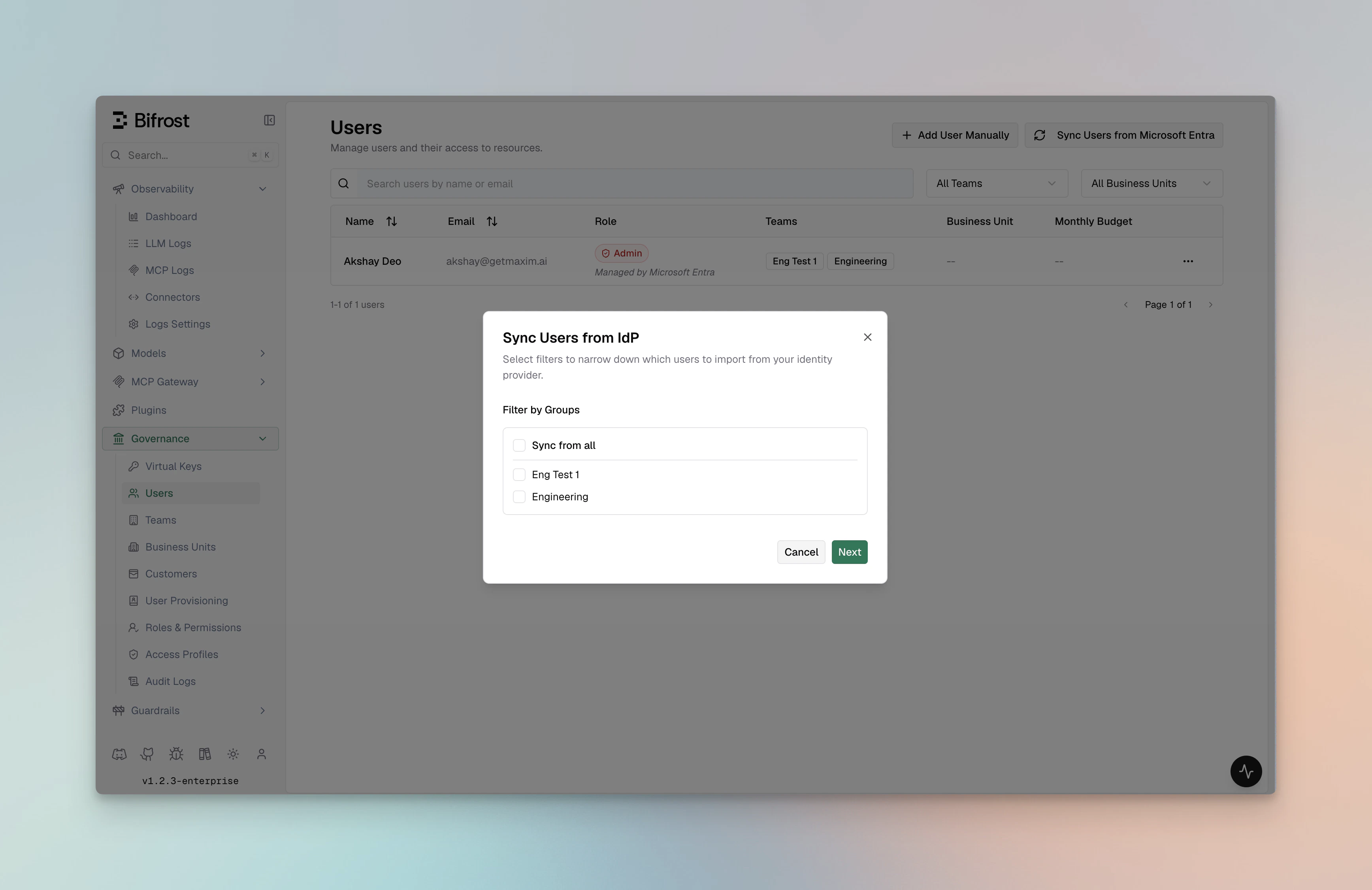
Providers that support a directory API (Okta, Entra, Keycloak, Zitadel, Google Workspace) allow you to preview and import users in bulk from the dashboard:
1. Go to **Governance → User Provisioning → Import Users**.
2. Select a filter — groups, roles, departments, or a custom query depending on provider support.
3. Click **Preview** to see up to 50 matching users.
4. Click **Import** to create them in Bifrost with role / team / BU assignments applied.
Each mapping is an ordered rule:
```json theme={null}
{
"attribute": "department",
"value": "Engineering",
"role": "developer"
}
```
Rules are evaluated top-to-bottom:
* **Role mappings** — first match wins. Set a fallback with `"value": "*"` at the end.
* **Team mappings** and **business unit mappings** — all matching rules apply, so a user with `department=Platform` and `group=sre` can be placed on multiple teams.
Claim values can be strings, arrays, or nested objects — Bifrost resolves dotted paths (e.g., `realm_access.roles`).
### `attributeType` field
Team and business unit mappings have an optional `attributeType` field:
| Value | Meaning |
| ------------------ | ----------------------------------------------------------------------------------------------------------------------------------------------------------------------- |
| `"user"` (default) | Match against JWT claims or SCIM user attributes (e.g. `department`, `title`). |
| `"group"` | Match against the `displayName` of groups pushed via SCIM. Use this when your IdP pushes group membership via SCIM rather than embedding group names in the user token. |
```json theme={null}
{
"attribute": "displayName",
"value": "platform-team",
"team": "Platform",
"attributeType": "group"
}
```
Leave `attributeType` unset (or `"user"`) for all OIDC claim-based mappings.
### `attributeValue` field
Team and business unit mappings also support an optional `attributeValue` field. This is the key Bifrost uses to look up the attribute in a SCIM-provisioned user's stored profile (a flat key-value map).
`attribute` and `attributeValue` serve different codepaths:
* `attribute` is used for **OIDC JWT claim lookup** and supports dotted paths into nested objects (e.g. `realm_access.roles`).
* `attributeValue` is used for **SCIM profile lookup** against the flat map stored from inbound SCIM pushes. It defaults to `attribute` when not set.
For standard SCIM attributes (`department`, `title`, `userType`, `costCenter`, etc.) the two values are identical, so you never need to set `attributeValue` — the same name works for both OIDC and SCIM paths.
You only need `attributeValue` when a single mapping rule must cover both OIDC and inbound SCIM, and the OIDC claim path differs from the SCIM storage key — for example, a custom attribute sent under `profile.jobFunction` in the JWT but stored as `jobFunction` in the SCIM profile:
```json theme={null}
{
"attribute": "profile.jobFunction",
"attributeValue": "jobFunction",
"value": "platform-engineer",
"team": "Platform"
}
```
If you only use OIDC (no inbound SCIM push), `attributeValue` has no effect.
### SCIM attribute suggestions
When configuring attribute mappings for SCIM-provisioned users, the following attributes are available from the user payload:
**Core attributes** — sent by all SCIM-capable providers:
| Attribute | Description |
| ------------- | ------------------------------------------------------------- |
| `userName` | The user's unique identifier (usually email) at the provider. |
| `displayName` | The user's display name. |
| `title` | Job title. |
| `userType` | User category (e.g. `"Employee"`, `"Contractor"`). |
**Enterprise extension attributes** — sent by most providers via `urn:ietf:params:scim:schemas:extension:enterprise:2.0:User`:
| Attribute | Description |
| ---------------- | ------------------ |
| `department` | Department name. |
| `costCenter` | Cost center code. |
| `organization` | Organization name. |
| `division` | Division name. |
| `employeeNumber` | Employee ID. |
**Custom extension attributes** — any additional attributes sent under custom URNs are flattened and made available by their field name for use in mappings.
***
## Inbound SCIM 2.0 provisioning
Bifrost exposes a SCIM 2.0 endpoint that identity providers can use to push user and group changes in real time, without waiting for the next 24-hour reconciliation cycle.
### Base URL
```
https:///scim/v2
```
### Authentication
All SCIM requests must include a bearer token:
```
Authorization: Bearer
```
The provisioning token is generated per SCIM provider and can be rotated from the Bifrost dashboard under **Governance → User Provisioning → SCIM Settings**.
### How SCIM writes trigger governance updates
Every SCIM create, replace, or patch immediately re-evaluates the user's `attributeRoleMappings`, `attributeTeamMappings`, and `attributeBusinessUnitMappings` against the current SCIM attributes. Changes to role, team, or business unit assignments are committed to the database and broadcast to all cluster nodes before the SCIM response is returned.
Only SCIM-managed memberships are affected — any manually assigned teams or roles are preserved.
***
## Bulk user provisioning
There are two ways to get users into Bifrost, depending on what your IdP supports:
**Via API token (bulk import):**
Providers that support a directory API (Okta, Entra, Keycloak, Zitadel, Google Workspace) allow you to preview and import users in bulk from the dashboard:
1. Go to **Governance → User Provisioning → Import Users**.
2. Select a filter — groups, roles, departments, or a custom query depending on provider support.
3. Click **Preview** to see up to 50 matching users.
4. Click **Import** to create them in Bifrost with role / team / BU assignments applied.
 Re-running an import reconciles existing users — role and team changes in the IdP are reflected on the next import.
**Via SCIM push (real-time):**
If the IdP supports SCIM provisioning (e.g. Okta with a SCIM app), you can configure it to push users to Bifrost automatically — no manual import needed. Users are created, updated, and deactivated in Bifrost as they change in the IdP. See the [Inbound SCIM 2.0 provisioning](#inbound-scim-20-provisioning) section and your IdP's setup guide for configuration steps.
***
## Troubleshooting
| Symptom | Likely cause |
| ----------------------------------------------------------------------------- | -------------------------------------------------------------------------------------------------------------------------------------------------------------------------------------------------------------------------------- |
| Access denied: no application role or group mapping is assigned to this user. | Make sure you have assigned the user to the Bifrost IdP application and they have a valid group/attribute mapping to a role in Bifrost. |
| Redirect loop on login | Make sure you have restarted pods/Bifrost instance after changing OIDC configuration, or check for a redirect URI mismatch. Exact string match required — check trailing slashes and `http` vs `https`. |
| `invalid audience` | `audience` field does not match the access token's `aud` claim. Use the same value your IdP issues. |
| Empty roles / teams | Claim mapping is off. Verify the JWT at [jwt.io](https://jwt.io) and check `rolesField` / `teamIdsField`. |
| Token refresh failing | `offline_access` scope missing or refresh token revoked. Re-enable the scope and re-authenticate. |
| First user gets Admin | By design — if no matching role mapping applies, the first user is promoted to Admin so they can finish configuration. Subsequent users default to Viewer. |
| SCIM `401 Unauthorized` | The `Authorization: Bearer ` header is missing or the provisioning token has been rotated. Rotate a new token and update your IdP SCIM connector. |
| SCIM writes not updating teams / roles | Ensure `attributeTeamMappings` / `attributeRoleMappings` reference the correct attribute name (e.g. `department`, not `Department`). Attribute matching is case-insensitive for values but the attribute key must match exactly. |
| SCIM group push not placing users in teams | Make sure the relevant `attributeTeamMappings` entries use `"attributeType": "group"`. Without this, group `displayName` is not evaluated against team mappings. |
Provider-specific troubleshooting lives in each IdP's guide.
***
## Related
* [Role-Based Access Control](./rbac) — permissions model and custom roles
* [Advanced Governance](./advanced-governance) — budgets, limits, and compliance
* [Audit Logs](./audit-logs) — track authentication events and role changes
Re-running an import reconciles existing users — role and team changes in the IdP are reflected on the next import.
**Via SCIM push (real-time):**
If the IdP supports SCIM provisioning (e.g. Okta with a SCIM app), you can configure it to push users to Bifrost automatically — no manual import needed. Users are created, updated, and deactivated in Bifrost as they change in the IdP. See the [Inbound SCIM 2.0 provisioning](#inbound-scim-20-provisioning) section and your IdP's setup guide for configuration steps.
***
## Troubleshooting
| Symptom | Likely cause |
| ----------------------------------------------------------------------------- | -------------------------------------------------------------------------------------------------------------------------------------------------------------------------------------------------------------------------------- |
| Access denied: no application role or group mapping is assigned to this user. | Make sure you have assigned the user to the Bifrost IdP application and they have a valid group/attribute mapping to a role in Bifrost. |
| Redirect loop on login | Make sure you have restarted pods/Bifrost instance after changing OIDC configuration, or check for a redirect URI mismatch. Exact string match required — check trailing slashes and `http` vs `https`. |
| `invalid audience` | `audience` field does not match the access token's `aud` claim. Use the same value your IdP issues. |
| Empty roles / teams | Claim mapping is off. Verify the JWT at [jwt.io](https://jwt.io) and check `rolesField` / `teamIdsField`. |
| Token refresh failing | `offline_access` scope missing or refresh token revoked. Re-enable the scope and re-authenticate. |
| First user gets Admin | By design — if no matching role mapping applies, the first user is promoted to Admin so they can finish configuration. Subsequent users default to Viewer. |
| SCIM `401 Unauthorized` | The `Authorization: Bearer ` header is missing or the provisioning token has been rotated. Rotate a new token and update your IdP SCIM connector. |
| SCIM writes not updating teams / roles | Ensure `attributeTeamMappings` / `attributeRoleMappings` reference the correct attribute name (e.g. `department`, not `Department`). Attribute matching is case-insensitive for values but the attribute key must match exactly. |
| SCIM group push not placing users in teams | Make sure the relevant `attributeTeamMappings` entries use `"attributeType": "group"`. Without this, group `displayName` is not evaluated against team mappings. |
Provider-specific troubleshooting lives in each IdP's guide.
***
## Related
* [Role-Based Access Control](./rbac) — permissions model and custom roles
* [Advanced Governance](./advanced-governance) — budgets, limits, and compliance
* [Audit Logs](./audit-logs) — track authentication events and role changes