> ## Documentation Index
> Fetch the complete documentation index at: https://docs.getbifrost.ai/llms.txt
> Use this file to discover all available pages before exploring further.
# Role-Based Access Control
> Manage user access with fine-grained permissions across Bifrost resources using roles and permissions.
## Overview
Role-Based Access Control (RBAC) in Bifrost Enterprise provides fine-grained access management for your organization. RBAC allows you to define roles with specific permissions, controlling what users can view, create, update, or delete across all Bifrost resources.
**Key Benefits:**
* **Principle of Least Privilege** - Grant users only the permissions they need
* **Centralized Access Management** - Manage all permissions from a single interface
* **Audit-Ready** - Track who has access to what for compliance requirements
* **Flexible Role Design** - Use system roles or create custom roles for your organization
RBAC integrates seamlessly with [User Provisioning (OIDC)](./user-provisioning), automatically assigning roles based on your IdP groups and claims.
***
## Roles & Permissions
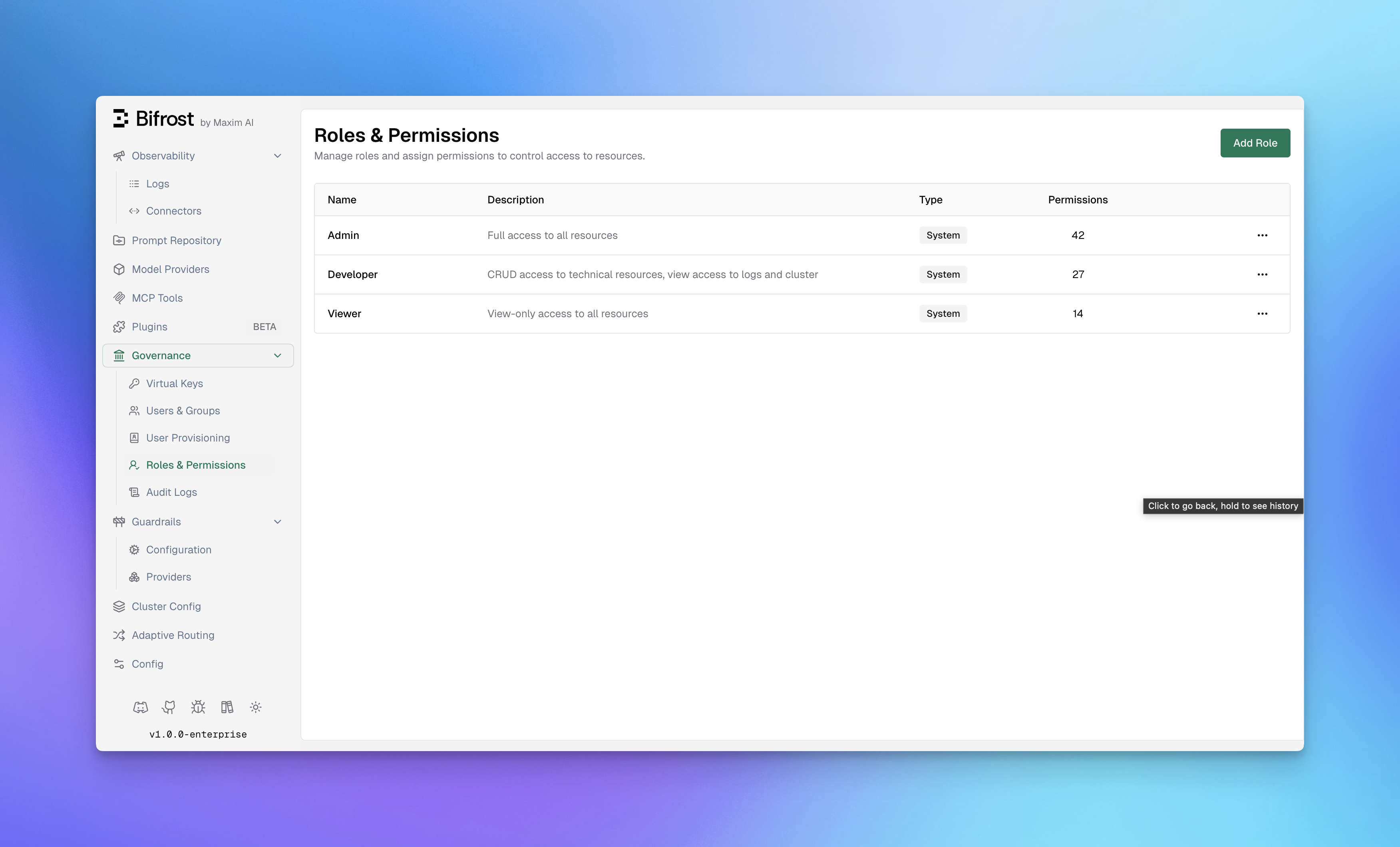
Navigate to **Governance** → **Roles & Permissions** in the Bifrost dashboard to manage roles.
 ### System Roles
Bifrost includes three pre-configured system roles that cover common access patterns:
| Role | Permissions | Description |
| ------------- | ----------- | ------------------------------------------------------------------- |
| **Admin** | 42 | Full access to all resources and operations |
| **Developer** | 27 | CRUD access to technical resources, view access to logs and cluster |
| **Viewer** | 14 | Read-only access to all resources |
System roles cannot be deleted, but their permissions can be customized to fit your organization's needs.
### Custom Roles
Create custom roles when system roles don't match your organizational structure. Custom roles are useful for:
* **Specialized Teams** - Create roles for QA, Security, or Compliance teams
* **Project-Based Access** - Limit access to specific resources per project
* **Temporary Access** - Grant limited permissions for contractors or auditors
**To create a custom role:**
1. Click **Add Role** in the top-right corner
2. Enter a **Role Name** (e.g., "Auditor", "QA Team")
3. Add a **Description** explaining the role's purpose
4. Click **Create Role**
5. Assign permissions using the Manage Permissions dialog
***
## Resources & Operations
RBAC permissions are defined as combinations of **Resources** and **Operations**.
### Protected Resources
Bifrost protects access to the following resources:
| Resource | Description |
| ----------------------- | ------------------------------------ |
| **Logs** | Request and response logs |
| **ModelProvider** | AI model provider configurations |
| **Observability** | Monitoring and metrics dashboards |
| **Plugins** | Plugin configurations and management |
| **VirtualKeys** | Virtual key management |
| **UserProvisioning** | User and group provisioning settings |
| **Users** | User account management |
| **AuditLogs** | Audit trail and compliance logs |
| **GuardrailsConfig** | Guardrail rules and configuration |
| **GuardrailsProviders** | Guardrail provider profiles |
| **Cluster** | Cluster configuration and nodes |
| **Settings** | Workspace settings |
| **MCPGateway** | MCP Gateway configurations |
| **MCPToolGroups** | MCP tool group management |
| **MCPLogs** | MCP tool execution logs |
| **AdaptiveRouter** | Adaptive routing settings |
### Operations
Most resources support the standard CRUD operations. Some resources expose specialized operations for security-sensitive or non-CRUD workflows.
| Operation | Description |
| ------------------------ | ------------------------------------------------------------------------------------------------------------------- |
| **View** | Read-only access to view the resource |
| **Create** | Ability to create new instances of the resource |
| **Update** | Ability to modify existing resources |
| **Delete** | Ability to remove resources |
| **Download** | Ability to download resources, such as audit logs |
| **Reveal** | Ability to reveal original values for reversible redactions in Bifrost logs |
| **Inference operations** | Ability to invoke specific inference surfaces, such as chat completions, embeddings, images, audio, and moderations |
***
## Managing Permissions
To assign or modify permissions for a role:
1. Navigate to **Governance** → **Roles & Permissions**
2. Click the **menu icon** (•••) on the role you want to modify
3. Select **Manage Permissions**
### System Roles
Bifrost includes three pre-configured system roles that cover common access patterns:
| Role | Permissions | Description |
| ------------- | ----------- | ------------------------------------------------------------------- |
| **Admin** | 42 | Full access to all resources and operations |
| **Developer** | 27 | CRUD access to technical resources, view access to logs and cluster |
| **Viewer** | 14 | Read-only access to all resources |
System roles cannot be deleted, but their permissions can be customized to fit your organization's needs.
### Custom Roles
Create custom roles when system roles don't match your organizational structure. Custom roles are useful for:
* **Specialized Teams** - Create roles for QA, Security, or Compliance teams
* **Project-Based Access** - Limit access to specific resources per project
* **Temporary Access** - Grant limited permissions for contractors or auditors
**To create a custom role:**
1. Click **Add Role** in the top-right corner
2. Enter a **Role Name** (e.g., "Auditor", "QA Team")
3. Add a **Description** explaining the role's purpose
4. Click **Create Role**
5. Assign permissions using the Manage Permissions dialog
***
## Resources & Operations
RBAC permissions are defined as combinations of **Resources** and **Operations**.
### Protected Resources
Bifrost protects access to the following resources:
| Resource | Description |
| ----------------------- | ------------------------------------ |
| **Logs** | Request and response logs |
| **ModelProvider** | AI model provider configurations |
| **Observability** | Monitoring and metrics dashboards |
| **Plugins** | Plugin configurations and management |
| **VirtualKeys** | Virtual key management |
| **UserProvisioning** | User and group provisioning settings |
| **Users** | User account management |
| **AuditLogs** | Audit trail and compliance logs |
| **GuardrailsConfig** | Guardrail rules and configuration |
| **GuardrailsProviders** | Guardrail provider profiles |
| **Cluster** | Cluster configuration and nodes |
| **Settings** | Workspace settings |
| **MCPGateway** | MCP Gateway configurations |
| **MCPToolGroups** | MCP tool group management |
| **MCPLogs** | MCP tool execution logs |
| **AdaptiveRouter** | Adaptive routing settings |
### Operations
Most resources support the standard CRUD operations. Some resources expose specialized operations for security-sensitive or non-CRUD workflows.
| Operation | Description |
| ------------------------ | ------------------------------------------------------------------------------------------------------------------- |
| **View** | Read-only access to view the resource |
| **Create** | Ability to create new instances of the resource |
| **Update** | Ability to modify existing resources |
| **Delete** | Ability to remove resources |
| **Download** | Ability to download resources, such as audit logs |
| **Reveal** | Ability to reveal original values for reversible redactions in Bifrost logs |
| **Inference operations** | Ability to invoke specific inference surfaces, such as chat completions, embeddings, images, audio, and moderations |
***
## Managing Permissions
To assign or modify permissions for a role:
1. Navigate to **Governance** → **Roles & Permissions**
2. Click the **menu icon** (•••) on the role you want to modify
3. Select **Manage Permissions**
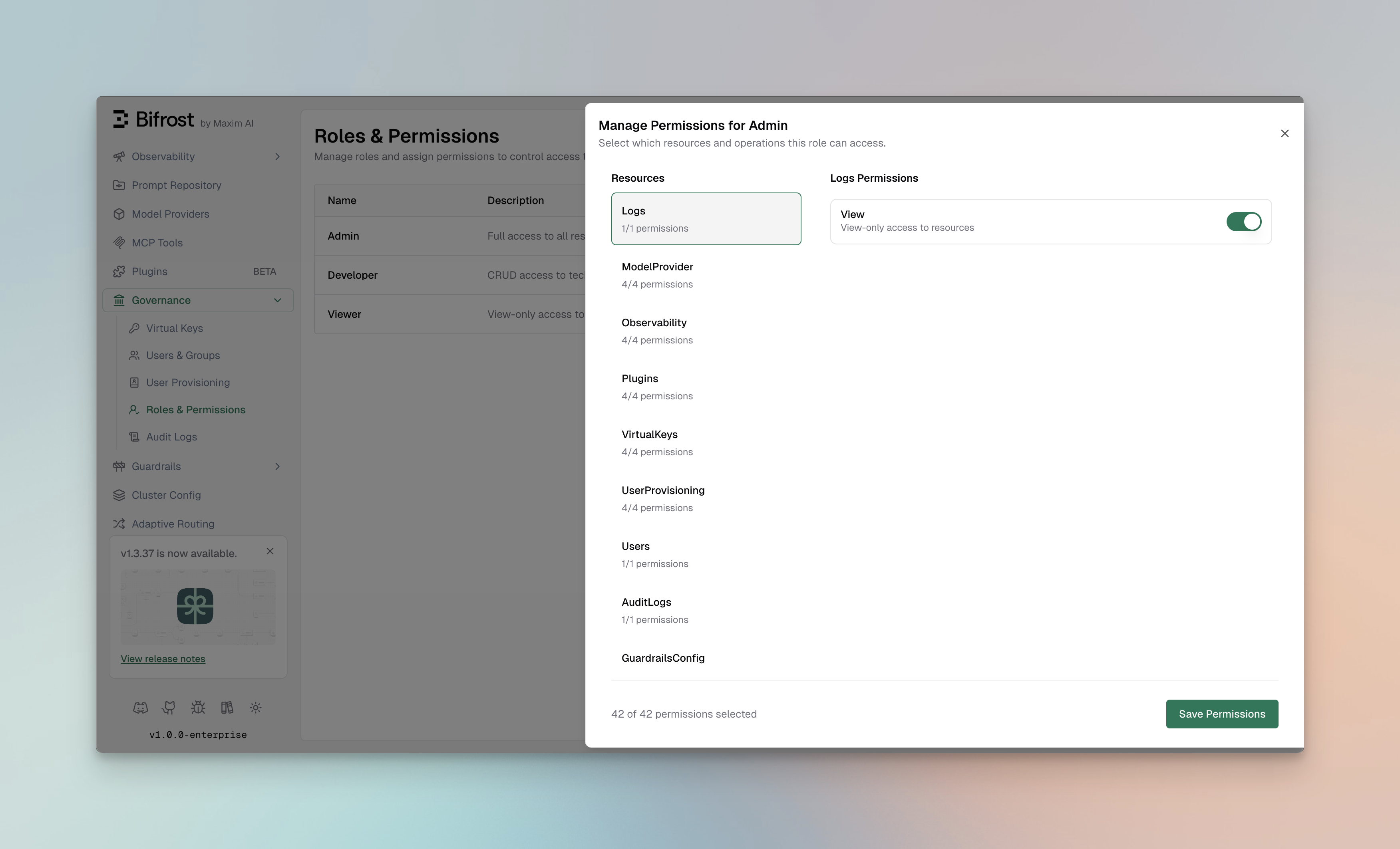 The Manage Permissions dialog provides a two-panel interface:
**Left Panel - Resources:**
* Lists all available resources
* Shows the count of enabled permissions per resource (e.g., "4/4 permissions")
* Click a resource to view its permissions
**Right Panel - Permissions:**
* Displays available operations for the selected resource
* Toggle switches to enable/disable each permission
* Shows operation descriptions for clarity
### Assigning Permissions
1. Select a **Resource** from the left panel
2. Toggle the **operations** you want to enable for this role
3. Repeat for other resources as needed
4. Click **Save Permissions** to apply changes
The footer shows the total permissions count (e.g., "42 of 42 permissions selected") to help track the role's access level.
***
## Best Practices
### Role Design
* **Start with System Roles** - Use Admin, Developer, and Viewer as templates
* **Follow Least Privilege** - Only grant permissions that are necessary
* **Document Role Purpose** - Use clear descriptions to explain each role's intent
* **Review Regularly** - Audit role assignments quarterly
### Permission Strategies
**For Development Teams:**
```
Developer role + specific resource access based on team focus
- Frontend team: VirtualKeys (View), Logs (View), Observability (View)
- Backend team: ModelProvider (CRUD), Plugins (CRUD), Logs (View)
```
**For Security/Compliance Teams:**
```
Custom "Auditor" role with:
- AuditLogs (View)
- Logs (View)
- GuardrailsConfig (View)
- Users (View)
```
**For Operations Teams:**
```
Custom "Ops" role with:
- Cluster (CRUD)
- Observability (View)
- Logs (View)
- Settings (View, Update)
```
***
## Integration with Identity Providers
When using [User Provisioning (OIDC)](./user-provisioning) with Okta, Entra, Zitadel, Keycloak, or Google Workspace, roles can be automatically assigned based on:
* **IdP Groups** - Map identity provider groups to Bifrost roles
* **App Roles** - Sync application roles from your IdP
* **Claims** - Use custom claims to determine role assignment
Users authenticated via SSO receive their role assignments automatically on first login, with permissions synchronized on each session.
***
## API Access
Roles and permissions can also be managed via the API:
**List all roles:**
```bash theme={null}
curl -X GET http://localhost:8080/api/roles \
-H "Authorization: Bearer "
```
**Get role permissions:**
```bash theme={null}
curl -X GET http://localhost:8080/api/roles/{role_id}/permissions \
-H "Authorization: Bearer "
```
**Update role permissions:**
```bash theme={null}
curl -X PUT http://localhost:8080/api/roles/{role_id}/permissions \
-H "Authorization: Bearer " \
-H "Content-Type: application/json" \
-d '{
"permission_ids": [1, 2, 3, 4, 5]
}'
```
**Create a custom role:**
```bash theme={null}
curl -X POST http://localhost:8080/api/roles \
-H "Authorization: Bearer " \
-H "Content-Type: application/json" \
-d '{
"name": "Auditor",
"description": "Read-only access for compliance auditing"
}'
```
***
## Next Steps
* **[Setting up Okta](./setting-up-okta)** - Configure Okta for SSO with role sync
* **[Setting up Microsoft Entra](./setting-up-entra)** - Configure Entra ID for SSO with role sync
* **[Audit Logs](./audit-logs)** - Track permission usage and access patterns
* **[Advanced Governance](./advanced-governance)** - Learn about the complete governance framework
The Manage Permissions dialog provides a two-panel interface:
**Left Panel - Resources:**
* Lists all available resources
* Shows the count of enabled permissions per resource (e.g., "4/4 permissions")
* Click a resource to view its permissions
**Right Panel - Permissions:**
* Displays available operations for the selected resource
* Toggle switches to enable/disable each permission
* Shows operation descriptions for clarity
### Assigning Permissions
1. Select a **Resource** from the left panel
2. Toggle the **operations** you want to enable for this role
3. Repeat for other resources as needed
4. Click **Save Permissions** to apply changes
The footer shows the total permissions count (e.g., "42 of 42 permissions selected") to help track the role's access level.
***
## Best Practices
### Role Design
* **Start with System Roles** - Use Admin, Developer, and Viewer as templates
* **Follow Least Privilege** - Only grant permissions that are necessary
* **Document Role Purpose** - Use clear descriptions to explain each role's intent
* **Review Regularly** - Audit role assignments quarterly
### Permission Strategies
**For Development Teams:**
```
Developer role + specific resource access based on team focus
- Frontend team: VirtualKeys (View), Logs (View), Observability (View)
- Backend team: ModelProvider (CRUD), Plugins (CRUD), Logs (View)
```
**For Security/Compliance Teams:**
```
Custom "Auditor" role with:
- AuditLogs (View)
- Logs (View)
- GuardrailsConfig (View)
- Users (View)
```
**For Operations Teams:**
```
Custom "Ops" role with:
- Cluster (CRUD)
- Observability (View)
- Logs (View)
- Settings (View, Update)
```
***
## Integration with Identity Providers
When using [User Provisioning (OIDC)](./user-provisioning) with Okta, Entra, Zitadel, Keycloak, or Google Workspace, roles can be automatically assigned based on:
* **IdP Groups** - Map identity provider groups to Bifrost roles
* **App Roles** - Sync application roles from your IdP
* **Claims** - Use custom claims to determine role assignment
Users authenticated via SSO receive their role assignments automatically on first login, with permissions synchronized on each session.
***
## API Access
Roles and permissions can also be managed via the API:
**List all roles:**
```bash theme={null}
curl -X GET http://localhost:8080/api/roles \
-H "Authorization: Bearer "
```
**Get role permissions:**
```bash theme={null}
curl -X GET http://localhost:8080/api/roles/{role_id}/permissions \
-H "Authorization: Bearer "
```
**Update role permissions:**
```bash theme={null}
curl -X PUT http://localhost:8080/api/roles/{role_id}/permissions \
-H "Authorization: Bearer " \
-H "Content-Type: application/json" \
-d '{
"permission_ids": [1, 2, 3, 4, 5]
}'
```
**Create a custom role:**
```bash theme={null}
curl -X POST http://localhost:8080/api/roles \
-H "Authorization: Bearer " \
-H "Content-Type: application/json" \
-d '{
"name": "Auditor",
"description": "Read-only access for compliance auditing"
}'
```
***
## Next Steps
* **[Setting up Okta](./setting-up-okta)** - Configure Okta for SSO with role sync
* **[Setting up Microsoft Entra](./setting-up-entra)** - Configure Entra ID for SSO with role sync
* **[Audit Logs](./audit-logs)** - Track permission usage and access patterns
* **[Advanced Governance](./advanced-governance)** - Learn about the complete governance framework