> ## Documentation Index
> Fetch the complete documentation index at: https://docs.getbifrost.ai/llms.txt
> Use this file to discover all available pages before exploring further.
# Prompt Guardrails
> Use a configured LLM judge to enforce natural-language policies on LLM and MCP inputs and outputs.
## Overview
**Prompt Guardrails** is a Bifrost Enterprise guardrail provider that uses a configured LLM as a judge. The judge evaluates text against a natural-language policy and returns one of two decisions:
* `ALLOW` lets the request or response continue.
* `BLOCK` returns a guardrail intervention with the judge's reason.
Use Prompt Guardrails for semantic policies that are difficult to express as fixed patterns, such as organization-specific conduct rules, domain restrictions, or contextual content policies.
Prompt Guardrails is a blocking guardrail. It does not redact or transform content. For deterministic credential and pattern checks, use [Secrets Detection](/enterprise/guardrails/secrets-detection) or [Custom Regex](/enterprise/guardrails/custom-regex).
## How It Works
At runtime:
1. A guardrail rule matches an LLM request or MCP tool execution.
2. Bifrost extracts text from the rule's selected `input`, `output`, or `both` phase.
3. Prompt Guardrails sends that text and the configured natural-language policy to the selected judge model.
4. The judge returns a structured `ALLOW` or `BLOCK` decision with a short reason.
5. Bifrost continues processing or returns a guardrail intervention.
The evaluated content is sent separately from the judge's system prompt and encoded as JSON. The internal judge request skips the guardrail plugin pipeline so it cannot recursively invoke Prompt Guardrails.
Prompt Guardrails evaluates extracted text. It does not inspect image pixels or binary file contents. A phase containing no text is allowed without making a judge call.
## When to Use Prompt Guardrails
Prompt Guardrails is a good fit when a policy depends on meaning or context:
* Block requests asking the model to impersonate a company employee.
* Prevent responses from making definitive medical diagnoses.
* Restrict discussion of unreleased product information.
* Enforce a customer-specific communication or content policy.
Prefer deterministic providers when the condition has an exact representation:
| Requirement | Recommended provider |
| ------------------------------------------------------- | ------------------------------------------------------------- |
| Leaked API keys, tokens, or credentials | [Secrets Detection](/enterprise/guardrails/secrets-detection) |
| Known text formats or organization-specific identifiers | [Custom Regex](/enterprise/guardrails/custom-regex) |
| Contextual or semantic policy | Prompt Guardrails |
You can attach multiple profiles to one rule for layered protection.
## Judge Model Requirements
The selected judge provider must already be configured and enabled in Bifrost. The judge model must:
* Support **Chat Completions** or the **Responses API**. Bifrost prefers Chat Completions when both are available.
* Support the `response_format` parameter used for the structured decision.
* Be available in Bifrost's model catalog.
Bifrost checks model-catalog metadata before verification and runtime execution. Provider behavior remains authoritative: a provider can still reject a model that advertises the required parameters, particularly when strict structured output is incompatible with the model's reasoning behavior. If verification returns such an error, select another judge model that supports `response_format`.
## Configuration
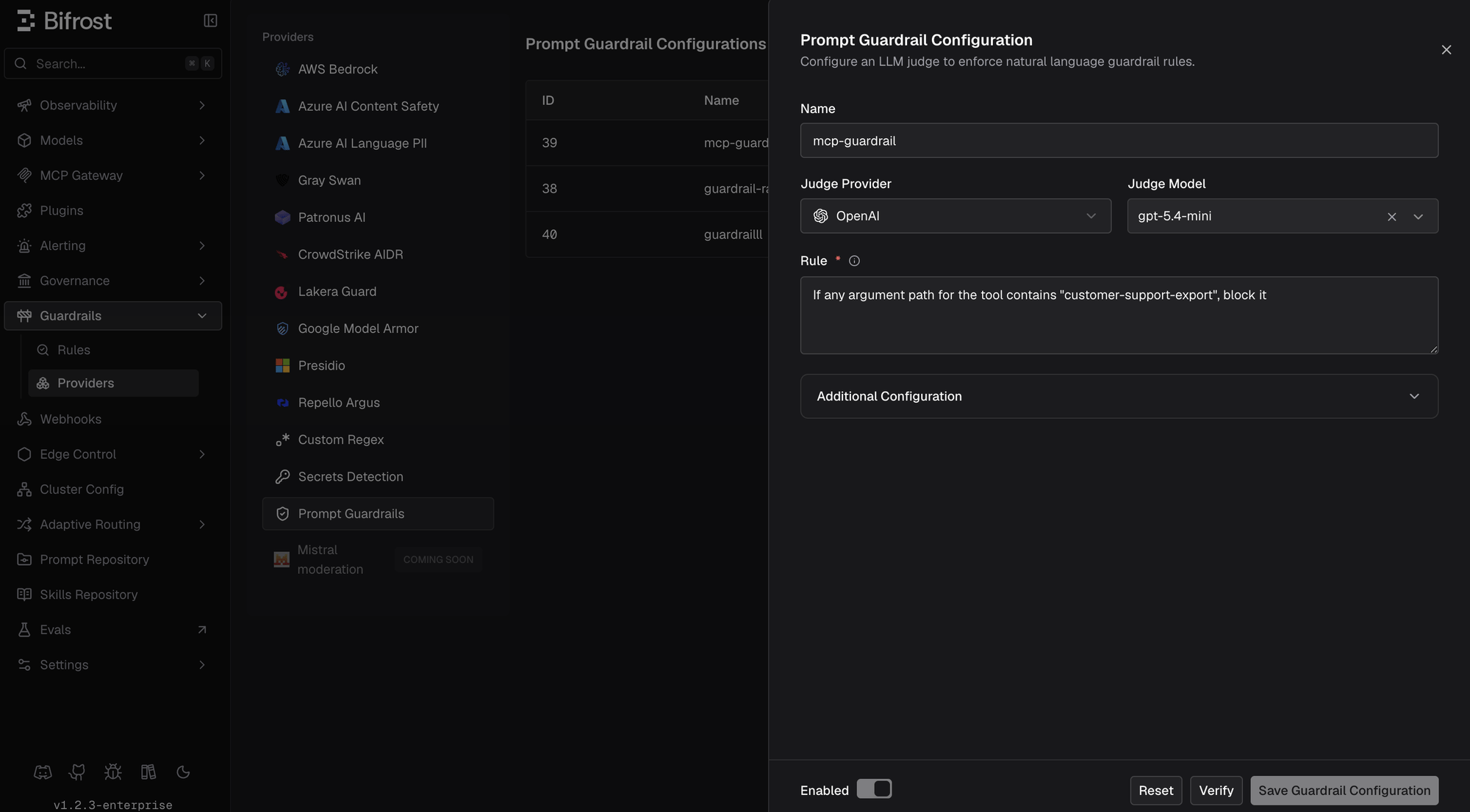 1. Go to **Guardrails** > **Providers**.
2. Select **Prompt Guardrails**.
3. Click **Add Configuration**.
4. Enter a descriptive **Name**.
5. Select the **Judge Provider** and **Judge Model**.
6. Enter the natural-language policy in **Rule**.
7. Optionally expand **Additional Configuration** to change the system prompt, timeout, or output-token limit.
8. Click **Verify**.
9. Enable and save the configuration.
10. Go to **Guardrails** > **Configuration** and attach the profile to a guardrail rule.
Changing the provider, model, policy, or additional configuration invalidates the previous verification. Verify the updated configuration before enabling it.
Create a Prompt Guardrails profile:
```bash theme={null}
curl -X POST http://localhost:8080/api/guardrails/prompt-guardrail \
-H "Content-Type: application/json" \
-d '{
"name": "block-medical-diagnoses",
"enabled": true,
"config": {
"judge_provider": "openai",
"judge_model": "gpt-4o-mini",
"rule": "Block responses that provide a definitive medical diagnosis for an individual.",
"timeout": 30,
"max_output_tokens": 200
}
}'
```
Verify the configuration before saving it:
```bash theme={null}
curl -X POST http://localhost:8080/api/guardrails/prompt-guardrail/verify \
-H "Content-Type: application/json" \
-d '{
"name": "block-medical-diagnoses",
"config": {
"judge_provider": "openai",
"judge_model": "gpt-4o-mini",
"rule": "Block responses that provide a definitive medical diagnosis for an individual.",
"timeout": 30,
"max_output_tokens": 200
}
}'
```
The management API assigns the profile ID after creation. Attach the profile to a rule as `"prompt-guardrail:"`; see [Creating Rules](/enterprise/guardrails#creating-rules).
```json theme={null}
{
"guardrails_config": {
"guardrail_providers": [
{
"id": 3,
"provider_name": "prompt-guardrail",
"policy_name": "block-medical-diagnoses",
"enabled": true,
"timeout": 30,
"config": {
"judge_provider": "openai",
"judge_model": "gpt-4o-mini",
"rule": "Block responses that provide a definitive medical diagnosis for an individual.",
"max_output_tokens": 200
}
}
]
}
}
```
```yaml theme={null}
bifrost:
guardrails:
providers:
- id: 3
provider_name: "prompt-guardrail"
policy_name: "block-medical-diagnoses"
enabled: true
timeout: 30
config:
judge_provider: "openai"
judge_model: "gpt-4o-mini"
rule: "Block responses that provide a definitive medical diagnosis for an individual."
max_output_tokens: 200
```
### Configuration Fields
| Field | Required | Default | Description |
| ------------------- | -------- | -------------------------- | -------------------------------------------------------------------------------------------- |
| `judge_provider` | Yes | - | Configured Bifrost provider used for the internal judge request. |
| `judge_model` | Yes | - | Chat Completions or Responses model used as the judge. |
| `rule` | Yes | - | Natural-language policy the judge evaluates. |
| `prompt_template` | No | Built-in classifier prompt | Judge system-prompt template. It must contain `{{rule}}` and must not contain `{{content}}`. |
| `timeout` | No | `30` | Judge-request timeout in seconds. Must be greater than zero. |
| `max_output_tokens` | No | `200` | Maximum judge response tokens. Must be between `1` and `1024`. |
The default system prompt treats the configured rule as the complete policy. It blocks only clear rule violations and allows unrelated, ambiguous, or uncertain content. If you customize the prompt, preserve `{{rule}}`; Bifrost always sends the evaluated content separately.
## Prompt Policy vs. Guardrail Rule
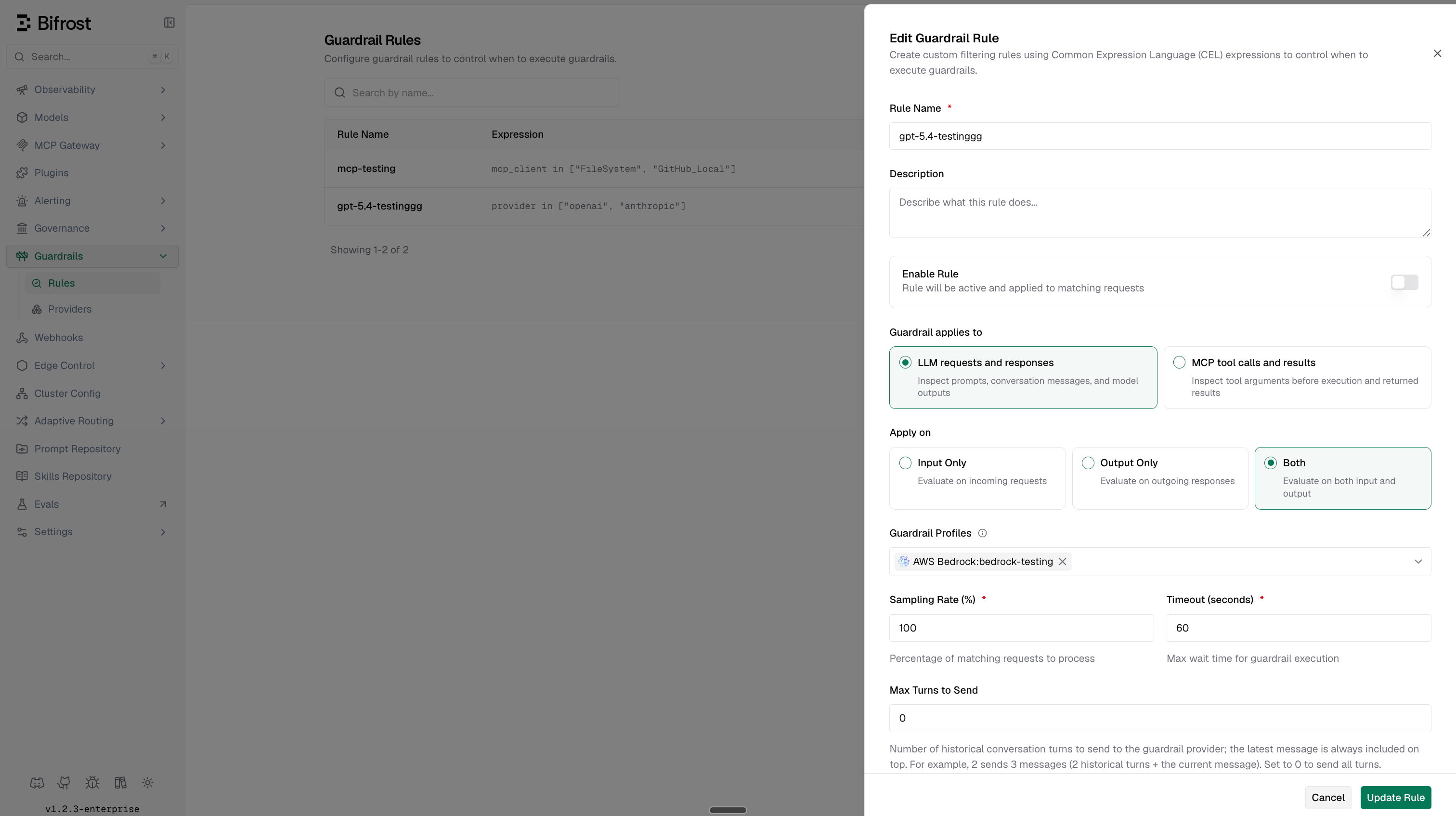
Prompt Guardrails uses two different kinds of rules:
| Rule | Purpose | Example |
| --------------------------- | --------------------------------------------------------- | -------------------------------------------------------------- |
| **Prompt Guardrail policy** | Describes what the judge should block | `Block responses that provide a definitive medical diagnosis.` |
| **Guardrail CEL rule** | Selects which traffic runs the profile and on which phase | `provider == "openai" && team == "support"` |
The guardrail rule also owns `input`, `output`, or `both`, sampling, execution timeout, maximum turns, streaming replay settings, and the linked profile IDs.
1. Go to **Guardrails** > **Providers**.
2. Select **Prompt Guardrails**.
3. Click **Add Configuration**.
4. Enter a descriptive **Name**.
5. Select the **Judge Provider** and **Judge Model**.
6. Enter the natural-language policy in **Rule**.
7. Optionally expand **Additional Configuration** to change the system prompt, timeout, or output-token limit.
8. Click **Verify**.
9. Enable and save the configuration.
10. Go to **Guardrails** > **Configuration** and attach the profile to a guardrail rule.
Changing the provider, model, policy, or additional configuration invalidates the previous verification. Verify the updated configuration before enabling it.
Create a Prompt Guardrails profile:
```bash theme={null}
curl -X POST http://localhost:8080/api/guardrails/prompt-guardrail \
-H "Content-Type: application/json" \
-d '{
"name": "block-medical-diagnoses",
"enabled": true,
"config": {
"judge_provider": "openai",
"judge_model": "gpt-4o-mini",
"rule": "Block responses that provide a definitive medical diagnosis for an individual.",
"timeout": 30,
"max_output_tokens": 200
}
}'
```
Verify the configuration before saving it:
```bash theme={null}
curl -X POST http://localhost:8080/api/guardrails/prompt-guardrail/verify \
-H "Content-Type: application/json" \
-d '{
"name": "block-medical-diagnoses",
"config": {
"judge_provider": "openai",
"judge_model": "gpt-4o-mini",
"rule": "Block responses that provide a definitive medical diagnosis for an individual.",
"timeout": 30,
"max_output_tokens": 200
}
}'
```
The management API assigns the profile ID after creation. Attach the profile to a rule as `"prompt-guardrail:"`; see [Creating Rules](/enterprise/guardrails#creating-rules).
```json theme={null}
{
"guardrails_config": {
"guardrail_providers": [
{
"id": 3,
"provider_name": "prompt-guardrail",
"policy_name": "block-medical-diagnoses",
"enabled": true,
"timeout": 30,
"config": {
"judge_provider": "openai",
"judge_model": "gpt-4o-mini",
"rule": "Block responses that provide a definitive medical diagnosis for an individual.",
"max_output_tokens": 200
}
}
]
}
}
```
```yaml theme={null}
bifrost:
guardrails:
providers:
- id: 3
provider_name: "prompt-guardrail"
policy_name: "block-medical-diagnoses"
enabled: true
timeout: 30
config:
judge_provider: "openai"
judge_model: "gpt-4o-mini"
rule: "Block responses that provide a definitive medical diagnosis for an individual."
max_output_tokens: 200
```
### Configuration Fields
| Field | Required | Default | Description |
| ------------------- | -------- | -------------------------- | -------------------------------------------------------------------------------------------- |
| `judge_provider` | Yes | - | Configured Bifrost provider used for the internal judge request. |
| `judge_model` | Yes | - | Chat Completions or Responses model used as the judge. |
| `rule` | Yes | - | Natural-language policy the judge evaluates. |
| `prompt_template` | No | Built-in classifier prompt | Judge system-prompt template. It must contain `{{rule}}` and must not contain `{{content}}`. |
| `timeout` | No | `30` | Judge-request timeout in seconds. Must be greater than zero. |
| `max_output_tokens` | No | `200` | Maximum judge response tokens. Must be between `1` and `1024`. |
The default system prompt treats the configured rule as the complete policy. It blocks only clear rule violations and allows unrelated, ambiguous, or uncertain content. If you customize the prompt, preserve `{{rule}}`; Bifrost always sends the evaluated content separately.
## Prompt Policy vs. Guardrail Rule
Prompt Guardrails uses two different kinds of rules:
| Rule | Purpose | Example |
| --------------------------- | --------------------------------------------------------- | -------------------------------------------------------------- |
| **Prompt Guardrail policy** | Describes what the judge should block | `Block responses that provide a definitive medical diagnosis.` |
| **Guardrail CEL rule** | Selects which traffic runs the profile and on which phase | `provider == "openai" && team == "support"` |
The guardrail rule also owns `input`, `output`, or `both`, sampling, execution timeout, maximum turns, streaming replay settings, and the linked profile IDs.
 ## What Verify Checks
**Verify** performs a real internal judge request with the selected provider and model. It checks:
* Configuration-field validation.
* Chat Completions or Responses API support, plus the `response_format` model capability.
* Provider configuration and model reachability.
* The judge model's ability to return a usable structured decision.
Verification evaluates a dummy text value, `"test"`. It does not test whether your policy makes the correct decision on real application content.
A successful verification proves configuration and connectivity, not policy quality. Test representative allowed, blocked, ambiguous, and adversarial inputs before enabling the profile in production.
## Decisions and Failure Behavior
The judge returns:
```json theme={null}
{
"action": "ALLOW",
"reason": "The content does not violate the configured policy."
}
```
For `BLOCK`, Bifrost returns a guardrail intervention containing the judge's short reason. For `ALLOW`, processing continues normally.
If the judge request times out, the provider rejects it, or the response cannot be parsed, Bifrost logs the provider failure and continues the application request or response. Prompt Guardrails therefore fails open on judge/runtime errors. Monitor guardrail logs and alerts if the policy protects a security-critical boundary.
## Streaming and MCP
Prompt Guardrails can be attached to LLM and MCP guardrail rules:
* For LLM input rules, it evaluates extracted request text before the model call.
* For LLM output rules, it evaluates extracted response text.
* For MCP input rules, it evaluates text extracted from tool arguments before execution.
* For MCP output rules, it evaluates text extracted from a successful tool result before it is returned.
Because Prompt Guardrails can block output, matched streaming-output rules hold the completed stream until the judge allows or blocks it. See [Streaming Output Guardrails](/enterprise/guardrails#streaming-output-guardrails) for replay pacing and delivery behavior.
## Cost, Latency, and Logs
Each evaluated input or output phase makes an additional LLM request to the judge. Multiple matching rules or Prompt Guardrails profiles can produce multiple judge calls for one application request.
Judge calls add:
* Provider latency, bounded by the configured timeout.
* Prompt and completion token usage.
* Judge-model cost when pricing is available in the model catalog.
In **LLM Logs**, open a request and review **Guardrail Details** to see the rule, phase, action, guardrail profile, judge provider and model, token usage, and block reason. Judge-model cost is included in the request cost calculation when Bifrost has pricing for the selected model.
## Writing Effective Policies
Write one narrow, testable policy per profile. For example:
```text theme={null}
Block responses that claim a user definitely has a specific medical condition.
Allow general educational information and recommendations to consult a clinician.
```
Recommended practice:
* State exactly what must be blocked and what closely related content is allowed.
* Test clear allow, clear block, ambiguous, and prompt-injection examples.
* Keep deterministic checks in Secrets Detection or Custom Regex.
* Use rule sampling when full coverage is not required and judge cost is significant.
* Use descriptive profile names so logs identify the policy without opening its configuration.
* Review judge reasons and false positives before expanding traffic coverage.
## Troubleshooting
| Error or symptom | Meaning | Recommended action |
| ------------------------------------------------------------------- | ------------------------------------------------------------------- | -------------------------------------------------- |
| Model supports neither Chat Completions nor the Responses API | The model cannot serve as a Prompt Guardrails judge | Select a model with either supported inference API |
| Model does not support `response_format` | Bifrost cannot request the strict `ALLOW`/`BLOCK` schema | Select a model with structured-output support |
| Provider rejects function tools or structured output with reasoning | Catalog metadata and provider runtime behavior differ | Select another compatible judge model |
| Verify succeeds but policy decisions are poor | Verification used dummy content and did not evaluate policy quality | Test representative examples and refine the policy |
| No judge call for image-only or file-only content | Prompt Guardrails evaluates extracted text only | Add a provider that supports the required modality |
| More judge cost than expected | Multiple phases, rules, or profiles executed | Review rule matching, `apply_to`, and sampling |
For shared rule configuration, CEL variables, and provider management, see the [Guardrails overview](/enterprise/guardrails).
## What Verify Checks
**Verify** performs a real internal judge request with the selected provider and model. It checks:
* Configuration-field validation.
* Chat Completions or Responses API support, plus the `response_format` model capability.
* Provider configuration and model reachability.
* The judge model's ability to return a usable structured decision.
Verification evaluates a dummy text value, `"test"`. It does not test whether your policy makes the correct decision on real application content.
A successful verification proves configuration and connectivity, not policy quality. Test representative allowed, blocked, ambiguous, and adversarial inputs before enabling the profile in production.
## Decisions and Failure Behavior
The judge returns:
```json theme={null}
{
"action": "ALLOW",
"reason": "The content does not violate the configured policy."
}
```
For `BLOCK`, Bifrost returns a guardrail intervention containing the judge's short reason. For `ALLOW`, processing continues normally.
If the judge request times out, the provider rejects it, or the response cannot be parsed, Bifrost logs the provider failure and continues the application request or response. Prompt Guardrails therefore fails open on judge/runtime errors. Monitor guardrail logs and alerts if the policy protects a security-critical boundary.
## Streaming and MCP
Prompt Guardrails can be attached to LLM and MCP guardrail rules:
* For LLM input rules, it evaluates extracted request text before the model call.
* For LLM output rules, it evaluates extracted response text.
* For MCP input rules, it evaluates text extracted from tool arguments before execution.
* For MCP output rules, it evaluates text extracted from a successful tool result before it is returned.
Because Prompt Guardrails can block output, matched streaming-output rules hold the completed stream until the judge allows or blocks it. See [Streaming Output Guardrails](/enterprise/guardrails#streaming-output-guardrails) for replay pacing and delivery behavior.
## Cost, Latency, and Logs
Each evaluated input or output phase makes an additional LLM request to the judge. Multiple matching rules or Prompt Guardrails profiles can produce multiple judge calls for one application request.
Judge calls add:
* Provider latency, bounded by the configured timeout.
* Prompt and completion token usage.
* Judge-model cost when pricing is available in the model catalog.
In **LLM Logs**, open a request and review **Guardrail Details** to see the rule, phase, action, guardrail profile, judge provider and model, token usage, and block reason. Judge-model cost is included in the request cost calculation when Bifrost has pricing for the selected model.
## Writing Effective Policies
Write one narrow, testable policy per profile. For example:
```text theme={null}
Block responses that claim a user definitely has a specific medical condition.
Allow general educational information and recommendations to consult a clinician.
```
Recommended practice:
* State exactly what must be blocked and what closely related content is allowed.
* Test clear allow, clear block, ambiguous, and prompt-injection examples.
* Keep deterministic checks in Secrets Detection or Custom Regex.
* Use rule sampling when full coverage is not required and judge cost is significant.
* Use descriptive profile names so logs identify the policy without opening its configuration.
* Review judge reasons and false positives before expanding traffic coverage.
## Troubleshooting
| Error or symptom | Meaning | Recommended action |
| ------------------------------------------------------------------- | ------------------------------------------------------------------- | -------------------------------------------------- |
| Model supports neither Chat Completions nor the Responses API | The model cannot serve as a Prompt Guardrails judge | Select a model with either supported inference API |
| Model does not support `response_format` | Bifrost cannot request the strict `ALLOW`/`BLOCK` schema | Select a model with structured-output support |
| Provider rejects function tools or structured output with reasoning | Catalog metadata and provider runtime behavior differ | Select another compatible judge model |
| Verify succeeds but policy decisions are poor | Verification used dummy content and did not evaluate policy quality | Test representative examples and refine the policy |
| No judge call for image-only or file-only content | Prompt Guardrails evaluates extracted text only | Add a provider that supports the required modality |
| More judge cost than expected | Multiple phases, rules, or profiles executed | Review rule matching, `apply_to`, and sampling |
For shared rule configuration, CEL variables, and provider management, see the [Guardrails overview](/enterprise/guardrails).