> ## Documentation Index
> Fetch the complete documentation index at: https://docs.getbifrost.ai/llms.txt
> Use this file to discover all available pages before exploring further.
# Incidents and Monitoring
> Read the adaptive routing dashboard, work through incidents, follow a request in the logs, and recognise the common cases.
Adaptive routing records what it saw and what it changed on every node. The **Dashboard** shows that history over time, **Incidents** lists every problem it found, and each request log shows what adaptive routing decided for that request.
## What is recorded
* **Every minute**, each node records the state of every provider and key it routes, including any hold.
* **As it happens**, each node records state changes, holds, checks and releases, edits to keys and providers, and changes to the adaptive routing settings.
* History is stored in the logs database, so it needs a Postgres or ClickHouse log store.
* History is kept for **History Retention (days)**, 7 by default. The cluster leader deletes older history once a day.
* With **Record Routing History** off, nothing new is recorded and the dashboard shows the time since as **No data**. Routing is the same either way, and what adaptive routing decided for each request is still written to its request log.
Both settings are on the [settings page](/enterprise/adaptive-routing/overview#settings).
## The dashboard
Open **Adaptive Routing > Dashboard** in the sidebar. The dashboard and the incidents page need **AdaptiveRouter: View** (see [RBAC](/enterprise/rbac)).
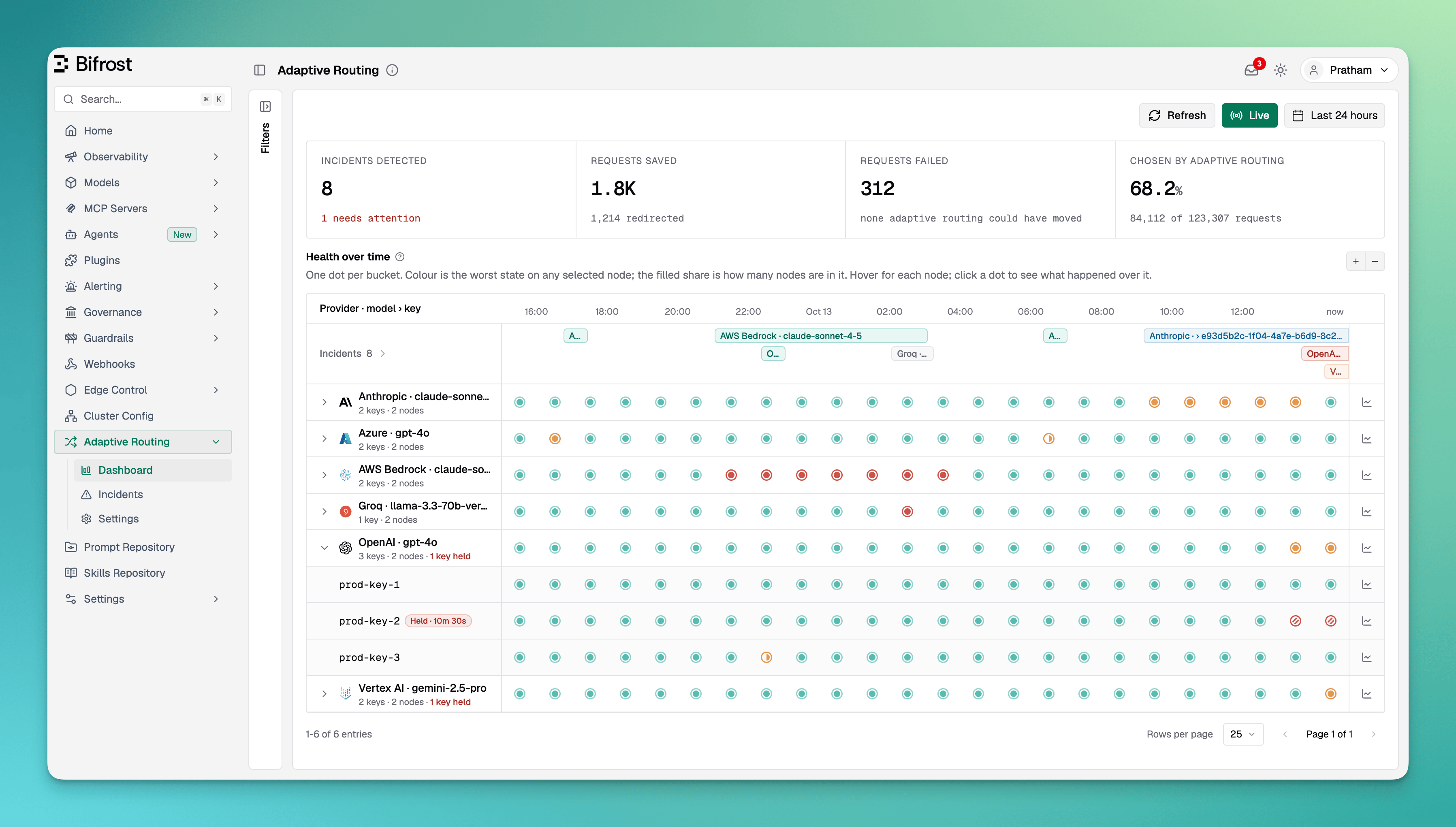 **Live** refreshes the dashboard every minute. The time window offers the last hour, 6 hours, 24 hours, 7 days and 30 days, limited to the history retention, or a custom range. The **Filters** panel narrows everything on the page by provider, model, region, node, held-key reason, or to **Held now only**.
### Figures
| Figure | What it counts |
| - | - |
| **Incidents detected** | Distinct problems seen on a provider and model or on a key. A problem seen on several nodes counts once. The line below says how many need attention. |
| **Requests saved** | Requests that adaptive routing redirected to a healthy provider, or that a fallback it added served. Retries and fallbacks you configured yourself are not counted. |
| **Requests failed** | Requests that failed, grouped by cause in its details. The line below says how many were kept on a failing provider because redirecting is off. Request errors and cancellations by the caller are left out. |
| **Chosen by adaptive routing** | The share of requests whose provider adaptive routing picked, rather than the request, a rule or the virtual key naming it. Its details also show how keys were picked for each attempt. |
Click a figure for its breakdown.
### Health over time
The timeline has one row per provider and model. Expand a row to see its keys.
* **Each dot covers a stretch of time.** Its colour is the worst state on any selected node in that stretch, and the filled share of the dot is how many nodes were in that state. Hover a dot for each node; click it to see what happened in that stretch.
* **A hatched dot** is a key held because the provider refused it.
* **A grey dashed dot** means no node was recording, because the cluster was down or history was off.
* **A small mark on a dot**, with a matching mark on the time axis, means a node wrote no samples for part of that stretch, for example because its process was paused.
* **The Incidents lane** above the rows shows each incident as a bar over the time it lasted. Click a bar to open the incident.
* **Drag across the timeline** to zoom into a range, or use the zoom buttons.
**Live** refreshes the dashboard every minute. The time window offers the last hour, 6 hours, 24 hours, 7 days and 30 days, limited to the history retention, or a custom range. The **Filters** panel narrows everything on the page by provider, model, region, node, held-key reason, or to **Held now only**.
### Figures
| Figure | What it counts |
| - | - |
| **Incidents detected** | Distinct problems seen on a provider and model or on a key. A problem seen on several nodes counts once. The line below says how many need attention. |
| **Requests saved** | Requests that adaptive routing redirected to a healthy provider, or that a fallback it added served. Retries and fallbacks you configured yourself are not counted. |
| **Requests failed** | Requests that failed, grouped by cause in its details. The line below says how many were kept on a failing provider because redirecting is off. Request errors and cancellations by the caller are left out. |
| **Chosen by adaptive routing** | The share of requests whose provider adaptive routing picked, rather than the request, a rule or the virtual key naming it. Its details also show how keys were picked for each attempt. |
Click a figure for its breakdown.
### Health over time
The timeline has one row per provider and model. Expand a row to see its keys.
* **Each dot covers a stretch of time.** Its colour is the worst state on any selected node in that stretch, and the filled share of the dot is how many nodes were in that state. Hover a dot for each node; click it to see what happened in that stretch.
* **A hatched dot** is a key held because the provider refused it.
* **A grey dashed dot** means no node was recording, because the cluster was down or history was off.
* **A small mark on a dot**, with a matching mark on the time axis, means a node wrote no samples for part of that stretch, for example because its process was paused.
* **The Incidents lane** above the rows shows each incident as a bar over the time it lasted. Click a bar to open the incident.
* **Drag across the timeline** to zoom into a range, or use the zoom buttons.
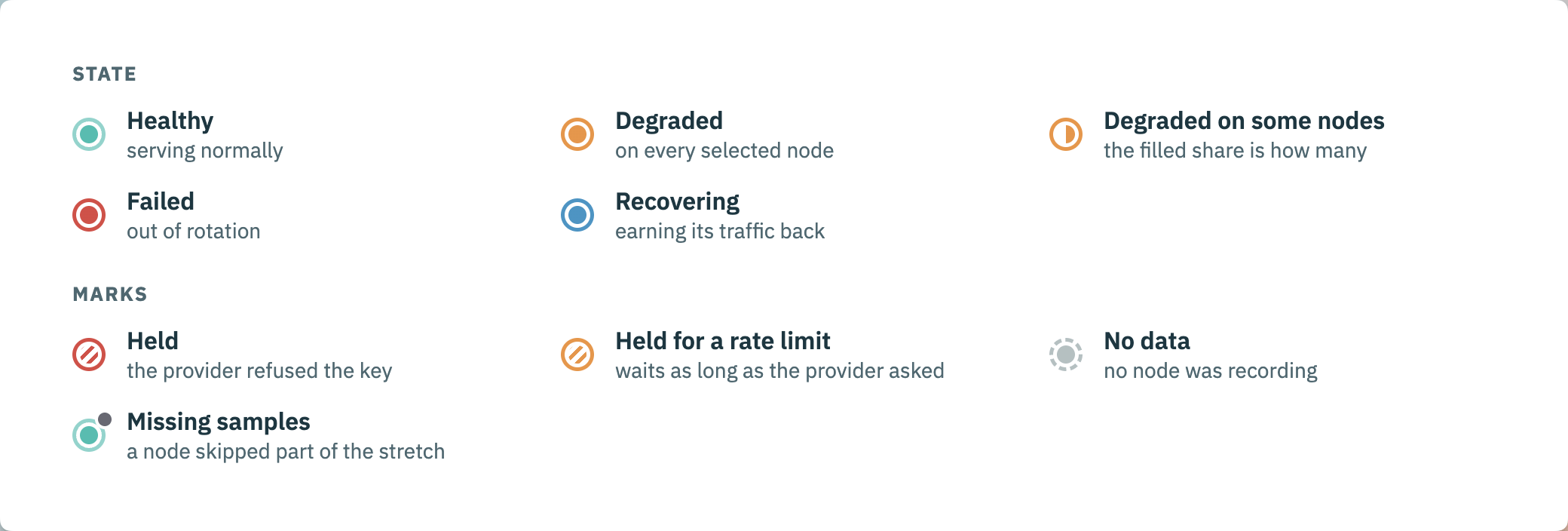 The **?** next to **Health over time** shows the same legend in the app.
The chart button at the end of a row opens its **routing score**: the score each node gave the provider or key over time, out of 100. Pick a node to see what lowered the score (error, latency and load penalties) and what raised it (the recovery boost). Each is its own score out of 100, combined inside adaptive routing, so they do not add up to the gap below 100.
The **?** next to **Health over time** shows the same legend in the app.
The chart button at the end of a row opens its **routing score**: the score each node gave the provider or key over time, out of 100. Pick a node to see what lowered the score (error, latency and load penalties) and what raised it (the recovery boost). Each is its own score out of 100, combined inside adaptive routing, so they do not add up to the gap below 100.
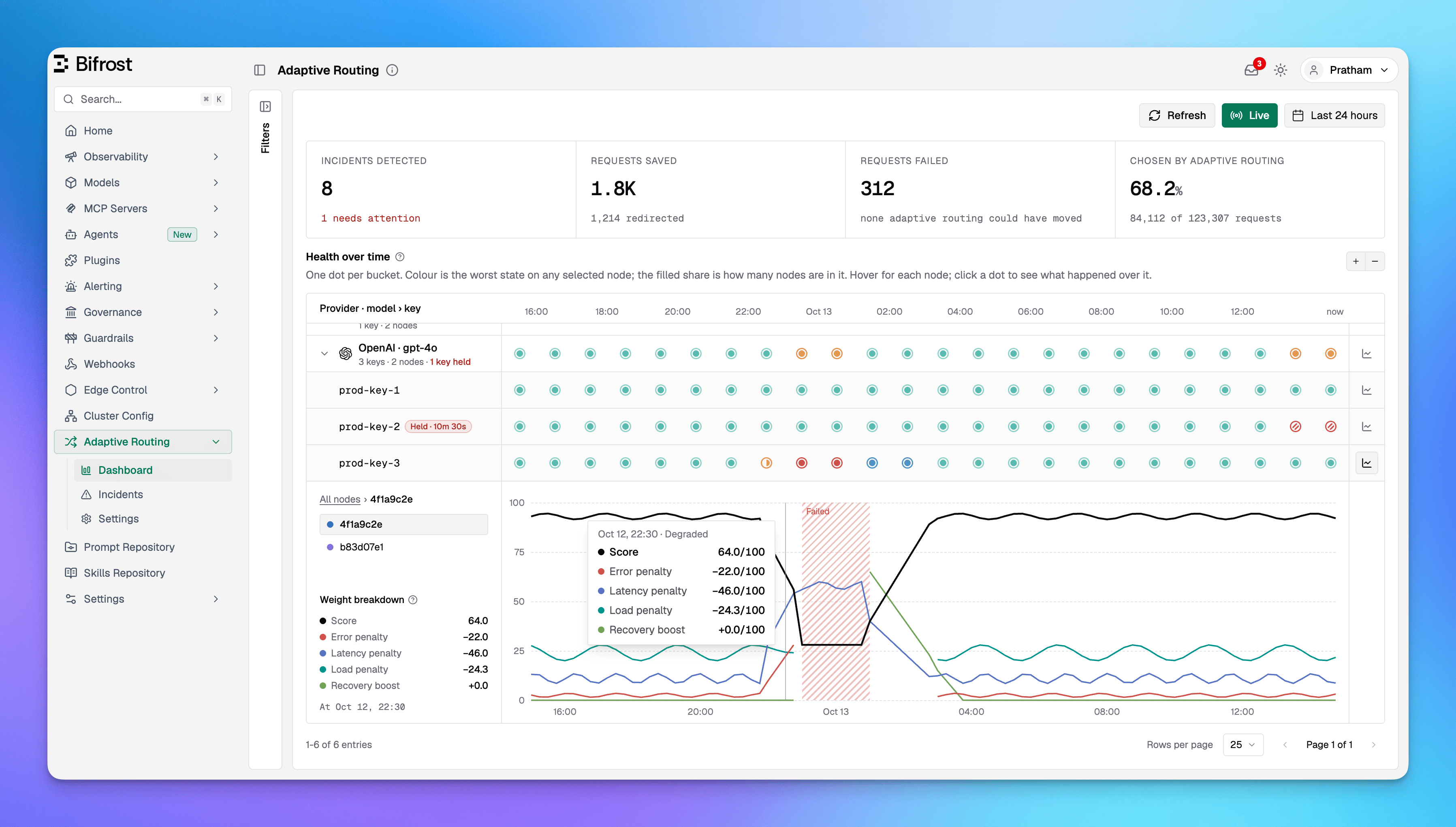 A provider row with held keys shows **N keys held**, and each held key row shows a **Held** chip. Click either to open [Held keys](/enterprise/adaptive-routing/how-it-works#releasing-held-keys).
## Incidents
An **incident** is one problem adaptive routing saw, on one of:
* **Provider · model**: a provider failing or degraded for a model.
* **Key on a model**: one key failing or held for one model.
* **Key, every model**: one key held for every model, such as a rejected credential.
What every node saw of the same problem is merged into one incident, with each node's part shown in its details.
### Statuses
| Status | Meaning |
| - | - |
| **Needs attention** | Adaptive routing can't fix this on its own. The incident says what to do. |
| **Mitigated** | Adaptive routing keeps traffic off it while it fails, so there is nothing to do unless it lasts. |
| **Recovering** | Back in rotation with a reduced share of traffic. It is marked recovered once it serves its share cleanly. |
| **Resolved** | It recovered and serves normally again. |
| **Waiting for traffic** | It was recovering, but no request has reached it for an hour, so nothing showed it recovered. Requests reaching it again will. |
| **No longer observed** | Its nodes stopped reporting, or history was switched off on them, before it recovered. |
An incident **needs attention** when:
| Why | What to do |
| - | - |
| The provider keeps rejecting the key | Replace the key in the provider's settings. A key change clears the hold and adaptive routing checks the new key on its own. Or release the key to check it now. |
| The key is out of quota | Raise the quota with the provider, or release the key once it has room. |
| Requests are failing with no healthy key or provider to send them to | Add another key to the provider, or a fallback provider to the requests or a routing rule. A provider that is down comes back on its own once it answers again. |
| Requests that name the provider keep failing because redirecting is off | Turn on **Redirect Away from Failing Providers** in the settings. |
A held key stops needing attention once its hold is released.
### The incidents page
Open **Adaptive Routing > Incidents** in the sidebar.
A provider row with held keys shows **N keys held**, and each held key row shows a **Held** chip. Click either to open [Held keys](/enterprise/adaptive-routing/how-it-works#releasing-held-keys).
## Incidents
An **incident** is one problem adaptive routing saw, on one of:
* **Provider · model**: a provider failing or degraded for a model.
* **Key on a model**: one key failing or held for one model.
* **Key, every model**: one key held for every model, such as a rejected credential.
What every node saw of the same problem is merged into one incident, with each node's part shown in its details.
### Statuses
| Status | Meaning |
| - | - |
| **Needs attention** | Adaptive routing can't fix this on its own. The incident says what to do. |
| **Mitigated** | Adaptive routing keeps traffic off it while it fails, so there is nothing to do unless it lasts. |
| **Recovering** | Back in rotation with a reduced share of traffic. It is marked recovered once it serves its share cleanly. |
| **Resolved** | It recovered and serves normally again. |
| **Waiting for traffic** | It was recovering, but no request has reached it for an hour, so nothing showed it recovered. Requests reaching it again will. |
| **No longer observed** | Its nodes stopped reporting, or history was switched off on them, before it recovered. |
An incident **needs attention** when:
| Why | What to do |
| - | - |
| The provider keeps rejecting the key | Replace the key in the provider's settings. A key change clears the hold and adaptive routing checks the new key on its own. Or release the key to check it now. |
| The key is out of quota | Raise the quota with the provider, or release the key once it has room. |
| Requests are failing with no healthy key or provider to send them to | Add another key to the provider, or a fallback provider to the requests or a routing rule. A provider that is down comes back on its own once it answers again. |
| Requests that name the provider keep failing because redirecting is off | Turn on **Redirect Away from Failing Providers** in the settings. |
A held key stops needing attention once its hold is released.
### The incidents page
Open **Adaptive Routing > Incidents** in the sidebar.
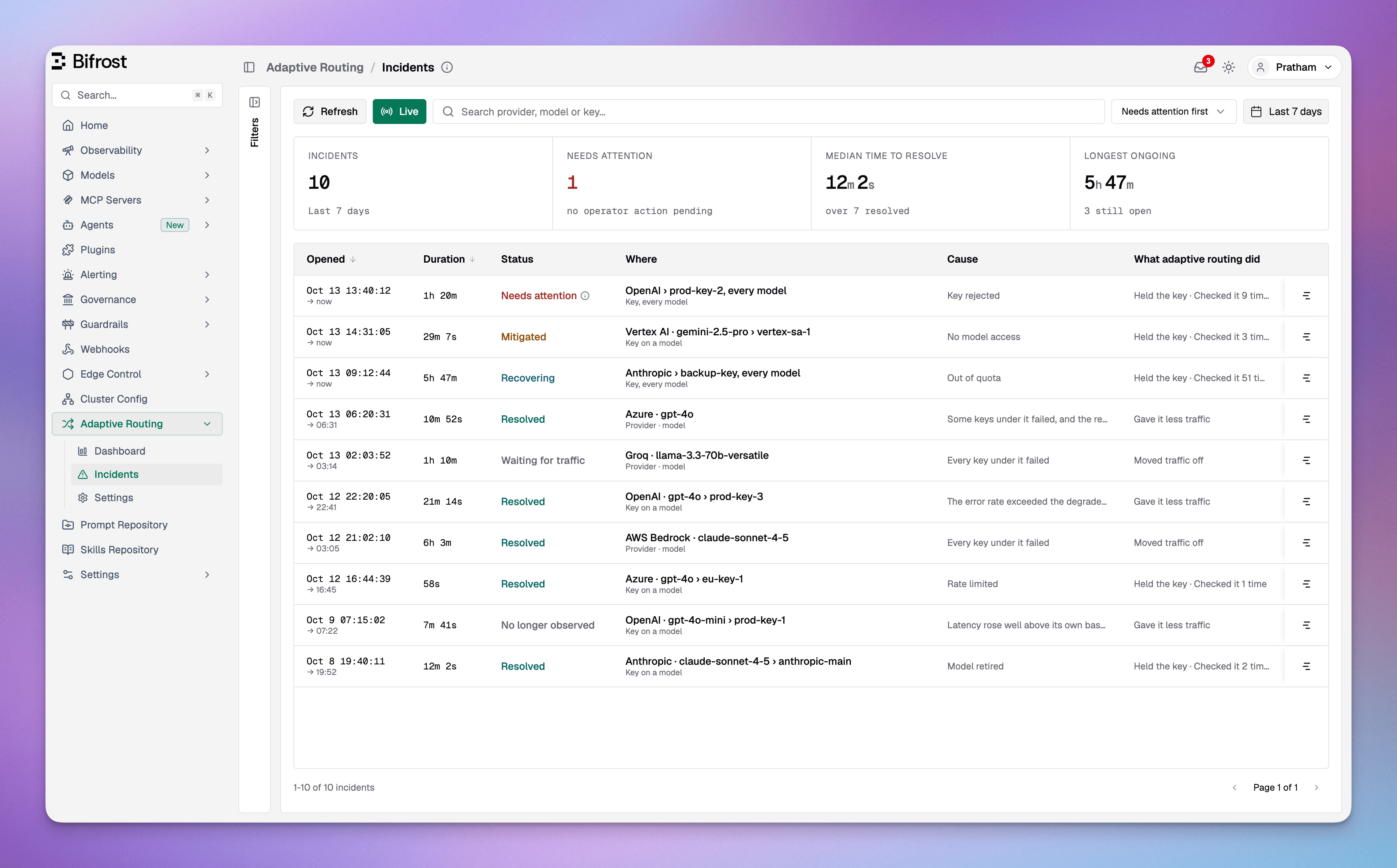 | Figure | Meaning |
| - | - |
| **Incidents** | Incidents that match the filters, out of the window's total when a filter is on. |
| **Needs attention** | Incidents waiting on an operator. Click to list them. |
| **Median time to resolve** | Median duration of resolved incidents. Incidents waiting for traffic or no longer observed are left out, since neither is a confirmed recovery. |
| **Longest ongoing** | The longest open incident. Click to list open incidents, longest first. |
Each row shows when the incident opened, how long it lasted, its status, where it happened, its cause and what adaptive routing did about it: **Held the key**, **Moved traffic off**, **Gave it less traffic**, and how many times it **checked** a held key. The chart button shows the incident on the dashboard timeline.
Filter by status, provider, model, reason, worst state, scope, region and node; each value shows how many incidents it matches. Search matches provider, model or key. Sort by needs attention first, newest, oldest, longest or shortest. The page shares the dashboard's time window, Live mode and filters, so moving between them keeps your view.
### Incident details
Click an incident on either page to open its details. Use the arrows to move through the list.
| Figure | Meaning |
| - | - |
| **Incidents** | Incidents that match the filters, out of the window's total when a filter is on. |
| **Needs attention** | Incidents waiting on an operator. Click to list them. |
| **Median time to resolve** | Median duration of resolved incidents. Incidents waiting for traffic or no longer observed are left out, since neither is a confirmed recovery. |
| **Longest ongoing** | The longest open incident. Click to list open incidents, longest first. |
Each row shows when the incident opened, how long it lasted, its status, where it happened, its cause and what adaptive routing did about it: **Held the key**, **Moved traffic off**, **Gave it less traffic**, and how many times it **checked** a held key. The chart button shows the incident on the dashboard timeline.
Filter by status, provider, model, reason, worst state, scope, region and node; each value shows how many incidents it matches. Search matches provider, model or key. Sort by needs attention first, newest, oldest, longest or shortest. The page shares the dashboard's time window, Live mode and filters, so moving between them keeps your view.
### Incident details
Click an incident on either page to open its details. Use the arrows to move through the list.
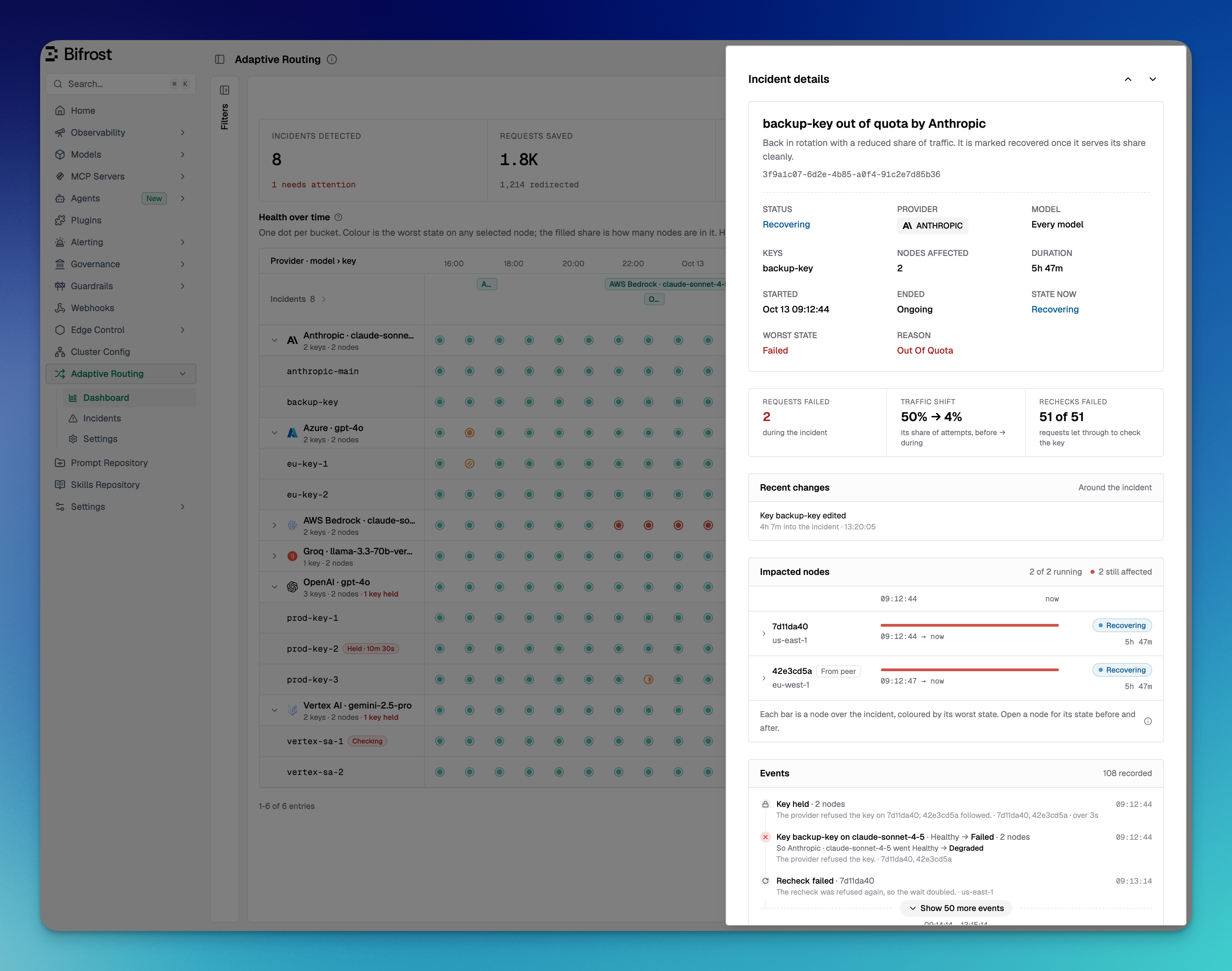 | Section | What it shows |
| - | - |
| **Overview** | What happened, the status, provider, model, keys, nodes affected, duration, the state now and the worst state, and the reason. |
| **Held key** | While a key is held: the provider's reason and message, how long it has been held, the next check, and **Release key**. For a reason that needs attention, what to do and a link to the provider. |
| **Figures** | Requests failed and saved during the incident, the change in its share of traffic, failed checks, and requests refused again after the wait or kept on it with redirecting off. |
| **Recent changes** | Edits and removals of its keys, edits of its provider and changes to the adaptive routing settings, from 15 minutes before the incident until it ended. A key edit here often explains a recovery. |
| **Impacted nodes** | Each node's part of the incident and its state now. **From peer** marks a node that held the key because another node saw the refusal first. |
| **Events** | What adaptive routing did, in order: state changes, holds, checks, releases and recovery. |
| **What would help** | Changes the incident's requests point to, with a link to make them. |
| **Settings in effect** | The adaptive routing settings when the incident opened. **Mixed** means nodes ran different settings; hover for each node. |
## In the request logs
What adaptive routing decided for a request is written to its log, whether or not history is recorded. Open a request in **Logs** and its **Routing** tab starts with the **Adaptive Routing** card.
| Section | What it shows |
| - | - |
| **Overview** | What happened, the status, provider, model, keys, nodes affected, duration, the state now and the worst state, and the reason. |
| **Held key** | While a key is held: the provider's reason and message, how long it has been held, the next check, and **Release key**. For a reason that needs attention, what to do and a link to the provider. |
| **Figures** | Requests failed and saved during the incident, the change in its share of traffic, failed checks, and requests refused again after the wait or kept on it with redirecting off. |
| **Recent changes** | Edits and removals of its keys, edits of its provider and changes to the adaptive routing settings, from 15 minutes before the incident until it ended. A key edit here often explains a recovery. |
| **Impacted nodes** | Each node's part of the incident and its state now. **From peer** marks a node that held the key because another node saw the refusal first. |
| **Events** | What adaptive routing did, in order: state changes, holds, checks, releases and recovery. |
| **What would help** | Changes the incident's requests point to, with a link to make them. |
| **Settings in effect** | The adaptive routing settings when the incident opened. **Mixed** means nodes ran different settings; hover for each node. |
## In the request logs
What adaptive routing decided for a request is written to its log, whether or not history is recorded. Open a request in **Logs** and its **Routing** tab starts with the **Adaptive Routing** card.
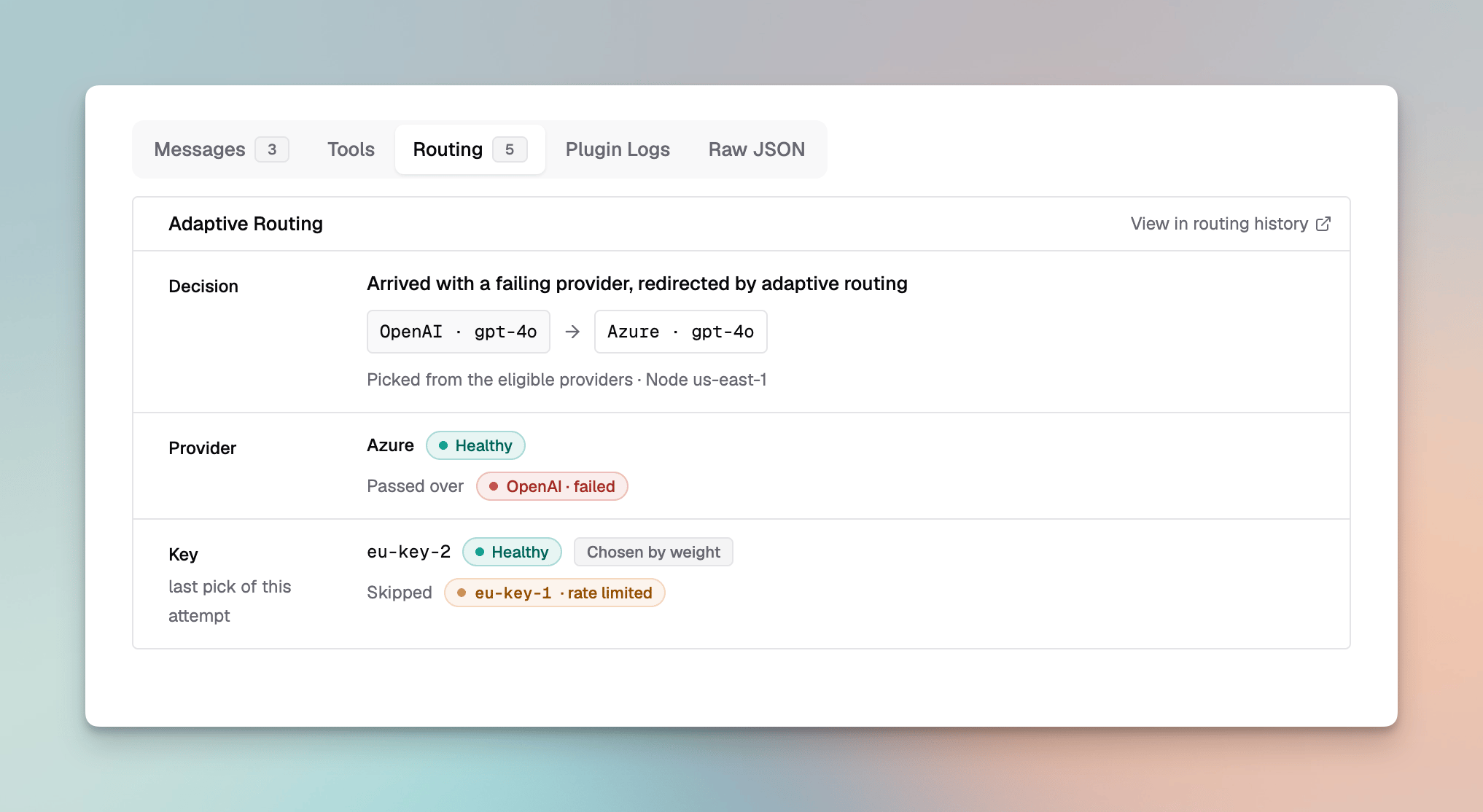 | Row | What it shows |
| - | - |
| **Decision** | How the provider was decided, and for a redirected request where it was moved from and to. |
| **Fallback** | Whether this attempt ran on a fallback adaptive routing added. |
| **Provider** | The provider's state, and the providers passed over with their states. |
| **Key** | The key picked for this attempt, its state and how it was picked, and the keys skipped with why. |
| **Failed as** | How the attempt failed, when it did. |
**View in routing history** opens the dashboard on the hour around the request, filtered to its provider.
The **Logs** filters have an **Adaptive Routing** group to find requests by these decisions, for example every request redirected away from the provider it named, or every attempt that was the check of a held key.
| Row | What it shows |
| - | - |
| **Decision** | How the provider was decided, and for a redirected request where it was moved from and to. |
| **Fallback** | Whether this attempt ran on a fallback adaptive routing added. |
| **Provider** | The provider's state, and the providers passed over with their states. |
| **Key** | The key picked for this attempt, its state and how it was picked, and the keys skipped with why. |
| **Failed as** | How the attempt failed, when it did. |
**View in routing history** opens the dashboard on the hour around the request, filtered to its provider.
The **Logs** filters have an **Adaptive Routing** group to find requests by these decisions, for example every request redirected away from the provider it named, or every attempt that was the check of a held key.
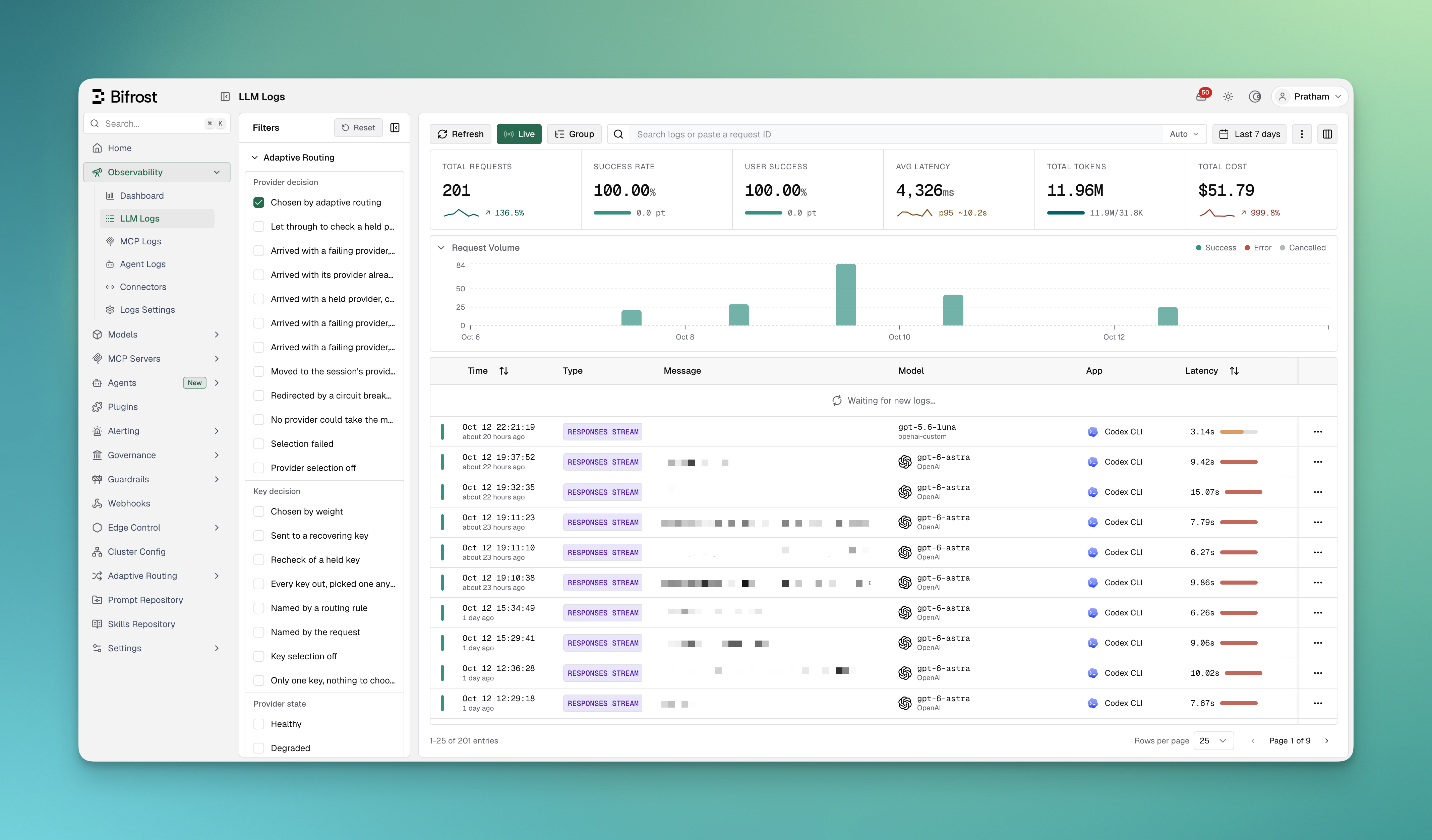 These values are stored in the log's metadata, under keys that start with `bifrost_alb_`. You can filter on them through the [logs API](/api-reference) with a `metadata_` parameter, such as `metadata_bifrost_alb_decision=pinned_rerouted`, or read them from [log exports](/enterprise/log-exports).
| Metadata key | Values |
| - | - |
| `bifrost_alb_decision` | How the provider was decided: `selected`, `recheck`, `pinned`, `pinned_rerouted`, `pinned_kept_failed`, `pinned_no_alternative`, `pinned_recheck`, `session_affinity`, `breaker_redirect`, `no_candidates`, `selection_failed`, `disabled` |
| `bifrost_alb_key_decision` | How the key was decided: `weighted`, `probe`, `recheck`, `failover`, `rule_pinned`, `caller_pinned`, `static`, `single` |
| `bifrost_alb_direction_state` | The provider's state: `healthy`, `degraded`, `failed` |
| `bifrost_alb_route_state` | The key's state: `healthy`, `degraded`, `recovering`, `failed`, `unknown` |
| `bifrost_alb_failure_class` | How the attempt failed, as [classified](/features/retries-and-fallbacks#how-failures-are-classified) |
| `bifrost_alb_rerouted` | `true` when the request was moved off the provider it named |
| `bifrost_alb_reroute_target` | Where a redirected request went: `pool` or `fallbacks` |
| `bifrost_alb_fallback_added` | `true` when the attempt ran on a fallback adaptive routing added |
| `bifrost_alb_requested_provider`, `bifrost_alb_requested_model` | The provider and model the request named |
| `bifrost_alb_refined_model` | The model name adaptive routing used for the provider |
| `bifrost_alb_excluded_providers`, `bifrost_alb_excluded_keys` | Providers and keys passed over, with why |
| `bifrost_alb_region` | The region of the node that routed the request |
Provider-level fields are on a request's first attempt. Key-level fields describe the last key picked for each attempt.
## Common cases
Each case below is an illustration that puts the case's rows from the dashboard timeline above its row on the Incidents page.
### Key rejected
These values are stored in the log's metadata, under keys that start with `bifrost_alb_`. You can filter on them through the [logs API](/api-reference) with a `metadata_` parameter, such as `metadata_bifrost_alb_decision=pinned_rerouted`, or read them from [log exports](/enterprise/log-exports).
| Metadata key | Values |
| - | - |
| `bifrost_alb_decision` | How the provider was decided: `selected`, `recheck`, `pinned`, `pinned_rerouted`, `pinned_kept_failed`, `pinned_no_alternative`, `pinned_recheck`, `session_affinity`, `breaker_redirect`, `no_candidates`, `selection_failed`, `disabled` |
| `bifrost_alb_key_decision` | How the key was decided: `weighted`, `probe`, `recheck`, `failover`, `rule_pinned`, `caller_pinned`, `static`, `single` |
| `bifrost_alb_direction_state` | The provider's state: `healthy`, `degraded`, `failed` |
| `bifrost_alb_route_state` | The key's state: `healthy`, `degraded`, `recovering`, `failed`, `unknown` |
| `bifrost_alb_failure_class` | How the attempt failed, as [classified](/features/retries-and-fallbacks#how-failures-are-classified) |
| `bifrost_alb_rerouted` | `true` when the request was moved off the provider it named |
| `bifrost_alb_reroute_target` | Where a redirected request went: `pool` or `fallbacks` |
| `bifrost_alb_fallback_added` | `true` when the attempt ran on a fallback adaptive routing added |
| `bifrost_alb_requested_provider`, `bifrost_alb_requested_model` | The provider and model the request named |
| `bifrost_alb_refined_model` | The model name adaptive routing used for the provider |
| `bifrost_alb_excluded_providers`, `bifrost_alb_excluded_keys` | Providers and keys passed over, with why |
| `bifrost_alb_region` | The region of the node that routed the request |
Provider-level fields are on a request's first attempt. Key-level fields describe the last key picked for each attempt.
## Common cases
Each case below is an illustration that puts the case's rows from the dashboard timeline above its row on the Incidents page.
### Key rejected
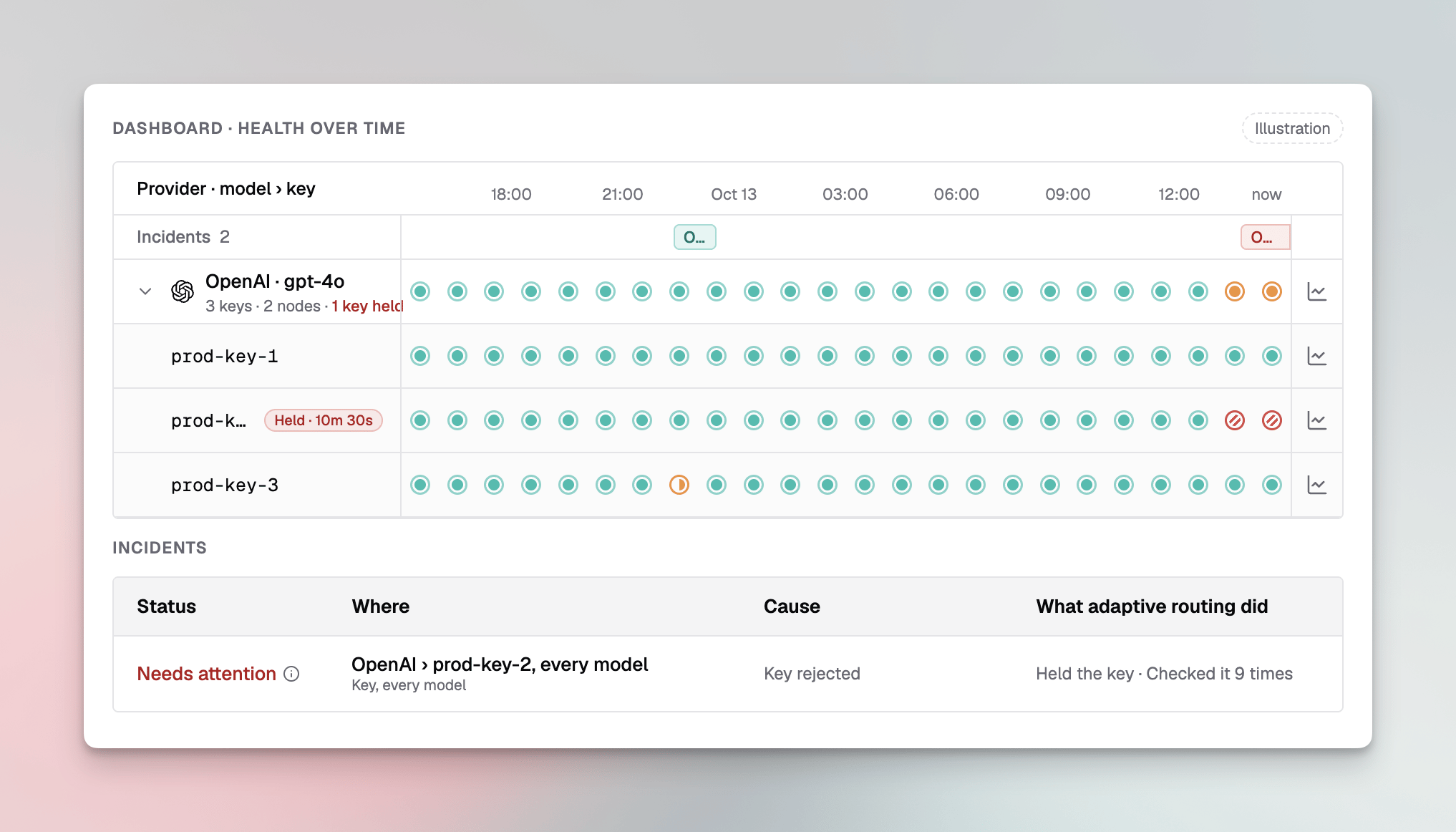 **What you see:** a key row turns hatched red with a **Held** chip, the provider row shows **1 key held**, and an incident on **Key, every model** says **Needs attention** with cause **Key rejected**.
**What it means:** the provider returned an authentication error for the key, for example because it was revoked or rotated outside Bifrost. The key is out of rotation on every node and gets one request after each wait. The provider's other keys carry its traffic.
**What to do:** replace the key in the provider's settings. Editing the key releases the hold, and adaptive routing checks the new key with live traffic. To check the existing key at once, release it from **Held keys**.
### Key rate limited
**What you see:** a key row turns hatched red with a **Held** chip, the provider row shows **1 key held**, and an incident on **Key, every model** says **Needs attention** with cause **Key rejected**.
**What it means:** the provider returned an authentication error for the key, for example because it was revoked or rotated outside Bifrost. The key is out of rotation on every node and gets one request after each wait. The provider's other keys carry its traffic.
**What to do:** replace the key in the provider's settings. Editing the key releases the hold, and adaptive routing checks the new key with live traffic. To check the existing key at once, release it from **Held keys**.
### Key rate limited
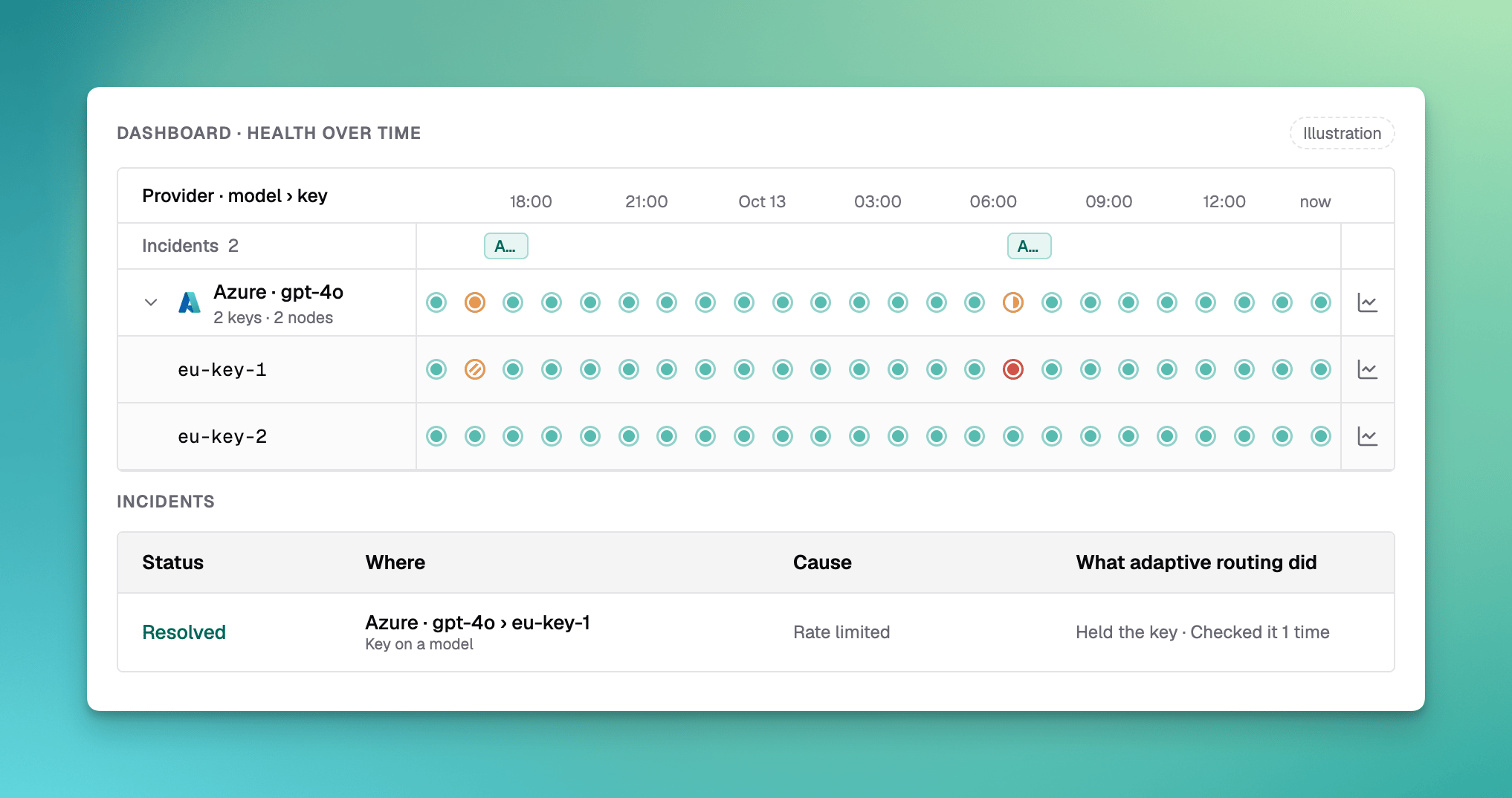 **What you see:** a short amber hatch on one key and a resolved incident with cause **Rate limited**.
**What it means:** the provider rate limited the key for one model. Adaptive routing held it for as long as the provider asked (or a short wait when it did not say), sent its traffic to the other keys, and the first check after the wait served.
**What to do:** nothing, unless it keeps happening. Frequent rate limits on one key mean it needs more capacity or another key alongside it.
### Provider outage
**What you see:** a short amber hatch on one key and a resolved incident with cause **Rate limited**.
**What it means:** the provider rate limited the key for one model. Adaptive routing held it for as long as the provider asked (or a short wait when it did not say), sent its traffic to the other keys, and the first check after the wait served.
**What to do:** nothing, unless it keeps happening. Frequent rate limits on one key mean it needs more capacity or another key alongside it.
### Provider outage
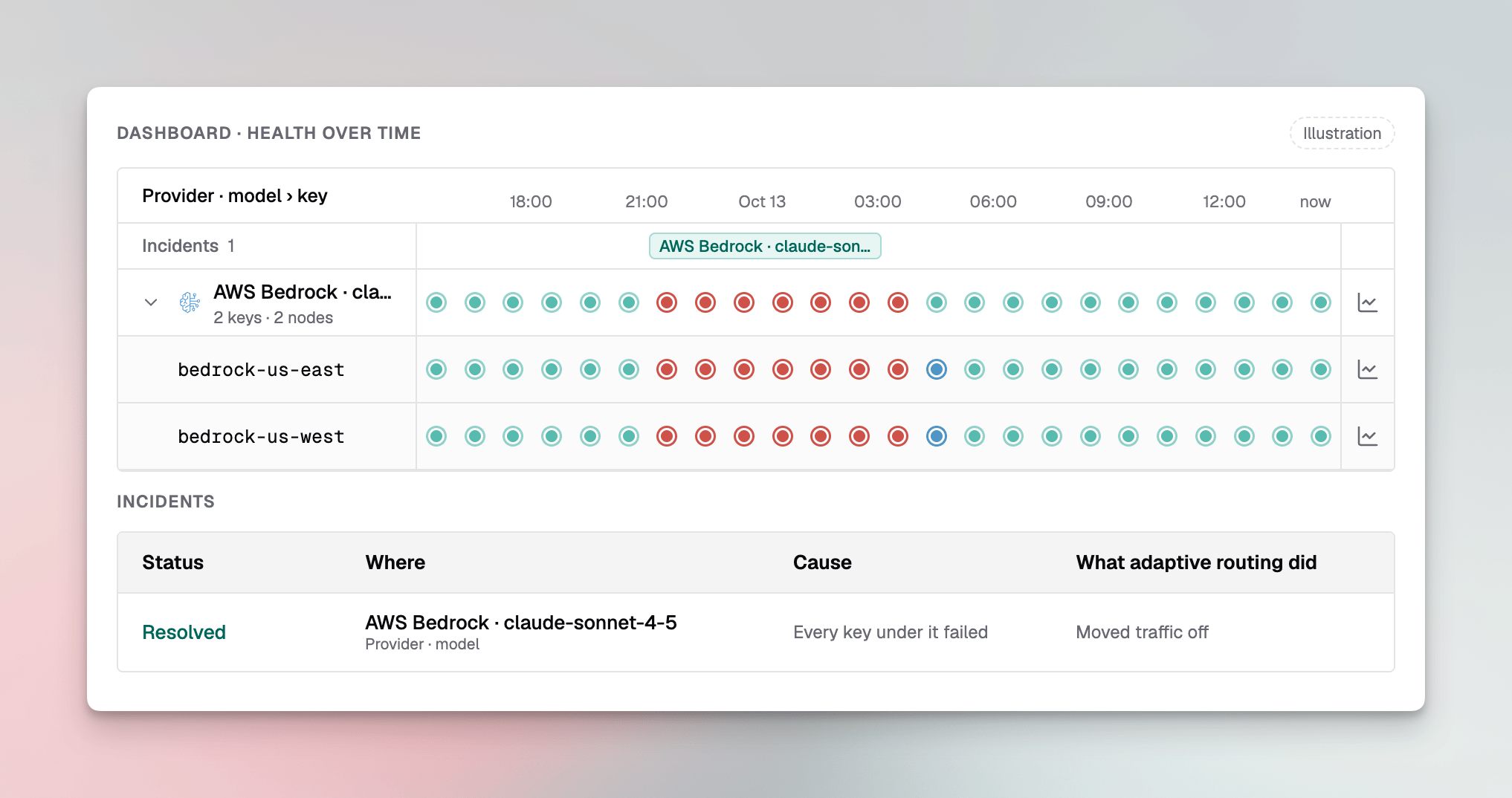 **What you see:** a provider row and all of its keys turn Failed together, the keys pass through Recovering when it ends, and an incident on **Provider · model** says **Every key under it failed** and **Moved traffic off**.
**What it means:** the provider was down or erroring for the model. Requests that did not name a provider were sent to the other providers for the model. Requests that named it were moved only with redirecting on, and those count in **Requests saved**.
**What to do:** nothing for requests adaptive routing could move. If the incident shows requests failing with nothing healthier to send them to, add another provider for the model, or a fallback to the requests or a routing rule.
### Key out of quota, recovering
**What you see:** a provider row and all of its keys turn Failed together, the keys pass through Recovering when it ends, and an incident on **Provider · model** says **Every key under it failed** and **Moved traffic off**.
**What it means:** the provider was down or erroring for the model. Requests that did not name a provider were sent to the other providers for the model. Requests that named it were moved only with redirecting on, and those count in **Requests saved**.
**What to do:** nothing for requests adaptive routing could move. If the incident shows requests failing with nothing healthier to send them to, add another provider for the model, or a fallback to the requests or a routing rule.
### Key out of quota, recovering
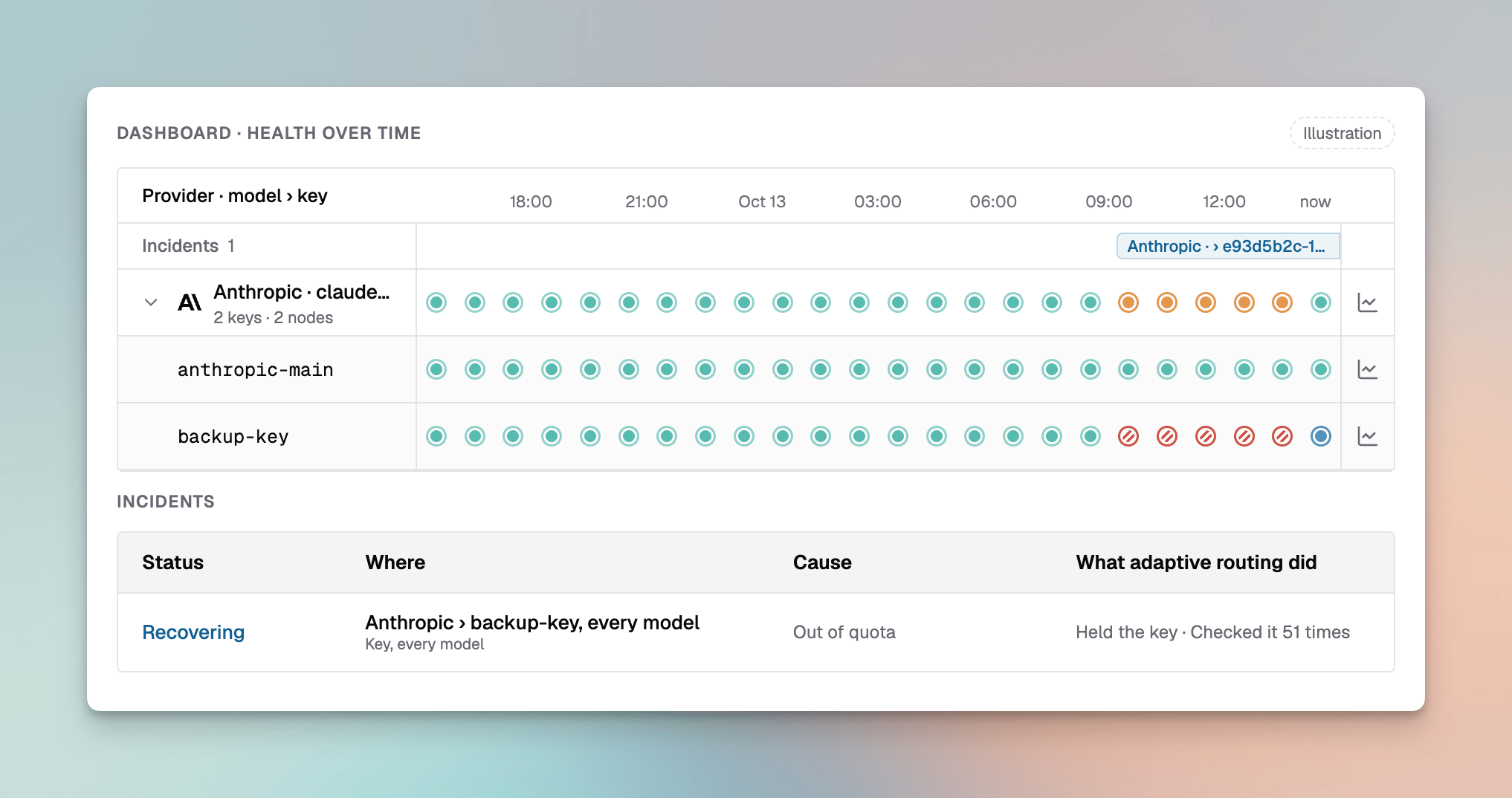 **What you see:** a key held for **Out of quota** keeps its provider **Degraded** while the provider's other keys serve. After the quota is fixed the key shows **Recovering**, and the incident's **Recent changes** shows the key edit.
**What it means:** the key's account ran out of credit, so every model on it was held. Editing the key released the hold, and the key is earning its traffic back.
**What to do:** nothing more. The incident resolves once the key serves its share cleanly.
### Requests kept on a failing provider
**What you see:** a key held for **Out of quota** keeps its provider **Degraded** while the provider's other keys serve. After the quota is fixed the key shows **Recovering**, and the incident's **Recent changes** shows the key edit.
**What it means:** the key's account ran out of credit, so every model on it was held. Editing the key released the hold, and the key is earning its traffic back.
**What to do:** nothing more. The incident resolves once the key serves its share cleanly.
### Requests kept on a failing provider
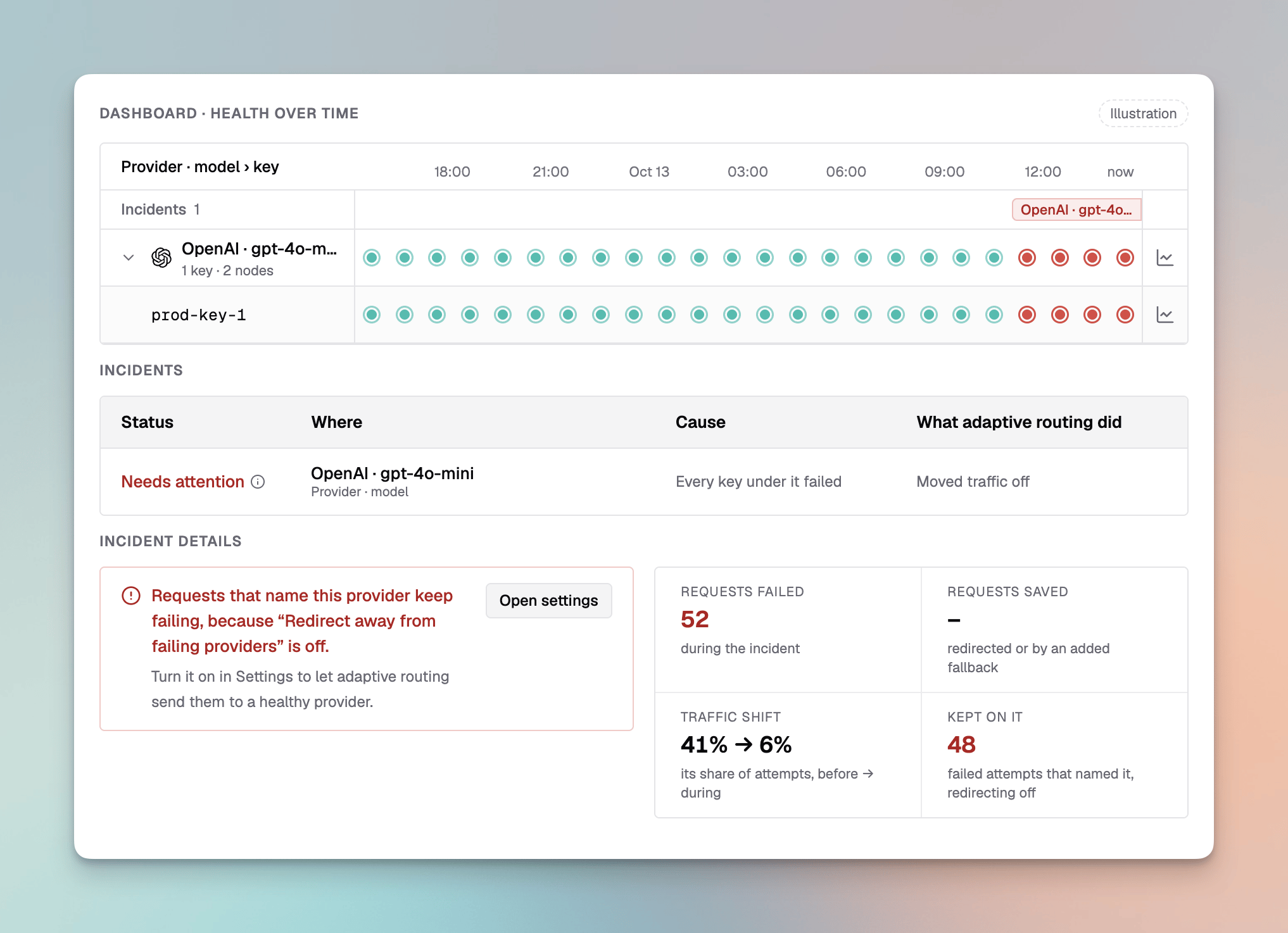 **What you see:** a provider is Failed, its incident **Needs attention**, **Requests failed** says how many were kept on a failing provider, and the incident counts them under **Kept on it**.
**What it means:** these requests named the provider, by `provider/model`, a routing rule or the virtual key, and **Redirect Away from Failing Providers** is off, so adaptive routing left them on it.
**What to do:** turn on **Redirect Away from Failing Providers**, and **Add Fallbacks When a Provider Is Named** if you want those requests to fall back while the provider recovers. Or give the requests fallbacks of their own.
### Waiting for traffic
**What you see:** a provider is Failed, its incident **Needs attention**, **Requests failed** says how many were kept on a failing provider, and the incident counts them under **Kept on it**.
**What it means:** these requests named the provider, by `provider/model`, a routing rule or the virtual key, and **Redirect Away from Failing Providers** is off, so adaptive routing left them on it.
**What to do:** turn on **Redirect Away from Failing Providers**, and **Add Fallbacks When a Provider Is Named** if you want those requests to fall back while the provider recovers. Or give the requests fallbacks of their own.
### Waiting for traffic
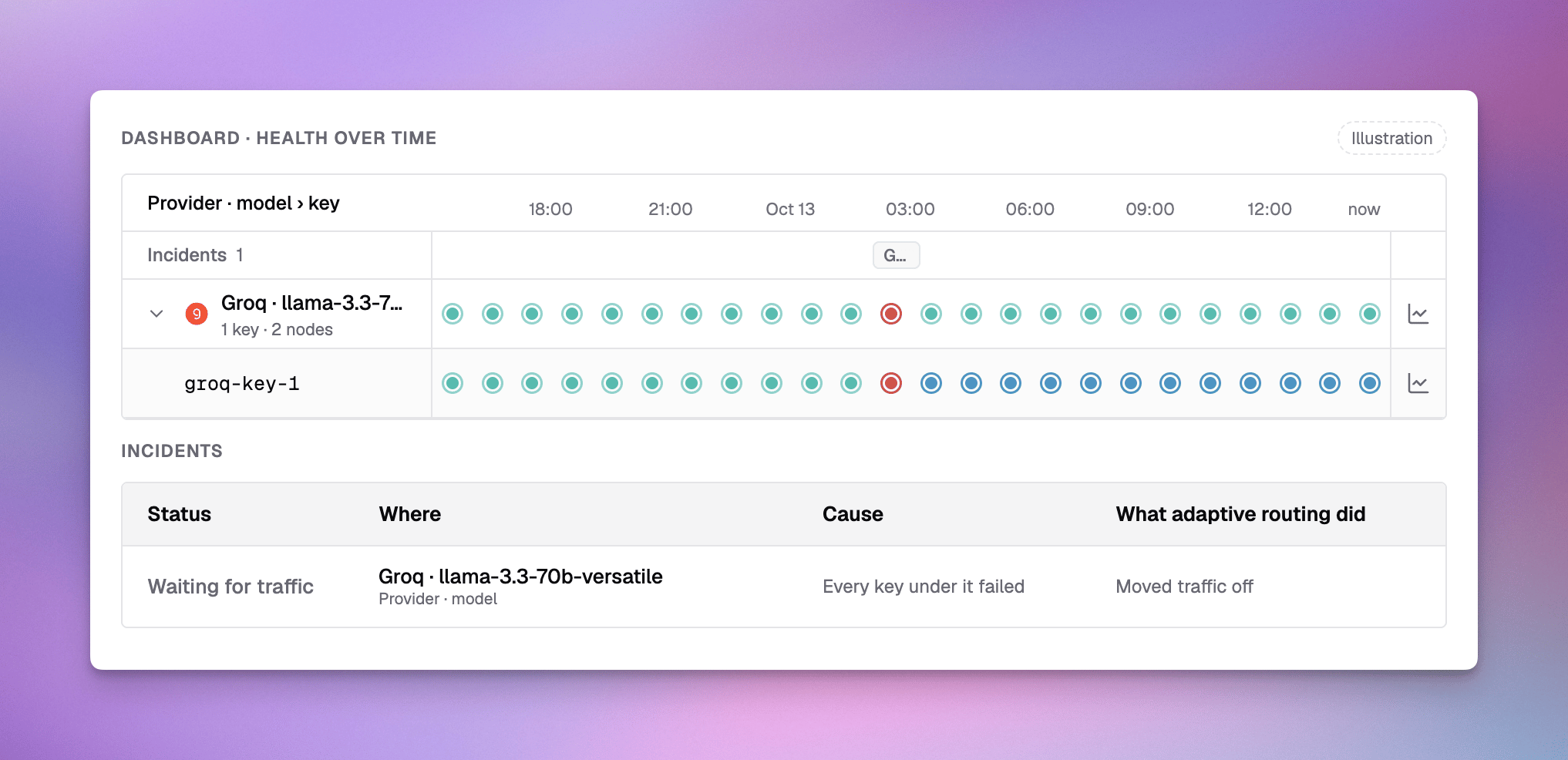 **What you see:** a key stays **Recovering** for hours, and its incident shows **Waiting for traffic**.
**What it means:** the key came back after a failure, but no request has reached it for an hour, so adaptive routing has not seen it serve its share yet. This is common for a provider that only serves as a fallback.
**What to do:** nothing. The next requests that reach it confirm the recovery.
This documentation is built and hosted on [Mintlify](https://mintlify.com), a developer documentation platform.
**What you see:** a key stays **Recovering** for hours, and its incident shows **Waiting for traffic**.
**What it means:** the key came back after a failure, but no request has reached it for an hour, so adaptive routing has not seen it serve its share yet. This is common for a provider that only serves as a fallback.
**What to do:** nothing. The next requests that reach it confirm the recovery.
This documentation is built and hosted on [Mintlify](https://mintlify.com), a developer documentation platform.