> ## Documentation Index
> Fetch the complete documentation index at: https://docs.getbifrost.ai/llms.txt
> Use this file to discover all available pages before exploring further.
# Multinode Deployment
> Deploy multiple Bifrost nodes with shared configuration for high availability in OSS deployments
## Overview
Running multiple Bifrost nodes provides high availability, load distribution, and fault tolerance for your AI gateway. This guide covers the recommended approach for deploying multiple Bifrost nodes in OSS deployments.
Running multiple OSS Bifrost nodes with a Postgres backend is not supported.
Here is the short technical explanation:
* Bifrost is designed to keep all critical information in memory, including provider configs, API keys, budgets, usage, and traffic distribution.
* Once a node is initialized, it does not read this information back from the database.
* In the Enterprise version, we use a slightly modified version of RAFT to synchronize this state in real time across nodes, while the database acts only as a dumb store.
* Based on our current view, OSS is sufficient for startups and medium-scale teams, and can easily handle around 3,000–5,000 RPS on a single instance.
* If you need high availability and enterprise capabilities such as real-time synchronization, the Enterprise plan is the right fit.
* And yes, that is part of how we draw the OSS vs Enterprise line 💰.
### OSS vs Enterprise
| Aspect | OSS Approach | Enterprise Approach |
| ------------------------ | --------------------------------- | --------------------------------- |
| **Configuration Source** | Shared `config.json` file | Database with P2P sync |
| **Sync Mechanism** | File sharing (ConfigMap, volumes) | Gossip protocol (real-time) |
| **Config Updates** | Modify file + restart nodes | UI/API with automatic propagation |
***
## How It Works
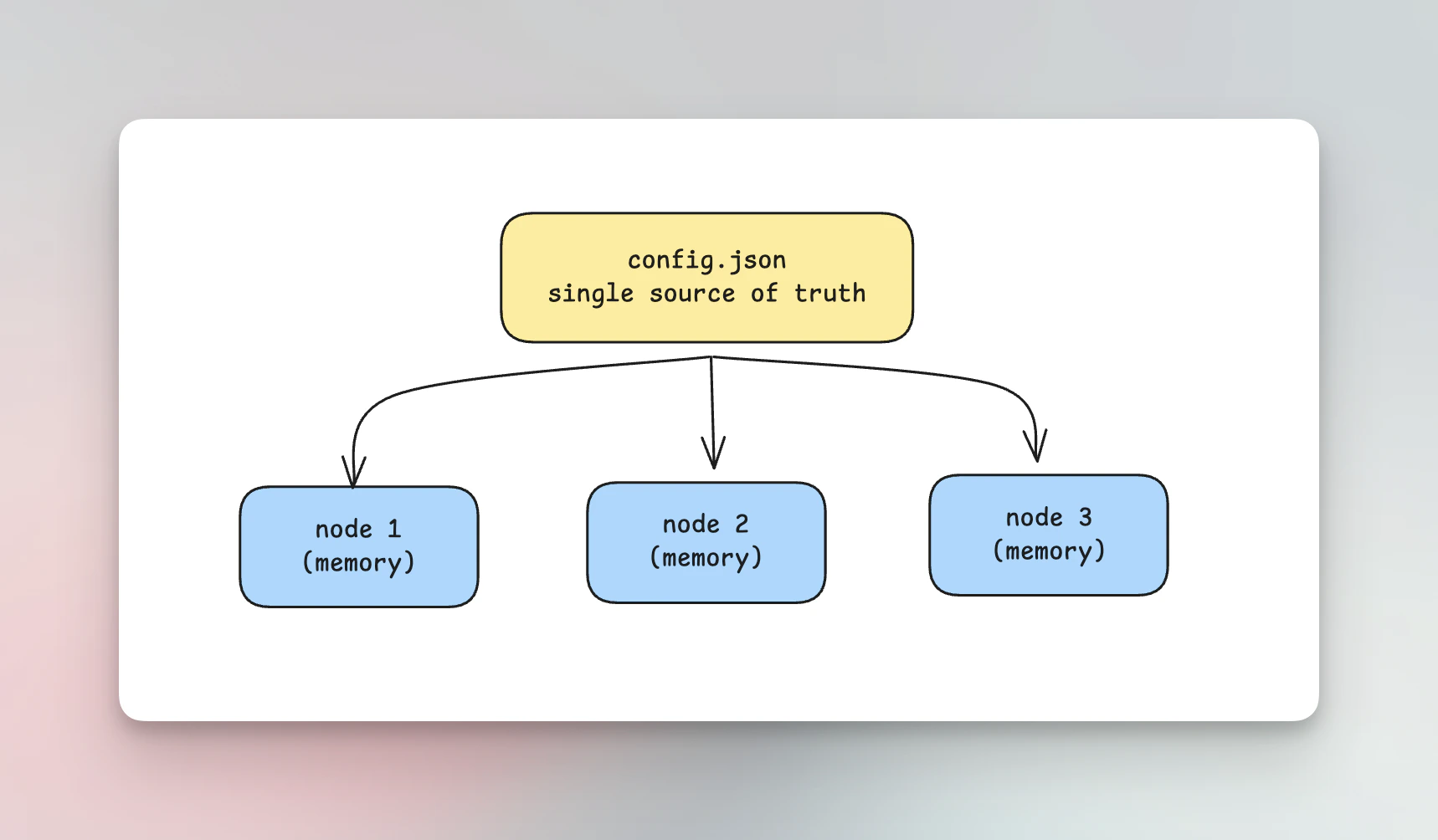
All configuration in Bifrost is loaded into memory at startup. For OSS multinode deployments, the recommended approach is to use `config.json` **without** `config_store` enabled.
### `config.json` as Single Source of Truth
When you deploy without `config_store`:
* **No database involved** - `config.json` is the only configuration source
* **Shared file** - All nodes read from the same `config.json` file
* **Identical configuration** - Since the source is shared, all nodes automatically have the same configuration
* **No sync needed** - The shared file itself ensures consistency
 ***
## Why not to use `config_store` for Multinode OSS?
Using `config_store` (database-backed configuration) with multiple nodes in OSS creates a **synchronization problem**:
1. **Config changes are local** - When you update configuration via the UI or API, it updates the database and the in-memory config on that specific node only
2. **No propagation mechanism** - Other nodes don't know about the change; they keep their existing in-memory configuration
3. **Nodes become out of sync** - Different nodes end up with different configurations
4. **Restart required** - You'd have to restart all nodes after every config change to bring them back in sync
This defeats the purpose of having database-backed configuration with real-time updates.
Without P2P clustering (Enterprise feature), there's no mechanism to notify other nodes of configuration changes. For OSS multinode deployments, use the shared `config.json` approach instead.
### Enterprise Solution
Bifrost Enterprise includes **P2P clustering** with gossip protocol that automatically syncs configuration changes across all nodes in real-time. See the [Clustering documentation](/enterprise/clustering) for details.
***
## Setting Up Multinode OSS Deployment
### Example config.json
Create a `config.json` **without** `config_store` or `logs_store`:
If you use PostgreSQL for `logs_store`, ensure the target database is UTF8 encoded. See [PostgreSQL UTF8 Requirement](../../quickstart/gateway/setting-up#postgresql-utf8-requirement).
```json theme={null}
{
"$schema": "https://www.getbifrost.ai/schema",
"client": {
"drop_excess_requests": false,
"enable_logging": false
},
"config_store": {
"enabled": false
},
"logs_store": {
"enabled": true,
"type": "postgres",
"config": {...}
},
"providers": {
"openai": {
"keys": [
{
"name": "openai-primary",
"value": "env.OPENAI_API_KEY",
"models": ["gpt-4o", "gpt-4o-mini"],
"weight": 1.0
}
]
},
"anthropic": {
"keys": [
{
"name": "anthropic-primary",
"value": "env.ANTHROPIC_API_KEY",
"models": ["claude-sonnet-4-20250514", "claude-3-5-haiku-20241022"],
"weight": 1.0
}
]
}
}
}
```
Notice `config_store` is disabled. This ensures all configuration comes from the file only.
### Kubernetes Deployment
Use a ConfigMap to share the same configuration across all pods:
```yaml theme={null}
apiVersion: v1
kind: ConfigMap
metadata:
name: bifrost-config
namespace: default
data:
config.json: |
{
"$schema": "https://www.getbifrost.ai/schema",
"client": {
"drop_excess_requests": false,
"enable_logging": false
},
"config_store": {
"enabled": false
},
"logs_store": {
"enabled": true,
"type": "postgres",
"config": {...}
},
"providers": {
"openai": {
"keys": [
{
"name": "openai-primary",
"value": "env.OPENAI_API_KEY",
"models": ["gpt-4o", "gpt-4o-mini"],
"weight": 1.0
}
]
}
}
}
---
apiVersion: apps/v1
kind: Deployment
metadata:
name: bifrost
namespace: default
spec:
replicas: 3
selector:
matchLabels:
app: bifrost
template:
metadata:
labels:
app: bifrost
spec:
containers:
- name: bifrost
image: maximhq/bifrost:latest
ports:
- containerPort: 8080
name: http
env:
- name: OPENAI_API_KEY
valueFrom:
secretKeyRef:
name: provider-secrets
key: openai-api-key
volumeMounts:
- name: config
mountPath: /app
readOnly: true
resources:
requests:
cpu: 250m
memory: 256Mi
limits:
cpu: 1000m
memory: 1Gi
livenessProbe:
httpGet:
path: /health
port: 8080
initialDelaySeconds: 10
periodSeconds: 10
readinessProbe:
httpGet:
path: /health
port: 8080
initialDelaySeconds: 5
periodSeconds: 5
volumes:
- name: config
configMap:
name: bifrost-config
---
apiVersion: v1
kind: Service
metadata:
name: bifrost
namespace: default
spec:
type: LoadBalancer
selector:
app: bifrost
ports:
- port: 80
targetPort: 8080
protocol: TCP
name: http
```
### Docker Compose
Share the configuration using a bind mount:
```yaml theme={null}
version: '3.8'
services:
nginx:
image: nginx:alpine
ports:
- "80:80"
volumes:
- ./nginx.conf:/etc/nginx/nginx.conf:ro
depends_on:
- bifrost-1
- bifrost-2
- bifrost-3
bifrost-1:
image: maximhq/bifrost:latest
environment:
- OPENAI_API_KEY=${OPENAI_API_KEY}
- ANTHROPIC_API_KEY=${ANTHROPIC_API_KEY}
volumes:
- ./config.json:/app/config.json:ro
expose:
- "8080"
bifrost-2:
image: maximhq/bifrost:latest
environment:
- OPENAI_API_KEY=${OPENAI_API_KEY}
- ANTHROPIC_API_KEY=${ANTHROPIC_API_KEY}
volumes:
- ./config.json:/app/config.json:ro
expose:
- "8080"
bifrost-3:
image: maximhq/bifrost:latest
environment:
- OPENAI_API_KEY=${OPENAI_API_KEY}
- ANTHROPIC_API_KEY=${ANTHROPIC_API_KEY}
volumes:
- ./config.json:/app/config.json:ro
expose:
- "8080"
```
**nginx.conf** for load balancing:
```nginx theme={null}
events {
worker_connections 1024;
}
http {
upstream bifrost {
least_conn;
server bifrost-1:8080;
server bifrost-2:8080;
server bifrost-3:8080;
}
server {
listen 80;
location / {
proxy_pass http://bifrost;
proxy_set_header Host $host;
proxy_set_header X-Real-IP $remote_addr;
proxy_set_header X-Forwarded-For $proxy_add_x_forwarded_for;
proxy_connect_timeout 60s;
proxy_send_timeout 60s;
proxy_read_timeout 60s;
}
location /health {
access_log off;
return 200 "healthy\n";
}
}
}
```
### Bare Metal / VM Deployment
For bare metal or VM deployments, distribute the configuration file using:
* **NFS mount** - Mount a shared NFS directory containing `config.json`
* **rsync** - Sync the config file from a central location to all nodes
* **Configuration management** - Use Ansible, Chef, or Puppet to deploy identical configs
Example with rsync:
```bash theme={null}
# On config server - push to all nodes
for node in node1 node2 node3; do
rsync -avz /etc/bifrost/config.json $node:/etc/bifrost/config.json
done
# Restart nodes after config update
for node in node1 node2 node3; do
ssh $node "systemctl restart bifrost"
done
```
***
## Updating Configuration
To update configuration in a multinode OSS deployment:
1. **Modify the shared `config.json` file**
* Update the ConfigMap (Kubernetes)
* Edit the shared file (Docker Compose / bare metal)
2. **Restart the nodes**
* Rolling restart is supported - nodes can be restarted one at a time
* Each node picks up the new configuration on startup
### Kubernetes Rolling Restart
```bash theme={null}
# Update ConfigMap
kubectl apply -f configmap.yaml
# Trigger rolling restart
kubectl rollout restart deployment/bifrost
# Watch the rollout
kubectl rollout status deployment/bifrost
```
### Docker Compose Restart
```bash theme={null}
# After updating config.json
docker-compose restart bifrost-1
docker-compose restart bifrost-2
docker-compose restart bifrost-3
```
***
## Best Practices
### Use Environment Variables for Secrets
Never put API keys directly in `config.json`. Use the `env.` prefix to reference environment variables:
```json theme={null}
{
"providers": {
"openai": {
"keys": [
{
"value": "env.OPENAI_API_KEY"
}
]
}
}
}
```
Then provide the actual keys via environment variables or Kubernetes secrets.
### Load Balancer Configuration
Always put a load balancer in front of your Bifrost nodes:
* **Kubernetes**: Use a Service with `type: LoadBalancer` or an Ingress
* **Docker/VMs**: Use nginx, HAProxy, or a cloud load balancer
### Health Checks
Configure health checks to ensure traffic only goes to healthy nodes:
* **Liveness endpoint**: `GET /health`
* **Readiness endpoint**: `GET /health`
### Resource Allocation
For production deployments:
```yaml theme={null}
resources:
requests:
cpu: 500m
memory: 512Mi
limits:
cpu: 2000m
memory: 2Gi
```
***
## Summary
| Scenario | Recommendation |
| -------------------- | ----------------------------------------------- |
| Single node | Use `config_store` for UI access |
| Multinode OSS | Use shared `config.json` without `config_store` |
| Multinode Enterprise | Use P2P clustering with `config_store` |
For OSS multinode deployments, the shared `config.json` approach provides a simple, reliable way to keep all nodes in sync without the complexity of database synchronization.
***
## Why not to use `config_store` for Multinode OSS?
Using `config_store` (database-backed configuration) with multiple nodes in OSS creates a **synchronization problem**:
1. **Config changes are local** - When you update configuration via the UI or API, it updates the database and the in-memory config on that specific node only
2. **No propagation mechanism** - Other nodes don't know about the change; they keep their existing in-memory configuration
3. **Nodes become out of sync** - Different nodes end up with different configurations
4. **Restart required** - You'd have to restart all nodes after every config change to bring them back in sync
This defeats the purpose of having database-backed configuration with real-time updates.
Without P2P clustering (Enterprise feature), there's no mechanism to notify other nodes of configuration changes. For OSS multinode deployments, use the shared `config.json` approach instead.
### Enterprise Solution
Bifrost Enterprise includes **P2P clustering** with gossip protocol that automatically syncs configuration changes across all nodes in real-time. See the [Clustering documentation](/enterprise/clustering) for details.
***
## Setting Up Multinode OSS Deployment
### Example config.json
Create a `config.json` **without** `config_store` or `logs_store`:
If you use PostgreSQL for `logs_store`, ensure the target database is UTF8 encoded. See [PostgreSQL UTF8 Requirement](../../quickstart/gateway/setting-up#postgresql-utf8-requirement).
```json theme={null}
{
"$schema": "https://www.getbifrost.ai/schema",
"client": {
"drop_excess_requests": false,
"enable_logging": false
},
"config_store": {
"enabled": false
},
"logs_store": {
"enabled": true,
"type": "postgres",
"config": {...}
},
"providers": {
"openai": {
"keys": [
{
"name": "openai-primary",
"value": "env.OPENAI_API_KEY",
"models": ["gpt-4o", "gpt-4o-mini"],
"weight": 1.0
}
]
},
"anthropic": {
"keys": [
{
"name": "anthropic-primary",
"value": "env.ANTHROPIC_API_KEY",
"models": ["claude-sonnet-4-20250514", "claude-3-5-haiku-20241022"],
"weight": 1.0
}
]
}
}
}
```
Notice `config_store` is disabled. This ensures all configuration comes from the file only.
### Kubernetes Deployment
Use a ConfigMap to share the same configuration across all pods:
```yaml theme={null}
apiVersion: v1
kind: ConfigMap
metadata:
name: bifrost-config
namespace: default
data:
config.json: |
{
"$schema": "https://www.getbifrost.ai/schema",
"client": {
"drop_excess_requests": false,
"enable_logging": false
},
"config_store": {
"enabled": false
},
"logs_store": {
"enabled": true,
"type": "postgres",
"config": {...}
},
"providers": {
"openai": {
"keys": [
{
"name": "openai-primary",
"value": "env.OPENAI_API_KEY",
"models": ["gpt-4o", "gpt-4o-mini"],
"weight": 1.0
}
]
}
}
}
---
apiVersion: apps/v1
kind: Deployment
metadata:
name: bifrost
namespace: default
spec:
replicas: 3
selector:
matchLabels:
app: bifrost
template:
metadata:
labels:
app: bifrost
spec:
containers:
- name: bifrost
image: maximhq/bifrost:latest
ports:
- containerPort: 8080
name: http
env:
- name: OPENAI_API_KEY
valueFrom:
secretKeyRef:
name: provider-secrets
key: openai-api-key
volumeMounts:
- name: config
mountPath: /app
readOnly: true
resources:
requests:
cpu: 250m
memory: 256Mi
limits:
cpu: 1000m
memory: 1Gi
livenessProbe:
httpGet:
path: /health
port: 8080
initialDelaySeconds: 10
periodSeconds: 10
readinessProbe:
httpGet:
path: /health
port: 8080
initialDelaySeconds: 5
periodSeconds: 5
volumes:
- name: config
configMap:
name: bifrost-config
---
apiVersion: v1
kind: Service
metadata:
name: bifrost
namespace: default
spec:
type: LoadBalancer
selector:
app: bifrost
ports:
- port: 80
targetPort: 8080
protocol: TCP
name: http
```
### Docker Compose
Share the configuration using a bind mount:
```yaml theme={null}
version: '3.8'
services:
nginx:
image: nginx:alpine
ports:
- "80:80"
volumes:
- ./nginx.conf:/etc/nginx/nginx.conf:ro
depends_on:
- bifrost-1
- bifrost-2
- bifrost-3
bifrost-1:
image: maximhq/bifrost:latest
environment:
- OPENAI_API_KEY=${OPENAI_API_KEY}
- ANTHROPIC_API_KEY=${ANTHROPIC_API_KEY}
volumes:
- ./config.json:/app/config.json:ro
expose:
- "8080"
bifrost-2:
image: maximhq/bifrost:latest
environment:
- OPENAI_API_KEY=${OPENAI_API_KEY}
- ANTHROPIC_API_KEY=${ANTHROPIC_API_KEY}
volumes:
- ./config.json:/app/config.json:ro
expose:
- "8080"
bifrost-3:
image: maximhq/bifrost:latest
environment:
- OPENAI_API_KEY=${OPENAI_API_KEY}
- ANTHROPIC_API_KEY=${ANTHROPIC_API_KEY}
volumes:
- ./config.json:/app/config.json:ro
expose:
- "8080"
```
**nginx.conf** for load balancing:
```nginx theme={null}
events {
worker_connections 1024;
}
http {
upstream bifrost {
least_conn;
server bifrost-1:8080;
server bifrost-2:8080;
server bifrost-3:8080;
}
server {
listen 80;
location / {
proxy_pass http://bifrost;
proxy_set_header Host $host;
proxy_set_header X-Real-IP $remote_addr;
proxy_set_header X-Forwarded-For $proxy_add_x_forwarded_for;
proxy_connect_timeout 60s;
proxy_send_timeout 60s;
proxy_read_timeout 60s;
}
location /health {
access_log off;
return 200 "healthy\n";
}
}
}
```
### Bare Metal / VM Deployment
For bare metal or VM deployments, distribute the configuration file using:
* **NFS mount** - Mount a shared NFS directory containing `config.json`
* **rsync** - Sync the config file from a central location to all nodes
* **Configuration management** - Use Ansible, Chef, or Puppet to deploy identical configs
Example with rsync:
```bash theme={null}
# On config server - push to all nodes
for node in node1 node2 node3; do
rsync -avz /etc/bifrost/config.json $node:/etc/bifrost/config.json
done
# Restart nodes after config update
for node in node1 node2 node3; do
ssh $node "systemctl restart bifrost"
done
```
***
## Updating Configuration
To update configuration in a multinode OSS deployment:
1. **Modify the shared `config.json` file**
* Update the ConfigMap (Kubernetes)
* Edit the shared file (Docker Compose / bare metal)
2. **Restart the nodes**
* Rolling restart is supported - nodes can be restarted one at a time
* Each node picks up the new configuration on startup
### Kubernetes Rolling Restart
```bash theme={null}
# Update ConfigMap
kubectl apply -f configmap.yaml
# Trigger rolling restart
kubectl rollout restart deployment/bifrost
# Watch the rollout
kubectl rollout status deployment/bifrost
```
### Docker Compose Restart
```bash theme={null}
# After updating config.json
docker-compose restart bifrost-1
docker-compose restart bifrost-2
docker-compose restart bifrost-3
```
***
## Best Practices
### Use Environment Variables for Secrets
Never put API keys directly in `config.json`. Use the `env.` prefix to reference environment variables:
```json theme={null}
{
"providers": {
"openai": {
"keys": [
{
"value": "env.OPENAI_API_KEY"
}
]
}
}
}
```
Then provide the actual keys via environment variables or Kubernetes secrets.
### Load Balancer Configuration
Always put a load balancer in front of your Bifrost nodes:
* **Kubernetes**: Use a Service with `type: LoadBalancer` or an Ingress
* **Docker/VMs**: Use nginx, HAProxy, or a cloud load balancer
### Health Checks
Configure health checks to ensure traffic only goes to healthy nodes:
* **Liveness endpoint**: `GET /health`
* **Readiness endpoint**: `GET /health`
### Resource Allocation
For production deployments:
```yaml theme={null}
resources:
requests:
cpu: 500m
memory: 512Mi
limits:
cpu: 2000m
memory: 2Gi
```
***
## Summary
| Scenario | Recommendation |
| -------------------- | ----------------------------------------------- |
| Single node | Use `config_store` for UI access |
| Multinode OSS | Use shared `config.json` without `config_store` |
| Multinode Enterprise | Use P2P clustering with `config_store` |
For OSS multinode deployments, the shared `config.json` approach provides a simple, reliable way to keep all nodes in sync without the complexity of database synchronization.