> ## Documentation Index
> Fetch the complete documentation index at: https://docs.getbifrost.ai/llms.txt
> Use this file to discover all available pages before exploring further.
# Claude Desktop
> Route Claude Desktop App traffic through Bifrost for multi-provider routing, virtual keys, and observability.
The [Claude Desktop App](https://claude.ai/download) brings Claude to your desktop with a chat interface and a built-in Code tab powered by [Claude Code](https://claude.com/product/claude-code). By routing the Code tab through Bifrost, you get multi-provider routing, virtual keys, budget controls, and full observability.
If your Allowed Headers are already set to `*`, you can skip this note. If not and you face issues integrating Bifrost with Claude Desktop, try switching to `*` or adding the specific headers required by your client. By default, Bifrost whitelists: `Content-Type`, `Authorization`, `X-Requested-With`, `X-Stainless-Timeout`, and `X-Api-Key`.
## How It Works
The Claude Desktop App has two tabs with different routing behavior:
| Tab | Traffic | Bifrost Integration |
| ------------ | ------------------------------------------------------------ | ------------------------------------------------------- |
| **Code tab** | Uses the Anthropic Messages API (Claude Code under the hood) | Route inference through Bifrost's `/anthropic` endpoint |
| **Chat tab** | Connects directly to claude.ai | Connect to Bifrost's `/mcp` endpoint for MCP tools |
This guide covers configuring the **Code tab** for inference routing and the **Chat tab** for MCP tool access.
## Setup
### 1. Configure settings.json
Open `~/.claude/settings.json` and add the Bifrost endpoint and API key under the `env` key:
```json theme={null}
{
"env": {
"ANTHROPIC_API_KEY": "your-bifrost-virtual-key",
"ANTHROPIC_BASE_URL": "http://localhost:8080/anthropic"
}
}
```
For production deployments:
```json theme={null}
{
"env": {
"ANTHROPIC_API_KEY": "your-bifrost-virtual-key",
"ANTHROPIC_BASE_URL": "https://bifrost.example.com/anthropic"
}
}
```
You can open this file by running `/config` inside Claude Code, or by editing `~/.claude/settings.json` directly. These settings are shared between the Desktop app and the CLI.
### 2. Start a New Session
Close any active session in the Code tab and start a new one for the settings to take effect.
## Native App Routing via the Gateway Provider (Developer Mode)
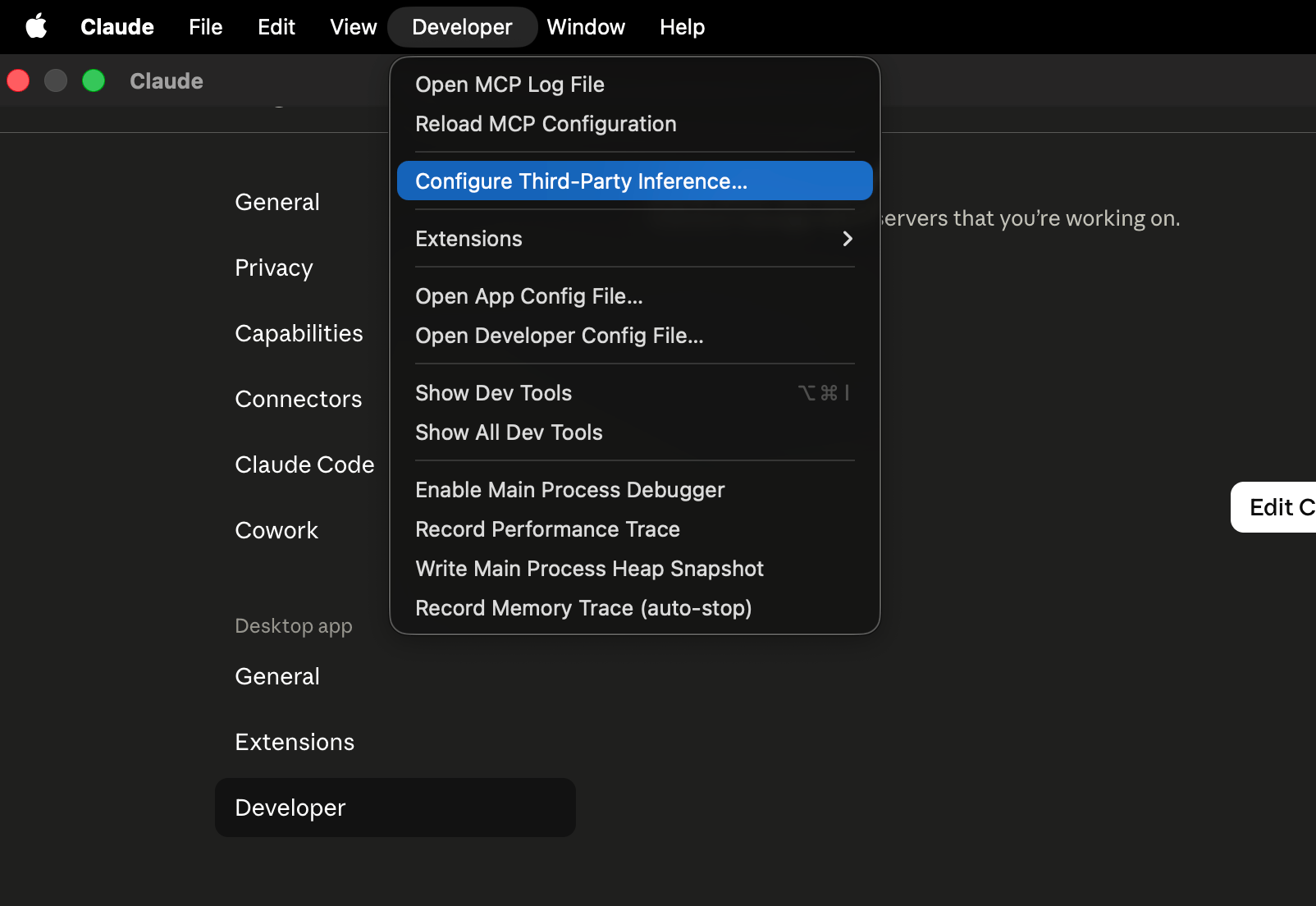
The steps above route the **Code tab** through Bifrost. The Claude Desktop app can also route its **native inference** through a custom gateway directly, without touching `~/.claude/settings.json`. This is configured in the app's **Developer** settings by setting the **inference provider** to **Gateway**.
The Developer settings and the Gateway inference provider are surfaced by Claude Desktop and may require Developer mode (or managed/enterprise enablement) to appear. If you don't see them, this flow isn't available in your build.
### 1. Enable Developer Mode and Select Gateway
1. Open **Settings** and enable **Developer mode**.
2. Go to the **Developer** tab and find the **Inference provider** setting.
3. Set the inference provider to **Gateway**.
 ### 2a. Authenticate with a Virtual Key (Direct)
Fill in the gateway fields to point Claude Desktop at Bifrost:
| Field | Value |
| -------------------- | --------------------------------------- |
| **Gateway base URL** | `https:///anthropic` |
| **Auth scheme** | `x-api-key` or `bearer` (both work) |
| **Gateway API key** | Your Bifrost virtual key |
A few things to get right:
* **Use the `/anthropic` path.** Claude Desktop appends `/v1/messages` to the base URL, and Bifrost serves the Anthropic Messages API under `/anthropic` (so requests land on `/anthropic/v1/messages`).
* **The virtual key is the credential.** With either auth scheme, set the key to your Bifrost virtual key — Bifrost recognizes a virtual key sent as `Authorization: Bearer ` or `X-Api-Key: `.
### 2a. Authenticate with a Virtual Key (Direct)
Fill in the gateway fields to point Claude Desktop at Bifrost:
| Field | Value |
| -------------------- | --------------------------------------- |
| **Gateway base URL** | `https:///anthropic` |
| **Auth scheme** | `x-api-key` or `bearer` (both work) |
| **Gateway API key** | Your Bifrost virtual key |
A few things to get right:
* **Use the `/anthropic` path.** Claude Desktop appends `/v1/messages` to the base URL, and Bifrost serves the Anthropic Messages API under `/anthropic` (so requests land on `/anthropic/v1/messages`).
* **The virtual key is the credential.** With either auth scheme, set the key to your Bifrost virtual key — Bifrost recognizes a virtual key sent as `Authorization: Bearer ` or `X-Api-Key: `.
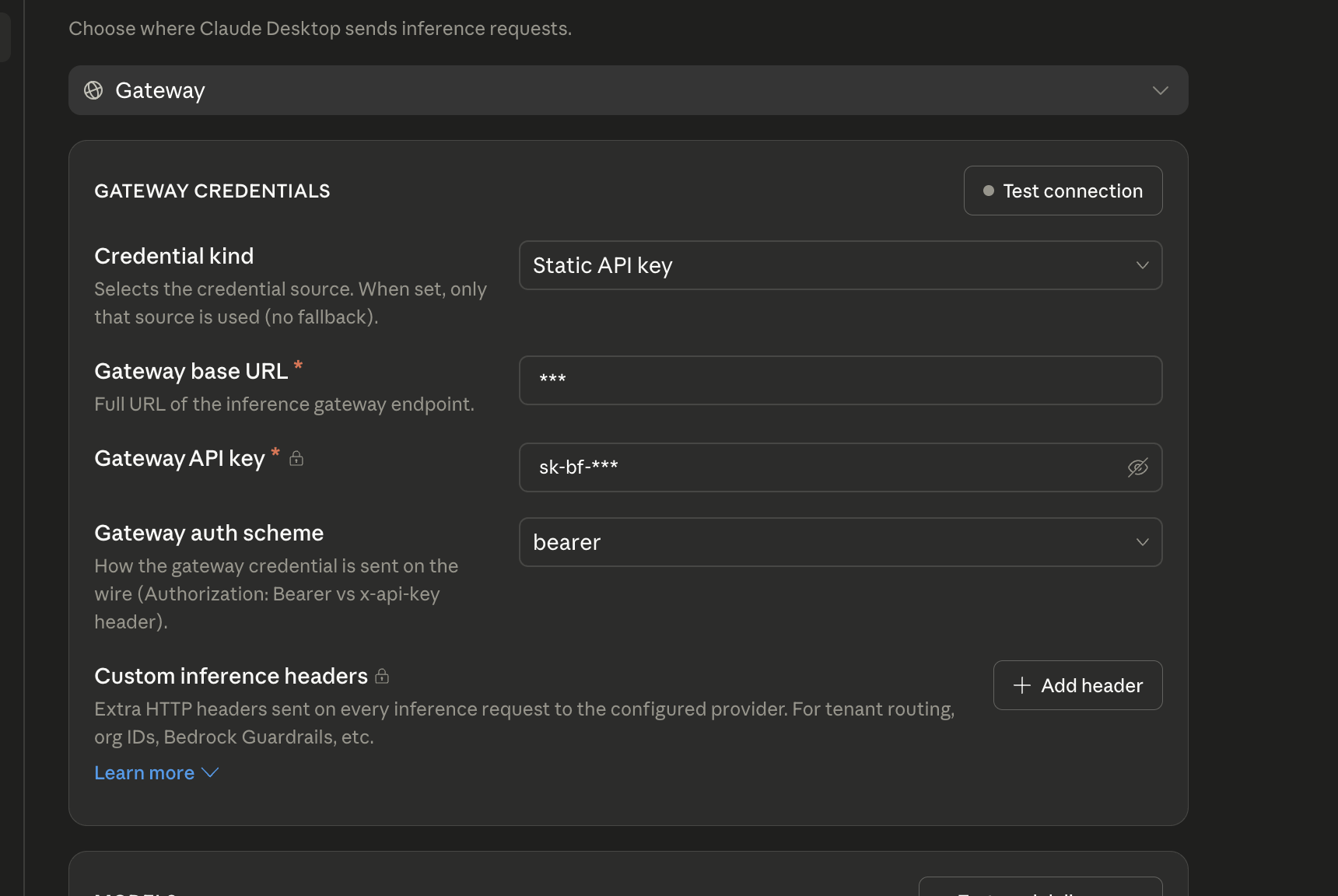 After saving, **restart Claude Desktop** so it picks up the gateway configuration.
### 2b. Authenticate with SSO
Instead of a static virtual key, you can set the gateway auth scheme to **Interactive sign-in** and have Claude Desktop authenticate against your identity provider. The **Gateway base URL** is the same as in 2a (`https:///anthropic`, including the `/anthropic` suffix) — only the auth scheme changes.
After saving, **restart Claude Desktop** so it picks up the gateway configuration.
### 2b. Authenticate with SSO
Instead of a static virtual key, you can set the gateway auth scheme to **Interactive sign-in** and have Claude Desktop authenticate against your identity provider. The **Gateway base URL** is the same as in 2a (`https:///anthropic`, including the `/anthropic` suffix) — only the auth scheme changes.
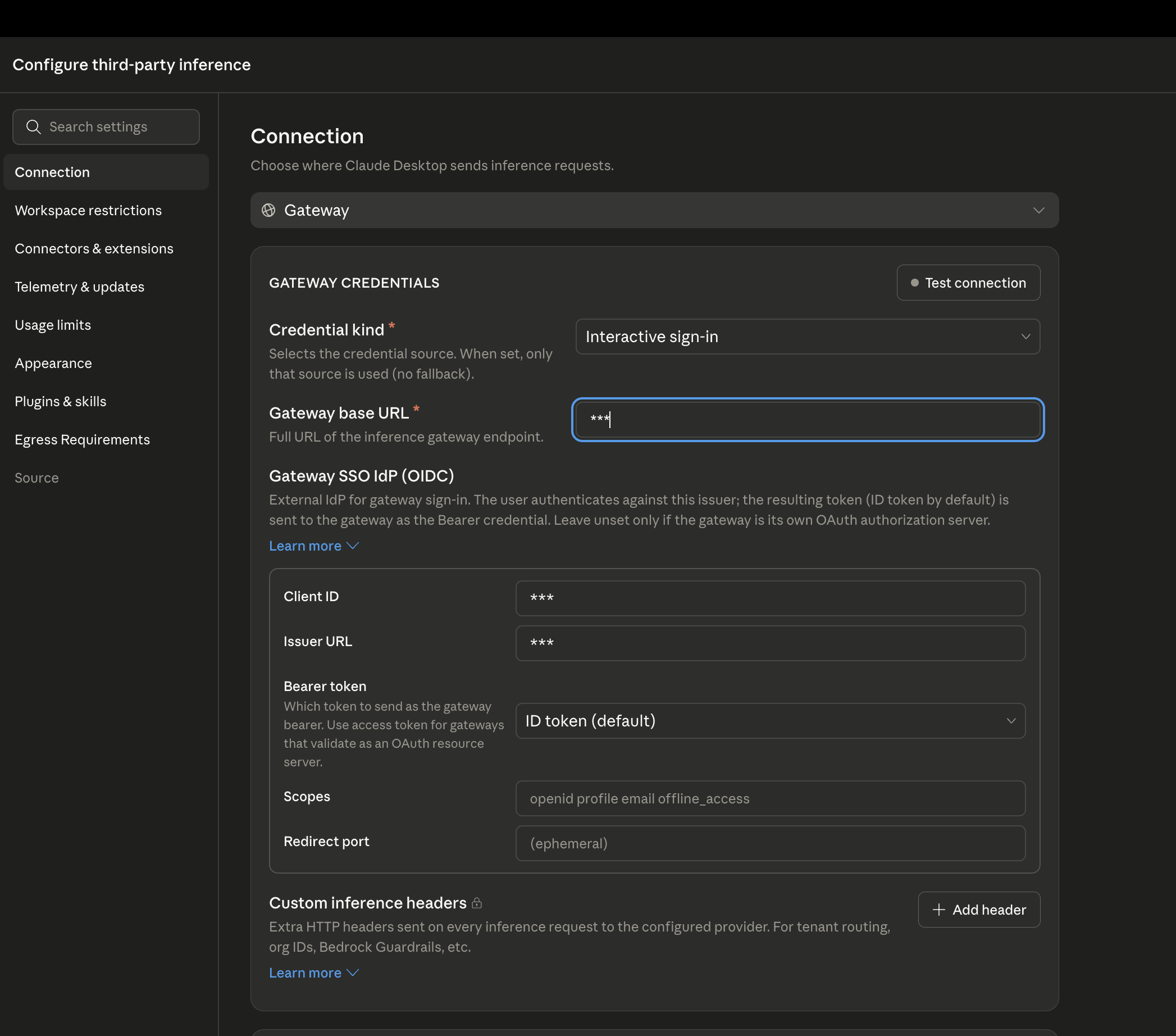 This will allow users to log in directly onto their Bifrost through the configured IdP.
### Why You Only See Anthropic Models
When you list models through the gateway, you'll notice that only Claude-family models show up in Claude Desktop — even though Bifrost is configured with models from many providers.
This is expected. **Claude Desktop deliberately displays only its own Claude-family models**, and quietly hides everything else returned by the gateway. It is a client-side decision made by the Claude Desktop app — it is **not** a limitation or misconfiguration on the Bifrost side. Bifrost returns every model you've allowed (you can confirm this by calling its list-models endpoint directly); the app simply chooses not to show the non-Claude ones in its picker.
If you need to use non-Claude models from Bifrost in Claude tooling, route through the **Code tab** instead (configured in the [Setup](#setup) section above), where model tiers can be pinned or aliased to any provider.
## MCP Integration (Chat Tab)
The Chat tab supports MCP servers configured in `claude_desktop_config.json`. Connect to Bifrost's MCP endpoint to give the Chat tab access to all your aggregated MCP tools:
**Config file locations:**
* **macOS**: `~/Library/Application Support/Claude/claude_desktop_config.json`
* **Windows**: `%APPDATA%\Claude\claude_desktop_config.json`
```json theme={null}
{
"mcpServers": {
"bifrost": {
"url": "http://localhost:8080/mcp",
"headers": {
"Authorization": "Bearer your-bifrost-virtual-key"
}
}
}
}
```
MCP servers in `claude_desktop_config.json` are for the **Chat tab only**. For MCP in the Code tab, configure servers in `~/.claude.json` or your project's `.mcp.json` file. See [MCP Gateway](/mcp/gateway) for full setup details.
## Enterprise Deployment
For organization-wide Bifrost routing, deploy a `managed-settings.json` file via MDM (Jamf, Kandji, Intune):
* **macOS**: `/Library/Application Support/ClaudeCode/managed-settings.json`
* **Windows**: `C:\Program Files\ClaudeCode\managed-settings.json`
```json theme={null}
{
"env": {
"ANTHROPIC_BASE_URL": "https://bifrost.example.com/anthropic",
"ANTHROPIC_API_KEY": "org-bifrost-virtual-key"
}
}
```
Managed settings cannot be overridden by individual users, ensuring all Code tab traffic routes through Bifrost.
## Observability
All Claude Desktop Code tab requests through Bifrost are logged. Monitor them at `http://localhost:8080/logs` - filter by provider, model, or search through conversation content to track usage patterns across your organization.
## Next Steps
* [Provider Configuration](/quickstart/gateway/provider-configuration) - Configure AI providers in Bifrost
* [Virtual Keys](/features/governance/virtual-keys) - Set up usage limits and access control
* [Built-in Observability](/features/observability/default) - Monitor all AI traffic
* [MCP Gateway](/mcp/gateway) - Full MCP server setup and tool filtering
This will allow users to log in directly onto their Bifrost through the configured IdP.
### Why You Only See Anthropic Models
When you list models through the gateway, you'll notice that only Claude-family models show up in Claude Desktop — even though Bifrost is configured with models from many providers.
This is expected. **Claude Desktop deliberately displays only its own Claude-family models**, and quietly hides everything else returned by the gateway. It is a client-side decision made by the Claude Desktop app — it is **not** a limitation or misconfiguration on the Bifrost side. Bifrost returns every model you've allowed (you can confirm this by calling its list-models endpoint directly); the app simply chooses not to show the non-Claude ones in its picker.
If you need to use non-Claude models from Bifrost in Claude tooling, route through the **Code tab** instead (configured in the [Setup](#setup) section above), where model tiers can be pinned or aliased to any provider.
## MCP Integration (Chat Tab)
The Chat tab supports MCP servers configured in `claude_desktop_config.json`. Connect to Bifrost's MCP endpoint to give the Chat tab access to all your aggregated MCP tools:
**Config file locations:**
* **macOS**: `~/Library/Application Support/Claude/claude_desktop_config.json`
* **Windows**: `%APPDATA%\Claude\claude_desktop_config.json`
```json theme={null}
{
"mcpServers": {
"bifrost": {
"url": "http://localhost:8080/mcp",
"headers": {
"Authorization": "Bearer your-bifrost-virtual-key"
}
}
}
}
```
MCP servers in `claude_desktop_config.json` are for the **Chat tab only**. For MCP in the Code tab, configure servers in `~/.claude.json` or your project's `.mcp.json` file. See [MCP Gateway](/mcp/gateway) for full setup details.
## Enterprise Deployment
For organization-wide Bifrost routing, deploy a `managed-settings.json` file via MDM (Jamf, Kandji, Intune):
* **macOS**: `/Library/Application Support/ClaudeCode/managed-settings.json`
* **Windows**: `C:\Program Files\ClaudeCode\managed-settings.json`
```json theme={null}
{
"env": {
"ANTHROPIC_BASE_URL": "https://bifrost.example.com/anthropic",
"ANTHROPIC_API_KEY": "org-bifrost-virtual-key"
}
}
```
Managed settings cannot be overridden by individual users, ensuring all Code tab traffic routes through Bifrost.
## Observability
All Claude Desktop Code tab requests through Bifrost are logged. Monitor them at `http://localhost:8080/logs` - filter by provider, model, or search through conversation content to track usage patterns across your organization.
## Next Steps
* [Provider Configuration](/quickstart/gateway/provider-configuration) - Configure AI providers in Bifrost
* [Virtual Keys](/features/governance/virtual-keys) - Set up usage limits and access control
* [Built-in Observability](/features/observability/default) - Monitor all AI traffic
* [MCP Gateway](/mcp/gateway) - Full MCP server setup and tool filtering